Welcome to another installment of WordPress Wednesday!
As you may know, our LiteSpeed Cache for WordPress plugin supports Edge Side Includes, also known as ESI. Today we are going to talk about why this is such awesome news for your website.
Please note: OpenLiteSpeed does not support ESI functionality. You will need LiteSpeed Web Server Enterprise, LiteSpeed Web ADC, or QUIC.cloud CDN in order to use ESI.
What is ESI?
ESI is a markup language that allows you to designate parts of your dynamic page as separate fragments that are then assembled together to make the whole page. To put it more quaintly, ESI lets you “punch holes” in a publicly cached page, and then fill those holes with privately cached content.
With ESI, punched holes can be treated differently than the rest of the page. They can have different TTLs and be purged by events that are completely separate from the page they are on. This allows you to cache more of your site for more of your visitors.
Public Cache vs. Private Cache
LiteSpeed Cache is tag-based (which means that each page is stored with an identifier that allows it to be purged from cache as part of a specific subset) and has built-in public and private caches. In the public cache you will find pages that are exactly the same for everyone. Private caches contain content that pertains only to a specific user specified by their IP address and session ID.
Until now, you’ve had to think about your site’s pages in their entirety. Is this page publicly cacheable? Is that one publicly cacheable? If a page had any private data on it at all, you’d have to say “no, it cannot be stored in the public cache.” This issue of having to cache a full page in its entirety is why our WordPress plugin until 2017 only cached pages for non-logged-in users. In WordPress, non-logged-in users are almost always served only public content. And in the few cases where they are not (password-protected posts, moderated comments, etc.), that content is usually considered non-cacheable for that user. ESI changes this.
How do ESI and Public/Private Cache Work Together?
ESI allows you to disassemble a full page and treat the pieces differently from each other.
LiteSpeed Web Server allows you to store content in either the public cache or a private cache.
Combine these two elements and you get something very powerful. You get a system that can break apart a page into public and private pieces, cache each piece appropriately, and then re-compose the full-page content from the relevant caches and serve it to a user without ever hitting the PHP backend.
That is pretty amazing.

This combination allows you to cache content for logged-in WordPress users. With ESI enabled you can say, “Hey this page is mostly public. Let’s cache it, punch a few holes in it for the private content, and save that content in the private cache.”
Examples
Let’s look at a few common scenarios and see how they play out with ESI enabled and without ESI.
Example #1: Admin Bar
You’re the site admin, you are logged in, and you visit your site’s home page, which is in the public cache.
Without ESI: your request hits the backend, because the admin bar at the top of the page is private content, and as such this page (and every other page on your site, for that matter) cannot be served to you from cache.
With ESI: most of this page is served to you from the public cache, while the admin bar is served to you from your private cache. There is no need to invoke PHP.
Example #2: Recent Posts Widget
You have a large site with much static content that rarely changes. Every page has a sidebar, and the sidebar widget “Recent Posts” appears on each page.
Without ESI: Every time a new post is published, every single page in the site must be purged so that the widget displays up-to-date data. Re-populating the entire cache requires a crawler to run, or visitors to hit all of the pages of the site.
With ESI: All of the pages in the site can remain cached with a nice long TTL, while the Recent Posts widget is the only thing that needs to be purged. Re-populating that one bit of the cache requires just one visitor to request any page one time.
You can see how ESI + LSCache can have huge implications for the speed of your site!
Enabling and Configuring ESI
LiteSpeed Cache for WordPress considers all cacheable full pages to be publicly cached.
When you enable ESI, you instruct LSCWP to punch holes in public pages. LiteSpeed then caches the content according to the settings for each block: public, private or not at all, and with its own TTL, independent of the page it is on.
When you enable ESI, LSCWP creates the following ESI blocks:
- Admin Bar
- Comments
- Comment form
- Recent Posts widget
- Recent Comments widget
Any widget can be an ESI block if you want it to be. By default, ESI is disabled for all but the two widgets listed above, but you can change that in WP Admin.
Note: ESI doesn’t come without a cost. It is much simpler for the server to return fully-cached pages than it is for it to piece together pages from several different blocks (although it’s still more efficient than invoking PHP would be), and so this must be a factor in your decision to enable ESI. Will the speed benefits outweigh the efficiency hit? It depends on your site, really, and it may require some experimentation on your part.
Basic ESI Settings
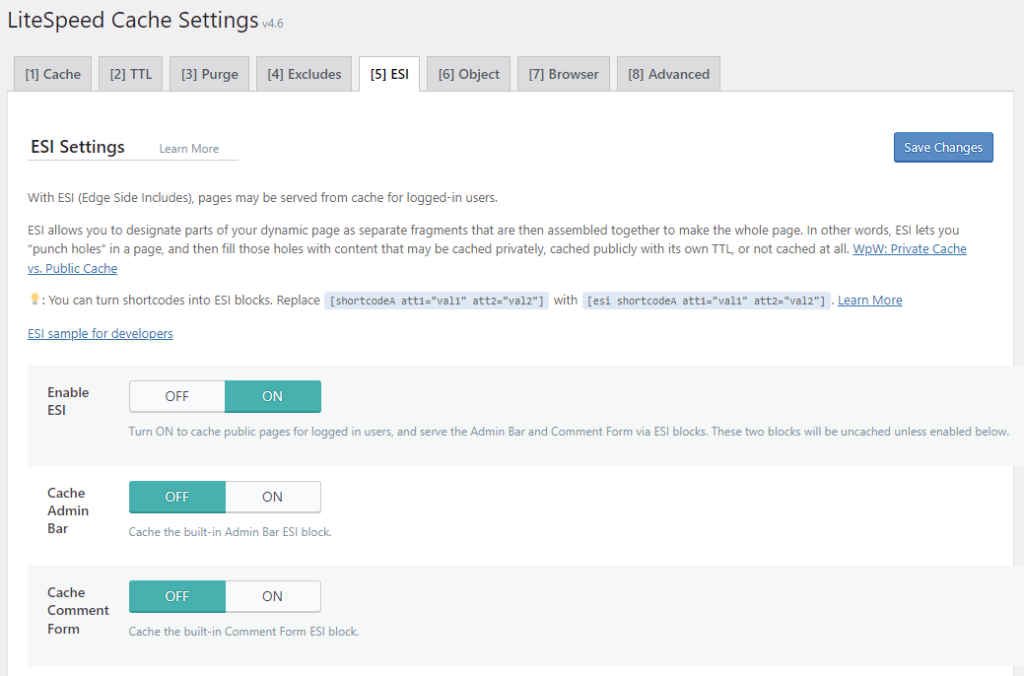
Navigate to WP Admin > LiteSpeed Cache > Cache> ESI. Set Enable ESI to ON.
This creates the ESI blocks listed above. The blocks will be uncached, unless you enable caching for them via the Cache Admin Bar and Cache Comment Form settings.
Creating new Widget ESI Blocks
If you are using Classic Widgets, you can turn any widget into an ESI block. (Please note that at this time, ESI is only available for classic widgets, and not for the new block-style widgets.)
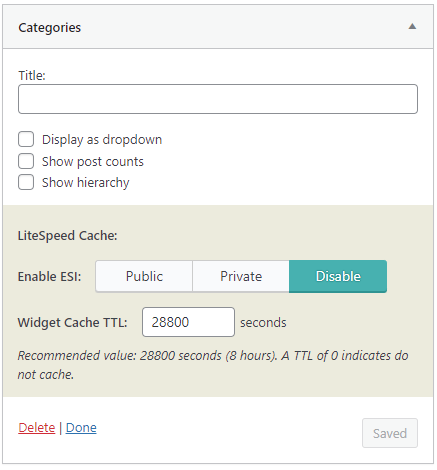
Navigate to WP Admin > Appearance > Widgets and select the widget that you want to turn into an ESI block.
Within the widget settings area, you will see a shaded box entitled “LiteSpeed Cache.” By default a widget is not considered an ESI block (unless it is Recent Posts or Recent Comments, as mentioned above). If you want the widget to be treated differently than the pages on which it appears, there are a few possible configurations:
Private widget
LSCWP will store the contents in private cache, with different copies for each user by IP/session ID. (Examples: a list of recently viewed posts, or a personalized greeting.)
- Set Enable ESI to
Private. - Set Widget Cache TTL to a value appropriate for the contents of the widget.
Public widget
LSCWP will store the contents in public cache, with each user seeing the exact same thing. (Examples: a list of recent posts, or a calendar of upcoming events).
- Set Enable ESI to
Public. - Set Widget Cache TTL to a value appropriate for the contents of the widget.
Uncached widget
LSCWP will not cache the contents at all, and WordPress will dynamically-generate the widget each time it displays on the page.
- Set Enable ESI to either
PublicorPrivate(it makes no difference, as long as it’s notDisable) - Set Widget Cache TTL to
0.
ESI and Third Party Plugins
Our ESI implementation supports a few other blocks that belong to third-party plugins. For instance, we consider the WooCommerce shopping cart to be a private ESI block.
As we mentioned earlier, with ESI enabled, your site pages are now considered publicly-cacheable, because we are able to punch holes for the occasional non-public content. This is true for all native WordPress pages, and for all WooCommerce pages. It is not, however, true with bbPress.
A bbPress page contains so many areas of private data, that it’s actually much more efficient to consider the entire page to be private. So, that’s what we’ve done. LSCache considers all bbPress pages to be private.
If one of your favorite plugins warrants special consideration, we encourage you to get in touch with us via the WordPress plugin support forum and tell us about it.
Or try turning third party shortcodes into ESI blocks.
P.S. Want to know more technical details about ESI? Check out the official specs.
—
This content was last verified and updated in April of 2023. If you find an inaccuracy, please let us know! In the meantime, see our documentation site for the most up-to-date information.
—
Have some of your own ideas for future WordPress Wednesday topics? Leave us a comment!
Don’t forget to meet us back here next week for the next installment. In the meantime, here are a few other things you can do:
- Subscribe to the WordPress Wednesday RSS feed
- Download LiteSpeed Cache for WordPress plugin
- Learn more about the plugin on our website


Leave a Reply