Welcome to WordPress. This is your first post. Edit or delete it, then start writing!
Author: wpuser
-
HTTP/2 Bomb Vulnerability
Here is what you need to know about LiteSpeed and the HTTP/2 Bomb vulnerability:
- HTTP/2 Bomb is a remote denial-of-service exploit that exists in many servers’ default HTTP/2 configurations.
- LiteSpeed server products (including LiteSpeed Web Server Enterprise, LiteSpeed Web ADC, and OpenLiteSpeed) are effectively not vulnerable to HTTP/2 Bomb attacks
Who is affected by HTTP/2 Bomb?
The HTTP/2 Bomb vulnerability was announced this week on the Calif Substack after having previously been disclosed to nginx and Apache, who then released their own patches. Other servers, not including LiteSpeed, have since been included in the “affected” list.
LiteSpeed Web Server is an Apache drop-in replacement, but LiteSpeed does not share any code with Apache.
LiteSpeed’s from-the-ground-up implementation of Apache-compatible systems means that LiteSpeed is usually not subject to the same vulnerabilities as Apache. That is indeed the case with the HTTP/2 Bomb vulnerability.
How are LiteSpeed Users Protected?
We assessed the vulnerability and concluded that there is only one situation in which LiteSpeed servers may be exploitable by the HTTP/2 Bomb vulnerability:
- If an IP address is added to the Trusted IP list, and is intentionally allowed to abuse the server, the HTTP/2 Bomb may have an effect.
We don’t anticipate that many admins have trusted their attacker’s IPs, but even if they have, the amplification rate is roughly 30x to 40x. This should not be enough to bring down a server.
Just the same, we will add some tightening around this scenario in upcoming server product releases.
If you are using LiteSpeed Web Server Enterprise, LiteSpeed Web ADC, or OpenLiteSpeed, there is nothing you need to do right now. You are already immune to this attack, assuming your Trusted IP list contains only truly trustworthy IPs.
- Learn more about the HTTP/2 Bomb vulnerability on the Calif Substack
- Get LiteSpeed Web Server
-
Security Update for LiteSpeed cPanel Plugin
We have another urgent security update for LiteSpeed’s user-end plugin for cPanel.
Last night we were made aware of a vulnerability affecting our user-end cPanel plugin (LiteSpeed’s WHM plugin was not affected). We patched this vulnerability in v2.4.8.
Please update to the latest version of the cPanel user-end plugin, which is bundled with the WHM plugin..
This Privilege Escalation vulnerability, which was reported to us by the team at Namecheap, has been assigned CVE-2026-54420.
Impact
A vulnerability in the LiteSpeed cPanel plugin allows a user with FTP or web shell access to escalate privileges to root on shared hosting servers running CloudLinux/CageFS.
This vulnerability is being actively exploited, and poses a risk for all user-end plugin versions prior to 2.4.8.
Use the following command to determine if your server has been affected:
grep -rE 'cpanel_jsonapi_func=(generateEcCert|packageUserSize)|cert_action_entry .*geneccert' /usr/local/cpanel/logs/ /var/cpanel/logs/ 2>/dev/null
If there is no output, then your server has not been affected.
If this command results in any output, the vulnerability may have been exploited on your server. There can be false positives, so look for the following to confirm:
- Pairing:
generateEcCertimmediately followed bypackageUserSizefor the same user (legitimate UI flows don’t chain these) - Concurrency: 7–10 concurrent calls per attempt (legitimate UI does one at a time)
- Same source IP hammering both endpoints
To determine any damage done, examine the system logs for any actions taken by the detected IPs. If you need assistance, you may contact our support team.
Actions
We urgently recommend that those using the LiteSpeed user-end plugin for cPanel upgrade to LiteSpeed WHM Plugin v5.3.2.1 (bundled w/ cPanel plugin v2.4.8) or higher to patch this vulnerability.
To update the WHM plugin, run this command, which will also update the user-end plugin, if you currently have it installed:
wget -O- https://litespeedtech.com/packages/cpanel/lsws_whm_plugin_install.sh | sh
If you cannot upgrade at this time, you can use the following command to remove the user-end plugin and avoid this vulnerability:
/usr/local/lsws/admin/misc/lscmctl cpanelplugin --uninstall
Once you’ve updated the WHM plugin, you can run the following commands, which will reinstall the user-end plugin and turn on autoinstall:
/usr/local/lsws/admin/misc/lscmctl cpanelplugin --install
/usr/local/lsws/admin/misc/lscmctl cpanelplugin -autoinstall 1
Timeline
- May 31, 2026: We were alerted to the original issue.
- May 31, 2026: cPanel pushed an
uninstallcommand for the user-end plugin - Jun 1, 2026: We released cPanel plugin v2.4.8 and WHM plugin v5.3.2.1
- Jun 1, 2026: We applied for a CVE
- Jun 14, 2026: CVE-2026-54420 was assigned
Conclusion
We thank Namecheap for bringing the original issue to our attention. We’d also like to thank the cPanel team for their immediate action in preventing further exploitation on additional servers. The vulnerability has been patched, so if you are keeping your cPanel plugin up-to-date, there is nothing you need to do. If you have not updated in a while, please do so immediately.
- Pairing:
-

Security Update for LSCWP
We have a security update for LiteSpeed Cache for WordPress. A few months ago, we were made aware of a vulnerability in the LiteSpeed Cache for WordPress plugin. We patched it shortly thereafter, in v7.8.
To protect your WordPress sites, please update to the latest version of the LSCache plugin immediately.
This cross-site scripting vulnerability, reported by the WordFence team, has been assigned CVE-2026-3375.
Impact
This vulnerability only affects those sites where one or both of the following settings are enabled in Page Optimization > CCS Settings:
- Generate UCSS
- Load CSS Asynchronously
Additionally, the site’s server IP must be exposed, and there must be a QUIC.cloud- or Cloudflare-related misconfiguration in the site’s WordPress code.
With all of the above in place, the vulnerability may be exploited.
Given that it requires a misconfiguration, we don’t expect this vulnerability to be frequently exploited.
Actions
We recommend that every site upgrade to the plugin version 7.8 or higher to patch this vulnerability.
Timeline
- February 27, 2026: WordFence alerted us to the issue.
- March 3, 2026: We patched the issue and released v7.8 to the WordPress repository
- March 20, 2026: We added v7.8 to the list of stable releases in our control panel plugins
Conclusion
We thank WordFence for bringing this issue to our attention. This vulnerability has been patched, so if you are keeping your LiteSpeed Cache plugin up-to-date, there is nothing you need to do. If you have not updated in a while, please do so today.
-
Security Update for LiteSpeed cPanel Plugin
We have an urgent security update for LiteSpeed’s user-end plugin for cPanel.
This week we were made aware of a vulnerability affecting our user-end cPanel plugin (LiteSpeed’s WHM plugin was not affected). We patched this vulnerability in v2.4.5.
Please update to the latest version of the cPanel user-end plugin, which is bundled with the WHM plugin..
This Privilege Escalation vulnerability, which was reported to us by David Strydom has been assigned CVE-2026-48172.
Impact
Any cPanel user (including an attacker or a compromised account) may exploit the
lsws.redisAblefunction to execute arbitrary scripts as root.This vulnerability is being actively exploited, and poses a risk for all user-end plugin versions between v2.3 and v2.4.4.
Use the following command to determine if your server has been affected:
grep -rE "cpanel_jsonapi_func=redisAble" /var/cpanel/logs /usr/local/cpanel/logs/ 2>/dev/null
If there is no output, then your server has not been affected.
If this command results in any output, we recommend you examine the IPs in the list, determine if they are valid, and if not, block them. To determine any damage done, examine the system logs for any actions taken by the detected IPs. If you need assistance, you may contact our support team.
Actions
We urgently recommend that those using the LiteSpeed user-end plugin for cPanel upgrade to LiteSpeed WHM Plugin v5.3.1.0 (bundled w/ cPanel plugin v2.4.7) or higher to patch this vulnerability.
If you cannot upgrade at this time, you can use the following command to remove the user-end plugin and avoid this vulnerability:
/usr/local/lsws/admin/misc/lscmctl cpanelplugin --uninstall
Additional Vulnerabilities
After addressing the initial report, we undertook a full security review of our cPanel and WHM plugins
As a result, we have patched additional potential attack vectors in both plugins and released cPanel plugin v2.4.7 bundled with WHM plugin v5.3.1.0.
To be clear, there have been no reports of these additional vulnerabilities being exploited. This was a proactive review, undertaken with the assistance of the cPanel/WebPros team.
Timeline
- May 19, 2026: We were alerted to the original issue.
- May 19, 2026: cPanel pushed an uninstall command for the user-end plugin
- May 19, 2026: We released cPanel plugin v2.4.6 and WHM plugin v5.3.0.0
- May 20, 2026: We applied for a CVE
- May 21, 2026: We completed a security review and released v2.4.7 and v5.3.1.0 of the plugins
Conclusion
We thank David Strydom for bringing the original issue to our attention. We’d also like to thank the cPanel team for their immediate action in preventing further exploitation on additional servers. All known vulnerabilities have been patched, so if you are keeping your cPanel plugin up-to-date, there is nothing you need to do. If you have not updated in a while, please do so immediately.
-

Stretch Your Hardware Budget With LiteSpeed

Times are tough for hosting providers. Hardware costs are climbing. Between tariffs, supply chain disruptions, and rising component costs, your margins are being squeezed from every angle.
Your clients’ needs are outpacing your existing hardware, but purchasing additional servers is becoming cost-prohibitive.
Enter LiteSpeed. With LiteSpeed Web Server, you can host more customers on the hardware you already own.
Hardware Costs Are Not Coming Down
In recent months:
- Server component prices have risen significantly, and these price hikes are beginning to be felt in server and infrastructure costs.
- Tariff uncertainty is adding volatility to purchasing decisions and making long-term procurement planning more difficult.
- Colocation and power costs are increasing.
Hosting providers are caught between raising prices and losing customers.
But there is a third option: LiteSpeed Web Server.
Concrete Ways LiteSpeed Saves Money
LiteSpeed can often handle more traffic than Apache without requiring a hardware upgrade.
LiteSpeed’s event-driven architecture can process thousands of concurrent connections with a fraction of the memory that traditional Apache deployments would require. That higher concurrency means you can serve more customers per machine.
LSCache is LiteSpeed’s built-in full-page caching solution. By serving cached pages, LSCache reduces repeated PHP execution and unnecessary database queries, lowering CPU load. It also eliminates the need for a separate Varnish layer, keeping your stack efficient and compact.
LiteSpeed Web Server was the first production server to support HTTP/3 and QUIC. In fact, LiteSpeed helped write the specification as an active participant in the IETF working group. Built-in HTTP/3 support can reduce the need for extra layers in deployments that might otherwise rely on additional proxy infrastructure.
LiteSpeed supports ModSecurity rules asynchronously for robust application-layer protection with lower overhead.
Apache users can switch to LiteSpeed Web Server with minimal disruption, and typically without downtime. LiteSpeed is a drop-in replacement for Apache and supports Apache configuration and
.htaccessfiles.LiteSpeed can significantly increase the amount of traffic each server can handle, allowing you to:
- delay your next hardware purchase
- extend the useful life of your existing hardware
- reduce the number of nodes in a cluster
If you can serve the same workload with fewer servers, power consumption drops and energy costs become easier to control, especially at scale.
Why Now?
The ROI window is now.
- There is little sign of near-term relief in infrastructure costs
- Every month you delay efficiency improvements is another month of unnecessary hardware and operating costs
- The cost of a LiteSpeed license is typically a fraction of the cost of new hardware
Audit your current server utilization and then sign up for a LiteSpeed trial to experience the difference for yourself!
-

Proxy n8n with LiteSpeed Web Server

If you are running cPanel with LiteSpeed Enterprise and want to deploy a modern automation service such as n8n, the setup can be both straightforward and reliable.
In this article, we will walk through a basic example of running n8n inside Docker on a cPanel server, then publishing it through LiteSpeed Enterprise using reverse proxy rules that support both normal HTTP traffic and WebSocket connections.
Set up n8n
Below is a n8n example
docker-compose.ymlused for then8n.example.comdomain:version: "3.8" services: n8n: image: docker.n8n.io/n8nio/n8n:latest container_name: n8n ports: - "127.0.0.1:5678:5678" environment: - TZ= America/Los_Angeles - N8N_HOST=n8n.example.com - N8N_PROTOCOL=https - N8N_PROXY_HOPS=1 - WEBHOOK_URL=https://n8n.example.com/ - N8N_EDITOR_BASE_URL=https://n8n.example.com/ - N8N_ENFORCE_SETTINGS_FILE_PERMISSIONS=true - N8N_RUNNERS_ENABLED=true volumes: - n8n_data:/home/node/.n8n restart: unless-stopped volumes: n8n_data:A few points are worth highlighting here:
N8N_HOST,N8N_PROTOCOL,WEBHOOK_URL, andN8N_EDITOR_BASE_URLhelp n8n understand that it is being served behind HTTPS on the public domain.N8N_PROXY_HOPS=1is important when n8n is behind a reverse proxy, because it helps n8n trust the forwarded request information correctly.
Learn more about n8n environment variables.
Proxy Setup
To support both HTTP requests and WebSocket traffic, we used Apache-style userdata include files in cPanel.
We added the following:
<IfModule mod_rewrite.c>
RewriteEngine on
RewriteRule (.*) http://localhost:5678/\$1 [P,L]
ProxyPass / ws://localhost:5678/
</IfModule>
to
/etc/apache2/conf.d/userdata/ssl/2_4/n8examplecom/proxy.conffor the SSL configuration and to/etc/apache2/conf.d/userdata/std/2_4/n8examplecom/proxy.conffor the non-SSL configuration.This configuration allows the domain to proxy regular traffic to the n8n container on localhost:5678, while also passing WebSocket connections correctly.
Note: The backend target is always plain HTTP because SSL termination happens at the web-server level.
After saving the include files, we rebuilt and reloaded the web server configuration, like so:
/scripts/buildhttpdconf
systemctl restart lsws
Domain access
Once DNS, SSL, Docker, and proxy rules are all in place, you can visit the public domain at
https://n8n.example.com.From there, register your account on the n8n instance and begin building workflows.
Set up simple test workflow
To confirm that the reverse proxy and application are working properly, create a simple test workflow:
- Receive a webhook request
- Make an HTTP request to
api.ipify.org - Return the detected IP address as JSON
Webhook node
Use these two URLs:
- Test URL:
https://n8n.example.com/webhook-test/test-api - Production URL:
https://n8n.example.com/webhook/test-api
Set the webhook response mode to
Using "Respond to Webhook" node.HTTP Request node
Create an HTTP Request node with:
- Method:
GET - URL:
https://api.ipify.org?format=json
This endpoint returns a simple JSON response containing the requester IP address.
Respond to Webhook node
Set the following:
- Respond With:
JSON - Response Body (Expression):
  {
  "myIP": "{{$json.ip}}"
  }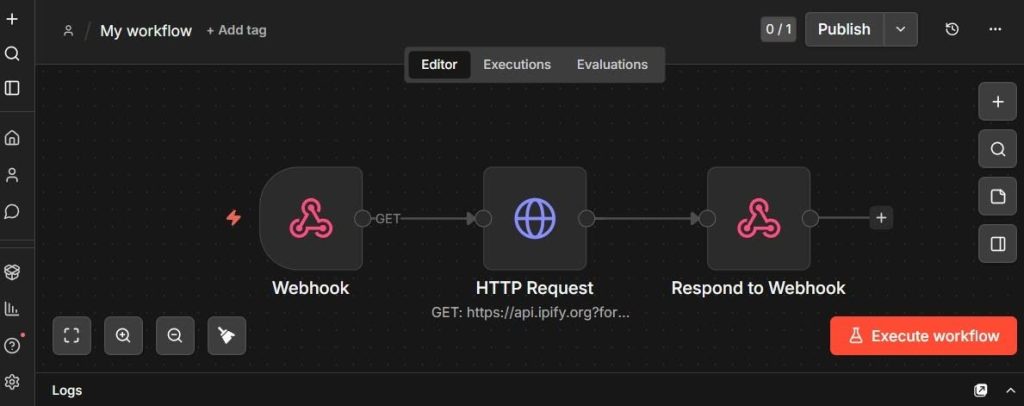
The image above shows what the workflow looks like in the editor.Activate the workflow
Activate the workflow to validate the webhook.
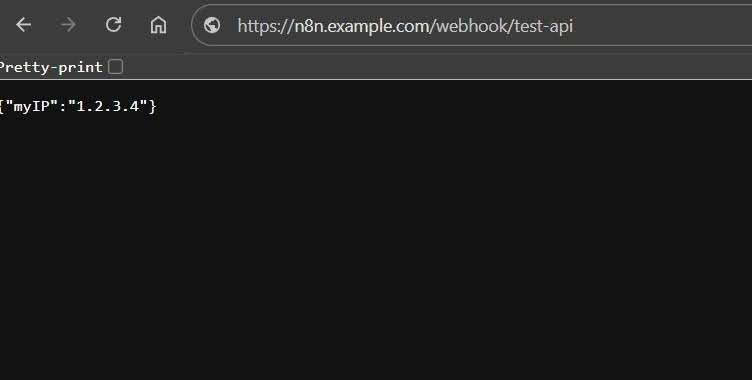
After activating the workflow, visiting the webhook URL in the browser should return a JSON response showing your IP address, like so:
{"myIP": "192.0.2.0"}This is a simple but useful validation test, because it confirms:
- the domain is reachable
- HTTPS is working
- the reverse proxy is forwarding requests correctly
- n8n is processing the workflow
- the response is being returned properly through LiteSpeed
Conclusion
Running n8n on cPanel with LiteSpeed Enterprise and Docker is practical. With the right proxy configuration, it is possible to support both standard HTTP traffic and WebSocket connections cleanly, while keeping the service accessible over HTTPS on its own domain.
If you are looking for a clean way to publish n8n on a LiteSpeed Enterprise server, this is a solid approach.
-
Security Update for LSCWP
We have a security update for LiteSpeed Cache for WordPress. Recently we were made aware of a vulnerability in the LiteSpeed Cache for WordPress plugin. We patched this vulnerability earlier this month, in v7.6.
To protect your WordPress sites, please update to the latest version of the LSCache plugin immediately.
This cross-site scripting vulnerability, reported by the Trustwave team, has been assigned CVE-2025-12450.
Impact
This vulnerability only affects those who have debug enabled:
- Debug Log must be
ONorAdmin IP Only - Enable Cache must be
ON
With both of these settings in place, the vulnerability may be exploited when a visitor accesses a link with a particular malicious string appended to the URL.
Since it’s not common to turn on debug mode and keep it on, we don’t expect this vulnerability to be frequently exploited.
Actions
We recommend that every site upgrade to the plugin version 7.6 or higher to patch this vulnerability.
Timeline
- October 14, 2025: Trustwave alerted us to the issue.
- October 15, 2025: We patched the issue and released v7.6 to the WordPress repository
- October 21, 2025: We added v7.6 to the list of stable releases in our control panel plugins
Conclusion
We thank Trustwave for bringing this issue to our attention. This vulnerability has been patched, so if you are keeping your LiteSpeed Cache plugin up-to-date, there is nothing you need to do. If you have not updated in a while, please do so today.
- Debug Log must be
-
LiteSpeed Security Update
We have a security update for LiteSpeed’s QUIC and HTTP/3 Library (LSQUIC), and all three LiteSpeed server products. Recently we were made aware of a vulnerability affecting LSQUIC. We patched this vulnerability in v4.3.1.
Please update to the latest versions of LSQUIC and all LiteSpeed server products.
This Allocation of Resources Without Limits or Throttling vulnerability, reported by Yohann Sillam from Imperva Offensive Team, has been assigned CVE-2025-54939.
Impact
UDP packets, crafted in a particular way and sent to the HTTP/QUIC service port, can cause an unbounded memory leak. This has the potential to cause the process or the server to run out of memory, eventually leading to a Denial of Service.
This vulnerability in the LSQUIC Library affects all server products and may be easily exploited.
Actions
We strongly recommend that those using the QUIC and HTTP/3 library upgrade to LSQUIC version 4.3.1 or higher to patch this vulnerability.
Additionally, those who are using LiteSpeed server products, should upgrade to the following versions of these products immediately:
- LiteSpeed Web Server (LSWS) v6.3.4 or higher
- LiteSpeed Web ADC (LSADC) v3.3.1 or higher
- OpenLiteSpeed (OLS) v1.8.4 or higher
If you cannot upgrade your server at this time, you can disable HTTP/3 to avoid this vulnerability.
Timeline
- July 15, 2025: We were alerted to the issue.
- July 18, 2025: Patch was added to our internal repo to be included in all subsequent builds of our commercial server products
- August 1, 2025: Released LSWS v6.3.4 and OLS v1.8.4
- August 4, 2025: Released LSADC v3.3.1
- August 13, 2025: Released LSQUIC v4.3.1 to the GitHub repository
Conclusion
We thank Imperva Offensive Team for bringing this issue to our attention. This vulnerability has been patched, so if you are keeping your LSQUIC library or your LiteSpeed server products up-to-date, there is nothing you need to do. If you have not updated in a while, please do so today.
-
LiteSpeed Not Affected By MadeYouReset
Here is what you need to know about LiteSpeed and the HTTP/2 MadeYouReset vulnerability, specifically CVE-2025-8671:
- MadeYouReset uses malformed HTTP/2 control frames in order to break the maximum concurrent streams limit.
- LiteSpeed server products (including LiteSpeed Web Server Enterprise, LiteSpeed Web ADC, and OpenLiteSpeed) are NOT vulnerable to MadeYouReset attacks
What is MadeYouReset?
The MadeYouReset vulnerability was announced today as Vulnerability Note #767506 published by the CERT Coordination Center.
The note states:
By opening streams and then rapidly triggering the server to reset them using malformed frames or flow control errors, an attacker can exploit a discrepancy created between HTTP/2 streams accounting and the servers active HTTP requests. Streams reset by the server are considered closed, even though backend processing continues. This allows a client to cause the server to handle an unbounded number of concurrent HTTP/2 requests on a single connection.
How are LiteSpeed Users Protected?
We simulated a MadeYouReset attack, and our LiteSpeed servers quickly blocked it due to the aggressiveness of the HTTP/2 behavior. Before blocking the client, LiteSpeed’s memory usage was not affected. This is mainly because of LiteSpeed’s efficient stream life cycle and memory management. Resources are promptly released when streams are reset, even in cases where a quick blocking is not triggered.
We are confident that MadeYouReset attacks cannot cause any trouble with LiteSpeed’s HTTP/2 implementation.
If you are using LiteSpeed Web Server Enterprise, LiteSpeed Web ADC, or OpenLiteSpeed, there is nothing you need to do. You are already immune to this attack.
- Learn more about the HTTP/2 MadeYouReset vulnerability at cve.org
- Get LiteSpeed Web Server