Category: LSCache

Learn more about LiteSpeed Cache plugin for WordPress, PrestaShop, XenForo, Drupal, Joomla, MediaWiki, WooCommerce, and more. Sites powered by LiteSpeed Web Server with LSCache may accelerate their web apps with extensions or rewrite rules.

In this category you will find tutorials, case studies, and useful information related to this popular cache solution.

  • Security Update for LSCWP

    Security Update for LSCWP

    Security patch for LiteSpeed Cache for WordPress

    We have a security update for LiteSpeed Cache for WordPress. A few months ago, we were made aware of a vulnerability in the LiteSpeed Cache for WordPress plugin. We patched it shortly thereafter, in v7.8.

    To protect your WordPress sites, please update to the latest version of the LSCache plugin immediately.

    This cross-site scripting vulnerability, reported by the WordFence team, has been assigned CVE-2026-3375.

    Impact

    This vulnerability only affects those sites where one or both of the following settings are enabled in Page Optimization > CCS Settings:

    • Generate UCSS
    • Load CSS Asynchronously

    Additionally, the site’s server IP must be exposed, and there must be a QUIC.cloud- or Cloudflare-related misconfiguration in the site’s WordPress code.

    With all of the above in place, the vulnerability may be exploited.

    Given that it requires a misconfiguration, we don’t expect this vulnerability to be frequently exploited.

    Actions

    We recommend that every site upgrade to the plugin version 7.8 or higher to patch this vulnerability.

    Timeline

    • February 27, 2026: WordFence alerted us to the issue.
    • March 3, 2026: We patched the issue and released v7.8 to the WordPress repository
    • March 20, 2026: We added v7.8 to the list of stable releases in our control panel plugins

    Conclusion

    We thank WordFence for bringing this issue to our attention. This vulnerability has been patched, so if you are keeping your LiteSpeed Cache plugin up-to-date, there is nothing you need to do. If you have not updated in a while, please do so today.

  • Security Update for LSCWP

    Security Update for LSCWP

    Security patch for LiteSpeed Cache for WordPress

    We have a security update for LiteSpeed Cache for WordPress. Recently we were made aware of a vulnerability in the LiteSpeed Cache for WordPress plugin. We patched this vulnerability earlier this month, in v7.6.

    To protect your WordPress sites, please update to the latest version of the LSCache plugin immediately.

    This cross-site scripting vulnerability, reported by the Trustwave team, has been assigned CVE-2025-12450.

    Impact

    This vulnerability only affects those who have debug enabled:

    • Debug Log must be ON or Admin IP Only
    • Enable Cache must be ON

    With both of these settings in place, the vulnerability may be exploited when a visitor accesses a link with a particular malicious string appended to the URL.

    Since it’s not common to turn on debug mode and keep it on, we don’t expect this vulnerability to be frequently exploited.

    Actions

    We recommend that every site upgrade to the plugin version 7.6 or higher to patch this vulnerability.

    Timeline

    • October 14, 2025: Trustwave alerted us to the issue.
    • October 15, 2025: We patched the issue and released v7.6 to the WordPress repository
    • October 21, 2025: We added v7.6 to the list of stable releases in our control panel plugins

    Conclusion

    We thank Trustwave for bringing this issue to our attention. This vulnerability has been patched, so if you are keeping your LiteSpeed Cache plugin up-to-date, there is nothing you need to do. If you have not updated in a while, please do so today.

  • 2025 So Far

    2025 So Far

    2025 so far
    We are more than halfway through 2025, and we wanted to take this opportunity to tell you what we’ve been doing this year, in case you’ve missed anything. We’ve released updates to three cache plugins, three control panel plugins, and all three server products!

    Cache Plugins

    First, let’s take a look at what’s new with our LiteSpeed Cache plugins for WordPress, PrestaShop, and Magento.

    WordPress

    We released three LSCWP updates in the last six months. In addition to dozens of minor changes and bug fixes, these new features were among the updates:

    • AVIF support in v7.0
    • Allowlist support for Critical CSS in v7.1
    • Cloudflare cache clear on Purge All in v7.2

    This is just the tip of the iceberg, though. There’s a lot more. See the full release log.

    PrestaShop

    For v1.5.2 of LSCPS, we made a few minor updates: we fixed some bugs, we added parameter support to ESI block widgets, and we improved compatibility with Smarty and Symphony caches.

    See the release log.

    Magento

    LiteMage v2.2.5 had just a minor release, which included a bug fix, and an update which removed the jQuery dependency for custom varies.

    See the release log.

    Servers

    Our server products were updated this year to use a new version of LSQUIC. (A hash flood vulnerability was addressed in our LSQUIC HTTP/3 Library in February with the v4.2.0 release.)

    LiteSpeed Web Server

    We released LSWS v6.3.2 and v6.3.3, which included new features, security updates, and a number of bug fixes. See the full release log here.

    New features include:

    • Improvements to HTTP/2’s ability to block aggressive robots when under attack
    • Improved support for LiteSpeed Containers and Redis in control panels
    • The ability to selectively disable anti-DDoS detection

    The security updates addressed the LSQUIC vulnerability, and an issue with stderr.log permissions.

    OpenLiteSpeed

    OLS v1.8.3 updated LSQUIC and added support for “expect: 100 continue” handling.

    See the release log.

    Web ADC

    Our LSADC v3.3.0 release improved both HTTP/2 and HTTP/3 with stronger anti-DDoS capabilities, and stream priority adjustments.

    See the release log.

    Control Panel Plugins

    Our control panel plugins for cPanel/WHM, Plesk, and DirectAdmin all got a brand new Flag All button for the Cache Management feature.

    Additionally, in cPanel and WHM we addressed a minor security issue, and added some improvements related to the Cache Redis for Users feature.

    We released the following plugin updates:

    • cPanel v2.4.1-v2.4.3 and WHM v5.1.2-v5.2.3
    • Plesk v2.1.3-v2.2.0
    • DirectAdmin v2.4

    See the release logs.

    Stay Tuned

    We’ve got a lot more in store for the rest of 2025. Thanks for coming along for the ride!

  • Why You Need LSCache Plugins

    Why You Need LSCache Plugins

    LSCache Plugins

    Introduction

    LiteSpeed Cache plugins are available for a variety of web applications, including WordPress, Joomla!, and Drupal. But do you know why you should cache your apps? Or why a LiteSpeed Cache plugin is uniquely capable of delivering your web content quickly and accurately?

    Let’s talk about all of that, and then look at a quick and easy way to see if your website supports LiteSpeed Cache.

    Prefer to see this topic in video form? Click here.

    Why Cache Your Web App?

    Let’s start with a basic explanation of what a cache is. Generally speaking, a cache is a way of storing data so that it is easier or faster to retrieve than the original source.

    With many web applications, caches are particularly helpful. The dynamic pages generated by these apps don’t exist anywhere in the file system. They are built on demand with PHP or some other method. So even though the web app’s pages are served to the visitor as HTML, generating them can be resource-intensive. And slow.

    This is where LiteSpeed Cache comes in. LiteSpeed takes the dynamically generated web page, and stores it as a static HTML snapshot. That way, the next time the page is requested by a visitor, the snapshot can be served immediately. Serving a snapshot is much faster and uses far fewer resources than generating the page dynamically does.

    Why Use a LiteSpeed Plugin?

    If you know a little something about .htaccess files, and how to use rewrite rules, you can control the LiteSpeed Cache Engine that way. All it takes is a few rewrite rules in your application’s document root .htaccess, and you can have a simple page cache.

    So what do you gain by using an LSCache plugin? Quit a lot actually.

    An LSCache plugin bridges the knowledge gap between a web app and the Cache Engine.

    Let’s put it another way: web applications have rules about what content you can cache, and when that cache should expire or be purged. An LSCache plugin understands these rules, and instructs the server Cache Engine how to proceed. This communication is not something that you can duplicate with rewrite rules.

    For example, let’s say you have a WordPress site. The LSCache plugin for WordPress knows that when a post is edited, saved, or deleted, that post must then be purged from the cache. But it goes even further than that.

    The LiteSpeed Cache engine is equipped with a handy tagging system that allows cached pages to be grouped together and purged all at the same time. This purge tag functionality is very powerful. It means that LSCache can do a targeted purge, removing the edited page, as well as every other page that is influenced by it. Without a tagging system, other plugins may either purge too little (just the single page) or too much (all of the site’s pages).

    So, returning to our WordPress example, when the plugin knows to purge an edited post from the cache, it also knows to purge everything else that shares the same purge tags as that post. That can include the category pages for the post’s categories, monthly archives for the post’s publication date, author archives for the post’s author, and more.

    Other benefits of LiteSpeed Cache plugins include:

    • the ability to cache both logged in and guest users
    • ESI technology for punching holes of private content on publicly cached pages
    • support for caching multiple views of a single URL with cache varies
    • and much more

    LSCache plugins are available for many popular web apps, and you can get a list of them at lscache.io.

    If there is no plugin for your favorite web app, and you’ve got developer skills, why not try writing one? Check out our documentation for all of the details.

    Check Your Site for LiteSpeed Support

    There’s a simple way to see if your site supports LiteSpeed Cache, and if caching is active: the LSCache Check Tool.

    Visit check.lscache.io and enter your website’s URL. The tool will respond with an easy-to-read Yes or No result. Plus, it will display the URL’s response headers, in case you want to examine the results more closely.

    In addition to LSCache support, the tool can detect cache hits, and can detect when sites are using LiteSpeed Web ADC or QUIC.cloud CDN for caching.

    Additionally, a Stale Cache Warning will alert you if browser cache is detected on dynamic pages. This is because browser cache may interfere with the delivery of fresh content.

    If your site doesn’t have LiteSpeed Cache support, you can change that! Here are a few ways:

    Conclusion

    Now that you know what LiteSpeed Cache can do for your web applications, we hope you’ll give it a try!

  • LSCWP Responsive Placeholders Patch

    LSCWP Responsive Placeholders Patch

    LiteSpeed Cache v7.1 Patch

    We have a security update for LiteSpeed Cache for WordPress. Recently we were made aware of a vulnerability in the LiteSpeed Cache for WordPress plugin. We patched this vulnerability in v7.1.

    To protect your WordPress sites, please update to the latest version of the LSCache plugin immediately.

    This Server Side Request Forgery vulnerability, reported by the Patchstack team, has been assigned CVE-2025-47437.

    Impact

    This vulnerability affects those using Responsive Placeholders, and having the following configuration:

    • Media Settings > Lazy Load Images must be ON
    • Media Settings > Responsive Placeholders must be ON

    With both of these settings in place, the vulnerability may be exploited by a user with unfiltered_html capability and the ability to create a new post with a Custom HTML block.

    NOTE: by default, only Editor, Admin, and Super Admin roles have the unfiltered_html capability, but admins may assign it to other roles on a case-by-case basis via a plugin or custom code.

    Actions

    We suggest that every site upgrade to the plugin version 7.1 or higher to patch this low-severity vulnerability.

    Timeline

    • April 10, 2025: Patchstack alerted us to the issue.
    • April 24, 2025: We patched the issue and released v7.1 to the WordPress repository.
    • April 30, 2025: We added v7.1 to the list of stable releases in our control panel plugins.

    Conclusion

    We thank Patchstack for bringing this issue to our attention. This vulnerability has been patched, so if you are keeping your LiteSpeed Cache plugin up-to-date, there is nothing you need to do. If you have not updated in a while, please do so today.

  • AVIF Support in LiteSpeed Plugin v7

    AVIF Support in LiteSpeed Plugin v7

    AVIF support in LiteSpeed Plugin
    LiteSpeed is thrilled to announce Version 7.0 of the LiteSpeed Cache plugin for WordPress! One of the improvements that you will see in v7 is a new option for next-generation image formats. We’ve always provided the ability to generate WebP images with our image optimization service, and now we are adding the option to choose AVIF format, if you prefer.

    The WebP raster graphics file format, announced in 2010 by Google, was introduced as a potential replacement for JPEG, PNG, and GIF file formats. It is widely available across major browsers.

    The AVIF file format, introduced in 2019, is intended to replace the WebP format, and shows better compression ability than the JPEG format. It has recently become available across major browsers, too.

    Which is better?

    Both WebP and AVIF support these features:

    • ICC profiles including HDR
    • Both lossless and lossy compression
    • Alpha channels for transparency
    • Animation
    • Exif and XMP metadata support
    • Royalty-free usage

    AVIF additionally supports these features that WebP doesn’t:

    • A variety of color spaces, including monochrome
    • Multi-layer images
    • Film grain synthesis

    When Should you use WebP Image formats?

    • If your site contains mostly web graphics, especially illustrations, logos, and animations
    • If you plan to use lossless compression
    • If you want to continue enjoying QUIC.cloud image optimization Standard Queue for free

    When Should you use AVIF Image formats?

    • If your site features high-quality photos, where accurate colors and finer details are important
    • If you plan to use lossy compression
    • If you want to upgrade to QUIC.cloud image optimization Advanced Queue, which for an additional charge, gives you faster processing and AVIF format

    The bottom line: if you’re currently using WebP images, and you are happy with that, there’s no need to do anything. But if you want to switch to using AVIF instead, keep reading!

    How to Generate AVIF Images

    Here’s how you can set up the LiteSpeed plugin to generate a next-generation image format alongside your optimized JPG and PNG files.

    If you are brand new to our Image Optimization service, we recommend you visit QUIC.cloud’s Handy Guide to Image Optimization to learn how to get started. It will tell you everything you need to know.

    If you’re a seasoned Image Optimization user, and you’re ready to start generating AVIF images, here’s how to do it:

    Enable AVIF in LiteSpeed Plugin

    1. In your WordPress Dashboard, navigate to LiteSpeed Cache > Image Optimization > Image Optimization Settings and set Next-Gen Image Format to AVIF. Press the Save Changes button.
    2. Click the Image Optimization Summary tab and click the Soft Reset Optimization Counter link under Optimization Tools. This will tell LiteSpeed to start over at the beginning of your Media Library and process everything again. Images that are already optimized will not be re-optimized, but AVIF files will be created for them.
    3. If you have enabled Auto Request Cron, then you can simply wait for Image Optimization to begin again. Otherwise, click the Send Optimization Request button to get started.

    Image Optimization employs two queues:

    1. The Standard Queue, which is always free
    2. The Advanced Queue (previously called the Fast Queue), which is mostly not.

    WebP images may be generated using either queue, but AVIF images may only be generated with the Advanced Queue power-up.

    QUIC.cloud gives every domain some free Advanced Queue quota every month. Once it is used up, all requests are sent to the Standard Queue for processing. Or, in the case of AVIF users, requests are paused until the free quota replenishes at the beginning of the next month.

    An optional Advanced Queue power-up subscription is available for a monthly charge. With that, you get 20,000 additional Advanced Queue requests each month.

    There is also a pay-as-you-go option. Use this to increase your Advanced Queue quota on an ad-hoc basis. You can manage it manually, or enable auto-refill to top up your quota whenever you are running low.

    See QUIC.cloud’s Online Services Costs for the specifics.

    What Else is New?

    LSCWP v7 is packed with fabulous features, including these:

    • A new, streamlined approach to enabling QUIC.cloud services in WordPress. We’ve replaced the Domain Key with sodium encryption, and automated more of the process. Visit LiteSpeed Cache > General > Online Services to get started, or see our documentation for more details.
    • CDN Setup is also significantly simplified.
    • More CLI commands, and more API hooks.
    • Simplified Crawler settings.
    • Improved UCSS compatibility.

    Download v7.0 and see for yourself!

  • LSCWP Viewport Images Patch

    LSCWP Viewport Images Patch

    Introduction

    We have a security update for LiteSpeed Cache for WordPress. Recently we were made aware of a vulnerability in the LiteSpeed Cache for WordPress plugin. We patched this vulnerability in v6.5.3.

    To protect your WordPress sites, please update to the latest version of the LSCache plugin immediately.

    This Cross Site Scripting vulnerability, reported by the Patchstack team, has been assigned CVE-2024-51915.

    Impact

    This vulnerability affects those using the Viewport Images service, and having the following Page Optimization configuration:

    • Media Settings > Lazy Load Images must be ON
    • VPI > Viewport Images must be ON
    • Tuning > Optimize for Guests Only must be OFF

    With all of these settings in place, the vulnerability may be exploited by a user with the Editor role. They must have permission to create a new post and set the LiteSpeed Options on that post, before they can inject JavaScript code through a DOM mutation.

    Actions

    We strongly recommend that every site upgrade to the plugin version 6.5.3 or higher to patch this vulnerability.

    Timeline

    • November 07, 2024: Patchstack alerted us to the issue.
    • December 04, 2024: We patched the issue and released v6.5.3 to the WordPress repository
    • December 05, 2024: We added v6.5.3 to the list of stable releases in our control panel plugins

    Conclusion

    We thank Patchstack for bringing this issue to our attention. This vulnerability has been patched, so if you are keeping your LiteSpeed Cache plugin up-to-date, there is nothing you need to do. If you have not updated in a while, please do so today.

  • Disk Space Filling up Fast with LSCWP

    Disk Space Filling up Fast with LSCWP

    Disk space filling up fast with LiteSpeed Cache for WordPress

    LiteSpeed Cache for WordPress provides a number of optimization tools, like CSS Combine, or JavaScript Combine. When you use these tools, the goal is to make your pages load faster. Sometimes, though, these tools cause your disk space to grow very quickly, and that can be a problem. If this is happening to you, the reason is probably a randomized string in your CSS or JavaScript code.

    The Problem With Randomized Strings

    Why are random strings a problem? The presence of random strings causes a new combined file to be created for each page on your site. And if you’ve got a separate mobile view, then there will be two combined files created for each page in the site. For each additional cache vary on your site, another set of combined files will be created.

    As you can imagine, this is not ideal, and it has the potential to fill up your server’s disk space very quickly.

    To stop this behavior, you must exclude the randomized CSS or JavaScript from being combined. But first, you have to figure out where the random string is coming from.

    Finding the Random String

    To find a random string that is inline in your page’s HTML, here’s what you need to do:

    1. View the page without any optimization, in two different incognito browsers
    2. View the page source from each browser and compare them
    3. The only difference you should see is the random string itself. You can use that to determine which CSS or JavaScript should be excluded from optimization

    An Example

    Let’s go through an example:

    • Open an incognito browser window and visit your site. Append the ?LSCWP_CTRL=before_optm string to the end of the URL. Like this: https://example.com/?LSCWP_CTRL=before_optm
    • Open another incognito browser window and visit your site without optimization, like this: https://example.com/
    • View the page source in each browser window.
    • Copy and paste each source into a diff checker site like https://www.diffchecker.com/ and compare them.
    • You should see just a few lines of CSS or JavaScript highlighted. This is where the two page loads differ, and it indicates where the random strings are.
    • The strings should have a common part. (for example, if you see abc_12345 and abc_67890, the common part is abc_) It will be something different for your own page, but it should be fairly easy to spot.
    • If the random string occurred in CSS, then navigate to Page Optimization > Tuning and enter the common part of the string into the CSS Excludes setting.
    • If the random string occurred in JavaScript, then navigate to Page Optimization > JS Tuning and enter the common part of the string into the JS Excludes setting.
    • Save your changes.

    Finally, hover over the LiteSpeed icon on the WordPress Admin Bar and click Purge All in the drop down menu. This will clear the CSS and JavaScript page optimization files in the wp-content/litespeed folder. After a short while the page optimization process will re-generate the files. Without any of the random strings, many fewer files will be generated, and you will see that it doesn’t take up much disk space at all.

    Video

    Prefer to see this topic in video form? Your wish is our command.

    Conclusion

    If you’ve tried these steps and are still having difficulty with your disk space filling up, your random strings may not be inline. They may be in combined CSS or JavaScript files. Here’s another method you can try to find random strings in combined CSS or JS files. If you’re still having trouble after that, open a ticket with our friendly support team, and they’ll be happy to help!

  • Crawler Patch for WordPress Cache Plugin

    Crawler Patch for WordPress Cache Plugin

    We have a new patch to announce. Recently we were made aware of a vulnerability in the LiteSpeed Cache for WordPress plugin. We patched this vulnerability in v6.5.2.

    To protect your WordPress sites, please update to the latest version of the LSCache plugin immediately.

    This broken authentication vulnerability, reported by the Patchstack team, has been assigned CVE-2024-50550.

    Impact

    This vulnerability only affects those who have a very specific Crawler configuration:

    • Crawler must be ON
    • Run Duration and Interval Between Runs should both be large numbers, for example 3000
    • Server Load Limit should be 0
    • Role Simulation should be 1 (or any other userid with Administrator privileges)
    • All crawlers should be turned off, except for the Administrator crawler

    With all of these settings in place, the vulnerability may be exploited.

    This is a configuration that is unlikely to be used under real world conditions, and as such, we don’t expect too many sites to be impacted.

    In particular, it is highly unusual to set the Server Load Limit to 0, because that means that the crawler won’t run at all, and it is required for Server Load Limit to be 0 to reproduce the issue.

    Actions

    We recommend that every site upgrade to the plugin version 6.5.2 or higher to patch this vulnerability. Additionally, we suggest that you check your site’s user list for any accounts with administrator privileges and delete any accounts that you don’t recognize.

    Version 6.5.2 temporarily removes the Role Simulation functionality, and eliminates the mt_srand function which was used for random hash generation. We understand that some users do rely on the Role Simulation functionality, so we plan to reinstate it once we can be sure it won’t leave your sites vulnerable.

    Timeline

    • September 24, 2024: Patchstack alerted us to the issue.
    • October 17, 2024: We patched the issue and released v6.5.2 to the WordPress repository
    • October 29, 2024: We added v6.5.2 to the list of stable releases in our control panel plugins

    Conclusion

    We thank Patchstack for bringing this issue to our attention. This vulnerability has been patched, so if you are keeping your LiteSpeed Cache plugin up-to-date, there is nothing you need to do. If you have not updated in a while, please do so today.

  • Security Update for LiteSpeed Cache

    Security Update for LiteSpeed Cache

    Security patch for LiteSpeed Cache for WordPress

    We have a security update for LiteSpeed Cache for WordPress. Recently we were made aware of a vulnerability in the LiteSpeed Cache for WordPress plugin. We patched this vulnerability last week, in v6.4.

    To protect your WordPress sites, please update to the latest version of the LSCache plugin immediately.

    This unauthenticated privilege escalation vulnerability, reported by the Patchstack team, has been assigned CVE-2024-28000.

    Impact

    Bad actors may exploit this vulnerability via the Role Simulation option available with the Crawler feature, due to a weak security hash.

    However, there is an additional weakness which allows the security hash to be generated and saved without enabling the crawler. This combination extends the vulnerability to ALL sites where a bad actor is able to guess the user ID of an admin-level user.

    Actions

    We strongly recommend that every site upgrade to the plugin version 6.4 or higher to patch this vulnerability.

    Additionally, we suggest that you check your site’s user list for any accounts with administrator privileges and delete any accounts that you don’t recognize.

    Timeline

    • August 5, 2024: Patchstack alerted us to the issue.
    • August 13, 2024: We patched the issue and released v6.4 to the WordPress repository
    • August 20, 2024: We added v6.4 to the list of stable releases in our control panel plugins

    Temporary Measures

    While we strongly recommend that you upgrade immediately, if you are unable to do so for some reason, we have alternative temporary solutions that you may implement at the site level or at the server level.

    Site admins

    In your file manager, navigate to wp-content/plugins/litespeed-cache/src and edit the router.cls.php file. Change line 265 from this:

    wp_set_current_user($role_uid);
    

    to this:

    /** wp_set_current_user($role_uid); **/
    

    Save the file.

    Then, from the WordPress Dashboard, navigate to LiteSpeed Cache > Crawler > Simulation Settings and make sure the Role Simulation box is empty.
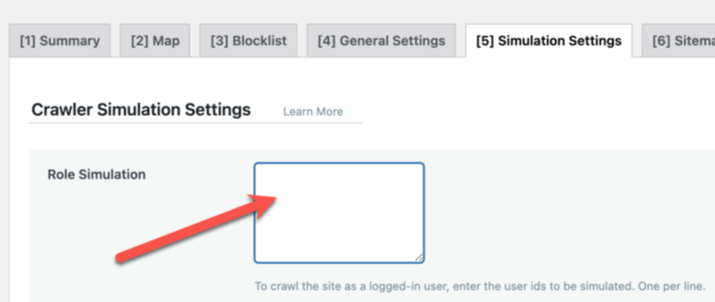
    Save any changes.

    This will disable role simulation completely, until you are able to upgrade to v6.4.

    Hosting providers

    Hosting providers have two temporary solutions: add a mod_sec rule, or add a rewrite rule. There is no need to apply both. Choose whichever one you prefer.

    These rules disable access to the litespeed_role cookie. Here’s why:

    Potential attacks are carried out via litespeed_role in pre-6.4 versions of the plugin. Blocking the cookie will not have any implications for those who have upgraded. For those who have not upgraded, it will make it impossible for them (or anyone else) to use crawler role simulation. But otherwise, it should not have any impact on the functionality of the plugin.

    Mod_sec rule:

    SecRuleEngine On
    SecRule REQUEST_URI "wp-content/debug.log" "id:10001,phase:1,t:urldecode,t:normalizePath,log,deny,status:403,msg:'wp-content/debug.log block'"
    SecRule &REQUEST_COOKIES_NAMES:litespeed_role "@gt 0" "id:10002,phase:1,log,deny,status:403,msg:'litespeed_role cookie block'"
    

    Rewrite rule:

    RewriteEngine On
    RewriteCond %{HTTP_COOKIE} litespeed_role [NC]
    RewriteRule ^ - [F,L]
    RewriteCond %{REQUEST_URI} wp-content/debug.log [NC]
    RewriteRule ^ - [F,L]
    

    Note that these rules should be enclosed within <IfModule LiteSpeed>...</IfModule> tags. The following instructions explain how to apply the rules in cPanel, Plesk, or DirectAdmin.

    cPanel

    In WHM, create a file called lscwp_custom.conf in the /etc/apache2/conf.d/userdata directory and insert the rewrite rule or the mod_sec rule above into it.

    Rebuild the Apache config file and restart LiteSpeed Web Server with the following commands:

    /scripts/rebuildhttpdconf
    systemctl restart lsws
    

    Plesk

    Edit the /usr/local/psa/admin/conf/templates/custom/domain/domainVirtualHost.php file. Look for two </VirtualHost> lines and insert the rewrite rule or the mod_sec rule before both of them.

    Rebuild the Apache config file and restart LiteSpeed Web Server with the following commands:

    /usr/local/psa/admin/sbin/httpdmng --reconfigure-all
    systemctl restart lsws
    

    DirectAdmin

    Create the custom template directory /usr/local/directadmin/data/templates/custom/ if it doesn’t exist. Copy four template files into that directory using the following commands:

    cp /usr/local/directadmin/data/templates/virtual_host2.conf /usr/local/directadmin/data/templates/custom/virtual_host2.conf
    cp /usr/local/directadmin/data/templates/virtual_host2_secure.conf /usr/local/directadmin/data/templates/custom/virtual_host2_secure.conf
    cp /usr/local/directadmin/data/templates/virtual_host2_sub.conf /usr/local/directadmin/data/templates/custom/virtual_host2_sub.conf
    cp /usr/local/directadmin/data/templates/virtual_host2_secure_sub.conf /usr/local/directadmin/data/templates/custom/virtual_host2_secure_sub.conf
    

    Open each of the new template files, and look for the </VirtualHost> tag at the bottom of the file. Insert the rewrite rule or the mod_sec rule before this line.

    Rebuild the Apache config file and restart LiteSpeed Web Server with the following command:

    /usr/local/directadmin/custombuild/build rewrite_confs
    

    Conclusion

    We thank Patchstack for bringing this issue to our attention. This vulnerability has been patched, so if you are keeping your LiteSpeed Cache plugin up-to-date, there is nothing you need to do. If you have not updated in a while, please do so today.