WpW: Vary Groups

Written by

in

Welcome to another installment of WordPress Wednesday!

It’s been a busy few weeks for LiteSpeed Cache for WordPress! We’ve released updates that have enabled private cache and ESI, both of which have been high on our customers’ wish lists. Today we’re going to talk about another feature that was enabled recently: Vary Groups.

The Vary Group functionality combines the concepts of “cache varies” and “user roles.” Let’s explore each of those ideas and then see what happens when you put them together.

Cache Varies

Sometimes you need to have multiple publicly-cached versions of a single page. We call this “varying,” and it can be used on many types of criteria. One popular vary built into the plugin allows you to specify a list of mobile user agents so that we can cache one view for mobile users and a different view for those on desktop.

User Roles

WordPress comes with a handful of built-in user roles: administrator, author, editor, contributor, and subscriber. Various plugins may create other roles as necessary.

Each of these roles gives a user certain permissions. Editors, for instance, can publish and manage the posts on a site, but they don’t have access to all of the site-management features that an Administrator does.

Vary Groups

With Vary Groups you can have multiple publicly-cached versions of a single page, based on the permissions of the users who view the page.

 

For example:

An Administrator has all kinds of abilities that the other users do not. They can edit and delete posts. They can manage categories, remove users, switch themes, and so on. In some themes, administrator functions will appear right on the public pages (like an “edit” link at the end of a post). If you create a Vary Group for administrators, then LSCache will save two public copies of the page: one with all of the editing permissions displayed on it for anyone in the administrator group, and the default copy of the page with none of the editing links for everyone else.

Here’s a more complicated example:

You have a shop running on your site, and through the shop admin, you’ve defined two user roles: retail_customer and wholesale_customer. You have two sets of prices, and three different ways that your site can be viewed: users in the group retail_customers will see your highest prices. Users in the group wholesale_customers will see your lowest prices. Users who are not yet customers will see the default page with no pricing whatsoever. To ensure that the three different views would be saved separately in the public cache, you would create two Vary Groups, one for each customer role.

An important distinction:

With Vary Groups, we’re not changing the behavior of your application at all. We are simply allowing you to have separate cached copies for each of the public views that are already being generated. Before we had Vary Group functionality, you would only have been able to cache the default view, which usually meant that you couldn’t cache pages at all for logged-in users. This new ability to cache all of your user-role-based content is a nice perk!

Setting it up

From your WordPress Admin, navigate to LiteSpeed Cache > Settings > ESI. Scroll down to the Vary Group setting.
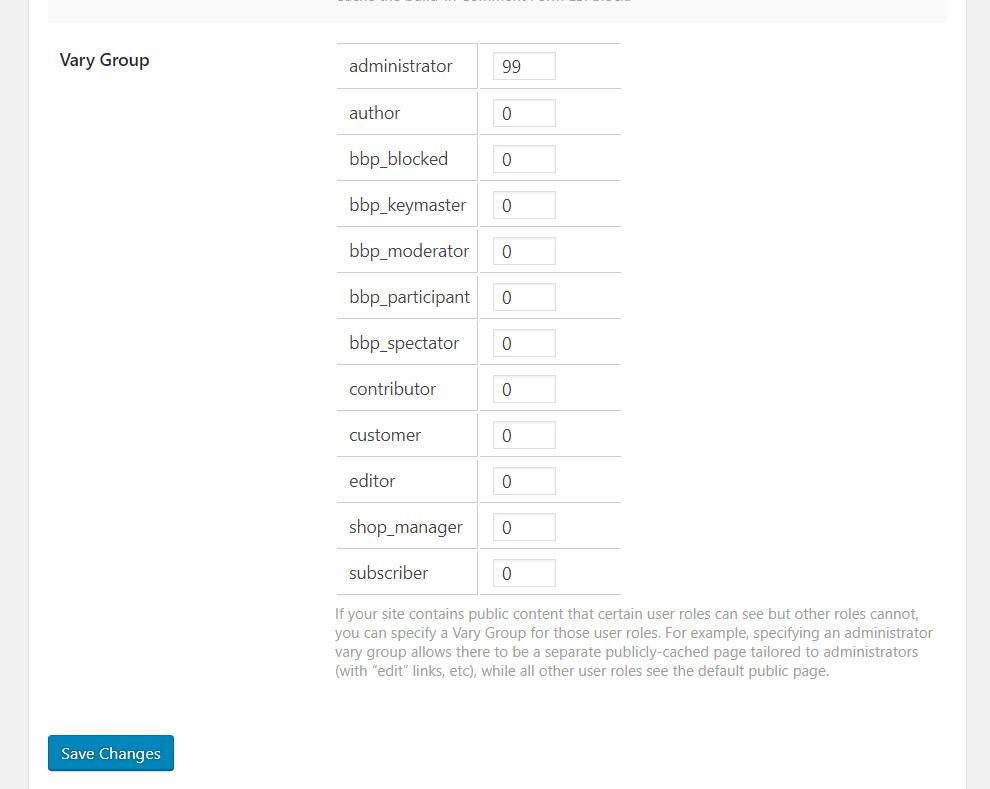
You should see a list of the user roles that are defined on your site. Your list of user roles may be different than our example site’s list above, but don’t let that confuse you. It’s normal.

To create a vary group for any user role shown, enter a non-zero value into the box next to that user role. If a user role has a 0 next to it, then it will be served the default cached copy.

There is no significance to the numbers other than the fact that unique views should have unique values.

If two user roles share the same view, put them in the same group by using the same number. In other words, if author and editor both have the same view, but it’s different from everyone else’s view, author and editor could both be given the number 22, while everyone else remained at 0.

Why?

You may be wondering, why do this when you can just use ESI to adjust what displays on different people’s pages? Or cache the whole page in private cache?

While ESI is handy for situations where you want to insert a little bit of private content onto a mostly-public page, it can be resource-intensive, particularly if several blocks are required on the page.

Additionally, the situations that call for Vary Groups are not quite the same as those that benefit from ESI or private caching.

Use Vary Groups when your pages have multiple public versions that have been generated based on user permissions. The differences might be subtle, like on a shop page where the design is the same but the prices vary per user group. Or the differences might be drastic, going so far as to not show some content at all for certain user roles.

With Vary Groups, we cache one copy of the page per group. This is different than privately-cached content, which is stored as one copy of the page for each user that requests it. When you privately cache a page, you can potentially be caching thousands of copies of the same page! Reserve private cache for pages that truly serve up individualized content that varies from user to user.

Vary Groups are a useful tool in your cache toolbox. They use far fewer resources than private caches do, and are easier on the server than ESI is. If you have situations where different public content is being generated based on user roles, Vary Group functionality is your most efficient caching option.

If you have any questions about this, or are wondering what type of caching would benefit your unique situation, leave a comment and ask us!

Have some of your own ideas for future WordPress Wednesday topics? Leave us a comment!

Don’t forget to meet us back here next week for the next installment. In the meantime, here are a few other things you can do:

Comments

15 responses to “WpW: Vary Groups”

  1. Steve Avatar

    Thanks for this explanation! It would be nice to see this incorporated into the wiki and linked from the admin area as I found it much more useful than what’s there now. The burning question I have left is: Does ESI need to be enabled for Vary Groups to take effect? If so, please explain because it seems from this article they are totally separate tools. Also, does the Administrator Vary group include any part of the admin bar since most of that doesn’t need to be private?

    1. Lisa Clarke Avatar
      Lisa Clarke

      Hi, Steve. Thanks for your feedback! As a matter of fact, we were discussing today that the Vary Groups setting really doesn’t belong under ESI. It will probably be moved as soon as we decide the best place for it. (As you may have noticed, the Settings tabs are getting quite full these days – real estate is at a premium!)

      ESI does not need to be enabled for Vary Groups to work.

      I think you’re right about the wiki – it could use some more detail. I’ll put it on my list for next week 🙂

      As for the admin bar: if you create an Administrator vary group, then everything that an admin sees will be stored as part of that view, including the admin bar. The pages that are cached for vary groups are not stored in private cache. They are public. Vary Groups are really just a mechanism for storing multiple copies of the same public page. The copies may be different from each other based on the role of the user who will view them.

      LMK if this doesn’t answer your questions!

      1. Steve Avatar

        Alright, that makes more sense now. The admin bar is still confusing me though because it does contain the personal greeting, e.g. “Howdy, Lisa”. So it would seem that would need private cache unless that greeting is split out, correct?

        As for the real estate, IMHO you should split the settings into separate pages for cache and optimization/CDN. Then split the cache settings up more, such as getting the object cache on its own page. Vary Groups could be its own tab there.

        1. Lisa Clarke Avatar
          Lisa Clarke

          Yes, that’s true. The admin bar does either require ESI, or full page private cache, if it’s going to be cached at all. But that functionality is separate from vary groups. I probably should have been more clear. Vary groups are for storing separate copies of the public portions of a page. So, if ESI is enabled, it will still work within the vary group mechanism, and in your example, the admin bar would be cached privately in an ESI block, while the rest of the page would be saved publicly.

          Vary Groups are really only necessary for sites that have a few different types of logged-in users, and their app is configured to serve significantly different content to the different types of users.

          Most normal sites can be served well by simply setting Cache Logged-in Users to ON. Logged-in users would get private cache, and everyone else would get public cache. No fussing with ESI or Vary Groups required.

          RE: your suggestions for re-arranging tabs, yes that idea is similar to one of the ones on the table. Thanks.

          1. Joe Avatar

            My understanding is that private cache is a separate cache per individual user. I have a magazine where logged in users see the same content, there isn’t even a “Hi, Joe” in the corner. No individualization at all. I basically just want my logged in users, paying customers, to be delivered content at the same speed as new visitors.

            I’m using a vary group to cover that. Should I leave Private Cache turned off?

          2. Lisa Clarke Avatar
            Lisa Clarke

            Yes. No need for private cache in your example. It wasn’t clear whether logged in users see anything different (as a group) than non-logged-in users do, but if they do not, then you shouldn’t need vary groups, either. Just let everyone use the shared public cache.

  2. Kyo Avatar
    Kyo

    Not sure if its a bug or not since the number value of vary group remain the same as default after i made some changes & save it. I let the admin on 99, shopmanager & affiliate with 22 because they share the same view but the changes keep going back to default value. Any advise?

    1. Lisa Clarke Avatar
      Lisa Clarke

      Hi, Kyo. It does sound like there might be something wrong there. We’ll need to take a look. Please create a ticket through our client area or by sending email to bug@litespeedtech.com. Thanks!

      1. Sergio Avatar

        Hello Lisa.

        Seems that this bug still happening. Just some time before I commented in wordpress website.

        We have litespeed license. Is better to use your ticket system than wordpress forum to notify bugs or ask doubts about wp plugin settings?

        Thanks.

        Regards!

        1. Lisa Clarke Avatar
          Lisa Clarke

          Yes, the ticket system is a much better place to get support. We don’t always see blog comments right away. Thanks!

        2. Lisa Clarke Avatar
          Lisa Clarke

          Oops, sorry, I read your reply too quickly. The WP forum is a fine place to ask for support. We have the same team answering questions there as in the ticket system.

  3. Paul Avatar
    Paul

    I use vary groups for access levels to our subscription based website. We have vary groups for basic and full access. When a user upgrades thier subscription we change their WordPress role (and their vary group).

    This change in WordPress role and vary group doesn’t appear to be in affect to the student until they click to a different page, then click a link back to that page (must be a link on a page, back/history button does not work). No matter how many times the user refreshes the page the new vary group will not be shown. It seems like they need to click a link on the page to another page, then click a link on that page that directs them back to the current page in order to see the new vary group.

    I have tried Javascript redirects but this seems to have the same effect as using the browser history. This always results in the user seeing the old vary group. Any ideas no how I can work around this>

    1. Lisa Clarke Avatar
      Lisa Clarke

      Maybe when you reload the page after their upgrade, you can add a query string to the URL, so that the page is treated like a different page as far as cache in concerned?

      I’m not sure if that would do the trick, but if it doesn’t, I’m sure our support team could give you some more suggestions. You can open a ticket by emailing support@litespeedtech.com.

  4. Stefan Roos Avatar
    Stefan Roos

    I am successfully using vary groups with a membership based site (all users at a particular level have the same views).

    However, some widgets in the sidebar need to be refreshed regularly, so we are using ESI public cache for these widgets with a TTL of 3600 (1 hour).

    It appears that there is only 1 version of the public cache for ESI widgets – it this correct? Can vary groups be applied to create group specific public cache for ESI widgets?

    1. Lisa Clarke Avatar
      Lisa Clarke

      LiteSpeed’s ESI engine does support cache varies, but there’s no way to configure that within the ESI widget interface. If you’re comfortable using rewrite rules, there may be a way to configure that. I can’t, personally, help you with that, but the support team should be able to point you in the right direction. `support@litespeedtech.com`

Leave a Reply

Your email address will not be published. Required fields are marked *