
LiteSpeed Technologies announces the release of a one-click script that quickly and easily supercharges your DigitalOcean Droplet’s WordPress setup. LiteSpeed’s cache performance delivers significant performance and scalability gains over the DigitalOcean default.
DigitalOcean’s default WordPress droplet relies on Apache Web Server and does not utilize a cache. We improve upon this by replacing Apache with OpenLiteSpeed Web Server and add LiteSpeed Cache for WordPress to further accelerate your WordPress site.
OpenLiteSpeed is our high-performance, lightweight, open source HTTP server that outperforms Apache Web Server by a wide margin. By working directly with OpenLiteSpeed, the LiteSpeed Cache for WordPress plugin statically caches your dynamic WordPress pages, greatly reducing page load times and server load. Additionally, the LiteSpeed Cache for WordPress plugin provides superior control and flexibility over your cache when compared to other WordPress cache plugins.
Both OpenLiteSpeed and the LiteSpeed Cache for WordPress plugin are free and open source.
When compared to the default droplet, benchmarks show that our solution offers a performance increase of 10x and even more as the load increases. When compared to a DigitalOcean 1-Click Droplet modified to include WP Super Cache, our solution still handles around 2x the requests per second at less than 1/100 of the server load.
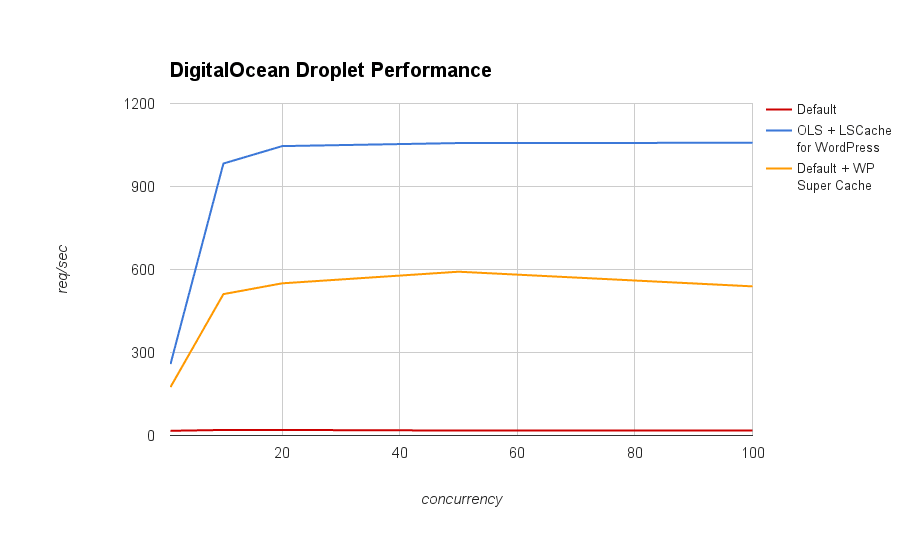
Larger sites with higher concurrent visitors will see the most benefit, however even small sites should see a performance boost of 3-4x.
Our benchmarks were done using ab to simulate up to 100 users hitting the WordPress home page (with its sample hello world post) at a time. They were performed on a 1GB 1 Core Droplet.
Currently our DigitalOcean WordPress script is only compatible with Ubuntu 14 based DigitalOcean 1-click WordPress Droplets. This script will install OpenLiteSpeed, lsphp56 and its components, and the LSCache for WordPress plugin for your droplet.
Simply run the script as a superuser (sudo can also be used) with the upgrade flag to quickly and easily install and set up OpenLiteSpeed with lsphp56:
bash <(curl http://www.litespeedtech.com/packages/tools/convert-dowp-to-ols.sh) upgrade
Or use the upgrade70 flag to use lsphp70.
bash <(curl http://www.litespeedtech.com/packages/tools/convert-dowp-to-ols.sh) upgrade70
This command will install OpenLiteSpeed to the /usr/local/lsws directory and use your existing WordPress installation in /var/www/html.
Increasing your DigitalOcean WordPress performance has never been easier!
For more info, check out our DOWP Droplet Upgrade wiki page.
The Raw Data
| Concurrency | Total Requests | Default Droplet | OpenLiteSpeed + LSCache for WordPress | Default Droplet with WP Super Cache |
| 1 | 100 | 17 | 285 | 177 |
| 1 | 1,000 | 17 | 258 | 175 |
| 10 | 1,000 | 20 | 949 | 581 |
| 10 | 10,000 | 20 | 983 | 511 |
| 20 | 1,000 | 20 | 1053 | 655 |
| 20 | 10,000 | 20 | 1046 | 550 |
| 50 | 1,000 | 18 | 1056 | 617 |
| 50 | 10,000 | 18 | 1057 | 592 |
| 100 | 10,000 | 18* | 1058 | 539 |
| 100 | 100,000 | 20* | 1054 | 651 |
We also measured server load during a 100 concurrency tests with 100,000 total requests:
| Server + Cache | Duration | Server Load | Req/Sec |
| OLS + LSCache for WordPress | 95 seconds | 0.35-0.4 | 1052 |
| Default + WP Super Cache | 209 seconds | ~130 | 480 |


Leave a Reply