Learn more about LiteSpeed Web Server. LSWS conserves resources without sacrificing performance, security, compatibility, or convenience. When you replace Apache with LiteSpeed, you double your maximum capacity, and eliminate the need for a 3rd party caching layer – all in 15 minutes with zero downtime!
HTTP/2 Bomb is a remote denial-of-service exploit that exists in many servers’ default HTTP/2 configurations.
LiteSpeed server products (including LiteSpeed Web Server Enterprise, LiteSpeed Web ADC, and OpenLiteSpeed) are effectively not vulnerable to HTTP/2 Bomb attacks
Who is affected by HTTP/2 Bomb?
The HTTP/2 Bomb vulnerability was announced this week on the Calif Substack after having previously been disclosed to nginx and Apache, who then released their own patches. Other servers, not including LiteSpeed, have since been included in the “affected” list.
LiteSpeed Web Server is an Apache drop-in replacement, but LiteSpeed does not share any code with Apache.
LiteSpeed’s from-the-ground-up implementation of Apache-compatible systems means that LiteSpeed is usually not subject to the same vulnerabilities as Apache. That is indeed the case with the HTTP/2 Bomb vulnerability.
How are LiteSpeed Users Protected?
We assessed the vulnerability and concluded that there is only one situation in which LiteSpeed servers may be exploitable by the HTTP/2 Bomb vulnerability:
If an IP address is added to the Trusted IP list, and is intentionally allowed to abuse the server, the HTTP/2 Bomb may have an effect.
We don’t anticipate that many admins have trusted their attacker’s IPs, but even if they have, the amplification rate is roughly 30x to 40x. This should not be enough to bring down a server.
Just the same, we will add some tightening around this scenario in upcoming server product releases.
If you are using LiteSpeed Web Server Enterprise, LiteSpeed Web ADC, or OpenLiteSpeed, there is nothing you need to do right now. You are already immune to this attack, assuming your Trusted IP list contains only truly trustworthy IPs.
We have another urgent security update for LiteSpeed’s user-end plugin for cPanel.
Last night we were made aware of a vulnerability affecting our user-end cPanel plugin (LiteSpeed’s WHM plugin was not affected). We patched this vulnerability in v2.4.8.
Please update to the latest version of the cPanel user-end plugin, which is bundled with the WHM plugin..
This Privilege Escalation vulnerability, which was reported to us by the team at Namecheap, has been assigned CVE-2026-54420.
Impact
A vulnerability in the LiteSpeed cPanel plugin allows a user with FTP or web shell access to escalate privileges to root on shared hosting servers running CloudLinux/CageFS.
This vulnerability is being actively exploited, and poses a risk for all user-end plugin versions prior to 2.4.8.
Use the following command to determine if your server has been affected:
If there is no output, then your server has not been affected.
If this command results in any output, the vulnerability may have been exploited on your server. There can be false positives, so look for the following to confirm:
Pairing: generateEcCert immediately followed by packageUserSize for the same user (legitimate UI flows don’t chain these)
Concurrency: 7–10 concurrent calls per attempt (legitimate UI does one at a time)
Same source IP hammering both endpoints
To determine any damage done, examine the system logs for any actions taken by the detected IPs. If you need assistance, you may contact our support team.
Actions
We urgently recommend that those using the LiteSpeed user-end plugin for cPanel upgrade to LiteSpeed WHM Plugin v5.3.2.1 (bundled w/ cPanel plugin v2.4.8) or higher to patch this vulnerability.
To update the WHM plugin, run this command, which will also update the user-end plugin, if you currently have it installed:
wget -O- https://litespeedtech.com/packages/cpanel/lsws_whm_plugin_install.sh | sh
If you cannot upgrade at this time, you can use the following command to remove the user-end plugin and avoid this vulnerability:
We thank Namecheap for bringing the original issue to our attention. We’d also like to thank the cPanel team for their immediate action in preventing further exploitation on additional servers. The vulnerability has been patched, so if you are keeping your cPanel plugin up-to-date, there is nothing you need to do. If you have not updated in a while, please do so immediately.
We have an urgent security update for LiteSpeed’s user-end plugin for cPanel.
This week we were made aware of a vulnerability affecting our user-end cPanel plugin (LiteSpeed’s WHM plugin was not affected). We patched this vulnerability in v2.4.5.
Please update to the latest version of the cPanel user-end plugin, which is bundled with the WHM plugin..
This Privilege Escalation vulnerability, which was reported to us by David Strydom has been assigned CVE-2026-48172.
Impact
Any cPanel user (including an attacker or a compromised account) may exploit the lsws.redisAble function to execute arbitrary scripts as root.
This vulnerability is being actively exploited, and poses a risk for all user-end plugin versions between v2.3 and v2.4.4.
Use the following command to determine if your server has been affected:
If there is no output, then your server has not been affected.
If this command results in any output, we recommend you examine the IPs in the list, determine if they are valid, and if not, block them. To determine any damage done, examine the system logs for any actions taken by the detected IPs. If you need assistance, you may contact our support team.
Actions
We urgently recommend that those using the LiteSpeed user-end plugin for cPanel upgrade to LiteSpeed WHM Plugin v5.3.1.0 (bundled w/ cPanel plugin v2.4.7) or higher to patch this vulnerability.
If you cannot upgrade at this time, you can use the following command to remove the user-end plugin and avoid this vulnerability:
After addressing the initial report, we undertook a full security review of our cPanel and WHM plugins
As a result, we have patched additional potential attack vectors in both plugins and released cPanel plugin v2.4.7 bundled with WHM plugin v5.3.1.0.
To be clear, there have been no reports of these additional vulnerabilities being exploited. This was a proactive review, undertaken with the assistance of the cPanel/WebPros team.
Timeline
May 19, 2026: We were alerted to the original issue.
May 21, 2026: We completed a security review and released v2.4.7 and v5.3.1.0 of the plugins
Conclusion
We thank David Strydom for bringing the original issue to our attention. We’d also like to thank the cPanel team for their immediate action in preventing further exploitation on additional servers. All known vulnerabilities have been patched, so if you are keeping your cPanel plugin up-to-date, there is nothing you need to do. If you have not updated in a while, please do so immediately.
Times are tough for hosting providers. Hardware costs are climbing. Between tariffs, supply chain disruptions, and rising component costs, your margins are being squeezed from every angle.
Your clients’ needs are outpacing your existing hardware, but purchasing additional servers is becoming cost-prohibitive.
Enter LiteSpeed. With LiteSpeed Web Server, you can host more customers on the hardware you already own.
Hardware Costs Are Not Coming Down
In recent months:
Server component prices have risen significantly, and these price hikes are beginning to be felt in server and infrastructure costs.
Tariff uncertainty is adding volatility to purchasing decisions and making long-term procurement planning more difficult.
Hosting providers are caught between raising prices and losing customers.
But there is a third option: LiteSpeed Web Server.
Concrete Ways LiteSpeed Saves Money
LiteSpeed can often handle more traffic than Apache without requiring a hardware upgrade.
LiteSpeed’s event-driven architecture can process thousands of concurrent connections with a fraction of the memory that traditional Apache deployments would require. That higher concurrency means you can serve more customers per machine.
LSCache is LiteSpeed’s built-in full-page caching solution. By serving cached pages, LSCache reduces repeated PHP execution and unnecessary database queries, lowering CPU load. It also eliminates the need for a separate Varnish layer, keeping your stack efficient and compact.
LiteSpeed Web Server was the first production server to support HTTP/3 and QUIC. In fact, LiteSpeed helped write the specification as an active participant in the IETF working group. Built-in HTTP/3 support can reduce the need for extra layers in deployments that might otherwise rely on additional proxy infrastructure.
Apache users can switch to LiteSpeed Web Server with minimal disruption, and typically without downtime. LiteSpeed is a drop-in replacement for Apache and supports Apache configuration and .htaccess files.
LiteSpeed can significantly increase the amount of traffic each server can handle, allowing you to:
delay your next hardware purchase
extend the useful life of your existing hardware
reduce the number of nodes in a cluster
If you can serve the same workload with fewer servers, power consumption drops and energy costs become easier to control, especially at scale.
Why Now?
The ROI window is now.
There is little sign of near-term relief in infrastructure costs
Every month you delay efficiency improvements is another month of unnecessary hardware and operating costs
If you are running cPanel with LiteSpeed Enterprise and want to deploy a modern automation service such as n8n, the setup can be both straightforward and reliable.
In this article, we will walk through a basic example of running n8n inside Docker on a cPanel server, then publishing it through LiteSpeed Enterprise using reverse proxy rules that support both normal HTTP traffic and WebSocket connections.
Set up n8n
Below is a n8n example docker-compose.yml used for the n8n.example.com domain:
to /etc/apache2/conf.d/userdata/ssl/2_4/n8examplecom/proxy.conf for the SSL configuration and to /etc/apache2/conf.d/userdata/std/2_4/n8examplecom/proxy.conf for the non-SSL configuration.
This configuration allows the domain to proxy regular traffic to the n8n container on localhost:5678, while also passing WebSocket connections correctly.
Note: The backend target is always plain HTTP because SSL termination happens at the web-server level.
After saving the include files, we rebuilt and reloaded the web server configuration, like so:
/scripts/buildhttpdconf
systemctl restart lsws
Domain access
Once DNS, SSL, Docker, and proxy rules are all in place, you can visit the public domain at https://n8n.example.com.
From there, register your account on the n8n instance and begin building workflows.
Set up simple test workflow
To confirm that the reverse proxy and application are working properly, create a simple test workflow:
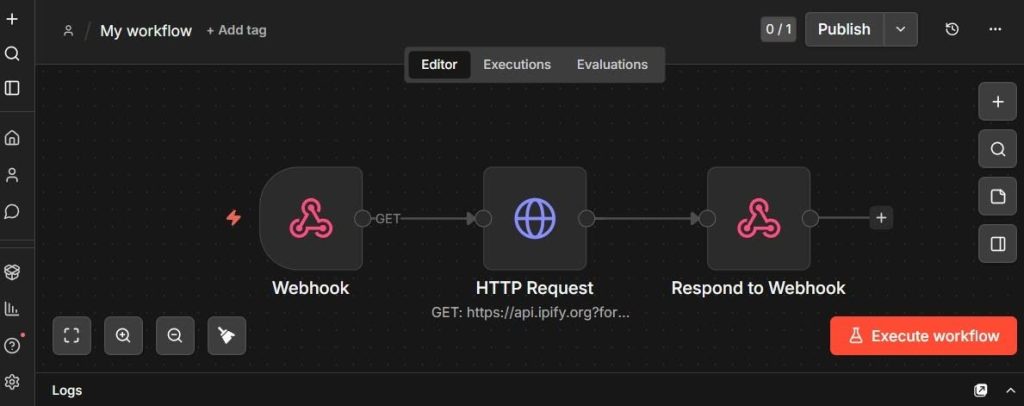
Receive a webhook request
Make an HTTP request to api.ipify.org
Return the detected IP address as JSON
Webhook node
Use these two URLs:
Test URL: https://n8n.example.com/webhook-test/test-api
Production URL: https://n8n.example.com/webhook/test-api
Set the webhook response mode to Using "Respond to Webhook" node.
HTTP Request node
Create an HTTP Request node with:
Method: GET
URL: https://api.ipify.org?format=json
This endpoint returns a simple JSON response containing the requester IP address.
Respond to Webhook node
Set the following:
Respond With: JSON
Response Body (Expression):
  {
  "myIP": "{{$json.ip}}"
  }
The image above shows what the workflow looks like in the editor.
Activate the workflow
Activate the workflow to validate the webhook.
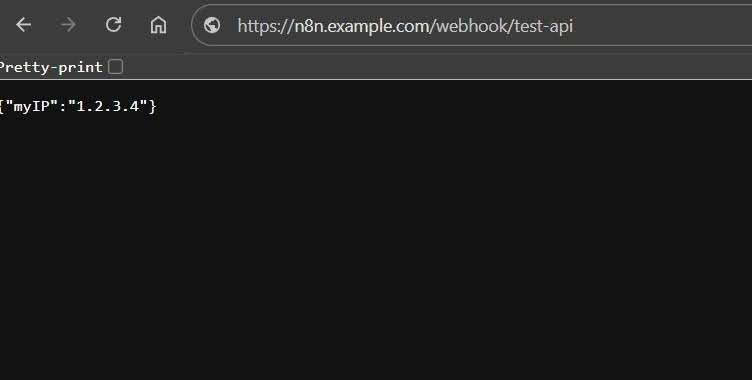
After activating the workflow, visiting the webhook URL in the browser should return a JSON response showing your IP address, like so:
{"myIP": "192.0.2.0"}
This is a simple but useful validation test, because it confirms:
the domain is reachable
HTTPS is working
the reverse proxy is forwarding requests correctly
n8n is processing the workflow
the response is being returned properly through LiteSpeed
Conclusion
Running n8n on cPanel with LiteSpeed Enterprise and Docker is practical. With the right proxy configuration, it is possible to support both standard HTTP traffic and WebSocket connections cleanly, while keeping the service accessible over HTTPS on its own domain.
If you are looking for a clean way to publish n8n on a LiteSpeed Enterprise server, this is a solid approach.
We have a security update for LiteSpeed’s QUIC and HTTP/3 Library (LSQUIC), and all three LiteSpeed server products. Recently we were made aware of a vulnerability affecting LSQUIC. We patched this vulnerability in v4.3.1.
Please update to the latest versions of LSQUIC and all LiteSpeed server products.
UDP packets, crafted in a particular way and sent to the HTTP/QUIC service port, can cause an unbounded memory leak. This has the potential to cause the process or the server to run out of memory, eventually leading to a Denial of Service.
This vulnerability in the LSQUIC Library affects all server products and may be easily exploited.
Actions
We strongly recommend that those using the QUIC and HTTP/3 library upgrade to LSQUIC version 4.3.1 or higher to patch this vulnerability.
Additionally, those who are using LiteSpeed server products, should upgrade to the following versions of these products immediately:
LiteSpeed Web Server (LSWS) v6.3.4 or higher
LiteSpeed Web ADC (LSADC) v3.3.1 or higher
OpenLiteSpeed (OLS) v1.8.4 or higher
If you cannot upgrade your server at this time, you can disable HTTP/3 to avoid this vulnerability.
Timeline
July 15, 2025: We were alerted to the issue.
July 18, 2025: Patch was added to our internal repo to be included in all subsequent builds of our commercial server products
August 1, 2025: Released LSWS v6.3.4 and OLS v1.8.4
August 4, 2025: Released LSADC v3.3.1
August 13, 2025: Released LSQUIC v4.3.1 to the GitHub repository
Conclusion
We thank Imperva Offensive Team for bringing this issue to our attention. This vulnerability has been patched, so if you are keeping your LSQUIC library or your LiteSpeed server products up-to-date, there is nothing you need to do. If you have not updated in a while, please do so today.
We are more than halfway through 2025, and we wanted to take this opportunity to tell you what we’ve been doing this year, in case you’ve missed anything. We’ve released updates to three cache plugins, three control panel plugins, and all three server products!
Cache Plugins
First, let’s take a look at what’s new with our LiteSpeed Cache plugins for WordPress, PrestaShop, and Magento.
WordPress
We released three LSCWP updates in the last six months. In addition to dozens of minor changes and bug fixes, these new features were among the updates:
For v1.5.2 of LSCPS, we made a few minor updates: we fixed some bugs, we added parameter support to ESI block widgets, and we improved compatibility with Smarty and Symphony caches.
Our server products were updated this year to use a new version of LSQUIC. (A hash flood vulnerability was addressed in our LSQUIC HTTP/3 Library in February with the v4.2.0 release.)
LiteSpeed Web Server
We released LSWS v6.3.2 and v6.3.3, which included new features, security updates, and a number of bug fixes. See the full release log here.
New features include:
Improvements to HTTP/2’s ability to block aggressive robots when under attack
Improved support for LiteSpeed Containers and Redis in control panels
The ability to selectively disable anti-DDoS detection
The security updates addressed the LSQUIC vulnerability, and an issue with stderr.log permissions.
OpenLiteSpeed
OLS v1.8.3 updated LSQUIC and added support for “expect: 100 continue” handling.
Introducing a new way to install LiteSpeed Web Server with just one click! LiteSpeed Web Server One-Click Installation (lsws1clk.sh) comes with several options and can be used with any supported operating system. Using this versatile script, you can quickly and easily install our enterprise web server with its default settings, and you can choose to include other useful applications, including WordPress and the LiteSpeed Cache plugin.
The script includes a 15-day LiteSpeed Web Server trial license by default. After the trial period, you can apply your own license or enter your serial number using the --license [LICENSE_NO] parameter during installation. Don’t know what license is best for you? You can browse our licenses here. There’s a LiteSpeed Web Server license for every budget, starting at zero dollars!
Install LSWS and LSPHP
The default use for the one-click script sets a random admin password and installs only two pieces of software:
A few tips to keep in mind when using the script to install WordPress:
The -W parameter will install WordPress as shown above, but you will still need to configure the WordPress installation through the browser.
By default, a MariaDB database will be set up using this script. You can also specify another DB if needed, using the --with-mysql or --with-percona flags.
If you already have a WordPress installation running on another server, it can be imported into LiteSpeed with no hassle using the --wordpresspath parameter.
To completely install WordPress with your LiteSpeed installation, skipping the need for the browser installation process, use --wordpressplus [SITEDOMAIN]. The --wpuser, --wppassword, --wplang, and --sitetitle flags allow you to further customize the settings.
Other Examples
Here are a few more usage examples that you might find helpful:
./lsws1clk.sh --lsphp 83: install LSWS with LSPHP v8.3 (also known as lsphp83)
./lsws1clk.sh -A 123456 -E admin@example.com: install LSWS with WebAdmin password 123456 and email admin@example.com
./lsws1clk.sh -R 123456 -W: install LSWS with WordPress and MariaDB root password 123456
./lsws1clk.sh --wordpressplus example.com: install LSWS with a fully configured WordPress installation at example.com
Please see the documentation to learn how to use these and other options.
Additional Virtual Hosts
Any time you want to create an additional virtual host, we have another script for that. Create a vhost in seconds using vhsetup.sh with the -d option, like so:
The document root in the example above would be /var/www/www.example.com. Be sure to substitute your own domain when you use the -d option.
Add Let’s Encrypt
Want to use Let’s Encrypt to get an SSL certificate? You can do that with the -le option, as long as you already have your domain configured to point to the server.
This example creates a www.example.com virtual host with the admin email address of admin@example.com. We used the -f option to force an HTTPS redirection:
This will create the www.example.com virtual host, and install all of the applications needed for WordPress.
NOTE: The first time you create an additional WordPress virtual host, you need to make sure the script can fetch your database root password. If you have a custom password, you can update /usr/local/lsws/password, or you can echo the password to /root/.db_password, like so:
The LiteSpeed Web Server one-click installation script has flexible options that allow you to make installation as simple or complex as you wish. Check out our documentation for more options, or watch our brief video to see lsws1clc in action.
If you’re an OpenLiteSpeed user, we’ve got a script for you, too. Find information about the OLS one-click script here.
We have a security update for LiteSpeed’s QUIC and HTTP/3 Library (LSQUIC). Recently we were made aware of a vulnerability affecting several QUIC implementations, including LSQUIC. We patched this vulnerability in v4.2.0.
Please update to the latest version of LSQUIC.
This Hash-based Denial-of-Service vulnerability, reported by Paul Bottinelli, Cryptography and Security Consultant at NCC Group, has been assigned CVE-2025-24947.
Impact
Several QUIC implementations, including LSQUIC, use a hash table to store Secure Connection IDs (or, SCIDs) as indices to connection data. If the hash function is weak, an attacker can trigger a denial-of-service attack by initiating connections with colliding SCIDs, causing significant slow downs.
LSQUIC, while technically vulnerable to this type of attack, has a rate limiting feature. If there are too many INIT packets for new connections, a Retry packet will be triggered. This means, LSQUIC doesn’t put the client-generated SCID in the hash. As such, in a real-world deployment, this vulnerability is not easy to exploit with LSQUIC.
Previously, we used XXH32(), which is prone to hash collisions, to generate a 32-bit hash key. With v4.2.0, LSQUIC has switched to rapidhash, which allows us to generate a stronger random seed, and produces a 64-bit hash key.
Our test shows that it addresses the hash collision issue well. Here are some examples:
without seed
211C6C858BB29CDD408F1EBDAA43A980CE016B71 -> F3C569EBDE612455
211CEC85DBB29CDE418F1EBDAA43A980CF214B71 -> F3C569EBDE612455
with seed
211C6C858BB29CDD408F1EBDAA43A980CE016B71 -> 3173D06C62EB64E2
211CEC85DBB29CDE418F1EBDAA43A980CF214B71 -> EF06763606005C05
without seed
211C6C858BB29CDD408F1EBDAA43A980CE016B71 -> 56B71185739E534A
211CEC85DBB29CDE418F1EBDAA43A980CF214B71 -> 56B71185739E534A
with seed
211C6C858BB29CDD408F1EBDAA43A980CE016B71 -> D18323CAAFD14A5A
211CEC85DBB29CDE418F1EBDAA43A980CF214B71 -> 190C4F2674528BE1
without seed
211C6C858BB29CDD408F1EBDAA43A980CE016B71 -> 9183B84F3AE05847
211CEC85DBB29CDE418F1EBDAA43A980CF214B71 -> 9183B84F3AE05847
with seed
211C6C858BB29CDD408F1EBDAA43A980CE016B71 -> D05A92D1069111F3
211CEC85DBB29CDE418F1EBDAA43A980CF214B71 -> 3150BF22FFAA28E4
Actions
We recommend that those using the QUIC and HTTP/3 library upgrade to LSQUIC version 4.2.0 or higher to patch this vulnerability.
Those who are using LiteSpeed server products, including LiteSpeed Web Server (LSWS), LiteSpeed Web ADC (LSADC), and OpenLiteSpeed (OLS), should upgrade to the latest versions of these products.
Timeline
January 10, 2025: We were alerted to the issue.
January 15, 2025: Patch was added to our internal repo to be included in all subsequent builds of our commercial server products
February 18, 2025: Released LSWS v 6.3.2, LSADC v3.3.0, and OLS v1.8.3
February 18, 2025: Released LSQUIC v4.2.0 to the GitHub repository
Conclusion
We thank Paul Bottinelli for bringing this issue to our attention. This vulnerability has been patched, so if you are keeping your LSQUIC library or your LiteSpeed server products up-to-date, there is nothing you need to do. If you have not updated in a while, please do so today.
Web Servers play an important role in connecting people around the world through the internet. Every day, users send millions of requests for content via their web browsers, and it’s web servers that answer those calls.
In this introduction to web servers, we’ll look at how this request-and-response routine works, and get some more details about the capabilities and functionalities of web servers.
If you’d prefer the video version of this article, you can watch it here:
Requests and Responses
A user’s website experience is built on a series of requests and responses.
First the user opens their browser and enters a URL. Let’s say, example.com.
Every device that is connected to the internet has a unique IP address. Think of it like a phone number. The browser sends a request to the Domain Name System (DNS) to look up the IP address that belongs to example.com‘s web server. Using DNS to translate a URL into an IP address allows your browser to know exactly where to send the request.
The DNS Request
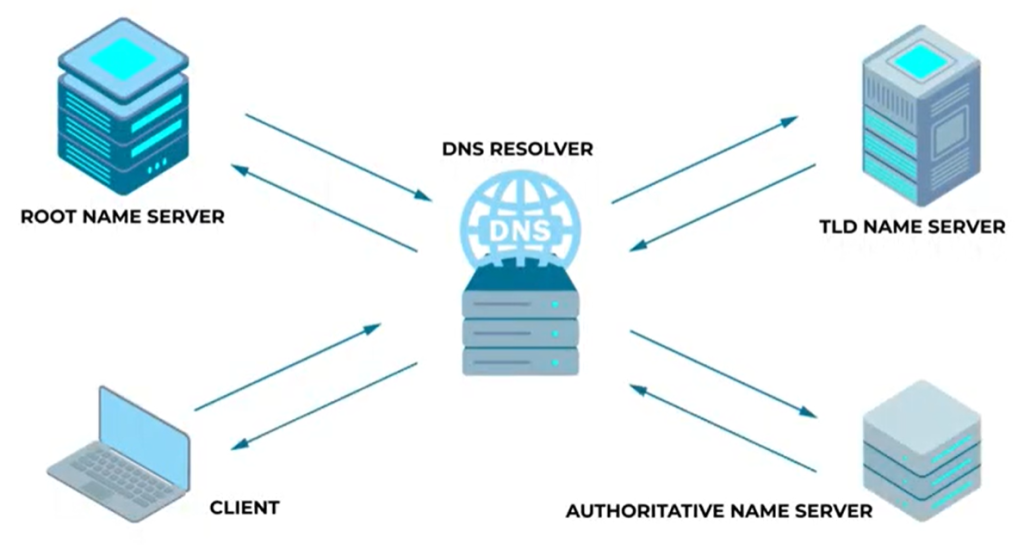
A DNS request is processed through a hierarchy of servers:
The Recursive Resolver receives the initial request and passes it along to the closest Root Nameserver
The Root Nameserver has information about top-level domains (TLDs), such as .com,.net, and all of the country-based domains, so it instructs the Recursive Resolver to pass along the request to the appropriate TLD Nameserver.
The TLD Nameserver stores information for second-level domain names, like example.com, and instructs the Recursive Resolver to pass the request along to the appropriate Authoritative Nameserver.
The Authoritative Nameserver looks up example.com’s IP address (let’s say, 192.0.2.0) and returns it to the recursive resolver, which finally sends the information to the browser.
Thanks to DNS, the browser now knows to send the user’s example.com request to 192.0.2.0, where the web server will receive it.
The Web Server Response
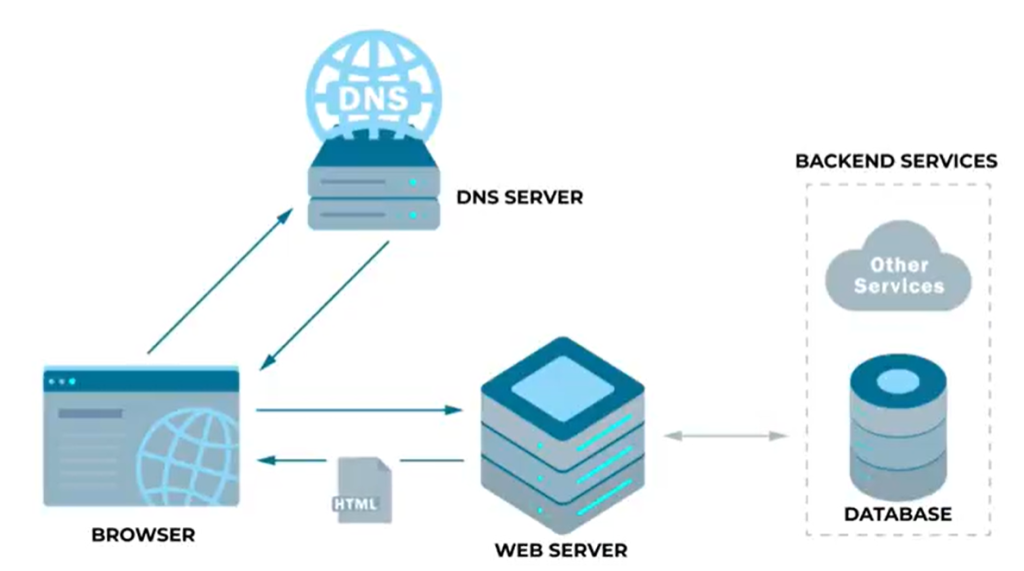
The web server’s job is to receive the request, fetch any necessary content, and send a response back to the browser:
Processing the request: The web server receives the request and interprets it (for example, is it a GET request? or a POST request?). It checks if the requested content is static (like HTML) or whether it requires dynamic generation (like PHP or Python).
Fetching or generating content: The server retrieves the requested content. If it’s dynamic content, the server also processes the request using backend languages, connects to databases if needed, and generates the appropriate response.
Sending the response to the browser: Once the content is ready, the server wraps it in an HTTP or secure HTTPS response and sends it back to the browser.
After all of these steps, which usually take a fraction of a second, the browser renders the requested content from example.com for the user.
So, What is a Web Server?
A web server is a collection of specialized software installed on a physical server (a machine similar to your computer at home) that listens for incoming requests from browsers. These requests are usually made via the HTTP or HTTPS protocols and could involve fetching static files like HTML, CSS, and JavaScript, or processing dynamic data.
Let’s look more closely at these ideas.
Key Components of a Web Server
A “web server” essentially consists of three things: a physical computer or virtual machine, an operating system, and web server software.
The physical computer or virtual machine acts as the foundation of the web server, providing computing resources (CPU, RAM, storage) and network connectivity to support web hosting. The resources can be dedicated to a single user or shared with several users.
The underlying operating system (OS) manages hardware resources and provides a platform for other components in the system. These components, plus the OS itself are also called a “stack.” Common choices for OS include Linux and Windows Server. Linux is the most popular, well-known for its stability and flexibility in server environments. The majority of web servers use some variant of Linux, like CentOS or Ubuntu.
The web server software handles the incoming HTTP/HTTPS requests. In response, it serves static content or forwards dynamic requests to an application server. Common web server software includes Apache HTTP Server, Nginx, and LiteSpeed Web Server. We’ll talk more about these later.
Static vs. Dynamic Content
Let’s look at the different types of content that may be requested from a web server:
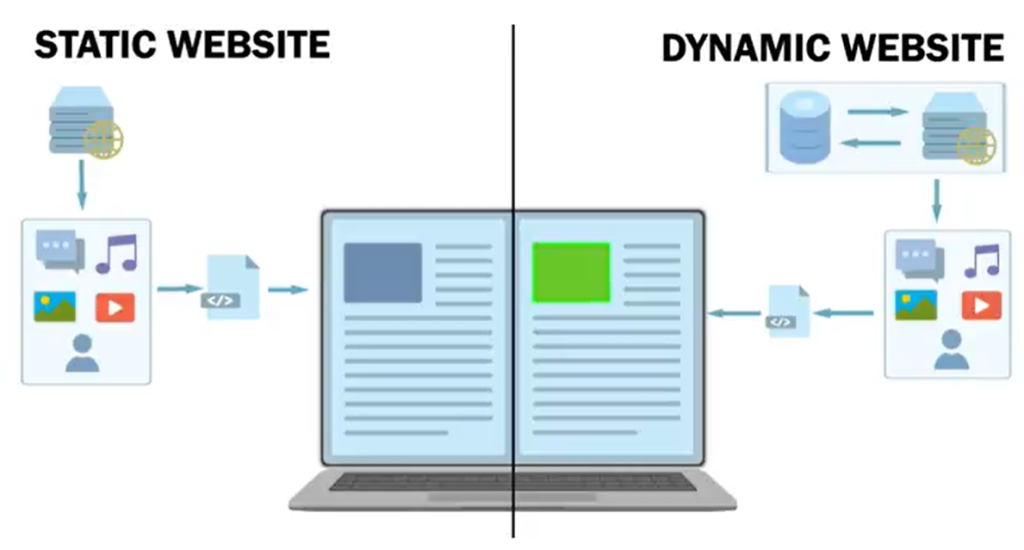
When the web server receives a request for static content, it directly delivers pre-existing files to the browser without any modifications. It’s fast, because the server only has to retrieve and serve the file. Popular types of static content include HTML, CSS, and images.
Dynamic content requires additional server-side processing time before the response can be sent to the browser. In a nutshell:
The web server runs an application server script. This could be in PHP, Python, or some other language.
The script may talk to a database to get specific information, such as user details, or search results, depending on the request.
The server generates a custom HTML page tailored to the user’s request.
The server sends the generated page back as static HTML to be displayed in the user’s browser.
Additional Web Server Features
This is the basic behavior of a web server: to receive a request, process it, and respond with the requested content. But there are other features that a web server provides, including security and performance enhancements.
Security Features
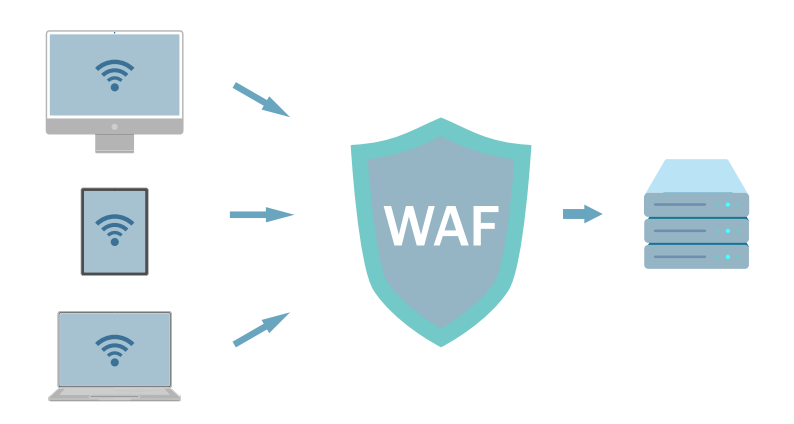
Web servers can support a number of security features, but the two most popular are Web Application Firewall (WAF) and Secure Socket Layers (SSL) / Transport Layer Security (TLS) Encryption. These important features are not built into web servers, per se, but good servers support them.
A WAF, usually in conjunction with a server’s security module, monitors incoming traffic, inspects each request, and uses a set of rules to block anything suspicious. This helps prevent hacking attempts and traffic overload attacks like Distributed Denial of Service (DDoS) attacks.
SSL and TLS encrypt the data that is exchanged between your browser and the web server, keeping sensitive information like passwords and payment details safe from hackers. When you see https in the address bar, you know that the server is using SSL/TLS to create a secure connection, scrambling data so that only the right people can read it.
SSL and TLS protect personal information from being intercepted, ensure data isn’t altered during transmission, and confirm the website is genuine. SSL support is built into the web server, but it uses certificates that are generated externally via a Certificate Authority (CA) like Let’s Encrypt.
Performance Features
In addition to security, web servers provide important performance features, such as compression and caching.
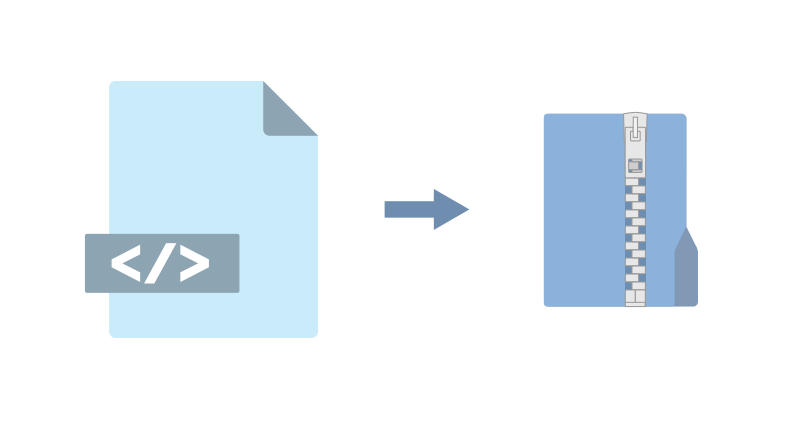
Web servers use GZIP, Brotli, and other technologies to compress the size of files sent from the server, making them faster to download. The browser decompresses the files upon receipt. This saves bandwidth and decreases page load times, a boon for users with slower connections.
A cache is used to store static copies of frequently requested dynamic content. Web servers that make use of caching, serve the static copies rather than regenerating the dynamic content each time it is needed. This significantly reduces server workload, saves resources, improves load times and provides a better user experience.
Common Web Servers
Let’s take a look at a few popular Linux-based web servers, and see what sets them apart from each other.
Apache
Apache HTTP Server was launched in 1995, and is one of the earliest web servers. Still widely used today, Apache was developed as an open-source project, and gained popularity for its flexibility and ability to run on multiple platforms, such as Linux and Windows.
Apache revolutionized web hosting by making it accessible and customizable. Its modular design attracted users who were able to adapt the server for a wide range of web-based applications. Even today, Apache powers millions of websites worldwide.
Nginx
Nginx was released in 2004 by Igor Sysoev, and was designed to solve the problem of handling ten thousand concurrent connections efficiently. This is also known as the C10k Problem. Nginx’s lightweight, event-driven architecture made it an attractive choice for high-traffic websites.
Known for its high performance, scalability, and low resource usage, Nginx excels at serving static content and handling a large number of simultaneous connections. It’s often used as a reverse proxy and load balancer in front of Apache servers, as it is better at efficiently handling heavy traffic than Apache tends to be.
LiteSpeed Web Server
LiteSpeed Web Server was launched in 2003 by George Wang. It was designed for speed and efficiency, developed to address the performance limitations of traditional web servers like Apache. LiteSpeed Web Server offers seamless Apache compatibility and significantly better performance, especially for dynamic content and SSL handling. Its compatibility with Apache configurations allows for easy migration, making it attractive for users seeking better performance without reconfiguring their entire setup.
LiteSpeed is known for its speed, resource efficiency, and robust security features. It excels in server-side caching, and is a go-to solution for web hosts prioritizing speed, security, and scalability.
Conclusion
We hope this overview has given you a sense of what web servers do, in general, and the vital role they play in the functioning of the internet. Visit our website if you’d like to learn more about LiteSpeed Web Server in particular!