
Category: LiteSpeed Web Server

Learn more about LiteSpeed Web Server. LSWS conserves resources without sacrificing performance, security, compatibility, or convenience. When you replace Apache with LiteSpeed, you double your maximum capacity, and eliminate the need for a 3rd party caching layer – all in 15 minutes with zero downtime!

  • Full Disclosure of CVE-2022-0072, CVE-2022-0073, and CVE-2022-0074 and What You Should Do

    Full Disclosure of CVE-2022-0072, CVE-2022-0073, and CVE-2022-0074 and What You Should Do

    CVE-2022-0072 CVE-2022-0073 CVE-2022-0074

    Security has always been at the forefront of our development process at LiteSpeed Technologies. So when a vulnerability is discovered, we act quickly. Our priority is to empower our customers to better protect their systems, but we also take such situations as learning opportunities.

    Today, as a part of that commitment, we want to share details of certain bugs reported in OpenLiteSpeed (OLS) and LiteSpeed Enterprise (LSWS) web servers.

    Summary

    • Three vulnerabilities were reported to LiteSpeed. These were fixed in OpenLiteSpeed v1.7.16 Build 1 and LiteSpeed Enterprise v6.0.12 Build 10.
    • These vulnerabilities don’t impact the majority of our clients. One is within the Docker system, and the other two cannot be exploited without WebAdmin access.
    • You should upgrade to the latest version and build of OpenLiteSpeed or LiteSpeed Enterprise, as appropriate.
    • Future security updates will be released with incremented version numbers, and will no longer be released as new builds of existing version numbers.

    About the Vulnerabilities

    We would like to thank the Unit 42 Team at Palo Alto Networks for responsibly disclosing security issues in our OpenLiteSpeed and LiteSpeed Enterprise web servers on October 4th, and maintaining good communication throughout.

    LiteSpeed’s Team acted swiftly and informed Unit 42 that the issues were under remediation.

    On October 8th, we internally remediated these bugs and put them into testing. During this period we monitored the changes and ensured they were not affecting anything else.

    On October 12th, we pushed the related updates to LiteSpeed Enterprise v6.0.12 as Build 10

    On October 18th, we pushed the related updates to OpenLiteSpeed v1.7.16 as Build 1

    On October 20th, our Docker Images for both OLS and LSWS were updated.

    The reported vulnerabilities have the following CVE numbers: CVE-2022-0072CVE-2022-0073 and CVE-2022-0074.

    Palo Alto Networks has already released information about these CVEs, but we would like to expand on this, below.

    CVE-2022-0072

    Directory Traversal (CVE-2022-0072) rated Medium severity (CVSS 5.8)

    [This issue] was a directory traversal vulnerability that could allow an attacker to bypass security measures and access forbidden files. An attacker that compromised the server could create a secret backdoor and exploit the vulnerability to access it.

    This vulnerability applies to OpenLiteSpeed and LiteSpeed Enterprise WebAdmin Console, and is only exploitable after WebAdmin Authentication has been achieved.

    Additionally, you must have root privileges in order to upload a custom exploit under /usr/local/lsws/admin/html.

    CVE-2022-0073

    Remote Code Execution (CVE-2022-0073) rated High severity (CVSS 8.8)

    At the first stage of the attack, we tried to gain remote code execution and found that the OpenLiteSpeed Web Server admin dashboard is vulnerable to a command injection vulnerability. A threat actor who managed to gain the credentials to the dashboard, whether by brute force attacks or social engineering, could exploit the vulnerability in order to execute code on the server.

    This also applies only to the OLS and LSWS WebAdmin Console for an authenticated user.

    CVE-2022-0074

    Privilege Escalation (CVE-2022-0074) rated High severity (CVSS 8.8)

    While exploring the OpenLiteSpeed Docker image as nobody, we found a misconfiguration in the PATH environment variable that could be exploited into a privilege escalation using the CWE untrusted search path.

    This is another vulnerability that requires OpenLiteSpeed WebAdmin access in order to exploit. LiteSpeed Enterprise is not affected.

    We were unable to reproduce this scenario in our tests with a standard real-world Docker installation. It seems that the environment used by the reporting team differs from the default Docker configuration. The reporting team’s /usr/local/bin folder was owned by the nobody user, which allowed the vulnerability to operate.

    We tried to reproduce this bug on an Ubuntu 22 system with the default Docker host environment and the vulnerable build of our Docker image. We found that the /usr/local/bin directory was owned by root, and any attempt to change the files in the reported directory failed.
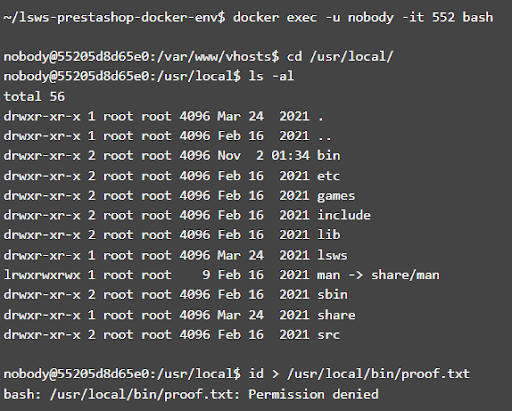
    CVE-2022-0074 Screenshot

    We don’t expect this vulnerability to impact standard Docker installations, however, we are in touch with the PaloAlto Networks Team to get more details on their Docker environment. We’d like to understand how it was customized to make this vulnerability possible.

    Regardless, this is not a privilege escalation from within any LiteSpeed products.

    What You Should Do

    For Docker users, if you’re able to change the contents of /usr/local/bin in your environment, please update to our latest Docker image. An additional security layer which corrects the environment path will be added to your image, effectively patching any side-effects of this vulnerability.

    We also recommend any manual web server installations to be updated by using the $LSWS_PATH/admin/misc/lsup.sh script. Installations installed via any RPM/package managers(yum/apt) will be updated automatically.

    We always recommend, for your general security, that you do not share LiteSpeed WebAdmin authentication details with more than the necessary system administrators. We also suggest you set a strong password and take advantage of the available Brute Force protection available for WebAdmin.

    For best-case scenarios, use a firewall to mask LiteSpeed WebAdmin Console from any public access.

    We would like to once again thank the Unit 42 Team, for their help in making our products secure.

  • Customer Showcase: LiteSpeed Cache Package Boosts WordPress Performance

    Customer Showcase: LiteSpeed Cache Package Boosts WordPress Performance

    LiteSpeed Cache Boosts WordPress Performance for Hostinger

    Our friends at Hostinger are here today, sharing how LiteSpeed Cache boosts WordPress performance on their hosting infrastructure. Without further ado, here they are in their own words! -LC

    Rockets have engines, electric guitars have amplifiers, and WordPress has LiteSpeed. We applied LiteSpeed cache solutions to help our customers make the most of their WordPress websites. The actual results convinced us – LiteSpeed did an excellent job. Now, we’re ready to prove it.

    It’s More Than a Plugin

    Most of our customers are familiar with LiteSpeed Cache as a WordPress plugin. Surprisingly, only a few know that LiteSpeed impacts an entire hosting ecosystem, starting with a web server, where the WordPress Cache plugin gets its power.

    We’ve deployed LiteSpeed Web Server (LSWS) on our hosting infrastructure. Customers can access it through our hPanel. LSWS saves the website’s resources without losing any speed and security. It doubles the capacity of the server memory and CPU.

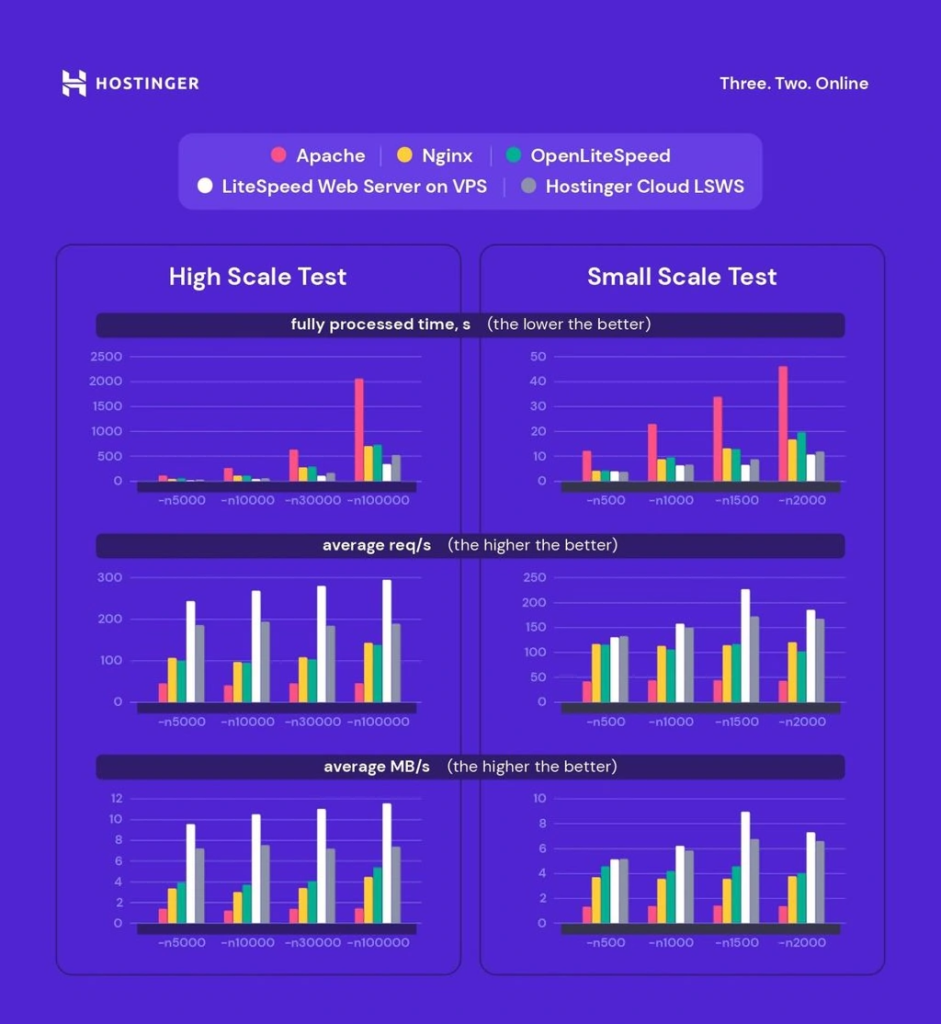
    As an Apache alternative, LSWS is performing up to 10 times better. And it’s lighter compared to Apache. We’ve run stress tests (high and small-scale) to see the difference between the three leading web servers (LiteSpeed Web Server, Nginx, and Apache). The results speak for themselves:

    LiteSpeed Boosts Performance for Hostinger

    More details about these results are available in our LiteSpeed cache plugin test tutorial.

    Give an Extra Boost with PHP Extensions

    Although LiteSpeed supports many PHP extensions, opcode caches are on the top of the list for WordPress developers (​​APCu, Xcache, Zend Opcache). Extensions accelerate PHP’s performance by being involved in the PHP execution life-cycle and storing the results of the compilation phase so the next time code can load instantly.

    LiteSpeed has a unique API (LSAPI). It ensures PHP communication with web servers. Usually, one has LSAPI automatically activated in the control panel. For our customers’ convenience, in hPanel, all PHP extensions suggested by LiteSpeed are already on. No action is needed, but we provide this tutorial on how to increase PHP memory, if desired.

    The Cherry on Top: WordPress Cache Plugin (LSCWP)

    This level of performance wouldn’t be possible without the main switcher to the engine – the LiteSpeed cache plugin installed on each WordPress website. We activate LSCWP on all Hostinger web hosting plans, so customers can be sure their websites are powered with LiteSpeed from day 1. There are different ways to adapt LiteSpeed cache to a website’s needs. With that in mind, we provide detailed descriptions of settings for Blog, eCommerce website, and online portfolio.

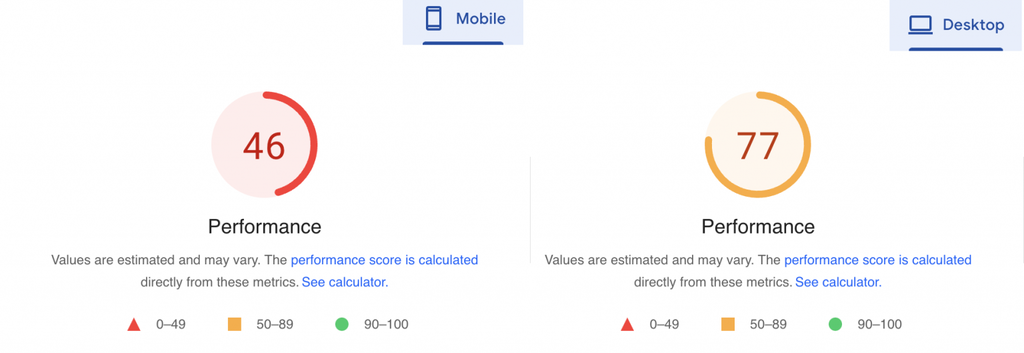
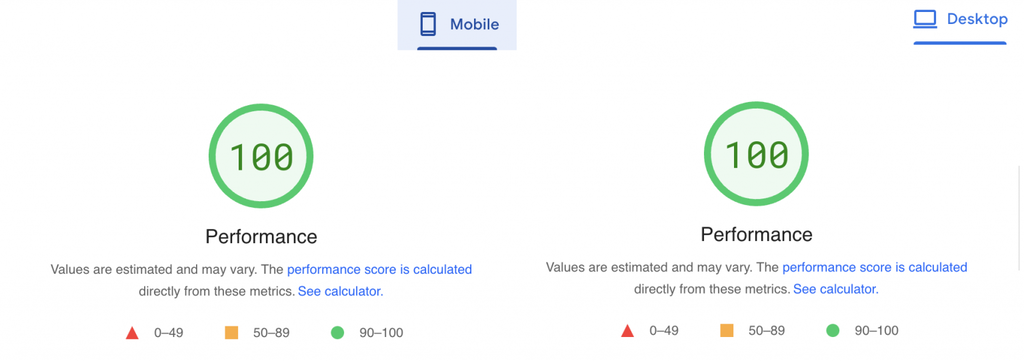
    Our LiteSpeed cache plugin test tutorial illustrates how it enhances the website’s performance. Here’s Google’s PageSpeed verdict.

    Before:

    WordPress Performance Before LiteSpeed Cache

    After:

    WordPress Performance After LiteSpeed Cache

    Impressive, right?

    QUIC.cloud + Cloudflare Integration

    Both QUIC.cloud and Cloudflare are reverse proxy content delivery networks (CDN). Unlike regular CDNs, they cache static files (images, CSS, JS, etc.) and dynamic HTML files. Combined, they provide a vast global network of about 270 points of presence (PoP). QUIC.cloud – 70 PoP and Cloudflare – 200. Those nodes operate like individual data centers storing your website’s data and letting visitors from different countries get a faster and more secure website experience.

    Why do you need both CDNs?

    Apart from being the new excellent CDN, QUIC.cloud does many other speed optimizations for WordPress sites like Low-Quality Image Placeholder generation, critical CSS generation, and so on. Because it comes as a part of the LiteSpeed Cache tool-set for website acceleration, it performs better with LSWS and is relatively easy to set up.

    How should you combine them?

    LiteSpeed recommends using QUIC.cloud for caching dynamic content and Cloudflare for static content. Cloudflare’s primary function is to deal with static content. But when both are turned to cache dynamic content, some conflicts may occur.

    Technically, you can use either of these CDNs for your WordPress optimization, but to achieve even better performance, we include both QUIC.cloud and Cloudflare in our web hosting plans. Setting them up in our hPanel is hassle-free.

    Conclusion

    As you see, LiteSpeed can improve WordPress performance at different levels of your website infrastructure: from the webserver to PHP extensions, from CDN to cache plugins. We chose LiteSpeed because of its advanced technological ecosystem and endless possibilities for customization.

    Hostinger users, who may not be as advanced in hosting, can reap the benefits of the LiteSpeed cache package while having peace of mind. When customers get their websites off the ground with Hostinger, we make sure all tools are integrated and ready to boost their Core Web Vitals.

    Our thanks to Hostinger for sharing their story in this Customer Showcase! Has your business experienced the LiteSpeed difference? If you would like to share your story with our readers, find me (@Lisa at Litespeed) on our Slack workspace, and we can discuss it. –LC

  • LiteSpeed Web Server v6.0

    LiteSpeed Web Server v6.0

    LiteSpeed Web Server v6.0 Now Available
    LiteSpeed Web Server v6.0 is now available! This important update provides significant gains in performance, security, and Apache compatibility, so let’s take a look!

    What’s New in 6.0?

    In v6.0, we tackled cache engine enhancements, Asynchronous ModSecurity, support for the new HTTP/3 v1, improved Apache compatibility, and so much more.

    Cache Engine Enhancements

    This update introduces a few enhancements to the LSCache Engine, including POST response caching, and improved PURGE/REFRESH by URL. We designed these enhancements to provide greater flexibility in managing your customized web application caches.

    We go into a lot more detail in this blog post.

    Asynchronous ModSecurity Engine

    As of LiteSpeed Web Server v6.0, we have introduced a separate worker thread pool for ModSecurity processing. Now, when a request needs to be scanned, LSWS offloads it to the dedicated thread pool. There are numerous benefits to this. For example, not only does it improve performance, but it also adds one important feature: the ability to scan the response body without clogging the main event loop thread. We describe these benefits and others in more detail in this blog post.

    HTTP/3 v1 Support

    At long last, HTTP/3 is on the verge of becoming official. We have supported HTTP/3 and QUIC at every milestone along the way, and so we are ready to support v1 of the new protocol.

    Apache Compatibility Improvements

    ProxyPass

    ProxyPass is a feature frequently used to facilitate cPanel’s Live Transfer feature. Live Transfer requires a domain name in the target URL, but until now, LiteSpeed Web Server could not meet this requirement. Previous versions required a manual external application configuration in order to work around a target URL with domain name, but this is no longer the case.

    LSWS v6.0 supports external application configuration using a domain name for the target address. Now you can use Live Transfer to migrate LiteSpeed sites between servers with near zero downtime.

    Version 6.0 has better support for websocket backends, too. Now secure wss:// connections are supported..

    Conditional Configuration

    One big change to Apache 2.4’s configuration is the addition of the <if><else> context to enable configurations based on the runtime evaluation of an expression.

    For LiteSpeed to support this new configuration directive, we needed to make big changes. This is because LiteSpeed merges all of the various levels of configuration together one time, when a configuration is saved, in order to improve runtime performance. This method does not lend itself to runtime changes.

    So, LSWS v6.0 includes the necessary changes to support conditional configuration.

    Bubblewrap Support

    Bubblewrap is a lightweight sandbox application by Flatpak, which implements Linux namespaces. Supporting Bubblewrap essentially gives LiteSpeed Web Server a full sandbox, including operating-system-supported isolated mounts, user/group IDs, interprocess communications, users, cgroups, host names and more.

    Learn more about Bubblewrap and LiteSpeed in this blog post.

    Cgroup resource throttling

    In order to maintain compatibility with DirectAdmin’s new per-user resource throttling feature, LiteSpeed has added simple cgroup-based resource throttling through lscgid. Now, not only is it possible to control PHP processes, but you may throttle CGI scripts as well.

    Conclusion

    In conclusion, we encourage you to update to LiteSpeed Enterprise v6.0 today! It is available immediately, and you can get a full list of updates on our website. Still trying to make up your mind about LiteSpeed Web Server? Why not give our 15-day Trial License a try?

  • Cache Engine Enhancements

    Cache Engine Enhancements


    LiteSpeed Web Server v6.0 is here! Among other cutting edge features, this update introduces a few enhancements to the LSCache Engine. These changes, including POST response caching, and improved PURGE/REFRESH by URL, were designed to provide greater flexibility in managing your customized web application caches.

    POST Response Caching

    Previously, only GET responses were cacheable, but as of LSWS v6.0, you will be able to cache POST responses as well.

    To take advantage of this feature, two things need to happen:

    1. POST caching must be enabled at the server level: In the WebAdmin Console, navigate to Cache Policy Configuration and set Enable POST Cache to Yes.
    2. The response header must include X-LiteSpeed-Cache-Control, which is used to indicate that the response is cacheable.

    Cache Tags via Rewrite Rules

    Cache tags are the mechanism used by LiteSpeed’s cache engine to group content together and enable intelligent purging of related cache objects. Traditionally, tags have been assigned via the X-LiteSpeed-Tag response header, but v6.0 will allow you to do it with rewrite rules.

    Rewrite rules can set cache tags for any cached response that hasn’t already been tagged, like so:

    RewriteRule /cached/url - [E=Cache-Tag:exampletag]
    

    If tags have already been assigned by response header, the rewrite rule will be ignored.

    To assign multiple tags to the cached response, the tags must be within quotes:

    RewriteRule /cached/url - [E=”Cache-Tag:tag1,tag2”]
    

    Enhanced Purge/Refresh by URL

    LSCache’s earlier purge-by-URL feature only purged a single matching cache object. If there were varying copies of the URL, like in the case of mobile and desktop views, only one of those copies would be purged.

    In v6.0, the request URL will be treated as a special cache tag. It will always purge all varying copies of the same URL, and may also be used to purge cache objects for the same URL with different query strings.

    The methods for purging by URL will not change. You may continue to use the PURGE or REFRESH request methods, or the X-LiteSpeed-Purge response header. Additionally, the lsws/admin/misc/purge_cache_by_url script is still available to send a PURGE/REFRESH request, but the client IP must be trusted.

    Examples Using the X-LiteSpeed-Purge Response Header

    Purge /url/to/be/purged, including varying copies if any exist:

    X-LiteSpeed-Purge: /url/to/be/purged
    

    Purge /url/to/be/purged, including any copies with query strings (regardless of what that string may be):

    X-LiteSpeed-Purge: /url/to/be/purged?*
    

    This won’t work with wildcards or Regex patterns. The only acceptable use of * when purging by URL, is to signify “any query string” as in the example above. In other words, do not use /url/prefix* to purge all URLs starting with /url/prefix. If you must purge a group of URLs in this manner, you should use an explicit cache tag. In other words, assign all relevant URLs starting with /url/prefix a particular tag, and PURGE/REFRESH that tag.

    Stale purge /url/to/be/purged, including any copies with query strings:

    X-LiteSpeed-Purge: stale, /url/to/be/purged?*
    

    Stale purge is equivalent to a REFRESH request type. It enables an out-of-date cache object to be served to users while a fresh copy of the page is in the process of being cached. This is useful on busy sites, where there could be hundreds of requests for a page before the caching process has completed. In these cases, it may be better to serve out-of-date content from cache than to attempt to fill such a volume of requests with uncached content.

    Conclusion

    With POST response caching, the ability to add rewrite-rule-based cache tags, and improvements to purge-by-URL, LSCache is upping its game yet again. A tradition of excellence in web app acceleration continues!

    Get a trial license and try LiteSpeed Web Server v6.0 today!

  • Asynchronous ModSecurity Enhancement

    Asynchronous ModSecurity Enhancement

    Asynchronous ModSecurity Engine
    LiteSpeed Web Server’s proprietary ModSecurity engine already delivers stellar performance. We’ve achieved that with an implementation that is highly optimized and well-integrated into the server. In-depth testing shows that LiteSpeed’s ModSecurity solution is faster and more efficient than Apache’s or nginx’s.

    Even so, ModSecurity, being CPU intensive, can be a drag on performance. Our implementation already reduces the CPU impact with measures such as:

    • Intelligently skipping some rules based on the request input
    • Caching regex results to speed up regular expression matching
    • Execution suspension for long-running rule processing

    That said, we’re not ones to rest on our laurels! And that is why we are pleased to announce a major feature enhancement for LiteSpeed Web Server v6.0: an Asynchronous ModSecurity Engine.

    The Problems with ModSecurity

    Implementing ModSecurity is a challenge due to the heavy reliance on CPU, limited resources available, and ModSecurity’s tendency to clog the main event loop thread.

    Clogging the Main Event Loop Thread

    Popular ModSecurity rulesets contain hundreds of rules. Depending on the input size, one request could take upwards of a few hundred milliseconds to scan. In an event-driven server, where the main event loop thread handles all events, everything else must wait while a ModSecurity scan executes.

    LiteSpeed already has a mechanism in place that tracks the time spent in the ModSecurity engine, and suspends execution if necessary, to give other events a chance to process in a timely manner. But even with this execution suspension, the main event loop can still get bogged down by ModSecurity. For example, regular expression execution cannot be interrupted, and some of these executions (particularly during ReDoS attacks) can be highly expensive.

    Limited CPU Resources Available

    The main event loop thread uses a single CPU core. When executing ModSecurity rules in the main event loop thread, the only way to get better performance is to increase the number of worker processes, which means upgrading to a more powerful license.

    Solving ModSecurity’s Problems

    One obvious solution to the problem of CPU resources is to create more lshttpd workers. The more workers available, the more CPU processing power ModSecurity can take advantage of. But managing a large number of workers means a more expensive license. Until now.

    LiteSpeed is introducing a better way.

    As of LiteSpeed Web Server v6.0, we have introduced a separate worker thread pool for ModSecurity processing. When a request needs to be scanned, it is offloaded to the dedicated thread pool. The benefits of this are numerous:

    • Most importantly, it allows the main event loop thread to become available immediately for processing the next event.
    • CPUs with a large number of cores can be better utilized without having to upgrade to a more powerful license.
    • The worker thread pool may have a different priority and CPU affinity from the main event loop thread, which minimizes the potential impact of thread scheduling.
    • With a dedicated worker thread, LiteSpeed’s ModSecurity engine is able to scan the response body. Support for applying ModSecurity to a response body was not available until now, mainly due to the problems described above.

    LiteSpeed Web Server v6.0 is available now. Download it and try it out today!

  • Perfect Forward Secrecy

    Perfect Forward Secrecy

    Forward Secrecy in LiteSpeed Web Server

    What is Perfect Forward Secrecy?

    Perfect Forward Secrecy, also simply called Forward Secrecy, is a TLS/SSL concept which protects data by ensuring that past communications cannot be decrypted, even if secret keys are compromised. Forward secrecy in LiteSpeed Web Server is achieved through session ticket key rotation.

    Why is Forward Secrecy Important?

    An attacker may gain access to website communications, and patiently collect massive amounts of encrypted data. Session Tickets, a mechanism used to resume TLS sessions, provide a vehicle for attackers to decrypt the traffic they’ve intercepted, if the attacker manages to steal the key.

    This is a serious security problem. For this reason, website administrators are often advised to turn off session ticket functionality.

    Turning off session tickets, however, is not an ideal solution. Session tickets reduce the overhead of the handshake in resumed TLS sessions by eliminating the need for key negotiation, like so:

    • The server encrypts the session key and stores it in the session ticket, which it sends to the client.
    • The client keeps the ticket, and the corresponding session key, for later.
    • The next time the client wants to connect to that server it sends the ticket to the server.
    • The server decrypts the ticket, extracts the session key, and starts using it. No key negotiation required.

    So, rather than disabling session tickets, which speed up HTTPS connections for resumed sessions, a better solution is to periodically rotate the keys.

    Session Ticket Key Rotation

    Rotating session ticket keys ensures that attackers can only decrypt the most recently collected data.

    In other words, if you choose to rotate your session ticket keys once a day, then at worst, an attacker can decrypt 24 hours’ worth of data. This is a far less troubling scenario than attackers having access to massive amounts of traffic over the course of several months.

    Shorter periods of ticket key rotation protect the data even more.

    Unlike Apache and nginx, LiteSpeed Web Server supports session ticket key rotation out of the box. There is no special knowledge or configuration required.

    As of LiteSpeed Web Server v5.4.11b3, the default rotation period is one hour. It doesn’t matter how much data an attacker may have collected. Stealing a key that the server has recently rotated, allows them to decrypt, at most, one hour’s worth of data.

    Session ticket key rotation is just one measure LiteSpeed takes to protect your SSL/TLS security. Visit our website to learn about all of our SSL/TLS security features.

  • The ForceSecureCookie Directive

    The ForceSecureCookie Directive

    Header Edit Set-Cookie Alternative

    If you have past experience with Apache, you may have used a Header edit directive such as this to adjust cookie attributes:

    Header always edit Set-Cookie (.*) "$1;HTTPOnly;Secure;SameSite=none"
    

    LiteSpeed Web Server does not support Header edit Set-Cookie directives, but there is an alternative way to deal with cookie attributes. First, let’s look at what this directive does:

    In English, it’s saying:

    If there is a Set-Cookie header, append HTTPOnly;Secure;SameSite=none to the list of existing attributes on that header.

    While you can’t use the Header edit directive with LiteSpeed Web Server, you can use ForceSecureCookie.

    What the Cookie Attributes Mean

    The HTTPOnly tag prevents client-side scripts from accessing the cookie.

    The Secure tag prevents the cookie from being sent over HTTP. It may only be sent via a secure HTTPS connection.

    SameSite governs the usage of cookies in a first-party or third-party context. SameSite=none specifically states that the cookie is for third-party usage. Other options are strict, which indicates first-party only, and lax which means the cookie may be sent from another site, if it is referencing your site’s content.

    Using ForceSecureCookie

    LiteSpeed Web Server introduced the ForceSecureCookie directive in v5.4.9b2, and expanded it in v5.4.10b2. You may use ForceSecureCookie in lieu of Apache edit for HTTPOnly, Secure, and SameSite attributes.

    Set ForceSecureCookie in the Apache config file at the server or virtual-host level, or in the .htaccess of the document root directory, and assign one or more of the following values:

    • off
    • on or secure
    • httponly
    • same_site_lax or lax
    • same_site_strict or strict
    • same_site_none

    (You can combine same_site_xxxx values with secure and httponly.)

    So, to return to the example at the beginning of this article, we would replace this:

    Header always edit Set-Cookie (.*) "$1;HTTPOnly;Secure;SameSite=none"
    

    with this:

    ForceSecureCookie httponly secure same_site_none
    

    As always, when using LiteSpeed-only directives, be sure to place them between <IfModule LiteSpeed>/</IfModule> tags.

    More Examples

    Enforce the secure attribute only:

    <IfModule LiteSpeed>
    ForceSecureCookie secure
    </IfModule>
    

    The secure; SameSite=none attributes:

    <IfModule LiteSpeed>
    ForceSecureCookie secure same_site_none
    </IfModule>
    

    The SameSite=strict attribute only:

    <IfModule LiteSpeed>
    ForceSecureCookie strict
    </IfModule>
    

    or

    <IfModule LiteSpeed>
    ForceSecureCookie same_site_strict
    </IfModule>


    This content was last verified and updated in May of 2022. If you find an inaccuracy, please let us know! In the meantime, see our documentation site for the most up-to-date information.

  • ECC SSL Certificate Generation and LiteSpeed Web Server

    ECC SSL Certificate Generation and LiteSpeed Web Server

    LiteSpeed Supports ECC SSL

    ECC SSL certificates are supported by LiteSpeed Web Server, and ECC generation is now a feature in the user-end cPanel plugin.

    What is an ECC SSL certificate?

    An ECC SSL certificate is similar to a traditional RSA SSL certificate with the exception of using Elliptic Curve Cryptography (ECC) for it’s key exchange (elliptic-curve Diffie–Hellman [ECDH]) and signing (Elliptic Curve Digital Signature Algorithm [ECDSA]) operations.

    Is ECC better than RSA?

    Why use an ECC SSL certificate over a traditional RSA SSL certificate? In short, an ECC certificate can achieve the same level of security as that of an RSA certificate at a much smaller size with the added benefit of ECC also being easier to encrypt/decrypt than RSA (especially attractive for mobile user’s who may have underpowered processors).

    Symmetric Key Size (bits)
    /Security level (bits)
    RSA and DSA Key Size (bits) ECC Key Size (bits)
    80 1024 160
    112 2048 224
    128 3072 256
    192 7680 384
    256 15360 512

    (Source: https://casecurity.org/2014/06/10/benefits-of-elliptic-curve-cryptography)

    A 1024-bit RSA key is the lower bound for what is considered “secure” given the computation power available today. As we can see above, that level of security can be matched with just a 160-bit ECC key. This size disparity only widens as we require higher levels of security, making ECC certificates the more future proof option as well.

    Combine this with the fact that ECC encryption/decryption requires less processing power than RSA, and there is the potential to significantly increase server throughput by making the switch.

    LiteSpeed Supports ECC SSL

    LiteSpeed Web Server both supports ECC certificate usage directly and, as of version 5.4.8, has the ability to load ECC certificates in parallel with existing RSA certificates when the Enable Multiple SSL Certificates setting is enabled (disabled by default). In the case of parallel loading, ECC certificates will be used for SSL if supported by the browser/protocol making the request. If unsupported, it will fall back to existing DSA/RSA certificates.

    LiteSpeed made the decision to add ECC support for two compelling reasons. First, Internet Explorer 11 uses a weak cipher suite for RSA. This is not a problem with their ECC cipher suite. So, adding ECC support provides a more secure option for those users. The other reason comes down to server performance. When serving SSL traffic with an ECC certificate LiteSpeed Web Server can complete SSL handshakes faster, improving both the speed and the number of concurrent clients that can be served.

    cPanel ECC Integration

    Despite feature requests going back a number of years, cPanel has so far chosen to not officially support the generation and use of ECC certificates.

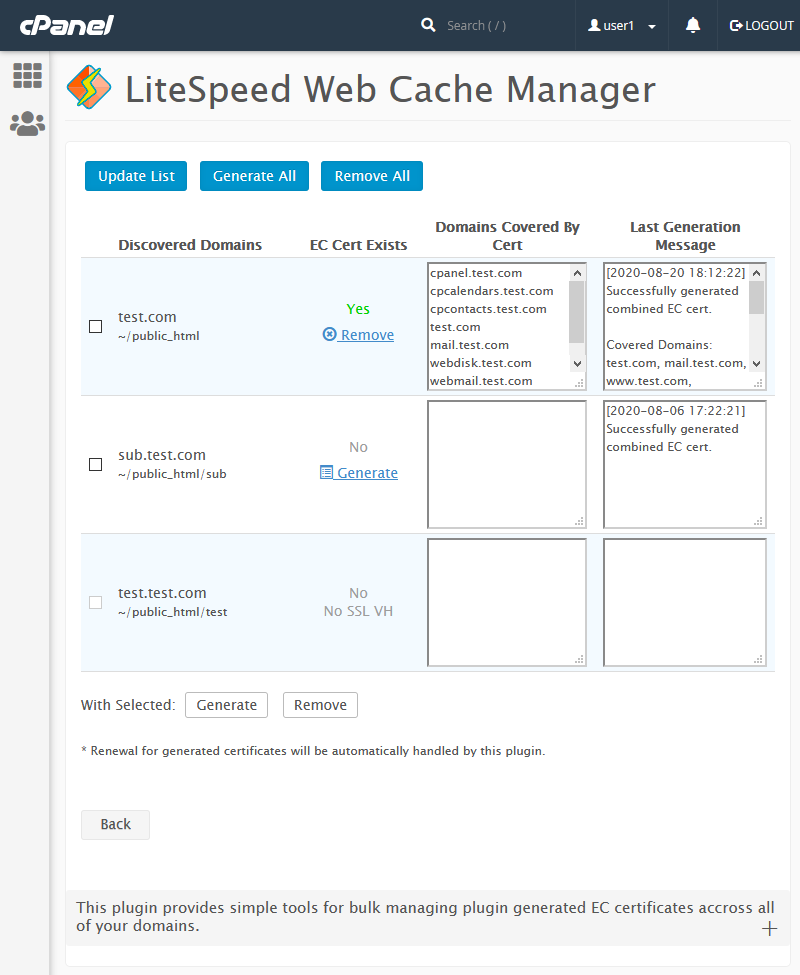
    Fortunately for those interested, we have added an ECC Certificate Management feature to the latest release of our user-end LiteSpeed Web Cache Manager plugin for cPanel (v2.1), shipped with LSWS v5.4.9. With this new feature, cPanel users can still improve their site performance by generating a new ECC certificate for each of their domains with only a few clicks. These generated certificates will be loaded in parallel with any existing RSA certificates with certificate renewal being handled automatically by the cPanel plugin itself.

    ECC SSL Generation in LiteSpeed Web Cache Manager

    Notes:

    Conclusion

    Most major browsers already support ECC, and support continues to grow. Meanwhile, RSA-encrypted certificates are quite literally outgrowing their ability to meet the security needs of tomorrow. It would appear that smaller and faster ECC encrypted certificates are the next natural step in SSL security.

    Are you ready to switch to ECC SSL?

  • Integrated Bubblewrap Support in LiteSpeed Web Servers

    Integrated Bubblewrap Support in LiteSpeed Web Servers

    Bubblewrap in LiteSpeed Web Server

    The LiteSpeed family of high performance web servers offers a number of ways to isolate requests, thereby providing protection against attack. In upcoming releases of LiteSpeed Enterprise (6.0) and OpenLiteSpeed (1.6.15), we have added integrated support for bubblewrap by Flatpak, providing even greater isolation and protection against attack.

    What’s so great about bubblewrap?

    Bubblewrap is a lightweight sandbox application written by Flatpak, and is described in their wiki here. What it does is implement Linux namespaces, which basically gives the application (LiteSpeed in this case) a full sandbox, which includes operating-system-supported isolated mounts, user/group IDs, interprocess communications, users, cgroups, host names and more.

    For example, with isolated mount namespaces: each request can only see the file system designated for that request and can even be denied write access to any files within any directories you specify.

    With isolated users and groups, the user will only be able to see their own user ID, group ID and capabilities. The default even creates independent /etc/passwd and /etc/group files with the contents you specify.

    With isolated interprocess communications each process can only see the named pipes, or Unix Domain Sockets you specify, which limits the applications that a process can contact. It’s impossible to communicate with applications without specified file system access.

    Similar to, but perhaps less comprehensive than, CloudLinux CageFS, a bubblewrap’d process is utterly independent. Thus significantly reducing the opportunities for an attack.

    Why integrate it?

    Use of bubblewrap may be configured into previous versions of LiteSpeed (or other web servers), however, it requires complex reconfiguration of your server in order to call the bwrap program directly, and call your program from it. By integrating it into LiteSpeed, bubblewrap works for a large number of application types and requires a very simple configuration change.

    Integration allows it to operate on CGI applications as well as FCGI applications, which would not be possible without integration.

    How to bubblewrap in LiteSpeed Web Server

    In most cases you can enable bubblewrap in your existing LiteSpeed configuration by setting Bubblewrap Container to On in your security configuration. Details for OpenLiteSpeed are here.

    If you do not customize a Bubblewrap Command (and most users will not) it will use the default of:

    /bin/bwrap --ro-bind /usr /usr --ro-bind /lib /lib --ro-bind-try /lib64 /lib64 --ro-bind /bin /bin --ro-bind /sbin /sbin --dir /var --dir /tmp --proc /proc --symlink../tmp var/tmp --dev /dev --ro-bind-try /etc/localtime /etc/localtime --ro-bind-try /etc/ld.so.cache /etc/ld.so.cache --ro-bind-try /etc/resolv.conf /etc/resolv.conf --ro-bind-try /etc/ssl /etc/ssl --ro-bind-try /etc/pki /etc/pki --ro-bind-try /etc/man_db.conf /etc/man_db.conf --ro-bind-try /home/$USER /home/$USER --bind-try /var/lib/mysql/mysql.sock /var/lib/mysql/mysql.sock --bind-try /home/mysql/mysql.sock /home/mysql/mysql.sock --bind-try /tmp/mysql.sock /tmp/mysql.sock  --unshare-all --share-net --die-with-parent --dir /run/user/$UID '$PASSWD 65534' '$GROUP 65534'
    

    The key to the isolation is the bubblewrap parameters --unshare-all and --share-net.

    • --unshare-all specifies all of the isolation mentioned above.
    • --share-net is required to allow your application access to networking.

    Let’s see the isolation this gives you. The first parameter is simply the location of the bubblewrap program. The rest of the parameters will:

    • Mount the following directories (and their subdirectories) as read-only:
      • /usr
      • /lib
      • /lib64 (if it exists)
      • /bin
      • /sbin
      • /etc/ssl (if it exists)
      • /etc/pki (if it exists)
      • /home/(your user’s directory) (if it exists)
    • Mount the following files as read-only:
      • /etc/localtime (if it exists)
      • /etc/ld.so.cache (if it exists)
      • /etc/resolv.conf (if it exists)
      • /etc/man_db.conf (if it exists)
    • Mount the following files as read-write:
      • /var/lib/mysql/mysql.sock (if it exists)
      • /home/mysql/mysql.sock (if it exists)
      • /tmp/mysql.sock (if it exists).
    • Create the following empty directories:
      • /var
      • /tmp
      • /run/user/(your user’s ID)
    • Create symbolic links:
      • from ../tmp to var/tmp
    • Provide minimal access to:
      • /proc
      • /dev
    • Terminate when LiteSpeed terminates
    • Create custom:
      • /etc/passwd file with only your user’s entry and 65534 (nobody)
      • /etc/group file with only your group’s entry and 65534 (nogroup)

    Most programs will be able to run with these defaults and the result is great protection with minimum configuration.

    If your program is not in one of the mounted directories, uses a file not in the list of files or directories, or needs write access to a file not in the writable list, your program won’t be able to access what it needs and will fail. In that case you will need to create a customized command line.

    How to customize it

    The customization is all in the Bubblewrap Command command line. Basically it uses the bubblewrap parameters from your version of bubblewrap with some additional tokens which LiteSpeed adds to provide better customization:

    • $USER is replaced with the actual user name of your user.
    • $UID is replaced with the user ID of your user.
    • $GID is replaced with the group ID of your group.
    • $PASSWD is replaced with the creation of a custom /etc/passwd file with a single user line in it, for the user you’re running as. If you enclose this option in single quotes you can add space-separated additional users. The default is ’$PASSWD 65535’ which creates a 2 line /etc/hosts file, with your user and the nobody user.
    • $GROUP is just like $PASSWD but creates a custom /etc/group.

    Note that most users will be able to use the default Bubblewrap Command by leaving it blank.

    A simple example

    The simplest example is the worst because it gives your application no additional protections. Set Bubblewrap Container to On and Bubblewrap Command to:

    /bin/bwrap --dev-bind / /

    A better example

    This is a much better example of a Bubblewrap Command as it mounts even fewer files and directories than the default. It includes no /var, no /etc/man_db.conf, no database sockets, and only your user in /etc/passwd and your group in /etc/group:

    bin/bwrap --ro-bind /usr /usr --ro-bind /lib /lib --ro-bind-try /lib64 /lib64 --ro-bind /bin /bin --ro-bind /sbin /sbin --dir /tmp --proc /proc --dev /dev --ro-bind-try /etc/localtime /etc/localtime --ro-bind-try /etc/resolv.conf /etc/resolv.conf --ro-bind-try /etc/ssl /etc/ssl --ro-bind-try /etc/pki /etc/pki --ro-bind-try /home/$USER /home/$USER --unshare-all --share-net --die-with-parent --dir /run/user/$UID $PASSWD $GROUP

    Give it a try!

    To try it, upgrade to a version of LiteSpeed Enterprise or OpenLiteSpeed that supports bubblewrap, and turn it on for an application. This will show you the power of an integrated sandbox like bubblewrap inside of a powerful web server like LiteSpeed.

  • LiteSpeed Web Server or OpenLiteSpeed?

    LiteSpeed Web Server or OpenLiteSpeed?

    LiteSpeed Enterprise or OpenLiteSpeed for WordPress

    You’ve heard about how LiteSpeed Cache can significantly improve your WordPress site’s performance, but there is more than one way to get LiteSpeed Cache. How do you know which option is best for you? Let’s answer that question by taking a closer look at our two web server options: OpenLiteSpeed and LiteSpeed Enterprise.

    Simply put, if you are already an OpenLiteSpeed (OLS) user, or a LiteSpeed Web Server (LSWS) user, and your current choice is working for you, then there is no need to switch. The LiteSpeed Cache Plugin for WordPress (LSCWP) works with either OLS or LSWS to speed up your site.

    But what if you have not yet decided which LiteSpeed server to use? Let’s look at a few common scenarios, and see which web server is best for each.

    If you are… You should use…
    a VPS user with simple non-ecommerce sites OpenLiteSpeed
    running a WooCommerce (or similar eCommerce plugin) site LiteSpeed Enterprise
    more comfortable with Managed WP hosting and full Apache compatibility LiteSpeed Enterprise

    Need more help making a choice? Read on!

    Similarities Between Servers

    Both LiteSpeed servers run on Linux and FreeBSD, and share an impressive list of basic features, including:

    • Support for both common and cutting-edge Internet protocols: HTTP / SPDY / HTTP/2 / QUIC / HTTP/3
    • IPv4 and IPv6 support
    • Language support: PHP, Perl, Ruby, Python, NodeJS, JSP, etc.
    • SAPIs: LiteSpeed API, CGI, FCGI, AJPv13, Proxy
    • Unlimited virtual hosting, both IP-based and name-based
    • Gzip and Brotli compression
    • WebSocket Proxy
    • TLS v1.3
    • CloudLinux CL LVE support

    OLS and LSWS both have the ability to understand Apache rewrite rules, configuration files, and ModSecurity, making it easy to switch from Apache to LiteSpeed. Both servers share an event-driven architecture, comprehensive security options, high availability and many more features, which are listed in full on our website.

    LiteSpeed Cache for WordPress (LSCWP) plugin is supported by both servers. LSCWP has earned a 5-star reputation for good reason. And while the optimization features of the LiteSpeed Cache plugin can, technically, be used with any server (LiteSpeed, Apache, nginx, etc.), the caching features, which are LiteSpeed exclusive, can only be used with a LiteSpeed server product.

    So, how do you choose? Let’s take a closer look at the differences between OpenLiteSpeed and LiteSpeed Enterprise.

    OpenLiteSpeed

    Use OpenLiteSpeed for WordPress

    OpenLiteSpeed, our free, open source web server comes with a powerful cache engine, unlimited worker processes, and community support options.

    OLS understands Apache rewrite rules, however a restart is required in order to process any new or changed .htaccess files. For this reason, OLS is most frequently used for individual sites that don’t change often.

    For those who like working with a control panel, OLS is compatible with DirectAdmin and CyberPanel.

    It’s easy to give OpenLiteSpeed a try. One-click images are available in a variety of cloud services, including Digital Ocean, Amazon Web Services, and Google Cloud Platform.

    Visit openlitespeed.org to see all available installation options.

    LiteSpeed Web Server

    Use LiteSpeed Web Server on WordPress

    LiteSpeed Enterprise is a fully-Apache-compatible drop-in-replacement. LSWS autodetects changes to .htaccess and adjusts as necessary without requiring a restart. For this reason, It is ideal for shared hosting environments where updates are frequent.

    LSWS is compatible with any control panel that was written for Apache. This includes cPanel, Plesk, DirectAdmin and more.

    In addition to the extensive security features shared with OpenLiteSpeed, Enterprise also boasts protection from WordPress Brute Force attacks.

    Like OLS, LSWS features a powerful cache engine. But LSWS’s cache engine goes further with ESI support included. ESI, or Edge Side Includes, allows LiteSpeed to cache mixed public and private content on a single page. It’s especially useful in eCommerce situations.

    ESI makes it possible to cache the following:

    • logged-in users
    • non-ajax-based WooCommerce carts
    • widgets with different cache requirements than the rest of the page

    Other caching solutions require you to exclude pages with such content from their caches. LiteSpeed Enterprise with ESI support allows you to cache all of it.

    LSWS is a licensed product with a number of tiers to fit within any budget. The lowest tier, perfect for personal sites and developers, is the Free Starter, which includes the full-featured LSWS Enterprise software and is available for a single domain with a 2GB VPS. It’s 100% free, forever.

    Site Owner tiers start at $10/month for 5 domains on an 8GB VPS, and Web Hosting tiers are available for agencies and hosting providers who need unlimited domains.

    Visit our website to see all of the licensing options.

    You can also get LiteSpeed Enterprise with Jelastic’s PaaS or find a hosting provider who offers LiteSpeed Web Server.

    Other Options

    The whole point of this article is to help you to choose between OpenLiteSpeed and LiteSpeed Enterprise, and so we don’t want to spend a lot of time talking about other options. But we do want you to know that these options exist! So here is just a very brief overview of our CDN and ADC products. Please feel free to explore the links, to learn more about each.

    QUIC.cloud

    Use QUIC.cloud on WordPress

    Even if you know you want to use LiteSpeed, sometimes it is not feasible to switch to a new server, for whatever reason.

    Our QUIC.cloud CDN is a reverse proxy content delivery network, and is the only CDN that interfaces with the LSCache plugin to intelligently cache all of the content on your WordPress site. Learn more about the benefits of QUIC.cloud.

    LiteSpeed Web ADC

    Use LiteSpeed Web ADC on WordPress

    If you’re managing a clustered environment, consider LiteSpeed Web ADC.

    Our ADC is an affordable, high-performance HTTP load balancer application. Even if your backend servers are not LiteSpeed servers, with LiteSpeed Web ADC on the front end, you can interface with the LSCache plugin across all WordPress sites in the cluster. Learn more about LiteSpeed Web ADC.

    Conclusion

    LiteSpeed’s web server editions share an impressive selection of cutting edge features in common, and you can explore them more fully on our website. However, as we’ve seen, there are some differences between OLS and LSWS, and each server caters to a different audience.

    We hope you now have a better idea of which LiteSpeed server will work for you. If you still have questions, don’t hesitate to ask in the comments, or drop by our Slack workspace for the opportunity to chat with other LiteSpeed enthusiasts.

    Happy Caching!


    This content was last verified and updated in August of 2022. If you find an inaccuracy, please let us know! In the meantime, see our documentation site for the most up-to-date information.