Category: LiteSpeed Web Server

Learn more about LiteSpeed Web Server. LSWS conserves resources without sacrificing performance, security, compatibility, or convenience. When you replace Apache with LiteSpeed, you double your maximum capacity, and eliminate the need for a 3rd party caching layer – all in 15 minutes with zero downtime!

  • WpW: Dropping Query Strings in LSCache

    WpW: Dropping Query Strings in LSCache

    WordPress Wednesday: Query Strings You Can Ignore

    Welcome to another installment of WordPress Wednesday!
    Today’s topic is: Query Strings You Can Ignore

    As you may know, LSCache is a server-level cache, meaning the basic cache functions are actually carried out by LiteSpeed Web Server. Sometimes certain cache settings are configured at the server level. This allows the settings to apply to all of the server’s web apps that use LSCache.

    I mention this because even though this discussion is taking place in the context of WordPress, it applies to everywhere you use LSCache on your server! So, even if you are not a WordPress user, if you have LSCache installed in any of your other web apps (like PrestaShop and MediaWiki, to name a few) these instructions can still apply to you.

    Query Strings You Can Ignore: bowl full of coffee beans

    Query Strings and Caching

    As far as LiteSpeed Cache is concerned, these two URLs are different, and are cached separately:

    http://www.example.com/coffee.html?grind=wholebean&roast=light
    http://www.example.com/coffee.html?grind=drip&roast=dark
    

    Technically, both refer to the same coffee page, but the output is different depending on the values of the query strings. One URL displays a whole bean light roast, and the other displays a drip grind dark roast. To coffee shoppers, these are very different items.

    In this case (indeed, in most cases), saving separate copies is exactly what you want LSCache to do. Query strings are usually important to the content of the page, and so they are also important to caching that content.

    Ignorable Query Strings

    But not all query strings are relevant when it comes to generating dynamic content. For instance, the “utm” queries that are popular in Google Analytics:

    http://www.example.com/coffee.html?utm_source=google&utm_medium=email&utm_campaign=buymorebeans
    http://www.example.com/coffee.html?utm_source=google&utm_medium=banner&utm_campaign=coffeeiscool
    http://www.example.com/coffee.html?utm_source=twitter&utm_medium=tweet&utm_campaign=tweetabrew
    

    Just like in the previous example, these three URLs refer to the same page. But unlike before, the query strings do not influence the content that is displayed to the user. Their only function is to facilitate tracking for a variety of ad campaigns.

    Why does this matter?

    Why can’t you just let the cache fill up with these extra entries?

    Remember how caching works: the first user to visit a URL has to wait a while for the page to be generated, as it has not yet been cached. Subsequent visitors then get the cached copy served quickly to them.

    Now, imagine visitors are coming to your store from a each of the different ad campaigns you have set up:

    • Visitor #1 arrives at the coffee page after seeing the “Buy More Beans” campaign in his email.
    • Visitor #2 lands on the coffee page after being tempted by a “Coffee is Cool” banner.
    • And Visitor #3 finds the coffee page through a “Tweet a Brew” link on Twitter.

    All three visitors arrive at the exact same coffee page through three different URLs.

    If the URLs have all been cached separately, each visitor will be the first to request their particular URL, and as such, each will have to wait for that first page to be dynamically generated. None of them will get a cached copy of the page.

    On the other hand, if the ad campaign information has been dropped, and only one copy of the page is saved in the cache (i.e. http://www.example.com/coffee.html), then it’s only Visitor #1 who must wait for the first page load. Visitors #2 and #3, and everyone else who comes after them, will reap the rewards of caching.

    And it’s safe to simply ignore the query strings because they have already served their purpose by the time the server gets involved.

    Caching the URLs individually, with query strings intact, causes more of your visitors to be exposed to slow page loads, and results in more work for the WordPress backend.

    That is why it matters.

    Other query strings you can ignore

    Of course, ignorable query strings are not limited to the “utm” variety. There are other known queries that can be ignored, such as Google AdWords’ Google Click Identifier, aka “gclid.” And there’s nothing stopping you from doing your own kind of tracking with a made up query like ?mysitenav=sidebar, which could (for example) help you gain insights about your visitors’ clicking habits within your site.

    Any of these query strings can be dropped from the URL without changing the content that is displayed. Therefore, they can also be dropped when saving and retrieving the page from the cache.

    Query Strings You Can Ignore: pourover coffee grounds

    Configuring Query String Cache Rules

    So, how do you instruct LiteSpeed Web Server to ignore certain query strings? You have two options:

    • Configure it for WordPress only, from within the plugin.
    • Configure it server-wide to apply to all of your LSCache-enabled web apps.

    WordPress Plugin Level

    From the WordPress Dashboard, navigate to Litespeed Cache > Settings > Cache and scroll down to the Drop Query String setting.

    In this box, you can list the strings you want to ignore, one per line, using wildcards if desired.

    So, to ignore all of the “utm” query strings, the Google Click ID “gclid” query, and your own custom “mysitenav” query, you could enter the following in the box:

    utm*
    gclid
    mysitenav
    

    Press the Save Changes button, and you’re done.

    LiteSpeed Web Server Level

    If you’d like to configure LSWS to drop certain query strings on a server-wide (or virtual-host-wide, or even site-wide) basis, you can use the Apache-style CacheKeyModify configuration directive.

    You’ll need LiteSpeed Enterprise v5.2.3 or higher, and you’ll need access to modify its configuration. If you don’t have the ability to configure LSWS, please ask your hosting provider to add the directive for you. More environment-specific directions are available on our wiki.

    As mentioned, you can use this directive in the server level configuration, at the virtual host level, or in a site’s .htaccess, and it looks like this:

    <IfModule Litespeed>
    CacheKeyModify -qs:utm*
    </IfModule>
    

    Upper level configurations are inherited by lower levels. If a lower level adds more rules, they are in addition to those of the upper level. If a lower level doesn’t want to use the upper level’s configuration, the “clear” parameter should be used before adding the new rules.

    The CacheKeyModify directive can be used multiple times, but it does not support more than one parameter at a time. Each parameter gets its own line, like so:

    <IfModule Litespeed>
    CacheKeyModify clear
    CacheKeyModify -qs:utm*
    CacheKeyModify -qs:gclid
    CacheKeyModify -qs:mysitenav
    </IfModule>
    

    Place a snippet like that in the appropriate configuration file, and you’re good to go!

    Query Strings You Can Ignore: pourover coffee grounds closeup

    Conclusion

    You can save yourself a real cache-induced headache by dropping certain query strings. Think about all of the situations where people are directed to your site with tracking code attached to the URL: mailing lists, ad campaigns, social media… Caching separate copies of such pages is unnecessary. Plus, it’s a waste of precious resources, and a potential speed bump for your visitors.

    Take advantage of LiteSpeed’s ability to drop query strings, and streamline your cache!

    Have some of your own ideas for future WordPress Wednesday topics? Leave us a comment!

    Don’t forget to meet us back here next week for the next installment. In the meantime, here are a few other things you can do:

  • LiteSpeed Sites are Safe and Secure

    LiteSpeed Sites are Safe and Secure


    LiteSpeed Sites are Safe and Secure

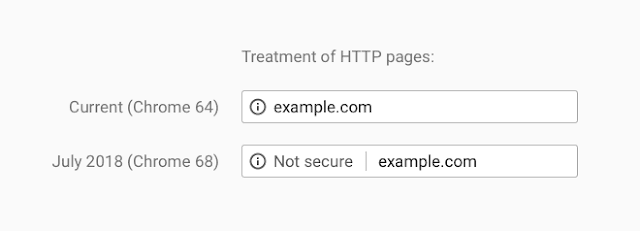
    If you’ve been putting off thinking about security for your sites, Google is about to force your hand. Beginning in July 2018, any sites still using HTTP will be marked as “not secure” in Chrome.

    There are obvious risks associated with relying on old technology to power your sites. Until now, you’ve been able to accept those risks without broadcasting such to all of your visitors. With this change, visitors to your sites will be aware that you’re not keeping up to date. This is likely to bother a large percentage of your audience.

    More and more, Internet users are becoming savvy to security concerns, and a “not secure” label in their browser could send potential customers running to a competitor.

    So, what can you do?

    LiteSpeed Sites are Safe, Secure & Fast

    Treatment of HTTP pages

    In order to avoid being called out by Chrome 68’s omnibar (as shown above), your site will need to be running HTTPS at a minimum. HTTPS, however, is slow. Luckily, there are even better protocols available:

    • HTTP/2: A newer, faster implementation of HTTPS. It includes multiplexing, server push, and many other improvements.
    • QUIC: A next-generation internet protocol, improving upon the gains made by HTTP/2. It is faster and more secure.

    Enabling either of these protocols will satisfy Chrome’s security requirements.

    If your sites are powered by LiteSpeed Web Server, then you are almost there. LiteSpeed has been ahead of the curve, being the first to offer both HTTP/2 support and QUIC support in a production-grade mass-market server. LiteSpeed keeps up with a changing world so that you will always be prepared.

    Ask your hosting provider if you are on LiteSpeed Web Server, and take advantage of HTTP/2 and QUIC today!

  • How LiteSpeed Web Server is Like a Coffee Shop

    How LiteSpeed Web Server is Like a Coffee Shop

    The Difference Between Event-Driven and Process-Based Web Servers

    Let’s talk about the difference between event-driven and process-based web servers. These terms refer to two distinct ways of handling connections, and represent the most significant difference between LiteSpeed and Apache.

    LiteSpeed Web Server is event-driven and Apache is process-based.

    So, what does that mean, exactly, and why would you prefer one method over another?

    The Coffee Shop Analogy

    Imagine for a moment that your web server is a busy coffee shop, and the customers in the shop are the requests that the web server must handle. Which type of coffee shop handles its customers more efficiently?

    The Process-Based Coffee Shop

    The Difference Between Event-Driven and Process-Based Web Servers: Single Coffee Cup Pourover Brew

    In the process-based coffee shop, each employee serves one customer. The employee takes the order, pours the coffee, and collects the payment.

    If there are three customers in the shop, there must be three employees to serve those customers, or else a line will form. This is a manageable scenario in a shop that serves few customers, or has a simple menu such as coffee and donuts.

    But what happens when there are ten customers in the shop? And each of them wants a decaf soy peppermint mocha latte with no whip, and a heated croissant? The first three customers to place their orders probably get served pretty quickly, but the other seven? They will have a long wait. Many customers will not have that kind of patience, and will go elsewhere for their coffee.

    In order to solve the efficiency problem in the process-based coffee shop, you need more employees. And in order to fit all of those extra employees behind the counter, you’ll need to expand your shop. You may need to move to a bigger location.

    Such is the case with the process-based Apache web server. In order to deal with a large number of requests, you need more processes, and that means you’ll need to buy more hardware.

    The Event-Driven Coffee Shop

    The Difference Between Event-Driven and Process-Based Web Servers: Line of Cups Waiting For Espresso

    Now imagine the same customer load and the same complicated orders, but in the event-driven coffee shop.

    In the event-driven coffee shop, each employee serves multiple customers. One employee takes the orders and the payment, and delegates the order-filling tasks to other employees.

    The employee at the register gets to all ten customers in a timely manner, because all he or she needs to do is take the order, relay instructions to the baristas on the backend, and take the payment. Meanwhile the backend baristas are pouring coffees, making lattes, and warming up croissants as needed.

    This is an ideal solution that scales well, as one employee can do the work of many. You save money on retail space and wages, all while keeping your customers plied with fancy coffees and warm pastries in an efficient manner.

    In the same way, LiteSpeed Web Server saves you money. With fewer processes doing the work of many, your server can handle a large number of requests quickly. And without the need for more hardware.

    Conclusion

    For static content like images, CSS, and HTML, the advantage of an event-driven model is clear. Instead of consuming the overhead required for a new process for each request, LiteSpeed employs its one process to handle the requests as they come in. This is faster and consumes significantly less CPU and memory than Apache.

    The Difference Between Event-Driven and Process-Based Web Servers: Filling a Mug at an Espresso Machine

    The coffee-shop metaphor is particularly apt when it comes to dynamic content. Imagine web applications like PHP, and database processes like MySQL. This is how an event-driven model handles their requests:

    LiteSpeed Web Server A Coffee Shop
    LiteSpeed Web Server fields a request and forwards it to an external process A shop employee takes an order and delegates it to a barista
    LiteSpeed does not wait around for the dynamic responses, but instead continues to field more requests The employee doesn’t wait for the barista to finish, but instead moves on to take the next order
    When an external process response is ready, LiteSpeed Web Server gets a callback When the barista finishes filling the order, the employee is notified
    LiteSpeed sends the external response back to the requesting client The employee serves the completed order to the customer

    Learn more about LiteSpeed Web Server’s event-driven architecture, and how it can accelerate your internet.

  • LiteSpeed Powers Most QUIC Sites!

    LiteSpeed Powers Most QUIC Sites!

    LiteSpeed Powers Most QUIC Sites

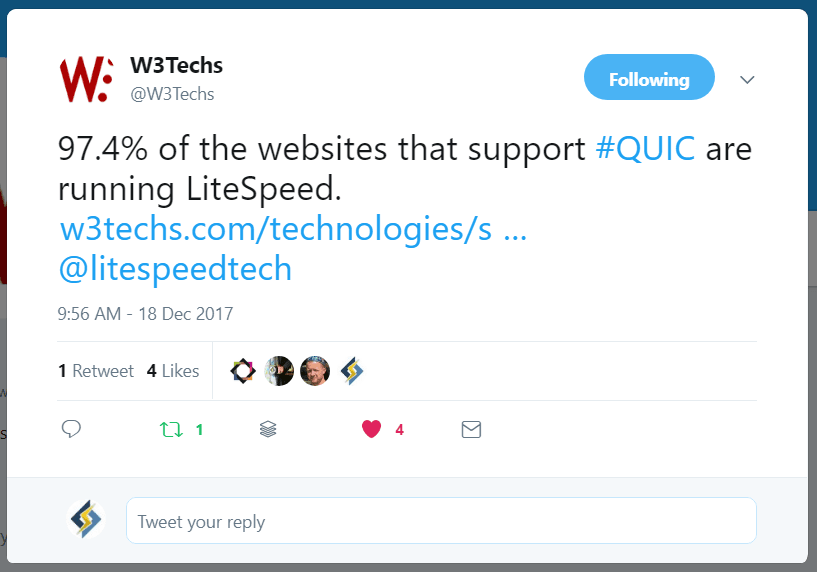
    Back in July, we announced that we would be supporting the QUIC internet protocol in our web server products. Today, a mere five months later, LiteSpeed powers most QUIC sites: more than 97% of them, to be exact!

    According to W3Techs:

    LiteSpeed Powers Most QUIC Sites Tweet via W3Techs

    Wow!

    As of this writing, 0.5% of the web is currently QUIC-enabled, and most of those sites are running a LiteSpeed server!

    We love seeing statistics like this. It means our energy is well-spent, and our efforts to champion widespread adoption of QUIC so far have not been in vain. We will continue to help QUIC usage climb in 2018!

    This kind of thing is in our blood. We deliver cutting-edge technologies and work towards seeing them widely adopted. We did it with HTTP/2, and before that, it was SPDY. It’s what we do: Internet. Accelerated.

    So how can you get in on the QUIC action if you haven’t already? Get yourself a trial license, and Install LiteSpeed Web Server. QUIC will be enabled by default. All you need to do is open UDP port 443. It doesn’t get much easier than that.

    We’ve been writing a lot about QUIC lately, so be sure to check out some of the other articles here on the blog, if you’d like to know more.

  • WpW: Brute Force Attack Protection

    WpW: Brute Force Attack Protection

    Welcome to another installment of WordPress Wednesday!
    Today’s Topic: Brute Force Attack Protection for WordPress

    Disclaimer: The information contained in this post is accurate for LSWS v5.2.3 [release log]. If you are using a newer version of LiteSpeed Enterprise, some details may have changed. Please refer to our wiki for the latest!

    This week we are going to talk about brute force login attacks, and what you, as a site admin or hosting provider, can do to protect your WordPress site(s). Usually our WPW posts involve our popular cache plugin, but this week it’s all about the web server. You don’t need to be running LSCache for WordPress in order to benefit from LiteSpeed’s WordPress Protection. You only need a LiteSpeed Enterprise server or LiteSpeed Web ADC.

    What is a Brute Force Login Attack?

    During a brute force login attack, the attacker attempts to gain access to a website by repeatedly trying to guess a valid username and password. WordPress, being the most popular CMS, often finds itself the target of such shenanigans, and without any built-in protection, a third-party solution is needed.

    Enter LiteSpeed.

    Starting with version 5.2.3, LSWS has a built-in WordPress protection system. It covers shared hosting WordPress environments against large-scale brute force attacks. Such attacks usually target the wp-login.php and xmlrpc.php pages via POST, and have the potential to bring down entire servers!

    How Brute Force Protection Works

    So how, exactly, does LiteSpeed protect your WordPress sites? We’ve got you covered through a new directive known as WordPressProtect.

    The directive

    This directive may be used at the server level, the virtual host level, or the individual site level via .htaccess.

    Usage: WordPressProtect [off|on|drop|deny|throttle, ] <limit>

    Examples:

    • WordPressProtect drop, 10 – drop the connection after 10 login attempts.
    • WordPressProtect throttle, 20 – throttle the connection after 20 login attempts.
    • WordPressProtect 12 – after 12 login attempts, take the preferred action.

    The drop, deny, and throttle parameters configure how the server is to react when the login limit is reached. By default, the connection will be throttled, however you may choose to drop the connection directly without any reply, or to deny the connection with a 403 response.

    The login <limit> is the maximum number of wp-login.php and xmlrpc.php login attempts allowed within 5 minutes before the desired action is taken. Possible values are integers between 5 and 1000.

    Values higher than 1000 will be treated as 1000, and values lower than 5 will be treated as 5, with two exceptions:

    • 0 is the same as off. It disables WordPress Protection.
    • 1 is used at the virtual-host level to indicate that the server-level setting should be honored.

    The quota system

    The login limit is used to drive a quota system as follows:

    • The quota starts at the specified login limit.
    • Each POST attempt decreases the quota by 1
    • Once the quota reaches half of the limit, the IP will be throttled, slowing more as the quota drops further.
    • When the quota reaches 0, the IP is either throttled, denied, or dropped according to the settings.

    A blocked IP, given time or a restart, may be redeemed:

    • Over the course of 5 minutes without further POST attempts, the quota gradually increases back to the set limit.
    • Restarting LiteSpeed Web Server will reset the quota back to the specified login limit.

    Examples

    • Assume the limit is set to 10, and the preferred action is to drop.
    • After the first POST attempt, the quota is decreased to 9.
    • When there are more than 5 attempts within a short period of time, the IP will be throttled.
    • Once the quota reaches 0, the client will be dropped.
    • Every 30 seconds, if there are no further POST attempts, the quota will increase by 1. (Why 30 seconds? 5 minutes divided by 10 [the limit] = 30 seconds)


    • Assume the limit is set to 300, and the preferred action is to deny.
    • After the first POST attempt, the quota is decreased to 299.
    • When there are more than 150 attempts within a short period of time, the IP will be throttled.
    • Once the quota reaches 0, the client will be denied with a 403 response from the server.
    • Every second, if there are no further POST attempts, the quota will increase by 1. (Why every second? 5 minutes divided by 300 [the limit] = 1 second)

    Why Use LiteSpeed’s WordPressProtect?

    Security-conscious site admins have been protecting themselves with various WordPress plugins since the first time somebody got hacked. And while plugins have their place, nothing beats the speed and efficiency of stopping attackers at the server level.

    To that end, some use the mod_security WAF, but it can be slow. LiteSpeed’s WordPressProtect feature is fast.

    There are a few scenarios where WordPressProtect will not activate:

    • If you are using deny from all in .htaccess for your WP login page, a 403 is immediately returned when access to that page is attempted. WordPressProtect is not necessary when all visitors are denied an opportunity for login.
    • Some security plugins employ a tactic of renaming the login page to something that is less easily guessed by potential attackers. If your login page is named something other than wp-login.php, WordPressProtect will not know about it, and the feature will not activate.
    • If the user’s IP is on the trusted list, WordPressProtect will not block or throttle that IP.

    WordPressProtect Logic

    Since you can set up WordPressProtect at a few different levels, it’s a good idea to understand how these settings relate to each other, and which ones take precedence over which other ones.

    WordPressProtect is enabled by default at the server level with login limit 10 in LiteSpeed Web Server v5.2.3 and above. (It is disabled by default in LiteSpeed Web ADC.)

    If you want to change anything, keep these facts in mind:

    • Changing the settings at the Apache-server-level configuration will override the setting for any Apache-based virtual host, but will have no impact on LSWS-native virtual hosts, which can only be controlled by LSWS-native settings.
    • Changing the settings at the Apache-virtual-host level configuration will override the server-level configuration as well as the .htaccess level. This means that the server administrator’s virtual host setting will override the end user’s setting in .htaccess.

    Additionally:

    • No matter how the server level is set, the end user has the ability to enable or disable it through their .htaccess file. In other words, user level overrides server level.
    • However, the end user’s preference does not override the virtual host level, if any setting is specified at that level. This means that if the feature is disabled in the virtual-host-level include file, then any directives in .htaccess will be ignored.

    Here’s a handy chart that will help you visualize the priority rules. Assume A, B, and C refer to different WordPressProtect directives:

    Server Virtual Host User Result
    A not set not set A
    A not set C C
    A B not set B
    A B C B

    Please take a look at our wiki for some concrete examples for setting up WordPressProtect in a cPanel environment.

    Testing

    We ran a test with WordPressProtect set to drop, 10, and these are the results:

    Round:  1  Fail 0.626
    Round:  2  Fail 0.615
    Round:  3  Fail 0.605
    Round:  4  Fail 0.581
    Round:  5  Fail 0.595
    Round:  6  Fail 1.619
    Round:  7  Fail 2.615
    Round:  8  Fail 3.611
    Round:  9  Fail 4.602
    Round:  10 Fail 5.604
    Round:  11 Erro MSG:  ('Connection aborted.', RemoteDisconnected('Remote end closed connection without response',))
    

    You can see that the server is responding fairly quickly for each login attempt until the sixth. At that point, the quota has surpassed the halfway point of the login limit, and so the server is starting to throttle its responses. Each attempt after that gets an even slower response. At the 10th attempt, the quota reaches 0. The server won’t even talk to us for attempt #11.

    We’re locked out until we’ve behaved ourselves for a long enough period of time to regenerate our quota.

    As you can see, this new tool will protect your WordPress sites from relentless login attempts, and the potential drain on your server that such attacks can cause. And of course, the fewer login attempts that are allowed, the less likely the attackers will actually have time to guess a valid login and password combination!

    Upgrade to LiteSpeed Enterprise 5.2.3 today and all of your WordPress installations are automatically protected.


    Have some of your own ideas for future WordPress Wednesday topics? Leave us a comment!

    Don’t forget to meet us back here next week for the next installment. In the meantime, here are a few other things you can do:

  • HTTP/2 is Easy With LiteSpeed

    HTTP/2 is Easy With LiteSpeed

    We are leaving our competition in the dust, when it comes to cutting-edge technologies like HTTP/2 and QUIC!

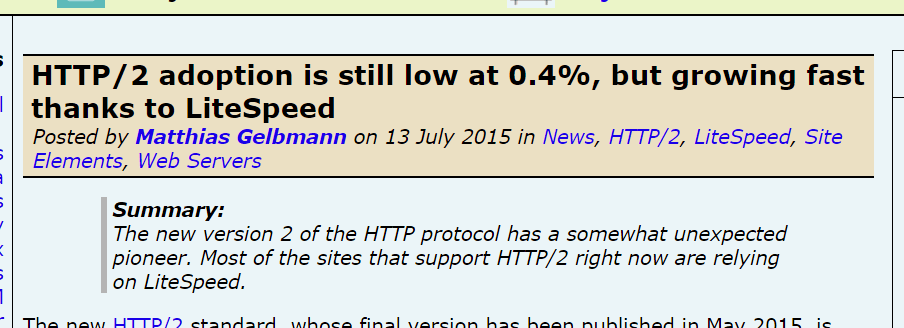
    If you want to see what we mean by that, check out this impressive statistic that W3Techs released today:

    Nice, right?

    LiteSpeed Web Server was the first on the scene with production-quality support of HTTP/2 for the mass market, and, as you can see from that statistic, our customers love it.

    In fact, LiteSpeed has been instrumental in the widespread adoption of HTTP/2 since the very beginning.

    So how can you get in on the HTTP/2 action if you haven’t already? Get yourself a trial license, and Install LiteSpeed Web Server. HTTP/2 will be enabled by default. It doesn’t get much easier than that.

    While you’re evaluating LiteSpeed Web Server, don’t forget to give QUIC a try, too!

  • Developer’s Corner: QUIC v39 Added

    Developer’s Corner: QUIC v39 Added

    LiteSpeed is glad to announce support for QUIC1 v39. This is the QUIC version used in Chrome 62, currently available in the Chrome Dev Release Channel.

    The switch from little-endian to big-endian representation in the packet and frame formats was the biggest change with regard to the amount of code that had to be modified. Because we need to support both little-endian (such as QUIC v37 used in Chrome 60) and big-endian QUIC versions, we could not simply replace all instances of the former with the latter. Some modules had to be reorganized and new interfaces were added. While this is a lot of work, I like this sort of refactoring: One is forced to think more clearly about module responsibilities and relationships, and the end result is better code.

    On the protocol side, QUIC v39 introduces a couple of improvements in the way packets are acknowledged, making QUIC more efficient.

    When the next Chrome release becomes stable, our customers will be ready to serve the next version of QUIC.

    From the cutting edge, until next time,

    LiteSpeed QUIC Team.


    1. Technically, the correct way to write it now is Google QUIC, or gQUIC. This differentiates it from IETF QUIC. The IETF QUIC is to become a standard, at which point it will be referred to simply as QUIC.

  • Which LiteSpeed Server Powers YOU?

    Which LiteSpeed Server Powers YOU?

    Shopping for a new web server? With LiteSpeed, you have choices. When it comes to technology, are you the kind of person who values stability, or do you crave adventure? Do you have customers to consider, or are you able to tinker at will?

    Answer this just-for-fun five-question quiz to find out your LiteSpeed Personality! (Don’t like quizzes? No problem. You can skip to the end of this post, or go straight to our website for a detailed list of features and a comparison between the web server editions.)

    [wp_quiz id=”7740″]


    Conclusion

    As you can imagine, we can’t possibly know everything about you after five questions. Your “LiteSpeed Personality” should give you a good place to start your research, but it’s certainly not written in stone!

    How about some good solid facts to help you choose the right web server for you?

    Both LiteSpeed servers offer the same basic features:

    • HTTP 1.0/1.1 compliant
    • HTTP/2 support
    • Languages: PHP, Perl, Ruby, Python, JSP, etc..
    • SAPIs: LiteSpeed API, CGI, FCGI, AJPv13, Proxy
    • HTTPS
    • IPv4 and IPv6
    • Unlimited IP and name-based virtual hosting
    • GZIP compression
    • SPDY2/3, WebSocket
    • Runs on Linux, FreeBSD, MacOSX, Solaris

    There are differences between OpenLiteSpeed and LiteSpeed Enterprise, too. Apache compatibility, performance, scalability, security features, ease of use, and other advanced features vary between the two editions.

    If you really are unsure which web server solution is for you, drop by our website for a full comparison of features.

    What did you think of our quiz? What is your LiteSpeed Personality? Do you think your results were accurate? We’d love to hear from you!

  • LiteSpeed Announces QUIC Support

    LiteSpeed Announces QUIC Support

    We said it was coming, and now it is here!

    LiteSpeed Technologies is pleased to announce QUIC support!

    As of today, your LiteSpeed-powered sites can be on the cutting-edge with QUIC, via LiteSpeed WebADC and LiteSpeed Web Server.

    What is QUIC?

    QUIC (or, Quick UDP Internet Connection) is an experimental protocol initially developed by Google in 2012, and announced publicly the following year.

    As of mid-2015, roughly half of all requests from Chrome to Google servers were served over QUIC, and Google intended to ramp up QUIC traffic, eventually making it the default transport from Google clients to Google servers.

    QUIC is now in the hands of the IETF, which is working to develop a standard.

    Why use a QUIC Server?

    QUIC is a good choice for those looking to reduce connection-establishment time and improve congestion control.

    QUIC takes a unique approach to classic latency problems. Rather than attempting to solve the issues of packet-loss and long RTT’s (Round Trip Times), QUIC developers have devised new time-saving and resource-saving ways around these issues.

    Connection-establishment

    SPDY and HTTP/2 have made significant progress in improving application performance, but they fail to address the problem of high round trip time. There is a limited amount that can be done to improve RTT, as response time over a network is limited by the speed of light. QUIC sets aside the hard-to-solve question of reducing RTT and instead concentrates on reducing the number of trips that must be taken.

    When establishing a secure network connection with HTTPS, multiple round trips are required. The client and server shake hands and share encryption keys before they ever get around to the initial request. The QUIC approach is to combine some of these steps, which results in a need for fewer trips. QUIC uses UDP (User Datagram Protocol) instead of the ubiquitous TCP, and as such a multi-step handshake process can be stripped down to 1 or 2 steps, depending on whether this is a new connection, or a re-establishment of a known one.

    Congestion Control

    QUIC deals with packet loss more efficiently than HTTP/2. HTTP/2 and TCP rely on consecutive packets, which means the connection is stalled when one packet goes awry. QUIC and UDP, on the other hand, don’t require packets to arrive in order, and as such, one missing packet can’t tie up the entire queue.

    LiteSpeed + QUIC

    LiteSpeed provides the first production-grade mass-market QUIC implementation available for the public. If you want to serve your web content using the QUIC protocol, LiteSpeed is the solution.

    Concerned about user experience? Who isn’t? You gain an impressive edge over your competitors by serving applications over QUIC. Your visitors will love it. Shaving off even a few hundred milliseconds is important when it comes to UX. The site that loads in half a second now could load instantaneously over QUIC!

    QUIC is not a niche product. QUIC support has been enabled by default in all Chrome releases since August of 2013, and recently it was introduced in Opera as well (although it is disabled by default). While it has been widely adopted among Google’s own services, you’re not likely to find QUIC in use much outside of Google space. That is, until now.  Yes, now you can have a QUIC-powered WordPress blog, Joomla site, Magento shop and more.

    If you can serve it from LiteSpeed, you can power it with QUIC!

    QUIC support is built-in to LiteSpeed WebADC 2.1  and LiteSpeed Web Server 5.2.

    We’re energized by this new protocol, and motivated to see what we can do with it, so please stay tuned. And don’t forget to tell us what you think!

    Things to do now:

  • Clever ways to get your LiteSpeed fix

    Clever ways to get your LiteSpeed fix

    The Internet is big. And we all hang out in our own corners of it. It’s not always easy to keep up with all of the update-and-release news that you need to keep your business systems running as smoothly as possible. We announce all of our software updates on a handful of public channels, and then after a few days of letting potential bugs shake out, we spread the word to the admins who have provided a valid email address. The majority of our customers are content to wait for that email announcement or the notification that appears on their control panel plugins, and that’s ok!

    But what about the rest of you? We know some of you crave adventure, and you want to install those updates the second the paint is dry. You have a need to be hooked into the latest announcements, but if you don’t know where to look for them (or, more importantly, don’t know how to fit them seamlessly into your workflow), you could miss something important!

    So let’s address that. First, I’ll tell you where you can go around the web to find our update announcements. Then, I’ll share a few nifty tips and tricks for getting our news to come to you in the places that are most convenient for the way you work.

    Where you can go to get the news

    We are all over social media, but for product updates in particular, these are the sources that are updated with every single new release. Visit any of these links to get the latest scoop:

    • Twitter: @litespeedtech for all product announcements and general news/links
    • Twitter: @lswsrelease for LiteSpeed Web Server announcements only
    • Twitter: @openlswsrelease for OpenLiteSpeed announcements only
    • Google Groups: LiteSpeed Edge for all product announcements and pre-releases except OpenLiteSpeed
    • Google Groups: OpenLiteSpeed Development for announcements and discussion
    • Our Forum: News for all product announcements

    How you can make the news come to you

    Knowing where to look is all well and good, but you can work more efficiently if you have the updates meet you where you are. There are three primary ways to accomplish this: Email, RSS feeds, and push notifications. Each of our announcement mechanisms may be configured to use at least one of these methods.

    Email

    If email is your preferred means of communication, you’ll want to subscribe to one (or both) of the Google Groups. When you join the group, you are given four email options:

    • Don’t send email updates
    • Send daily summaries
    • Combined updates (25 messages per email)
    • Every new message

    Our groups are low-volume enough that you should be able to subscribe to “Every new message” without being overwhelmed.

    RSS

    RSS is not as well-supported as it once was, but you can still find feeds here and there if you look for them. You’ll need an RSS reader (such as Feedly) to access these feeds. Here are some feeds from the above sources:

    LiteSpeed Edge Google Group

    OpenLiteSpeed Development Google Group

    News on our Forum

    Push notifications

    If a mobile device is an important part of your workflow, you may find push notifications more your speed. All of our Twitter accounts support push notifications.

    To enable notifications, first follow the relevant account on Twitter. Then, (on desktop) next to the Following button, click on the 3-dot menu and select “Turn on mobile notifications.” Or (on mobile) next to the Following button, tap the little bell icon and select “All Tweets.”

    For those not on mobile devices, the Chrome and Firefox browsers allow browser notifications for any site that has enabled the functionality. Twitter is one such site. To enable browser notifications for Twitter, click on your own profile icon, select Settings from the drop down menu, click on Web Notifications from the settings sidebar and check the appropriate boxes for the notifications you want to see.

    A couple of clever ideas

    Here are a few outside-the-box ideas that may fit nicely into your workflow.

    Import into Slack

    If your team uses Slack to communicate, why not set up a #software_updates channel, and import vital release announcements from your favorite vendors (including LiteSpeed, of course!) into that channel?

    Slack integrations are available for Twitter and RSS, so you can either import our Twitter feeds via the Twitter integration, or import our Google Groups or Forum feeds via the RSS integration.

    Use IFTTT

    IFTTT (or, If This Than That) is a really cool application that lets you connect a wealth of things that wouldn’t normally be connected. For instance, you can create an applet that says “if there is an update to OpenLiteSpeed, turn the Philips Hue lights in the office blue.”

    That’s somewhat of a silly example, but you get the point.

    A more practical application would be to connect our Google Groups or Forum RSS feeds or our Twitter feeds with an application your company uses extensively (Skype, Telegram, Trello and more). For example: if there’s a new LiteSpeed tweet, send the tweet via Skype to your server admin.

    Or, if you do like the traditional route of email or push notifications, you can use IFTTT to make the sources that are not available that way become available that way. For instance, you can use IFTTT to send Twitter updates through email. Or you can get an IFTTT push notification when there’s an update to the Google Group RSS feed.

    It’s very powerful. (And it’s fun to play with, so don’t fall down that rabbit hole when you should be working!)

    In conclusion…

    We want you to get your LiteSpeed updates in a timely fashion and through a medium that fits into the way you work. We hope some of these ideas can help you keep as informed as possible! Be sure to let us know if you have any ideas to add to this list!