Category: LiteSpeed Web Server

Learn more about LiteSpeed Web Server. LSWS conserves resources without sacrificing performance, security, compatibility, or convenience. When you replace Apache with LiteSpeed, you double your maximum capacity, and eliminate the need for a 3rd party caching layer – all in 15 minutes with zero downtime!

  • LiteSpeed Support in DirectAdmin

    LiteSpeed Support in DirectAdmin

    LiteSpeed Support in DirectAdmin

    If you are a DirectAdmin user (or are looking for an alternative to your current control panel), you’ll be happy to know that DirectAdmin supports both OpenLiteSpeed and LiteSpeed Web Server Enterprise.

    DirectAdmin has always worked nicely with LiteSpeed Enterprise, actually, but now, as of OLS version 1.5.2, you can use your DirectAdmin control panel to manage OpenLiteSpeed as well!

    And that’s not the only good news. Now our popular LiteSpeed Cache Management CLI script, which was formerly only available for cPanel or Plesk users, may be used with DirectAdmin!

    OpenLiteSpeed Support in DirectAdmin

    DirectAdmin version 1.57 or higher, and Custom Build 2.0 are required for installation of OpenLiteSpeed. Getting started is easy. Take a look at the documentation.

    Differences between OLS and LSWS in DA

    The main difference between OpenLiteSpeed and LiteSpeed Enterprise is that OLS will not autodetect an update to .htaccess. OLS is most frequently used for individual sites that don’t change often and it’s suggested that you simply restart OLS to load any new .htaccess file.

    If you are in a situation where you need to frequently update, such as a shared hosting environment, then you’ll want to use LiteSpeed Enterprise.

    LiteSpeed CLI Script Support in DA

    You may be familiar with the LiteSpeed Cache for WordPress Management CLI tool. Previously, it was only available for cPanel and Plesk, but now we are happy to include DirectAdmin support, too. This script allows you to execute basic cache management actions through the terminal or a cron job.

    Batch install and enable LSCache on all of the WordPress installations hosted on the server, broadcast a message to all discovered installations and more. Please see our wiki for a complete list of available commands.

    OpenLiteSpeed Support in DirectAdmin

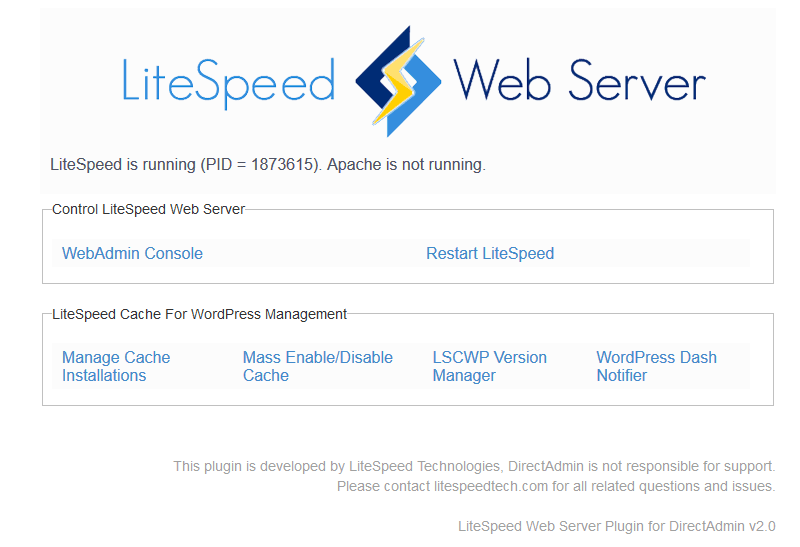
    We’ve recently released a plugin with a GUI for this functionality. You can download that here.

    LiteSpeed and DirectAdmin

    We demonstrate how to set up LiteSpeed Enterprise on DirectAdmin in this video:

    For more information, please see our documentation:

  • BBR Control in QUIC and HTTP/3

    BBR Control in QUIC and HTTP/3

    BBR Congestion Control in QUIC and HTTP/3

    BBR congestion control is now available for LiteSpeed QUIC and the upcoming HTTP/3.

    The newly released LiteSpeed Web Server 5.4.2, Web ADC 2.6.0, and OpenLiteSpeed 1.6.1 use BBR congestion control for QUIC connections. BBR (which stands for Bottleneck Bandwidth and RTT) is a new congestion control algorithm developed by Google in the last few years. It features several profitable properties.

    Resistance to Loss

    The main idea behind BBR is that packet loss may not mean that there is congestion in the network. For example, a packet may be lost due to transient radio interference. Cubic and other congestion-based algorithm do not distinguish between such spurious losses and real congestion, reducing their send rate in both cases. BBR, on the other hand, is not so easily spooked.

    As a result, BBR can deliver sustained throughput performance even in the face of suboptimal network conditions.

    Minimal Latency

    Bufferbloat has been the bane of good UX for years. Since the problem was identified and alarm sounded, there have been changes to network infrastructure equipment to avoid buffering too much data. Nevertheless, the fact remains: Cubic will try to fill the bottleneck buffer on the network path, increasing connection latency. A study of 4G LTE networks reveals that to mask packet loss, buffers are used extensively, thereby inflating RTT.

    BBR keeps track of the bottleneck bandwidth and periodically tests for minimum round-trip time. These estimates are used by the sender to avoid filling the bottleneck buffer. With BBR, an interactive web application is more likely to be responsive.

    Drawbacks

    Despite its terrific advantages, BBR is not without problems. It performs poorly when there are shallow buffers on the path and it may not be fair to other flows, claiming most of available bandwidth. These issues will be addressed in BBRv2, which is being actively developed at Google.

    Test Results

    Throughput Under Loss

    To compare BBR to Cubic, I set up a pre-release build of LSWS 5.4.2 and conducted a few experiments downloading a static file from the web server using the LiteSpeed QUIC client. The bottleneck was set up on the client side using netem and ifb.

    Rate (MBit/sec) Delay (ms) Loss (%) Cubic (sec) BBR (sec)
    20 25 0 4.5 4.5
    20 25 0.5 6.7 4.6
    20 25 1 8.6 4.6
    20 25 2 14.3 4.7
    20 25 3 17.6 4.7

    Table 1: Time to transfer 10 MB file, in seconds

    It is evident that Cubic is very sensitive to packet loss, while BBR is not.

    Latency

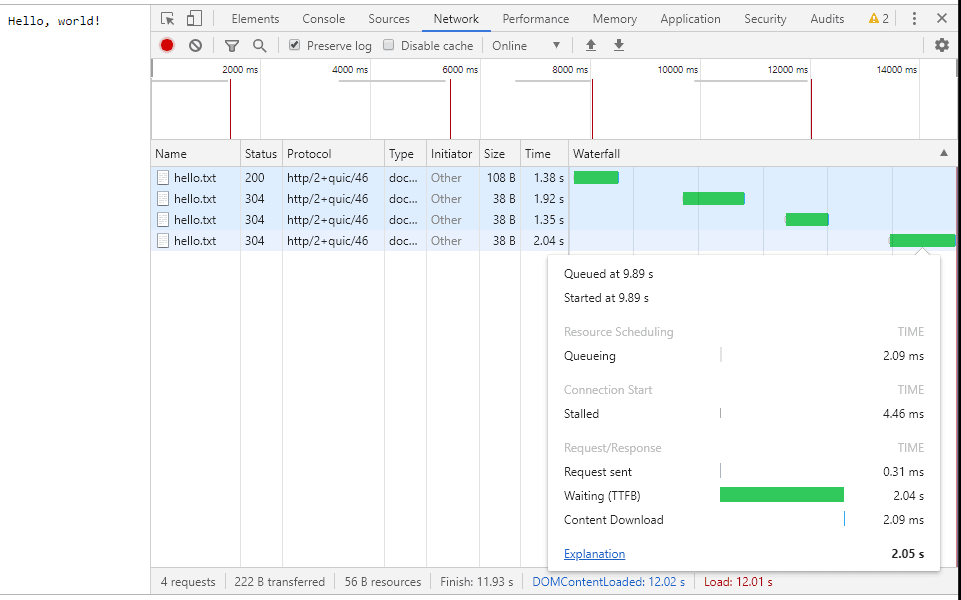
    To test the difference in latency between Cubic and BBR, we set up a simple website with three resources: an HTML page with links to two files: one large and one tiny. The bottleneck was set up to have 20 MBit/sec bandwidth and 25 ms delay with a large buffer. The user clicks on the large file and it begins downloading. The user then clicks on the small file. When Cubic is used, it takes one to two seconds to download the small file:


    Figure 1: Downloading small file when server uses Cubic

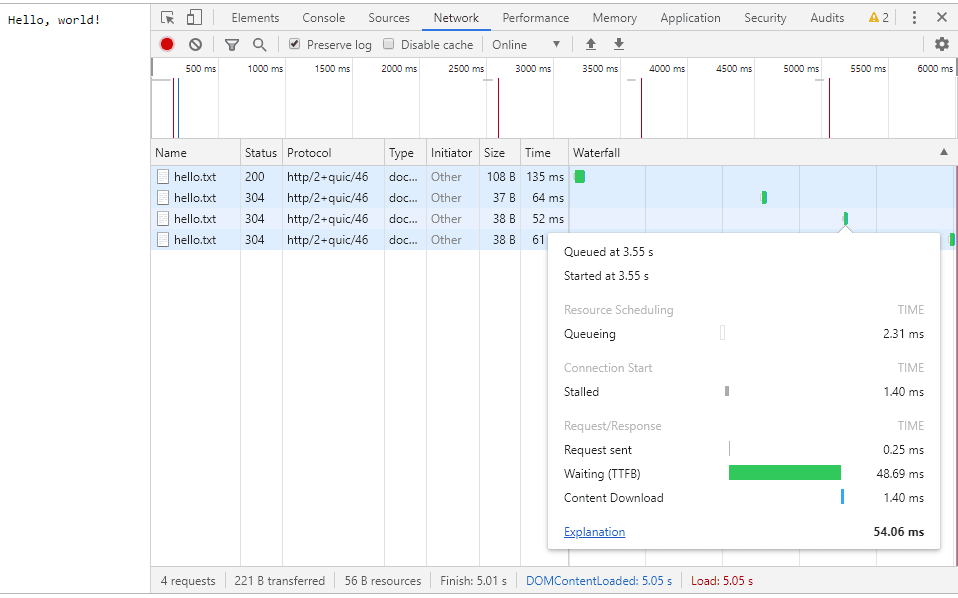
    This is because Cubic tries to fill the intermediate buffer. BBR, on the other hand, keeps the bottleneck buffer filled “just right” so that downloading a small file take on the order of RTT:


    Figure 2: Downloading small file when server user BBR

    BBR Congestion Control in QUIC and HTTP/3

    BBR is a novel congestion control technology. It has two advantages over the widely-deployed Cubic congestion control: insensitivity to random loss and low latency. With LiteSpeed, you can take advantage of this technology today to power your server’s Google QUIC and HTTP/3 connections.

    As Google evolves BBR, we will continue to support the most recent stable version.

  • LiteSpeed Web Server v5.4 is Here!

    LiteSpeed Web Server v5.4 is Here!

    LiteSpeed Web Server v5.4

    LiteSpeed Technologies is pleased to introduce LiteSpeed Web Server Enterprise, version 5.4.

    This update is bursting with improvements such as:

    • A massive HTTP/2 HTTPS performance boost.
    • Anti-DDoS with reCAPTCHA integration to stop any Layer7 attack, easily.
    • Experimental HTTP/3 support
    • Mass Hosting support with Redis or with rewrite rules.
    • SO_REUSEPORT to handle HIGH traffic efficiently in a large multi-worker deployment.

    LiteSpeed Web Server Enterprise, version 5.4 gives you massive performance increases without price inflation!

    Read on to learn about everything LSWS v5.4 has to offer!

    HTTP/2 and HTTPS Improvements

    The performance improvements we’ve made to our HTTP/2 implementation are significant. We’ve taken several steps to minimize overhead and maximize efficiency in this version.

    This newly-optimized HTTP/2 implementation beats Nginx’s HTTP/2 implementation by a wide margin: by 2X when serving large dynamic files, by 4X when serving small static files, and by 10X when serving WordPress!

    These are verifiable, repeatable results.  Try it yourself.

    Take a look at the ways in which we’ve improved LiteSpeed HTTP/2:

    TLS Record Direct

    Rather than relying on third-party SSL libraries with their heavy, inflexible and bloated code path, LSWS builds the TLS record directly. This minimizes data-copies, and allows LiteSpeed to directly control TLS record size in the process.

    TLS sendfile()

    By implementing an efficient sendfile()-like API, and loading file data directly into the TLS record buffer, LiteSpeed minimizes deep copies and beats kernel TLS (kTLS) efficiency. In a comparison with rival web servers Apache and nginx, LSWS’s throughput of file stream over TLS almost doubled!

    Dynamic TLS Record Size

    LSWS dynamically adjust TLS record size to deliver data in an optimal way under a variety of conditions. When it’s necessary to improve time to first byte, a small TLS record is used to deliver data quickly. When improving throughput is the goal, maximum sized TLS records are used to reduce TLS protocol overhead.

    TLS Record Buffering

    In order to reduce system-call overhead and network-packet-level fragmentation, LSWS combines multiple TLS records together and sends them over one system call.

    SSL Handshake Offloading

    The SSL handshake is the most expensive operation in SSL. Event driven servers usually do the SSL handshake in the main event loop thread, But when there is a large number of incoming SSL connections, this method may cause the event loop to become heavily clogged. To utilize multi-core processors in a modern server, LSWS 5.4 offloads the handshake operation to separate worker threads. By avoiding blockage of the main event-loop, we improve SSL handshake performance.

    TLS Certificate Compression

    While the IETF is working on the TLS Certificate Compression standard, Google Chrome already supports it. LSWS 5.4 adds certificate compression, which reduces the amount of data that server and client exchange during the handshake.

    HPACK Performance Optimization

    We’ve heavily optimized both HPACK compression/decompression speed and compression ratio.

    HTTP/2 Stream Priority Tuning

    With light SSL data buffering, LSWS 5.4 is able to implement HTTP/2 stream priority effectively and efficiently.

    Learn more about what makes HTTP/2 with LiteSpeed so special.

    Built-in reCAPTCHA Integration

    You’re undoubtedly familiar with the application-level reCAPTCHA model, which traditionally protects login screens, form submissions, and the like. LiteSpeed’s new reCAPTCHA implementation, however, provides server-level protection: the best available weapon against Layer-7 DDoS attacks.

    When implemented on the server, reCAPTCHA provides more control than most other popular DDoS protection solutions. Legitimate visitors will be able to access the site, while suspicious bots and relentless attackers will be stopped, providing a powerful tool to mitigate resource usage before it can become a problem.

    Best of all, LiteSpeed reCAPTCHA is flexible, so you can protect the entire server, or you can enable protection at the Virtual Host level. You can even control coverage by URL via rewrite rules. And by specifying an appropriate trigger sensitivity, you can configure reCAPTCHA to engage only when the server is under heavy load, if you wish.

    Learn more about LiteSpeed’s server-level reCAPTCHA, and see why it’s a much better solution than traditional application-level implementations.

    HTTP/3 Support

    The Internet is abuzz over the new HTTP/3 protocol currently under development. HTTP/3 (formerly known as HTTP-over-QUIC) was originally a Google effort to improve HTTP/2 by transporting it encrypted over UDP.

    The IETF is still defining the HTTP/3 standard, but LiteSpeed intends to be the first production-ready server to support the new protocol once they adopt a standard. We’re keeping a close eye on the IETF’s progress. LiteSpeed Web Server v5.4 supports HTTP/3 (IETF-QUIC) Draft 20.

    Mass Hosting

    With v5.4, LiteSpeed introduces support for two types of Mass Hosting setups:

    1. High-Availability Redis-Controlled Dynamic Virtual Hosting
    2. Dynamic Virtual Hosting via Rewrite Mapping.

    With Redis

    Best for large-scale generic hosting with hundreds of nodes, Redis-based mass hosting with LSWS boasts the following features:

    • Powerful virtual host template via the main Apache configuration file.
    • Most flexible vhost configuration via custom Apache configuration.
    • Custom SSL certificate for each domain, dynamically loaded.
    • High scalability with cloud infrastructure.
    • Account migration with a simple Redis record update.

    Our friend Aurimas at Hostinger was instrumental in helping us develop this feature. In fact, prior to LSWS v5.4’s public release, Hostinger has already been successfully running it on all of their production servers.

    On their blog, Aurimas writes about Hostinger’s experience switching from an OpenResty+Apache solution to LiteSpeed-powered mass hosting. It’s worth a read!

    With Rewrite Rules

    For those providing shared hosting with minimal customization, LSWS 5.4 allows you to manage virtual hosts via rewrite rules. Benefits include:

    • Virtual host template based on Apache configuration.
    • High scalability with cloud infrastructure.

    Learn more about Mass Hosting with LiteSpeed.

    SO_REUSEPORT support

    In large multi-worker deployments, SO_REUSEPORT allows multiple sockets on the same host to bind to the same port. By hashing the TCP socket and UDP packets by source IP:port, LSWS can shard the data into smaller chunks. Processes/threads may more easily digest these smaller chunks.

    Using SO_REUSEPORT with TCP lets you avoid the thundering herd issue that accept() system calls are susceptible to in multi-worker mode.

    With UDP, the same worker process handles packets from the same source. This is great for the QUIC protocol, as it avoids passing packets between processes.

    SO_REUSEPORT is enabled automatically when multiple workers are used.

    Upgrade Today

    Now that you’ve seen the highlights, take a look at the full release log for a list of all of the changes that have gone into LiteSpeed Web Server v5.4.

    If you’re already a LiteSpeed customer, you can upgrade immediately to 5.4 with this command:

    /usr/local/lsws/admin/misc/lsup.sh -f -v  5.4

    If you’re not yet experiencing LiteSpeed for yourself, why not sign up for a free trial?

  • Auto Update With the LSUP Command

    Auto Update With the LSUP Command

    From the Support Desk 01: Auto Update LiteSpeed with lsup

    Welcome to our new blog series: From the Support Desk! From time to time, our support staff will drop in here to impart tips, how-to’s and other pearls of LiteSpeed wisdom.

    Today’s topic is: Auto Update LiteSpeed with the LSUP Command

    LiteSpeed Web Server’s lsup command is used primarily to update LSWS to the latest version from the command line. But now, with the addition of a tier system, stable version updates may be safely automated from your system cron! Read on to learn about the new Stable Tier, how it differs from the Edge Tier, and how to use this much-requested new feature.

    Basic Usage

    The lsup command is a simple way to update LiteSpeed Web Server from the command line, and allows the possibility of upgrading LSWS installations in bulk with a single command.

    You can find lsup located at $SERVER_ROOT/admin/misc/lsup.sh. In most CentOS installations, that would mean this is the full command:

    /usr/local/lsws/admin/misc/lsup.sh
    

    Running lsup without parameters will automatically upgrade your installation of LiteSpeed Web Server to the latest stable release, assuming you are following the Stable Tier (more on that later).

    Automation

    The new tier system allows you to automate your LSWS Stable Tier updates. Safely set up a cron job to keep all of your LSWS installations current with the latest stable version.

    To automate Stable Tier updates in the cron, use lsup.sh with no parameters.
    IMPORTANT: If you have previously set up a cron job for lsup.sh, please verify that there are no parameters included!

    Other Options

    The following parameters are available for use with lsup:

    • -f: If you already have the most recent stable version installed, the basic, no-parameter lsup command will abort. The -f option forces lsup to install the latest edge build.
    • -v: You can control what version of LSWS you install with the -v option, followed by a version number. For example: ./lsup.sh -v 5.3.6. This will allow you to downgrade to an older version if you experience a problem with the current one, or upgrade to a specific edge version.
    • -b: This parameter designates a build number. All versions start from build 0. lsup will automatically upgrade to the latest build of the designated version if -b is not set. (Note: this option is only available for LSWS versions 5.0 and higher.) To view what build you are currently using, display the contents of /usr/local/lsws/autoupdate/build.

    If you are looking to upgrade/downgrade to a particular version or build, but don’t know the numbers, you can look them up on our wiki.

    Usage Examples

    You can use lsup to force updates to any version or build.

    Version 5.3.7:

    /usr/local/lsws/admin/misc/lsup.sh -f -v 5.3.7
    

    Version 5.3.7 build 4:

    /usr/local/lsws/admin/misc/lsup.sh -f -v 5.3.7 -b 4
    

    Edge version 5.4RC3:

    /usr/local/lsws/admin/misc/lsup.sh -f -v 5.4RC3
    

    IMPORTANT: Please never use these other parameters when automating updates via cron! These are only for command-line use.

    Stable Tier vs. Edge Tier

    So about that new tier system… Starting from version 5.3.7 build 4, the lsup command will be able to distinguish between two tiers: Stable and Edge. (This tier system is not available on older versions – please upgrade, if you want to use it.)

    lsup.sh is for updating to the most recent stable release (Stable Tier).

    lsup.sh -f is for forcing an update to the most cutting edge build available (Edge Tier).

    follow_stable

    The behavior of lsup is influenced by the new follow_stable marker, located in /usr/local/lsws/autoupdate/follow_stable.

    The first time you upgrade to v5.3.7 b4 (or later), this marker will be automatically created, ensuring that your auto-updates will continue to default to the Stable Tier.

    Edge Builds

    If you like living on the edge, you can use lsup.sh -f. The -f parameter installs the edge build, which is the absolute latest available, and it will remove the follow_stable marker, if it exists.

    If you change your mind and want to go back to following the Stable Tier, simply create the follow_stable marker again, like so:

    touch /usr/local/lsws/autoupdate/follow_stable
    

    Specific Versions

    You can also force a particular version to install, such as with lsup.sh -f -v <version>. In this case, as well, the follow_stable marker will be removed, as long as the specified version is different than the latest stable version.

    Conversely, if the follow_stable marker doesn’t already exist, and the specified version is the same as the latest stable version, the marker will be created.

    Here’s a handy table to illustrate how all of these elements work together:

    follow_stable marker exists follow_stable doesn’t exist
    lsup.sh with no parameters latest Stable Tier build installed nothing is installed
    marker may be created*
    lsup.sh -f latest Edge Tier build installed
    marker deleted
    latest Edge Tier build installed
    lsup.sh -f -v <version> <version>’s latest build installed
    marker may be deleted**
    <version>’s latest build installed
    marker may be created***
    lsup.sh -f -v <version> -b <build> <version> <build> installed
    marker may be deleted**
    <version> <build> installed
    marker may be created***

    *if currently-installed version is the same as the latest stable version and build
    **if specified <version> and/or <build> is different than the latest stable version and build.
    ***if specified <version> and/or <build> is the same as the latest stable version and build.

    Using follow_stable to Control Cron Updates

    As you can see from the table above, lsup.sh with no parameters will always install the latest stable version, as long as the follow_stable marker exists. If the marker does not exist, then lsup.sh with no parameters installs nothing.

    This is important. It means that even when you have temporarily installed an edge build or downgraded to an older version, you can leave your daily cron job in place. When you are purposely working with a specific LSWS version, you don’t want the cron to come along and change everything. You want it to do nothing until you are ready.

    Once your specific-version work has concluded, you can put the marker back in place and regular updates will resume automatically.

    Alternately, if you are working with an edge build, you can simply wait for that edge build to be added to the Stable Tier. The next time lsup runs, the marker will automatically be recreated and stable updates will resume.

    Conclusion

    With the release of LSWS v5.3.7 b4, it is now possible to automate LiteSpeed Web Server updates through a regular system cron job. We hope this article has given you a full understanding of how the new tier system works, but if you have any questions, please leave a comment. We’ll be happy to help. See you next time!

  • Win an Upgrade to a Free Site Owner License!

    Win an Upgrade to a Free Site Owner License!

    LiteSpeed Free Starter License Contest

    Calling all Free Starter License Customers! We want to hear about your experiences so far using this new license. Our favorite stories will win a permanent upgrade to a Site Owner License for free!

    What You Need to Do

    Write something up about your LiteSpeed experience with the Starter License. This can be a blog post, a public Facebook post, a series of before and after PageSpeed score screenshots, a love poem, or whatever you like.

    Be creative – tell your story in words, or in images, or both.

    How has your site/business/life changed as a result of the Free Starter License. Is the site faster? Is it a LOT faster? Are you finding certain tasks easier? Have your visitors noticed? These are examples of things you can write about, but really, it’s entirely up to you!

    Just make sure that you are specific about the impact LiteSpeed has had on your own site.

    To enter:

    1. Write up your entry and post it wherever you like.
    2. Share a link to your entry on Twitter using the #GoLiteSpeed hashtag. Don’t forget the hashtag! This is the only way for you to officially submit your entry.
    3. Tweet the link with hashtag by January 15th.

    What We Will Do

    1. Our team will look through all of the entries and choose our three favorite stories. If you submitted one of our favorites, you will win a free upgrade to a Site Owner license for the featured domain!
    2. Of the three winning entries, the one with the most retweets will win an additional upgrade to Site Owner Plus! (So, encourage your friends to RT your entry.)
    3. We will announce the winners by the beginning of the year.

    The Fine Print

    • Entries must be publicly accessible
    • Links to entries must be posted to Twitter no later than 11:59pm EST January 15, 2019
    • Entries posted later than the above date will be included in the following month’s contest.
    • Non-winning entries may be tweeted again to be entered in the following month’s contest.
    • Each tweet must contain the hashtag #GoLiteSpeed
    • Only one entry per domain will be accepted, though you may tweet your entry multiple times.
    • Favorites will be at our discretion.
    • Two of the three winners will receive a free, permanent upgrade to Site Owner, which supports 5 domains, 1 worker, and 8GB RAM.
    • The winner with the most retweets as of the close of entries will receive a free, permanent upgrade to Site Owner Plus, which supports 5 domains, 1 worker, and Unlimited RAM.
    • Winners must provide domain name upon request, and domain must be running on a valid LiteSpeed server under the Free Starter license.
    • Prizes have no cash value and cannot be traded or exchanged.

    Good luck! We look forward to reading your entries!

  • Notes From the Road: IETF 103 Short Takes

    Notes From the Road: IETF 103 Short Takes

    Notes from the Road: IETF 103 Litespeed and Facebook Complete First HTTP/3 Inter-Operability Test

    Last week, IETF 103 was held in Bangkok. Those lucky enough to attend in person had fun eating durians, attending the Diwali celebration at a famous local temple, or getting patted down by a few sullen Thai law enforcement officers. Since I was attending remotely, I had to content myself with eating tomato soup with sardines at 3 o’clock in the morning… and not getting harassed by the Thai police.

    IETF 103: The Number Three
    The new HTTP/3 logo from Mike Bishop’s HTTP/QUIC presentation. Just kidding, this won’t be the logo! …I think.

    HTTP/3

    The unwieldy “HTTP over QUIC” (or HQ for short) is now known as HTTP/3 (or H3). This big change was sudden to many and set the Internet abuzz. Undoubtedly, this step will be considered controversial. And yet, the name change was approved by both QUIC and HTTPbis Working Groups. (See relevant minutes: 1, 2.) Concurrently, it was decided that the HTTPbis WG will take on maintenance of HTTP/3 and QPACK documents after they are published as RFCs.

    LiteSpeed first with functional HTTP/3 server

    During the QUIC Interop Hackathon that accompanied IETF 103, LiteSpeed Technologies became the first entity to operate a functional HTTP/3 server. On the night of November 6th, a Facebook HTTP/3 client made several successful GET and POST requests to the LiteSpeed HTTP/3 server. After some fixes to the Facebook server, we were able to return the favor on the afternoon of November 8th when the LiteSpeed client fetched resources from the Facebook server.

    Draft 17 is the last major change

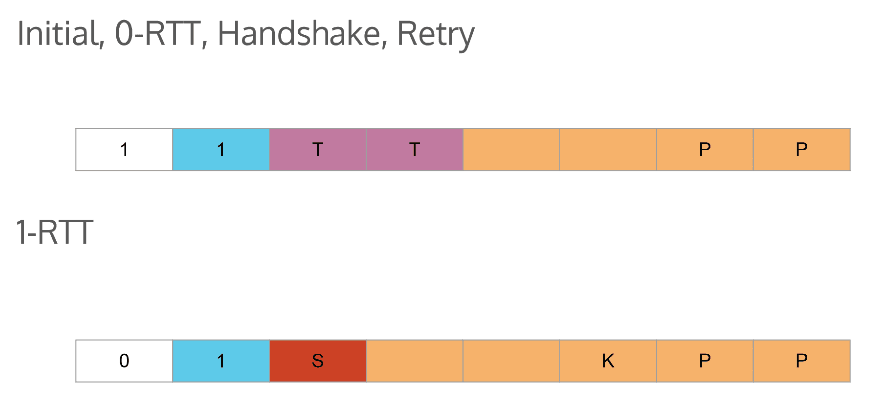
    Or so we’ve been told by Martin Thomson and other QUIC luminaries. Here is a (likely incomplete) list of changes which will make the new version incompatible with the previous version:

    IETF 103 Handshake Retry
    A slide from Martin Thomson’s First Octet presentation.

    Farewell to Q043 and earlier

    The octet zero change means that servers will not be able to support older versions of Google QUIC — Q043 and earlier — and IETF QUIC at the same time. Ian Swett informed us that Google plans to deploy IETF QUIC Draft-17 at scale at which point they, too, will have to drop support for pre-Q044 QUIC.

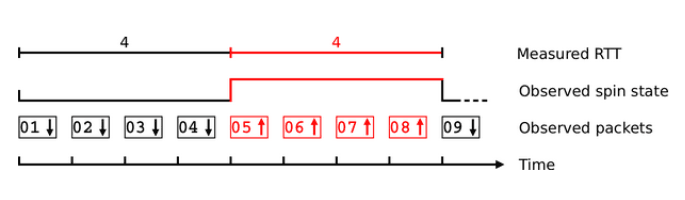
    The spin bit is in

    IETF 103: Spin Bit
    A diagram from Marcus Ihlar’s Spin Bit presentation

    The QUIC Working Group voted to include the spin bit into the specification. Having been the subject of a rather contentious debate at IETF 101 in London, the spin bit is an optional protocol feature.

    Chrome’s and Firefox’s stated intent of not implementing the spin bit makes its value questionable. On the other hand, Microsoft, LiteSpeed Technologies, and F5 pledged to support it in both their server and client products and Apple plans to implement it on the client.

    Is there life after QUIC?

    At the end of the second (and last) QUIC session, we discussed the road ahead. The plan it to freeze the 17th version of the draft family and get many implementations going. The finish line has been moved again, this time to July 2019.

    Shall we disband after QUIC is released? There has been talk of rechartering the Working Group to take on new challenges, such as multipath and partial reliability.

    Given the rate of protocol changes that are still being worked on, that point still seems pretty far off to me. Now, it’s time to roll up the sleeves and finish our server implementation. Until next time!

  • Announcing New Licensing Options

    Announcing New Licensing Options

    New Licenses for LiteSpeed Web Server

    One of the exciting new developments to come out of the release of LiteSpeed Web Server 5.3, is a revision to our license structure. We think you will like these new changes.

    Effective immediately:

    1. All licenses will have new names and clearer branding
    2. LSCache is included by default in all licenses
    3. We’ve added a new FREE Starter license and new Site Owner licenses

    Revised License Structure

    We know that choosing a license in the past may have been complicated, so we’ve added a few new licenses for LiteSpeed Web Server, and retired a few others, in order to simplify our offerings. All licenses now fall under one of three categories: Starter, Site Owner and Web Host.

    Site Owner licenses are geared toward single websites (5 domains or less) and are available at price points that are affordable for individuals.

    Web Host licenses allow unlimited domains, and most of them also allow unlimited memory. Price varies based on the number of workers you require. If you previously had a VPS license, you will find one of the Web Host licenses to be comparable..

    We’ll talk about the Starter license in more detail below.

    The brand new licenses (those that are not based on a previously-existing license) require LiteSpeed Web Server v5.3, so be sure to update your server to the latest version before trying to buy/upgrade to one of the new licenses!

    LSCache Included With Every License

    All of the licenses now come with LSCache, our exclusive server-level full-page caching module, no add-on required. LSCache can make a huge difference in terms of server resources. Hosting providers who have enabled LSCache have seen their server capacity increase dramatically, allowing them to host more customers on the same hardware.

    Site owners like LSCache because it can interface with a variety of popular web apps through our plugins. Or they can customize it for their own applications through rewrite rules. An LSCache-powered web app is a fast web app.

    Please note that while LSCache is now included with the license, the LiteMage cache solution for Magento is still only available through a separate add-on purchase.

    FREE Starter License

    And now for something 100% free! One of our newly-introduced licenses is the Starter License. This is a single-domain, 2GB license with 1 worker, and LSCache included. It’s a great option for site owners who have simple needs, or for those who want to try LiteSpeed Web Server for an extended period on a single site before committing to a more robust Site Owner license.

    Here’s a handy chart to help you compare the new licenses and choose the one that’s right for you.

    License Domain Limit* Workers RAM Limit Monthly Price Compare to
    Starter 1 1 2 GB FREE n/a
    Site Owner 5 1 8 GB $10 n/a
    Site Owner Plus 5 1 Unlimited $16 n/a
    Web Host Lite Unlimited 1 8 GB $26 UltraVPS + LSCache
    without platform restriction or 800 concurrent connection limit
    Web Host Essential Unlimited 1 Unlimited $36 1-CPU + LSCache
    with lower price
    Web Host Professional Unlimited 2 Unlimited $46 2-CPU License
    Web Host Enterprise Unlimited 4 Unlimited $65 4-CPU License
    Web Host Elite Unlimited Configurable Unlimited $92 8-CPU License with ability to configure qty of workers

    * Domain Limits apply to top-level domains only. There is no limit on subdomains.

    Please note, all information is current as of this writing, but is subject to change. Please visit the store to see the latest pricing and features.

    A Note for Site Owners

    Depending on your comfort level, buying a license directly from LiteSpeed might not be the right choice for you. Once you have the license, you will need to procure hosting. You will need to install, configure, and maintain your server yourself, or hire staff to do it for you.

    If you’re eager to become LiteSpeed-powered, but you don’t want to handle all of the details yourself, you might prefer LiteSpeed hosting. Take a look at our Hosting Provider Partners list. These companies offer a variety of services that include LiteSpeed Web Server and the hosting you need to use it. You can get a package that includes just the right amount of hands-on server configuration for your taste. In other words, you can have complete control, or you can let the provider handle everything for you.

    A Few Notes for Web Hosts

    Any existing licenses and packages that you have with us will not be affected by this change, with one exception. We have lowered the 1 CPU + LSCache license price from $38/month to $36/month to match the pricing of the new Web Host Essential license.

    API and WHMCS reseller module users may begin offering the new licenses at any time. (Please note, the free Starter license is not available through the API.)

    We encourage you to upgrade to the new licenses at your convenience. In order to aid in the transition, we will continue to list the old license types for the time being. You can find them listed in the Legacy LSWS Licenses category.

  • LiteSpeed Web Server v5.3 New Features

    LiteSpeed Web Server v5.3 New Features

    LiteSpeed Web Server version 5.3

    Have you heard about the new version of LiteSpeed Web Server?

    LiteSpeed Enterprise Web Server v5.3 dropped last month, bringing with it a collection of new features that we think you’ll really like. Let’s take a look!

    PHP Detached Mode

    This is the big enhancement that everybody is talking about. PHP Detached Mode is new to LSWS 5.3, and changes the relationship between LSWS and PHP processes.

    In previous versions (LSWS 5.2.x and earlier), all PHP processes were attached to the LiteSpeed Web Server process. As such, when LiteSpeed Web Server restarted, so would the PHP processes. By contrast, PHP Detached Mode dictates that the PHP processes will continue running independently, even when LiteSpeed Web Server restarts.

    PHP Detached Mode doesn’t mean that PHP will run forever. It will still follow the Max Idle Time setting. If you want to make PHP live longer, just increase Max Idle Time.

    Benefits of PHP Detached Mode

    Sysadmins often need to restart the server, and in certain situations, it’s beneficial to leave the PHP processes alone and let them continue to serve their purposes.

    For example, when hundreds of accounts are hosted on the same shared hosting server, and new accounts are being added rapidly, the server may be restarted many times, but the PHP process don’t have to be.

    Or, if a user is relying heavily on opcode cache to reduce the server load, PHP Detached Mode avoids having to reset the opcode cache during a server restart.

    Restart Detached PHP Processes

    It works the other way, too. Maybe you want to restart the PHP processes without interfering with the server process.

    In the past, if there were any php.ini changes, you would probably want to restart LSWS to apply the changes (since restarting LSWS would also restart all PHP processes). But now, since PHP can run detached from the server, you can make php.ini changes effective immediately simply by restarting the PHP processes.

    See our wiki to learn how to configure Detached Mode, and how to stop and restart detached processes.

    Support for CloudLinux Node.js Selector

    JavaScript has become one of the most popular programming languages. As it’s usage has increased, more and more customers have demanded Node.js hosting. The CloudLinux Node.js Selector was introduced to facilitate the performance and functionality related to Node.js, and now it is supported by LiteSpeed Web Server.

    There is virtually no downside to using this method. All of your existing Node.js packages which can include any homegrown software, will run with virtually no changes through the LiteSpeed port. LiteSpeed continues to serve all of your non-Node.js traffic and it will now additionally serve the Node.js traffic.

    Node.js Selector from CloudLinux is supported by LiteSpeed Web Server out of the box. Refer to the official CloudLinux documentation for Selector usage instructions. For testing and troubleshooting tips as they pertain to LSWS support, see our wiki.

    PHP CRIU Support in CloudLinux Environments

    Checkpoint/Restore In Userspace, or CRIU, freezes a process and saves a snapshot of it. Then, process may be restored and run from the point of the snapshot. LSWS 5.3 supports CRIU for CloudLinux. CRIU improves performance for transactions which are commonly used, and reduces the memory overhead on the server.

    Learn how to configure CRIU on our wiki.

    Maxmind database support for GeoIP2 lookup

    As of LSWS v5.3, the MaxMind GeoIP2 format database, .mmdb, is supported. (Previous versions of LSWS only supported the MaxMind Legacy Database.) Please see our wiki for installation instructions.

    Brotli compression for dynamic responses

    LiteSpeed Web Server has included Brotli compression support for a while, but it was only for static files. Now, as of v5.3, Brotli compression has been added for dynamic responses. Learn more on our wiki.

    Automatic gzip and brotli conversion for cached pages

    LSWS 5.3 can cache a gzip-compressed page, convert it to Brotli, and cache the converted result. Or, vice-versa. The converted result, however, is not saved immediately. There is a hit limit, in order to save disk space.

    Example: If the Brotli version is cached, and the client requests gzip, LSWS will dynamically decompress the Brotli version, re-compress as gzip, serve the request, and discard the result. If this request is repeated more than 10 times, the gzip version will be cached, and the next request will be served directly from cache. You can get more details about how this works on our wiki.

    TLS v1.3 Support on cPanel

    LiteSpeed Web Server now supports TLS v1.3 on cPanel. See our wiki for more details.

    Smarter Cache Engine Knows What You Were Thinking

    No, LiteSpeed Web Server is not really a mind-reader, but, as of v5.3, it has an improved cache engine that can fix badly-configured cache storage directories and file permissions. That’s almost mind reading.

    Normally in a control panel environment, server-level and virtual-host-level cache roots are set in the Apache configuration, or in include files. Once these are set and LSWS is restarted, the web server will create the required directories automatically, and with correct ownership and permissions.

    However, a user may have manually created a cache folder with the wrong ownership or permissions. This will cause a lot of problems later when creating cache entries, or when looking them up. LSWS 5.3 addresses this problem by knowing what the user intended, and automatically fixing the issue.

    You can learn more about this feature on our wiki.

    Also…

    As if all of the aforementioned enhancements weren’t enough, with LSWS v5.3, we are now supporting QUIC 43. Additionally, we have an opportunity to introduce some exciting new licensing options! You can learn more about that here.

    Have you already tried 5.3? What’s your favorite feature?

  • Why LiteSpeed and WAF is Pure Love

    Why LiteSpeed and WAF is Pure Love

    LiteSpeed vs. Apache WAF

    Do you use WAF (Web Application Firewalls) to protect your sites? Our guest blogger, Lucas Rolff does. Lucas is, as he says, “the everything man – sales, support, accounting, coffee drinker, and operations guy” for Hosting4Real. Today he’ll be sharing his experience implementing WAF. See how its impact on his systems changed dramatically when he switched from Apache to LiteSpeed!

    So, without further ado, here’s Lucas’ story in his own words:

    At Hosting4Real, we run WAF across our fleet. This is done mainly to protect against known vulnerabilities in the open source software our customers use. It also protects against generic attacks such as SQL injection, cross-site scripting, backdoors etc.

    We use the Comodo CWAF ruleset. CWAF contains hundreds of rules for SQL injection, cross-site scripting and, more importantly, rules targeting specific software vulnerabilities in WordPress, Joomla, Magento and other known CMS’s.

    WAF and Apache

    The issue with having an extensive list of WAF rules is that it tends to hurt your performance, both in your rules latency, and in the amount of resources your system requires to handle a request.

    On certain shared hosting servers with a particular traffic patterns, we noticed Apache would sometimes take up 100-200% (1-2 cores) alone for processing requests within mod_security. Eventually, we got to the point where we tried turning off mod_security rules, and we instantly saw a drop in CPU usage of about 100% (1 core).

    WAF and LiteSpeed

    In early-mid 2018 we decided to switch to LiteSpeed for various reasons, one of them being the CPU load experienced while using our Comodo WAF ruleset. After the switch to LiteSpeed, which had already decreased our CPU usage compared to Apache without mod_security, we decided to enable our ruleset again. We went in with the expectation that we’d see an increase in CPU load similar to the drop we saw when turning it off in Apache. To our surprise, we saw almost zero difference in the CPU usage on the server, despite running with the full set enabled.

    We didn’t believe this, so we talked to LiteSpeed core developers to figure it out!

    LiteSpeed uses it’s very own implementation to parse rules, instead of relying on a generic mod_security library. This has allowed LiteSpeed to optimize the way regular expressions are matched, as well as utilize an internal cache.

    What is even more impressive is that LiteSpeed has managed to only run the rules for dynamic requests. This is a big difference compared to how Apache and other web servers handle this.

    Apache, for example, will execute your rules for every single request, even the pictures of cats and hamsters. This means we’re maybe saving 40-90% processing power alone by this optimization.

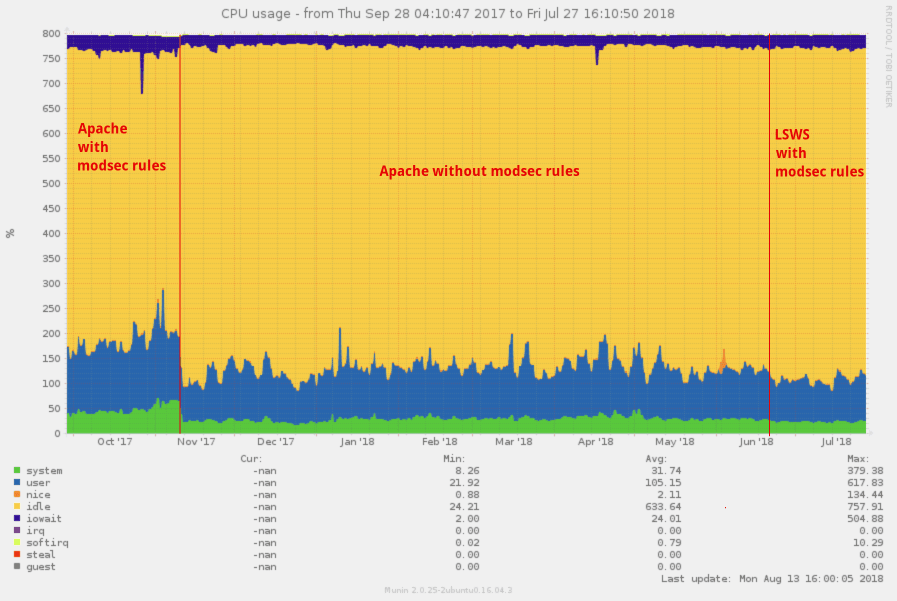
    Effectively, we went from a server using up 180-200% of our CPU the majority of the time due to mod_security, down to roughly 100% when using LiteSpeed. What is even more amazing is that the decrease of 80-100% CPU is despite an increase in traffic of 10.8% (from 42.06 million to 46.6 million requests).

    LiteSpeed vs. Apache WAF

    In the screenshot above you’ll see how our CPU usage changed.

    In the first section we see Apache with CWAF modsec rules. At the first red line we decided to disable the rules for the given server. At the second red line in mid-June, we decided to switch to LiteSpeed and then enable the CWAF modsec rules again, decreasing the CPU by a further 10-25%.


    In the above screenshot, we see that the traffic is rather stable with an increase in traffic in the last couple of weeks.

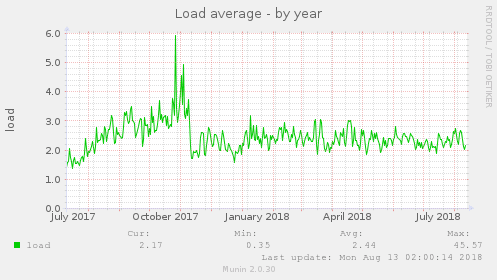
    And if we take a look at the Unix load, we also see a massive drop there as well.

    As you can see over time at the beginning of the Unix load graph, we’re seeing a slow increase in load – the load increase is consistent with the rate of growing traffic over the months, and also as new customers would get on board the server.

    How to Enable CWAF in cPanel for LiteSpeed

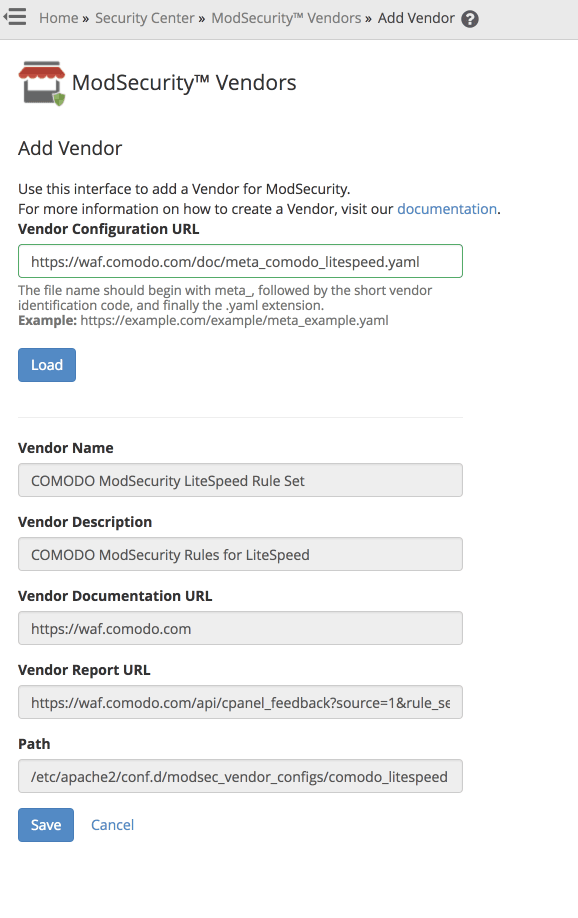
    Since LiteSpeed requires another set of rules compared to the Apache ones from CWAF, we have to use a new vendor. You can use “ModSecurity™ Vendors” from cPanel within WHM.

    In the ModSecurity™ Vendors page, click Add Vendor. Supply a Vendor Configuration URL, i.e. https://waf.comodo.com/doc/meta_comodo_litespeed.yaml. Click Load, which loads the vendor information in the fields below, and then click Save.

    This will automatically enable the ruleset, and ensure that updates to the ruleset are downloaded every night. It will also trigger a restart request to LiteSpeed.  So, the rules will be active seconds after you’ve clicked the Save button.

    The Server Hardware Specs

    CPU: Intel Xeon E5-1630 v4 @ 3.70GHz (4C/8T)
    RAM: 64GB DDR4 2400 Mhz ECC Memory
    Disks: 2x480GB Intel DC S3520 SSDs (for MySQL) and 2x2TB HGST Ultrastar 7K4000 Spinning disks for OS and files

    Who is Hosting4Real?

    We are a small Dutch-based company focusing on high-performance shared web hosting. We try to kill the bad reputation of the shared hosting market by offering extremely fast (and scalable) web hosting. We’re addicted to performance, and we use best-in-class software such as LiteSpeed to help us handle traffic peaks, as well as our own in-house-developed Content Delivery Network


    Our thanks go to Lucas for sharing his story. Readers, if you have a LiteSpeed success story that you would like to share, drop by our Slack community, and let us know what you have in mind!

  • Joomla Benchmarks: LiteSpeed vs. Apache

    Joomla Benchmarks: LiteSpeed vs. Apache

    The LSCache for Joomla Module is one of our newest cache plugins. We recently teamed-up with Svend Gundestrup to generate a series of new benchmarks using one of his Joomla sites in Denmark. Svend takes a scientific approach to benchmarking, which we’ll discuss in detail after we show you the test results.

    We should mention that Svend performed all tests on his own, without any compensation from LiteSpeed, and using equipment he purchased himself.

    Benchmarks

    Return Load Tests were run using four different methods:

    • AB from within the test server
    • AB from an external server in the same region
    • Pingdom
    • GTMetrix

    Additionally, one set of Initial Load Tests was performed:

    • Pingdom

    Each type of test was run 20 times per server, making a total of 100 benchmarks for each server+cache setup. We’ll share the details in the Specifics of Testing section below.

    The goal was to compare performance between the following servers and cache solutions on a highly optimized Joomla website in a production environment, with a valid SSL certificate. We tested the following two servers+cache solutions:

    • Apache event MPM + php-FPM + Memcached + JotCache (memcached)
    • LiteSpeed Web Server + LSCache for Joomla

    Each results graph shows the average speed in milliseconds. Additionally, Svend has included some figures that help to evaluate the results from a statistical perspective: standard deviation (SD), F-test, and T-test. We’ll talk more about what those numbers mean in the Definitions section below.

    AB Test #1 (within the test server)

    This AB load test was performed on the test server itself. The following command was used:

    ab -k -n 1000 -c 100 -H "Accept-Encoding: gzip,deflate" -l https://www.lite.lungekursus.dk/
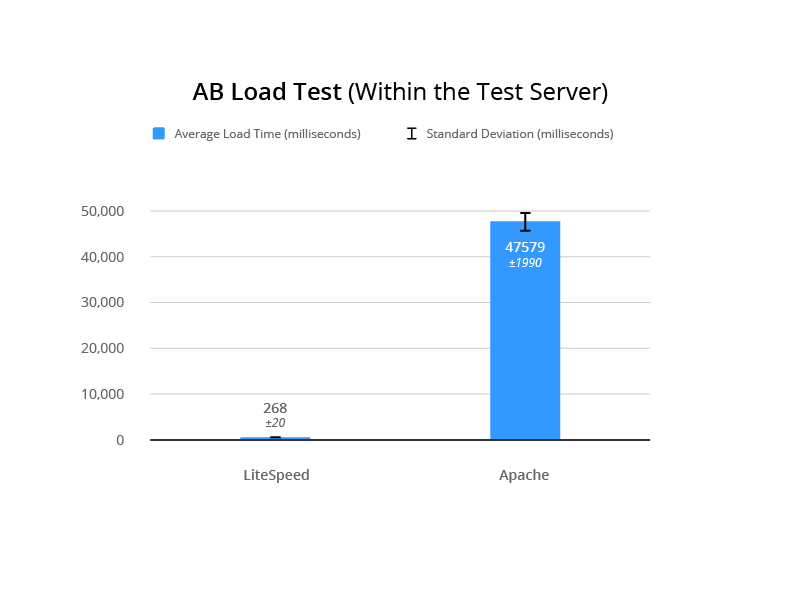
    

    LSCache for Joomla Benchmarks: Internal AB Load Test
    F-Test 0

    T-Test 6.12E-49

    AB Test #2 (external server, same region)

    This AB load test was performed from a server external to the test server. The following command was used:

    ab -k -n 1000 -c 100 -H "Accept-Encoding: gzip,deflate" -l https://www.lite.lungekursus.dk/
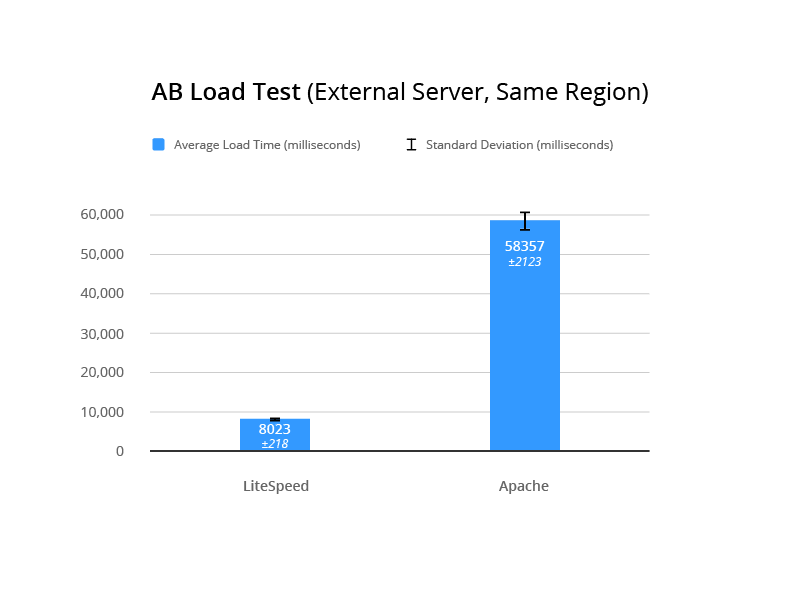
    

    LSCache for Joomla Benchmarks: External AB Load Test

    Pingdom Speed Test

    This test was run from Sweden to the test server in Amsterdam.

    For the Initial Load Testing, the following command was run:

    sudo /etc/init.d/php7.2-fpm restart && sudo /etc/init.d/apache2 restart
    

    For each iteration, Svend cleared the cache, restarted the server from the command line, and then verified that the cache was missed to prove that caching would have no effect on the results.
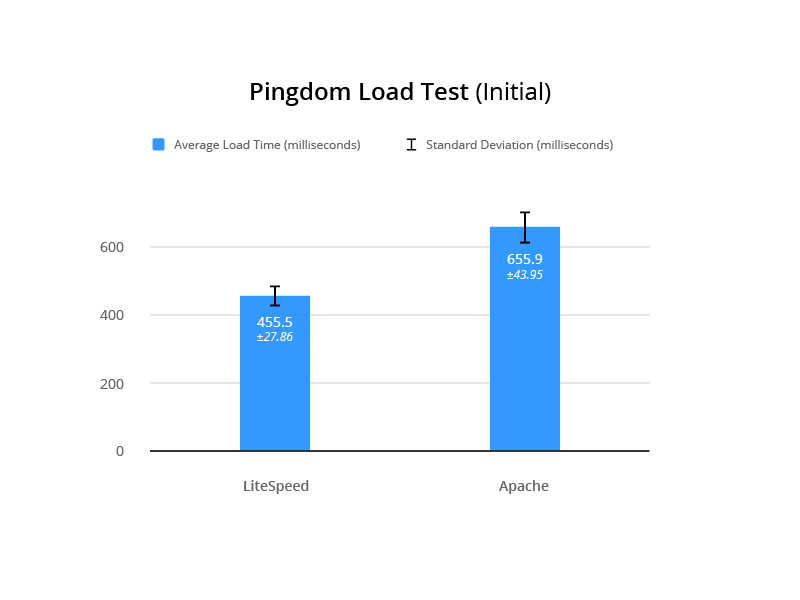
    LSCache for Joomla Benchmarks: Pingdom Initial Load Test
    F-Test 0.05369249473

    T-Test 7.63E-20

    For the Return Load Testing, the server was restarted once, all caching was cleared, and Svend loaded the website to verify a cache hit. The server was not reset in between tests.
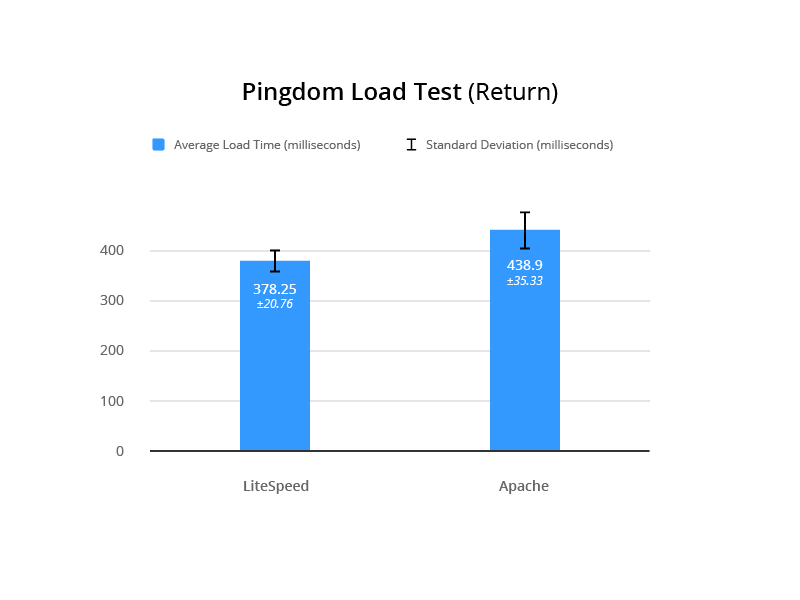
    LSCache for Joomla Benchmarks: Pingdom Return Load Test
    F-Test 0.02524102277

    T-Test 4.05E-08

    GTmetrix

    Measuring time to fully load in the UK from the test server in Amsterdam.
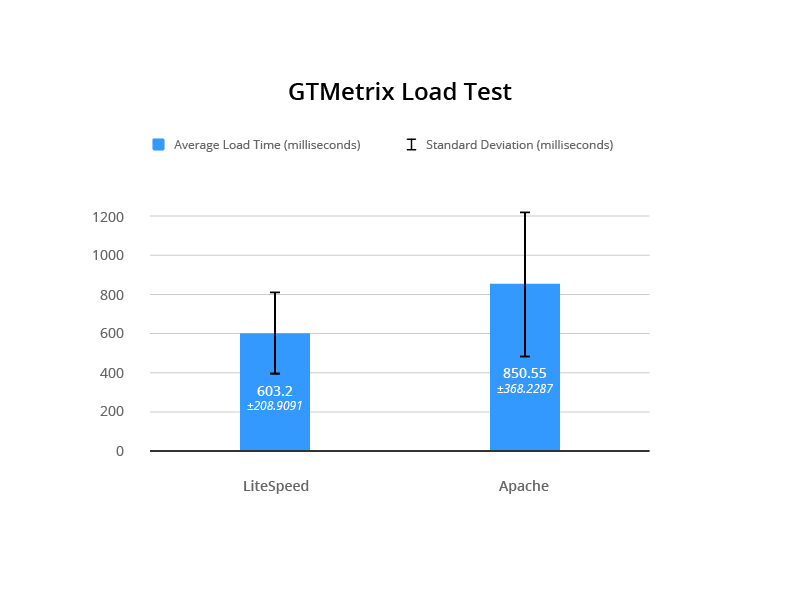
    LSCache for Joomla Benchmarks: GTMetrix Load Test
    F-Test 0.01739569946

    T-Test 6.40E-03

    Test Environment

    Common To Both

    Digital Ocean server: 4GB, 80SSD, 2vCPU, based in Amsterdam, with a target audience in Denmark

    Config Server Firewall, IDS, Tripwire, MySQL, Fail2Ban

    Joomla 3.8.7, JCH Optimizer Pro, Joomla Admin (with security enabled), JA Builder template

    Apache

    Apache 2.4 with event MPM running

    PHP FPM 7.2.4.1

    Memcached

    JotCache (Memcached)

    LiteSpeed

    LiteSpeed Web Server 5.2.7

    LSCache for Joomla 1.1.1

    PHP 7.2.2-2+Xenial

    Specifics of Testing

    Each test was run as follows:

    1. service lsws stop
    2. ps -ef | grep httpd (to make sure LSWS is not running)
    3. service apache2 start
    4. ps -ef | grep apache2 (to make sure Apache is running)
    5. Enable JotCache (all plugins and dependencies)
    6. Run 20 iterations of each test
    7. service apache2 stop
    8. service lsws start
    9. Disable JotCache (and associated plugins)
    10. Enable LiteSpeed Cache
    11. Look for x-litespeed-cache: hit/miss response header to ensure LSCache is working.
    12. Run 20 iterations of each test

    Note: the .htaccess files remained unchanged during the testing

    Definitions

    Return Load Test: Load testing where the first load is discarded. This type of testing makes sense for evaluating a page cache, as the cache is not primed until the first page load triggers it.

    Initial Load Test: Load testing where the server is restarted after each test. The purpose is to test the initial first page load of the server without influence from memcached or lscache. It’s essentially the opposite of Return Load Testing, and measures the performance of the server and PHP.

    Standard Deviation: Abbreviated in our charts as SD, standard deviation measures the variation among individual test results from the mean result. A smaller standard deviation is preferable because it indicates some consistency in the test results. A higher SD indicates that the server speed is unstable. (Wikipedia)

    F-Test: Compares two sets of results and returns a number (p-value). If the p-value is high, there is not a significant difference between the two sets of results. So, for our testing, we want to see a low p-value, indicating that there is indeed a significant difference between the performance of the two servers. (Wikipedia | Google Sheets)

    T-Test: Determines if two sets of results are significantly different from each other. There are different types of T Tests, and which one you use is determined by the p-value returned by the f-test. We are looking for a low t-test value to indicate a strong probability that LiteSpeed is faster than Apache. (Wikipedia | Google Sheets)

    Why Standard Deviation?

    Svend performed all of these tests and made all of the calculations. He feels it is important to take a proper, statistically-sound approach to benchmarking. This approach involves comparing speed, loading, and repeated loading on a real website and a real server that handles IDS, security, and so on in an actual production environment.

    For each server tested, Svend calculated the standard deviation of the results. The SD indicates the stability of the test results. If you have a low SD, you are essentially saying “this server performs consistently in these tests.” A high SD means that the results for that server are erratic and inconsistent. In these tests, the SD calculated for LiteSpeed results was always much lower than that calculated for Apache results, leading to the conclusion that LiteSpeed Web Server is the more consistently performing server.

    Why F Tests and T Tests?

    Being more consistent doesn’t necessarily make it a better performer, however. And so Svend ran f-tests on most of the datasets above. The f-tests generated a p-value, which could be used to determine whether there was truly a significant difference between the two servers’ benchmark results. In every case, the p-value indicated that the test results of the two servers were significantly different from each other.

    Now that he knew that there was definitely a difference, he needed to calculate the probability that one server would outperform the other. He ran t-tests on the dataset. The tests returned low values in all cases, which indicated a strong possibility that LiteSpeed is faster than Apache.

    Why Follow This Process?

    You might be wondering if all of this is necessary. After all, you can simply look at the data and see that LiteSpeed’s numbers are always better than Apache’s. While that might be true, the statistical approach gives you a way to scientifically quantify the significance of the differences between the two servers.

    According to Svend, “I am tired of seeing ‘we did these 5 tests, on a completely blank system, that was not optimized for the system or the website prior to testing.’ It’s like testing a placebo to treat pneumonia. No wonder the antibiotics are working. It’s about testing and comparing, to find if the new antibiotic is better than the old (standard treatment). You need to do a lot more than 5 tests, both to be sure the results are correct, but also to see how much the test results differ over time.”

    These tests definitively show:

    • LiteSpeed is faster than Apache.
    • Speed varies much less with LiteSpeed than with Apache, meaning it is consistently faster.
    • Even in the initial load speed (where cache is not a factor) LiteSpeed outperforms Apache.

    Care to have a look at the original test results? Check out the Google Sheet.

    About Svend

    Svend Gundestrup is an MD in his last year to become a specialist in Pulmonology. He runs a specialized website for education within the pulmonology field in Denmark, catering to Danish pulmonologists and registered nurses. In addition to his medical duties, Svend runs a consultant firm that specializes in IT, IT security and IT development, and also EPIC healthcare in Danish Hospitals. His website audience requires speed, stability, and interoperability between desktop, laptop, tablet, and mobile phone.

    Svend is married with two kids, and has been playing with and building computers since the days of the 386 with coprocessor. Fluent in linux, OSX, and Windows, Svend has been creating websites as co-projects for many years, working with mambo and later Joomla.

    This blog post was a team effort. Thanks to Svend for executing the tests, providing an explanation of his process, and helping me proofread. And thanks to Mark Zou for the helpful graphics illustrating each test.
    –Lisa

    Want to try LSCache for Joomla for yourself? Download the module.