Category: Performance

Every site owner wants to improve site performance. Let’s talk about that: broad performance concepts, specific tips, and our own software-based solutions.

  • Improving Page Experience with LiteSpeed

    Improving Page Experience with LiteSpeed

    Improving Page Experience with LiteSpeed

    As a site owner, you naturally want your visitors to have a seamless and successful visit that entices them to continue coming back. In May 2021, you were given an even better reason to improve page experience for your visitors: Page Experience became a factor in Google Search Rank.

    While it seems like something too subjective to measure, there are actually some metrics that go a long way towards quantifying page experience. Across the web, page experience is considered good when the page loads quickly, is responsive to user input, and is visually stable. These aspects can be measured through a series of metrics known as the “Core Web Vitals.”

    Today we will talk about these vital measurements, and give you tips to ensure your WordPress pages are delivering the optimal visitor experience.

    NOTE: While we are talking specifically about WordPress here, know that these strategies apply to all kinds of sites. The tools needed to implement our suggestions, though, may vary for other CMSs.

    Core Web Vitals
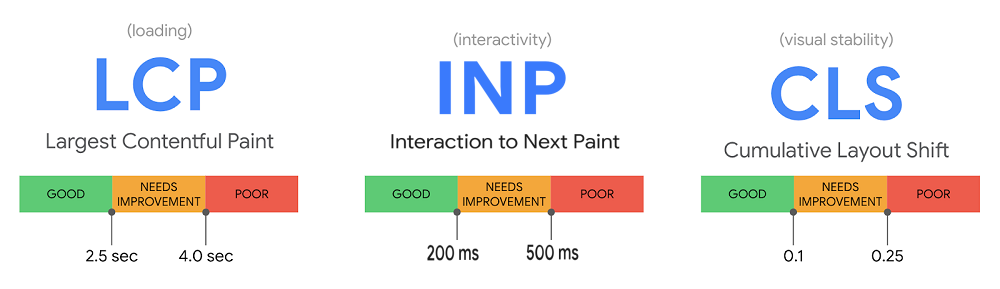
    Page Experience Core Web Vitals
    Google has defined a set of three Core Web Vitals. These measurements, when taken together, provide a way to quantify user experience and assign it a value.

    The Core Web Vitals measure page experience by focusing on aspects of loading, interactivity, and visual stability, respectively.

    Initially, the Core Web Vitals were Largest Contentful Paint, First Input Delay, and Cumulative Layout Shift, but in 2023, Google announced that it would be replacing First Input Delay with Interaction to Next Paint as of March, 2024.

    Let’s look at each metric one by one.

    Largest Contentful Paint (LCP)
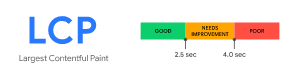
    Core Web Vitals Largest Contentful Paint

    LCP is a measure of loading performance. This is LiteSpeed’s specialty!

    More specifically, LCP measures how long it takes to load the largest element on a page. It’s considered a user-centric metric, because it estimates the perceived load speed. Generally speaking, when the largest element on a page has rendered, the page will be ready to use, even if there are still smaller (and potentially less important) items yet to load.

    There are primarily four things that impact LCP on your site:

    1. Server response time
    2. Render-blocking JavaScript and CSS
    3. Resource load time
    4. Rendering on the client side

    Chances are, each of these four elements can be improved for your site. Take a look:

    Server response time

    Action: Install LiteSpeed Cache for WordPress and enable caching.

    Page caching is a crucial tool in your arsenal against sluggish server response times. When your site is cached, it requires much less involvement from the WordPress backend, which translates into a faster site and a better experience for your site’s visitors.

    WordPress sites consist of dynamic pages that are built with PHP. The pages of a WP site don’t exist anywhere in the file system; they are constructed on-demand through PHP, and then served to the visitor as HTML. This can be a resource-heavy process, but page caching is an effective way of dealing with it. (You can learn more about this topic in our Caching 101 series.)

    Some other suggestions for improving server responsiveness include:

    • Optimizing your server
    • Using a CDN (like QUIC.cloud!) with nodes nearer to your visitors than your origin site

    Render-blocking JavaScript and CSS

    Action: Enable Load JS Deferred and Load CSS Asynchronously in the LSCache plugin.

    This is one of those solutions that page speed tools have been suggesting for some time. There is no need to load all of your JavaScript or CSS upfront. If you defer unnecessary JS and CSS until later, the above-the-fold content can render more quickly. You can defer both JS and CSS using settings in the Page Optimization section of the LSCache plugin for WordPress.

    Other suggestions, (all available in LSCache Page Optimization):

    Resource load time

    Action: Sign up for QUIC.cloud CDN, and/or optimize your images.

    A CDN such as QUIC.cloud is a smart idea, because it potentially minimizes the distance resources need to travel between server and client, which in turn makes the resources load faster.

    While minimizing the distance resources must travel is important, you could increase the impact by also reducing the size of the resources themselves. This is where image optimization comes into play. LiteSpeed offers an image optimization service through QUIC.cloud, which compresses images, making them faster to transport and faster to load. The service allows you to optionally enable the modern, more efficient image format, WebP, as well.

    Other suggestions:

    • Preloading some resources
    • Enabling file compression
    • Caching static and dynamic content

    Rendering on the client side

    Action: Optimize JavaScript usage

    Many modern sites use JavaScript to render pages entirely on the client side. In some cases, this can be problematic for Largest Contentful Paint, particularly if a large JS bundle is used and content is unable to be rendered until the JS execution completes.

    In addition to the JavaScript optimizations mentioned earlier, it could be helpful to break up large bundles, or switch to server-side rendering where possible.

    First Input Delay (FID) – to be deprecated
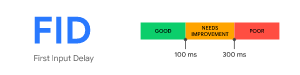
    Core Web Vitals First Input Delay

    As mentioned earlier, FID is to be deprecated in March of 2024. Until then, it’s still considered one of the Core Web Vitals. FID measures your site’s responsiveness. How long does the site take to act when a button is pressed? For a good page experience, the interactive elements of your site should feel instantaneous and not sluggish. A low FID is important to user experience.

    JavaScript is usually the culprit here, too. Breaking up long tasks, switching to server-side logic, deferring JS execution, and other JS optimizations that you may have implemented to help with Largest Contentful Paint, will also be instrumental in improving the First Input Delay metric.

    Interaction to Next Paint (INP) – replacing FID

    Core Web Vitals Interaction to Next Paint

    Like FID, INP measures the responsiveness of a page. However, FID deals in first impressions, measuring only the user’s initial interaction. INP is a more comprehensive measurement, sampling the page’s responsiveness through the lifespan of the user’s visit.

    INP observes mouse clicks, touchscreen taps, and keyboard taps, and measure how long it takes for the page to return a visual response.

    To improve INP, you need to optimize input delay, event callbacks, and presentation delay. For example, a user presses a Submit button. How long does it take for the submitting action to begin? And how long before the browser paints Submitting... on the screen?

    Again, these interactions are usually powered by JavaScript, which means the best way to minimize the time they take is to optimize your JavaScript. This is not a trivial task, if your website is highly interactive, and it may take a lot of repetitive work to find and mitigate all of the bottlenecks. It is worth the effort, though, as a low INP means a snappy page, and a more pleasant user experience.

    Cumulative Layout Shift (CLS)
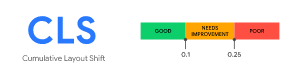
    Core Web Vitals Cumulative Layout Shift

    CLS measures the visual stability of a page. How much do elements move around while the page is loading? CLS should be low to avoid the possibility of accidental clicks, or losing one’s place while reading, which can be frustrating for a user.

    In general, CLS is impacted by these items:

    • Lack of size attributes on images and videos
    • Insertion of content above existing content
    • Use of animation properties that trigger layout changes

    Here are some strategies for improving CLS:

    Lack of size attributes on images and videos

    Action: Make sure all images, videos, and iframes have size attributes.

    Generally speaking, text loads first on a page, and then the images and videos start filling in wherever they belong. If space for these resources is not reserved ahead of time, then the text moves around to accommodate the resources as they load. To avoid this, in your theme, and in your posts, all added images, videos, and iframes should explicitly list their sizes in the HTML code.

    If you don’t want to do this manually, try LiteSpeed Cache’s Add Missing Sizes option in the Page Optimization > Media Settings section. If enabled, LSCache will detect any resources with missing size attributes, calculate the appropriate sizes, and add them to the dynamically generated HTML before caching the page.

    Insertion of content above existing content

    Action: Use static-size containers around variable-size items

    This type of issue happens a lot when you have advertisements on your site, particularly ones where you let the ad service decide what size ad to stick in the spot. For example, you may have a banner ad at the top of your page, but it might at any time display a Leaderboard, Large Leaderboard, or Billboard sized ad. By not specifying a size ahead of time, any content that appears below the ad will be pushed down when the ad displays.

    You can fix this problem by creating a container for that ad, which will display at the same time the text loads. When the ad renders, it will fit inside the box (and if it doesn’t fit, you can prevent it from exceeding the allotted space with an overflow: hidden attribute).

    Use of animation properties that trigger layout changes

    ACTION: Switch to transform animations.

    Some CSS properties trigger a re-layout, which can cause page resources to move around undesirably. Instead of using CSS triggers – and there are a lot of them – try transform, which does not trigger any geometry changes or painting on the page.

    Other Page Experience Metrics

    Your pages should be in good shape, if you master the Core Web Vitals, but there are other metrics that inform page experience, and you don’t want to ignore them:

    Mobile Friendliness

    Can your site be read and interacted comfortably with on a mobile device? These days, with so many internet users accessing content on the go, Google has adopted a “mobile first” philosophy. So, if your mobile site is functionally impaired, it will undoubtedly impact your page experience score and rank. You can evaluate your site’s mobile friendliness with Google’s Mobile-Friendly Test.

    Safe Browsing

    It probably goes without saying that your page should not contain malware, social engineering, or other malicious and deceptive content. You can check Google’s Security Issues report to be sure your site is clean.

    Secure Connections

    Serving your site over a secure connection with HTTPS is more important than ever. Google penalizes insecure sites in terms of page rank, so if you want to rank, you need to be secure.

    If you’re running LiteSpeed Web Server, which comes with secure HTTP/2 and HTTP/3 connections enabled out of the box, then you’re good. You can use the HTTP/3 Check tool to verify that your site supports HTTP/3 connections, or see our instructions to test for HTTP/2.

    No Intrusive Interstitials

    Interstitials include pop-up ads that cover the content, inline promotional material that appears above the fold, or any advertising that otherwise must be dismissed or scrolled past before the user can access the site’s actual content. Your site should be clear of such elements and your content easily accessible.

    Conclusion

    Improve Page Experience with LiteSpeed

    Of course, there is more to search rank than page experience. First and foremost, you need to provide content that answers the searcher’s question. But everything else being equal, a superior page experience can be the factor that puts your page ahead of that of your closest competitors.

    As you have seen, our end-to-end WordPress solution provides excellent tools – LiteSpeed Web Server, LSCache Plugin, and QUIC.cloud CDN – to help you improve page experience.

    If you are not a WordPress user, LiteSpeed Web Server with LSCache can still be of value to you. We have cache plugins for many other CMSs, or you can use LSCache without a plugin.

    With LiteSpeed, you can address problems with Core Web Vitals, and improve page experience for your users while simultaneously working your way to the top of the Google Search Results!

    —
    This content was last verified and updated in November of 2023. If you find an inaccuracy, please let us know! In the meantime, see our documentation site for the most up-to-date information.

  • Developer’s Corner: QPACK Mnemonic Technique

    Developer’s Corner: QPACK Mnemonic Technique

    Developer's Corner 13: QPACK Mnemonic Technique

    To index or not to index?
    – Prince Hamlet (paraphrased)

    QPACK is the mechanism used to compress headers (or, to use the new nomenclature, “fields”) in HTTP/3. QPACK, while based on HPACK, was designed specifically for HTTP/3: it takes advantage of the properties of the transport protocol (QUIC).

    We wrote our own library, ls-qpack, that implements QPACK. The library’s origins go back to 2017, for we participated in the development of the QPACK specification itself. That is when we developed the QPACK Mnemonic Technique.

    Background

    The goal of QPACK is to reduce the space taken up by HTTP headers. Smaller size translates to higher throughput and better user experience. Effectiveness of data compression is expressed as compression ratio, defined in Data Compression, 4th ed by David Solomon as size of output divided by size of input.

    Compression Ratio: QPACK Mnemonic Technique

    Thus, for example, if you compare a string “LiteSpeed” to “ls”, the compression ratio is 2/9, or about 0.22. The smaller the number, the better the compression performance.

    QPACK compresses headers in two ways:

    1. Individual header names and values are compressed using Huffman coding. HTTP headers in normal web applications get compressed with a compression ratio of about 0.7.
    2. Headers are added to a dictionary. The dictionary — called the dynamic table — can then be used to represent whole headers, achieving a much higher compression ratio.

    Most of the QPACK specification deals with maintaining the dynamic table, because the dynamic table offers the best opportunity to improve compression performance. It is this, optimizing the dynamic table use, that is the topic of this article.

    Note on Terminology

    Headers

    The HTTP Working Group has renamed headers to “fields” in its latest set of Internet Drafts. This is keeping in line with the long-term goal to allow not just headers and trailers in HTTP, but also an arbitrary number of interleaved sets of name/value pairs which, of course, can no longer be called “headers.”

    In this document, however, we will use the term “headers,” as it has been used for the last three decades or so to mean exactly what this article discusses and thus causes no confusion.

    Indexing

    In the QPACK specification and in some other QPACK-related articles, the verb “to index” is used to mean two things:

    1. to refer to an entry in the dynamic table (from a header block) and
    2. (less commonly) to add an entry to the dynamic table.

    In this article, the second sense is used.

    Problem Statement

    The dynamic table used in QPACK has a limited size. Once the table is full, an addition of an item to it results in a removal (called eviction in QPACK) of some items. The addition and eviction of dynamic table entries happens in a first-in-first-out — FIFO — manner; given enough new entries, a header will be evicted.

    The optimization question, then, is

    What should be inserted into the dynamic table?

    Inserting a header (also called indexing it) that is not likely to be seen again wastes space in the dynamic table.

    x-fb-debug: hNasT30wyD225zmLGjd98lm1G7TlbDM+zcTdX7qZlSynWsNhXkkmD8KfEEHxjPiQAwo653unEMs9XMxpigpgPg==
    

    Example of header that should not go into the dynamic table

    How do we know whether a particular header will occur again? Certainly, there are some headers that are present in each HTTP message — request or response — and they always have the same value.

    user-agent: Mozilla/5.0 (X11; Ubuntu; Linux x86_64; rv:87.0) Gecko/20100101 Firefox/87.0
    

    Example of header that should definitely be indexed

    Some implementations use the simple “index everything” approach. Upon examination, it often proves to perform better than one would expect (that is, better than terrible). This is due to the repetitive nature of the data (and the fact that an individual set of headers is likely to be much smaller than the dynamic table).

    Most QPACK and HPACK implementations, however, employ one or more of the following heuristics:

    • Index well-known headers, such as Server and User-Agent.
    • Do not index other well-known headers, such as Set-Cookie.
    • Do not index headers whose values are small.

    Can we do better?

    Insight

    Without any a priori information, it is impossible to know whether a particular header will repeat again. Because an HTTP session usually consists of more than one request, the encoder can retain some information from previous requests in the session to allow it to make better than random guesses.

    The main idea behind the Mnemonic Technique is simple: A header that repeats once is likely to repeat again. Otherwise, we have no idea whether this something is likely to repeat and we guess that it won’t.

    The encoder keeps header history (or remembers them, thus the Mnemonic Technique) to which it refers:

    Insert this header into the dynamic table only if it has been seen recently.

    QPACK Mnemonic Technique Implementation

    History Maintenance

    The QPACK encoder updates the history each time it encodes a header. The history is a list of recently seen headers. Similar to the dynamic table, it is a FIFO structure: older entries are pushed out as new entries are added.

    To save memory, instead of keeping copies of the name and value strings, their hashes are kept instead. The hashes are 32-bit values and so collisions — two headers whose hashes are the same — should be quite rare. When a collision does occur, it only results in a misprediction and a worsened compression performance.

    History Sizing

    The history size matters as well:

    • If it is too small, we may not index a header that actually repeats, because by the time it repeats, we’ve lost that history.
    • If it is too large, we may index something that repeats with a period larger than the size of the dynamic table. In other words, the next time we see the header, its entry in the dynamic table has already been evicted.

    To keep the history within a reasonable range, the encoder maintains the average number of headers per header set and the average number of entries in the dynamic table.

    Compression Check

    The process of encoding a header may include emitting two literals, because of the inability to risk a blocked stream. A literal is a non-indexed string, plain or Huffman-encoded. One is emitted as the insertion into the dynamic table on the encoding stream and the other as a literal representation in the header block. In other words, processing a header may result in inflation, not in deflation. This is perfectly fine — but not when it causes the cumulative compression ratio to climb too high.

    This problem is most likely to occur in the beginning of the connection, when the dynamic table is just beginning to be populated. For example, consider two header sets. In the first header set, we see header A. It is emitted as a literal in the header block and hash(A) is added to history. In the second header, we see the same name/value pair A again. Because history contains hash(A), the header A is now added to the dynamic table and is written to the encoder stream. If the stream cannot be risked, the header A must be emitted as a literal again in the header block. That makes for 3 literals emitted for 2 headers. Huffman compression gives about 0.7 compression ratio. You can see that 3 * 0.7 / 2 > 1.0 — inflation!

    To cope with that, the encoder keeps track of the cumulative compression ratio and checks it before emitting two literals. If the operation would go over the threshold (the encoder actually uses a value slightly smaller than 1.0), the header is not indexed and only the header block literal is emitted.

    Performance

    The Mnemonic Technique performs well. While it is difficult to compare different QPACK implementations head to head, there is a proxy in the form of the QIF corpus. The QIF format was used to aid development and interoperability of different QPACK stacks. The corpus consists of recordings of three web sessions. These recordings (QIF files) can be processed by command-line tools to run an offline QPACK encoder, producing binary output which can be read by command-line QPACK decoders.

    In addition to the QIF files themselves, the GitHub repository contains binary encodings produced by several different QPACK implementations. To approximate the compression ratio, we will divide the size of the binary compressed output by the size of the source QIF file, which is just text.

    The repository contains output for many different scenarios. We will consider two:

    1. Standard table size (4KB, although some browsers use 16KB or 64KB), risking blocked headers is allowed.
    2. Standard table size, no risking blocked headers.

    These scenarios approximate the real world. Browsers have begun to advertise larger tables, 16KB and 64KB, but when the encodings were generated, 4KB was the largest table size used. The ability to risk header blocking is a tradeoff: Risking a blocked header improves compression; a header blocked due to packet loss incurs a significant penalty in the form of at least one round-trip to resend the data.

    We will examine how well the different encoders compress fb-resp.qif, which is a session of responses from a Facebook server. It is the largest of the three QIF files in the corpus.

    1. Risking blocked headers

    Implementation Compression Ratio
    ls-qpack 0.16
    qthingey 0.19
    nghttp3 0.21
    proxygen 0.22
    f5 0.22
    quinn 0.51

    2. No blocked header risk

    Implementation Compression Ratio
    ls-qpack 0.18
    f5 0.25
    qthingey 0.33
    nghttp3 0.39
    proxygen 0.47
    quinn 0.61

    Analysis

    The ls-qpack encoder performs well in both scenarios. Any initial performance penalty incurred by not using the dynamic table immediately is well-amortized over the run of the session.

    When risking blocked headers, other QPACK encoders are close to ls-qpack’s compression performance. When you take away that crutch, their performance lags by a significant amount.

    Note that you can configure ls-qpack encoder never to risk streams, as the decoder does not mandate risking streams, only allowed. In that case, at the small cost of compression performance, the operator of the encoder (in the case of LiteSpeed, our server) can eliminate the blocked header risk — and improve user experience — unilaterally.

    Application Independence

    Another important property of ls-qpack is that the use of the Mnemonic Technique allows it to be completely application-agnostic. It will work well whether the HTTP/3 headers are those of a web session or some other, perhaps completely non-web-related, protocol that uses HTTP/3 as its substrate.

    Conclusion

    The ls-qpack QPACK library delivers excellent compression performance thanks to its innovative encoder design. This design is based on a simple insight that a header that repeats once is likely to repeat again. The Mnemonic Technique is the best available mechanism for improving compression performance in QPACK. It cannot be beat: and I expect all competing stacks at some point to implement a version of it. (You are welcome!)

  • Improve Performance with DPLPMTUD

    Improve Performance with DPLPMTUD

    Improve HTTP/3 Performance with DPLPMTUD

    Alphabet soup to the rescue!

    Introduction

    DPLPMTUD, described in the newly published RFC 8899, is a way for a transport protocol to figure out the maximum size of a single packet. QUIC, which performs packetization by itself, is the perfect use case for this mechanism. We implemented DPLPMTUD in our web server products and we see significant performance advantages.

    Tame the Acronym

    DPLPMTUD stands for Data Packetization Layer Path MTU Discovery, where MTU, of course, stands for Maximum Transmission Unit.

    MTU is another way of saying “maximum packet size.”

    MTU Discovery means figuring out what the maximum packet size is.

    Having Path in the name reflects the fact that we care about the end-to-end (between client and server) MTU, not just between your browser and your wireless router.

    The first three letters — DPL — describes when this algorithm is meant to be used. Because QUIC arranges data into packets by itself, a QUIC implementation is that layer.

    How it Works

    By default, the maximum size of QUIC packets is limited to 1252 bytes (or 1232 bytes on IPv6). This is done to increase the chances of a successful QUIC connection, for research has shown that there are paths on the Internet that will drop packets larger than a certain threshold.

    The downside to using the lowest common denominator is that throughput on paths with larger PMTUs suffers unnecessarily. To cope with that, the QUIC Internet Draft recommends that endpoints use one of DPLPMTUD or PMTUD discovery mechanisms to find the optimal maximum packet size. For portability and simplicity, we chose to implement DPLPMTUD.

    The main idea of DPLPMTUD is simple. Pick the maximum packet size that you would be willing to send (MAX_PLPMTU) and then search the space between the current PLPMTU and that maximum value. The search is performed by constructing and sending probe packets. These are packets whose size is larger than PLPMTU. If the peer acknowledges receipt of the probe, increase PLPMTU; otherwise, decrease the ceiling.

    lsquic has two search modes, depending on the value of MAX_PLPMTU.

    Search Mode 1

    If MAX_PLPMTU is not specified, lsquic assumes that it is running on an Ethernet and will use MTU of 1500 bytes to calculate MAX_PLPMTU to be 1472 bytes (or 1452 bytes on IPv6). It then tries to use MAX_PLPMTU first, hoping for the best case that its initial guess was right. If the probe is acknowledged, then the maximum packet size is set to MAX_PLPMTU and the search ends.

    If the probe is not acknowledged (and, following the RFC’s recommendation, lsquic sends three probes one second apart), lsquic switches to a binary search. The next probe will be of size that is midway between the current maximum packet size and MAX_PLPMTU. This search will end when lsquic has found PLPMTU with at least 99% precision.

    Search Mode 2

    When MAX_PLPMTU is specified, then lsquic starts to use the binary search immediately.

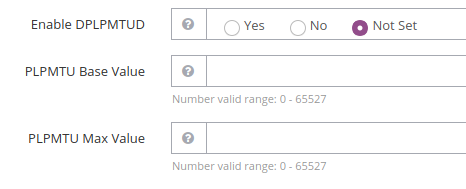
    Web Server Settings

    Performance Improvement

    The performance gain of using larger packets is straightforward: fewer packets are needed to transfer the same amount of data. This has two positive effects:

    1. Both sender and receiver have fewer packets to keep track of. This means fewer packets to encrypt and fewer packets to acknowledge. (The sender having fewer acknowledgements to process is another beneficial effect.)
    2. Smaller network overhead, improving goodput.

    The Numbers

    The speed-up is most easily observed when the sender transmits a lot of data and uses close to 100% of CPU. To do this, I used a command-line HTTP/3 client from our lsquic GitHub library to open five parallel connections to our HTTP/3 server on the local interface and fetch a 1 GB file each. (Five is an arbitrary number that produces a good load on my workstation; another number of connections could be used.) Using NetEm, I set the delay to be 1 ms (for an RTT of 2 ms).

    I tested three scenarios:

    1. DPLPMTUD is turned off on the server. This is as if DPLPMTUD were never implemented — maximum QUIC packet size is 1252 bytes.
    2. DPLPMTUD is turned on. This results in server connections probing for a maximum packet size of 1472 bytes.
    3. DPLPMTUD is turned on and the Maximum PLPMTU is set to 4096 bytes. This is not a realistic value to use on the Internet, but plausible on a local network.

    The metric is the time it takes all five connections to fetch a 1 GB file from the HTTP/3 server. Each scenario is run three times and the median time is recorded.

    Scenario Timing Improvement
    1: No DPLPMTUD 19.9 seconds 0% (baseline)
    2: Default: PLPMTU is 1472 bytes 17.7 seconds 11%
    3: PLPMTU is 4096 bytes 13.0 seconds 35%

    Transferring data in 8/9th of the time just by changing the packet size is a pretty good deal. Outside of the lab, the performance gain may not be as dramatic, but it will be a significant improvement nonetheless.

    Browser Support

    The browsers do not need any configuration to take advantage of DPLPMTUD: it will just work. Chrome limits PLPMTU to 1472 bytes by sending the special max_udp_payload_size QUIC transport parameter. Firefox does not limit PLPMTU. In practical terms, in a default server setup, the effect will be the same on both these browsers.

    Conclusion

    DPLPMTUD is a neat and effective performance booster for a protocol that is not easy to optimize. Users of LiteSpeed products can take advantage of it today: DPLPMTUD support is included in OpenLiteSpeed 1.7.5 and the upcoming LiteSpeed Web Server 6.0 and is enabled by default. Following our pioneer tradition, we deliver cutting edge technology before anybody else.

    Finding a good PLPMTU value quickly is the subject of ongoing research — both here at LiteSpeed and in the IETF community. Stay tuned, for we reserve the right to make our implementation even faster in the future!

  • Performance Comparison of QUIC with UDP and XDP

    Performance Comparison of QUIC with UDP and XDP

    Compare Performance QUIC UDP XDP

    Goal: Determine whether any performance gain can be achieved with XDP UDP versus kernel UDP

    HTTP/3 uses QUIC which in turn uses UDP (User Datagram Protocol) rather than TCP/IP for communications. XDP (eXpress Data Path) has been added recently to several operating systems to provide User Space applications performance comparable to direct kernel applications.

    The goal of this blog is to determine if QUIC can gain significant enough performance to justify implementing XDP where it is available. Understanding performance gains usually requires detail so besides a simple test, a profiler will be used to see exactly where performance gains occur.

    XDP can be run with hardware support or can be run entirely in software. The goal is to have an XDP program be usable in the widest possible range of computing environments. This is best accomplished by targeting virtual machines.

    The Test Environment

    LSQUIC

    The QUIC engine used was the popular open-source LSQUIC library available from LiteSpeed Technologies. Only small modifications were made to the base library to support XDP. The XDP functionality was provided by a separate module, which implemented LSQUIC callbacks to send, receive, and allocate packets. Testing was performed using the http_server and http_client programs provided by LSQUIC, modified as necessary.

    The client machine ran a released version of the http_client program from the LSQUIC library and was always the receiver. It was specified to use the Q046 QUIC protocol version.

    The server machine ran the modified version of the http_server program from the LSQUIC library and was run with command line parameters to use either the native UDP or the XDP UDP. It ran in Interop mode, which is a mode of the program where data is transmitted without having to be read from disk.

    Simple volume tests of 2GB were executed to show performance differences between native UDP and XDP UDP. A profiler was used to examine the effect of XDP UDP versus native UDP in the program to help identify specific bottlenecks.

    Hardware and Software

    Server machine:

    • OS: Lubuntu v19.04
    • CPU: Xeon E7 2.4 Ghz
    • Host: Proxmox 6.1
    • Host NIC: Intel X540-AT2 10Gb dual port NIC.
    • VM type: KVM
    • VM Memory: 8 GB
    • VM NIC: virtio_net driver (it has specific performance improvements for XDP built in)

    Client machine:

    • OS: Lubuntu v19.04
    • CPU: Xeon E5 a 3.6 Ghz
    • VM type: None.
    • Memory: 8 GB
    • NIC: Intel X540-AT2 10Gb dual port NIC.

    NOTE: A non-VM machine was chosen with a high speed data path so as to best simulate access to the wider internet in a controlled environment. Other works showing performance include this one, which shows runs simply tossing away or moving data without any real involvement. In contrast, we believe our comparison is the first where a real application could be used.

    The Tests and Results

    3 runs in a row were performed by the client machine pointing to the server machine which was configured to run in native UDP mode. Results reported were:

    • Test 1: 111,036,768 bytes/sec
    • Test 2: 98,336,240 bytes/sec
    • Test 3: 96,860,121 bytes/sec

    Resulting in an average of 102,077,709 bytes per second.

    The server was restarted to run in XDP UDP mode and the client tests were repeated:

    • Test 1: 152,644,777 bytes/sec
    • Test 2: 147,426,653 bytes/sec
    • Test 3: 138,277,563 bytes/sec

    Resulting in an average of 146,116,331 bytes per second.

    XDP Gets the Win

    This is a 43% performance improvement by changing from native UDP sends to XDP UDP sends.

    By examining the top program on all runs we could see that the server program was running at 100% or nearly so. On the client machine the CPU differences were significant. When running in XDP UDP mode the CPU utilization was close to or exceeding 70%. When running in native UDP mode the CPU utilization was less than 60%. This implies that the limit was in the CPU on the server system, which is where the UDP transmissions were occurring.

    Flame Graph from perf Profiling

    Since there’s such a significant difference in performance a profiler was used to see exactly where the program was spending its time. In particular the profiler perf was used as it provides great detail.

    Flame Graph for native UDP

    Processing the perf output with FlameGraph produces:

    In a flamegraph the widest (horizontal) bars take the most CPU. As you go up the graph, you go deeper into the call stack. At the bottom is http_server. As you go up, you go into the program. The bar stays very wide until send_packets_out, an LSQUIC function that has two expensive children, gquic_encrypt_packet and send_batch, the latter being the more expensive of the two. Following send_batch it continues staying very wide into __libc_sendmsg where it leaves the program entirely and is routed into the kernel. From this we can determine that the kernel overhead is by far the most CPU intensive cost.

    Flame Graph for XDP

    Running the same perf run and FlameGraph with XDP results in:

    QUIC with XDP UDP

    This flamegraph has a much faster separation into narrower functions indicating that there are more contributors to CPU cost, in other words, not a single bottleneck. As above the widest row stays wide going into the program until send_packets out where it breaks into gquic_encrypt_packet and send_batch, where send_batch is the slightly wider function. The entry point into the kernel is __libc_sendto where it is barely the widest row at that depth indicating that CPU overhead of encryption is nearly as expensive as transmission.

    This gives us an indication that the kernel overhead is substantially reduced in XDP and explains the performance improvements.

    Conclusions

    The goal of this blog post was to determine where the bottlenecks in QUIC and HTTP/3 are and to see if the XDP UDP interface could help in improving the overall performance. The results of the tests show quite convincingly that XDP reduces the kernel penalty of native UDP.

    While XDP UDP is not a perfect solution for many environments as it is Linux specific it appears that for Linux web servers implementing XDP will result in higher overall performance.

  • Fast Huffman Encoder

    Fast Huffman Encoder

    Fast Huffman Encoder

    LiteSpeed’s HPACK Huffman Encoder has been optimized: it now runs twice as fast as before. In this article, we present the Fast Huffman Encoder, share a few optimization tricks and pitfalls, and benchmark several Huffman encoder implementations.

    Introduction

    Huffman encoder is used both in HTTP/2 and HTTP/3 stacks (HPACK and QPACK compression, respectively). Speeding up this component thus leads to a double win.

    In our previous blog post, we discussed how we sped up our Huffman decoder. The main idea was that we can process the input two, rather than one, bytes at a time. The same approach can be used to speed up the Huffman encoder.

    Unlike the decoder, the encoder implementations by LiteSpeed, nginx, h2o, and nghttp2 do not share a common ancestor. For that reason, we will benchmark all of them.

    Starting Line

    Before optimization, the main encoder loop in our implementation looks like this:

        while (src != src_end)
        {
            cur_enc_code = encode_table[*src++];
            if (bits_used + cur_enc_code.bits < sizeof(bits) * 8)
            {
                bits <<= cur_enc_code.bits;
                bits |= cur_enc_code.code;
                bits_used += cur_enc_code.bits;
                continue;
            }
            else if (p_dst + sizeof(bits) <= dst_end)
            {
                bits <<= sizeof(bits) * 8 - bits_used;
                bits_used = cur_enc_code.bits - (sizeof(bits) * 8 - bits_used);
                bits |= cur_enc_code.code >> bits_used;
    #if UINTPTR_MAX == 18446744073709551615ull
                *p_dst++ = bits >> 56;
                *p_dst++ = bits >> 48;
                *p_dst++ = bits >> 40;
                *p_dst++ = bits >> 32;
    #endif
                *p_dst++ = bits >> 24;
                *p_dst++ = bits >> 16;
                *p_dst++ = bits >> 8;
                *p_dst++ = bits;
                bits = cur_enc_code.code;   /* OK not to clear high bits */
            }
            else
                return -1;
        }
    

    Where an element of encode_table is as follows:

    struct encode_el
    {
        uint32_t code;
        int  	bits;
    };
    

    Each byte of input is used as an index into encode_table. The associated encoded bit string is added to the accumulator buffer bits, which is an 8-byte or 4-byte integer, depending on the platform. When bits is full, its bytes are written out and the accumulator is reset.

    We want to reduce the number of branches. A useful metric is “number of conditionals per byte of input.” In this loop, we check whether

    1. we’ve run out of input (for every input byte);
    2. the accumulator buffer is full (for every input byte); and
    3. we’ve run out of output (every 8 output bytes).

    Estimating average compression ratio of 0.75, this translates to 2.1 branches per byte of input. Can we do better?

    Big Table

    Since there is no obvious way to reduce the number of conditionals in the processing loop, the next thing to do is to reduce the number of input units: that is, process two bytes at a time instead of one.

    struct henc {
        unsigned lens;
        uint32_t code;
    } hencs[] = {
        [0x0000] = { 26, 0x3FF1FF8 },
        [0x0001] = { 64, 0 },
        /* --- 8< -- snip --- 8< --- */
        [0x6161] = { 10, 0x63 },
        /* --- 8< -- snip --- 8< --- */
        [0xFFFF] = { 64, 0 },
    };
    

    This table has 64K entries. Each element contains the bit string code that represents the Huffman encoding of the two input bytes and its length, lens. Because code is 32 bits wide, some two-byte encodings cannot be represented. They are marked by lens having value 64. In this case, the encoder has to fall back to processing input byte by byte.

    New Loop

    The new loop is broken up into three parts below to place explanation next to the code. You can view the loop in its entirety on GitHub.

    Read

        while (src + sizeof(bits) * 8 / 5 + sizeof(idx) < src_end
                                        && p_dst + sizeof(bits) <= dst_end)
        {
            memcpy(&idx, src, 2);
            henc = &hencs[idx];
            src += 2;
            while (bits_used + henc->lens < sizeof(bits) * 8)
            {
                bits <<= henc->lens;
                bits |= henc->code;
                bits_used += henc->lens;
                memcpy(&idx, src, 2);
                henc = &hencs[idx];
                src += 2;
            }
    

    To avoid source and destination checks inside the loop, they are performed once. The body of the loop is executed if there are enough source bytes to fill the accumulator with shortest Huffman codes and read two more bytes (that translates to 64 / 5 + 2 = 14 bytes on 64-bit platforms) and enough space in the destination buffer to fit all bytes in the accumulator.

    With that out of the way two bytes are read into idx and this value is used to point to the corresponding entry in the hencs table. memcpy is used to guarantee aligned access.

    The loop condition of the inner while loop checks two things:

    1. whether the accumulator will be filled by the current output bit string; and
    2. output bit string validity.

    The reason for making 64 the invalid value in the hencs table is to be able to combine the two checks above into a single expression. If 0 were the invalid value indicator, the condition would have to be more complicated:

    henc->lens && bits_used + henc->lens < sizeof(bits) * 8
    

    This optimization makes a noticeable difference by reducing the number of instructions in the inner loop.

    Write

            if (henc->lens < 64)
            {
                bits <<= sizeof(bits) * 8 - bits_used;
                bits_used = henc->lens - (sizeof(bits) * 8 - bits_used);
                bits |= henc->code >> bits_used;
    #if UINTPTR_MAX == 18446744073709551615ull
                *p_dst++ = bits >> 56;
                *p_dst++ = bits >> 48;
                *p_dst++ = bits >> 40;
                *p_dst++ = bits >> 32;
    #endif
                *p_dst++ = bits >> 24;
                *p_dst++ = bits >> 16;
                *p_dst++ = bits >> 8;
                *p_dst++ = bits;
                bits = henc->code;   /* OK not to clear high bits */
            }
    

    If the current henc entry is valid, the accumulated bytes are written to destination buffer. First, the accumulator bits is filled to the max by adding first part of the current output bit string henc->code.

    Because the destination check has already been performed and we know the number of bytes to write, it is done in a series of shift, assignment, and increment statements.

    henc->code is simply copied to the bits accumulator as is not necessary to clear any bits. The unused bits from henc->code will be processed based on the value of bits_used.

    Note that it costs only one conditional to output a bits-ful of bytes.

    Fallback

            else
            {
                src -= 2;
                break;
            }
        }
    

    The fallback occurs when the current two-byte input sequence translates to an output bit string that is too long. The input pointer is backed up two bytes and the new loop is exited, with control proceeding naturally to the original byte-by-byte loop.

    Count Branches

    The loop checks:

    1. source and destination bounds once per every 8 output bytes;
    2. accumulator fill every two input bytes; and
    3. code validity every 8 output bytes.

    Again, assuming compression ratio to be 0.75, this translates to 1 / (8 / 0.75) + 1 / 2 + 1 / (8 / 0.75) = 0.69 branches per input byte. This is three times fewer branches than in the original loop.

    Benchmarks

    We compare the optimized Huffman encoder (litespeed) to the original (litespeed-orig), as well as to Huffman decoders from nginx, h2o, and nghttp2 projects. I extracted the relevant pieces of code from each project and placed them into separate C files in our Huffman encoder benchmark GitHub repo.

    We will test using four different inputs:

    1. litespeed.txt: This file contains the string “LiteSpeed”. It is used to test small inputs.
    2. x-fb-debug.txt: This is a medium-size string taken from a real x-fb-debug header from the Facebook response QIF file. This is used to test medium-size input.
    3. idle.huff: This file contains the first few paragraphs from The Idle Thoughts of an Idle Fellow by Jerome K. Jerome. It is used to test large input.
    4. x-fb-backslash.huff: This is the same as (2), except with three backslashes inserted in the middle of the string. The backslash is encoded using a 19-bit code, and so the Fast Huffman Encoder will have to fall back to using the original byte-by-bytes loop.

    The table below was generated by the helper program bench.pl. In addition to running the driver and calculating median values, it first calibrates each input file so that the fastest of the encoders runs for at least five seconds. Each encoder runs an input file five times and the median run time is taken. These are the numbers for each encoder in the table below. They are in seconds.

    Results

    Input
    Number of iterations
    litespeed
    litespeed-orig
    nginx
    h2o
    nghttp2
    litespeed.txt 327680000 8.67 8.80 9.61 10.19 20.59
    x-fb-debug.txt 40960000 5.25 11.23 11.13 18.83 30.31
    x-fb-backslash.txt 40960000 7.22 12.65 11.20 19.80 32.21
    idle.txt 2560000 9.32 15.89 17.60 29.50 52.25

    As expected, there is no speedup for litespeed.txt, as that string is shorter than 14 bytes. For x-fb-debug.txt, x-fb-backslash.txt, and idle.txt, litespeed is 2.14, 1.75, and 1.70 times, respectively, faster than litespeed-orig. litespeed Huffman encoder beats nginx, h2o, and nghttp2 in all tests. This is how much faster:

    input
    litespeed
    nginx
    h2o
    nghttp2
    litespeed.txt 1.00 1.11 1.18 2.37
    x-fb-debug.txt 1.00 2.12 3.59 5.77
    x-fb-backslash.txt 1.00 1.55 2.74 4.46
    idle.txt 1.00 1.89 3.17 5.61

    litespeed is about twice as fast (2.12 and 1.89) as nginx on normal input when the string is not tiny (and when it is tiny, its still faster).

    h2o is an also-ran, while the nghttp2 encoder is the slowest of the bunch.

    Conclusion

    The Fast Huffman Encoder uses the same insight as the Fast Huffman Decoder: the subset of commonly used characters in HTTP headers is much smaller than the set of possible characters. For inputs of 12 characters or longer, the encoder virtually always uses the fast path, and the fallback is cheap. At the cost of 512KB of a read-only lookup table, we've doubled the Huffman encoding speed.

    Portability

    This is a bonus section for the dedicated. Welcome!

    Table Compilation: Endianness

    The initial description of the big table was a bit of a white lie. The table actually looks like this:

    #if __BYTE_ORDER == __LITTLE_ENDIAN
    #define I(i,j) ((j<<8)|i)
    #else
    #define I(i,j) ((i<<8)|j)
    #endif
    #if UINTPTR_MAX == 18446744073709551615ull
    #define X32 32
    #else
    #define X32 64
    #endif
    struct henc {
        unsigned lens;
        uint32_t code;
    } hencs[] = {
        [I(0,0)] = {26,0x3FF1FF8},
        [I(1,0)] = {64,0},
        /* --- 8< --- snip --- 8< --- */
        [I(97,97)] = {10,0x63},
        /* --- 8< --- snip --- 8< --- */
        [I(203,97)] = {X32,0xFFFFFBC3},
        /* --- 8< --- snip --- 8< --- */
        [I(255,255)] = {64,0},
    };
    #undef X32
    #undef I
    

    The I() macro is used to generate different indexes on little-endian and big-endian platforms.

    Avoid Undefined Behavior

    The X32 macro effectively disables 32-bit output sequences on 32-bit platforms. This is because of the left shift used when outputting encoded buffer in the big loop. The C standard says the following about bitwise shift operators:

    If the value of the right operand is negative or is greater than or equal to the width of the promoted left operand, the behavior is undefined.

    This means that the result of the following statement may be undefined if we shift by 32:

    bits <<= sizeof(bits) * 8 - bits_used;
    

    To avoid bits_used from being 0 here, the longest code must be smaller than 32 on a 32-bit platform. We guarantee this with the inner while loop.

    Aligned Access

    We read encoder input as a sequence of two-byte integers by copying memory to a local variable:

    memcpy(&idx, src, 2);
    henc = &hencs[idx];
    

    On Intel x86 and x64 architecture, data does not have to be aligned, so one could (or could one?) get away with writing code like this:

    henc = &hencs[ * (uint16_t *) src];
    

    But then this would not work on platforms with stricter alignment requirements, such as SPARC.

    Fortunately, the compiler is smart enough to compile both of these code snippets to exactly the same -- fast -- code.

  • Fast Huffman Decoder

    Fast Huffman Decoder

    Fast Huffman Decoder

    Summary

    The LiteSpeed HPACK Huffman decoder is twice as fast as that used by nginx. This is one of the reasons LiteSpeed Web Server outperforms nginx in a variety of HTTP/2 benchmarks. This article describes how our Huffman decoder works and then tests its performance against that of nginx Huffman decoder. The benchmarked code is available in a public GitHub repository, making the results easy to verify.

    Introduction

    The latest major release of LiteSpeed Web Server includes several new features and optimizations. Our web server outperforms nginx by a factor of 2 to 12 in several readily reproducible benchmarks.

    How do we do it? The truth is, when we are not adding new features, we are optimizing existing code. We 1) examine each module and submodule to find one we can speed up; 2) speed it up; and 3) go back to step 1. Sometimes we wake up because a way to elide a branch in the middle of a tight loop has appeared to us in a dream. Then we turn on the terminal and put down the nocturnal epiphany in code.

    Why do we do it? HTTP/2 is on its way to become the dominant web protocol. HTTP/2 performance is crucial for any modern web server. And, of course, we want to be faster than everyone else.

    This article describes one of the optimizations that made ours the fastest HTTP/2 implementation in the world.

    History

    Well-led software projects are not afraid to borrow good ideas, for the hubris of the not-invented-here syndrome often leads to suboptimal implementations. Such is the story of the HPACK Huffman decoder in today’s major web servers. Apache, LiteSpeed, and nginx have all, until recently, used the same Huffman decoder implementation.

    HPACK is a specialized compression mechanism for HTTP headers, designed specifically for HTTP/2. Header compression is one of HTTP/2’s “killer features:” it reduces bandwidth necessary to transfer headers and thus improves throughput. Huffman coding is used to compress headers that are not in one of the HPACK tables.

    In January of 2014, over a year before the HPACK RFC was published, Tatsuhiro Tsujikawa rewrote Huffman decoder in nghttp2’s implementation of HPACK. (nghttp2 is used by Apache to provide HTTP/2 functionality.) The new code used the method described eleven years earlier by Renato Pajarola in his paper Fast Prefix Code Processing. It is significantly faster than prior methods. The idea is to process compressed data several bits — instead of one bit — at a time. Tatsuhiro chose 4 bits as input length. 4 is a good number. Conveniently, it is exactly half the length of a byte. A shorter sequence would not have sped up the code as much, while a longer sequence would grow the transition table.

    Because HPACK Huffman codes do not change, the transition table is generated once — at compile time. The static table is then used by a simple, robust, and fast decoder function. This was a good idea and a good piece of code, so LiteSpeed, nginx, and others copied (with slight alterations) the code, and moved on.

    Fast or Slow?

    Our own version of the Huffman decoder looks like this (see litespeed.c):

    int
    lshpack_dec_huff_decode_full (const unsigned char *src, int src_len,
                                                unsigned char *dst, int dst_len)
    {
        const unsigned char *p_src = src;
        const unsigned char *const src_end = src + src_len;
        unsigned char *p_dst = dst;
        unsigned char *dst_end = dst + dst_len;
        struct decode_status status = { 0, 1 };
    
        while (p_src != src_end)
        {
            if (p_dst == dst_end)
                return -2;
            if ((p_dst = hdec_huff_dec4bits(*p_src >> 4, p_dst, &status))
                    == NULL)
                return -1;
            if (p_dst == dst_end)
                return -2;
            if ((p_dst = hdec_huff_dec4bits(*p_src & 0xf, p_dst, &status))
                    == NULL)
                return -1;
            ++p_src;
        }
    
        if (!status.eos)
            return -1;
    
        return p_dst - dst;
    }
    

    Even though 4 bits at a time is faster than one bit at a time, the code is still pretty expensive. One way to look at this is to count the number of branches for each byte of input. Inside the while loop above, there are four if statements. This is in addition to conditionals in hdec_huff_dec4bits function (there are two) and in addition to the while loop conditional that checks for end of input. That is seven branches for each byte of input. Can we do better?

    Common Case

    HPACK defines 257 Huffman codes: one for each of the 256 possible bytes and one for the special end-of-stream (EOS) symbol. The codes range from 5 to 30 bits in length: the more likely the value, the shorter its code. What is important to realize is that two thirds of the Huffman codes are virtually never used in HTTP headers. Most of the time, only shorter codes are used. For example, no codes longer than 13 bits are used in the QIF corpus. In this restricted domain, there are more possibilities for optimization.

    Big Table!

    The idea is to generate a large table that can be indexed by the longest of the common Huffman codes. For example, a table with 64K entries can be indexed by a 16-bit value, representing a sequence of 16 input bits. In the common case, a 16-bit sequence is wide enough to contain Huffman codes for one or more output symbols (the average number is 2.14 output symbols per 16 bits).

    Encountering a code longer than 16 bits would require falling back to the original, full Huffman decoder that processes the input 4 bits at a time.

    Fast Huffman Decoder Details

    (To keep the blog post manageable, only the most important snippets of code are included here. For your convenience, the table and the Fast Huffman Decoder function are available in their entirety here: litespeed.c, litespeed-table.h.)

    The Table

    As mentioned above, the table contains 64K entries, for the full range of values that fits into a 16-bit integer, from 0 to 65,535. Each entry contains three things:

    1. Sum of lengths of Huffman codes consumed from the input stream, in bits. This value has a valid range from 5, which is the length of the shortest HPACK Huffman code, to 16, which is the number of bits available for input. Remember, the input bits here are in the index value.
    2. Number of output bytes. The smallest value is 1, while the largest is 3. 3 is how many 5-bit codes can fit into 16 bits.
    3. Output bytes themselves.
    static const struct hdec {
        uint8_t lens;
        uint8_t out[3];
    } hdecs[] = {
        /* 0 */ {(15<<2)|3,{48,48,48}},
        /* 1 */ {(15<<2)|3,{48,48,48}},
        /* 2 */ {(15<<2)|3,{48,48,49}},
        /* 3 */ {(15<<2)|3,{48,48,49}},
        /* --- 8< --- many rows skipped --- 8< --- */
        /* 65532 */ {(15<<2)|1,{123,0,0}},
        /* 65533 */ {(15<<2)|1,{123,0,0}},
        /* 65534 */ {0,{0,0,0,}},
        /* 65535 */ {0,{0,0,0,}},
    };
    

    To keep each element to 4 bytes, Huffman codes lengths and number of output bytes are combined into a single struct member lens. The 3-byte array out holds the output bytes themselves. For example, element 2 above consumes 15 bits of input and outputs 3 bytes: 0, 0, 1. Element 65533 consumes 15 bits of input and outputs 1 byte: {.

    The last two elements of the table have lens equal zero. This indicates that there is no matching Huffman code that fits into 16 bits. The HPACK Huffman code table shows that, indeed, all codes longer than 16 bits begin with either 11111111 11111110 (65534) or 11111111 11111111 (65535) bit sequence. When this code is encountered, the Fast Huffman Decoder has to use the fallback mechanism.

    Main Loop

    The main loop can be described in this high-level pseudocode:

    while (have input)
    {
        fill buf;
        drain buf;
    }
    

    Several input bytes are copied into an intermediate representation. This batch of input bits is then processed: an element in hdecs table is looked up and output is written, until the number of available bits (avail_bits) falls under 16. At this point, buf is refilled.

    Input Batching

    The input bytes are copied into an integer buffer buf, which is the size of a pointer (8 bytes on 64-bit platforms). avail_bits holds the number of input bits available in buf. avail_bits must be at least 16 to be able to use the large table.

    if (src + sizeof(buf) <= src_end)
        /* --- 8< --- omitted for brevity, refer to litespeed.c --- 8< --- */
        ;
    else if (src < src_end)
        do
        {
            buf <<= 8;
            buf |= (uintptr_t) *src++;
            avail_bits += 8;
        }
        while (src < src_end && avail_bits <= sizeof(buf) * 8 - 8);
    else
        break;  /* Normal case terminating condition: out of input */
    

    Filling buf is optimized. If the number of remaining input bytes is at least the size of buf, we can use a switch statement. Otherwise, bytes are added to buf using a while loop.

    Batch Processing

    The batch of input bits in buf is used to look up elements in hdecs. If the output buffer has enough room to fit the maximum number of bytes that could possibly be encoded in buf (64 / 5 = 12 bytes on 64-bit platform), the processing loop can skip destination check.

    if (dst_end - dst >= (ptrdiff_t) (8 * sizeof(buf) / SHORTEST_CODE)
                                                    	&& avail_bits >= 16)
    {
        /* Fast path: don't check destination bounds */
        do
        {
            idx = buf >> (avail_bits - 16);
            hdec = hdecs[idx];
        	dst[0] = hdec.out[0];
        	dst[1] = hdec.out[1];
        	dst[2] = hdec.out[2];
        	dst += hdec.lens & 3;
        	avail_bits -= hdec.lens >> 2;
        }
        while (avail_bits >= 16 && hdec.lens);
        if (avail_bits < 16)
            continue;
        goto slow_path;
    }
    

    The do/while loop above is the main reason the Fast Huffman Decoder is fast. The only conditional is the terminating condition, which checks both the number of available bits and hdec validity at the same time. The average number of consumed bits in hdecs table is 12.76. This translates to 0.63 branches per input byte. Far cry from seven! Of course, there are branch penalties elsewhere — filling the batch, error checking — but this loop’s speed makes up for them in spades.

    The next 16-bit input sequence to use is in the most significant bits of buf. Since idx is uint16_t, there is no need to mask out the low 16 bits of buf: assignment to uint16_t takes care of that.

    All three bytes of the hdec.out array are written to the destination buffer. This saves a conditional at a cost of an unnecessary write. 15% of hdecs entries output 3 bytes, while 84% output 2 bytes. On average, then, 5 times out of 6 an extra byte is written to dst. This is cheaper than a branch.

    As described above, invalid entries have lens equal to zero. In this case, the values of dst and avail_bits are not changed inside the loop. The if statement after the loop is used to differentiate whether we ran out of bits (the common case) or found an invalid code. The latter forces us to fall back to the full Huffman decoder.

    A slower while loop is utilized when there is not much room left in the destination buffer.

    Fallback

    When a long (or invalid) Huffman code is encountered, we have to use the full (original) Huffman decoder to process the rest of the string.

    /* Find previous byte boundary and finish decoding thence. */
    while ((avail_bits & 7) && dst > orig_dst)
        avail_bits += encode_table[ *--dst ].bits;
    src -= avail_bits >> 3;
    r = lshpack_dec_huff_decode_full(src, src_end - src, dst, dst_end - dst);
    if (r >= 0)
        return dst - orig_dst + r;
    else
        return r;
    

    We cannot start processing from the current input position if the Huffman code is not on the byte boundary. We need to rewind the input pointer toward the beginning, looking for the byte boundary. To do that, we use the bytes we already output and the Huffman encoder table. We back up until avail_bits is a multiple of 8. In the worst case, we will stop at the beginning of the input, but that usually does not happen for an input of any appreciable length.

    Benchmarks

    We will compare the Fast Huffman Decoder with Huffman decoder from nginx. To do that, I extracted Huffman decoder functions from ls-hpack and nginx and wrote a small driver program that runs the decoder. See our Huffman decoder GitHub repo. The specific versions of the decoder are here (LiteSpeed) and here (nginx). The latter has been adapted from nginx 1.16.1. You should be able easily to clone this repository and replicate our results.

    The driver is a simple program that reads Huffman-encoder string from a file and decodes it a number of times. The less time a decoder takes to decode the input, the faster the decoder.

    For example:

    sh$ time -p ./comp-dec idle.huff 1000000 litespeed
    real 8.35
    user 8.33
    sys 0.00
    sh$ time -p ./comp-dec idle.huff 1000000 nginx
    real 16.20
    user 16.16
    sys 0.00
    

    It took Fast Huffman Decoder 8.35 seconds to decode Huffman-encoded string in idle.huff one million times, while the nginx Huffman decoder took 16.20 seconds.

    We will test using four different inputs:

    1. litespeed.huff. This is a Huffman-encoded string “LiteSpeed”. It is used to test small inputs.
    2. x-fb-debug.huff. This is a medium-size string taken from a real x-fb-debug header from the Facebook response QIF file. This is used to test medium-size input.
    3. idle.huff. This file contains the first few paragraphs from The Idle Thoughts of an Idle Fellow by Jerome K. Jerome. It is used to test large input.
    4. x-fb-backslash.huff. This is the same as (2), except with a backslash inserted in the middle of the string. The backslash is encoded using a 19-bit code, and so the Fast Huffman Decoder will have to backtrack and fall back to the full decoder. This is used to test how well (or poorly) the Fast Huffman Decoder performs in this case.

    We’ll run each input file five times for each decoder, LiteSpeed and nginx. Then we will compare median average run times. (See the complete numbers at the bottom of this article.)

    Results

    Input nginx LiteSpeed Speed-up
    litespeed.huff 5.05s 2.57s 1.96x
    x-fb-debug.huff 5.33s 2.75s 1.94x
    idle.huff 16.09s 8.22s 1.96x
    x-fb-backslash.huff 4.86s 4.21s 1.15x

    Presented with normal input, the LiteSpeed Fast Huffman Decoder almost doubles the speed of the nginx Huffman decoder. Even when the Fast Huffman Decoder has to backtrack due to uncommon input, it still performs significantly better than the alternative.

    Conclusion

    The LiteSpeed Fast HPACK Huffman Decoder leverages its knowledge of the expected input to optimize for the common case. The fast code path uses two to three times fewer conditionals than the original decoder, making it twice as fast as the original Huffman decoder for all but the most unusual inputs. This is one of the many optimizations we performed — and continue to perform — to make ours the fastest web server, period.

    We also use the Fast Huffman Decoder in our QPACK library, speeding up our HTTP/3 stack. We intend to maintain performance leadership with next-generation HTTP version as well.

    Post Scriptum

    While writing this article, I found two more optimizations that would make the Fast Huffman Decoder even faster. Stay tuned!

    Raw Numbers

    litespeed.huff

    Needed to set number of iterations to 100,000,000 to get into the seconds.

    nginx 5.05 4.94 4.97 5.07 5.07
    LiteSpeed 2.93 2.74 2.78 2.74 2.75

    x-fb-debug.huff

    Number of iterations is set to 10,000,000

    nginx 5.27 5.37 5.31 5.34 5.33
    LiteSpeed 2.75 2.72 2.77 2.74 2.85

    idle.huff

    Number of iterations set to 1,000,000

    nginx 16.09 16.06 16.13 16.09 16.05
    LiteSpeed 8.17 8.25 8.21 8.22 8.29

    x-fb-backslash.huff

    Number of iterations set to 10,000,000

    nginx 4.82 4.86 4.80 4.89 4.86
    LiteSpeed 4.21 4.23 4.21 4.22 4.20

    It is curious that this input differs only by one character from x-fb-debug.huff, yet nginx decoder processes it markedly faster. I haven’t been able — using a limited amount of time — to figure out why.

  • QUIC Performance Benchmarks with HTTP/2

    QUIC Performance Benchmarks with HTTP/2

    QUIC Performance Benchmarks

    Purpose

    As we develop our own IETF QUIC implementation, we are focused on protocol correctness and robust performance. To get a better idea of the extent of our implementation comparative performance, we decided to benchmark it against other publicly available implementations.

    Since there are few stable IETF QUIC implementations, we have restricted the list of servers tested to only mature GQUIC implementations. We have made the assumption that the performance for an IETF QUIC implementation and its GQUIC counterpart should match closely.

    Benchmark

    We have designed a flexible QUIC benchmarking program and included a testing script for easy test automation. This open-source program is available in the lsquic repository on Github. It has the ability to request an array of files over many concurrent connections using many concurrent streams. This flexibility makes it an essential tool for understanding the performance of a QUIC implementation.

    We used this program and testing script to run a series of benchmark tests to understand the strengths and weaknesses of our own QUIC implementation, as well as other publicly available implementations. The benchmarking tests are meant to push servers to their limit and simulate realistic QUIC traffic. They range from requesting many small files to requesting a few large files.

    Methods

    The benchmark tests follow the client-server model and take place on a private network with a 10G link between the two testing machines. The client testing program used is the http_client sample client distributed with the lsquic-client repository.

    The independent variables in this benchmark are server type, the number of requests, the size of requests, the number of concurrent clients, the number of concurrent connections per client, and the number of concurrent streams per client.

    The server types tested in this experiment are lsws, proto-quic, caddy, and quic-go. Not all server types will be included in each test.

    The dependent variables in this benchmark are client time, client CPU usage, server CPU usage, and in some tests, packets received on client machine.

    The testing script runs five trials and calculates the average client time as well as the standard deviation across trials. Using the Linux top(1) command, the tester manually monitors client and server CPU usage and reports an average value, rounded to the nearest factor of 5.

    Results

    Round 1: Many Small Requests

    Description

    With the first test in this series of benchmarks, looked at how each server would handle a high number of small requests. A single test client would open one hundred concurrent connections, with a maximum of ten concurrent request streams. The client would make one million requests; each request was for a 630-byte file.

    Results

    server Client_time_avg (sec) client_time_stdev Client_cpu (%) Server_cpu (%)
    lsws 12.829 0.079 90 100
    proto-quic 42.462 2.187 90 100
    quic-go 60.421 0.407 85 295
    caddy 67.706 0.380 80 335

    Discussion

    The server with the lowest average client time was the LiteSpeed Web Server. It reached full server CPU utilization for a single thread of execution. Next, Google’s proto-quic server had the second lowest average client time and reached full server CPU utilization for a single thread of execution. Finally, the Golang-based implementations, quic-go and Caddy, reported the highest average client time. Additionally, both quic-go and Caddy used more than a single thread, consuming more resources that the previously reported servers.

    Round 2

    Description

    A single test client opens ten concurrent connections, with a maximum of ten concurrent request streams. The client makes four hundred requests; each request is for a 10-megabyte file.

    ./tools/bench/lsqb.sh -a <CLIENT_PATH> -H <HOSTNAME> -s <IP>:<PORT> -p <FILE_PATH> -T 5 -C 1 -r 400 -c 10 -m 50 -w 10 -K

    Results

    server client protocol client_time_avg client_time_stdev client_cpu server_cpu
    lsws ab HTTP/1.1 8.170 0.041 100 100
    lsws h2load HTTP/2 6.948 0.221 100 100
    lsws http_client QUIC 14.385 0.290 100 90
    proto-quic http_client QUIC 49.708 1.113 80 100
    quic-go http_client QUIC 86.011 2.650 80 240
    caddy http_client QUIC 82.537 2.555 80 250

    Discussion

    The LiteSpeed Web Server (lsws) trial with the lowest average client time is the HTTP/2 protocol. Next, the HTTP/1.1 protocol had the second lowest average client time. Finally, in comparison with the other LiteSpeed Web Server trials, the QUIC protocol had the highest average client time.
    When compared to other QUIC trials, LiteSpeed Web Server (lsws) using QUIC showed the lowest average client time. It is followed by Google’s proto-quic server and the Golang-based implementations, quic-go and caddy.

    Learn more about the LiteSpeed’s lsquic implementation in the Github repository.

  • Joomla Benchmarks: LiteSpeed vs. Apache

    Joomla Benchmarks: LiteSpeed vs. Apache

    The LSCache for Joomla Module is one of our newest cache plugins. We recently teamed-up with Svend Gundestrup to generate a series of new benchmarks using one of his Joomla sites in Denmark. Svend takes a scientific approach to benchmarking, which we’ll discuss in detail after we show you the test results.

    We should mention that Svend performed all tests on his own, without any compensation from LiteSpeed, and using equipment he purchased himself.

    Benchmarks

    Return Load Tests were run using four different methods:

    • AB from within the test server
    • AB from an external server in the same region
    • Pingdom
    • GTMetrix

    Additionally, one set of Initial Load Tests was performed:

    • Pingdom

    Each type of test was run 20 times per server, making a total of 100 benchmarks for each server+cache setup. We’ll share the details in the Specifics of Testing section below.

    The goal was to compare performance between the following servers and cache solutions on a highly optimized Joomla website in a production environment, with a valid SSL certificate. We tested the following two servers+cache solutions:

    • Apache event MPM + php-FPM + Memcached + JotCache (memcached)
    • LiteSpeed Web Server + LSCache for Joomla

    Each results graph shows the average speed in milliseconds. Additionally, Svend has included some figures that help to evaluate the results from a statistical perspective: standard deviation (SD), F-test, and T-test. We’ll talk more about what those numbers mean in the Definitions section below.

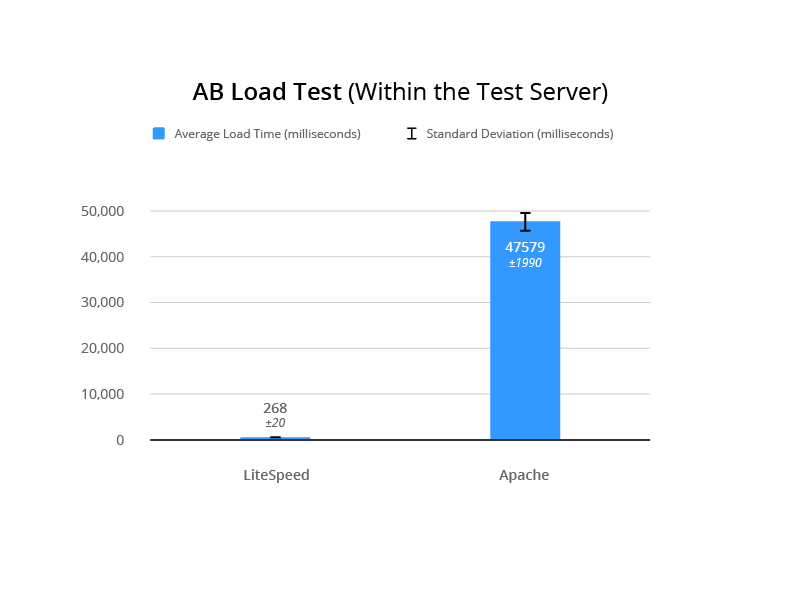
    AB Test #1 (within the test server)

    This AB load test was performed on the test server itself. The following command was used:

    ab -k -n 1000 -c 100 -H "Accept-Encoding: gzip,deflate" -l https://www.lite.lungekursus.dk/
    

    LSCache for Joomla Benchmarks: Internal AB Load Test
    F-Test 0

    T-Test 6.12E-49

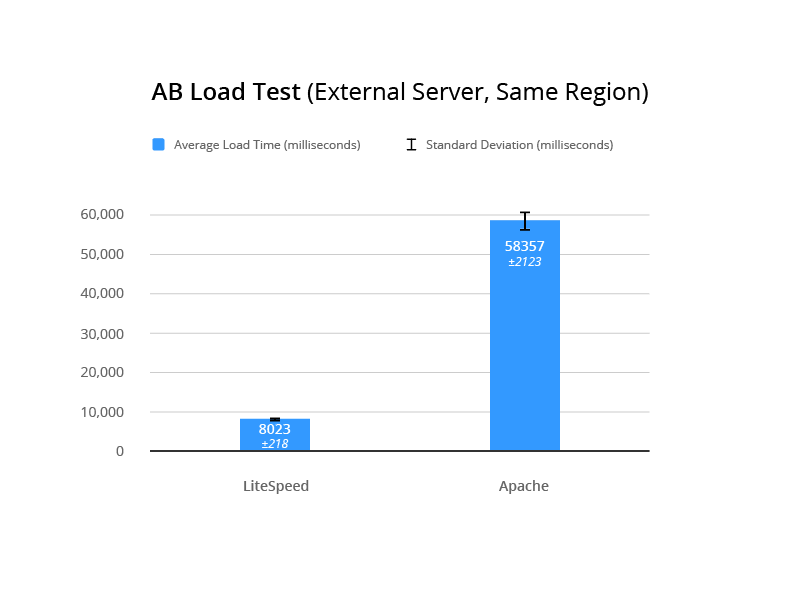
    AB Test #2 (external server, same region)

    This AB load test was performed from a server external to the test server. The following command was used:

    ab -k -n 1000 -c 100 -H "Accept-Encoding: gzip,deflate" -l https://www.lite.lungekursus.dk/
    

    LSCache for Joomla Benchmarks: External AB Load Test

    Pingdom Speed Test

    This test was run from Sweden to the test server in Amsterdam.

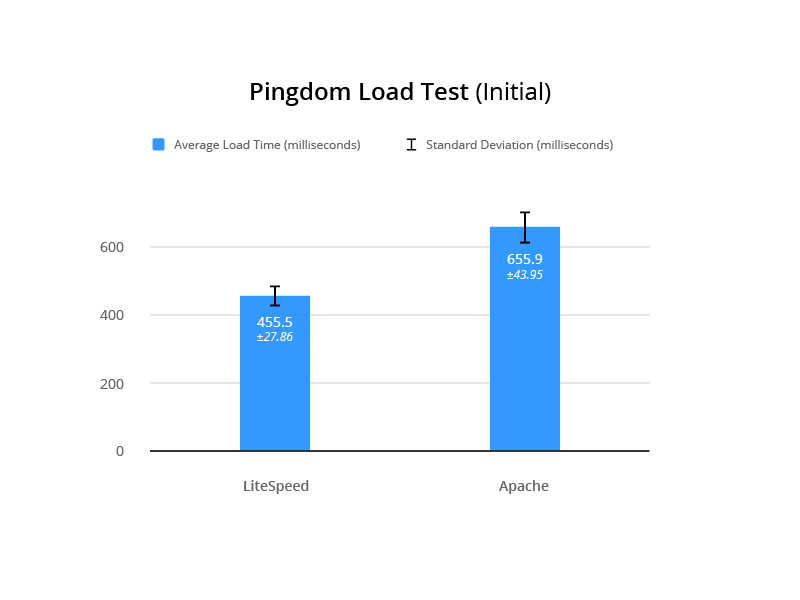
    For the Initial Load Testing, the following command was run:

    sudo /etc/init.d/php7.2-fpm restart && sudo /etc/init.d/apache2 restart
    

    For each iteration, Svend cleared the cache, restarted the server from the command line, and then verified that the cache was missed to prove that caching would have no effect on the results.
    LSCache for Joomla Benchmarks: Pingdom Initial Load Test
    F-Test 0.05369249473

    T-Test 7.63E-20

    For the Return Load Testing, the server was restarted once, all caching was cleared, and Svend loaded the website to verify a cache hit. The server was not reset in between tests.
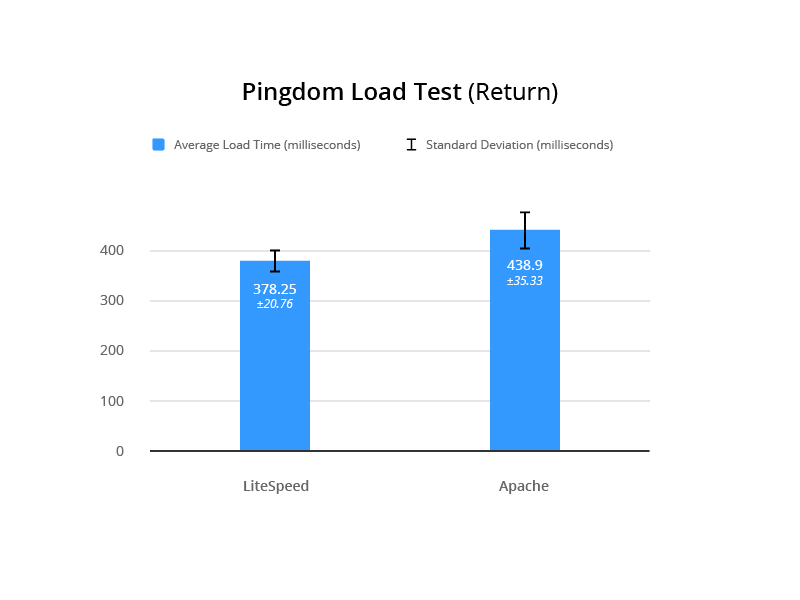
    LSCache for Joomla Benchmarks: Pingdom Return Load Test
    F-Test 0.02524102277

    T-Test 4.05E-08

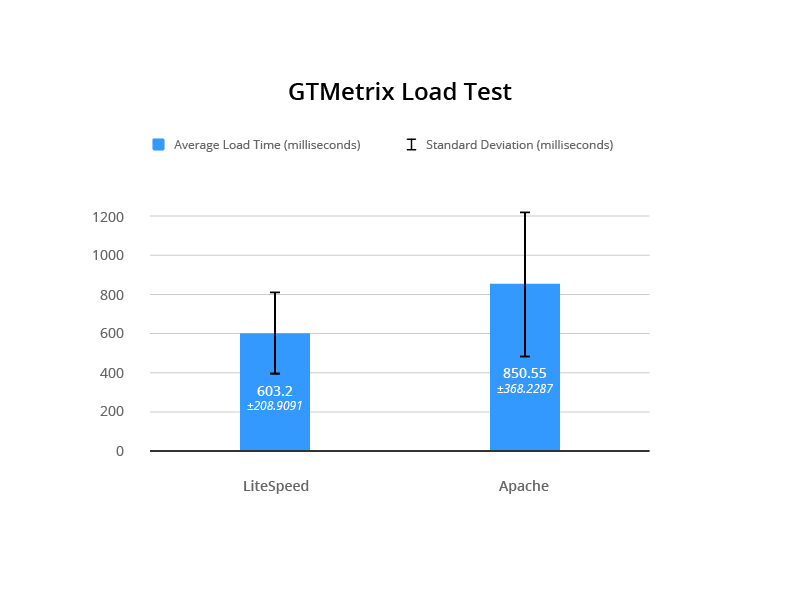
    GTmetrix

    Measuring time to fully load in the UK from the test server in Amsterdam.
    LSCache for Joomla Benchmarks: GTMetrix Load Test
    F-Test 0.01739569946

    T-Test 6.40E-03

    Test Environment

    Common To Both

    Digital Ocean server: 4GB, 80SSD, 2vCPU, based in Amsterdam, with a target audience in Denmark

    Config Server Firewall, IDS, Tripwire, MySQL, Fail2Ban

    Joomla 3.8.7, JCH Optimizer Pro, Joomla Admin (with security enabled), JA Builder template

    Apache

    Apache 2.4 with event MPM running

    PHP FPM 7.2.4.1

    Memcached

    JotCache (Memcached)

    LiteSpeed

    LiteSpeed Web Server 5.2.7

    LSCache for Joomla 1.1.1

    PHP 7.2.2-2+Xenial

    Specifics of Testing

    Each test was run as follows:

    1. service lsws stop
    2. ps -ef | grep httpd (to make sure LSWS is not running)
    3. service apache2 start
    4. ps -ef | grep apache2 (to make sure Apache is running)
    5. Enable JotCache (all plugins and dependencies)
    6. Run 20 iterations of each test
    7. service apache2 stop
    8. service lsws start
    9. Disable JotCache (and associated plugins)
    10. Enable LiteSpeed Cache
    11. Look for x-litespeed-cache: hit/miss response header to ensure LSCache is working.
    12. Run 20 iterations of each test

    Note: the .htaccess files remained unchanged during the testing

    Definitions

    Return Load Test: Load testing where the first load is discarded. This type of testing makes sense for evaluating a page cache, as the cache is not primed until the first page load triggers it.

    Initial Load Test: Load testing where the server is restarted after each test. The purpose is to test the initial first page load of the server without influence from memcached or lscache. It’s essentially the opposite of Return Load Testing, and measures the performance of the server and PHP.

    Standard Deviation: Abbreviated in our charts as SD, standard deviation measures the variation among individual test results from the mean result. A smaller standard deviation is preferable because it indicates some consistency in the test results. A higher SD indicates that the server speed is unstable. (Wikipedia)

    F-Test: Compares two sets of results and returns a number (p-value). If the p-value is high, there is not a significant difference between the two sets of results. So, for our testing, we want to see a low p-value, indicating that there is indeed a significant difference between the performance of the two servers. (Wikipedia | Google Sheets)

    T-Test: Determines if two sets of results are significantly different from each other. There are different types of T Tests, and which one you use is determined by the p-value returned by the f-test. We are looking for a low t-test value to indicate a strong probability that LiteSpeed is faster than Apache. (Wikipedia | Google Sheets)

    Why Standard Deviation?

    Svend performed all of these tests and made all of the calculations. He feels it is important to take a proper, statistically-sound approach to benchmarking. This approach involves comparing speed, loading, and repeated loading on a real website and a real server that handles IDS, security, and so on in an actual production environment.

    For each server tested, Svend calculated the standard deviation of the results. The SD indicates the stability of the test results. If you have a low SD, you are essentially saying “this server performs consistently in these tests.” A high SD means that the results for that server are erratic and inconsistent. In these tests, the SD calculated for LiteSpeed results was always much lower than that calculated for Apache results, leading to the conclusion that LiteSpeed Web Server is the more consistently performing server.

    Why F Tests and T Tests?

    Being more consistent doesn’t necessarily make it a better performer, however. And so Svend ran f-tests on most of the datasets above. The f-tests generated a p-value, which could be used to determine whether there was truly a significant difference between the two servers’ benchmark results. In every case, the p-value indicated that the test results of the two servers were significantly different from each other.

    Now that he knew that there was definitely a difference, he needed to calculate the probability that one server would outperform the other. He ran t-tests on the dataset. The tests returned low values in all cases, which indicated a strong possibility that LiteSpeed is faster than Apache.

    Why Follow This Process?

    You might be wondering if all of this is necessary. After all, you can simply look at the data and see that LiteSpeed’s numbers are always better than Apache’s. While that might be true, the statistical approach gives you a way to scientifically quantify the significance of the differences between the two servers.

    According to Svend, “I am tired of seeing ‘we did these 5 tests, on a completely blank system, that was not optimized for the system or the website prior to testing.’ It’s like testing a placebo to treat pneumonia. No wonder the antibiotics are working. It’s about testing and comparing, to find if the new antibiotic is better than the old (standard treatment). You need to do a lot more than 5 tests, both to be sure the results are correct, but also to see how much the test results differ over time.”

    These tests definitively show:

    • LiteSpeed is faster than Apache.
    • Speed varies much less with LiteSpeed than with Apache, meaning it is consistently faster.
    • Even in the initial load speed (where cache is not a factor) LiteSpeed outperforms Apache.

    Care to have a look at the original test results? Check out the Google Sheet.

    About Svend

    Svend Gundestrup is an MD in his last year to become a specialist in Pulmonology. He runs a specialized website for education within the pulmonology field in Denmark, catering to Danish pulmonologists and registered nurses. In addition to his medical duties, Svend runs a consultant firm that specializes in IT, IT security and IT development, and also EPIC healthcare in Danish Hospitals. His website audience requires speed, stability, and interoperability between desktop, laptop, tablet, and mobile phone.

    Svend is married with two kids, and has been playing with and building computers since the days of the 386 with coprocessor. Fluent in linux, OSX, and Windows, Svend has been creating websites as co-projects for many years, working with mambo and later Joomla.

    —

    This blog post was a team effort. Thanks to Svend for executing the tests, providing an explanation of his process, and helping me proofread. And thanks to Mark Zou for the helpful graphics illustrating each test.
    –Lisa

    Want to try LSCache for Joomla for yourself? Download the module.

  • How LiteSpeed Web Server is Like a Coffee Shop

    How LiteSpeed Web Server is Like a Coffee Shop

    The Difference Between Event-Driven and Process-Based Web Servers

    Let’s talk about the difference between event-driven and process-based web servers. These terms refer to two distinct ways of handling connections, and represent the most significant difference between LiteSpeed and Apache.

    LiteSpeed Web Server is event-driven and Apache is process-based.

    So, what does that mean, exactly, and why would you prefer one method over another?

    The Coffee Shop Analogy

    Imagine for a moment that your web server is a busy coffee shop, and the customers in the shop are the requests that the web server must handle. Which type of coffee shop handles its customers more efficiently?

    The Process-Based Coffee Shop

    The Difference Between Event-Driven and Process-Based Web Servers: Single Coffee Cup Pourover Brew

    In the process-based coffee shop, each employee serves one customer. The employee takes the order, pours the coffee, and collects the payment.

    If there are three customers in the shop, there must be three employees to serve those customers, or else a line will form. This is a manageable scenario in a shop that serves few customers, or has a simple menu such as coffee and donuts.

    But what happens when there are ten customers in the shop? And each of them wants a decaf soy peppermint mocha latte with no whip, and a heated croissant? The first three customers to place their orders probably get served pretty quickly, but the other seven? They will have a long wait. Many customers will not have that kind of patience, and will go elsewhere for their coffee.

    In order to solve the efficiency problem in the process-based coffee shop, you need more employees. And in order to fit all of those extra employees behind the counter, you’ll need to expand your shop. You may need to move to a bigger location.

    Such is the case with the process-based Apache web server. In order to deal with a large number of requests, you need more processes, and that means you’ll need to buy more hardware.

    The Event-Driven Coffee Shop

    The Difference Between Event-Driven and Process-Based Web Servers: Line of Cups Waiting For Espresso

    Now imagine the same customer load and the same complicated orders, but in the event-driven coffee shop.

    In the event-driven coffee shop, each employee serves multiple customers. One employee takes the orders and the payment, and delegates the order-filling tasks to other employees.

    The employee at the register gets to all ten customers in a timely manner, because all he or she needs to do is take the order, relay instructions to the baristas on the backend, and take the payment. Meanwhile the backend baristas are pouring coffees, making lattes, and warming up croissants as needed.

    This is an ideal solution that scales well, as one employee can do the work of many. You save money on retail space and wages, all while keeping your customers plied with fancy coffees and warm pastries in an efficient manner.

    In the same way, LiteSpeed Web Server saves you money. With fewer processes doing the work of many, your server can handle a large number of requests quickly. And without the need for more hardware.

    Conclusion

    For static content like images, CSS, and HTML, the advantage of an event-driven model is clear. Instead of consuming the overhead required for a new process for each request, LiteSpeed employs its one process to handle the requests as they come in. This is faster and consumes significantly less CPU and memory than Apache.

    The Difference Between Event-Driven and Process-Based Web Servers: Filling a Mug at an Espresso Machine

    The coffee-shop metaphor is particularly apt when it comes to dynamic content. Imagine web applications like PHP, and database processes like MySQL. This is how an event-driven model handles their requests:

    LiteSpeed Web Server A Coffee Shop
    LiteSpeed Web Server fields a request and forwards it to an external process A shop employee takes an order and delegates it to a barista
    LiteSpeed does not wait around for the dynamic responses, but instead continues to field more requests The employee doesn’t wait for the barista to finish, but instead moves on to take the next order
    When an external process response is ready, LiteSpeed Web Server gets a callback When the barista finishes filling the order, the employee is notified
    LiteSpeed sends the external response back to the requesting client The employee serves the completed order to the customer

    Learn more about LiteSpeed Web Server’s event-driven architecture, and how it can accelerate your internet.

  • Developer’s Corner: QCRAM-04 Does Not Solve HoLB

    Developer’s Corner: QCRAM-04 Does Not Solve HoLB

    Developer's Corner: QCRAM-04 Does Not Solve HoLB

    At the Melbourne Interim meeting, the IETF QUIC Working Group decided to use a version of the QCRAM header compression protocol with the following modification: use a dedicated control stream to carry all dynamic table updates. The result is QCRAM-04. This modification is one way to prevent deadlock hazard (the subject of last week’s blog post) present in the previous QCRAM proposals. While it certainly addresses the deadlock, the single control stream introduces ordering to otherwise independent operations, making it unable to minimize HoLB for a class of applications.

    The Original HoLB Problem

    The original HoLB problem that we are trying to solve is as follows. HPACK/GQUIC delivers all HTTP message headers as header blocks on a separate control stream. HTTP message payload (bodies) are sent on different streams, one message per stream. The application (HTTP) cannot process message bodies without the headers; it must have the headers before it starts reading from the message stream.

    The Original Head-of-Line Blocking Problem
    Figure 1: HPACK/GQUIC: Control stream carrying two header blocks and two streams carrying message bodies.

    If a packet carrying part of the Header Block A is lost, Header Block B and, therefore, the whole of Message B cannot be processed, even if all of the packets carrying Header Block B and Message B Body have arrived. Message B is stalled until the lost packet is retransmitted successfully and the control stream is unblocked. This is the HoLB problem.

    Proposed Solutions

    The solutions to the HoLB problem fall into two categories:

    1. Avoidance: Disallow vulnerable references. This approach is robust and simple to implement, but carries a compression performance penalty.
    2. Minimization: Allow vulnerable references, but minimize their impact. This approach looks to achieve maximum compression at the cost of protocol and implementation complexity.

    QCRAM and QPACK belong to the second category. Until QCRAM-04, both carried table updates on multiple streams, for the following reason:

    Coping with False Dependencies

    (Refer to Figure 1 again). If Header Block B uses a dynamic entry inserted by Header Block A, then B cannot be processed until A has been processed; this is a true dependency. If, however, Header Block B does not depend on any insertions performed by Header Block A, placing them in order on a single control stream introduces a false dependency. The design choice of placing dynamic table updates on separate streams is driven by desire to eliminate false dependencies and, thereby, to minimize HoLB.

    How QCRAM-04 is Different From HPACK/GQUIC

    QCRAM-04 moves parts of header blocks from the control stream to the individual message streams. This means that if a particular message’s headers do not cause an insertion into the dynamic table, this message does not have to write to the control stream. This eliminates some false dependencies and is an improvement over HPACK/GQUIC.

    How QCRAM-04 is Different From HPACK/GQUIC
    Figure 2: QCRAM-04: control stream carrying table modifications upon which Header Block A depends and message streams for messages A and B. Message B can be processed if parts of message A are lost.

    False Dependencies Remain

    If messages A and B cause independent updates to the dynamic table, they are written to the control stream. This fact makes message B depend on message A: a false dependency.

    False Dependencies Remain
    Figure 3: QCRAM-04: control stream carrying independent table modifications which, nevertheless, make Message B depend on Message A: a false dependency.

    Note that Figure 3 and Figure 1 are quite similar.

    Three Application Classes

    To analyze how QCRAM-04 improves over HPACK/GQUIC, we should consider three application classes (basically, usage patterns):

    1. Dependent header blocks;
    2. Independent header blocks without table modification; and
    3. Independent header blocks with table modification.

    I. Dependent Header Blocks

    If Header Block B uses table entries added by Header Block A, there is not much one can do about that: A must be processed before B, no matter how the header blocks are transmitted. QCRAM-04 and HPACK/GQUIC do not introduce HoLB: this is the property of the application itself.

    II. Independent header blocks without table modification

    Header blocks that do not modify the dynamic table do not require the use of the control stream in QCRAM-04 (see Figure 2). This is a clear improvement over HPACK/GQUIC, which introduces a false dependency and risks HoLB by delivering all header blocks over the same stream.

    III. Independent header blocks with table modification

    If Header Blocks A and B insert different entries into the dynamic table and Header Block B does not use any entries inserted by A, both QCRAM-04 and HPACK/GQUIC introduce a false dependency by delivering unrelated table updates associated with A and B on the same stream (see Figure 3).

    Quantitatively, QCRAM-04 is a little better than HPACK/GQUIC here. This is because it sends less data on the control stream, which means that the chances of packet loss are smaller. However, the improvement is small: the control stream carries table updates, which is most of the header block data.

    Summary

    QCRAM-04 achieves HoLB minimization in one class of applications, but not in the other, where it introduces a false dependency. This means that the answer to the question “Will my application suffer from protocol-induced HoLB were I to switch to HTTP/QUIC?” is “It depends.” That is not good enough. In the HoLB minimization approach, independent dynamic table updates must be sent on different streams.

    —
    Text by: Dmitri Tikhonov
    Graphics by: Mark Zou