
As a site owner, you naturally want your visitors to have a seamless and successful visit that entices them to continue coming back. In May 2021, you were given an even better reason to improve page experience for your visitors: Page Experience became a factor in Google Search Rank.
While it seems like something too subjective to measure, there are actually some metrics that go a long way towards quantifying page experience. Across the web, page experience is considered good when the page loads quickly, is responsive to user input, and is visually stable. These aspects can be measured through a series of metrics known as the “Core Web Vitals.”
Today we will talk about these vital measurements, and give you tips to ensure your WordPress pages are delivering the optimal visitor experience.
NOTE: While we are talking specifically about WordPress here, know that these strategies apply to all kinds of sites. The tools needed to implement our suggestions, though, may vary for other CMSs.
Core Web Vitals
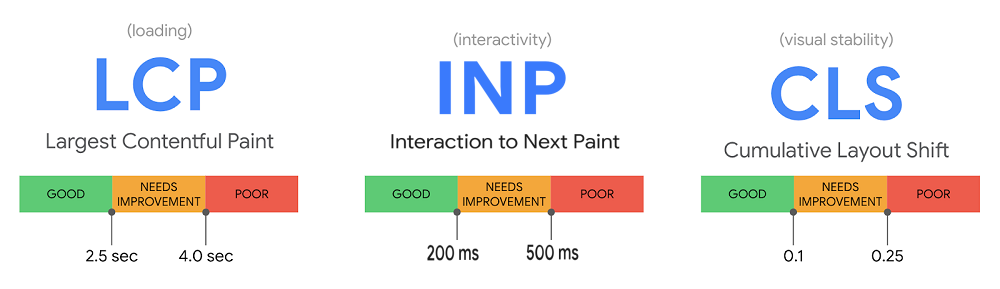
Google has defined a set of three Core Web Vitals. These measurements, when taken together, provide a way to quantify user experience and assign it a value.
The Core Web Vitals measure page experience by focusing on aspects of loading, interactivity, and visual stability, respectively.
Initially, the Core Web Vitals were Largest Contentful Paint, First Input Delay, and Cumulative Layout Shift, but in 2023, Google announced that it would be replacing First Input Delay with Interaction to Next Paint as of March, 2024.
Let’s look at each metric one by one.
Largest Contentful Paint (LCP)
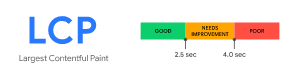
LCP is a measure of loading performance. This is LiteSpeed’s specialty!
More specifically, LCP measures how long it takes to load the largest element on a page. It’s considered a user-centric metric, because it estimates the perceived load speed. Generally speaking, when the largest element on a page has rendered, the page will be ready to use, even if there are still smaller (and potentially less important) items yet to load.
There are primarily four things that impact LCP on your site:
- Server response time
- Render-blocking JavaScript and CSS
- Resource load time
- Rendering on the client side
Chances are, each of these four elements can be improved for your site. Take a look:
Server response time
Action: Install LiteSpeed Cache for WordPress and enable caching.
Page caching is a crucial tool in your arsenal against sluggish server response times. When your site is cached, it requires much less involvement from the WordPress backend, which translates into a faster site and a better experience for your site’s visitors.
WordPress sites consist of dynamic pages that are built with PHP. The pages of a WP site don’t exist anywhere in the file system; they are constructed on-demand through PHP, and then served to the visitor as HTML. This can be a resource-heavy process, but page caching is an effective way of dealing with it. (You can learn more about this topic in our Caching 101 series.)
Some other suggestions for improving server responsiveness include:
- Optimizing your server
- Using a CDN (like QUIC.cloud!) with nodes nearer to your visitors than your origin site
Render-blocking JavaScript and CSS
Action: Enable Load JS Deferred and Load CSS Asynchronously in the LSCache plugin.
This is one of those solutions that page speed tools have been suggesting for some time. There is no need to load all of your JavaScript or CSS upfront. If you defer unnecessary JS and CSS until later, the above-the-fold content can render more quickly. You can defer both JS and CSS using settings in the Page Optimization section of the LSCache plugin for WordPress.
Other suggestions, (all available in LSCache Page Optimization):
- Minifying CSS and JavaScript
- Inlining Critical CSS
- Activating Guest Optimization
Resource load time
Action: Sign up for QUIC.cloud CDN, and/or optimize your images.
A CDN such as QUIC.cloud is a smart idea, because it potentially minimizes the distance resources need to travel between server and client, which in turn makes the resources load faster.
While minimizing the distance resources must travel is important, you could increase the impact by also reducing the size of the resources themselves. This is where image optimization comes into play. LiteSpeed offers an image optimization service through QUIC.cloud, which compresses images, making them faster to transport and faster to load. The service allows you to optionally enable the modern, more efficient image format, WebP, as well.
Other suggestions:
- Preloading some resources
- Enabling file compression
- Caching static and dynamic content
Rendering on the client side
Action: Optimize JavaScript usage
Many modern sites use JavaScript to render pages entirely on the client side. In some cases, this can be problematic for Largest Contentful Paint, particularly if a large JS bundle is used and content is unable to be rendered until the JS execution completes.
In addition to the JavaScript optimizations mentioned earlier, it could be helpful to break up large bundles, or switch to server-side rendering where possible.
First Input Delay (FID) – to be deprecated
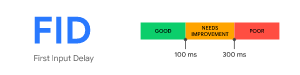
As mentioned earlier, FID is to be deprecated in March of 2024. Until then, it’s still considered one of the Core Web Vitals. FID measures your site’s responsiveness. How long does the site take to act when a button is pressed? For a good page experience, the interactive elements of your site should feel instantaneous and not sluggish. A low FID is important to user experience.
JavaScript is usually the culprit here, too. Breaking up long tasks, switching to server-side logic, deferring JS execution, and other JS optimizations that you may have implemented to help with Largest Contentful Paint, will also be instrumental in improving the First Input Delay metric.
Interaction to Next Paint (INP) – replacing FID
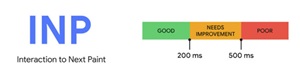
Like FID, INP measures the responsiveness of a page. However, FID deals in first impressions, measuring only the user’s initial interaction. INP is a more comprehensive measurement, sampling the page’s responsiveness through the lifespan of the user’s visit.
INP observes mouse clicks, touchscreen taps, and keyboard taps, and measure how long it takes for the page to return a visual response.
To improve INP, you need to optimize input delay, event callbacks, and presentation delay. For example, a user presses a Submit button. How long does it take for the submitting action to begin? And how long before the browser paints Submitting... on the screen?
Again, these interactions are usually powered by JavaScript, which means the best way to minimize the time they take is to optimize your JavaScript. This is not a trivial task, if your website is highly interactive, and it may take a lot of repetitive work to find and mitigate all of the bottlenecks. It is worth the effort, though, as a low INP means a snappy page, and a more pleasant user experience.
Cumulative Layout Shift (CLS)
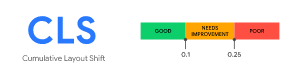
CLS measures the visual stability of a page. How much do elements move around while the page is loading? CLS should be low to avoid the possibility of accidental clicks, or losing one’s place while reading, which can be frustrating for a user.
In general, CLS is impacted by these items:
- Lack of size attributes on images and videos
- Insertion of content above existing content
- Use of animation properties that trigger layout changes
Here are some strategies for improving CLS:
Lack of size attributes on images and videos
Action: Make sure all images, videos, and iframes have size attributes.
Generally speaking, text loads first on a page, and then the images and videos start filling in wherever they belong. If space for these resources is not reserved ahead of time, then the text moves around to accommodate the resources as they load. To avoid this, in your theme, and in your posts, all added images, videos, and iframes should explicitly list their sizes in the HTML code.
If you don’t want to do this manually, try LiteSpeed Cache’s Add Missing Sizes option in the Page Optimization > Media Settings section. If enabled, LSCache will detect any resources with missing size attributes, calculate the appropriate sizes, and add them to the dynamically generated HTML before caching the page.
Insertion of content above existing content
Action: Use static-size containers around variable-size items
This type of issue happens a lot when you have advertisements on your site, particularly ones where you let the ad service decide what size ad to stick in the spot. For example, you may have a banner ad at the top of your page, but it might at any time display a Leaderboard, Large Leaderboard, or Billboard sized ad. By not specifying a size ahead of time, any content that appears below the ad will be pushed down when the ad displays.
You can fix this problem by creating a container for that ad, which will display at the same time the text loads. When the ad renders, it will fit inside the box (and if it doesn’t fit, you can prevent it from exceeding the allotted space with an overflow: hidden attribute).
Use of animation properties that trigger layout changes
ACTION: Switch to transform animations.
Some CSS properties trigger a re-layout, which can cause page resources to move around undesirably. Instead of using CSS triggers – and there are a lot of them – try transform, which does not trigger any geometry changes or painting on the page.
Other Page Experience Metrics
Your pages should be in good shape, if you master the Core Web Vitals, but there are other metrics that inform page experience, and you don’t want to ignore them:
Mobile Friendliness
Can your site be read and interacted comfortably with on a mobile device? These days, with so many internet users accessing content on the go, Google has adopted a “mobile first” philosophy. So, if your mobile site is functionally impaired, it will undoubtedly impact your page experience score and rank. You can evaluate your site’s mobile friendliness with Google’s Mobile-Friendly Test.
Safe Browsing
It probably goes without saying that your page should not contain malware, social engineering, or other malicious and deceptive content. You can check Google’s Security Issues report to be sure your site is clean.
Secure Connections
Serving your site over a secure connection with HTTPS is more important than ever. Google penalizes insecure sites in terms of page rank, so if you want to rank, you need to be secure.
If you’re running LiteSpeed Web Server, which comes with secure HTTP/2 and HTTP/3 connections enabled out of the box, then you’re good. You can use the HTTP/3 Check tool to verify that your site supports HTTP/3 connections, or see our instructions to test for HTTP/2.
No Intrusive Interstitials
Interstitials include pop-up ads that cover the content, inline promotional material that appears above the fold, or any advertising that otherwise must be dismissed or scrolled past before the user can access the site’s actual content. Your site should be clear of such elements and your content easily accessible.
Conclusion

Of course, there is more to search rank than page experience. First and foremost, you need to provide content that answers the searcher’s question. But everything else being equal, a superior page experience can be the factor that puts your page ahead of that of your closest competitors.
As you have seen, our end-to-end WordPress solution provides excellent tools – LiteSpeed Web Server, LSCache Plugin, and QUIC.cloud CDN – to help you improve page experience.
If you are not a WordPress user, LiteSpeed Web Server with LSCache can still be of value to you. We have cache plugins for many other CMSs, or you can use LSCache without a plugin.
With LiteSpeed, you can address problems with Core Web Vitals, and improve page experience for your users while simultaneously working your way to the top of the Google Search Results!
—
This content was last verified and updated in November of 2023. If you find an inaccuracy, please let us know! In the meantime, see our documentation site for the most up-to-date information.


Leave a Reply