WpW: Cloudflare Management in LSCache

CloudFlare Management in LSCache for WordPress

Written by

in

CloudFlare Management in LSCache for WordPress

Welcome to another installment of WordPress Wednesday! Today’s topic: Cloudflare Management in LSCache.

Disclaimer: The information contained in this post is accurate for LSCWP v1.7.2 [release log]. If you are using a newer version of the plugin, some details may have changed. Please refer to our wiki for the latest!

As of v1.7.2, you have the ability to manage certain aspects of your Cloudflare cache from within the LiteSpeed Cache for WordPress plugin.

This topic looks familiar

If you are getting sense of déjà vu right about now, it’s because we have talked about Content Delivery Networks before. We introduced CDN support in October of last year, but at the same time, we told you not to use it if you were getting your CDN service through Cloudflare.

Why? Cloudflare is actually a distributed proxy server. Most other CDNs are reverse proxies, which are not the same thing. As a result, the two types of CDN require entirely different configuration options.

CloudFlare Management in LSCache for WordPress

If you are perfectly happy with the way you currently manage your Cloudflare cache, you may continue to do what you have always done and leave LSCache’s Cloudflare API setting disabled. They will continue to work together just fine.

For the rest of you, enabling the Cloudflare API allows you to do all of your optimization and cache management from the dashboard of one handy and familiar plugin: LSCache!

Setting it up
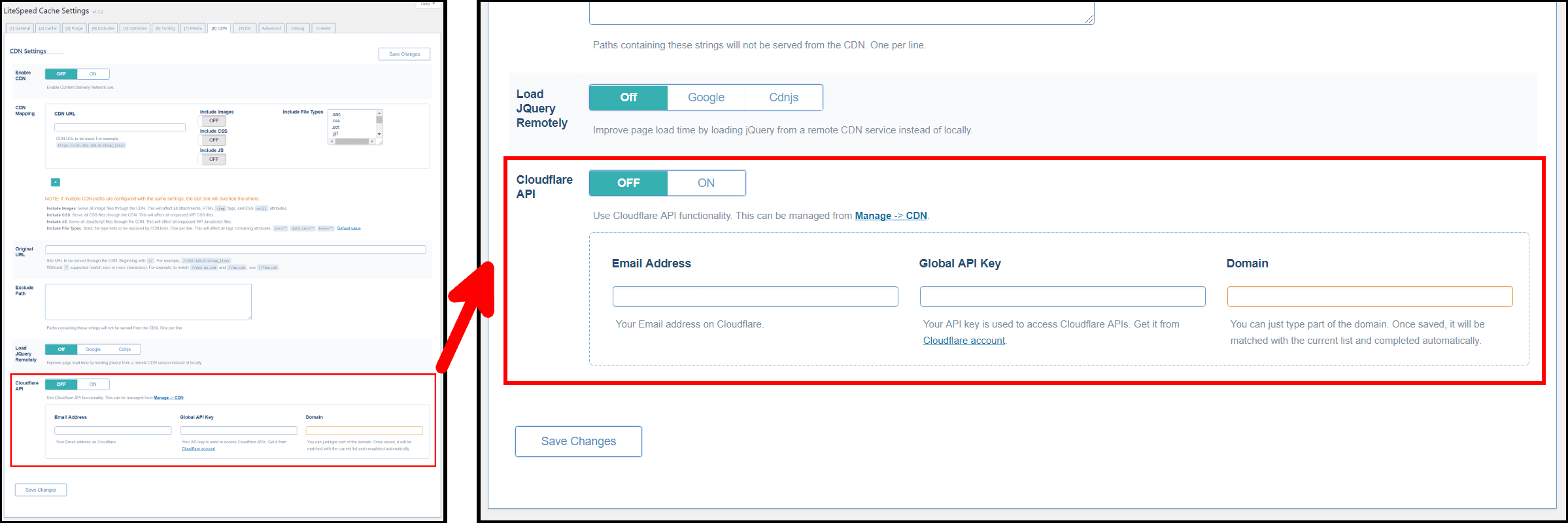
LSCache for WordPress CDN Settings Tab

Cloudflare isn’t like other CDNs, therefore you should not set Enable CDN to ON for Cloudflare.

You can, however, manage your Cloudflare cache through this plugin in another way: simply navigate to LiteSpeed Cache > Settings > CDN, scroll down, set Cloudflare API to ON and then fill in the three fields below. Save the settings. From now on you may manage your Cloudflare cache through the LiteSpeed Cache > Manage > CDN area!

Email Address

Enter the email address you use with your Cloudflare account.

Global API Key

Enter the API key you were given by Cloudflare. You can find it on your Cloudflare profile.

Domain

Enter the domain name served by Cloudflare. You needn’t enter the entire domain here. If you enter only part of it, LSCache will discover and fill in the remainder of the domain automatically after save.

Managing Cloudflare via LSCache
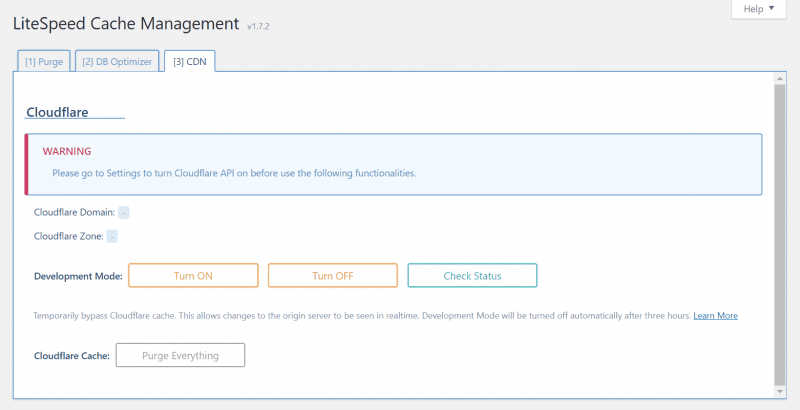
LSCache for WordPress CDN Management

Cloudflare Domain

This is the domain that you have configured to be served by Cloudflare. It is informational only and cannot be changed here. If it doesn’t match your actual Cloudflare domain, you will need to fix it in your Cloudflare account.

Cloudflare Zone

This is the unique id that was assigned to your domain by Cloudflare. It is informational only and cannot be changed here. You can see it on your Cloudflare profile.

Development Mode

These buttons allow you to turn on Development Mode, turn it off, and check to see whether it is running. If you are making updates to your site, and want to verify that they are working as planned, Development Mode allows you to temporarily disable Cloudflare so that you may see your updates in realtime.

After three hours, Development Mode will turn itself off, or you can turn it off manually via the button provided.

Purge

Press this button to purge your Cloudflare cache on demand. This is helpful if you have made changes that result in an LSCache purge, and you want to make sure Cloudflare is purged as well.

And that’s it! We hope you enjoy this enhancement. If you have any questions, as always, we are here to answer them!


Have some of your own ideas for future WordPress Wednesday topics? Leave us a comment!

Don’t forget to meet us back here next week for the next installment. In the meantime, here are a few other things you can do:

Comments

21 responses to “WpW: Cloudflare Management in LSCache”

  1. Jon Avatar

    Thanks for this but what about the settings within Cloudflare itself? Do you need to configure anything there or does the LS plugin handle all this (i.e. telling Cloudflare to just serve the static content and not the dynamic)? Cloudflare seems to have a ton of options on their interface…

    Cheers

    1. Lisa Clarke Avatar
      Lisa Clarke

      Hi, Jon

      It is assumed that you already have Cloudflare working to your satisfaction before you enable LiteSpeed’s support.

      By default, Cloudflare only caches static files, so it should work just fine with LSCache if you stick to the default settings and don’t create any page rules for dynamic content. I don’t know enough about it to make recommendations for any settings not on the free plan.

      I’m sorry if that’s not much help…

  2. Jim Walker Avatar

    Just wrote this article on how to set up the LiteSpeed Cache plugin.
    You folks see anything glaring that needs improvement I’m all ears, “TVCNet Website Hosting with PHP 7 and the LiteSpeed Cache Plugin”, https://goo.gl/txYmkF

    1. Lisa Clarke Avatar
      Lisa Clarke

      Looks great to me! Thanks for sharing!

  3. Michael Avatar
    Michael

    When using CloudFlare, how can one know if the images are indeed cached by CloudFlare?

    When using a “normal” CDN, it’s easy to know since the images have a CDN path (their URL start with “cdn.”).
    What should the URL be when using CloudFlare?
    Currently on our case the URL have not changed.

    Thank you.

    1. Lisa Clarke Avatar
      Lisa Clarke

      Hi, Michael. That’s more of a Cloudflare question than a LiteSpeed question, but you should be able to check the Network tab of the browser tool, click on one of the images listed, and then take a look at the headers to see where the image is being served from. I checked Cloudflare, and this is their suggestion. Good luck!

  4. John Blair Avatar
    John Blair

    This badly needs to be updated to support API Tokens. Using Global API key in wordpress site is not safe. If a hacker gets access to site all they have to do is dump the options and get your Global API key. and delete all your sites.

    Cloudflare now supports API Tokens which means you can assign permissions to the key. This needs to be implemented.

    1. Lisa Clarke Avatar
      Lisa Clarke

      Thank you for your feedback. I will pass it along to the development team.

    2. Lisa Clarke Avatar
      Lisa Clarke

      Just FYI, I’ve been told this is already in our to-do list.

  5. Borys Avatar
    Borys

    IS an issue with API was fixed?

    1. Lisa Clarke Avatar
      Lisa Clarke

      Hi, Borys. I’m not sure what issue you mean. If you are having a problem, please open a ticket by emailing support@litespeedtech.com and someone will be able to help you.

  6. Alex Kuang Avatar

    Is there any update on avoiding the use of global API key of Cloudflare?

    1. Lisa Clarke Avatar
      Lisa Clarke

      It’s still on our list. No ETA as of yet, but we are hoping to get to it soon. Thanks for your patience!

  7. Markus Avatar

    Hi Litespeed,
    is LSCache also compatible to Cloudflare APO?

    1. Lisa Clarke Avatar
      Lisa Clarke

      Hi, Markus. You can use the LSCache plugin with Cloudflare APO, but certain functions are incompatible. You can use them together if you disable Guest Mode, Mobile Cache, WebP Replacement, JS/CSS Minify, and JS/CSS Combine in the LSCache plugin.

      1. Cari Clemente Avatar

        Hello,

        Is it still necessary to disable all these options ? And if so, is it necessary to install the cloudflare plugin to run APO or is the litespeed add-on enough?

        Thanks in advance

        1. Lisa Clarke Avatar
          Lisa Clarke

          Hi, Cari. Yes, I believe it is. We suggest you turn off any functions that Cloudflare APO is already handling for you, since duplicating functionality would at best be extra work, but at worst could cause conflicts that break your site.

        2. Lisa Clarke Avatar
          Lisa Clarke

          Oops, I forgot the second part of your question, about whether you need the Cloudflare plugin. I am not familiar with what functionality is covered by Cloudflare’s plugin, but the LiteSpeed support for Cloudflare doesn’t include any special functionality for APO. If there are functions the CF plugin provides for APO, then you’ll need to install that.

      2. Jim Avatar

        Are these not disabled by default in the LiteSpeed plugin?
        Guess I need to verify this…

        1. Lisa Clarke Avatar
          Lisa Clarke

          Yes, I believe they are. I may have phrased that badly. It is possible that they could be enabled, though, for anyone who has made changes to their configuration from the default 🙂

Leave a Reply

Your email address will not be published. Required fields are marked *