Category: OpenLiteSpeed

News, tutorials, and information about OpenLiteSpeed, the fast open source web server developed by LiteSpeed Technologies. OpenLiteSpeed provides fewer processes, less overhead, more connections, and enormous scalability, with no hardware upgrade required!

  • Benchmarks: OpenLiteSpeed vs. NGiNX vs. Apache

    Benchmarks: OpenLiteSpeed vs. NGiNX vs. Apache

    Compare OpenLiteSpeed to NGiNX and Apache

    If our search statistics are any indication, the question on everyone’s mind is “How does OpenLiteSpeed compare to NGiNX and Apache?” We think that’s a question that deserves an answer, so we set up a test environment and got to work.

    Note: For a more in-depth discussion of the differences and similarities between LiteSpeed, Apache, and nginx, take a look at the comparison on our site.

    The Contenders

    We looked at OpenLiteSpeed, NGiNX, and Apache and we ran burst tests simulating 10,000 requests over 100 concurrent users. We looked at how the three web servers handled a small static file and a simple PHP script, and then we evaluated their WordPress performance.

    When it comes to WordPress, caching is important, so we made sure to use an appropriate caching solution for each web server in our tests.

    All tests were performed with Keep-Alive enabled. (See more common settings under Web Server Configuration below.)

    The Results

    The following charts show how many requests per second the three servers processed during our series of tests. The larger the number, the better.

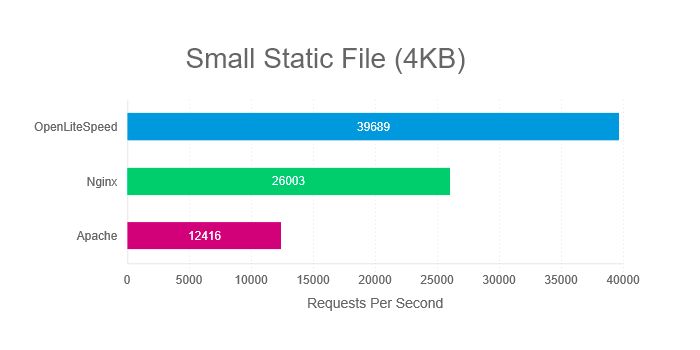
    Compare OpenLiteSpeed to NGiNX and Apache: Small Static File Benchmark

    Static files require no processing, and so this test is useful for measuring the servers’ response times. How quickly can each server deliver small static files?

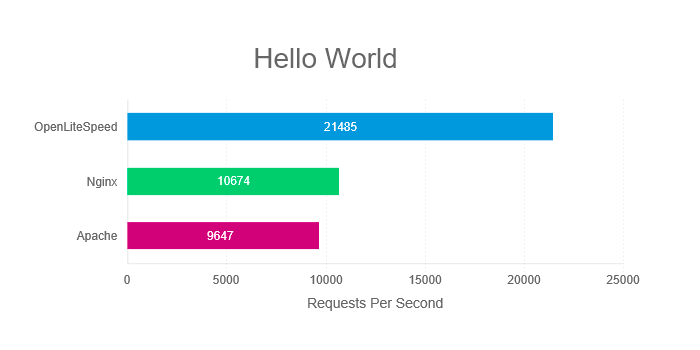
    Compare OpenLiteSpeed to NGiNX and Apache: Hello World PHP Benchmark

    When we benchmark the “Hello World” PHP app, we are not testing real-world conditions. Nevertheless, this is the best way to isolate the communication between server and PHP from the processing of the PHP itself. With this test, what we are most interested in is how efficiently the server communicates with the PHP engine.

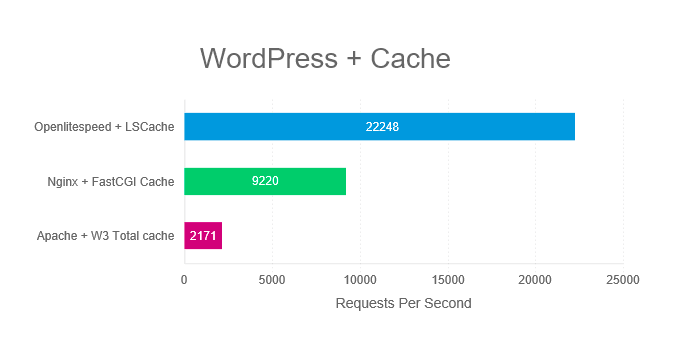
    Compare OpenLiteSpeed to NGiNX and Apache: WordPress Cache Benchmark

    WordPress is a heavy PHP application and as such, caching is strongly recommended. In this test, we pair each server with an appropriate caching option.

    As you can see, OpenLiteSpeed outperforms NGiNX and Apache in all of our scenarios.

    Try it Yourself

    In the interest of transparency, we’re including the specs of our web server configuration and test environment below. Feel free to run the same benchmarks and compare OpenLiteSpeed to NGiNX and Apache for yourself.

    This is the command we used in all tests (Replace example.com/path with the location of your test subjects):

    ab -n 10000 -k -H "Accept-Encoding: gzip,deflate" -c 100 example.com/path

    Each test was run five times, and the average result was used for our graphs.

    Web Server Configuration

    Common settings for all servers:

    • Keep-Alive
    • gzip
    • OPCache
    • PHP use socket
    • PHP version 7.1.2

    Additional OpenLiteSpeed settings:

    • Number of Workers 4
    • PHP_LSAPI_CHILDREN=20
    • LSAPI_AVOID_FORK=1

    Additional NGiNX settings:

    • worker_processes 4
    • worker_connections 4096
    • pm.start_servers = 20

    Test Environment

    Software

    Web Server version:

    • OLS: v1.4.28
    • NGiNX: v1.12.2
    • Apache: v2.4.6

    Server API version:

    • OLS: LSAPI v6.11
    • NGiNX: FPM/FastCGI
    • Apache: Apache 2.0 Handler

    Cache version:

    WordPress version:

    • Version: 4.9.4

    Hardware

    Both Client and Server specs:

    • Intel Xeon CPU E7- 4870 4 Core @ 2.40GHz
    • 4GB RAM
    • 120GB ZFS RAID-Z2 iSCSI Drive
    • CentOS 7

    Although we didn’t use one for our benchmarks, We recommend Solid State Drives (SSD) in production environments.

    Summary

    What we hope you have noticed, is that OpenLiteSpeed easily outperforms the competition. If you are in the market for a new web server solution, and you are thinking Open Source, give OpenLiteSpeed a try.

    Not convinced?

    We encourage you to repeat our tests on your own hardware and see the difference for yourself! Or, join us in our Benchmarks Shootout! If you think you can configure NGNiX or Apache to beat LiteSpeed, we’d love to go head-to-head with you. Follow this link for more information.

    Want More?

    Esteban over at infranetworking wrote up a very detailed and thorough comparison between Apache, NGNiX, and LiteSpeed Web Server. (It’s in Spanish, but Google Translate does a decent job, if you don’t speak Spanish.)


    Article by: Lisa Clarke
    Benchmarks Performed by: Eric Leu
    Graphs by: Mark Zou

  • Developer’s Corner: OpenLiteSpeed’s PHP Module

    Developer’s Corner: OpenLiteSpeed’s PHP Module

    Developer's Corner: OpenLiteSpeed's PHP Module

    We’ve been working on a PHP module.

    PHP, a server-side scripting language, was designed for web development but it does double duty as a general-purpose programming language. This makes it popular among internet developers who embed it into HTML code, or use it in web publishing frameworks and content management systems. PHP code is interpreted by either a web server module or a Common Gateway Interface (CGI) executable.

    As a CGI executable, it’s familiar to most LiteSpeed users as lsphp, lsphp5 or lsphp7 (if there’s a specific version dependency). For Apache there are corresponding programs: mod_php and php-cgi.

    Drawback of CGI Executables

    LiteSpeed does a lot of work to make lsphp fast. Once loaded, it will be reused for the same connection for as many applications as want to use it. This allows the PHP opcache to be reused and the speed to thus increase.

    Sounds good, but not ideal. Whenever an older connection times out and the process terminates or a new connection is started, a separate instance of lsphp is used and the opcache starts from scratch. In the future, there will be a CRIU (CheckPoint restore In Userspace) version of lsphp which will reload the opcache enabled code (and is CloudLinux aware), but that’s for a future article.

    The Module Approach

    Each time a separate instance is started, it causes performance lag. The module approach addresses this issue by loading in one instance for the entire server at server startup time. There are lots of reasons this is great:

    • The amount of memory and CPU necessary to run each PHP process is reduced.
    • The startup time to run a PHP process is reduced.
    • The opcache is available to all, which should make the applications progressively faster as they get compiled into opcache.

    But module usage also comes with some issues that are not necessarily easy to address:

    • Because both Apache and LiteSpeed* are multi-threaded applications, PHP has to be able to operate multi-threaded. This has only been true since PHP 7.2 has been released (November 2017). There were PHP implementations that claimed to be thread-safe, but they were not and have been deprecated for thread use by the PHP team.
    • Building mod_lsphp is quite a chore. It requires access to both OpenLiteSpeed module headers and a full PHP installation. The result of the compile is the entire PHP stack as a shared library. There are wiki instructions on how to do the build, but it can be tricky.
    • The existing SAPI module is highly optimized, both by the LiteSpeed developers and the PHP developers. Mod_lsphp may actually not be faster than lsphp so you may want to benchmark it. If lsphp is faster, obviously you should stay with it.
    • An errant module will crash the server. A PHP application can not. Mod_lsphp has been extensively tested, but it is possible. We recommend running mod_lsphp in isolation before putting it into full production.

    The Solution for You

    So why go through all of this trouble? The module may perform better on your server. And when the server is under a heavy load, it may perform even better. If your web site is PHP heavy and perhaps PHP bound, it’s really worth your while to go through whatever you can think of to improve its performance.

    Perhaps do a bit of homework before starting the process:

    • Make sure that your applications are compatible with PHP 7.2 or higher. This is a requirement.
    • You can use system tools (like the top program, for example) to see which processes are the most expensive in CPU utilization during your load peaks. In particular look for lsphp high on the list.
    • Verify that you’re not just simply low on memory. The free program can be helpful here. If a memory upgrade or an increase in swap space will address your problems you should start there.

    If you find that PHP is your problem, then mod_lsphp may be the solution for you.

    We should mention, this is a pioneering effort. We are still building this multi-threaded framework (more on that in a future article), and mod_lsphp is currently in beta. We encourage you to try it and share your feedback and any contributions you may have. Help us to make this module the best it can be!

    * The latest version (1.5) of OpenLiteSpeed is now multi-threaded and exports a detailed and robust set of APIs, all of which are thread-aware. Note that this is threading internal to the web server – it’s not PHP threading. That is still unavailable for web applications and is likely to remain that way.

  • 2017: The Year in Review

    2017: The Year in Review

    As the year draws to a close, we thought we’d take a moment to look back on our most memorable accomplishments of 2017. It was a year of innovation and growth, and we’re so happy to have had you along for the ride!

    QUIC

    In 2017, LiteSpeed released the first production-grade mass-market QUIC implementation available for the public.

    QUIC is the next generation Internet protocol, and is poised to replace HTTP/2. We introduced QUIC support in LiteSpeed Web Server and LiteSpeed Web ADC in the middle of the summer, and it has been a popular feature among our customers.

    We believe in this technology and so it has been a pleasure to publicly release our open source QUIC Client Library as a way to spearhead widespread adoption of QUIC. Going forward, we are participating in the QUIC standardization process alongside Google, Microsoft, Facebook, and others. Being a part of Internet history is a humbling experience, and we are honored to have a seat at the table.

    If you missed all of the excitement at the time, you can get the facts about QUIC on our website.

    Cache Plugins

    Our popular LSCache module for LiteSpeed Web Server and LiteSpeed Web ADC can be configured through rewrite rules. But the easiest approach is through LSCache plugins that are designed specifically for your web app.

    This year we added the LSCache Module for PrestaShop to our cache plugin family, thereby giving simple cache-management capabilities to LiteSpeed-powered PrestaShops everywhere.

    Additionally, there’s the so-new-it-hasn’t-yet-been-announced LSCache for MediaWiki! Look for more information about that soon.

    It’s always exciting to launch a new cache plugin, but we’ve also been having a blast enhancing one of our existing plugins as well: LiteSpeed Cache for WordPress. Over the course of 2017, this plugin has grown beyond cache management to become an all-in-one WordPress optimization solution. Some users are reporting PageSpeed scores of 100%! The reviews have been overwhelmingly positive, and we thank you for that.

    We’re planning more cache plugins for additional web apps in 2018, so stay tuned for that.

    LiteSpeed Web ADC

    Our Web ADC load balancer features High Scalability, High Availability IP failover, Cross Datacenter Replication, Cache Data Synchronization and out-of-the box acceleration for Magento and WordPress. And this year, we added more bells and whistles, including support for QUIC, BoringSSL, TCP_FastOPN, IP2Location, and SecRemoteRules.

    Additionally, the new ZeroConfig API means you can automate direct third-party management of your Web ADC’s configuration. You’ll be able to replace manual configuration of back-ends and domains using our automated message based interface.

    If you haven’t given our Web ADC a chance, why not get a trial license and play with it for a few weeks?

    CyberPanel

    This year OpenLiteSpeed users got a treat in the form of a shiny new control panel. CyberPanel is the only control panel built specifically for OpenLiteSpeed, and it’s free and Open Source, just like OpenLiteSpeed.

    Web Presence

    Our website got a complete overhaul in April, and we continue to make improvements to it.

    Around the same time, we added two more social media accounts to our online presence – you can now like and follow us on Facebook and Instagram. We share informational links and behind-the-scenes glimpses of our New Jersey office. In just under one year, we have already reached almost 2k followers on Facebook, and we are so thrilled. A huge thank you to all the LiteSpeeders out there. Keep interacting with us and inspiring us! In turn, we’ll continue to post interesting content.

    Speaking of interesting content, 2017 was the year we breathed new life into this blog. Since the introduction of WordPress Wednesday in May, we’ve published more than 30 tutorials and explored key caching concepts in detail. Our Developer’s Corner series has provided an opportunity for our developers to write about their projects from a technical point-of-view. This fall, we kicked off a new series, Notes from the Road, which we used to give you a peek into the QUIC Working Group Meeting in Seattle and the cPanel Convention in Florida.

    We’re loving these ways of communicating with our customers, so look for additional interesting blog and social media content in 2018!

    New Team Members

    This year, our team saw impressive growth. Say hello to 2017’s new faces: Tishu, Wuhua, Usman, Bob, Eric, Hai, Kacey, and Lisa (that one’s me… hi there!).

    All of the members of the LiteSpeed family – those who have been here for many years and those who are relative newbies – are happy to be here, working together towards the goal of an accelerated internet!

    Coming in 2018

    If you know LiteSpeed, then you know we’re never content to rest on our laurels. We’ve got so many more exciting developments to come, including:

    • New LiteSpeed Cache plugins for other popular web apps.
    • An embedded PHP module for OpenLiteSpeed, which will make OLS the fastest PHP server platform!
    • CRIU (Checkpoint Restore In User mode) support for PHP

    And that’s just the beginning! Stick with us in 2018 and beyond and see what’s next!

    From our family to yours: wishing you a happy and healthy New Year!

  • WpW: Installing OpenLiteSpeed, WordPress, and LSCache

    WpW: Installing OpenLiteSpeed, WordPress, and LSCache

    WordPress Wednesday: Installing OpenLiteSpeed WordPress and LSCache

    Welcome to another installment of WordPress Wednesday!
    Today’s Topic: Installing OpenLiteSpeed WordPress and LSCache

    So, you want to self-host a WordPress site, and you want to accelerate it with LiteSpeed Cache. That’s great news! LiteSpeed Cache for WordPress can easily be installed through your WordPress Dashboard. However, it requires a LiteSpeed web server in order to function. This guide will walk you through the installation of three free and open source pieces of software: OpenLiteSpeed, WordPress, and LiteSpeed Cache for WordPress.

    When we’re done, you’ll have your own brand new, self-hosted WordPress site, powered by LiteSpeed.

    Please note the versions of everything we are talking about today:

    OpenLiteSpeed: 1.4.28
    WordPress: 4.9
    LiteSpeed Cache for WordPress: 1.6.4

    If you are using different versions of any of this software, your experiences with this tutorial may vary.

    Why OpenLiteSpeed?

    LiteSpeed Cache is a server-level cache. The WordPress plugin provides an easy way for site admins to communicate with the server, but it does not implement any of the caching functionality itself. For this reason, you are required to have a LiteSpeed web server. Without one, the plugin has nothing to talk to.

    You may choose between LiteSpeed Enterprise and OpenLiteSpeed. We’ll be focusing on the latter today, but if you’re wondering which server is right for you, you can compare editions (and take a little quiz, if you like) here.

    Please note: not all LSCache functions are supported by OpenLiteSpeed. If you will be using ESI, for instance, you will need LiteSpeed Enterprise.

    OpenLiteSpeed One-click installation

    ols1clk is a one-click installation script for OpenLiteSpeed. Using this script, you can quickly and easily install OpenLiteSpeed with it’s default settings. By adding different parameters, you can use it to install WordPress and the LiteSpeed Cache.

    Currently one click installation only supports Centos(5-7), Debian(7-9) and Ubuntu(12,14,16)

    ols1clk must be run with superuser access, You can either switch to superuser (root) with the su command or you may run it as root using the sudo command. How you do this will depend upon which distribution you use. Some distributions enable the root user (such as CentOS), while others do not (such as Ubuntu and Debian).

    There are two different one-click methods: Direct Download and Command Line Interface.

    Direct Download

    1. Download ols1clk from GitHub.
    2. Run the ols1clk script on your server command line with ./ols1clk.sh or bash ols1clk.sh;

    CLI Installation

    Run the following from the command line:

    wget --no-check-certificate https://raw.githubusercontent.com/litespeedtech/ols1clk/master/ols1clk.sh; bash ols1clk.sh;
    

    OR, run the following from the command line:

    bash <( curl -k https://raw.githubusercontent.com/litespeedtech/ols1clk/master/ols1clk.sh ) [options] [options] …
    

    The above methods will install OpenLiteSpeed and the lsphp module. For additional options, examples, and a FAQ, see the OpenLiteSpeed wiki.

    WordPress Installation

    Installing OpenLiteSpeed, WordPress, and LSCache

    To install WordPress along with a MySQL database, run the following from the command line:

     ./ols1clk.sh -w.
    

    Answer any prompts within the script and you’re done!

    LSCache for WordPress Installation

    1. Download the LSCWP plugin from our WordPress Plugin Directory page.
    2. Log in to your WordPress Dashboard, navigate to Plugins > Add New and click on Upload Plugin.
    3. Select the LSCWP zip file and click Install Now. Activate the plugin.
    4. Navigate to LiteSpeed Cache > Settings > General and set Enable LiteSpeed Cache to Enable.

    OR

    1. Search for LiteSpeed Cache in the search box. Our plugin should be the first search result to come up.
    2. Press Install Now. Activate the plugin.
    3. Navigate to LiteSpeed Cache > Settings > General and set Enable LiteSpeed Cache to Enable.

    Testing

    Once you have installed LiteSpeed Cache for WordPress, you’ll want to run a few tests to be sure that it’s working as expected.

    You can verify a page is being served from LSCWP through the following steps using your browser’s developer tools:

    Step 1: Open the developer tools on a non-logged-in browser and navigate to your site. Open the Network tab.

    Step 2: Refresh the page.

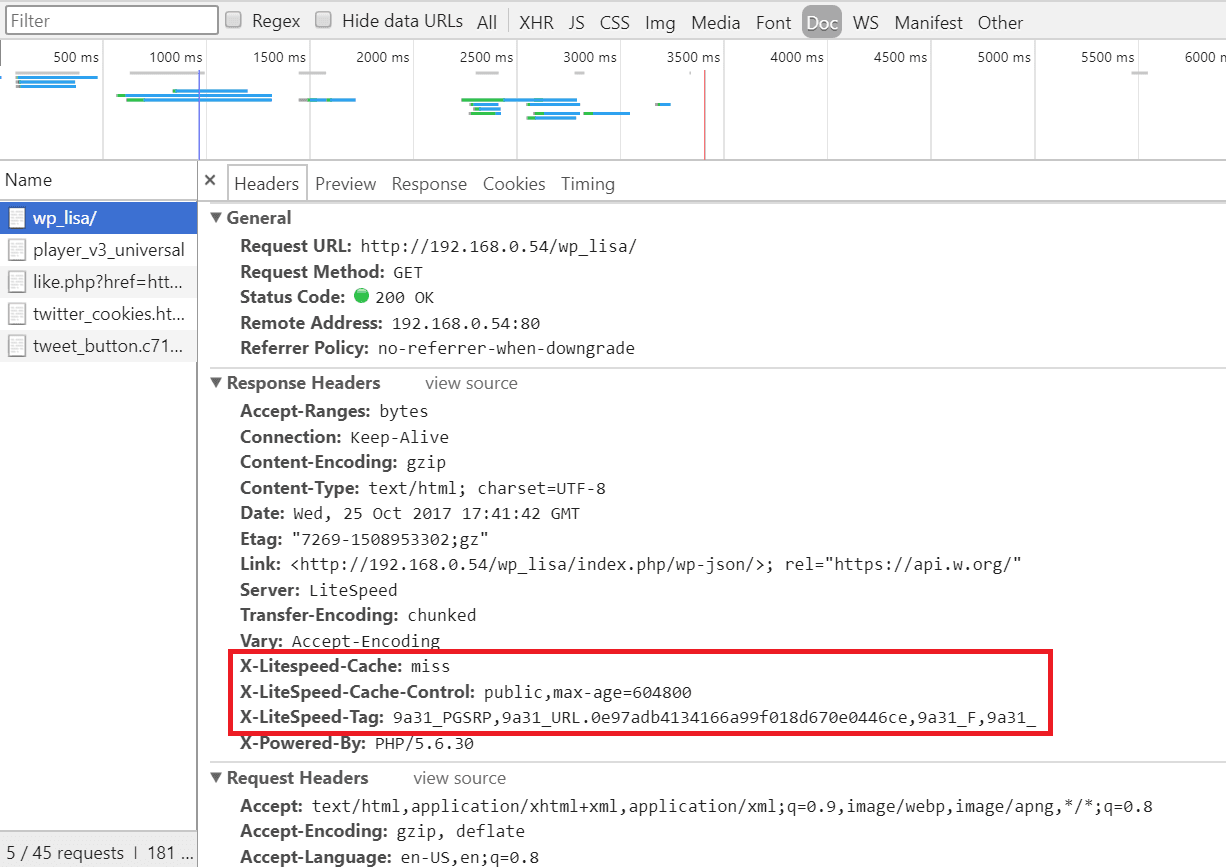
    Step 3: Click the first resource (this should be an HTML file and the resource’s headers should appear as in the image below). For example, if your page is http://example.com/wordpress/, your first resource should either be something like example.com/wordpress/ or wordpress/.

    Step 4: In a different, logged-in browser, in your WordPress Dashboard, navigate to LiteSpeed Cache > Manage and click the Purge All button.

    Installing OpenLiteSpeed, WordPress, and LSCache

    Step 5: Reload the page in the first (non-logged-in) browser and select the same resource again. If you see headings similar to

    X-LiteSpeed-Cache: miss
    X-LiteSpeed-Cache-Control:public,max-age=1800
    X-LiteSpeed-Tag:B1_F,B1_
    

    (for example), this means the page had not yet been cached, but that LiteSpeed has now stored it for future use.

    Installing OpenLiteSpeed, WordPress, and LSCache

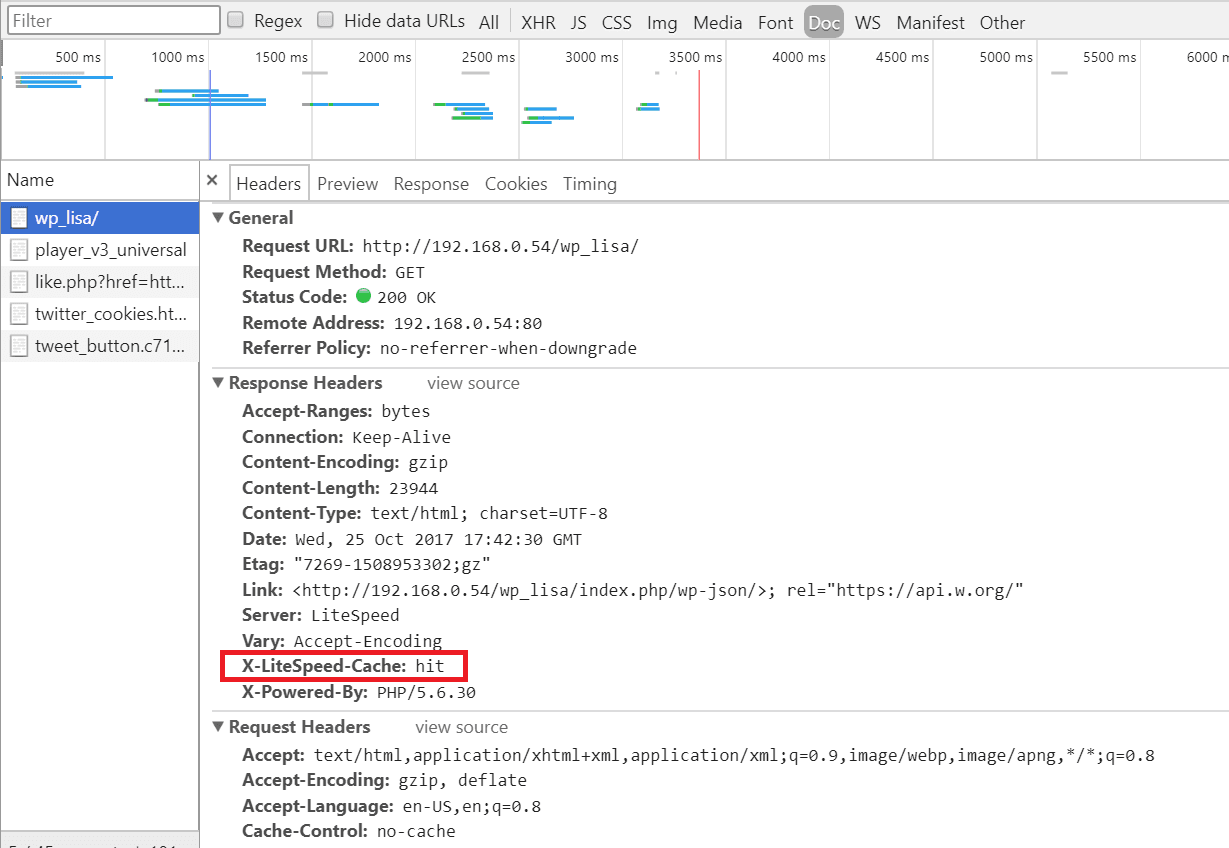
    Step 6: Reload the page a second time and you should see X-LiteSpeed-Cache: hit in the response header. This means the page is being served by the cache and LSCWP is configured correctly.

    Note: If your first refresh after purging returns X-LiteSpeed-Cache: hit in the response header, this may be because someone else visited the page after you purged but before you refreshed it yourself. Try again from step 4.

    Finding Errors

    To check the debug log, enter the following at the command line:

    tail -f wp-content/debug.log
    

    How to report problems you can’t fix

    If you run across a problem you can’t solve on your own, we are here to assist! If you take the time to gather a few of the following things before contacting us, it will help us to help you better:

    • Screenshots: If there are any error messages, grab a screenshot so we can see where it happens.
    • Environment Report: Navigate to LiteSpeed Cache > Environment Report > and press the Send to LiteSpeed button. You’ll be given a report number. Save the number.
    • Debug Log: Capture any relevant lines of the debug log as described above.

    Once you have your screenshots, environment report number, and/or debug log, you can share them with us through the WordPress Support Forum for our plugin, or you can submit a ticket to our ticket system.

    Congratulations!

    You are now the proud owner of a self-hosted, LiteSpeed-powered, WordPress site. Enjoy it!


    Have some of your own ideas for future WordPress Wednesday topics? Leave us a comment!

    Don’t forget to meet us back here next week for the next installment. In the meantime, here are a few other things you can do:

  • Which LiteSpeed Server Powers YOU?

    Which LiteSpeed Server Powers YOU?

    Shopping for a new web server? With LiteSpeed, you have choices. When it comes to technology, are you the kind of person who values stability, or do you crave adventure? Do you have customers to consider, or are you able to tinker at will?

    Answer this just-for-fun five-question quiz to find out your LiteSpeed Personality! (Don’t like quizzes? No problem. You can skip to the end of this post, or go straight to our website for a detailed list of features and a comparison between the web server editions.)

    [wp_quiz id=”7740″]


    Conclusion

    As you can imagine, we can’t possibly know everything about you after five questions. Your “LiteSpeed Personality” should give you a good place to start your research, but it’s certainly not written in stone!

    How about some good solid facts to help you choose the right web server for you?

    Both LiteSpeed servers offer the same basic features:

    • HTTP 1.0/1.1 compliant
    • HTTP/2 support
    • Languages: PHP, Perl, Ruby, Python, JSP, etc..
    • SAPIs: LiteSpeed API, CGI, FCGI, AJPv13, Proxy
    • HTTPS
    • IPv4 and IPv6
    • Unlimited IP and name-based virtual hosting
    • GZIP compression
    • SPDY2/3, WebSocket
    • Runs on Linux, FreeBSD, MacOSX, Solaris

    There are differences between OpenLiteSpeed and LiteSpeed Enterprise, too. Apache compatibility, performance, scalability, security features, ease of use, and other advanced features vary between the two editions.

    If you really are unsure which web server solution is for you, drop by our website for a full comparison of features.

    What did you think of our quiz? What is your LiteSpeed Personality? Do you think your results were accurate? We’d love to hear from you!

  • Clever ways to get your LiteSpeed fix

    Clever ways to get your LiteSpeed fix

    The Internet is big. And we all hang out in our own corners of it. It’s not always easy to keep up with all of the update-and-release news that you need to keep your business systems running as smoothly as possible. We announce all of our software updates on a handful of public channels, and then after a few days of letting potential bugs shake out, we spread the word to the admins who have provided a valid email address. The majority of our customers are content to wait for that email announcement or the notification that appears on their control panel plugins, and that’s ok!

    But what about the rest of you? We know some of you crave adventure, and you want to install those updates the second the paint is dry. You have a need to be hooked into the latest announcements, but if you don’t know where to look for them (or, more importantly, don’t know how to fit them seamlessly into your workflow), you could miss something important!

    So let’s address that. First, I’ll tell you where you can go around the web to find our update announcements. Then, I’ll share a few nifty tips and tricks for getting our news to come to you in the places that are most convenient for the way you work.

    Where you can go to get the news

    We are all over social media, but for product updates in particular, these are the sources that are updated with every single new release. Visit any of these links to get the latest scoop:

    • Twitter: @litespeedtech for all product announcements and general news/links
    • Twitter: @lswsrelease for LiteSpeed Web Server announcements only
    • Twitter: @openlswsrelease for OpenLiteSpeed announcements only
    • Google Groups: LiteSpeed Edge for all product announcements and pre-releases except OpenLiteSpeed
    • Google Groups: OpenLiteSpeed Development for announcements and discussion
    • Our Forum: News for all product announcements

    How you can make the news come to you

    Knowing where to look is all well and good, but you can work more efficiently if you have the updates meet you where you are. There are three primary ways to accomplish this: Email, RSS feeds, and push notifications. Each of our announcement mechanisms may be configured to use at least one of these methods.

    Email

    If email is your preferred means of communication, you’ll want to subscribe to one (or both) of the Google Groups. When you join the group, you are given four email options:

    • Don’t send email updates
    • Send daily summaries
    • Combined updates (25 messages per email)
    • Every new message

    Our groups are low-volume enough that you should be able to subscribe to “Every new message” without being overwhelmed.

    RSS

    RSS is not as well-supported as it once was, but you can still find feeds here and there if you look for them. You’ll need an RSS reader (such as Feedly) to access these feeds. Here are some feeds from the above sources:

    LiteSpeed Edge Google Group

    OpenLiteSpeed Development Google Group

    News on our Forum

    Push notifications

    If a mobile device is an important part of your workflow, you may find push notifications more your speed. All of our Twitter accounts support push notifications.

    To enable notifications, first follow the relevant account on Twitter. Then, (on desktop) next to the Following button, click on the 3-dot menu and select “Turn on mobile notifications.” Or (on mobile) next to the Following button, tap the little bell icon and select “All Tweets.”

    For those not on mobile devices, the Chrome and Firefox browsers allow browser notifications for any site that has enabled the functionality. Twitter is one such site. To enable browser notifications for Twitter, click on your own profile icon, select Settings from the drop down menu, click on Web Notifications from the settings sidebar and check the appropriate boxes for the notifications you want to see.

    A couple of clever ideas

    Here are a few outside-the-box ideas that may fit nicely into your workflow.

    Import into Slack

    If your team uses Slack to communicate, why not set up a #software_updates channel, and import vital release announcements from your favorite vendors (including LiteSpeed, of course!) into that channel?

    Slack integrations are available for Twitter and RSS, so you can either import our Twitter feeds via the Twitter integration, or import our Google Groups or Forum feeds via the RSS integration.

    Use IFTTT

    IFTTT (or, If This Than That) is a really cool application that lets you connect a wealth of things that wouldn’t normally be connected. For instance, you can create an applet that says “if there is an update to OpenLiteSpeed, turn the Philips Hue lights in the office blue.”

    That’s somewhat of a silly example, but you get the point.

    A more practical application would be to connect our Google Groups or Forum RSS feeds or our Twitter feeds with an application your company uses extensively (Skype, Telegram, Trello and more). For example: if there’s a new LiteSpeed tweet, send the tweet via Skype to your server admin.

    Or, if you do like the traditional route of email or push notifications, you can use IFTTT to make the sources that are not available that way become available that way. For instance, you can use IFTTT to send Twitter updates through email. Or you can get an IFTTT push notification when there’s an update to the Google Group RSS feed.

    It’s very powerful. (And it’s fun to play with, so don’t fall down that rabbit hole when you should be working!)

    In conclusion…

    We want you to get your LiteSpeed updates in a timely fashion and through a medium that fits into the way you work. We hope some of these ideas can help you keep as informed as possible! Be sure to let us know if you have any ideas to add to this list!

  • Meet Us at WHD.global and HostingCon Global!

    Meet Us at WHD.global and HostingCon Global!

    We are going for a trip around the world! At the end of March, we will be leaving our office in New Jersey, USA, to fly all the way to Rust, Germany, to attend WHD.global in Europa-Park. The second we get back from WHD.global, we will be on the next flight to Los Angeles, California, for HostingCon Global. We would love to personally invite each and every one of you to come visit us at both/either of these wonderful events! (more…)

  • Cache Makes the World Go Round

    Cache Makes the World Go Round

    First, we would like to thank each and every one of you for trying out LiteSpeed Cache for WordPress. We’re proud to see that there are 30,000+ active WordPress sites running LiteSpeed Cache. There was an enormous effort to make this plugin the easiest and most efficient caching solution for both WordPress users and hosts. Our latest release of 1.0.14.1 includes some exciting User Interface changes that hopefully simplify things for the administrator/user.

    (more…)

  • Why is Benchmarking WordPress so Hard?

    Why is Benchmarking WordPress so Hard?

    As promised, we’re going to be giving the hosting industry a tool for doing a proper “benchmark” as a means of evaluating your own WordPress capabilities in a standardized way. I’m going to start this post with a few definitions, since there has been a lot of misuse of the words and language in best practices.

    The essence of any meaningful benchmark is repeatability. If your test results are changing every time you run them, you are not running a benchmark. A benchmark environment is very tightly controlled and the results should be identical every time you run the test.

    Some people may want to compare environments. In order for the comparison to be valid, you must have control over both (or all) of the environments to make very broad conclusions. You may be able to make very specific conclusions, but you need to account for the things that you did not control in your test, and you ABSOLUTELY need to be able to explain any anomalies in the data.

    Case in point: It is fairly popular for hosts to run gtmetrix or webpagetest and suggest grandiose claims like “A is 10X faster than B”. However, doing so overlooks simple things like A might be much closer to the geographic location than B. If you are running a test from Australia against a site hosted in Australia and comparing the results against a completely different website hosted in Indiana, it is near impossible to draw any scientifically valid conclusions. The only realistic statement you might be able to make is that users in Australia get better performance from site A than users in Indiana get from a completely different site B… and even then, you’d be overlooking the variability of internet latency, possibilities of DDoS attacks impacting one site or the other while you were testing, peering issues, etc…

    So, how do we benchmark?

    Well, it starts with an environment, an understanding of what should happen (Benchmarking 101) and some questions. Let’s recount our last two weeks or so of preparation.

    Yes, I said two weeks…

    For this exercise, LiteSpeed was looking to get an idea of how our LSCache plugin for WordPress would compare to the most common Apache + WordPress cache solution (WP SuperCache). As it turns out, I also write a WordPress blog, so we downloaded my blog via WordPress’ export function and installed it in both environments. Throughout this blog post, I will mention assets that you will be able to download from a repository that we are building so that you can run the exact same tests that we run in any environment you’d like. The entire process will be documented in such a way that you should be able to follow it and modify it to fit your own needs, should you desire.

    When you are preparing to publish, it really helps to keep a notebook. It’s also an extremely valuable exercise to include various members of the team to build consensus and help evaluate “what happened” when you run a test. As a side note, we also uncovered two or three things that didn’t work the way we expected in our admin panel, and managed to get them fixed. Who knew that benchmarking could uncover bugs? 🙂

    My team for benchmarking includes:

    Kevin (Lead WordPress plug-in developer)
    George (LiteSpeed WebServer Architect)
    Mike (Lead WHM plug-in cache management developer)
    Rob (Social Media/Documentation lead)
    Jackson (Support/environment Manager)
    Jon and Mark (Test Environment admins)
    Steve (me… performance benchmark guy or marketing/BD lead…depending on the day)

    So, why is benchmarking a big deal here at LiteSpeed?

    We want to be the fastest solution for the Internet. If we are not, we need to understand where and why to continuously improve our products. This is an all-hands effort because it supports our core mission, and there is nothing more important to our company than being the best. (OK,I’m going to take the marketing hat off and go back to engineering 🙂 )

    Our test tool of choice for benchmarking is LoadRunner. It is a tool that I have been personally using for 17 years, and I have a wealth of contacts in industry if/when I need help. More importantly, I know that LoadRunner works in all of the possible test conditions and I don’t need 5 tools to do my work. LoadRunner Community Edition is completely free for anyone to use. We extend it with SiteScope for LoadRunner Community Edition to gather system level data while running the test, but we also have our team looking at traditional tools like TOP, Apache logs, etc. to do sanity checking.

    Sanity checking?

    Sanity checking is a double blind testing method of flushing out errors in your test environment. As an example, Jon and Mark will shout out the Server Load numbers from the CentOS console while I validate that the SiteScope data generally agrees. Mike will open a browser window and randomly click on the WordPress articles in our test site to see if the results match what our tool is reporting.

    And here is the rub: They do not always match. When they do not match, you need to fix something.

    And now you know why we’ve had 7 people working on this off and on for two plus weeks. We’ve been fixing problems in the test environment in preparation to run the benchmarks. Our last runs were almost “clean”. What does clean mean? Clean means that there wasn’t anything in the data that couldn’t be easily explained and didn’t follow the mathematical model exactly. Clean also means that we are getting the exact same results when we re-run tests.

    Clean means repeatable. (Every benchmark in this article was run multiple times to confirm that the results did not change between runs)

    We started with a WordPress (version X) site running on CentOS 7 [2 CPUs with 4 cores and 4GB of memory] (Full spec hyperlink). The site contains a home page that greets the visitor and 15 articles. I wrote a script that simulates someone coming to the site, and then randomly selecting an article to read. In our load testing software, we have the ability to run up to 50 concurrent users. Developing the working script took less than an hour, and a link to it along with the various scenarios we execute and result sets will all be provided at the bottom of this post.

    So why has this taken two weeks?

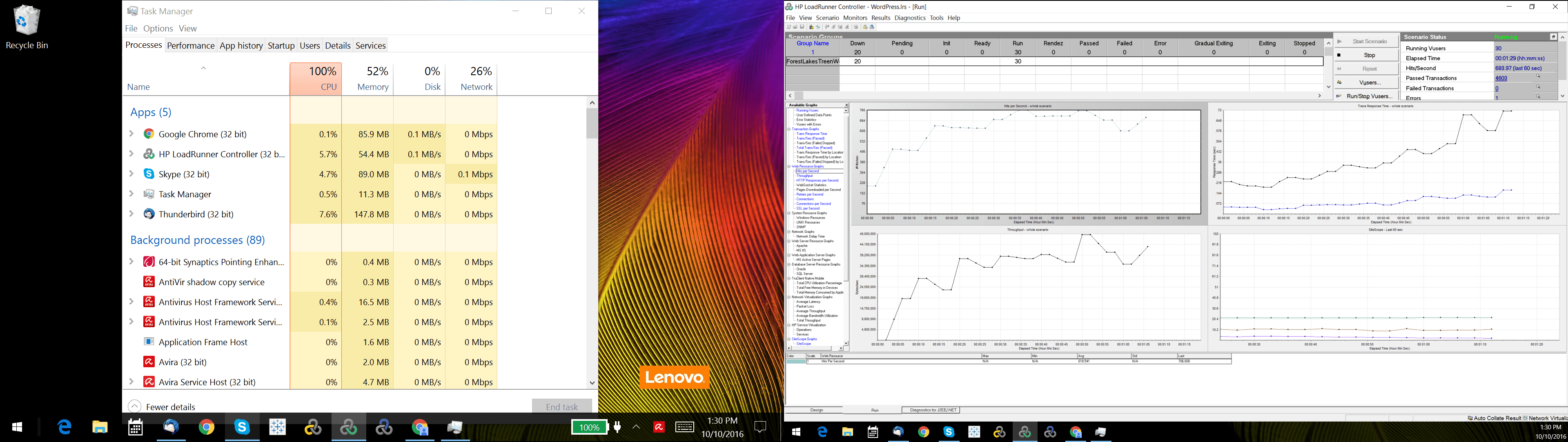
    Well… this might take a second. Before you benchmark WordPress, you need to benchmark your script and your test environment. That’s right. Benchmark your testing software first… and flush out environment issues. As an example, our load generators were Windows 10 VMs and our throughput was terrible because they were consuming a lot of CPU. In addition, the network bandwidth would stop climbing at around 200MB/s. As it turns out, Windows Defender was scanning every packet request which caused the high CPU utilization and limited bandwidth…somewhat.
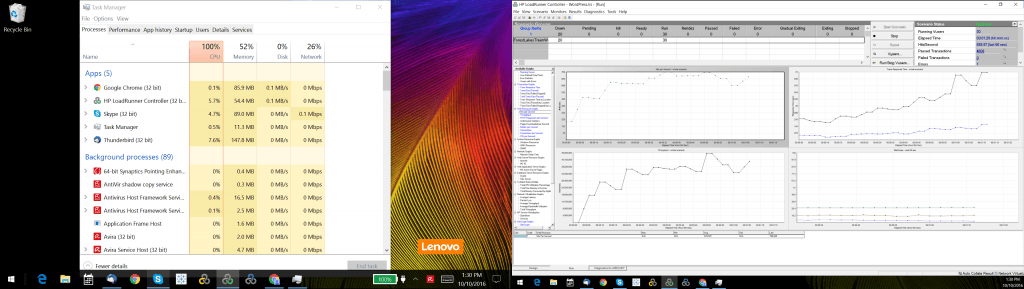
    overcooked-load-generator

    Next, investigation revealed that there was another bandwidth issue from outbound calls to Google for fonts in the page, saturating our internet connection. We turned off font calls and other outbound calls in the WordPress theme and our load generators scaled better. We tuned the TCP stack and were soon able to generate 4Gb/s per load generator, which gave us the ability to sustain 8 Gb/s. While we were connected to a 10Gb/s switch, we believe there was some bandwidth loss due to virtualization and we were never able to generate the full 10 Gb/s. As an independent verification step, we also ran iperf and got similar results. Whatever the cause, we know we are limited to 8Gb/s maximum.

    litespeedtech.com/packages/benchmark/LoadRunner/WordPress/2016/network8-9Gb/Report.htm
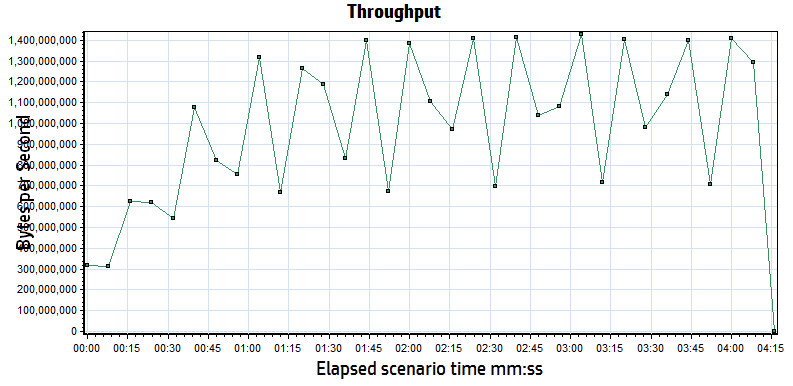
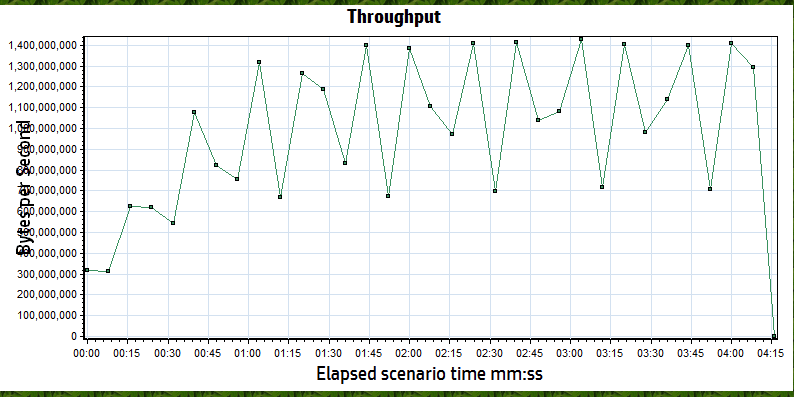
    throughput

    When an internet user visits a website, their browser will open multiple connections to speed up the movement of data. Some tools bypass this to conserve resources, only opening one connection to download a cached page, but then avoid sending the content via the other connections simulating a browser. We will run a test this way to illustrate why the results are not very meaningful. Most testing tools also allow you to make changes to the run-time settings that can impact what you are testing and what the subsequent results mean. We’re going to discuss those settings and how we incorporate them into our benchmarks.

    That’s right. Plural. Benchmarks.

    There is no one single benchmark that you can run that explains everything about the system. You will always be constrained by what is built, usually not by what is possible. We run a multitude of tests as a suite for describing system capabilities, and with good reason.

    It is prohibitively expensive to test maximum capabilities.

    WordPress is approximately 30% of the internet, so I will assume that they’ve done enough work to be able to build a low volume website like my blog. However, when a WordPress site has a significant audience, performance is not guaranteed. Like any PHP application, WordPress will bog down when you have a lot of users hitting PHP, so caching is popular to offload PHP workload. Instead of running 10,000 users in a test, which would require expensive licenses and hardware to drive the load, many people simulate via a high transaction rate. This method is not perfect, but it does allow you to understand transactional throughput. Transactional throughput is not user load, and if you see a benchmark that suggests that the two are equivalent, you should probably not pay too much attention to it.

    Since this benchmark is about WordPress and two web server/caching options, your first thought might be to batter both systems with your max load and see what happens! [hint: this isn’t very useful- unless you are trying to convince someone that they shouldn’t do it…]

    An example of a poorly defined test plan reads something like this:

    “We ran a 50 user test against two WordPress environments to see which one performed better.”

    In order for a requirement to be testable, you need to state a lot more specific information. Our example definition below remains incomplete, but for the purposes of this article will serve to illustrate how much further one needs to go to become “testable”

    We’re going to break our requirement into components, and then make sure that the tooling and the environment are set-up correctly to handle the test we are attempting to run:

    A Test Plan comes to Life:

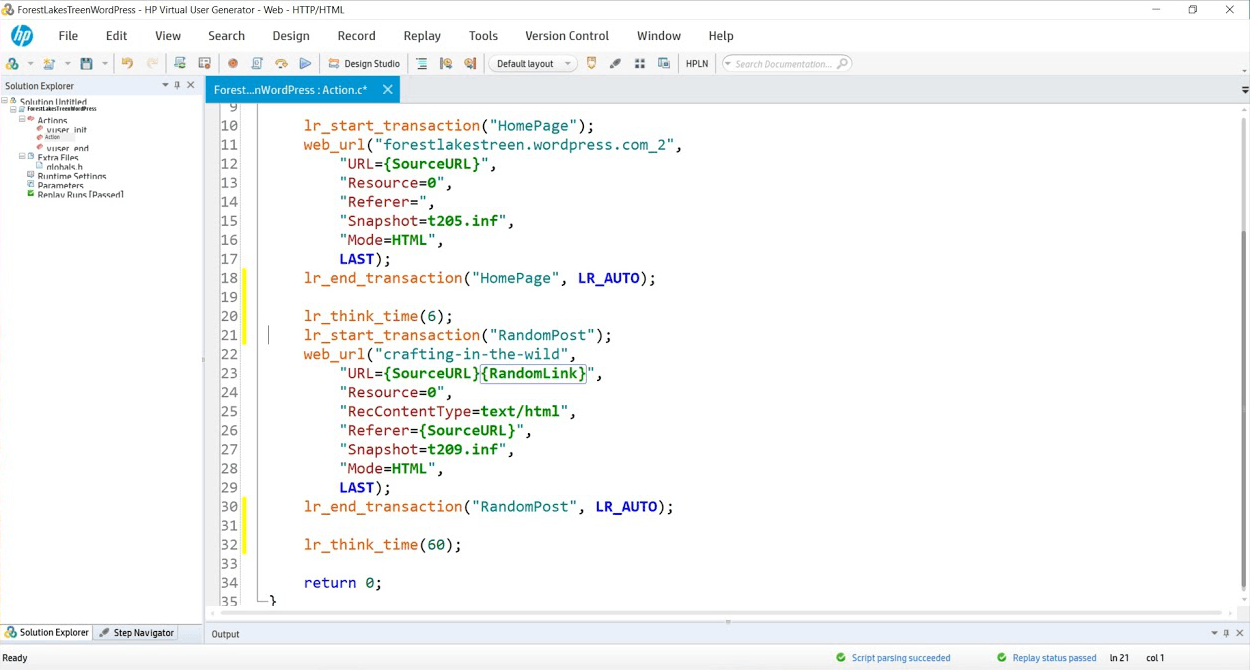
    Simulate 50 concurrent users running a script that hits the WordPress landing page and then randomly selects a blog link to read. In our scripts, lr_transaction statements capture transaction times for pages and store the results for analysis. We will measure the WordPress Home Page and then a randomly selected blog post throughout the duration of the tests we perform. We’ve created two variables

    {SourceURL}, which can be edited to store an IP or server name should you wish to test in your own WordPress domain.

    {RandomLink}, which contains the 15 articles and randomly picks one per user per iteration. If you wanted to simulate a larger collection of cached objects, you could create more articles and simply append their paths to the text file that serves as a data repository for this variable.

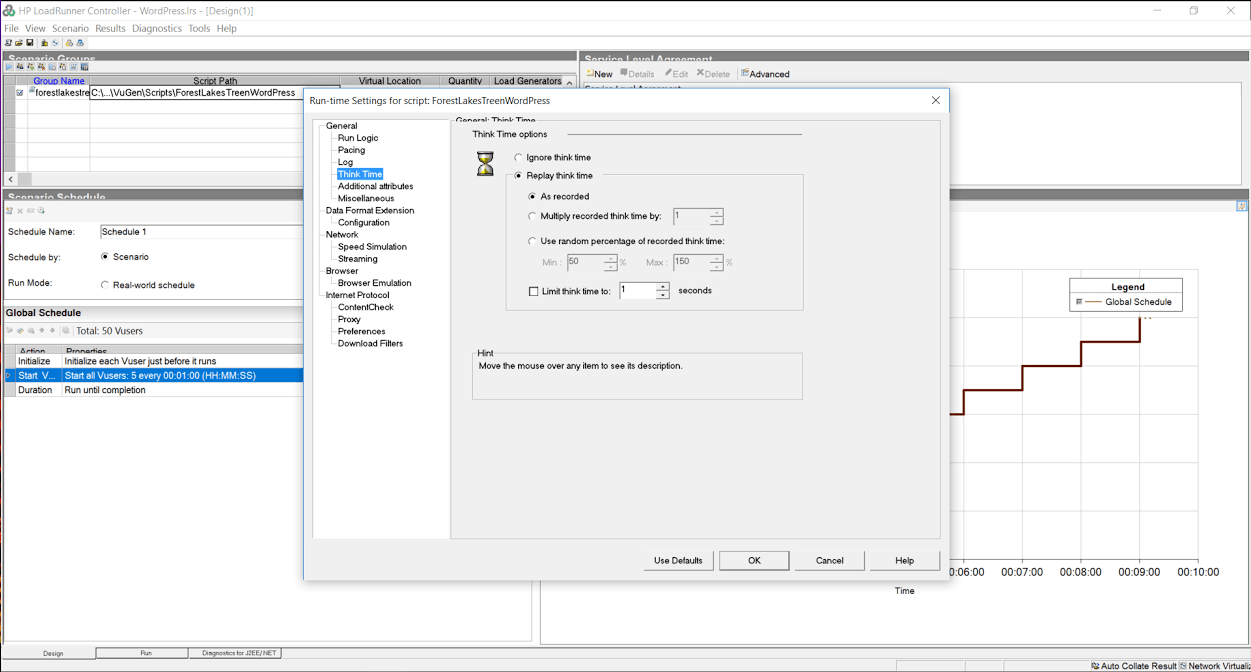
    While think time was recorded at 6 and 60 seconds, we have edited it to 1 second in both cases to gather more data rather than having the system sit idly for 99% of the test.
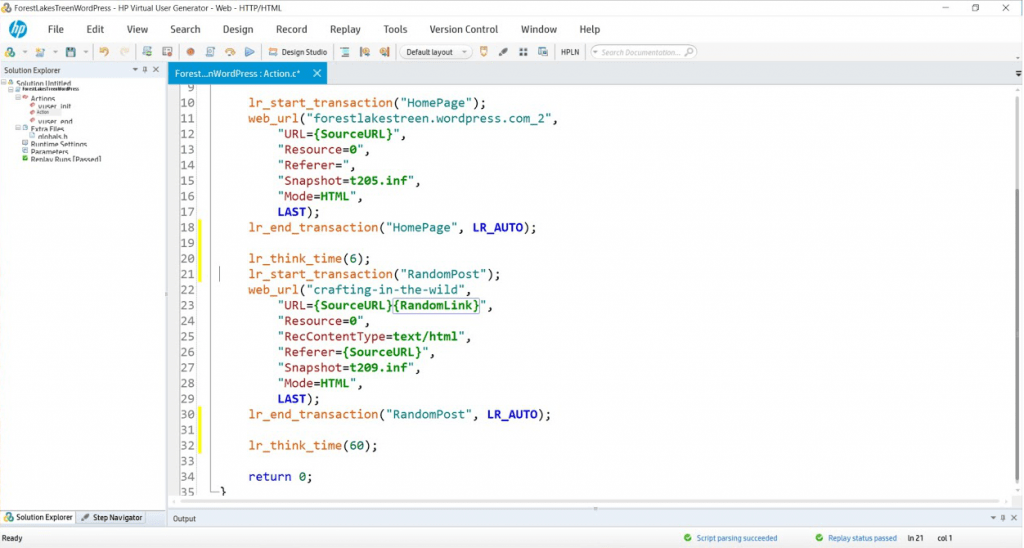
    loadrunner-script

    During this suite of tests, we will:

    Turn off HTML Parsing to avoid downloading resources with no think time to test the cache’s capability to create and close connections.

    Turn on HTML Parsing to download resources with no think time to simulate a high volume event and to test the cache’s ability to work with a server load of a real WordPress site serving pages from cache.

    Turn on HTML Parsing to download resources and replay think time typical of a real WordPress user to simulate a real world workload on a cache.

    Assumptions:

    1. System should not fail to respond to any transactions.
    2. All pages will be served from cache (cache warm-ups prior, if necessary).
    3. Page load speeds should remain relatively consistent for the duration of the test.

    Since both environments will be exercised with only cached content, every request will be served from cache in both Apache and LiteSpeed. During the test, we will attempt non-cached transactions like adding comments or logging in to the WordPress Admin panel and observe the effects the load has on the overall system. We will use the same script in the various exercises, only changing the run time settings to simulate different conditions.

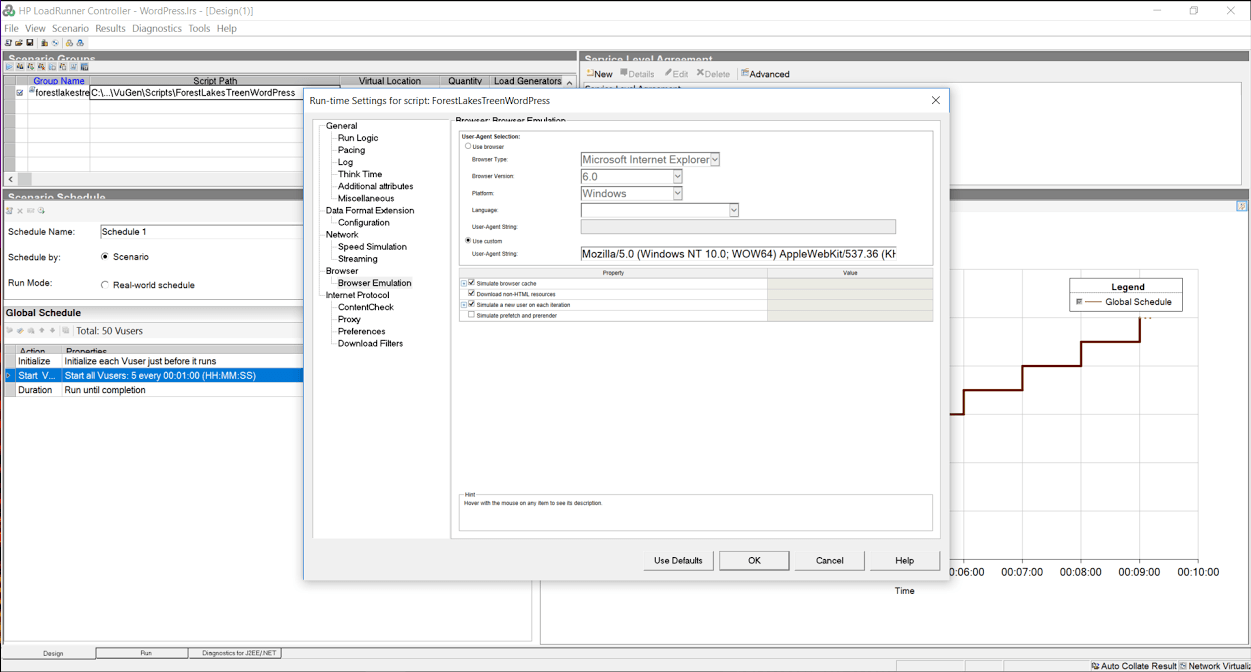
    In our tool’s runtime settings, we have the option to turn off the parsing of the cache served page so that it does not download resources, or pull them from the local browser cache. Simulating the browser behavior of downloading resources puts more load on the server, and also helps us measure throughput or the ability of the web server/cache to move data across the network.
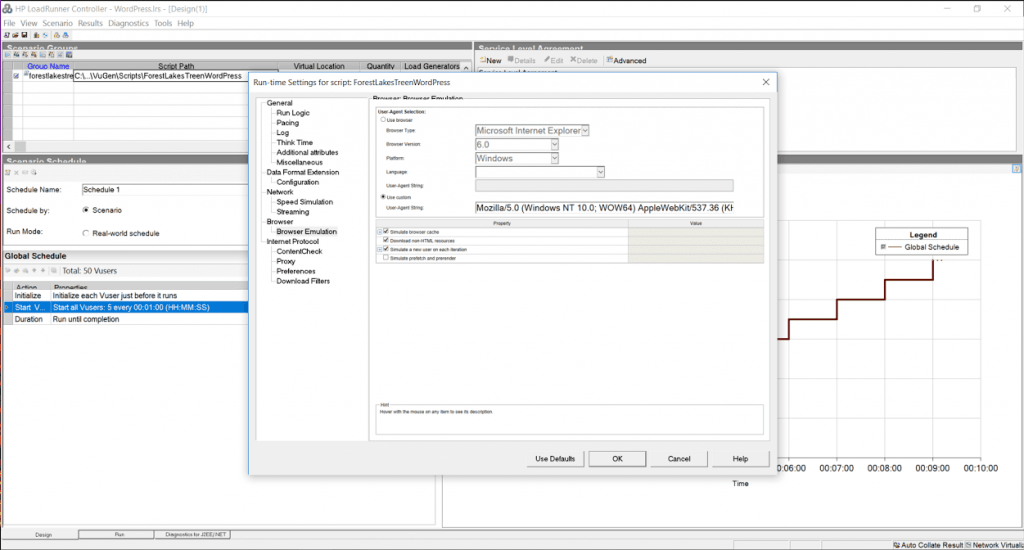
    runtime-settings

    In addition, when the script is recorded, it saves the amount of time a typical user spends reading the page into “think time”. As you might imagine, an average WordPress post has a significant amount of think time in it. By ignoring think time, we get a much higher load than replaying think time, which can help us stress test the environment… but is that what we want to do? [Maybe.]
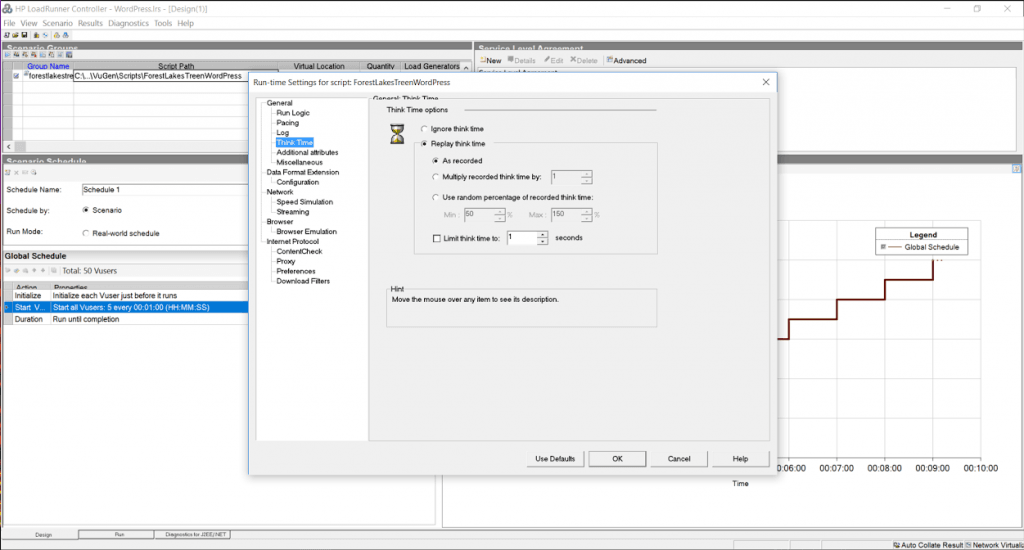
    think-time-options

    Debugging and Benchmarking Begin

    I’ve already discussed the model in the original performance blog (Benchmarking data looks like this…), and as a reminder, the tests should basically draw straight lines. When they do not, something is broken. To start, we want to know the characteristics of a single user running with no think time and downloading resources, since this will be our maximum load.

    Both Apache and LiteSpeed perform about the same in these conditions. A round estimate for throughput is that each user will consume about 90 MB/s or 0.4 Gb/s of bandwidth and generates about 1500 hits/sec. With a maximum of 8Gb/s of available bandwidth, we know that we cannot use all 50 users to run our test (rough estimates are ~20 users will saturate the network). This graph confirms that the network saturates around 5 minutes mark and somewhere around 20 users because the throughput no longer increases as the number of users grows.
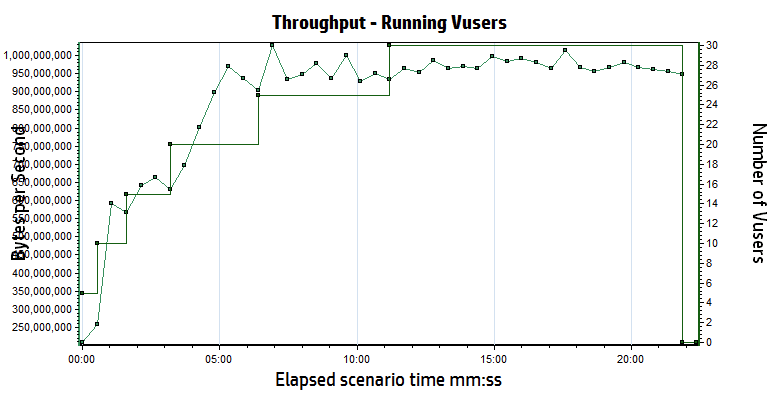
    throughtput-saturated-vusers

    Let’s do some quick math to double check our work.

    If we run one user, we see about 11ms response time, which would translate to approximately 90 requests for any page per second (1s/11ms). If you look at most of the articles you’ll see that most contain “about X-teen resources” per page, so your hits per second should be 90 times X-teen, which matches our 1500 hits per second.

    Here is the most important point: THIS MATH IS ALWAYS TRUE. It does not matter if the site is WordPress, Magento, or just PHP. Hits per second = (1s / single user page time) * average number of resource per page. If you turn off the downloading of resources, your average number of resources per page will be one (just the cache reply) …but the single user page time will probably drop to 1-3 ms.

    Believe the math.

    Low Load Baseline (5 users)

    When you are benchmarking, you are not trying to stress a system to its breaking point. You only want your system to respond as fast as it can, and that stops happening when you start approaching breaking points. While a single user response time is good for some things, it doesn’t create any of the deadlock conditions that a multi-user baseline will. Since LiteSpeed and Apache should both handle 5 users without issues, we start with 1 user and ramp up to 5 users by adding 1 user every 30 seconds. In a second I’ll explain why this didn’t happen the way we expected.

    We use the script to hit the test site for a minute or two, just to make sure that everything is cached, then we start a 5 minute test cycle. During the baseline tests, we planned to run three slightly different scenarios:

    Scenario #1: cache hits only, think time of 1 second between pages, downloading of resources
    Scenario #2: cache hits only, no think time, downloading of resources
    Scenario #3: cache hits only, no think time, no downloading of resources

    When it is done, we swap the LiteSpeed configuration for the Apache configuration… Lather, rinse, and repeat.

    litespeedtech.com/packages/benchmark/LoadRunner/WordPress/2016/apache-baseline/Report.htm

    litespeedtech.com/packages/benchmark/LoadRunner/WordPress/2016/nginx-baseline/Report.htm

    litespeedtech.com/packages/benchmark/LoadRunner/WordPress/2016/litespeed-baseline/Report.htm

    Replay Think Time/Download Resources

    Completed Trans. Hit/s Throughput Tx Home/Random Server Load
    LiteSpeed 1733 70 3.3 MB/s 0.007/0.010 0.026
    nginx 1778 60.5 3.7 MB/s 0.011/0.016 0.157
    Apache/WPSC 1776 70 4.3 MB/s 0.013/0.015 0.055

    No Think Time/Download Resources

    Completed Trans. Hit/s Maximum Throughput Tx (s) Home/Random Server Load
    LiteSpeed 221 K 7511 674 MB/s 0.007/0.009 1.12
    nginx 130 K 4428 501 MB/s 0.013/0.014 1.37
    Apache/WPSC 105 K 3568 424 MB/s 0.015/0.019 13.48

    What happened to the third test (no think time, don’t download resources)? We decided that there was very little reason to run it, because there is a problem that surfaces in this first test, which completely caught us off guard. Apache cannot scale in this environment past approximately 3200 h/s. Period.

    Notice the wording “in this environment”? That is a very specific statement. It is only relevant to this 2 CPU server, but we have seen the exact same behavior with other applications- so it has nothing to do with WordPress. We are saying (with a high degree of confidence) that Apache becomes CPU bound around 3200 hits/sec… regardless of what the hit is. The same behavior occurs at 3200 hit/sec with downloading full pages or just cache responses in a 2 CPU environment. It is a limitation of Apache and can only be addressed via adding more resources.

    If you look at the data with think time enabled, even a minimal 1s delay between requests drops the transaction rate to only 70 hits/sec. A hit is any request for any object (static or cached) being served by apache and/or LiteSpeed. The difference between the two in a low volume environment is negligible. If your WordPress site does not get a lot of traffic, you will not see any improvement running LiteSpeed.

    But, please, keep reading…

    The second test actually exposes the Apache problem. By removing the think time, you can simulate a much higher workload with the same number of users. The LiteSpeed Server delivers 8200 hits/sec, while the Apache workload peaks at about 3200 hits/sec (You’ll see this in the final data sets too). Take a look at the server load. Apache is running at 8X capacity, which results in requests being briefly queued by the processor and the longer response times in both Home Page and Random Page transactions.

    For the record, LiteSpeed capped at 16,000 hits/sec, but we were at the limits of everything (bandwidth, load generation capacity, LiteSpeed capacity…). There were peaks that were higher, but 16K sustained was held for nearly 10 minutes.

    Now, normally, this is the part in the effort that vendors would generally throw a celebratory high five and proclaim their awesomeness… but, let’s hold the applause. When you are 5X as scalable as your competition, that’s huge!

    Except the data tells a weird story.

    Under no load conditions, LiteSpeed and Apache perform about the same.

    AND…

    Under 1X vs. 8X load conditions, LiteSpeed and Apache perform about the same.

    And, that is 100% correct… Almost.

    While the Apache server is running at 8X load, you see a slight increase in the time that the pages get served by the cache. 5ms. Throughout the test, we would open browser sessions and independently hit pages on the site. Guess what. They were fast.

    The one hidden nugget in all of this is that the server load is not the same. The cache is fine, and able to respond, even though the server load is high. However, all uncached requests are occurring against a server that is dying. We tried logging into the root of the server, the WordPress Admin panel, and adding comments. Guess what. They were not fast… 30 seconds or more.

    This also explains why I hold webpagetest, gtmetrix, et. al. in such disdain. They test at low volume and they ignore the effects on the back-end web server. If you ignore load conditions and back-end system resources, everyone gets a trophy… Until the real world comes for them. Interestly enough, Internet Sucuri published a blog post about Layer 7 DDoS attacks and you’ll notice that the median attack size is very similar to… The Apache limit we demonstrated earlier. (Sucuri Layer 7 DDoS Blog). If nothing else, LiteSpeed buys you 4-5X more Layer 7 DDoS resiliency.

    So, what next?

    We better run a much bigger load against both servers to see what happens!

    We will rerun scenario #1 and scenario #2 with 5 users being added every 30 seconds in an attempt to reach the limit of 50 users in both scenarios. Scenario #2 may cause issues.

    Scenario #3 is officially retired (Siege-like) because …well, it doesn’t make sense. Please understand that if you are using Siege, you are not requesting resources unless you explicitly code every object on the cache page into a get request for every page within your WordPress site. You can use Siege, but you’d need to write a script that called the cache page, and then called every bitmap, CSS, and javascript object on the page to represent a user with a browser. For every page. Just not maintainable.

    Without downloading resources, you might as well test “hello world”…

    Replay Think Time/Download Resources

    Completed Trans. Hit/s Throughput Tx Home/Random Server Load
    LiteSpeed 21292 503 32 MB/s 0.013/0.026 0.205
    nginx 21484 535 33 MB/s 0.012/0.014 0.60
    Apache/WPSC 21122 527 39 MB/s 0.022/0.037 1.961

    litespeedtech.com/packages/benchmark/LoadRunner/WordPress/2016/apache-with-think-time/Report.htm

    litespeedtech.com/packages/benchmark/LoadRunner/WordPress/2016/nginx-with-think-time/Report.htm

    litespeedtech.com/packages/benchmark/LoadRunner/WordPress/2016/litespeed-with-think-time/Report.htm

    No Think Time/Download Resources

    Completed Trans. Hit/s Throughput Tx (s) Home/Random Server Load
    LiteSpeed 334K 12K 738 MB/s 0.048/0.055 1.6
    nginx 236K 6K 363 MB/s 0.090/0.094 1.8
    Apache/WPSC 93K 3400 300 MB/s 0.217/0.151 91.0

    litespeedtech.com/packages/benchmark/LoadRunner/WordPress/2016/apache-no-think-time/Report.htm

    litespeedtech.com/packages/benchmark/LoadRunner/WordPress/2016/nginx-no-think-time/Report.htm

    litespeedtech.com/packages/benchmark/LoadRunner/WordPress/2016/litespeed-no-think-time/Report.htm

    MAX
    litespeedtech.com/packages/benchmark/LoadRunner/WordPress/2016/litespeed-saturated/Report.htm

    Once again, with think time, both environments performed about the same. However, Apache running on 2 cores performance is saturated and becoming CPU bound, even though the transaction rate is nowhere near the 3200 hits/sec limit. Whenever you begin to run out of resources, the natural response is to add more resources. However, Apache’s CPU consumption is not linear at all, and doubling the amount of CPU’s would not double capabilities.

    Both environments performed well and most likely would be good choices for low volume WordPress hosting, but there is nothing equivalent about them. While 200 ms may be acceptable, a server load of 91 is an operations nightmare. LiteSpeed Web Server is seeing DDoS level hit rates, and still performing very well.

    We know that you can build sites that support many more readers by adding additional Apache servers, or perhaps larger servers. We’re a little disappointed in the fact that we cannot really “go big” on this because we all want to know how far we can go here at LiteSpeed. We’re always looking to push the engineering further.

    Drawing conclusions

    Final thoughts from a “benchmark suite”…

    Going through this exercise has been very helpful. We discovered some things we didn’t know. We confirmed some things that we thought we knew. We also corrected some things we were doing wrong.

    My personal takeaways are:

    While LiteSpeed would love to have every WordPress user as a customer, the truth is that if your site has low volume, then you shouldn’t expect much of a performance gain from running our software. We are working on some things that will change my opinion on the topic greatly, but for now, LiteSpeed really only helps at higher volumes and will likely help you if you are a Layer 7 DDoS victim.

    Assuming that you are operating a high volume WordPress hosting business, the case for LiteSpeed is pretty clear. Shared hosting providers can easily double their WordPress hosting capability by upgrading to LiteSpeed. If you write a WordPress blog with light traffic like mine, you are likely paying very little (I’m paying nothing), but you are also very likely grouped with hundreds of people like me in the shared environment. The aggregate load of these hundreds of WordPress blogs could result in death by a thousand paper cuts, or even worse, a hundred support calls/tickets from angry WordPress bloggers.

    As a final test, I turned up all of the real user features within the tool (realistic think times and browser side caching) and I reran 50 users against the Apache server. The peaks were about 70 hits/s and 7MB/s. This underscores a very important point. Real user loads are significantly lower than simulated loads because real users need time to think, which in turn gives the server time to think. Assuming that the math is a straight line, you could safely scale Apache to nearly 40X this real user load, or about 2000 active users reading WordPress articles. Similarly, the math for LiteSpeed would suggest about 20,000 real world active users interacting with a WordPress server in typical fashion. Real world active users do not mean concurrent users, nor logged in and browsing – more an audience/community sizing guideline.

    However, it is more likely that you will run out of inbound bandwidth at the host long before hitting the physical limits of the Apache server. A 10Gb/s port on a switch can only send as much data as the smallest network can accept before delays get introduced. Remember that a host only controls what happens inside of their four walls. They do not control the size of the content nor the network on the other side of their switch. One of the first things we fixed was the image sizes in our WordPress test server, because most were 4MB (mostly because I upload them from my phone and I’m lazy). You will ALMOST ALWAYS run into a bandwidth issue as a hosting provider first if your data center wasn’t designed by monkeys.

    Bandwidth is finite and expensive. Even the smallest servers are capable of consuming all of your bandwidth, which means that the bandwidth bottleneck will begin to protect the server by throttling the requests to the server. If you don’t have any idea of how much bandwidth per WordPress user your site consumes, forget about making any other claims. In addition, if you haven’t tested it all the way through, you probably missed the opportunity to tune your infrastructure.

    From testing for two solid weeks, we were able to flush out some network and server issues that degraded our test environment. We kept copious notes and developed methods and procedures to maximize performance by 400% over the two weeks. Just because Siege suggests that you can move 8Gb/s against your test environment, doesn’t mean you can actually do so and you don’t actually know for sure until you try it.

    In looking at Siege output, I noticed it had run for X number of seconds, and moved Y MB. In the end, it calculated that the network had a max rate of transfer of Z Gb/s. The only way you arrive at that conclusion with that scale is by calculation. (MBs cannot become Gb/s any other way). What this means is that you’ve never actually tried to move that much data, and you are assuming that everything is setup correctly and it will just work. Hypothetically.

    Our testing suite removes hypothetical to give you real world results that you can use to evaluate where you stand against the physical limits of your infrastructure. It doesn’t matter how expert you are, there are mistakes and/or misconfigurations that can be discovered via testing to improve performance. We are willing to share ANY and all of our test assets and expertise to help you assess LiteSpeed. (email: santonucci@litespeedtech.com)

    Keep an eye out later this year when we upgrade our WordPress cache to do some game changing things (and of course, the supporting benchmark blog post 🙂 ).

  • Improving DigitalOcean WordPress Droplet Performance with just One Click (With OpenLiteSpeed)!

    Improving DigitalOcean WordPress Droplet Performance with just One Click (With OpenLiteSpeed)!

    DigitalOcean-WP-Droplet-1

    LiteSpeed Technologies announces the release of a one-click script that quickly and easily supercharges your DigitalOcean Droplet’s WordPress setup. LiteSpeed’s cache performance delivers significant performance and scalability gains over the DigitalOcean default.

    (more…)