WpW: Object Cache Support in LSCache

WordPress Wednesday: Object Cache Support in LSCache

Written by

in

WordPress Wednesday: Object Cache Support in LSCache

Welcome to another installment of WordPress Wednesday!

Today’s topic is: Object Cache Support in LSCache

Disclaimer: The information contained in this post is accurate for LSCWP v4.5.0.1 [release log]. If you are using a newer version of the plugin, some details may have changed. Please refer to our documentation for the latest!

You asked for it, and we delivered. LiteSpeed Cache for WordPress supports Object Cache!

What is an Object Cache?

An object cache stores the results of expensive and/or frequent database queries in a way that makes them easy to retrieve, and eliminates the need for repeated access to the database. Object caching greatly reduces the time it takes to retrieve query results.

For example, WordPress stores your site’s options in the database. Site options include things like the site’s name and URL. Every time WP assembles a page for a visitor, it is necessary to access the database to read the site options. As you can imagine, these repeated queries for the same information represent wasted resources. With an object cache, you can query the database once, and save the results for a set period of time. During that time, whenever a page must be assembled, WordPress can get the site information from the object cache. Accessing object cache is a much less resource-intensive prospect than accessing a database.

Some queries are time-consuming, and other queries are repeated frequently. Both of these scenarios can be improved by storing the query results in object cache.

Note: If you have a site that is fully-cached by LSCWP, object cache won’t be invoked very often. Object cache is only necessary when WordPress is building a page through PHP. If PHP is not being called (and minimizing PHP usage is the goal with LSCache, after all) then there are no queries to process and therefore nothing to look up in object cache.

How to set up Object Cache Support

LSCWP doesn’t provide object caching directly. Rather, it supports your use of an external object cache such as Redis, Memcached or LiteSpeed’s drop-in Memcached replacement, LSMCD. Setting up object cache systems is outside of the scope of this tutorial, but you can find some useful information via the product links above or by visiting our documentation site.

So, assuming you are already using one of these object caching methods, you can set up LSCWP support in the Cache Settings tab.

Navigate to LiteSpeed Cache > Cache > Object. You will need to give LSCWP some parameters, including where your Redis, Memcached or LSMCD lives, which objects you’d like to have cached, and how long you want objects to remain in cache, among other things.

LSCache Object Cache Settings

Object Cache

This entire integration is disabled by default. Select ON to enable it and then configure it via the settings, as described below.

Status

This is an informational area to let you know the status of your external object cache. If you are getting errors here, please see How to Debug your Object Cache Setup.

Method

Choose Memcached if using Memcached or LSMCD. Choose Redis if using Redis.

Host and Port

These settings refer to the hostname (or IP address) and port number used by your object cache. The default values of localhost and 11211 should work fine for you, if your cache is set up via a TCP connection. If you are using a UNIX socket, Host should be set to /path/to/memcached.sock (substitute the actual path used for your installation) and Port should be set to 0.

Default Object Lifetime

Choose a TTL for items stored in the object cache. We recommend using a relatively short time in order to avoid stale results. Default is 360 seconds.

Username, Password, and Redis Database ID

These settings may or may not be applicable, depending on your object cache setup. If you have SASL installed, fill in the appropriate credentials. If you are using Redis, enter your database ID. These measures will prevent cross-contamination in situations where multiple sites share one object cache.
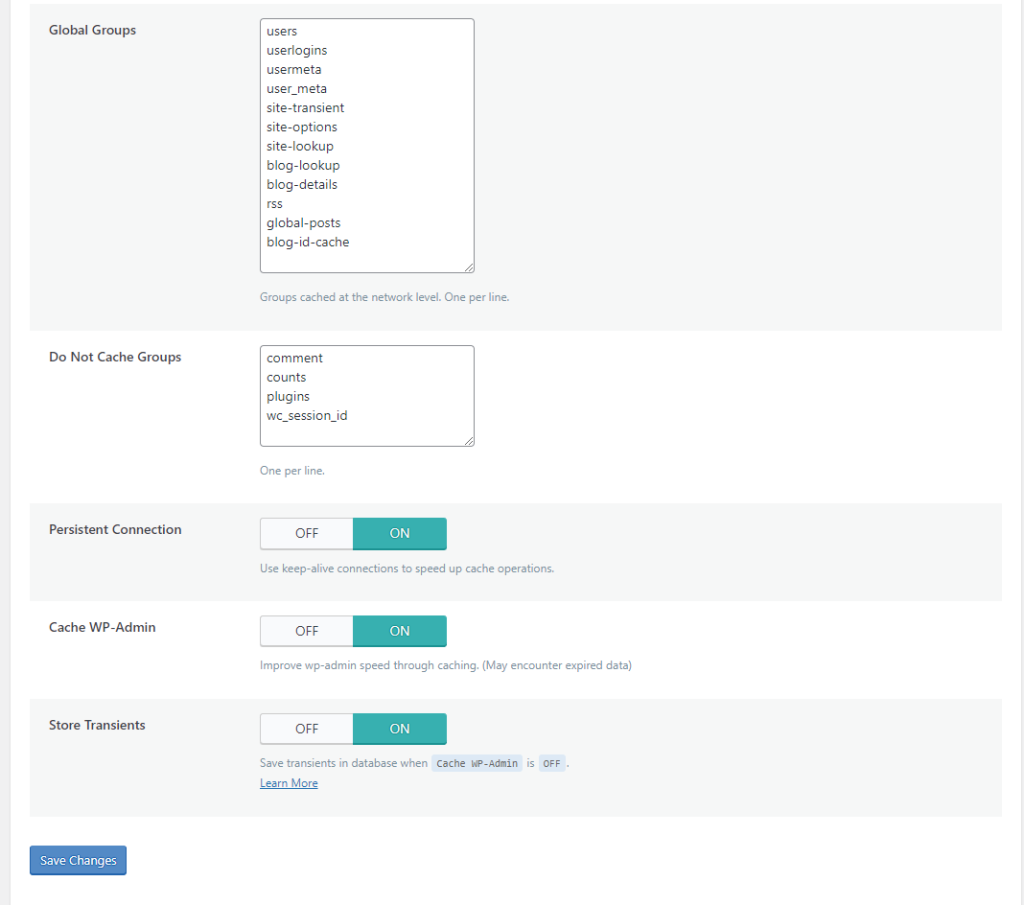
LSCache Object Cache Settings

Global Groups

This is a list of groups that you want to cache at the network level. By default:

users
userlogins
usermeta
user_meta
site-transient
site-options
site-lookup
blog-lookup
blog-details
rss
global-posts
blog-id-cache

Do Not Cache Groups

These are groups that you do not want to include in object cache. By default:

comment
counts
plugins

Persistent Connection

If enabled, the connection is kept alive in order to make Memcached faster. This is set to ON by default.

Cache WP Admin

If enabled, WordPress admin will be sped up, but at the risk of occasionally retrieving stale data from the object cache. This is set to ON by default.

Store Transients

When Cache WP Admin is set to OFF, transients have nowhere to go. Without transients, you don’t receive server status notices (such as XXXX has been completed successfully.). If you have disabled Cache WP Admin, then you can use Store Transients to get server notices. This is set to ON by default.

Why do You Need LSCache for This?

You may be wondering: what is the point of setting up object cache support in the LSCache plugin?

So here’s the thing: you can’t use object cache without telling WordPress how to handle it. You need a plugin for that. You can install a single-purpose object cache plugin, or you can let LSCache facilitate the relationship between your object cache and WordPress.

It comes down to this: would you rather install several plugins with many different interfaces to handle all of your optimization needs? Or would you rather have one optimization plugin that can handle it all? If you like the second option, then LSCache is your solution!

Have some of your own ideas for future WordPress Wednesday topics? Leave us a comment!

Don’t forget to meet us back here next week for the next installment. In the meantime, here are a few other things you can do:


This content was last verified and updated in April of 2023. If you find an inaccuracy, please let us know! In the meantime, see our documentation site for the most up-to-date information.

Comments

29 responses to “WpW: Object Cache Support in LSCache”

  1. Steve Avatar

    Forgive the cache newbie question, but can you explain where the list of groups is coming from, and how do I know they are correct for my site?

    1. Lisa Clarke Avatar
      Lisa Clarke

      Our object cache implementation uses WordPress’ object cache interface and then stores the results with your Redis or Memcached backend.

      Without getting into a whole lot of technical details, I can tell you that WP itself comes up with the group list. This is one of those things where the default value is fine for 99% of the people who use it, and if you don’t know what it is, then you shouldn’t need to change it.

      In the event that you do want to know more technical details, you can take a look at this page of the WordPress Codex where they describe the elements of their object cache interface, including the purpose of groups. There is a link there to their source code, if you really want to dig into it.

      I hope that clears it up a little bit. If not, let me know!

  2. zakki Avatar
    zakki

    Hi, I am using LS Cache version v2.1.1.1. I can’t found Object Cache in my advanced tab, only 2 option in there : Improve HTTP/HTTPS Compatibility and Instant Click. Where is Object Cache option location?

    thanks

    1. Lisa Clarke Avatar
      Lisa Clarke

      Hi, Zakki. It sounds like you are on WordPress multisite? If so, you can find the Object Cache settings in the Advanced tab at the network level. It can’t be configured from within an individual site.

  3. John Wuethrich Avatar
    John Wuethrich

    I cant get it to turn on or even show its tested. If i uninstall and reinstall plugin the connection test works for the first view but i have sockets enabled so the settings it tries arnt right. If i enter the right ones and hit save it reloads to totally blank fields where i had entered settings. Connection test “not available”.

    nc -U /path/sockname.socket works so it apears to be an issue with the plugin, any suggestions? is it possibly something with openbase dir (along the lines of the server cant access the path?) Ive tried ln -s and moving it one step bellow doc root but that didnt seem to change anything.

    1. Lisa Clarke Avatar
      Lisa Clarke

      Hmmm, our support team will need to look a little more closely at your setup. Please create a ticket through our client area or by sending email to support@litespeedtech.com. Thanks!

      1. John Wuethrich Avatar
        John Wuethrich

        im running olsws… does that change anything or is this something they would want to see anyway?
        its bizarr i got the memcached php test file working so now i know the socket is good and accessible via php but nothing on the advanced tab sticks around after hitting save. page refreshes and its blanked out. I guess i should set up logging and see if that tells me anything

        Thanks!

  4. Ryan Avatar
    Ryan

    Thank you for this tutorial. I managed to install redis and predis on my dedicated server ( CloudLinux 6, Litespeed Webserver Enterprise” while creating two instances as a start. I opt to utilize dedicated instance per cPanel account on the server to prevent cross contamination. The connectivity tests for both instances were successful. but I’m stuck at the the database ID and password i must specify on LS wordpress cache configuration page – I understand that the ID must be between 0 and 16 but is this limitation per cPanel account and so per Redis instance or is it on the whole server – as for the password was i supposed to specify it during Redis installation or on redis.config “that i am being able to find” before pasting it into LSWC. My apologies for these questions but i am new to Redis.

    1. Lisa Clarke Avatar
      Lisa Clarke

      Hi, Ryan. We see you already created a ticket about this. Shivam has responded to you there 🙂

  5. Gopal Thakur Avatar

    Dear Sir
    I am using these plugins but suddenly the following problems have come up, how to correct it. I’m not able to open the WordPress admin dashboard.

    “Can NOT find LSCWP path for object cache initialization in /home/merasharebazaar/public_html/wp-content/object-cache.php
    Warning: Cannot modify header information – headers already sent by (output started at /home/merasharebazaar/public_html/wp-content/object-cache.php:36) in /home/merasharebazaar/public_html/wp-includes/pluggable.php on line 1251

    Warning: Cannot modify header information – headers already sent by (output started at /home/merasharebazaar/public_html/wp-content/object-cache.php:36) in /home/merasharebazaar/public_html/wp-includes/pluggable.php on line 1254”

    regards
    Gopal
    http://www.merasharebazaar.com

    1. Lisa Clarke Avatar
      Lisa Clarke

      Please create a ticket through our client area or by sending email to support@litespeedtech.com. Thanks!

  6. Ara Komputer Avatar

    Hi Lisa

    can you tell me how to obtain path to ” $address = ‘/path/to/memcached.sock’ ; // set the address here” or path to memcached.sock ?

    In my Phpinfo information ,

    memcached
    memcached support enabled
    Version 3.1.5
    libmemcached version 1.0.18
    SASL support yes
    Session support yes
    igbinary support no
    json support no
    msgpack support no

    1. Lisa Clarke Avatar
      Lisa Clarke

      Hi, Ara. That is the path that was configured when you set up Memcached. (More info)

      If you have root access you can run the following command: ps -aux | grep memcached | grep -v grep

      If should output something like this:

      site_user     947  0.0  0.0 366536  3924 ?        Ssl  Sep04   8:28 /usr/bin/memcached -u site_user -p 11211 -m 64 -c 1024 -s /var/www/html/memcached.sock -a 0770

      If you don’t have root access, you will have to ask your hosting provider for help.

      Hope this helps!

  7. rakyatnesia Avatar

    hi i using redis plugin and LScache , should i uninstal redis plugin when i turn on redis setting on LScache ?

    1. Lisa Clarke Avatar
      Lisa Clarke

      Yes. You can only use one object cache plugin at a time, so you can either use the redis plugin, or you can set up redis in LSCache, but not both.

  8. Morteza Avatar
    Morteza

    how can i use object cache with redis cluster ?

    1. Lisa Clarke Avatar
      Lisa Clarke

      I’ve asked the team, and while we don’t have experience with redis cluster, we’re pretty sure setup in the LSCWP plugin should be the same as standalone redis.

  9. Peter Avatar
    Peter

    Is it okay if the default object lifetime of redis is increased? Let’s say to 1 hour?

    1. Lisa Clarke Avatar
      Lisa Clarke

      I don’t see any reason why that, technically, can’t be done. But I can’t really say whether that is a good idea or not. It probably depends on the nature of your site, how often content changes, etc. I’d say this is more of a question for a redis forum.

  10. Orlando Fernando Marconi Avatar
    Orlando Fernando Marconi

    Hi!

    If I’m using REDIS, can I completely disable MEMCACHED right?

    How can I do this? What is the command?

    Sometimes when I’m watching the TOP command, a Memcache process appears, I want to disable it.

    Thanks!

    1. Lisa Clarke Avatar
      Lisa Clarke

      Yes, you can disable it. Here’s how:

      systemctl stop memcached
      systemctl disable memcached
      systemctl mask memcached
      
  11. Orlando Fernando Marconi Avatar
    Orlando Fernando Marconi

    Hi!

    Is there any place that I can better filter these groups and understand what each one does?

    users
    userlogins
    useremail
    userslugs
    usermeta
    user_meta
    site-transient
    site-options
    site-lookup
    site-details
    blog-lookup
    blog-details
    blog-id-cache
    rss
    global-posts
    global-cache-test
    comment
    counts
    plugins
    wc_session_id

    The names look very obvious, but I wanted to read some documentation about it and other groups that I can add, or are there all?

    Thanks for the support via commets
    😉

    1. Lisa Clarke Avatar
      Lisa Clarke

      We use WordPress’s own Object Cache functions, and those groups are standard WP groups. I looked through the WordPress official docs, but couldn’t find any reference as to what they mean. Looking at the WP github code, we’re assuming that users, userlogins, email, slugs, metadata are for caching queries related to users. site- groups refer to individual sites, and blog- are for multisite setups. wc is for WooCommerce. Other than that, I’m afraid we don’t have any insight.

      1. Orlando Fernando Marconi Avatar
        Orlando Fernando Marconi

        No problem!

        This is already very useful!

        Thanks!

  12. Razeakhar Avatar

    Great article.
    I have this erroe ” You should use a persistent object cache ” and easily solve it.
    Thanx again ❤️

  13. max Avatar
    max

    hi, is it reasonable to use both memcached and redis with LireSpeed Cache plugin? if yes then how? there is only Method swither – either Memcached or Reddis

    BUT in Status field i see:

    Memcached Extension: Enabled
    Redis Extension: Enabled
    Connection Test: Passed Learn More

    1. Lisa Clarke Avatar
      Lisa Clarke

      That status indicates that you have both PHP extensions, but you can’t actually use both at the same time. You should just pick one and stick with that.

      1. Rolf Avatar
        Rolf

        So if you have the choice between Memcached and Redis, which one would you recommend? Which one is fastest for WP object caching with lscache? And what about socket if available? Is that faster than port or no difference?

        Any advise is much appreciated 🙂

        1. Lisa Clarke Avatar
          Lisa Clarke

          Hi, Rolf. I asked the support team, and they said it only matters in extreme cases. If you’ve got tens of thousands of queries per second, redis is faster than memcached, and socket is faster than port. But under the load of a typical WP site, it shouldn’t make any difference. Hope this helps!

Leave a Reply

Your email address will not be published. Required fields are marked *