WpW: DNS Prefetch with LiteSpeed Cache

WordPress Wednesday DNS Prefetch with LSCache

Written by

in

Welcome to another installment of WordPress Wednesday!

Disclaimer: The information contained in this post is accurate for LSCWP v7.5.0.1 [release log]. If you are using a newer version of the plugin, some details may have changed. Please refer to our documentation for the latest!

You may have noticed the DNS Prefetch option in the LiteSpeed Cache for WordPress settings. Today, we’ll talk a little bit about what that feature does and how to use it.

What Problem Does DNS Prefetch Solve?

There are all kinds of metrics to measure the actual page load time of your site, but what about the perceived speed? If a visitor feels like interacting with your site is slow, then it doesn’t matter what your PageSpeed score tells you!

One area in which you have the power to reduce user-perceived latency is DNS resolution.

If a visitor clicks an external link on your site, and then sits there for several seconds while the browser looks up the site’s IP address, it can feel like it’s your site that’s sluggish, even if your site has nothing at all to do with it! DNS Prefetch can eliminate the wait by doing the lookup before the visitor even clicks the link.

While your visitor is looking over your page and reading your engaging content, their browser can be quietly looking up IP addresses in anticipation of the visitor’s next click.

Example
Obviously, if you link to a lot of outside sources on your site, it’s not going to be practical to prefetch every one. There are a few situations, though, where this ability comes in especially handy.

Say you have a WordPress blog at https://www.mybirdsite.com and you regularly publish posts discussing bird-related books and gifts that are for sale in your online shop. The book and gift store is located at https://shop.mybirdsite.com. Now, wouldn’t it be nice if a visitor to your blog could click to buy that book about hawks without having to wait for DNS resolution?

If you want navigation from the blog to the shop to be seamless and to behave like it’s one big site, then it is helpful to enable DNS Prefetch for //shop.mybirdsite.com. With DNS Prefetch enabled, a visitor can shop without delay.

Which Browsers Support DNS Prefetch?

Most modern browsers support DNS Prefetch for HTTP, as seen in this chart. Both Chrome and Firefox have DNS prefetching over HTTPS disabled by default, but it may be enabled by savvy users. (I did not find anything to suggest that the other browsers differentiate between HTTP and HTTPS in this way.)

How to set up DNS Prefetch with LiteSpeed Cache
DNS Prefetch with LiteSpeed

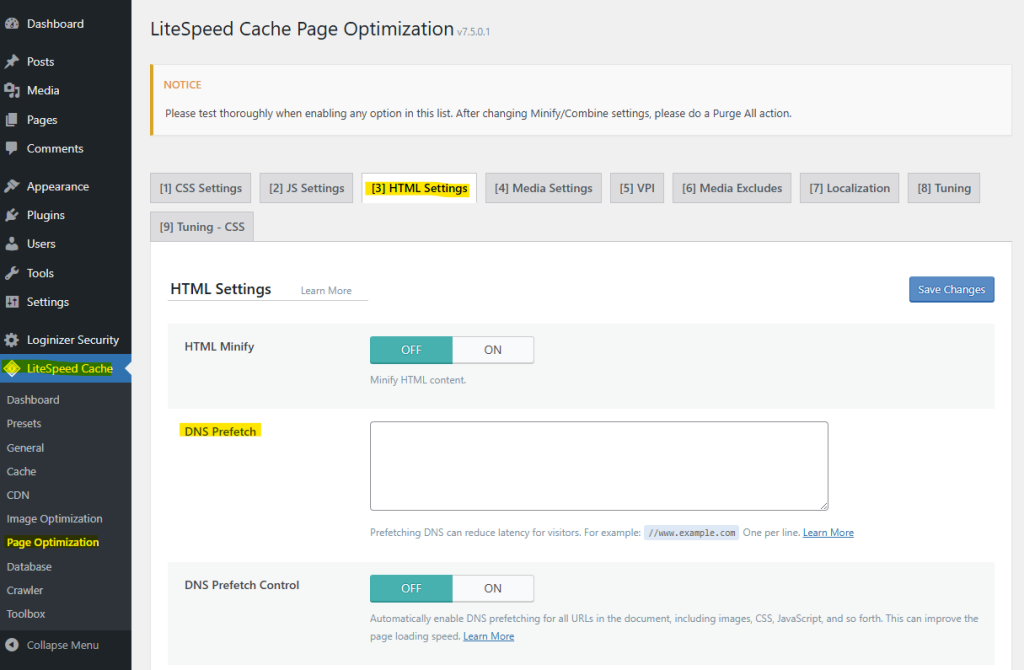
From the WordPress Dashboard, navigate to LiteSpeed Cache > Page Optimization > HTML Settings. Scroll down the DNS Prefetch. Enter the domain names to prefetch, one per line, using the format //www.example.com.

And that’s it. Setup couldn’t be easier!

Want more information about DNS Prefetch? The Chromium Projects has a detailed Design Document writeup, and Mozilla describes how the response header works.

If you have any questions about how DNS Prefetch could benefit your site, let us know in the comments!

—

Have some of your own ideas for future WordPress Wednesday topics? Leave us a comment!

Don’t forget to meet us back here next week for the next installment. In the meantime, here are a few other things you can do:

—
This content was last verified and updated in September of 2025. If you find an inaccuracy, please let us know! In the meantime, see our documentation site for the most up-to-date information.

Comments

19 responses to “WpW: DNS Prefetch with LiteSpeed Cache”

  1. Alex Avatar
    Alex

    Thank you for the new feature. This is great.

    If I wanted to prefetch fonts.gstatic.com then, would I put this into the prefect box:

    //fonts.gstatic.com

    ?

    I’m not a WEB guy but I have a blog. I just want to make sure I understand how to add a domain, subdomain and wild cards as well if I need to do that.

    1. Lisa Clarke Avatar
      Lisa Clarke

      Hi, Alex.

      Technically, yes, that is the correct syntax. However, for this particular example, it might not be the best way to go about it. I believe that’s the site for Google Fonts? If you’re trying to make the fonts that you use on your page have a smaller impact on the page’s load time, a better idea is to enable the Load Google Fonts Asynchronously setting in the Tuning tab of the Settings page.

      The DNS Prefetch setting is meant for external links that your visitors are likely to click. If you frequently link to articles on a favorite site, and those links look like https://blog.myfavoritesite.com/2018/new-blog-post and https://blog.myfavoritesite.com/2018/another-new-blog-post, you would enter //blog.myfavoritesite.com in the DNS Prefetch box. No wildcards necessary.

      Let me know if any of that is not clear!

      1. Alex Avatar
        Alex

        OK Thank you for the those details. But that opens a new question – why do I care how quickly DNS pre-loads for pages which users are going to? They are leaving my site so why do I care of the DNS is prefetched for those sites? I don’t care if they are slow or fast, it’s not my website….

        ?

        1. Lisa Clarke Avatar
          Lisa Clarke

          The idea is to improve the perceived speed of your site. If a user clicks a link and then sits there for several seconds waiting for the page to appear, it can feel like it’s your site that is the slow one (even though it isn’t). Also, there may be situations where your site spans several domains (like in the bird book store example), and in those cases, it really is your own site you are speeding up.

          This is one of those options that only makes sense if you own multiple domains, or if you have a few other sites that you link to frequently. It’s not really practical to do this for every site you ever link to, and probably most people with a simple blog wouldn’t use it.

  2. Rupam krishna Bharali Avatar

    Great plugin.

    I have tested all the features and it just works fine for me.

    To fix dns predetching I had written a article with list of domains that we need to mention. Here is the link to that post. https://www.rankwordpress.in/speed-up-wordpress-with-dns-prefetching/

    Listing Lightspeed cache was really mendetory as it practically helps me a lot.
    Keep up the good work team.

  3. Son Truong Avatar

    Hi Alex,

    I test my site on Gtmetrix and the results in my DNS Lookup here:

    The components are split over more than 4 domains

    mobimsua.com: 8 components, 678.3K (133.7K GZip)
    fonts.googleapis.com: 2 components, 19.8K (2.0K GZip)
    ajax.cloudflare.com: 1 component, 12.3K (4.3K GZip)
    images.dmca.com: 2 components, 2.5K (0.2K GZip)
    stats.wp.com: 1 component, 8.9K (3.1K GZip)
    pagead2.googlesyndication.com: 4 components, 369.0K (139.3K GZip)
    adservice.google.com: 1 component, 0.1K (0.1K GZip)
    googleads.g.doubleclick.net: 6 components, 17.6K (5.9K GZip)
    http://www.googletagservices.com: 1 component, 73.2K (27.2K GZip)
    http://www.google-analytics.com: 1 component, 45.9K (18.4K GZip)
    partner.googleadservices.com: 1 component, 0.1K (0.1K GZip)
    pixel.wp.com: 1 component, 0.05K
    connect.facebook.net: 2 components, 207.1K (63.0K GZip)
    tpc.googlesyndication.com: 2 components, 25.9K (10.1K GZip)
    http://www.facebook.com: 13 components, 863.8K (236.9K GZip)
    scontent-yyz1-1.xx.fbcdn.net: 2 components, 17.8K

    Could I add the domain here the the DNS Prefect reduce the DNS lookup.

    And I think your site had a problem with the like button in JetPack plugin.
    It’s only apeear: Like this
    And below: loading . . . (done nothing happen, don’t know where the star?)

    1. Lisa Clarke Avatar
      Lisa Clarke

      The DNS Prefetch setting is meant for external links that your visitors are likely to click. It’s not intended for the type of thing you mention. The idea is that you can use it to make navigation from your site to another site feel instant. This is especially beneficial when you have two sites (say, a blog and a store) and you want them to feel like a single site when your users click between them.

      Thanks for the feedback on the Like button.

  4. Kris Avatar

    And how can I preload files in LS Cache? Suppose I want to preload a fonts file, how can I do that with LSCache without using .httaccess rules? Are you bringing a new update with this any time soon?

    1. Lisa Clarke Avatar
      Lisa Clarke

      Hi, Kris. There is no way to do it now, but font preloading is on our list for a future enhancement.

  5. Mesut Avatar

    Hi. can you share the best DNS Prefetch list for us?

    1. Lisa Clarke Avatar
      Lisa Clarke

      There is no such thing. Every site is going to have different needs. If there is a domain that is related to yours (like in the bird blog and shop example), then it makes sense to prefetch the DNS for that domain. Same goes for domains that you link to frequently. But there really is no list that works for everyone.

  6. V. Avatar
    V.

    Hi Lisa,

    Seems like there is a new function called ‘DNS Prefetch Control’:
    Widely enable DNS Prefetch for all URLs in the document, including images, CSS, JavaScript, and so forth. This can improve the page loading speed.

    Would you advise to use this function? So it is not necessary anymore to manually add and remove external sources (websites)? Just use this setting and they all get automatically prefetched?

    1. Lisa Clarke Avatar
      Lisa Clarke

      I looked into this, and I would not personally use it, although technically there is no harm in it. It just might not always work. Mozilla advises that you not use it on a production site because it’s not standard. I found other sites via a Google search, which say that most browsers ignore the X-DNS-Prefetch-Control header. If you already have the DNS Prefetch feature configured manually, I would suggest sticking with that.

      1. V. Avatar
        V.

        Thanks for the reply Lisa!

        I think blog.litespeedtech.com prefetches https://secure.gravatar.com/ and https://v0.wordpress.com/.

        I think these links are not likely to be clicked by a visitor.
        Other sites also use DNS Prefetch for links that are not likely to be clicked by a visitor.
        Could you please explain, so I know which type of links to add manually?

        1. Lisa Clarke Avatar
          Lisa Clarke

          The idea behind the feature is to prefetch other domains that are actually part of your own ecosystem. So, for example, if you have a blog at `blog.example.com` and a shop at `shop.example.com`, you would prefetch `shop.example.com` so that there is no wait for DNS lookup when your blog readers click through to buy something.

          1. V. Avatar
            V.

            Thanks again, and by the way you really write useful blogs! Very helpful!

          2. Lisa Clarke Avatar
            Lisa Clarke

            Thank you! Glad to be helpful! 🙂

  7. Karolina bree Avatar

    In new version of litespeed catche “page optimization< html settings< DNS Prefetch.
    can we add here list of domains for DNS prefetch as i want to add it in my blog website

    1. Lisa Clarke Avatar
      Lisa Clarke

      Yes, that is where the setting is now, and it works the same way as before. I will update this blog post when time allows.

Leave a Reply

Your email address will not be published. Required fields are marked *