Welcome to another installment of WordPress Wednesday!
You’re a site owner, minding your own business, tending to your WordPress sites, and then one day you notice it: LiteSpeed Cache. It’s just sitting there in your list of active plugins, but you don’t remember installing it. How did it get there? What does it do? Read on to find out!
How did it get there?
Chances are your hosting provider put it there.
Hosting companies that are powered by LiteSpeed Web Server have access to a cache manager function that can automatically install and enable the LiteSpeed Cache plugin on every WordPress installation they host. If this is what has happened with your site, a message similar to the following should have been displayed in the WordPress dashboard:
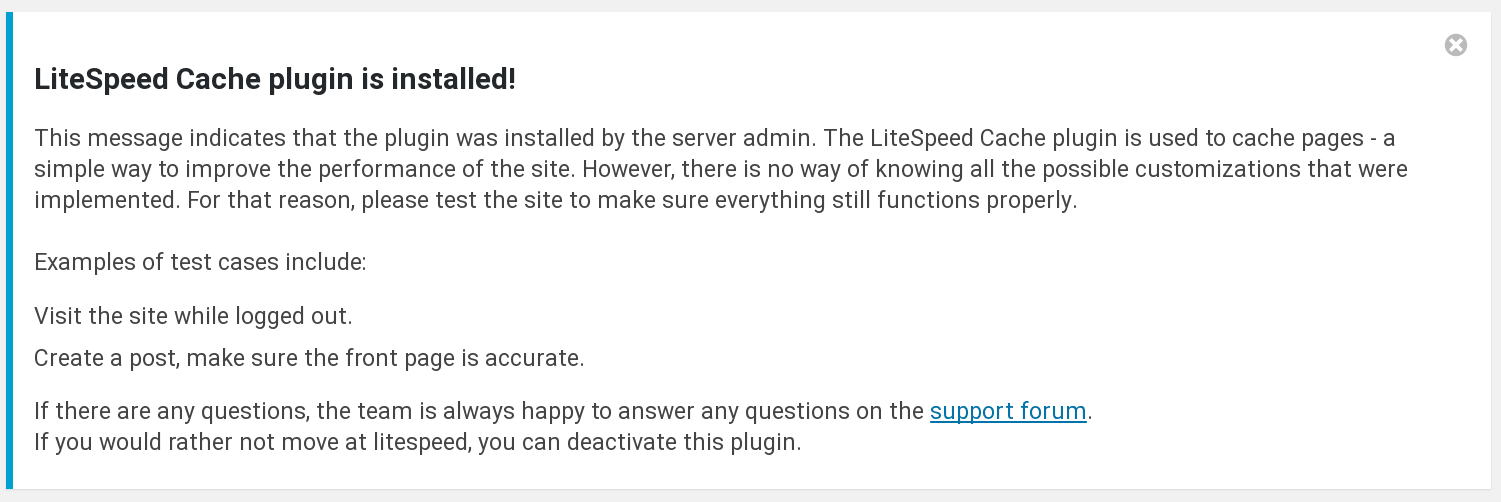
If you are having an issue and do not have time to read any further or to troubleshoot, you may deactivate the plugin. Navigate to WP Admin > Plugins > Installed Plugins and click on Deactivate under LiteSpeed Cache.
If you are having an issue and you do have time to troubleshoot, keep reading. If this article doesn’t answer all of your questions, drop by the support forum and we’ll be happy to help.
What does LiteSpeed Cache do?
WordPress sites consist of dynamic pages that are built with PHP. The pages of a WP site don’t exist anywhere in the file system; they are constructed on-demand through PHP, and then served to the visitor as HTML. This can be a resource-heavy process, and the LiteSpeed Cache for WordPress plugin is one way of dealing with it.
When WP dynamically generates the static HTML page, LSCache communicates with LiteSpeed Web Server to store a copy of it. Once the static copy exists in the cache, then that copy can be served to future visitors, eliminating the expensive WordPress PHP process for all but the first visitor to request the page.
When your site is cached, it requires much less involvement from the WordPress backend, which translates into a faster site and a better experience for your site’s visitors.

Think of it like baking: do you assemble the ingredients anew and turn on the oven every time a visitor to your house wants some dessert? No! You go through the baking process once for your first visitor, and then serve to each of your subsequent visitors from the finished dish. It’s faster and far more efficient.
LiteSpeed Cache is to your WordPress site as a pan of baked berry crisp is to dessert: quick and easy to serve, because all of the work of assembling the ingredients and baking them together has already been done.
If you’d like to know more about how LiteSpeed Cache works, or the concept of Caching in general, take a look at our Caching 101 articles. If you want to play around with some settings, visit our wiki for an explanation of what each of the settings means. If you’d like to see how a WordPress site with LSCache performs against a WordPress site without it, our benchmarks are a good place to start.
Why does my hosting provider want this?
You’ve seen above what LSCache can do for you. But what’s in it for your hosting provider?
As we mentioned previously, generating WordPress pages can be resource-intensive. With LSCache providing some relief, hosting providers can get better performance for all of the WordPress sites they host (including yours) while using fewer resources. It’s a win for everyone involved!
Specifically:
- LiteSpeed’s cache module is integrated directly into LiteSpeed Web Server, which makes for a shorter server stack and allows it to work more efficiently than any other WordPress cache plugin.
- With fewer resources being used for each client, hosting providers can offer their services to more clients without purchasing additional hardware, or negatively impacting the performance of their existing clients’ sites.
- With LiteSpeed-provided control panel plugins and command-line-interface scripts, hosting providers can easily manage all of the WordPress installations on their servers with one or two simple commands.
Do I have a choice?
Always! Let’s go back to that hosting provider function that we mentioned at the beginning. Its job is to autodiscover WordPress installations, install LSCache, and enable it. Sites are skipped if they already have another cache plugin in place, or if a file called .litespeed_flag exists in the WordPress root directory.
If you do not want any caching at all on your site, you have two options:
- Deactivate the plugin and leave it installed
- Deactivate the plugin, uninstall it and create the
.litespeed_flagfile in your WordPress root directory
If you choose option #2 and are not comfortable doing it yourself, your hosting provider should be able to help you create the file.
Of course, we hope you will leave LiteSpeed Cache installed on your site! If you are still unsure, or if you have any questions we haven’t answered here, please drop by the support forum. We are always happy to assist.
P.S. If I have made you hungry for berry crisp with the images and the analogy in this post, the least I can do is share the recipe 🙂
—
Have some of your own ideas for future WordPress Wednesday topics? Leave us a comment!
Don’t forget to meet us back here next week for the next installment. In the meantime, here are a few other things you can do:
- Subscribe to the WordPress Wednesday RSS feed
- Download LiteSpeed Cache for WordPress plugin
- Learn more about the plugin on our website


Leave a Reply