WpW: How to Set Up a CDN with LSCache

Written by

in

Welcome to another installment of WordPress Wednesday!

Disclaimer: The information contained in this post is accurate for LSCWP v5.0. If you are using a newer version of the plugin, some details may have changed. Please refer to our documentation for the latest!

LiteSpeed Cache for WordPress has the ability to support your Content Delivery Network usage. This quick guide should explain how the different settings between your CDN and LiteSpeed relate to each other.

Cloudflare

Make sure you have set up your Cloudflare account on the Cloudflare website. Once that’s done, switch over to your WordPress Dashboard and navigate to LiteSpeed Cache > CDN > CDN Settings.

To manage Cloudflare through the LSCache plugin, set the following:

  • QUIC Cloud CDN: OFF
  • Use CDN Mapping: OFF, and leave all settings under it alone
  • Cloudflare API: ON, and fill in your Email Address, Global API Key, and Domain

NOTE: You can also use Cloudflare without managing it through LSCache. If that is what you choose, just set Cloudflare API to OFF, and leave all settings under it alone. Cloudflare will work either way. The advantage of setting this up in LSCache is that you may purge your Cloudflare cache or enable Cloudflare’s Development Mode from within LSCache. If that doesn’t matter to you, feel free to skip this setup.

QUIC Cloud

The QUIC.cloud onboarding process is documented in the QUIC.cloud Knowledge Base, and explains how to set up everything from the LSCache plugin to your QUIC.cloud Dashboard.

Other Reverse-Proxy CDNs

CNAME setup in the CDN

For this guide, we’re going to assume you have already set up your CDN account, and added your site (let’s call it example.com) according to the CDN’s instructions.

Make sure that your CDN is configured to cache static files only. Dynamic content will be handled by LiteSpeed.

Your CDN configuration screen should have an area for adding a CNAME record. Look for it under DNS Editor or something along those lines.

The goal here is to set up a custom domain to be used only by the CDN. For example, cdn.example.com. Follow the CDN’s instructions for adding the CNAME record.

Once that is complete, and the domain is active, we’ll be ready to tell WordPress how to proceed.

LiteSpeed Cache CDN Settings

Now that your CDN is set up and your static content is ready to be served by the CDN, you will need to let WordPress know about it. You can do this through LiteSpeed Cache.

In your WordPress Dashboard, navigate to LiteSpeed Cache > CDN > CDN Settings.

Make sure both QUIC Cloud CDN and Cloudflare API are set to OFF.

  • Use CDN Mapping: ON.
  • CDN URL: http://cdn.example.com.
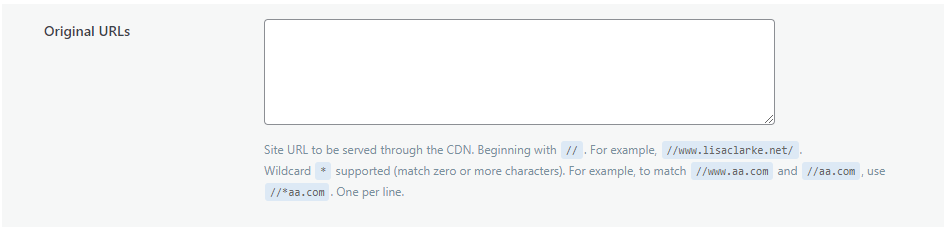
  • Original URLs: //example.com.

The remaining settings can be left as-is, unless you have a specific reason to change them. If you do want to adjust them, this documentation should help.

And that’s it! Once you save your changes, LiteSpeed Cache for WordPress will substitute the CDN URL for the Original URL in the static copies it saves of your dynamically-generated code, wherever appropriate.

Want to learn more about how all of this works? We’ve written about our CDN support in some depth before. You can check that out here.

Have some of your own ideas for future WordPress Wednesday topics? Leave us a comment!

Don’t forget to meet us back here next week for the next installment. In the meantime, here are a few other things you can do:


This content was last verified and updated in July of 2022. If you find an inaccuracy, please let us know! In the meantime, see our documentation site for the most up-to-date information.

Comments

30 responses to “WpW: How to Set Up a CDN with LSCache”

  1. Jason K. Dove Avatar

    Great update, Lisa. Question: How does the official Cloudflare WP Plugin factor in?

    1. Lisa Clarke Avatar
      Lisa Clarke

      It’s a one-or-the-other situation. So, either you use the Cloudflare WP plugin and de-activate that functionality in ours, or you use LSCWP and uninstall theirs.

      1. Jason K. Dove Avatar

        Sweet, thank you, Lisa.

        Jonothan was able to diagnose and fix my other issue, as well. I’m one super happy super LS Fanboi right now. woot woot

        1. Lisa Clarke Avatar
          Lisa Clarke

          Glad to hear it 🙂
          Let us know if you have any other issues!

    2. Lisa Clarke Avatar
      Lisa Clarke

      I have new information on this, and I thought you should know. I misspoke originally. Neither plugin is actually required for Cloudflare to function. Disable CDN in LiteSpeed if you’re using CF. You can use the CF plugin, if you like their WP tools, but it’s not strictly necessary. Apologies for any confusion!

      1. Pascal Avatar
        Pascal

        Here we go LIsa!
        😉

  2. Transhuman X Avatar

    Hi, my themes broken after I setup CDN on LSCWP. Any suggestion? Thanks 🙂

    1. Lisa Clarke Avatar
      Lisa Clarke

      Hi! I’m sorry to hear that. We can help, but we’ll need additional information.
      Would you mind creating a ticket (or send email to bug at litespeedtech.com)? Thanks!

  3. Pascal Avatar
    Pascal

    Hi
    I follow this guide and test it with a very simple site: https://www.itraveille.fr/

    CDN url : https://cdn.www.itraveille.fr
    Original url : //itraveille.fr
    And I have activated of the options below (Include Images, CSS and JS)

    I’m also using cPanel and for this to work I have created a subdomain of itraveille.fr (cdn.itraveille.fr) then also add a CNAME entry in cPanel.

    The only ressource I’m able to see that is loaded via Cloudflare is: https://cdnjs.cloudflare.com/ajax/libs/jquery/1.12.4/jquery.min.js

    And https://cdn.itraveille.fr/ return a 404

    I’m not sure I have done the good things… 🙁

    1. Lisa Clarke Avatar
      Lisa Clarke

      Hi, Pascal. When I try to visit either the CDN url you specified (cdn.www.itraveille.fr) or the other URL (cdn.itraveille.fr) I get 404 on the former, and 403 on the latter. I’m not entirely sure how cPanel fits into all of this, so it might be necessary to create a ticket, but before you do that, can you verify that cdn.www.itraveille.fr is indeed your Cloudflare URL? If it is, I should be able to visit it directly without getting a 404.

      1. Pascal Avatar
        Pascal

        Hi Lisa
        My apologize, I have entered a wrong URL for CDN, it is url : https://cdn.itraveille.fr I just updated it and cleared Cloudflare and Litespeed caches.
        And yes cdn.itraveille.fr is setup in Cloudflare: https://s26.postimg.org/r7vsit6t5/cloudflaredns.jpg

        But the hard part is the cPanel configuration because by adding a subdomain (required for ssl to works) my website itraveille.fr and cdn.itraveille.fr are not on the same folder level:
        + root
        +— itraveille.fr (the live website)
        +— cdn.itraveille.fr

        You get a 403 for https://cdn.itraveille.fr/ and this normal because this directory is empty…

        I must admin that I do no understand the goal of this method? I tried to test it, but what are the benefits?

        Thanks 🙂

        1. Lisa Clarke Avatar
          Lisa Clarke

          Let me see if I can illuminate the goal a bit. In order for a CDN to work with WordPress, you need a plugin that will inform WP to replace certain links with CDN links. That’s basically what the Cloudflare plugin does. If you use LSCache instead, it’s doing the same thing. When you specify your CDN URL, and choose the types of files to be served by CDN, you are giving LSCache the parameters for replacing native links with CDN links.

          Without a plugin to tell WP to replace the links, nothing would ever be served from CDN.

          [edited with new information: Oops. This is true of reverse-proxy CDNs but not of Cloudflare, and the CF plugin actually does not perform this task at all. Will update the post to reflect the correct information.]

          I am not familiar enough with cPanel to know how it fits into this. That may be a question for cPanel…

          I hope some of this has helped!

        2. Lisa Clarke Avatar
          Lisa Clarke

          Looking again at the cPanel thing, and remember I’m just guessing here, but cdn.itraveille.fr should not point to your site at all, but to Cloudflare. I feel like folder level doesn’t apply.

  4. Steve Avatar

    Hi,

    Does LS support multiple CNAMES for CDN use? CDN1, CDN2, CDN3 (For example).

    Many sites I own, I will parallelize the traffic across multiple CNAMES.

    Thanks!

    1. Lisa Clarke Avatar
      Lisa Clarke

      Hi, Steve.

      The WordPress plugin only provides a space for one single CDN URL. So for the moment, no, LSCWP’s CDN support doesn’t extend to multiple CNAMEs. You’ll need to continue using a separate plugin to manage your CDN. Hope this helps!

      Lisa

      1. Steve Avatar
        Steve

        OK – could I ask this to be a feature request? Or are you not planning to do this due to http/2

        1. Lisa Clarke Avatar
          Lisa Clarke

          Hi, Steve. I’m told this feature is already on the list for a future release 🙂

  5. dean Avatar

    You are missing half the cname instructions. What does cdn.example.com point to? example.com?

    1. Lisa Clarke Avatar
      Lisa Clarke

      The CDN that you are trying to set up should have thorough instructions on how to set the CNAME record so that it works with your site. We purposely glossed over that part, because instructions could conceivably differ from one CDN to another.

  6. Noviyanto Avatar

    Hello, I have problem, I was already setup my own cdn on cdn.example.com, then I setup lscahce and point static file to my cdn, but the file not save on my cdn directory? That give me 404 Not found because static file not save on cdn dir.

    how to fix that?

    Sorry for bad english.

    1. Lisa Clarke Avatar
      Lisa Clarke

      Hi. It would be easier to help, if you create a ticket. Please go through through our client area or send email to support@litespeedtech.com. Also be sure to include your Report Number, found in WP Admin > LiteSpeed Cache > Report so the team can help you more quickly. Thanks!

  7. Angel Avatar
    Angel

    Hello,

    I have some questions about CDN set up. The post says ‘Make sure that your CDN is configured to cache static files only. Dynamic content will be handled by LiteSpeed.’ but in my quic.cloud CDN (property of LiteSpeed Technologies) there is no option to use only static files.

    These are the cache settings:

    ———–
    Dynamic Cache: OFF / ON
    Enable this to use LSCache. NOTE: if this setting is turned OFF, Static Cache will also be disabled.

    Static Cache: OFF / ON
    Enable this to cache static files. NOTE: requires Dynamic Cache to be ON.
    ———–

    I don’t understand several issues. Why static cache requires dynamic cache on? And if one option requires the other is ON why we have the possibility of turn off one of them? There should be only one switch to turn ON/OFF static and dynamic cache together. Finally why the post says CDN must be configured to static cache only but LiteSpeed platform quic.cloud doesn’t allow this set up? Everything seems absurd…

    1. Lisa Clarke Avatar
      Lisa Clarke

      Hi, Angel

      This post doesn’t apply to QUIC.cloud CDN. It was written before QUIC.cloud existed.

      If you are using QUIC.cloud, you should not set it up like a traditional CDN in the LSCache settings. Instead, in the CDN Settings section in the LiteSpeed plugin, turn `ON` QUIC.cloud CDN, and leave Use CDN Mapping set to `OFF`.

      That is all that you need to do on the LSCache plugin side. Any further CDN management that you wish to do can be handled on your my.quic.cloud dashboard.

      I hope this helps. I will update the blog post soon to avoid any future confusion.

      1. Angel Avatar
        Angel

        Hi Lisa,

        I saw the post date but thought QUIC.cloud is older than it is. Thank you for the answer.

        Regards

  8. سایت تفریحی Avatar

    I need to build CDN server with Litespeed software
    my website is on CPanel + Litespeed server and I need to build another server for my content delivery network.
    Can I use Litespeed for this purpose?

    1. Lisa Clarke Avatar
      Lisa Clarke

      I believe this documentation can help you with that. If not, please create a ticket through our client area or by sending email to support@litespeedtech.com. The support team should know how to help you.

  9. Zahir Avatar
    Zahir

    Hi,
    I have a classified Ads website that means people will be posting alot of Ads.
    So i opted jetpack image CDN that covers images, JS and CSS (offsite, unlimited and free). However, my rest of website is not CDN for which i love to use cloudflare (unless you have better suggestions).

    How can i setup light speed cache to use both CDN covering above aspect. Also i need to be very economical that is why free plan is my first focus in start of website project.
    Awaiting reply

    1. Lisa Clarke Avatar
      Lisa Clarke

      Hi, Zahir

      As I understand it, you don’t need to do anything special with LiteSpeed in order to use the Jetpack CDN.

      Cloudflare, though is another story. You are using Jetpack for your static content, so I am guessing that what you are using Cloudflare for is the dynamic content (in other words, the HTML that is generate by WordPress). The problem with this is that it introduces a bit of a conflict. LiteSpeed Cache takes care of keeping the HTML cache up to date and accurate. If you put Cloudflare in front of it, CF’s own cache is not as precise as LiteSpeed’s, and you risk serving outdated content.

      Our recommendation is to try QUIC.cloud CDN, because QUIC.cloud is integrated with the LSCache plugin so that the content cached at the CDN level always is the same as that cached at your local server level. You can continue to use Jetpack for static content, if you switch to QUIC.cloud for everything else.

      You can learn more about the differences between Cloudflare and QUIC.cloud caching on the QUIC.cloud blog.

      And if you have any other questions, please feel free to drop by our Slack workspace and talk to other people who have used a variety of CDN setups with LSCache.

  10. igre Avatar

    Can i mix QUIC Cloud CDN and cloudflare…. or this is not good idea….

    1. Lisa Clarke Avatar
      Lisa Clarke

      It’s technically possible, but it’s simplest and less likely to cause conflicts if you choose one and just use that. That said, you could use QUIC.cloud for dynamic content, and Cloudflare for static content, as described here. Or, you could just try out QUIC.cloud in place of Cloudflare (we have an easy way to do that).

Leave a Reply

Your email address will not be published. Required fields are marked *