Generate Unique CSS with LSCWP v4.0

Unique CSS for WordPress

Written by

in

Unique CSS for WordPress

Introduction

Nearly every web page owes its aesthetics to a series of CSS files that are loaded with each page request. These CSS files define every possible style the pages on your site may need. However, not every page needs every style definition, and resources are often wasted parsing CSS code that is irrelevant to the current page.

The new Unique CSS feature, available in v4.0 of the LiteSpeed Cache for WordPress plugin, allows you to discard unused CSS, and load only the necessary CSS definitions required to make the page display properly.

Unique CSS

Have you ever looked at the CSS files that are included with your WordPress theme and installed plugins? Chances are, there are several, and they are large. When you consider that they must contain every CSS definition for every variation of every page on your site, it’s no wonder.

But parsing numerous large CSS files takes time, and when you consider that many of the styles defined in the file may not be appropriate for the page you are displaying, then you can see what a waste of precious time and resources it can be.

Unique CSS aims to solve that problem by creating a separate single CSS file for each page of your site, where the only defined styles are the ones required to properly style that particular page.

Impact on Page Speed Score

Having Unique CSS for each page essentially means that there is no unused CSS ever. Unused CSS is one of the things Google, GTMetrics, and others warn you about when calculating page score. Because of this, Unique CSS generally improves page speed score.

I tried UCSS on one of my sites.
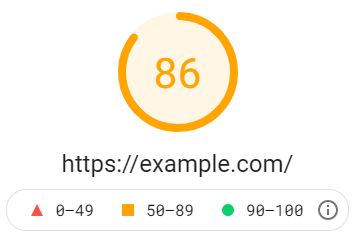
Page Score Before UCSS

Page Score Before UCSS

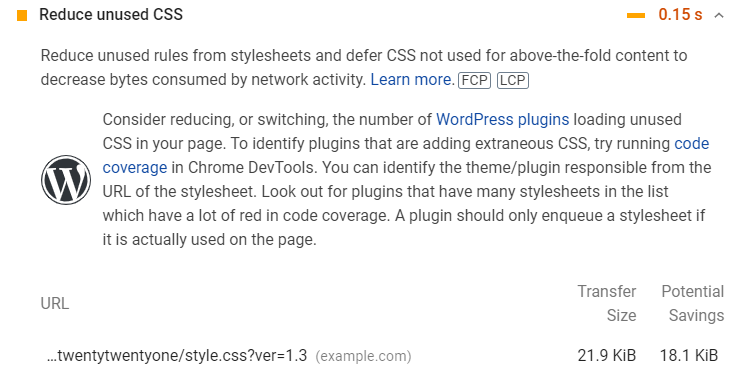
Before UCSS, the site had a score of 86, and was warning that I could shave off 0.15s if I got rid of any unused styles. This is a small site with very little customization, and so the CSS wasn’t particularly large to begin with at 21.9KiB. But even so, it appeared that only 3.8KiB-worth of those definitions was useful CSS for the home page!
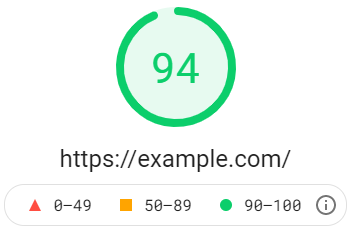

Page Score After UCSS

Page Score After UCSS

After enabling Unique CSS, the page score increased by 8 points, and “Reduce Unused CSS” was no longer a suggestion. Instead it was listed under the things the site does right.

How to Enable UCSS

Unique CSS is a QUIC.cloud service, so you need to set up your Domain Key before you can use it. If you’re using any other QUIC.cloud services, you should already have a Domain Key, and don’t need to request one again. Unique CSS pulls from the same quota pool as Critical CSS. The two QUIC.cloud services are combined under the Page Optimization label.
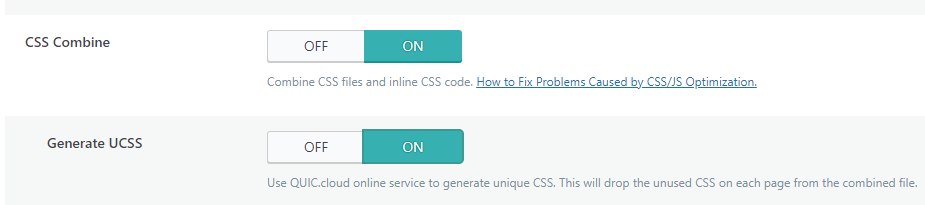
Enable Unique CSS Generation in LiteSpeed Cache

From the WordPress dashboard, navigate to LiteSpeed Cache > Page Optimization > CSS Settings and set CSS Combine to ON. Then set Generate UCSS to ON. Save your changes.

Next, turn on Cache Mobile. This is because Unique CSS for a mobile view will be different from that of a desktop view. Navigate to LiteSpeed Cache > Cache and set Cache Mobile to ON.

Finally, Purge All, either from the Admin Bar or via LiteSpeed Cache > Toolbox > Purge, so that new cache files are created for each page. This is necessary so that each page’s HTML links to the correct combined Unique CSS file.

From this point on, whenever someone visits a page on your site, the Unique CSS for that page will be served. If the UCSS has not yet been calculated, it will be added to a queue to be generated via cron.

Difference Between UCSS and CCSS

You may already be using our Critical CSS feature. Critical CSS, which is described in much more detail here, is designed to improve the display of above-the-fold content when loading CSS asynchronously.

Unique CSS, on the other hand, is meant to improve performance when loading the full page by eliminating any irrelevant style definitions from the combined CSS file. Without unused definitions weighing it down, the CSS file is smaller, faster to transmit, and easier for the browser to parse.

Disk Space

UCSS can be a big advantage to your site, but it does come at the cost of disk space. If you have a site with 1000 pages, then you will potentially have 1000 different UCSS files to store. And if you enable Cache Mobile, as we strongly recommend you do, you’ll need to double that amount. If you have other cache varies to consider, the number of UCSS files generated can grow dramatically.

Conclusion

With Unique CSS, LiteSpeed serves your page with only the defined styles that are required to make it load properly. It’s an excellent way to speed up your site and improve your page score. If your disk space situation allows it, we recommend giving Unique CSS a try today!

Have you tried Unique CSS yet? Let us know what you think!


This content was last verified and updated in May of 2022. If you find an inaccuracy, please let us know! In the meantime, see our documentation site for the most up-to-date information.

Comments

32 responses to “Generate Unique CSS with LSCWP v4.0”

  1. Stephen Revere Avatar

    When is 4.0 coming out of beta and going live Lisa? Anytime soon?

    1. michael Avatar

      Hai said this week.

    2. Lisa Clarke Avatar
      Lisa Clarke

      Yes, Michael is right. And I just confirmed, we are still on track for this week, barring any unforeseen difficulties!

      1. Stephen Revere Avatar

        I’m detecting unforeseen difficulties…

        1. Lisa Clarke Avatar
          Lisa Clarke

          Indeed. We did release 4.1, but we’re still not marking it stable and pushing it to the WP Plugin Directory just yet. Appreciate your patience!

  2. Nitish Avatar
    Nitish

    Hi Lisa,

    I have a couple of questions about LiteSpeed in general.

    1. Let’s say there is a page (Page A) on my website. A logged out User A visits this page and it is cached because I have set the TTL to 7 days. After 6 days, an logged out user B visits this page. Will user B see the cached version of the page without it bein generated from scratch.

    2. Are versions of private pages cached for individual logged in users? For example, one version of page A will be cached for a logged in User C and another version of page A will be cached for logged in user D?

    3. Are page caches cleared automatically for actions like someone posting a comment on that page? For example, logged in User C posts a comment on page A. Will this purge all caches of A for logged in as well ads logged out users?

    4. Are page caches generated no matter how someone visits a public page? For example, will page caches be generated if someone clicked at all links on a website in the sitemmap one-by-one and opened them in browser?

    5. Lets say I visit a newly published page X from a different browser. Will it then be cached as a public page for next 7 days? So if 1000 users visit that page in next 7 days they will all be served the cached page. No matter their location or browser used?

    Thanks. 🙂

    1. Lisa Clarke Avatar
      Lisa Clarke

      I’m happy to answer your questions. For these answers, I’m assuming you have a plugin with the default settings enabled. Some of these answers might change, if your configuration is more advanced.

      1. Let’s say there is a page (Page A) on my website. A logged out User A visits this page and it is cached because I have set the TTL to 7 days. After 6 days, an logged out user B visits this page. Will user B see the cached version of the page without it bein generated from scratch.

      Yes. The page will be served from cache until the TTL is reached and the page expires. If User C visits the page on day 8, then it will be regenerated.

      2. Are versions of private pages cached for individual logged in users? For example, one version of page A will be cached for a logged in User C and another version of page A will be cached for logged in user D?

      Yes, if you have Private Cache enabled in your settings. If it is turned off, then everyone gets the same version of the page.

      3. Are page caches cleared automatically for actions like someone posting a comment on that page? For example, logged in User C posts a comment on page A. Will this purge all caches of A for logged in as well ads logged out users?

      Yes. When a comment is posted, the page is purged from cache. When a page is purged from cache, all versions, public and private, are purged.

      4. Are page caches generated no matter how someone visits a public page? For example, will page caches be generated if someone clicked at all links on a website in the sitemmap one-by-one and opened them in browser?

      Yes. As long as a visitor accesses the page, cache will be generated. It doesn’t matter where the link came from.

      5. Lets say I visit a newly published page X from a different browser. Will it then be cached as a public page for next 7 days? So if 1000 users visit that page in next 7 days they will all be served the cached page. No matter their location or browser used?

      Correct. This assumes, though, that you want everyone to be served the same cached page. That’s how it works by default, but if you have a more complicated setup, and you want some people to get a different version of the page for whatever reason (like, different languages or currency, or different content for logged-in users in a particular WP role) then you can set up LSCache to handle that, and save multiple copies of the page in cache.

      I hope that helps. Please let us know if you have any more questions!

  3. Richie Avatar

    Hi Lisa,

    Thanks for the UCSS article – very informative.

    I activated V4.1 a couple of days ago and am experiencing some issues. I raised these on the Support page ( https://wordpress.org/support/topic/evaluating-v4-lsc/ ) but things seem very quiet there in terms of responses.

    And, not sure if it’s related, but I can no longer access the Slack group for QUIC.cloud – have you any idea what is going on there?

    Thanks,
    Richie

    1. Lisa Clarke Avatar
      Lisa Clarke

      Hi, Richie. Apologies for the lack of response on the WP Forum last week. We were short staffed for a while, but we should be catching up now on anything that was missed, and I see that you got some answers and were able to solve your problem (pesky curly bracket!). If you’re still having difficulty accessing Slack, let me know. It is up and running and should be accessible.

  4. John Avatar
    John

    Hello,

    How can we troubleshoot issues with UCSS? On my website, after enabling it, the styling was destroyed, and I can’t use it.

    Thanks

    1. Lisa Clarke Avatar
      Lisa Clarke

      We haven’t written up a troubleshooting guide at this point, so I can’t point you to any documentation, unfortunately. Your best bet is to open a ticket and see what the support team can suggest. Good luck!

  5. Tercih Koçu Avatar

    Hi team!

    v4.1 ? 🙂

    Thanks

    1. Lisa Clarke Avatar
      Lisa Clarke

      4.1 is not available through the WP Plugin Directory, but you can manually upgrade via the Toolbox > Beta Test tab. First make sure that you are already running 3.4.6 or higher. If you are not, please upgrade to that version first. Then press the Use latest GitHub Master commit button and press Upgrade.

    2. Lisa Clarke Avatar
      Lisa Clarke

      Actually, I misspoke. The `master` option is for the latest release candidate and may be more experimental than you want. If you simply want to use v4.1, you can enter `4.1` into the text box and then press Update.

  6. Angry Man Avatar
    Angry Man

    I think it’s not as good as it sounds, at least for everyone.

    I have one css file for 1000 pages. So, the css file will be downloaded once. (As browser caching works)

    With the UCSS, 1000 pages will download 1000 css files.

    So?

    1. Lisa Clarke Avatar
      Lisa Clarke

      It is true, if you have 1000 pages, then there will be 1000 unique CSS files generated, one for each page. This is still a good experience for your users, as they will only get the CSS for the page they are viewing.

      Where you might have a problem is if your hosting has limits on the number of files, or the amount of disk space you take up. It may not be able to handle 1000 CSS files.

      If you have the space for it, though, UCSS is a good thing, since it does potentially speed up the loading time of your pages.

  7. John Avatar

    We’ve got 10,000 pages so sure won’t be using this. We use Cloudflare so don’t use Quic.cloud. The amount of disk storage this will take up makes a 0.02 second improvement in load time pale into insignificance. Basing a website’s performance on numbers from GT Metrics is a flawed approach to webmastering. It’s what the user sees, not some fanciful number. Up until this most recent update we only had to clear transients from our database twice a day. Now we have to also clear the Pages cache or the the RSS feeds we have on Pages doesn’t refresh. Will be rolling it back today to confirm the issue.

    1. Lisa Clarke Avatar
      Lisa Clarke

      You absolutely need to weigh your desire for a good page speed score against the impact to user experience. While I personally agree with you that the more important factor is how visitors experience the site, there are many webmasters for whom an A+ page speed score is the holy grail. We aim to provide tools to help no matter your priority. You should only use what makes sense to you 🙂

      As far as the transients issue goes, or the uncleared caches, if you confirm that this is an issue, please join us on Slack, or create a ticket so we can investigate further.

  8. syed Avatar

    After moving from wp-rocket to litespeed my site admin dashboard is loading fast and also…..The CPU usage is normal.

  9. Jhon Avatar
    Jhon

    Hello.
    The unique CSS option is very interesting. Thanks for the information.
    By enabling this option the LiteSpeed Cache plugin saves additional CSS files on the server. I have some questions about this issue:
    1) Does the website return to the previous state, if I disable the uniquee CSS option in case this does not work well?
    2) Does the plugin delete the additional CSS files from the server, if I deactivate the single CSS option?
    3) What types of pages benefit from the unique CSS (indexed pages, non-indexed pages, posts, categories, etc.)?

    1. Lisa Clarke Avatar
      Lisa Clarke

      1) Does the website return to the previous state, if I disable the uniquee CSS option in case this does not work well?

      Yes. Disable the option and Purge All to go back to the way it was.

      2) Does the plugin delete the additional CSS files from the server, if I deactivate the single CSS option?

      I’m not 100% sure, but I think it does not. I will ask the team and update here if I am wrong.

      UPDATE: If you use the Purge All – UCSS option, it will remove those files for you.

      3) What types of pages benefit from the unique CSS (indexed pages, non-indexed pages, posts, categories, etc.)?

      Any page where the default CSS contains significantly more definitions than are needed in order to display the page. This will vary from theme to theme.

      Hope this helps!

  10. Georgi Avatar
    Georgi

    Hello, simple question: Does Combine CSS need to be enabled for the UCSS to work?

    1. Lisa Clarke Avatar
      Lisa Clarke

      Hello, and yes, it does.

  11. Eduard Avatar

    Hi Lisa! Great job on the plugin! but I still see two features missing and I’m wondering if you’re planning to implement them and when:

    1) Database clean schedule. Especially for those that manage many different websites would save us a ton of time, plus it is a very common feature!
    Also, I read here: https://blog.litespeedtech.com/2017/09/20/wpw-database-optimization/ that there was a plan of implementing it on version 3.0. What happened?

    2) Store google fonts locally. That is also becoming a pretty common feature among cache tools and it does affect especially on mobile devices. So any plans?

    Thank you in advance!

    1. Lisa Clarke Avatar
      Lisa Clarke

      Hi, Eduard. I asked the team, and unfortunately there are no immediate plans for either feature (though you are right, we did originally plan to do the scheduled DB cleanup in 3.0 – other more important features have taken precedence since then). The development team is now aware of your request, though, so hopefully those two items will find their way onto a feature list in the future!

  12. daniel Avatar
    daniel

    hello,
    I have a question:
    when the cache is purged, does it will regenerate UCSS again

    1. Lisa Clarke Avatar
      Lisa Clarke

      Hi, Daniel. If you Purge All, that does not actually purge anything that requires credits to regenerate. So, it does not purge LQIP, CCSS or UCSS. So, there is no need to regenerate.

      Now, if you Purge All – UCSS, then UCSS will all be purged, and as long as you still have UCSS enabled in the settings, it will be automatically regenerated.

      Hope this clears it up!

      1. daniel Avatar
        daniel

        thanks alot,
        one more question,
        when (not Purge All – UCSS) the Litespeed dashboard shows that there is UCSS waiting for a queue to generate (while it’s already generated), I need to understand that.
        thank you very much for your response

        1. Lisa Clarke Avatar
          Lisa Clarke

          I’m not sure I understand. Are you saying that the dashboard shows you still have UCSS in the queue waiting to be generated, but you have already generated all of the UCSS?

          What happens when you click the `More` link? Do you see a list of unprocessed UCSS under the Generate UCSS setting? If so, there are still some UCSS requests waiting to be processed. You can run that queue manually, if you want to.

          If there’s nothing there, but the Dashboard says you have items in the queue, then I’m not sure why that is happening. You can open a support ticket with QUIC.cloud, and they could help you figure it out.

  13. daniel Avatar
    daniel

    hello,
    I have a problem with UCSS:
    I’m using elementor pro and have a sticky header, when I generate UCSS the sticky header does not work.
    i try every thing ( disable all js, CSS optimization option and enable it one by one and testing) only when enable Generate UCSS the sticky header not work.
    I try whitelisting all selectors related to the sticky header but still did not work.
    need help, please.

    1. Lisa Clarke Avatar
      Lisa Clarke

      Hi, Daniel. Please open a support ticket so the team can help you out with that.

  14. Khurram Awan Avatar
    Khurram Awan

    Hi LiteSpeed Developers,
    I dont have nicer words to say thankyou to LiteSpeed team and specially developers. Great Job.
    Very nice, easy to understand and best results. on some clicks. Super 🙂

Leave a Reply

Your email address will not be published. Required fields are marked *