
Introducing LSCache Profiles for WordPress: the easiest way to optimize your website using Litespeed Cache
Litespeed Cache Profiles are a pre-tuned set of options, which can be used for optimizing any WordPress site using Litespeed Cache.
Choose Your Profile
Profiles come in 4 stages:
- Basic
- Advanced
- Aggressive
- Extreme
Basic
This profile has the bare minimum of features enabled, and is good for any website.
This profile sets the following:
- Default options enabled
- TTLs (Times to Live) set high
- Browser Cache enabled
Download Link – https://lscache.io/LSCWP_Profiles/LSCWP_Basic.data
Advanced
This profile has the safest options enabled, and takes a balanced approach to aggressiveness and optimization. It will work well with most WordPress and WooCommerce websites. A free Domain Key is required to use this profile.
This profile includes everything from the Basic Profile, plus enables the following settings:
- Image Optimization for all Images in the Media Library (both Original and WebP)
- CSS, JS and HTML Minification
- CSS & JS HTTP/2 Push
- Font Display Optimization
- JS Defer for both external and inline JS
- DNS Prefetch for static files
- Gravatar Cache
- Remove Query Strings from Static Files
- Remove WordPress Emoji
Download Link – https://lscache.io/LSCWP_Profiles/LSCWP_Advanced.data
Aggressive
Fairly experienced WordPress Administrators should be able to use this profile, though testing is a must. Because of its aggressive nature, you might be required to exclude a few resources from CSS/JS Combine, and you might need some advanced configuration for Critical CSS and Localization. A free Domain Key is required to use this profile.
This profile includes everything from the Advanced Profile, plus enables the following settings:
- CSS & JS Combine
- Asynchronous CSS Loading with Critical CSS
- JS Localization with most commonly used 3rd party JS
- Lazy Load for Iframes
Download Link – https://lscache.io/LSCWP_Profiles/LSCWP_Agressive.data
Extreme
This profile includes ESI which can supercharge your WooCommerce store. It might require some help from a developer to integrate ESI properly. In addition, some images like Logos and slider images might require exclusions from Lazy Load. A free Domain Key is required to use this profile.
This profile includes everything from the Aggressive Profile, plus enables the following settings:
- LazyLoad for Images
- ESI
Download Link – https://lscache.io/LSCWP_Profiles/LSCWP_Extreme.data
Applying a Profile
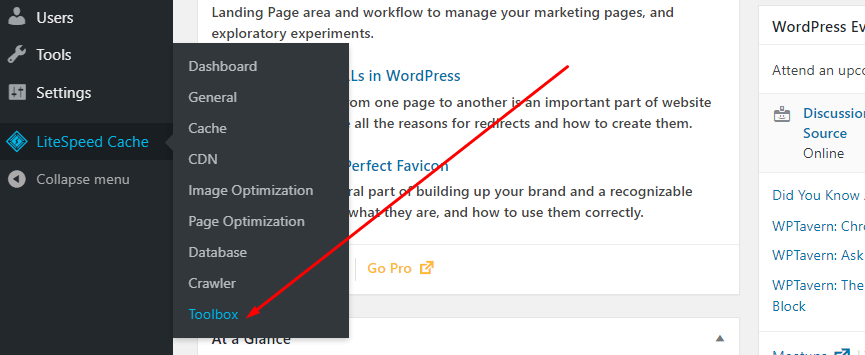
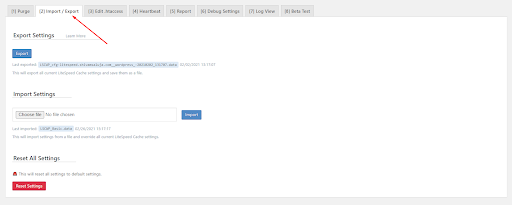
Navigate to Litespeed Cache > Toolbox > Import/Export and back up your current settings by pressing the Export button.
Apply the downloaded profile by using the Choose File option. Click Import to upload and apply the new settings.
Note: Changing profiles currently also resets your Domain Key. We plan to fix this in a future release, but until then, please navigate to the General section, and click on Refresh Domain Key to get your updated domain key.
Frequently Asked Questions
I am new to Litespeed Cache, which profile should I apply?
We recommend using the Advanced Profile as it takes a balanced approach to Optimization and Speed, and you shouldn’t need to manually tweak any settings. That said, if you experience difficulty, you can always revert to your previous settings, or try the Basic Profile.
Can I modify Litespeed Cache settings after setting up this profile?
Yes, it is absolutely possible to edit any options after applying this profile. Profiles are just an easy way to give you a good base optimization to start with. Most complex websites will need more fine-tuning to achieve their best possible score.
If my website breaks after applying a profile, Is it possible to change back to the setting I was before?
Yes, but only if you have previously saved a backup of your settings as instructed. A backup will provide you with a config file of your own website, which you can restore later if needed. Alternatively, you can always use the Basic Profile, which has the default settings.
How should I get more fine-tuning specifically for my website?
You can start with the Advanced Profile, and then go through the options in the Page Optimization section to see what more you’d need. Then try to enable them one-by-one to get the best for your website. You can also order our Paid Support Service to have LiteSpeed do the optimization for you.
Are there any known bugs?
Yes. The Domain Key removes itself when you apply a new profile, and requires you to manually refresh your domain key from the General settings. We plan to patch this issue in an upcoming version.


Leave a Reply