Speeding up your WordPress site requires a page cache. But choosing one can be difficult. There are so many options! Today, we’d like to help you narrow down your choices by comparing LiteSpeed Cache and W3 Total Cache. You’ll learn how each plugin works so that you can decide which is best for your site.
LiteSpeed Cache vs. W3 Total Cache
Let’s look at the basic caching functionality of each plugin and see where they are similar and where they are different.
Page Caching
Page caching is essential for a WordPress site. WordPress pages are built dynamically upon request through PHP and database calls. This can be a time-and-resource-heavy operation. If a page cache is in place, however, a static copy of each newly generated page is stored and then used later for subsequent requests. It’s significantly faster to serve static content than it is to wait for WordPress to generate dynamic content. Since most WP pages are exactly the same each time they are built, it makes sense to store these static copies and serve them to the site’s visitors. Page caching is an important ingredient in improved user experience.
How Caching Works
Populating a page cache is not always a straightforward matter. Simple sites can get away with caching a single copy of each page, but those sites which have significant customization or areas of private content will not. Luckily, both LSCache and W3 Total Cache have ways of addressing more complicated needs.
W3 Total Cache
W3 Total Cache provides two methods of page caching: Disk: Basic, and Disk: Enhanced..
Disk: Enhanced mode makes use of rewrite rules in a site’s .htaccess file. It completely bypasses PHP and serves static HTML.
Disk: Basic mode content is served instead by PHP.
W3TC can cache logged-in users, but the cache is not stored privately or individually. The cache for logged-in users is stored in the same pool of files as for non-logged-in users. Caching logged-in users is not recommended, as the lack of a private cache can cause guest users to see content meant for logged-in users.
LiteSpeed
One important thing that separates LiteSpeed Cache from other cache plugins is its tight integration with LiteSpeed Web Server. So, when we talk about the plugin’s capabilities, we are often actually talking about the server’s capabilities. The basic caching functions of LiteSpeed Cache require a LiteSpeed server in order to work, because the actual caching is carried out at the server level by LiteSpeed Web Server’s built-in cache module.
That said, LiteSpeed’s caching works a lot like W3Total Cache’s Disk:Enhanced mode, with the important distinction that LSCache and LiteSpeed Web Server are a team and share the work. The plugin is provided as an easy way for WordPress to communicate with the cache engine, but it doesn’t execute any of the caching tasks, and the cache files themselves are not stored within the WordPress file structure.
LiteSpeed Cache uses .htaccess rewrite rules and completely bypasses the use of PHP, as in W3 Total Cache’s Disk: Enhanced mode,. Good cache plugins prefer to avoid PHP because of its expensive overhead.
Unlike W3TC, LiteSpeed can cache private content for logged-in users. LiteSpeed can also include dynamic content on otherwise static pages. We’ll go into more detail about how that works when we discuss eCommerce, although the concepts of ESI apply to any area of your WordPress site, not just shopping carts.
Purging Cache on Demand
Pages are not cached indefinitely. Both plugins require you to choose a TTL (Time to Live), which controls after how many seconds the cached content is considered expired. Sometimes, though, content must be purged from the cache before it reaches its natural expiration. This is handled differently between the two plugins.
W3 Total Cache
If a post is modified or a comment is posted, the static HTML copy of the post page is automatically deleted. A purge policy may also be defined, wherein an updated post will trigger a purge of all of the selected related pages. W3TC recommends selecting only Posts page, Post page, and Blog feed as additional options “may reduce server performance.”
LiteSpeed
LiteSpeed, too, purges the static HTML copy of any post that has been modified. It also removes related content from the cache based on your defined purge policy. Unlike W3TC, LSCache can purge all related content without reducing server performance. LiteSpeed’s sophisticated tag-based smart purge system is made possible by the plugin’s partnership with LiteSpeed Web Server. This relationship allows LSCache to remember things about the cache entries that other plugins cannot, and to then act efficiently when content is created or edited. This makes it possible to manually purge the entire cache or just a single page, if desired.There is never too much or too little removed from the cache.
Handling Expired and Purged Cache
Garbage collection is important for any cache plugin. There will always be a cache directory on your server filling up and taking up space. Let’s look at how W3TC and LSCache clean up after themselves.
W3 Total Cache
With W3 Total Cache, you set an interval for garbage collection. A job runs on the specified schedule, deleting expired static HTML files from the cache directory. If you are using cache fragments, a separate garbage collection schedule may be set up for that.
LiteSpeed
LiteSpeed’s tag-based system isn’t only helpful for efficient purging, but it also allows garbage collection to have minimal impact on server performance. When the LiteSpeed server receives the purge header, it avoids heavy disk I/O by simply marking the related tags as “purged” without actually deleting the files on the file system.
LiteSpeed Server will delete the outdated entries in small batches during non-busy CPU cycles, causing a minimum of side effects.
Cache Varies
For situations where you need multiple publicly cached copies of a single page, both plugins offer solutions.
W3 Total Cache
W3 Total Cache has support for user agent groups and referrer groups. In both cases, you create rules to assign visitors to particular groups, each of which can be configured to either refer to a different URL, or use a different theme. A separate cache is created for each group.
LiteSpeed
LiteSpeed’s enormously flexible server-side cache engine allows it to use vary cookies to serve multiple versions of cached content. Varies can be based on things like mobile vs. desktop, geographic location, cookie, and user group.
Cache Preloading and Rebuilding
Both plugins have the ability to preload the cache. Cache crawlers traverse the site, and precache (or recache) any uncached pages. This minimizes the possibility of a visitor having to wait for any pages to be dynamically assembled.
W3 Total Cache
W3 Total Cache’s crawler simulates an unknown user on a desktop computer.
LiteSpeed
LiteSpeed Cache’s crawler also simulates a non-logged-in desktop user visit by default, but unlike W3TC, it may be configured to crawl cache varies, too. In fact, if you have the resources available, you could theoretically have dozens of crawlers going at once, simulating all sorts of user interactions: mobile vs, desktop, retail customers vs. wholesale customers, visitors with an affiliate cookie, etc.
Compression
Both plugins cache and serve compressed content.
eCommerce
eCommerce doesn’t lend itself to full page caching. With shopping cart pages and last-viewed product widgets, among other things, there are several areas of an eCommerce site that just cannot be cached publicly. Both plugins have their own way of handling this scenario.of private content on public pages.
W3 Total Cache
W3TC provides a mechanism for labeling eCommerce pages as uncacheable. Better not to cache these pages at all than to run the risk of one customer’s private data being cached publicly for all visitors. W3TC’s Pro version unlocks “Fragment Caching” which is a separate caching layer using the WordPress Transients API. It is theoretically possible to configure Fragment Caching to allow eCommerce sites to serve cached content, but it requires coding, and we were unable to find any specific documentation as to how this is best achieved.
LiteSpeed
LiteSpeed’s ESI (Edge Side Includes) implementation allows you to fully cache WooCommerce and other eCommerce pages. With ESI, holes are punched on a public page, and are filled with shopping cart data and other private content. Then, LiteSpeed serves the mixed-content page to the shopper, fully and safely cached. LiteSpeed’s ESI implementation is WooCommerce-aware, and is preconfigured to turn the cart and other Woo widgets into ESI blocks. It is easy, therefore, to cache WooCommerce’s mixed content with the flip of a switch.
Premium Tools
LiteSpeed Cache offers Image Optimization with WebP Generation, Critical CSS Generation, Unique CSS Generation, and Low-Quality Image Placeholder Generation. These services are performed remotely on QUIC.cloud servers so as not to put any extra load on yours. Each service includes some free quota every month. After that quota may be purchased. More details are available at QUIC.cloud.
W3TC offers an Image Service API extension, which generates WebP images on their remote servers. A certain amount of usage is free, after which a Pro account is required.
Documentation
W3TC has minimal documentation. In fact, we relied heavily on third-party tutorials and our own exploration of the plugin’s interface while researching this blog post. You can find some W3TC information on the WordPress Plugin Directory page, along with a disorganized FAQ.
LiteSpeed has a documentation site which explains each of the functions of the plugin and is constantly updated with new information and troubleshooting tips.
Cost
As of this writing, W3 Total Cache is free, but a Pro subscription is available for $99/year. Support for free plugin users is available on the WP forum, but more in-depth support is available to buy from the site and prices range from $200 – $350.
The LiteSpeed Cache plugin is 100% free, however you need a LiteSpeed web server in order to use the server-side cache, and there may be costs there, depending on your needs. There is a free, open source version (OpenLiteSpeed), or you can get an Enterprise license. License pricing ranges from Free for single site owners, to $96/month for large hosting companies, with several levels in between.
LiteSpeed provides free support via the WP forum, Slack, and customer tickets. There are paid support options for in-depth troubleshooting and full site optimization, and these range from $39 to $99.
Benchmarks
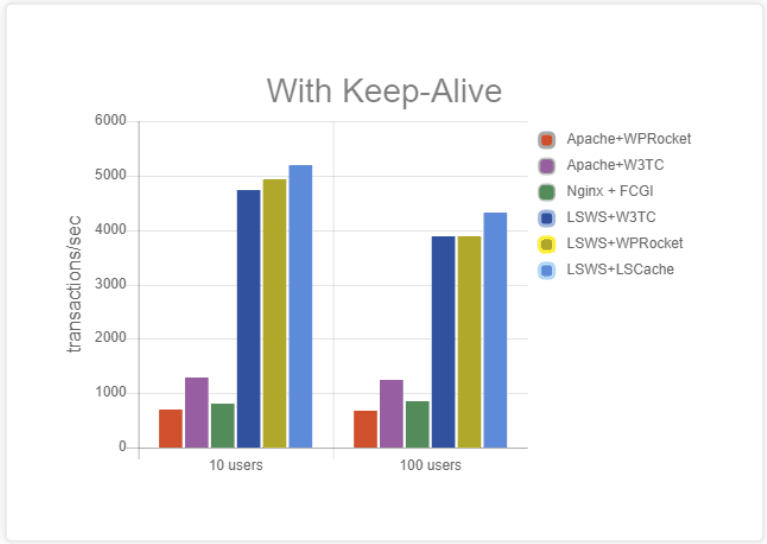
We compared LiteSpeed Web Server + LSCache to various other solutions, including W3 Total Cache.
Our results showed Apache + W3 Total Cache peaking around 1300 requests per second.
LiteSpeed Web Server + W3 Total Cache delivered around 4,700 requests per second.
LiteSpeed Web Server + LSCache easily handled close to 5,200 requests per second.
Feature Comparison
Let’s take a closer look at the specific features that come built into LSCache and W3 Total Cache.
✅ = has the feature
💰 = has the feature, but it requires a Pro subscription, or costs extra money in addition to any license costs
❌ = doesn’t have the feature
Cache Features
Both LiteSpeed Cache and W3 Total Cache have a variety of functions, but caching is the main ingredient. While both plugins feature a full-page cache, LiteSpeed’s cache engine is smart and flexible, allowing you to cache more of your site for more visitors. LSCache provides private cache capabilities, allowing you to cache logged-in users and eCommerce safely, while W3TC does not..
Learn more about how caching WordPress works in general, and how LiteSpeed Cache works in particular here.
Remember, you need LiteSpeed-powered hosting if you want to use LSCache’s cache features.
| Feature | LiteSpeed Cache | W3 Total Cache* |
| Full-Page Cache | ✅** | ✅ |
| Tag-Based “Smart Purge” | ✅** | ❌ |
| Tight Integration With Server | ✅** | ❌ |
| Edge Side Includes (ESI) | ✅** | ❌ |
| Crawler (Cache Preloading) | ✅** | ✅ |
| WordPress Multi-Site Support | ✅** | ✅ |
| Cache Logged-in Users | ✅** | ✅ (not recommended) |
| Cache Separate Mobile View | ✅** | ✅ |
| Cache Vary on User Group | ✅** | ✅ |
| Cache Vary on Geographic Location, Currency, etc | ✅** | ✅ |
| Cache REST API | ✅** | 💰 |
| Purge Selected URLs on a Schedule | ✅** | ❌ |
| Browser Cache Support | ✅** | ✅ |
* We based the W3 Total Cache feature list on what we could glean from the WP Directory, plugin interface, and blog posts
**Feature requires a licensed copy of LiteSpeed Web Server with Cache Module
Optimization Features
If you use site evaluation tools, like Google’s PageSpeed Insights, or GTmetrix, you’ll want a nice selection of optimization features in order to implement the tool’s suggested site improvements.
Unlike the Cache Features above, LiteSpeed Cache’s Optimization Features are available to anyone with any web server (LiteSpeed, Apache, nginx, etc.)
| Feature | LiteSpeed Cache | W3 Total Cache* |
| CDN Support | ✅ | ✅ |
| Database Optimization | ✅ | ❌ |
| CSS Minify | ✅ | ✅ |
| CSS Combine | ✅ | ✅ |
| CSS HTTP/2 Push | ✅ | ✅ |
| JavaScript Minify | ✅ | ✅ |
| JavaScript Combine | ✅ | ✅ |
| JavaScript HTTP/2 Push | ✅ | ✅ |
| Load CSS Asynchronously | ✅ | 💰 |
| Load JavaScript Deferred | ✅ | ✅ |
| HTML Minify | ✅ | ✅ |
| Exclude Selected URI’s from Optimization | ✅ | ✅ |
| Remove Query Strings | ✅ | ✅ |
| Remove Google Fonts | ✅ | ❌ |
| Lazy Load Images | ✅ | ✅ |
| Lazy Load iframes | ✅ | ❌ |
| Wildcard Usage in CDN Support | ✅ | ✅ |
* We based the W3 Total Cache feature list on what we could glean from the WP Directory, plugin interface, and blog posts
Provided Services
LiteSpeed provides premium optimization services on our own servers.
| Service | LiteSpeed Cache | W3 Total Cache* |
| Critical CSS Generation** | ✅ | 💰 | ❌ |
| Unique CSS Generation** | ✅ | 💰 | ❌ |
| Image Optimization** | ✅ | 💰 | ❌ |
| WebP Generation** | ✅ | 💰 | ✅ | 💰 |
| Low-Quality Image Placeholder Generation** | ✅ | 💰 | ❌ |
* We based the W3 Total Cache feature list on what we could glean from the WP Directory, plugin interface, and blog posts
** These features, where available, include an amount of free usage, after which more may be purchased or a Pro license is required
Costs
The LiteSpeed Cache plugin is free and always will be. In order to use the caching functionality, a LiteSpeed web server is required, and that may incur a fee. The optimization functionality, which is separate from caching, may be freely used by anyone with any web server.
For more information about how to get powered by LiteSpeed Web Server and the costs involved, see our website.
| Service | LiteSpeed Cache | W3 Total Cache* |
| Plugin Cost | FREE** | FREE or $99/year |
| Support Cost | FREE | FREE or $200-$350 |
* We based W3 Total Cache costs on what we found listed publicly on the W3 Total Cache website
**Requires Licensed copy of a LiteSpeed Web Server with Cache Module for Cache Features
Conclusion
LiteSpeed Cache for WordPress is faster than W3 Total Cache and allows more flexibility when it comes to eCommerce, logged-in users, and cache varies. You can use both plugins for free, or with additional costs, depending on your site’s needs.
If you’d like to try LiteSpeed Cache, drop by our website to learn how to get started!
—
This content was last verified and updated in March of 2022. If you find an inaccuracy, please let us know! In the meantime, see our documentation site for the most up-to-date information.


Leave a Reply