LiteSpeed Cache vs. WP Rocket

LSCWP vs WP Rocket2

Written by

in

LSCWP vs WP Rocket2

Choosing a cache plugin for your WordPress site can be a daunting task, but we are here to make things a little bit easier for you. Today we are comparing LiteSpeed Cache and WP Rocket.

LiteSpeed Cache vs. WP Rocket

Before we do a specific feature list comparison, let’s talk about some of the main similarities and differences between the two plugins.

Caching

Both plugins provide full-page caching for WordPress. This essentially means that they store static snapshots of the pages on your site. They can do this because the dynamically-generated pages are effectively the same each time they are built. Rather than making your visitors wait for WordPress and PHP to assemble the pages for each request, a page cache can serve them the snapshots much faster.

Caching with WP Rocket

WP Rocket, like most other WordPress cache plugins (including LiteSpeed), uses rewrite rules to tell the server where to look for cached content. It places pages in the cache by writing to the file system, and purges pages from the cache by deleting the files. It can tell whether or not a page is cached by checking for the presence of the file. And it can tell if a cached page has expired by comparing the file time to the page’s TTL.

Caching with LiteSpeed

The LiteSpeed Cache plugin works in a similar way, with one important difference: the plugin is not actually doing the caching. The basic LSCache functions are carried out by LiteSPeed Web Server’s builtin cache module. The plugin is provided as an easy way for WordPress to communicate with the cache engine, but it doesn’t execute any of the caching tasks, and the cache files themselves are not stored within the WordPress file structure.

There are many benefits to this server-side caching arrangement. Here are a few of them:

* Accurate Purge

Because of the plugin’s tight integration with the server on one end, and with WordPress on the other, LSCache remembers things about the cache entries that other plugins cannot, and it is able to act efficiently when content changes. When content is created or edited and must be purged from the cache, LSCache uses a tag-based system to identify related content that must also be purged. In this way, there is never too much or too little removed from the cache.

* Efficient Cache Cleanup

Tags are tracked and stored in shared memory. This provides an efficient way of determining when a page needs to be purged. When LiteSpeed receives the purge header, it simply marks the related tags as “purged” but does not actually delete the files on the file system. This is to avoid heavy disk I/O while serving the response. LiteSpeed Server will deal with the outdated entries during non-busy CPU cycles and delete files in small batches with minimum side effects.

* Compression

Another LiteSpeed advantage is Gzip and Brotli support out of the box. This allows compressed content to be stored in cache, which fits the majority of modern browsers. WP Rocket requires dynamic compression before serving each cached response, which results in much higher CPU usage in the real world.

* Cache Varies

LiteSpeed’s server-side cache engine allows it to use vary cookies to serve multiple versions of cached content based on things like device category (mobile vs. desktop), geographic location, cookie, and user group. There is enormous flexibility in the LiteSpeed system.

Cost

As of this writing, a WP Rocket license starts at $49/year. There is no free option or trial version, but they do offer a 14-day money back guarantee.

The LiteSpeed Cache plugin is 100% free, however a LiteSpeed web server is required in order to use the server-side cache, and there may be costs there, depending on your needs. There is a free, open source version (OpenLiteSpeed), or you can get an Enterprise license. License pricing ranges from Free for single site owners, to $96/month for large hosting companies, with several levels in between.

eCommerce

When you run an online shop, there are necessarily going to be pages (and sections of pages) that can’t be stored in the public cache. Shopping cart pages and last-viewed product widgets, are good examples of this.

WP Rocket supports eCommerce solutions such as WooCommerce by automatically considering cart and checkout pages uncacheable. Pages with this private content are dynamically generated each time and served uncached.

LiteSpeed allows you to cache WooCommerce and other eCommerce pages using ESI (Edge Side Includes). With ESI, holes are punched on a public page, and are filled with shopping cart data and other private content. Then, the mixed-content page can be served to the shopper, fully cached.

Premium Services

WP Rocket does not offer any extra premium services.

LiteSpeed Cache offers Image Optimization, Critical CSS Generation, Unique CSS Generation, and Low-Quality Image Placeholder Generation. These services are performed remotely on QUIC.cloud servers so as not to put any extra load on yours. Each service includes some free quota every month. After that quota may be purchased. More details are available at QUIC.cloud.

Cache Preloading

WP Rocket and LiteSpeed Cache both have crawlers. These crawlers traverse the site, caching any pages that are not currently cached.

WP Rocket’s crawler simulates a non-logged-in desktop user visit.

LiteSpeed Cache’s crawler also simulates a non-logged-in desktop user visit by default, but may also be configured to crawl as a mobile user. Additionally, for sites that employ user-group-based cache varies (i.e. retail customers vs. wholesale customers), or cookie-based varies (i.e. visitors with an affiliate cookie), the cache may be crawled simulating a logged-in user from any particular user group, or a user with a particular cookie. If you have the resources available, you could theoretically have dozens of crawlers going at once, simulating all sorts of user interactions.

Benchmarks
LiteSpeed Cache vs. WP Rocket: Benchmarks

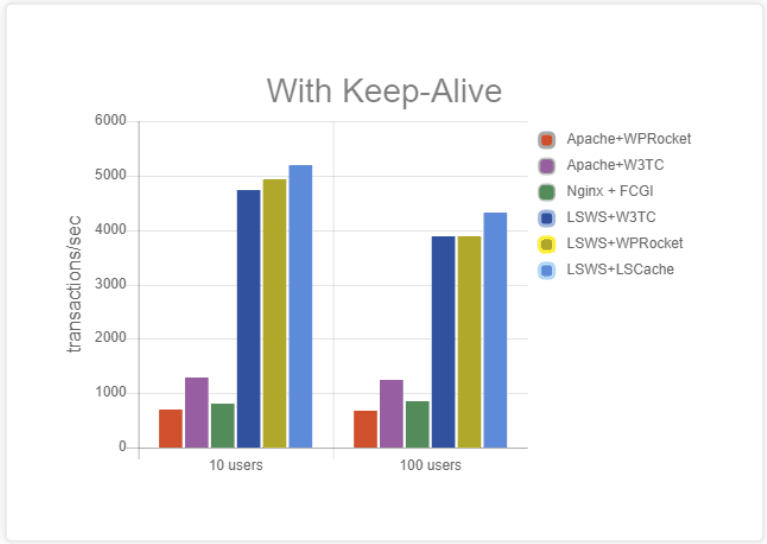
We compared LiteSpeed Web Server + LSCache to various other solutions, including WP Rocket.

Our results showed Apache + WP Rocket peaking around 700 requests per second.

LiteSpeed Web Server + WP Rocket delivered around 3,800 requests per second.

LiteSpeed Web Server + LSCache easily handled close to 4,500 requests per second.

Feature Comparison

Let’s take a closer look at the specific features that come built into LSCache and WP Rocket.

✅ = has the feature
💰 = has the feature, but it costs extra money in addition to any license costs
❌ = doesn't have the feature

The features are listed using LiteSpeed Cache terminology. If the other plugin calls it something different, we put their term in parentheses.

Cache Features

Both LiteSpeed Cache and WP Rocket have a variety of functions, but caching is the star of the show. While both plugins feature a full-page cache, LiteSpeed’s cache engine is smart and flexible, allowing you to cache more of your site for more visitors. LSCache gives you the ability to confidently cache frequently-changing content and eCommerce sites, without resorting to marking pages “uncacheable.”

Learn more about how caching WordPress works in general, and how LiteSpeed Cache works in particular here.

Remember, LiteSpeed-powered hosting is required in order to use LSCache’s cache features.

Feature LiteSpeed Cache WP Rocket*
Full-Page Cache ✅**
Tag-Based “Smart Purge” ✅**
Tight Integration With Server ✅**
Edge Side Includes (ESI) ✅**
Crawler ✅** (Cache Preloading)
WordPress Multi-Site Support ✅**
Cache Logged-in Users ✅** (User Cache)
Cache Separate Mobile View ✅**
Cache Vary on User Group ✅**
Cache Vary on Geographic Location, Currency, etc ✅**
Cache REST API ✅**
Purge Selected URLs on a Schedule ✅**
Browser Cache Support ✅**

* WP Rocket feature list is based on what is listed publicly on the WP Rocket website
**Feature requires a licensed copy of LiteSpeed Web Server with Cache Module

Optimization Features

If you use site evaluation tools, like Google’s PageSpeed Insights, or GTmetrix, you’ll want a nice selection of optimization features in order to implement the tool’s suggested site improvements.

Unlike the Cache Features above, LiteSpeed Cache’s Optimization Features may be used freely by anyone with any web server (LiteSpeed, Apache, nginx, etc.)

Feature LiteSpeed Cache WP Rocket*
CDN Support
Database Optimization
CSS Minify
CSS Combine (Concatenation)
JavaScript Minify
JavaScript Combine (Concatenation)
Load CSS Asynchronously
Load JavaScript Deferred
HTML Minify
Exclude Selected URI’s from Optimization
Remove Query Strings
Remove Google Fonts
Lazy Load Images
Lazy Load iframes
Wildcard Usage in CDN Support

* WP Rocket feature list is based on what is listed publicly on the WP Rocket website

Provided Services

LiteSpeed provides premium optimization services on our own servers.

Service LiteSpeed Cache* WP Rocket**
Critical CSS Generation ✅ | 💰
Unique CSS Generation ✅ | 💰
Image Optimization ✅ | 💰
Low Quality Image Placeholder Generation ✅ | 💰

* These LiteSpeed features all include an amount of free quota, and more may be purchased, if required
** WP Rocket feature list is based on what is listed publicly on the WP Rocket website

Costs

The LiteSpeed Cache plugin is free and always will be. Caching functionality requires a LiteSpeed web server, which may incur a fee. The optimization functionality, which is separate from caching, may be freely used by anyone with any web server. Online services powered by QUIC.cloud all have a free tier, but charge for additional service.

For more information about how to get powered by LiteSpeed Web Server and the costs involved, see our website.

Service LiteSpeed Cache WP Rocket*
Plugin Cost FREE** PAID
Support Cost FREE PAID

* WP Rocket costs are based on what is listed publicly on the WP Rocket website
**Requires Licensed copy of a LiteSpeed Web Server with Cache Module for Cache Features

Conclusion

LiteSpeed Cache for WordPress beats WP Rocket in flexibility and speed. Cost varies with a variety of factors for both plugins, but LiteSpeed Cache has some free options that WP Rocket does not.

If you’d like to try LiteSpeed Cache, drop by our website to learn how to get started!


This content was last verified and updated in March of 2022. If you find an inaccuracy, please let us know! In the meantime, see our documentation site for the most up-to-date information.

Comments

48 responses to “LiteSpeed Cache vs. WP Rocket”

  1. Daljit Singh Avatar

    Hi there, I need to update you guys that the information on this page is outdated. I am a WpRocket user and I have been using it from last year. There are so many new features in WpRocket which is not ticketed in this post. I am planning to remove WpRocket and add your plugin on this website –> https://www.khalsa-website-designers.net and let’s see the comparison after 24-07-2019. I will update my comment or add a new comment below to this comment. I request the admin to approve my comment please.

    1. Lisa Clarke Avatar
      Lisa Clarke

      Thank you for your note. We pulled the information for this post directly from WP Rocket’s own website. If you find any specific inaccuracies please do let us know. We’re pleased to hear you’ll be trying LiteSpeed. If you need any help with fine-tuning the settings, let us know.

  2. Sachin Avatar

    Hi!,
    Thanks for well organized post on WP-Rocket plugin. I’ve used WP-Rocket on my website and it works well and improve overall website performance.

    Do you mind if I quote a couple of your articles on my website- newsontheshow.com as long as I provide credit and sources back to your blog? My website is in the exact same niche as yours and my visitors would really benefit from a lot of the information you provide here. Please let me know if this okay with you.
    Many thanks!

    1. Lisa Clarke Avatar
      Lisa Clarke

      Sure, anyone is welcome to quote our articles as long as proper credit is given. Thanks for asking.

  3. Jonathan Avatar
    Jonathan

    Hi there,

    Jonathan from WP Rocket here. You missed to tick some features for WP Rocket:
    – Cache REST API (it can be activated by using a filter)
    – Cache Vary on Geographic Location, Currency, etc (it a cookie is set for Geographic Location & Currency, it can be done)
    – Load CSS Asynchronously
    – Exclude Selected URI’s from Optimization
    – Lazy Load iframes
    – Critical CSS Generation

    You can check everything on our changelog: https://wp-rocket.me/changelog/

    Feel free to delete this comment after 😉

    1. Lisa Clarke Avatar
      Lisa Clarke

      Thanks, Jonathan, for letting us know! I’ll update the post 🙂

  4. enjo Avatar
    enjo

    I believe commenters are missing the point. It would be more beneficial for them to state the specific reason that they believe the caching on-offer for free in LSWS is insufficient and how WP Rocket better meets their needs. There are, I believe, compelling reasons to use LSWS’s in-built cache warming features for example in a shared hosting environment. What are the compelling reasons to use WP Rocket when LSWS is the webserver?

    No disagreement that WP Rocket is a great tool for serving static content when one’s hosting provider only offers Apache as their web server. However, if LSWS is on offer, the end-customer does not need to incur the licensing expense of WP Rocket (x 10,000 other customers on that server), does not need to install, configure, and keep Rocket updated, nor cover the caching space, CPU and I/O resources out of their meager hosting resource allocation. Read the fine print to learn how limited your “unlimited” shared hosting account really is. You might also inquire how they get 1,000 vCores out of a 2×8 core server. But I digress.

    Those WP Rocket crawlers used to warm-up the cache can easily peg the CPU and IOPS limits of shared hosting accounts, causing account limits to slam on the brakes for 24 hours dramatically slowing your site visitors and, in some cases, causing total account suspensions. Whereas the same exact processes run by the LSWS system daemons get a pass. Oh you want a separate mobile cache? Double the resource consumption!

    LSCache which is in-built to LSWS (the web-server) is by definition architecturally superior to ANY bolt-on external solutions. Same as if we attached a trailer to your car. A really nice trailer with a really nice hitch. Still cannot walk to the bedroom from the passenger seat as one can in an RV. A trailer is simply not an integrated solution. In some instances that is a desirable feature.

    Take note that the cache is but a tiny part of the finely tuned race car that is LSWS. With all due respect, WP Rocket touting their cache is like touting the spoiler on a Ferrari. There may be no denying the sublime perfection of said spoiler. However, that should not to be confused with the totality of the complexity of all the other systems such as the engine, frame, suspension, cooling system, brakes, electrical and more that are required to field a race car. All must be Formula One quality.

    Frankly the benefits of this amazing web server architecture is likely to be unnoticeable to individual shared hosting customers who will have been rudely shown the door long before they hit meaningful sustained requests per second. And Joe C. Panel likely will never develop an app that actually implements ESI. Talking about punching holes and filling them with dynamic content from WooCommerce is far different than actually accomplishing said task with WooCommerce. Not a word on the WooCommerce site about ESI last time i checked. Sorry, Joe.

    Few among us need such a serious web server to serve-up our blogs and flog our merchandise. We are simply riding along for free because the hosting providers save money by using LSWS. Under-utilizing it at that.

    If your hosting provider offers LSWS and you still prefer to bolt-on WP Rocket, I would be interested in learning the reasons why. Please post-up.

  5. MiTGroup Avatar

    I have activated the LiteSpeed cache plugin that run on my website. Currently just purchased WP Rocket plugin, wondering can i use together with LiteSpeed cache plugin? If so, what should i take note of, so as not being interfere with each other?

    Thanks!

    1. Lisa Clarke Avatar
      Lisa Clarke

      The most important rule to remember is that you should not duplicate functionality. In other words, if you have caching enabled in one plugin, it should be disabled in the other. If you have CSS minification enabled in one plugin, it should be disabled in the other. And so on. Multiple optimization/cache plugins can usually be used together, just as long as they each have their own separate tasks to do. There’s more about this here, if you would like to read further.

  6. Mukesh Patel Avatar

    Why you didn’t use webp on this WordPress blog even your WP plugin has this option?

    1. Lisa Clarke Avatar
      Lisa Clarke

      Good question 🙂 It was not a conscious decision. We just never turned it on. It’s probably time to take another look at our optimization settings and turn on a few of the relatively newer options.

  7. Garrett Avatar

    Loving this article here Lisa! Very informative and couldn’t be any more truthful. WP Rocket is such a phenomenal product.

    Anyone who isn’t using WP Rocket, needs to be using WP Rocket. It’s definitely worth it! We have it on all 4 of our blogs and our most recent blog, before we bought WP Rocket for it, was loading extremely slow at roughly 4.7seconds. Afterwards … we’re loading at 1.2 seconds. For $49, it’s definitely worth the money.

    1. Lisa Clarke Avatar
      Lisa Clarke

      Glad to hear you have a cache solution that makes you happy. If you’re ever looking to change hosts, I encourage you to try a LiteSpeed-powered host with the free LSCache plugin. See if we can improve that 1.2 seconds even more!

      1. mohan Avatar

        I do use LiteSpeed-powered host but i dont see any difference even Wp rocket perform better then lightspeed.

        1. Lisa Clarke Avatar
          Lisa Clarke

          Sometimes we hear this, and it’s a case of misconfiguration, where the pages aren’t even being cached. If you’re interested in seeing if that may be the case, you can use these instructions to verify that your site is indeed being cached.

          If it is, and it’s still not fast, feel free to contact our support team for assistance.

  8. Sibi Paul Avatar
    Sibi Paul

    Do you Still believe Litespeed cache is Better Than WP Rocket?

    I’m an ex-user of WP Rocket and Currently using Litespeed Cache + LS Ent Server…

    But,

    Am I wrong?

    I use LS for more than 5 Server and 15+ Domains 🙂

    Apache and NginX also using for more.

    When I faced an Issue with LS, I posted for support.

    but, till now the issue was not resolved.

    https://wordpress.org/support/topic/top-nav-bar-search-button-disappearing-after-enable-cdn/

    Due to that, I run a Speed Test for One of My Site.

    It’s Digital Ocean + Apcha + NginX as Reverse Proxy

    See These Tests Here

    1 – Without Any Cache Plugin – https://gtmetrix.com/reports/www.universalnews.org/0ZFZT5wN

    2 – With WP Rocket + AWS CDN – https://gtmetrix.com/reports/www.universalnews.org/519dZqy5

    3 – With LS Cache + AWS CDN – https://gtmetrix.com/reports/www.universalnews.org/519dZqy5

    Check the Loading Time, Highest is when LS Cache is Active.

    I don’t know why this is happening.

    I’m not gonna open a Thread anyway.

    LS Ent Server may be Good, but… Cache Plugin 🙁

    You May Not Approve This Comment,

    even that, I just wanted to share my experience.

    1. Lisa Clarke Avatar
      Lisa Clarke

      Of course we will approve your comment! We welcome all productive discussion.

      Thank you for sharing the GTMetrix links for us to look over. It looks like you accidentally sent the second link twice, so I don’t see what the LiteSpeed load time looks like.

      While a majority of sites using the LSCache plugin show immediate improvement, others require some settings to be adjusted in order to see the best performance. It sounds like your site is one of those. We are happy to help figure it out with you. Just keep in mind that it is a weekend, and as such, our support team may not respond as quickly as they would on, say, a Tuesday afternoon.

  9. Mike Avatar

    Hi,

    Thanks for the article.

    I have spent countless hours configuring Litespeed Cache (I am also running a Litespeed Server). This is what I’ve found so far:

    – support is not good for anything but basic issues
    – CCSS is buggy and I have a support ticket unresolved for months
    – Image optimization is hit and miss
    – minification, concatenation and defer features are really hard to make them work. When you make them work, they might break on the next update. If you manage multiple websites, this turns into a unpaid, full time job

    WP Rocket seemed to have improved drastically since I used them last. Their plugin seems to work with little effort AND it gives better loading times than Litespeed.

    That being said, I had high hopes for Litespeed. I still do, hopefully 3.0 is going to take care of these issues. Until the, I’m going to spend some (extra) money on WP Rocket although I pay my hosting monthly fees for both Litespeed Server and Litespeed Cache licenses.

    Good luck to you!

    1. Lisa Clarke Avatar
      Lisa Clarke

      Hi, Mike. We appreciate the honest feedback. I’ll pass it along to the team.

      I’m sorry to hear you have a ticket that’s gone unresolved. If you’d like to share the ticket number with me, we can look into it. (If you’d prefer to share it privately, you can find me at @Lisa at LiteSpeed on our Slack workspace.)

  10. Bill Larkin Avatar
    Bill Larkin

    Hi! Excellent write up! I have a question, with a WP site running Lightspeed Cache, what options are there for minifying css/js and possibly defer JS if necessary that might be compatible with the LS Cache plugin?

    1. Lisa Clarke Avatar
      Lisa Clarke

      Hi, Bill. The LSCache plugin has the ability to minify CSS/JS, and also to defer JS. If you prefer to use some other plugin for that, it’s not a problem. You should be able to use multiple optimization plugins together, as long as you are not trying to duplicate any functionality. For example, if you use another plugin to minify CSS, make sure that the CSS minification option is disabled in the LSCache plugin. Likewise, any optimization functions you use in LSCache should be disabled in the other plugin. You can find more about this here.

      Let us know if you have any other questions!

  11. Romi Saputra Avatar

    I buy new plugin from wp rocket and test lite speed, i think lite speed better than wp rocket, 🙂

  12. Davido Avatar

    I’ve tried both plugins and I would be going for Lightspeed pro version. Thanks for this review.

  13. Nisha Sharma Avatar

    Litespeed plugin is the best plugin to speed the website. We used in so many websites of ours.. you can say i n all of our websites.

  14. Sarika Malhotra Avatar

    Litespeed Chache is best plugin instead of wp-rocket in my opinion. We are using this plugin at our web designing blog and we are not getting any problem.

  15. Khurl IT Solutions Avatar

    Very detailed explanation! I wish everything was so easy to understand like this!

  16. Prayas Avatar

    Great comparison. I have tested several caching plugins. Litespeed cache is one of the best free plugins!

  17. Joj Avatar
    Joj

    Hello,
    I’ve decativated my WP-Rocket plugin and installed and activated LScache aand configure it as I could… and than .. my site broke !!! so I’ve went back to Wp-Rocket way easier to configure and more reliable

    1. Lisa Clarke Avatar
      Lisa Clarke

      I’m sorry to hear that! If you would like to try LSCache again, please open a ticket (email support@litespeedtech.com with the issue) and we would be happy to help you track down what went wrong on your site!

  18. Manu Avatar
    Manu

    We use both but honestly we are gonna get rid of litespeed.

    Litespeed may even get better speed results when setup correctly but you guys know the problem? Not even developers with over 10 years of experience are capable of setting up your plugin correctly.

    Wp rocket is simply nstall and working and it will never break your site.

    Each time you release a new Litespeed update you add more features, more options but to a level or complexity that you guys/ladies are killing your own plugin.

    Sorry for this comment, but to this day there is no way you can measure your plugin against wp rocket, 2 different leagues.

    Still hope you are able to revive litespeed, it was so good when it was more simple to use.

    1. Lisa Clarke Avatar
      Lisa Clarke

      Hi, Manu

      Have you seen our documentation? In particular, the Beginner’s Guide can help cut through the complexity and get you started with minimal fuss.

      We appreciate your honest feedback. I have shared it with the team.

      Lisa

  19. Vanderlindemedia.nl Avatar

    I am not a core wordpress dev, but i do setup websites for clients and provide technical support for high speeds. In the course of these years that ive worked with wordpress, i always had a combination of plugins that offer the best possible result. I have 15 servers, one of ‘m is running now with litespeed and it actually gave a far better result then any of the combination ive tried over the years for several websites.

    The biggest problem is just wordpress itself; and the way it spawns open a page. It is memory and CPU consuming. I cant believe that 40% of that hog is actually a part of the internet as it is today. But we have to ride along with it; since i used litespeed, and i’m using it for expert reasons obviously, the amount of resources i have freed by just using this increased the amount of websites i can run simultaneously now, and having freed up resources it means i can install some more while staying under a 2% load on avg.

    I think the best thing that litespeed increased was the time to first byte. Starting from march 2021 the insights score is actually going to count in search. Apart from that having a optimised website itself saves on bandwidth and resources. For one site owner this is’nt the bottom point. For someone like me running 2700 websites we’re talking a whole different thing here now.

    We also applied the wasp ruleset for Cwaf; this means that i no longer have to use “security plugins” that would normally detect a bruteforce or so. I mean try running this on 10 sites at the same time alone (security plugins) and facing an attack. All cpu cycles pretty much goto this soft layer of security which cant even be called security since it works on wordpress and not apache level. I mean if you inject a JS file outside of wordpress, the whole security layer is obsolete and useless.

    We’re going to increase the server’s memory in a short period of time and it gives me some more time to play and finetune litespeed. I’m very satisfied with it. I might as well look into optimizing my own code for integration in litespeed apart from wordpress. Because it’s on server level, its just one of the best optimisations (and integrations) in directadmin right now.

  20. SPEED Avatar

    ma question c’est de savoir si on peut combiner le cache ls coté serveur avec wp-rocket ?

    1. Lisa Clarke Avatar
      Lisa Clarke

      Yes, you can combine LSCache with WP Rocket, but only if you configure each plugin to execute different functions. In other words, you can’t use them both for caching, and you can’t use them both for, CSS minification (for example). You need to use one of them for caching and one of them for CSS minification. You can learn more about using multiple optimization plugins here.

  21. Om Avatar

    Make a updated version of these articles

  22. Mohammad fare Avatar

    Good article!
    both plugins worth trying!

  23. Sabastian Avatar

    I’ve tried WP rocket and made huge improvement on my client site. But mobile speed wasn’t exactly the way we wanted.
    My developer friend tried LS CACHE and disabled WP Rocket. Oh boy. What difference. İf I uninstall WP Rocket I might get extra speed for sure. This plugin is game changer. My graduate goes to developer of this plug-in. Thank you guys for spreading the words around.

  24. Action Avatar
    Action

    Seems Nice! Will TRY!

  25. fiber optic Avatar

    can you please update article I really don’t know witch cashing better for my site https://mefiberoptic.com because I use cloudflare and not sure witch solution is more compatible

    1. Lisa Clarke Avatar
      Lisa Clarke

      Cloudflare should work with both solutions. We recommend you don’t enable dynamic caching with Cloudflare, though, because LSCache does a better job of caching dynamic content than Cloudflare does. Cloudflare is fine for static content, though, and it works equally as well for that no matter which cache plugin you choose.

  26. CreativeNewsHub Avatar

    I’ve been using Wp rocket and honestly, my website has improved in speed but still facing some challenges on my website https://www.creativenewshub.com so, I’m planning on trying Litespeed cache

  27. Kiều Trường Avatar

    Hello Litespeed
    After a year of testing Litespeed Cache Plugin.
    My page loads very quickly on Litespeed Web Servers.
    This is the best free plugin. I really love it.
    Thanks very much.

  28. Alex Avatar

    Thank you for your post. Very convincing and well argued. The difference is obvious. Now I am using wp-rocket for my website, but the speed is very slow. I will try your plugin, hope to get amazing optimization.

  29. Leo Avatar

    Hello, do you plan to update this post with information related to 2022. The article is made in 2019.

    1. Lisa Clarke Avatar
      Lisa Clarke

      Hello. I actually updated the post just last week. I did my best, but if you see anything that I missed, please let me know!

    2. nielit notes Avatar

      I am confused that, which cache plugin will be suitable for my blog? Can you help me in picking one by just looking at my blog nielitnotes . It will be a great help to me. thanks

  30. oscar Avatar

    This post is very good, it helped me to clear up doubts how to configure it in a more optimized way.
    Cheers

Leave a Reply

Your email address will not be published. Required fields are marked *