Guest Mode in LSCWP v4.0

Guest Mode for WordPress in LiteSpeed Cache

Written by

in

Guest Mode for WordPress in LiteSpeed Cache

First impressions are important. If your site loads sluggishly for a user’s first visit, you might not get another chance to impress them.

Guest Mode for WordPress is a new feature introduced in the LiteSpeed Cache plugin as of v4.0. It was designed to load your site as quickly as possible for a user’s first visit.

It’s not just human visitors that benefit from Guest Mode, though. Search engine bots and page speed checkers also get the fastest page load possible, leading to better search rank and improved page speed score.

A User’s First Visit

When someone drops by your site, there are a few things LiteSpeed server needs to learn about the new visitor. For example, if you are running a multi-lingual site, LiteSpeed might need to determine where the user is located. This is so that it may generate a page in that visitor’s native language. For an ecommerce site, LiteSpeed might need to figure out whether the page should have wholesale or retail pricing.

It takes some time to make these decisions, and then more time to generate a new page from scratch, if one is needed.

Guest Mode allows you to defer any decision-making, and immediately serve a default cached version of the requested page.

How Guest Mode for WordPress Works

A user’s first visit is different when Guest Mode is activated. Before trying to learn anything about the visitor, LiteSpeed server immediately serves a default version of the page from cache. This means, for this first visit only, there are no cache varies and no ESI. In other words, it doesn’t matter where, geographically, the user is coming from, what currency they prefer, what permissions they have to see particular content, or whether they have an account on your site.

Everyone, for their first visit, will see the exact same cached version of the page. And it will be fast, since the system did not need to spend time reading cookies, looking for cache varies, or processing ESI. It just finds the simple page in cache and serves it.

Once the HTML of the default cached page begins loading, an Ajax call is made. At this point, all of those factors that were originally ignored are processed, and the “correct” version of the page for that user, with cache varies, ESI, and all, is loaded.

Of course, this means that there is a short delay between the default cached page being served and the correct content loading via Ajax. And on some complicated sites, this can mean that the wrong language, incorrect pricing, or other problematic content may be momentarily displayed. You need to decide if this is acceptable for the kind of content on your site.

Guest Optimization

You can take Guest Mode even further by using Guest Optimization. When this setting is enabled, not only is the default version of the page served from cache, but also the maximum level of page optimization and image optimization is enacted.

This setting can greatly improve page speed score, as it will always serve a cached, highly optimized page when services like GTMetrix and PageSpeed Insights request it.

Once the Ajax call loads the correct version of the page for your user, it will do so using the optimization settings that you have established for your site.

It’s important to understand before you start using Guest Optimization, that not every site can handle “the maximum level of page optimization.” For some sites, page layouts may break, and functionality may be impaired. Please test fully before going all in with Guest Optimization.

Impact on Page Speed Score

The PageSpeed Insights bot (and others like it) is always considered a first-time visitor. If you have Guest Mode and Guest Optimization both enabled, the bot is served the fastest, most heavily optimized version of your page that exists. This can result in an improved score on Pagespeed Insights and other tools.

For the following example, I ran my own personal website through Pagespeed Insights. I ran it once without Guest Mode and Guest Optimization enabled. Then I ran it once after I’d turned both options on.


PageSpeed Mobile Score Before Guest Mode PageSpeed Mobile Score After Guest Mode

The mobile version of my site, as you can see, had a pretty terrible score. By simply flipping the Guest Mode switch, the site went from bad to OK. Guest Mode and Guest Optimization got me 58 additional points! (Imagine how much better it would be if I took some time to do some further site optimizations.)


PageSpeed Dektop Score Before Guest Mode PageSpeed Desktop Score After Guest Mode

My desktop site started out in a better place than the mobile site, but there was still room for improvement. Guest Mode got me to a near perfect score.

WARNING: if you are using page speed tools to look for problems on your site that need to be addressed, do not enable Guest Optimization. This feature may “mask” some site issues. So, while the page speed tool is showing you impressive results, your actual human users may be experiencing problems you don’t know about. Guest Optimization is best used after you’ve solved any user experience issues your site might have.

How to Enable Guest Mode
Guest Mode for WordPress Enable in LiteSpeed Cache

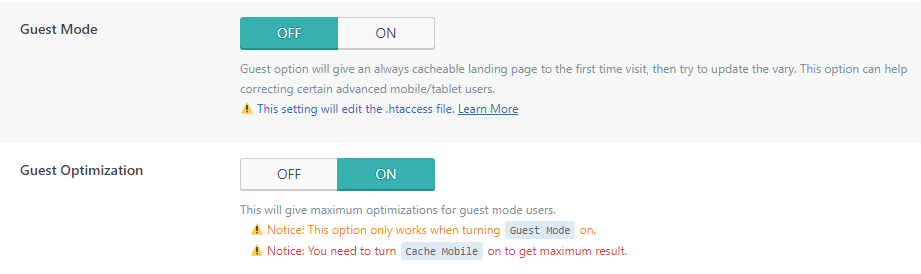
From the WordPress dashboard, navigate to LiteSpeed Cache > General and set Guest Mode to ON.

You can find Guest Optimization directly under the Guest Mode setting. It defaults to ON (though it is ignored for as long as Guest Mode itself is OFF). If you do not want to use Guest Optimization, set it to OFF.

In order for Guest Optimization to have maximum effectiveness, you should also enable Cache Mobile (found in LiteSpeed Cache > Cache), this way you can take advantage of a set of optimizations that are ideal for desktop and a different set of optimizations that are ideal for mobile.

By the way, if you are running a multisite network, you can find these settings under the Network Admin tab.

Resource Usage With Guest Optimization

There are a few things to consider before you enable Guest Optimization.

As we’ve pointed out, Guest Optimization enables the maximum number of optimizations on your site, but it’s important to understand what that entails. If you are already using the following features, independent of Guest Optimization, then there will be no additional impact on your resources:

Specific Impacts

If you are not already using the features listed above, they will be enabled as part of Guest Optimization. So, you should know how they may impact disk space, server resources, even QUIC.cloud quota:

  • QUIC.cloud Quota Critical CSS, Unique CSS, and Viewport Images are enabled and generated, for those who have a Domain Key. The CCSS, UCSS, and VPI generation processes are QUIC.cloud services. If your domain is set up with QUIC.cloud, then these services will be performed. QUIC.cloud CSS Optimization quota will be deducted accordingly, as if you had manually enabled CCSS, UCSS, and VPI. In other words, Guest Optimization may use up your free CSS Optimization quota, or any quota you have purchased with QUIC.cloud credits.
  • Disk space / File usage If your hosting provider puts limits on disk space or on the number of files you can have, Unique CSS may be problematic. The whole point of UCSS is that every stylistic variation of every page on your site gets its own CSS file. For a large site, that could mean thousands of extra files and heavy disk usage.
  • Server Resources. If your site makes use of crawling, the number of crawlers can grow exponentially by the enabling of Mobile Cache and WebP Replacement. This has the potential to consume server resources you may not have to spare.

Notes

If you don’t have a QUIC.cloud domain key, then CCSS, UCSS, and VPI will not be generated, and the first two points will not apply to you. (But also, without these improvements, Guest Optimization will not be as strong as it would be with them.)

Depending on your site’s configuration, Guest Optimization may not consume any additional resources at all. Or it may consume too many additional resources to be justifiable. The decision is yours, and will vary from site to site.

Conclusion

Want to make a good first impression on Pagespeed bots and real human beings alike? Guest Mode for WordPress is your handy new tool.

Want to give it a try? There are two ways to get Guest Mode:

    • Manually upgrade your LiteSpeed Cache plugin to v4.0 today (enter master in LiteSpeed Cache > Toolbox > Beta Test and press Upgrade)
    • Wait for v4.1 to be available in the WordPress plugin directory (coming soon!).

Have you tried Guest Mode and Guest Optimization yet? Let us know what you think!


This content was last verified and updated in June of 2023. If you find an inaccuracy, please let us know! In the meantime, see our documentation site for the most up-to-date information.

Comments

54 responses to “Guest Mode in LSCWP v4.0”

  1. Bill Avatar

    Saw a 17 point increase with mobile score and 6 point desktop improvement. Pretty impressive for the cost of a flick of a switch!

  2. JRMora Avatar

    It’s great. Improved almost 20 points on mobile and scored 100 on PC.
    98 average on Lighthouse. Tnx!

  3. Delcho Delchev Avatar

    I would definitely like to try. I look forward to finding out what the real difference will be. I Wait for v4.1 to be available.

  4. Bangla Quiz Avatar

    Guest Mode is Awesome.
    However faced lots of problem with v4.0
    My wordpress database size grew from 180 MB to 19 GB in three days. Even though I had disabled CCSS and UCSS, it was still generating those. Situation was so bad that my hosting warned me that they will suspend my account.
    Finally I had to remove version 4.0 |

    1. Lisa Clarke Avatar
      Lisa Clarke

      I’m sorry to hear you’ve had some problems with 4.0! We’d like to investigate what may be causing your database to grow so large. Please open a ticket (send email to support@litespeedtech.com) so we can look into it. Thanks!

      1. Bangla Quiz Avatar

        I already removed v4.0. My Hosting provided looked into the issue and they told it’s creating lots of records in WP_OPTIONS ( or something like that ) table.

        Two clear problems I faced was even when critical css and unique csss for combined files were disabled, it was still generating those .

        I think mostly the bug is related to ccss generation.

        I can not take any risk now .. so waiting for proper stable release.

        1. Lisa Clarke Avatar
          Lisa Clarke

          I’ll pass this along to the team, but if would be helpful if you also created a ticket so that they can ask you directly if there’s anything else they need to know in order to get to the bottom of the issue 🙂

        2. Lisa Clarke Avatar
          Lisa Clarke

          If you’d prefer not to create a ticket, you could visit our Slack community and DM @Hai and Litepeed. He’d like to ask you a few questions to help him track down the problem. Many thanks!

  5. JRMora Avatar

    Today the following error message appeared on AMP pages in Google Search Console:
    “Custom JavaScript is not allowed”

    Can it be related to Guest Mode?
    Regards

    1. JRMora Avatar

      On inspection it seems that yes, JS errors are generated on AMP pages.
      https://jrmora.com/archivo/error-amp.jpg

      1. Lisa Clarke Avatar
        Lisa Clarke

        Thanks for letting us know. I’ve passed your comment along to the development team.

        1. JRMora Avatar

          Thanks to you, I hope the update goes well. It is a very interesting feature.

  6. PR Avatar

    It’s definitely really cool, but for some reason, images aren’t loading in gtmetrix and the like.

    1. Lisa Clarke Avatar
      Lisa Clarke

      I believe that is because of lazy loading being enabled as part of Guest Mode. We have a new feature coming soon that will exclude any viewport images from being lazy loaded. That should solve that problem.

      It should only be the page speed tools that are seeing the blank images right now. Your actual human visitors are seeing the right thing. (If they’re not, please let us know.)

      1. Aiden Avatar

        Hi
        my english isnt that good
        but please take a look at my website and please tell me how to improve my page score in google page insights by right combanation of the plugin settings

        when I turned on gaust mode and G-M optimization i had a very long CLS time
        please tell me how to fix it with leaving guast mode on (because it make the pages faster)

        *** I Have a Huge CLS I have to reduce it***

        I realy be so happy if i can solve this

        send me an email if you have any sloution
        thanks a lot

        1. Lisa Clarke Avatar
          Lisa Clarke

          Our support team might be able to help. Please create a ticket through our client area or by sending email to support@litespeedtech.com.

      2. Georgi Avatar
        Georgi

        Hello, sorry for bothering, just curious has the solution come out yet?

        1. Lisa Clarke Avatar
          Lisa Clarke

          No, we’ve had to delay the viewport image feature to take care of some more urgent features. It’s still in the plan, though.

          1. John Avatar
            John

            ADS ABOVE THE FOLD – CLS WARNING. If you enable guest mode and also have ads above the fold inserted dynamically, like with adsense, then there will be CLS(content layout shift). This is because the adsense JS does not fire with the fast cached first visit version, it waits to fire until the page begins to process the rest of the content AFTER everything above the fold is loaded.

            It makes the ads pop up on screen after the above the fold content is loaded, moving content out of the way.

            Solution: Remove ads above the fold. In adsense, block specific zones from your adsense dashboard, the CLS will also disapear.

  7. Eduardo T. Avatar

    The utility its awesome, congratulations. I’m carefully trying the new v. 4.2.

    I recommend optimizing the LSCWP settings BEFORE enabling this functionality. Remember that this is for the first impression, but it does not mean that the global site is optimized.

  8. Kieu Truong Avatar

    I tried Guest Mode on this morning.
    Wow, everything TTBF, CSS…is handled.
    Now my site get 100 points on GTmetrix and .
    PageSpeed Insights.
    Thanks LiteSpeed.

  9. Georgi Avatar
    Georgi

    Pretty sure it’s a dumb question but should we enable Load CSS Asynchroniously when Guest Mode is turned on?

    1. Lisa Clarke Avatar
      Lisa Clarke

      It shouldn’t matter. Guest Mode and Guest Optimization work independently of whatever optimization settings you have enabled.

  10. BAI VASIL Avatar
    BAI VASIL

    Hello, if we have enabled Guest Mode & Guest Mode Optimizations, is it necessary to activate UCSS ourselves from Page Optimization > CSS or it works already when Guest Mode & Guest Mode Optimizations are enabled?

    1. Lisa Clarke Avatar
      Lisa Clarke

      Guest Mode + Guest Optimization automatically activate the maximum number of optimizations, and that includes UCSS. So, no need to activate it manually.

  11. Thinh Phan Avatar

    So great, but I can’t find Guest Mode, Cache Browser and Cache Mobile in 4.4.3.
    Please help me.

    1. Lisa Clarke Avatar
      Lisa Clarke

      Guest Mode is in the General > General Settings section, Browser Cache is in the Cache > Browser section, and Cache Mobile is in the Cache > Cache section.

  12. Emanuel Avatar

    Hello and thank you!

    We just setup LSC on our wordpress site (actually without CND) a we growed from 30 to 80 point on mobile and from 70 to 99 point od desktop on PageSpeed Insights.

    This is fantastic!

    Our SEO thank you. 🙂

  13. AnonyM Avatar
    AnonyM

    This feature good for score but user experience is bad, everyone can way to fix it

    1. Lisa Clarke Avatar
      Lisa Clarke

      It is true that for some sites, Guest Mode with Guest Optimization is not a good idea. It enables the maximum level of optimizations, and not every site can handle that well. That’s why it’s important to always test all optimizations (including Guest Mode) before leaving them enabled on your site.

      1. ANONYM Avatar
        ANONYM

        Hi Lisa Clarke,
        Thank you for your response. And I want to ask you another question. I’m using preload cache bash to run preload cache for first visitor to improve performance. But if my site have update new posts or change some file css or js or upgrade option in some plugin. I must purge all css/js, after my theme just work for change. If purge all css/js, that posts preload cache before will must cache again. If with some website small data, it fast to preload but with some website big data example woo (> 10000 products) time preload will so long and waste resource for preload cache again after change. Have you know way to only preload css/js or special page and more … not purge cache for posts/products cached before. Can you help me ? Thank you again.

        1. Lisa Clarke Avatar
          Lisa Clarke

          I’m not sure how your precache system works, but with LiteSpeed cache itself, when you update a blog post, or add a new one, it does not purge all. The only things to be purged are the things you have configured in LiteSpeed Cache > Cache > Purge > Auto Purge Rules For Publish/Update. Make sure you do not have All pages checked, and uncheck anything else that you don’t want to purge when a post is updated/added.

          I’m not sure if this answers your question, but if you still need help, our support team would be happy to assist you. You can open a ticket by emailing support@litespeedtech.com.

          1. ANONYM Avatar
            ANONYM

            Thank Lisa so much

  14. Ed Avatar
    Ed

    I there! I run a site in WP that uses LSCWP. The site is monetized by Google AdSense.

    After activating both options, Guest Mode and Guest Optimization, a warning message has emerged in my AdSense control panel, suggesting that something is wrong with the AdSense code.

    However, when I visit the page, ads keep showing as usual. Apparently, everything is working ok.

    Have you noticed anything similar? What can be the cause?

    1. Lisa Clarke Avatar
      Lisa Clarke

      Guest Optimization enables the maximum level of optimization on your site, and this includes minifying and combining JavaScript. It sounds like Google has detected that the JavaScript for Adsense has been modified in some way. If everything is still working as it should, then you can probably ignore the warning. However, if you would prefer to be on the safe side, you can exclude Adsense code from optimization.

      To do so, you’ll need to find out the JS filename for the Adsense code, and then you can enter it into LiteSpeed Cache > Page Optimization > Tuning > JS Excludes.

      If that doesn’t solve the issue, then please open a ticket by emailing `support@litespeedtech.com` and our support team will lend a hand.

      1. Mosharraf Avatar

        If I turn on guest mode, will there be any reduction in Adsense earnings? Please inform me.

        1. Lisa Clarke Avatar
          Lisa Clarke

          I don’t believe there would be. Even if the ad doesn’t come through on the guest page, the page is reloaded right away, and the ad would come through then.

  15. Khalid Avatar

    Hello !

    I just activated the guest mode, my homepage refreshes every second, I think there is a conflict. As soon as I activate the guest mode box.

    1. Lisa Clarke Avatar
      Lisa Clarke

      It is normal for it to refresh once, but if it keep refreshing, then it sounds like something is wrong. Please open a support ticket (email support@litespeedtech.com) so the team can have a look.

  16. Ray Avatar
    Ray

    Hi

    There is an issue.

    As when i turn on the Guest Mode and Guest Optimzation to “ON” each time, the Mobile version cant show properly, the contents are not in the right position or the pics cant show it.

    The website is using Astra Theme and Spectra, so is there any method to fix it ?
    So that all content can show property when i turn on the Guest MOde and Guest Optimization.

    Thanks.

    1. Lisa Clarke Avatar
      Lisa Clarke

      Hi, Ray. Have you also enabled Cache Mobile? This is required so that both the desktop and mobile versions render correctly.

  17. Julien Avatar

    Hi,

    I have a little problem with the guest mode when it’s activated:

    Guest mode test result: Guest mode test failed

    What could be causing this?

    Sincerely,
    Julien.

    1. Lisa Clarke Avatar
      Lisa Clarke

      Hi, Julien, sorry to hear about that, but I don’t know what the issue could be. The support team should be able to help you. support@litespeedtech.com

  18. Auto MotorX Avatar

    After enabling the “Guest Mode” & “Guest Optimization”, the site becomes fast, but my site loads twice. And, I don’t think it’s normal to load the site twice. please resolve the issue.

    1. Lisa Clarke Avatar
      Lisa Clarke

      Actually, that is how it should work. The first load is the default cached copy of the page, and it loads super fast. The second load is the one that is tailored to the user, as described in the How Guest Mode for WordPress Works section above:

      Once the HTML of the default cached page begins loading, an Ajax call is made. At this point, all of those factors that were originally ignored are processed, and the “correct” version of the page for that user, with cache varies, ESI, and all, is loaded.

  19. Mathew Nat Avatar
    Mathew Nat

    Hello team , since I implemented this the speed has increased & I can see for the first time the user visits my website it refreshes once more after first load i.e . loads twice, if he moves onto any of my other link that other page loads only once. This is what i observed, now the problem is about double loading and also the fact that Google analytics has started to mention page views as twice for each such visit , while the unique users is shown correctly. How to address this ??

    1. Lisa Clarke Avatar
      Lisa Clarke

      Hi, Mathew. As you probably realized, it is by design that the page loads twice. I believe you can solve the Google Analytics issue by excluding analytics JavaScript from Guest Mode. Here is the documentation on the Guest Mode Excludes setting. If you need more help than that, the support team (support@quic.cloud) should be able to lend a hand.

  20. Odene Avatar

    Hi,

    great article. Latelly I moved to litespeed with my directory page. I’m still in the middle of testing. I already know that I can’t optimize the js and most of the CSS as it will break my site but I was wondering. Would you recommend to use the guest mode for a page where Google maps are called via API? Example:
    https://placowkowo.pl/zlobek/
    Since people will mostly land on pages with predefined address, could that work?
    Right now I don’t have a staging env available and I don’t want to test it on the production so asking fo an advise..

    1. Lisa Clarke Avatar
      Lisa Clarke

      If you enable Guest Mode, it will always load twice for a user’s first visit: once to display a default cached copy, and a second time to with all of the right settings for the user. If you don’t mind having the page load twice, then Guest Mode should work. It wouldn’t hurt anything, really, to test it in production. If you don’t like the way it behaves, you can turn it off.

      1. Odene Avatar
        Odene

        Do you have a good way to exclude the first load from ga4?

        1. Lisa Clarke Avatar
          Lisa Clarke

          I believe you can exclude analytics JavaScript from Guest Mode. Here is the documentation on the Guest Mode Excludes setting. If you need more help than that, the support team (support@quic.cloud) should be able to lend a hand.

  21. John Avatar
    John

    In reading the problems people are having it’s obvious, to me, that they stem more from the optimization side, and I have an opinion about that.

    Don’t use guest mode optimization, instead, just use guest mode and then go fix the things that make your site slow directly. EXAMPLE: Optimize your images, so guest mode optimization doesn’t have to, etc.

    Remember, guest mode optimization is for fixing the things your site is not optimized for ON FIRST LOAD ONLY, meaning returning visitors will suffer from those things while you *think* the page is fast.

    I’d expect that page optimizations will be removed from guest mode as an option, and run standalone, as people think guest mode doesn’t work because of things breaking in optimizations.

    I get 100% pagespeed reports with optimizations on AND while using adsense, for example, because the adsense doesn’t trigger immediately on first page load… and I have no ads above the fold. (auto ads on, top of page placements blocked in the adsense dashboard).

    My site is fast even with adsense, but guest mode makes it faster for first visits(people SEE the page instantly) so it FEELS faster, even though it’s actually doing a little more work).

    I was most concerned with googlebot, and indexing issues. My logs show a LOT of requests to guest.vary.php from googlebot. Each of those “hits” is not a get hit, it’s a POST hit, 20 bytes, instant, and google clearly doesn’t mind allowing it.

    So far, rankings have held, even improved a little. Googlebot visits the url, hits the guest.vary page, and fully loads the url immediately without problem.

    If Google ever decides to stop allowing the POST, or reloading the guest and full page, it will be game over for this feature but, right now, Google is fine with it and I don’t see why they wouldn’t be.

    Great feature, but NEEDS to be used properly. Just turning it all on without knowing what its doing, and without optimizing what you can’t so litespeed doesn’t have to, is where the problems come from.

    Cheers.

  22. kenny Williamson Avatar

    Well, that is weird.
    I just moved to litespeed. Well couple of weeks ago.
    i just enabled guest mode (without optimisations- as i wanted to make sure i had fixed all i could first) and my mobile and desktop speeds went down).
    I am thinking that perhaps page was more optimised than guest mode? Weird.
    Anyway, taken off and will come back to it when i want guest optimisation on.

    1. Lisa Clarke Avatar
      Lisa Clarke

      It sounds like you are probably right, and your page was already very well optimized. Optimization solutions are not one-size-fits-all, and what works for some sites might not work for others. Sounds like you are already in pretty good shape without Guest Mode. Nicely done 🙂

      When you come back to it, and have added Guest Optimization, if it’s not performing as well as you think it should, feel free to open a ticket and talk to our support team about it.

Leave a Reply

Your email address will not be published. Required fields are marked *