
We have a security update for LiteSpeed Cache for WordPress. Recently we were made aware of a vulnerability in the LiteSpeed Cache for WordPress plugin. We patched this vulnerability last week, in v6.4.
To protect your WordPress sites, please update to the latest version of the LSCache plugin immediately.
This unauthenticated privilege escalation vulnerability, reported by the Patchstack team, has been assigned CVE-2024-28000.
Impact
Bad actors may exploit this vulnerability via the Role Simulation option available with the Crawler feature, due to a weak security hash.
However, there is an additional weakness which allows the security hash to be generated and saved without enabling the crawler. This combination extends the vulnerability to ALL sites where a bad actor is able to guess the user ID of an admin-level user.
Actions
We strongly recommend that every site upgrade to the plugin version 6.4 or higher to patch this vulnerability.
Additionally, we suggest that you check your site’s user list for any accounts with administrator privileges and delete any accounts that you don’t recognize.
Timeline
- August 5, 2024: Patchstack alerted us to the issue.
- August 13, 2024: We patched the issue and released v6.4 to the WordPress repository
- August 20, 2024: We added v6.4 to the list of stable releases in our control panel plugins
Temporary Measures
While we strongly recommend that you upgrade immediately, if you are unable to do so for some reason, we have alternative temporary solutions that you may implement at the site level or at the server level.
Site admins
In your file manager, navigate to wp-content/plugins/litespeed-cache/src and edit the router.cls.php file. Change line 265 from this:
wp_set_current_user($role_uid);
to this:
/** wp_set_current_user($role_uid); **/
Save the file.
Then, from the WordPress Dashboard, navigate to LiteSpeed Cache > Crawler > Simulation Settings and make sure the Role Simulation box is empty.
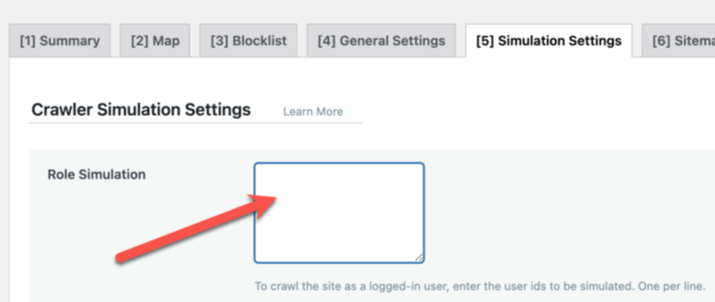
Save any changes.
This will disable role simulation completely, until you are able to upgrade to v6.4.
Hosting providers
Hosting providers have two temporary solutions: add a mod_sec rule, or add a rewrite rule. There is no need to apply both. Choose whichever one you prefer.
These rules disable access to the litespeed_role cookie. Here’s why:
Potential attacks are carried out via litespeed_role in pre-6.4 versions of the plugin. Blocking the cookie will not have any implications for those who have upgraded. For those who have not upgraded, it will make it impossible for them (or anyone else) to use crawler role simulation. But otherwise, it should not have any impact on the functionality of the plugin.
Mod_sec rule:
SecRuleEngine On
SecRule REQUEST_URI "wp-content/debug.log" "id:10001,phase:1,t:urldecode,t:normalizePath,log,deny,status:403,msg:'wp-content/debug.log block'"
SecRule &REQUEST_COOKIES_NAMES:litespeed_role "@gt 0" "id:10002,phase:1,log,deny,status:403,msg:'litespeed_role cookie block'"
Rewrite rule:
RewriteEngine On
RewriteCond %{HTTP_COOKIE} litespeed_role [NC]
RewriteRule ^ - [F,L]
RewriteCond %{REQUEST_URI} wp-content/debug.log [NC]
RewriteRule ^ - [F,L]
Note that these rules should be enclosed within <IfModule LiteSpeed>...</IfModule> tags. The following instructions explain how to apply the rules in cPanel, Plesk, or DirectAdmin.
cPanel
In WHM, create a file called lscwp_custom.conf in the /etc/apache2/conf.d/userdata directory and insert the rewrite rule or the mod_sec rule above into it.
Rebuild the Apache config file and restart LiteSpeed Web Server with the following commands:
/scripts/rebuildhttpdconf
systemctl restart lsws
Plesk
Edit the /usr/local/psa/admin/conf/templates/custom/domain/domainVirtualHost.php file. Look for two </VirtualHost> lines and insert the rewrite rule or the mod_sec rule before both of them.
Rebuild the Apache config file and restart LiteSpeed Web Server with the following commands:
/usr/local/psa/admin/sbin/httpdmng --reconfigure-all
systemctl restart lsws
DirectAdmin
Create the custom template directory /usr/local/directadmin/data/templates/custom/ if it doesn’t exist. Copy four template files into that directory using the following commands:
cp /usr/local/directadmin/data/templates/virtual_host2.conf /usr/local/directadmin/data/templates/custom/virtual_host2.conf
cp /usr/local/directadmin/data/templates/virtual_host2_secure.conf /usr/local/directadmin/data/templates/custom/virtual_host2_secure.conf
cp /usr/local/directadmin/data/templates/virtual_host2_sub.conf /usr/local/directadmin/data/templates/custom/virtual_host2_sub.conf
cp /usr/local/directadmin/data/templates/virtual_host2_secure_sub.conf /usr/local/directadmin/data/templates/custom/virtual_host2_secure_sub.conf
Open each of the new template files, and look for the </VirtualHost>
Rebuild the Apache config file and restart LiteSpeed Web Server with the following command:
/usr/local/directadmin/custombuild/build rewrite_confs
Conclusion
We thank Patchstack for bringing this issue to our attention. This vulnerability has been patched, so if you are keeping your LiteSpeed Cache plugin up-to-date, there is nothing you need to do. If you have not updated in a while, please do so today.


Leave a Reply