Tag: http/2

  • Rapid Reset HTTP/2 Vulnerablilty

    Rapid Reset HTTP/2 Vulnerablilty

    Rapid Reset HTTP/2 LiteSpeed

    Here’s the situation with the Rapid Reset HTTP/2 vulnerability in a nutshell:

    • CVE-2023-44487 was published yesterday. It outlines a vulnerability in the HTTP/2 protocol, which allows DDoS attacks that are massive in scale
    • LiteSpeed server products (including LiteSpeed Web Server Enterprise, LiteSpeed Web ADC and OpenLiteSpeed) are NOT vulnerable to this line of attack

    Read on for more information about the Rapid Reset HTTP/2 vulnerability, and why you don’t have to worry about your LiteSpeed-powered sites.

    How Rapid Reset Works

    After an HTTP/2 connection is established, the client may choose to cancel the stream by sending an RST_STREAM frame to the server. This is intended to save the server from executing unnecessary tasks.

    The vulnerability is exploited when a large number of streams are canceled quickly over a single connection, before any subsequent streams arrive. The server’s concurrent stream count is not incremented, the maximum is never reached despite all of the activity, and the server becomes overloaded.

    How it affects LiteSpeed products

    Unlike Cloudflare, Google, Microsoft, Amazon, F5, and others, who have been working together on a solution for more than a month, we only learned of this vulnerability with everyone else yesterday, when the CVE was published.

    Despite the short notice, we got to work immediately to learn how (or if) the Rapid Reset vulnerability could be leveraged against LiteSpeed’s HTTP/2 implementation.

    “Because the attack abuses an underlying weakness in the HTTP/2 protocol, we believe any vendor that has implemented HTTP/2 will be subject to the attack.”

    Cloudflare’s Rapid Reset Technical Breakdown

    We’re happy to report that LiteSpeed servers are NOT subject to the attack, and this comes down to our unique HTTP/2 implementation. When LiteSpeed Enterprise became the first web server to offer HTTP/2 support, we did so with an implementation that was written from the ground up with security in mind. LiteSpeed HTTP/2 effectively fends off many attacks that other implementations may struggle against.
    With LiteSpeed HTTP/2:

    • New streams are placed in internal priority queues
    • Streams are processed based on priority at the ending edge of one I/O event
    • When there are massive amounts of new streams with a RST_STREAM frame, closely followed within the same I/O event, the stream is immediately discarded from the priority queue without further processing.
    • If an attacker delays the RST_STREAM frame after the stream is processed, the effects are twofold:
      1. The attack will be slowed down
      2. The non-configurable 100 concurrent stream limit will be reached, and the connection will be closed by the server.

    There is nothing you need to do to protect yourself from this type of attack.

    The maximum impact a Rapid Reset attack can have on a LiteSpeed server is the wasting of CPU cycles in handling the stream’s frames, and creating and recycling the stream object.

    What we intend to do

    We plan to further enhance our HTTP/2 implementation to specifically target this attack based on its traffic pattern. Once detected, we’ll eliminate the waste of CPU cycles with IP blocking.

    An emergency security patch is not required this time.

    Conclusion

    “We, along with Google and AWS, have disclosed the attack method to web server vendors who we expect will implement patches.”
    Cloudflare’s Rapid Reset Technical Breakdown

    This was not our experience, sadly. We wish we had been notified in advance about this event. After all, we serve more than 12% of the top sites on the internet! It’s disappointing that we were not afforded the luxury of time that the other web server vendors were presumably given to address the potential impacts for our clients.

    Luckily, LiteSpeed servers are minimally affected by the Rapid Reset vulnerability. But can we be sure that will be the case when future vulnerabilities are discovered?

    We have tried to contact the proper people about this, to no avail. If you were involved in the coordination of the CVE, please get in touch via our info@litespeedtech.com email and help us ensure we are kept in the loop in the future. Thank you.

  • Protocol Switching with Web ADC 3.0

    Protocol Switching with Web ADC 3.0

    Protocol Switching with Web ADC 3.0

    Web servers and web browsers rely on HTTP to communicate with each other. The HTTP protocol in use on the web today may be one of three versions (HTTP/1.1, HTTP/2, or HTTP/3) and not all browsers or servers support all three versions.

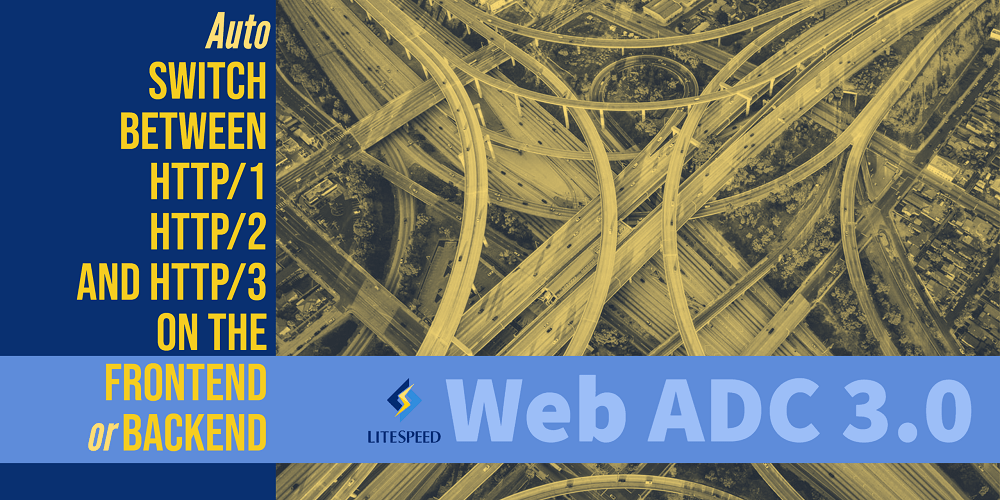
    LiteSpeed Web ADC v3.0 has the unique ability to proxy requests across all HTTP versions, providing end-to-end HTTP/3 for backend servers that support it.

    Because it can support all versions as both a server and a client, our ADC acts as a bridge between disparate technologies. This enables us to upgrade requests from HTTP/1 to HTTP/3 for backend servers that support HTTP/3, or to downgrade requests from HTTP/3 to HTTP/1 or HTTP/2 for backend servers that cannot. This provides maximum flexibility and optimal performance regardless of backend infrastructure.

    What is LiteSpeed Web ADC?

    LiteSpeed Web ADC is a high-performing HTTP load balancer and application delivery controller. It is a 100% software solution, meaning it can operate anywhere: private dedicated hardware, hosted environment, or the cloud, and can act as proxy to any type of backend web server (LiteSpeed, Apache, nginx, etc.).

    How Protocol Switching Works

    Browser to Web ADC

    Browser connections to the ADC work much as they would with any other server.

    The Initial connection is an HTTP/1 SSL connection. This may be negotiated to HTTP/2 during the SSL handshake, and further upgraded to HTTP/3 once the browser processes the ADC response headers. All LiteSpeed web serving products can handle all versions of HTTP requests. So, whether the connection is via HTTP/1, HTTP/2, or HTTP/3 mainly depends on what the browser can support.

    Web ADC to Backend Server

    Here is where LiteSpeed Web ADC differs from other proxies.

    When the ADC is unable to serve a request on its own and must retrieve a page from a backend web server, the ADC takes on the role of client. Then, the same process as above is played out between the ADC and the backend server. The ADC negotiates a connection via HTTP/1, HTTP/2, or HTTP/3 depending on what the backend server supports.

    No other proxy supports HTTP/3 connections to the backend servers. Many proxies don’t support HTTP/2 either. But LiteSpeed Web ADC provides support for all modern HTTP versions, along with all of the benefits that entails.

    Why it Matters

    LiteSpeed Web ADC has the ability to switch between HTTP protocol versions depending on the capabilities of the frontend browser and the backend servers. This interchangeability offers the maximum flexibility between infrastructures. Plus, it enables us to multiplex both the frontend and the backend, and support end-to-end HTTP/3. That leads to better performance all around.

    Get a trial license, and take LiteSpeed Web ADC 3.0 out for a spin today!

  • Fast Huffman Encoder

    Fast Huffman Encoder

    Fast Huffman Encoder

    LiteSpeed’s HPACK Huffman Encoder has been optimized: it now runs twice as fast as before. In this article, we present the Fast Huffman Encoder, share a few optimization tricks and pitfalls, and benchmark several Huffman encoder implementations.

    Introduction

    Huffman encoder is used both in HTTP/2 and HTTP/3 stacks (HPACK and QPACK compression, respectively). Speeding up this component thus leads to a double win.

    In our previous blog post, we discussed how we sped up our Huffman decoder. The main idea was that we can process the input two, rather than one, bytes at a time. The same approach can be used to speed up the Huffman encoder.

    Unlike the decoder, the encoder implementations by LiteSpeed, nginx, h2o, and nghttp2 do not share a common ancestor. For that reason, we will benchmark all of them.

    Starting Line

    Before optimization, the main encoder loop in our implementation looks like this:

        while (src != src_end)
        {
            cur_enc_code = encode_table[*src++];
            if (bits_used + cur_enc_code.bits < sizeof(bits) * 8)
            {
                bits <<= cur_enc_code.bits;
                bits |= cur_enc_code.code;
                bits_used += cur_enc_code.bits;
                continue;
            }
            else if (p_dst + sizeof(bits) <= dst_end)
            {
                bits <<= sizeof(bits) * 8 - bits_used;
                bits_used = cur_enc_code.bits - (sizeof(bits) * 8 - bits_used);
                bits |= cur_enc_code.code >> bits_used;
    #if UINTPTR_MAX == 18446744073709551615ull
                *p_dst++ = bits >> 56;
                *p_dst++ = bits >> 48;
                *p_dst++ = bits >> 40;
                *p_dst++ = bits >> 32;
    #endif
                *p_dst++ = bits >> 24;
                *p_dst++ = bits >> 16;
                *p_dst++ = bits >> 8;
                *p_dst++ = bits;
                bits = cur_enc_code.code;   /* OK not to clear high bits */
            }
            else
                return -1;
        }
    

    Where an element of encode_table is as follows:

    struct encode_el
    {
        uint32_t code;
        int  	bits;
    };
    

    Each byte of input is used as an index into encode_table. The associated encoded bit string is added to the accumulator buffer bits, which is an 8-byte or 4-byte integer, depending on the platform. When bits is full, its bytes are written out and the accumulator is reset.

    We want to reduce the number of branches. A useful metric is “number of conditionals per byte of input.” In this loop, we check whether

    1. we’ve run out of input (for every input byte);
    2. the accumulator buffer is full (for every input byte); and
    3. we’ve run out of output (every 8 output bytes).

    Estimating average compression ratio of 0.75, this translates to 2.1 branches per byte of input. Can we do better?

    Big Table

    Since there is no obvious way to reduce the number of conditionals in the processing loop, the next thing to do is to reduce the number of input units: that is, process two bytes at a time instead of one.

    struct henc {
        unsigned lens;
        uint32_t code;
    } hencs[] = {
        [0x0000] = { 26, 0x3FF1FF8 },
        [0x0001] = { 64, 0 },
        /* --- 8< -- snip --- 8< --- */
        [0x6161] = { 10, 0x63 },
        /* --- 8< -- snip --- 8< --- */
        [0xFFFF] = { 64, 0 },
    };
    

    This table has 64K entries. Each element contains the bit string code that represents the Huffman encoding of the two input bytes and its length, lens. Because code is 32 bits wide, some two-byte encodings cannot be represented. They are marked by lens having value 64. In this case, the encoder has to fall back to processing input byte by byte.

    New Loop

    The new loop is broken up into three parts below to place explanation next to the code. You can view the loop in its entirety on GitHub.

    Read

        while (src + sizeof(bits) * 8 / 5 + sizeof(idx) < src_end
                                        && p_dst + sizeof(bits) <= dst_end)
        {
            memcpy(&idx, src, 2);
            henc = &hencs[idx];
            src += 2;
            while (bits_used + henc->lens < sizeof(bits) * 8)
            {
                bits <<= henc->lens;
                bits |= henc->code;
                bits_used += henc->lens;
                memcpy(&idx, src, 2);
                henc = &hencs[idx];
                src += 2;
            }
    

    To avoid source and destination checks inside the loop, they are performed once. The body of the loop is executed if there are enough source bytes to fill the accumulator with shortest Huffman codes and read two more bytes (that translates to 64 / 5 + 2 = 14 bytes on 64-bit platforms) and enough space in the destination buffer to fit all bytes in the accumulator.

    With that out of the way two bytes are read into idx and this value is used to point to the corresponding entry in the hencs table. memcpy is used to guarantee aligned access.

    The loop condition of the inner while loop checks two things:

    1. whether the accumulator will be filled by the current output bit string; and
    2. output bit string validity.

    The reason for making 64 the invalid value in the hencs table is to be able to combine the two checks above into a single expression. If 0 were the invalid value indicator, the condition would have to be more complicated:

    henc->lens && bits_used + henc->lens < sizeof(bits) * 8
    

    This optimization makes a noticeable difference by reducing the number of instructions in the inner loop.

    Write

            if (henc->lens < 64)
            {
                bits <<= sizeof(bits) * 8 - bits_used;
                bits_used = henc->lens - (sizeof(bits) * 8 - bits_used);
                bits |= henc->code >> bits_used;
    #if UINTPTR_MAX == 18446744073709551615ull
                *p_dst++ = bits >> 56;
                *p_dst++ = bits >> 48;
                *p_dst++ = bits >> 40;
                *p_dst++ = bits >> 32;
    #endif
                *p_dst++ = bits >> 24;
                *p_dst++ = bits >> 16;
                *p_dst++ = bits >> 8;
                *p_dst++ = bits;
                bits = henc->code;   /* OK not to clear high bits */
            }
    

    If the current henc entry is valid, the accumulated bytes are written to destination buffer. First, the accumulator bits is filled to the max by adding first part of the current output bit string henc->code.

    Because the destination check has already been performed and we know the number of bytes to write, it is done in a series of shift, assignment, and increment statements.

    henc->code is simply copied to the bits accumulator as is not necessary to clear any bits. The unused bits from henc->code will be processed based on the value of bits_used.

    Note that it costs only one conditional to output a bits-ful of bytes.

    Fallback

            else
            {
                src -= 2;
                break;
            }
        }
    

    The fallback occurs when the current two-byte input sequence translates to an output bit string that is too long. The input pointer is backed up two bytes and the new loop is exited, with control proceeding naturally to the original byte-by-byte loop.

    Count Branches

    The loop checks:

    1. source and destination bounds once per every 8 output bytes;
    2. accumulator fill every two input bytes; and
    3. code validity every 8 output bytes.

    Again, assuming compression ratio to be 0.75, this translates to 1 / (8 / 0.75) + 1 / 2 + 1 / (8 / 0.75) = 0.69 branches per input byte. This is three times fewer branches than in the original loop.

    Benchmarks

    We compare the optimized Huffman encoder (litespeed) to the original (litespeed-orig), as well as to Huffman decoders from nginx, h2o, and nghttp2 projects. I extracted the relevant pieces of code from each project and placed them into separate C files in our Huffman encoder benchmark GitHub repo.

    We will test using four different inputs:

    1. litespeed.txt: This file contains the string “LiteSpeed”. It is used to test small inputs.
    2. x-fb-debug.txt: This is a medium-size string taken from a real x-fb-debug header from the Facebook response QIF file. This is used to test medium-size input.
    3. idle.huff: This file contains the first few paragraphs from The Idle Thoughts of an Idle Fellow by Jerome K. Jerome. It is used to test large input.
    4. x-fb-backslash.huff: This is the same as (2), except with three backslashes inserted in the middle of the string. The backslash is encoded using a 19-bit code, and so the Fast Huffman Encoder will have to fall back to using the original byte-by-bytes loop.

    The table below was generated by the helper program bench.pl. In addition to running the driver and calculating median values, it first calibrates each input file so that the fastest of the encoders runs for at least five seconds. Each encoder runs an input file five times and the median run time is taken. These are the numbers for each encoder in the table below. They are in seconds.

    Results

    Input
    Number of iterations
    litespeed
    litespeed-orig
    nginx
    h2o
    nghttp2
    litespeed.txt 327680000 8.67 8.80 9.61 10.19 20.59
    x-fb-debug.txt 40960000 5.25 11.23 11.13 18.83 30.31
    x-fb-backslash.txt 40960000 7.22 12.65 11.20 19.80 32.21
    idle.txt 2560000 9.32 15.89 17.60 29.50 52.25

    As expected, there is no speedup for litespeed.txt, as that string is shorter than 14 bytes. For x-fb-debug.txt, x-fb-backslash.txt, and idle.txt, litespeed is 2.14, 1.75, and 1.70 times, respectively, faster than litespeed-orig. litespeed Huffman encoder beats nginx, h2o, and nghttp2 in all tests. This is how much faster:

    input
    litespeed
    nginx
    h2o
    nghttp2
    litespeed.txt 1.00 1.11 1.18 2.37
    x-fb-debug.txt 1.00 2.12 3.59 5.77
    x-fb-backslash.txt 1.00 1.55 2.74 4.46
    idle.txt 1.00 1.89 3.17 5.61

    litespeed is about twice as fast (2.12 and 1.89) as nginx on normal input when the string is not tiny (and when it is tiny, its still faster).

    h2o is an also-ran, while the nghttp2 encoder is the slowest of the bunch.

    Conclusion

    The Fast Huffman Encoder uses the same insight as the Fast Huffman Decoder: the subset of commonly used characters in HTTP headers is much smaller than the set of possible characters. For inputs of 12 characters or longer, the encoder virtually always uses the fast path, and the fallback is cheap. At the cost of 512KB of a read-only lookup table, we've doubled the Huffman encoding speed.

    Portability

    This is a bonus section for the dedicated. Welcome!

    Table Compilation: Endianness

    The initial description of the big table was a bit of a white lie. The table actually looks like this:

    #if __BYTE_ORDER == __LITTLE_ENDIAN
    #define I(i,j) ((j<<8)|i)
    #else
    #define I(i,j) ((i<<8)|j)
    #endif
    #if UINTPTR_MAX == 18446744073709551615ull
    #define X32 32
    #else
    #define X32 64
    #endif
    struct henc {
        unsigned lens;
        uint32_t code;
    } hencs[] = {
        [I(0,0)] = {26,0x3FF1FF8},
        [I(1,0)] = {64,0},
        /* --- 8< --- snip --- 8< --- */
        [I(97,97)] = {10,0x63},
        /* --- 8< --- snip --- 8< --- */
        [I(203,97)] = {X32,0xFFFFFBC3},
        /* --- 8< --- snip --- 8< --- */
        [I(255,255)] = {64,0},
    };
    #undef X32
    #undef I
    

    The I() macro is used to generate different indexes on little-endian and big-endian platforms.

    Avoid Undefined Behavior

    The X32 macro effectively disables 32-bit output sequences on 32-bit platforms. This is because of the left shift used when outputting encoded buffer in the big loop. The C standard says the following about bitwise shift operators:

    If the value of the right operand is negative or is greater than or equal to the width of the promoted left operand, the behavior is undefined.

    This means that the result of the following statement may be undefined if we shift by 32:

    bits <<= sizeof(bits) * 8 - bits_used;
    

    To avoid bits_used from being 0 here, the longest code must be smaller than 32 on a 32-bit platform. We guarantee this with the inner while loop.

    Aligned Access

    We read encoder input as a sequence of two-byte integers by copying memory to a local variable:

    memcpy(&idx, src, 2);
    henc = &hencs[idx];
    

    On Intel x86 and x64 architecture, data does not have to be aligned, so one could (or could one?) get away with writing code like this:

    henc = &hencs[ * (uint16_t *) src];
    

    But then this would not work on platforms with stricter alignment requirements, such as SPARC.

    Fortunately, the compiler is smart enough to compile both of these code snippets to exactly the same -- fast -- code.

  • Fast Huffman Decoder

    Fast Huffman Decoder

    Fast Huffman Decoder

    Summary

    The LiteSpeed HPACK Huffman decoder is twice as fast as that used by nginx. This is one of the reasons LiteSpeed Web Server outperforms nginx in a variety of HTTP/2 benchmarks. This article describes how our Huffman decoder works and then tests its performance against that of nginx Huffman decoder. The benchmarked code is available in a public GitHub repository, making the results easy to verify.

    Introduction

    The latest major release of LiteSpeed Web Server includes several new features and optimizations. Our web server outperforms nginx by a factor of 2 to 12 in several readily reproducible benchmarks.

    How do we do it? The truth is, when we are not adding new features, we are optimizing existing code. We 1) examine each module and submodule to find one we can speed up; 2) speed it up; and 3) go back to step 1. Sometimes we wake up because a way to elide a branch in the middle of a tight loop has appeared to us in a dream. Then we turn on the terminal and put down the nocturnal epiphany in code.

    Why do we do it? HTTP/2 is on its way to become the dominant web protocol. HTTP/2 performance is crucial for any modern web server. And, of course, we want to be faster than everyone else.

    This article describes one of the optimizations that made ours the fastest HTTP/2 implementation in the world.

    History

    Well-led software projects are not afraid to borrow good ideas, for the hubris of the not-invented-here syndrome often leads to suboptimal implementations. Such is the story of the HPACK Huffman decoder in today’s major web servers. Apache, LiteSpeed, and nginx have all, until recently, used the same Huffman decoder implementation.

    HPACK is a specialized compression mechanism for HTTP headers, designed specifically for HTTP/2. Header compression is one of HTTP/2’s “killer features:” it reduces bandwidth necessary to transfer headers and thus improves throughput. Huffman coding is used to compress headers that are not in one of the HPACK tables.

    In January of 2014, over a year before the HPACK RFC was published, Tatsuhiro Tsujikawa rewrote Huffman decoder in nghttp2’s implementation of HPACK. (nghttp2 is used by Apache to provide HTTP/2 functionality.) The new code used the method described eleven years earlier by Renato Pajarola in his paper Fast Prefix Code Processing. It is significantly faster than prior methods. The idea is to process compressed data several bits — instead of one bit — at a time. Tatsuhiro chose 4 bits as input length. 4 is a good number. Conveniently, it is exactly half the length of a byte. A shorter sequence would not have sped up the code as much, while a longer sequence would grow the transition table.

    Because HPACK Huffman codes do not change, the transition table is generated once — at compile time. The static table is then used by a simple, robust, and fast decoder function. This was a good idea and a good piece of code, so LiteSpeed, nginx, and others copied (with slight alterations) the code, and moved on.

    Fast or Slow?

    Our own version of the Huffman decoder looks like this (see litespeed.c):

    int
    lshpack_dec_huff_decode_full (const unsigned char *src, int src_len,
                                                unsigned char *dst, int dst_len)
    {
        const unsigned char *p_src = src;
        const unsigned char *const src_end = src + src_len;
        unsigned char *p_dst = dst;
        unsigned char *dst_end = dst + dst_len;
        struct decode_status status = { 0, 1 };
    
        while (p_src != src_end)
        {
            if (p_dst == dst_end)
                return -2;
            if ((p_dst = hdec_huff_dec4bits(*p_src >> 4, p_dst, &status))
                    == NULL)
                return -1;
            if (p_dst == dst_end)
                return -2;
            if ((p_dst = hdec_huff_dec4bits(*p_src & 0xf, p_dst, &status))
                    == NULL)
                return -1;
            ++p_src;
        }
    
        if (!status.eos)
            return -1;
    
        return p_dst - dst;
    }
    

    Even though 4 bits at a time is faster than one bit at a time, the code is still pretty expensive. One way to look at this is to count the number of branches for each byte of input. Inside the while loop above, there are four if statements. This is in addition to conditionals in hdec_huff_dec4bits function (there are two) and in addition to the while loop conditional that checks for end of input. That is seven branches for each byte of input. Can we do better?

    Common Case

    HPACK defines 257 Huffman codes: one for each of the 256 possible bytes and one for the special end-of-stream (EOS) symbol. The codes range from 5 to 30 bits in length: the more likely the value, the shorter its code. What is important to realize is that two thirds of the Huffman codes are virtually never used in HTTP headers. Most of the time, only shorter codes are used. For example, no codes longer than 13 bits are used in the QIF corpus. In this restricted domain, there are more possibilities for optimization.

    Big Table!

    The idea is to generate a large table that can be indexed by the longest of the common Huffman codes. For example, a table with 64K entries can be indexed by a 16-bit value, representing a sequence of 16 input bits. In the common case, a 16-bit sequence is wide enough to contain Huffman codes for one or more output symbols (the average number is 2.14 output symbols per 16 bits).

    Encountering a code longer than 16 bits would require falling back to the original, full Huffman decoder that processes the input 4 bits at a time.

    Fast Huffman Decoder Details

    (To keep the blog post manageable, only the most important snippets of code are included here. For your convenience, the table and the Fast Huffman Decoder function are available in their entirety here: litespeed.c, litespeed-table.h.)

    The Table

    As mentioned above, the table contains 64K entries, for the full range of values that fits into a 16-bit integer, from 0 to 65,535. Each entry contains three things:

    1. Sum of lengths of Huffman codes consumed from the input stream, in bits. This value has a valid range from 5, which is the length of the shortest HPACK Huffman code, to 16, which is the number of bits available for input. Remember, the input bits here are in the index value.
    2. Number of output bytes. The smallest value is 1, while the largest is 3. 3 is how many 5-bit codes can fit into 16 bits.
    3. Output bytes themselves.
    static const struct hdec {
        uint8_t lens;
        uint8_t out[3];
    } hdecs[] = {
        /* 0 */ {(15<<2)|3,{48,48,48}},
        /* 1 */ {(15<<2)|3,{48,48,48}},
        /* 2 */ {(15<<2)|3,{48,48,49}},
        /* 3 */ {(15<<2)|3,{48,48,49}},
        /* --- 8< --- many rows skipped --- 8< --- */
        /* 65532 */ {(15<<2)|1,{123,0,0}},
        /* 65533 */ {(15<<2)|1,{123,0,0}},
        /* 65534 */ {0,{0,0,0,}},
        /* 65535 */ {0,{0,0,0,}},
    };
    

    To keep each element to 4 bytes, Huffman codes lengths and number of output bytes are combined into a single struct member lens. The 3-byte array out holds the output bytes themselves. For example, element 2 above consumes 15 bits of input and outputs 3 bytes: 0, 0, 1. Element 65533 consumes 15 bits of input and outputs 1 byte: {.

    The last two elements of the table have lens equal zero. This indicates that there is no matching Huffman code that fits into 16 bits. The HPACK Huffman code table shows that, indeed, all codes longer than 16 bits begin with either 11111111 11111110 (65534) or 11111111 11111111 (65535) bit sequence. When this code is encountered, the Fast Huffman Decoder has to use the fallback mechanism.

    Main Loop

    The main loop can be described in this high-level pseudocode:

    while (have input)
    {
        fill buf;
        drain buf;
    }
    

    Several input bytes are copied into an intermediate representation. This batch of input bits is then processed: an element in hdecs table is looked up and output is written, until the number of available bits (avail_bits) falls under 16. At this point, buf is refilled.

    Input Batching

    The input bytes are copied into an integer buffer buf, which is the size of a pointer (8 bytes on 64-bit platforms). avail_bits holds the number of input bits available in buf. avail_bits must be at least 16 to be able to use the large table.

    if (src + sizeof(buf) <= src_end)
        /* --- 8< --- omitted for brevity, refer to litespeed.c --- 8< --- */
        ;
    else if (src < src_end)
        do
        {
            buf <<= 8;
            buf |= (uintptr_t) *src++;
            avail_bits += 8;
        }
        while (src < src_end && avail_bits <= sizeof(buf) * 8 - 8);
    else
        break;  /* Normal case terminating condition: out of input */
    

    Filling buf is optimized. If the number of remaining input bytes is at least the size of buf, we can use a switch statement. Otherwise, bytes are added to buf using a while loop.

    Batch Processing

    The batch of input bits in buf is used to look up elements in hdecs. If the output buffer has enough room to fit the maximum number of bytes that could possibly be encoded in buf (64 / 5 = 12 bytes on 64-bit platform), the processing loop can skip destination check.

    if (dst_end - dst >= (ptrdiff_t) (8 * sizeof(buf) / SHORTEST_CODE)
                                                    	&& avail_bits >= 16)
    {
        /* Fast path: don't check destination bounds */
        do
        {
            idx = buf >> (avail_bits - 16);
            hdec = hdecs[idx];
        	dst[0] = hdec.out[0];
        	dst[1] = hdec.out[1];
        	dst[2] = hdec.out[2];
        	dst += hdec.lens & 3;
        	avail_bits -= hdec.lens >> 2;
        }
        while (avail_bits >= 16 && hdec.lens);
        if (avail_bits < 16)
            continue;
        goto slow_path;
    }
    

    The do/while loop above is the main reason the Fast Huffman Decoder is fast. The only conditional is the terminating condition, which checks both the number of available bits and hdec validity at the same time. The average number of consumed bits in hdecs table is 12.76. This translates to 0.63 branches per input byte. Far cry from seven! Of course, there are branch penalties elsewhere — filling the batch, error checking — but this loop’s speed makes up for them in spades.

    The next 16-bit input sequence to use is in the most significant bits of buf. Since idx is uint16_t, there is no need to mask out the low 16 bits of buf: assignment to uint16_t takes care of that.

    All three bytes of the hdec.out array are written to the destination buffer. This saves a conditional at a cost of an unnecessary write. 15% of hdecs entries output 3 bytes, while 84% output 2 bytes. On average, then, 5 times out of 6 an extra byte is written to dst. This is cheaper than a branch.

    As described above, invalid entries have lens equal to zero. In this case, the values of dst and avail_bits are not changed inside the loop. The if statement after the loop is used to differentiate whether we ran out of bits (the common case) or found an invalid code. The latter forces us to fall back to the full Huffman decoder.

    A slower while loop is utilized when there is not much room left in the destination buffer.

    Fallback

    When a long (or invalid) Huffman code is encountered, we have to use the full (original) Huffman decoder to process the rest of the string.

    /* Find previous byte boundary and finish decoding thence. */
    while ((avail_bits & 7) && dst > orig_dst)
        avail_bits += encode_table[ *--dst ].bits;
    src -= avail_bits >> 3;
    r = lshpack_dec_huff_decode_full(src, src_end - src, dst, dst_end - dst);
    if (r >= 0)
        return dst - orig_dst + r;
    else
        return r;
    

    We cannot start processing from the current input position if the Huffman code is not on the byte boundary. We need to rewind the input pointer toward the beginning, looking for the byte boundary. To do that, we use the bytes we already output and the Huffman encoder table. We back up until avail_bits is a multiple of 8. In the worst case, we will stop at the beginning of the input, but that usually does not happen for an input of any appreciable length.

    Benchmarks

    We will compare the Fast Huffman Decoder with Huffman decoder from nginx. To do that, I extracted Huffman decoder functions from ls-hpack and nginx and wrote a small driver program that runs the decoder. See our Huffman decoder GitHub repo. The specific versions of the decoder are here (LiteSpeed) and here (nginx). The latter has been adapted from nginx 1.16.1. You should be able easily to clone this repository and replicate our results.

    The driver is a simple program that reads Huffman-encoder string from a file and decodes it a number of times. The less time a decoder takes to decode the input, the faster the decoder.

    For example:

    sh$ time -p ./comp-dec idle.huff 1000000 litespeed
    real 8.35
    user 8.33
    sys 0.00
    sh$ time -p ./comp-dec idle.huff 1000000 nginx
    real 16.20
    user 16.16
    sys 0.00
    

    It took Fast Huffman Decoder 8.35 seconds to decode Huffman-encoded string in idle.huff one million times, while the nginx Huffman decoder took 16.20 seconds.

    We will test using four different inputs:

    1. litespeed.huff. This is a Huffman-encoded string “LiteSpeed”. It is used to test small inputs.
    2. x-fb-debug.huff. This is a medium-size string taken from a real x-fb-debug header from the Facebook response QIF file. This is used to test medium-size input.
    3. idle.huff. This file contains the first few paragraphs from The Idle Thoughts of an Idle Fellow by Jerome K. Jerome. It is used to test large input.
    4. x-fb-backslash.huff. This is the same as (2), except with a backslash inserted in the middle of the string. The backslash is encoded using a 19-bit code, and so the Fast Huffman Decoder will have to backtrack and fall back to the full decoder. This is used to test how well (or poorly) the Fast Huffman Decoder performs in this case.

    We’ll run each input file five times for each decoder, LiteSpeed and nginx. Then we will compare median average run times. (See the complete numbers at the bottom of this article.)

    Results

    Input nginx LiteSpeed Speed-up
    litespeed.huff 5.05s 2.57s 1.96x
    x-fb-debug.huff 5.33s 2.75s 1.94x
    idle.huff 16.09s 8.22s 1.96x
    x-fb-backslash.huff 4.86s 4.21s 1.15x

    Presented with normal input, the LiteSpeed Fast Huffman Decoder almost doubles the speed of the nginx Huffman decoder. Even when the Fast Huffman Decoder has to backtrack due to uncommon input, it still performs significantly better than the alternative.

    Conclusion

    The LiteSpeed Fast HPACK Huffman Decoder leverages its knowledge of the expected input to optimize for the common case. The fast code path uses two to three times fewer conditionals than the original decoder, making it twice as fast as the original Huffman decoder for all but the most unusual inputs. This is one of the many optimizations we performed — and continue to perform — to make ours the fastest web server, period.

    We also use the Fast Huffman Decoder in our QPACK library, speeding up our HTTP/3 stack. We intend to maintain performance leadership with next-generation HTTP version as well.

    Post Scriptum

    While writing this article, I found two more optimizations that would make the Fast Huffman Decoder even faster. Stay tuned!

    Raw Numbers

    litespeed.huff

    Needed to set number of iterations to 100,000,000 to get into the seconds.

    nginx 5.05 4.94 4.97 5.07 5.07
    LiteSpeed 2.93 2.74 2.78 2.74 2.75

    x-fb-debug.huff

    Number of iterations is set to 10,000,000

    nginx 5.27 5.37 5.31 5.34 5.33
    LiteSpeed 2.75 2.72 2.77 2.74 2.85

    idle.huff

    Number of iterations set to 1,000,000

    nginx 16.09 16.06 16.13 16.09 16.05
    LiteSpeed 8.17 8.25 8.21 8.22 8.29

    x-fb-backslash.huff

    Number of iterations set to 10,000,000

    nginx 4.82 4.86 4.80 4.89 4.86
    LiteSpeed 4.21 4.23 4.21 4.22 4.20

    It is curious that this input differs only by one character from x-fb-debug.huff, yet nginx decoder processes it markedly faster. I haven’t been able — using a limited amount of time — to figure out why.
  • LiteSpeed Addresses HTTP/2 DoS Advisories

    LiteSpeed Addresses HTTP/2 DoS Advisories

    Summary

    On Tuesday, August 13th, 2019 a family of eight HTTP/2 security advisories was disclosed publicly in Vulnerability Note VU#605641.  We examined our software and discovered that the flagship LiteSpeed Web Server and LiteSpeed ADC products are not vulnerable to seven of the eight potential attacks.  In fact, even the one troublesome attack cannot cause any service outage: all it can do is waste computer resources.  Nevertheless, today, August 15th, 2019, LiteSpeed Technologies releases updated server software that addresses all of these security vulnerabilities:

    Note: We have also added the fixes to LSWS 5.3.8 build 7.

    Timeline

    • Spring 2019: Netflix finds vulnerabilities in several HTTP/2 implementations.
    • 1pm EDT, Tue Aug 13: HTTP/2 security advisories are disclosed.
    • 3 pm EDT, Tue Aug 13: LiteSpeed begins tests to see whether its software is vulnerable.
    • 10 pm EDT, Tue Aug 13: Tests are completed and plan of action is agreed upon.
    • 1 am EDT, Wed Aug 14: Software fixes are complete.
    • Wed Aug 14: Fixes are ported to all our products and verification tests are performed.
    • 5pm EDT, Thu Aug 15: Security updates for LiteSpeed software are available.

    Background

    As early as May of this year, security researchers at Netflix examined several HTTP/2 implementations.  What they discovered were several avenues for potential DoS attacks.  Netflix teamed up with Google to inform HTTP/2 software vendors of potential vulnerabilities and to coordinate a synchronized software update rollout.  No one alerted us, however, and we learned about these vulnerabilities two days ago from the public announcement. Meanwhile, other vendors have had the luxury to spend months to fix their software.

    LiteSpeed HTTP/2 Implementation Holds Up Well

    The good news is that LiteSpeed software does well in the face of these attacks.  In fact, only one of the potential vulnerabilities, CVE-2019-9516 (a.k.a. Zero-Length Headers Leak) is present in LiteSpeed Web Server and ADC.  A malicious client that sends a stream of zero-length header names and values causes the server to waste CPU cycles and to keep allocating memory for the duration of the connection.  In our testing, even when under such an attack, the server continued to process other connections with no perceptible performance impact. LiteSpeed closed the offending connections after 60 seconds, releasing excess memory.  Nevertheless, even though this attack cannot cause a service outage, the wasted CPU cycles is something we won’t accept.

    Advisories in Detail

    Below, we list the individual security advisories and their potential impact on our software — LSWS, ADC, and OpenLiteSpeed — before today’s new releases.  However, the new releases mitigate all of these attack scenarios.

    CVE-2019-9511 “Data Dribble”

    This attack does not affect LiteSpeed software

    CVE-2019-9512 “Ping Flood”

    Under this attack, LSWS and ADC use slightly more memory than usual and use 100% CPU, but continue to serve other traffic.  LiteSpeed closes the attacking connection in 20 seconds.

    OpenLiteSpeed enters a busy loop and cannot serve other traffic.

    CVE-2019-9513 “Resource Loop”

    LiteSpeed’s HTTP/2 implementation uses an efficient priority mechanism (not a tree) and thus pays no price when priorities change.

    CVE-2019-9514 “Reset Flood”

    This attack does not affect LiteSpeed software

    CVE-2019-9515 “Settings Flood”

    Same as Ping Flood above: LSWS and ADC cope well. OpenLiteSpeed is effectively DoSed.

    CVE-2019-9516 “0-Length Headers Leak”

    LSWS, ADC, and OpenLiteSpeed keep on allocating memory and using CPU in this attack scenario, but are still able to serve other traffic.  LiteSpeed closes the attacking connection in 60 seconds.

    The damage is limited to wasting computer resources: CPU and memory.  The amount of memory the server allocates is proportional to the volume of incoming traffic.  Because the server closes the malicious connections after a period of time and releases memory, this attack cannot take down LSWS or ADC.

    CVE-2019-9517 “Internal Data Buffering”

    This attack does not affect LiteSpeed software

    CVE-2019-9518 “Empty Frames Flood”

    This attack does not affect LSWS and ADC: no memory increase and no impact to service.  More CPU cycles are used to process frames.

    OpenLiteSpeed gets stuck in a loop and cannot serve other traffic.

    Mitigation

    The updates introduce several heuristics to detect an abnormally high frequency of control or unusual (e.g. empty) frames.  LiteSpeed closes offending connections forthwith.

    When the outgoing buffer is under pressure, the processing of incoming frames is suspended, preventing allocating excessive amounts of memory to keep up with incoming data.  This feedback mechanism is a natural and effective defense against potential future DoS attacks.

    Looking Ahead

    It surprises us that we didn’t receive notification of the impending security advisories.  Not only were we the HTTP/2 pioneer — at one point powering 96.5% of all websites that used HTTP/2 — but we also offer the best HTTP/2 performance in the world, beating the next fastest implementation by a factor of 8.  (Head over to https://http2benchmark.org/ to see for yourself.)

    We have reached out to relevant parties to ensure that LiteSpeed Technologies is kept in the loop the next time around.

    In all, it was two busy days.  We are proud of the limited impact these security advisories had on our software and of delivering security updates in such a short time.

  • HTTP/2 is Easy With LiteSpeed

    HTTP/2 is Easy With LiteSpeed

    We are leaving our competition in the dust, when it comes to cutting-edge technologies like HTTP/2 and QUIC!

    If you want to see what we mean by that, check out this impressive statistic that W3Techs released today:

    Nice, right?

    LiteSpeed Web Server was the first on the scene with production-quality support of HTTP/2 for the mass market, and, as you can see from that statistic, our customers love it.

    In fact, LiteSpeed has been instrumental in the widespread adoption of HTTP/2 since the very beginning.

    So how can you get in on the HTTP/2 action if you haven’t already? Get yourself a trial license, and Install LiteSpeed Web Server. HTTP/2 will be enabled by default. It doesn’t get much easier than that.

    While you’re evaluating LiteSpeed Web Server, don’t forget to give QUIC a try, too!

  • WpW: Minification, Combination, and HTTP/2 Push

    WpW: Minification, Combination, and HTTP/2 Push

    Welcome to another installment of WordPress Wednesday!

    We’ve got more new features to talk about, so fasten your seatbelt and let’s get right to it: Minification, Combination, and HTTP/2 Push!

    Presumably, you are already enjoying the benefits of caching with LiteSpeed Cache for WordPress. These three new optimization functions are designed to give your website an additional performance boost beyond that!

    It’s generally accepted that the fewer plugins you have running the better, both in terms of performance, and in terms of just being able to manage everything efficiently. So, if you can replace two plugins with one that does everything, shouldn’t you?

    These three new optimization functions (along with other new additions: database optimization, content delivery network support, and more coming soon) will allow you to retire your other optimization plugins and let LiteSpeed handle all of it.

    For those of you who maybe have never minified or combined files before, let’s talk about what each of the new functions does. And then, we’ll show you how to set it all up.

    What is Minification?

    JavaScript, CSS, and HTML can all be put through the minification process.

    When code is minified, all unnecessary whitespace characters, newline characters, and comments are removed. Minification, as its name implies, shrinks the size of the source code, and the resulting new code is more efficient to transmit over networks.

    Minified code is distinctly difficult for a human to read, because all of those non-essential characters that were removed are precisely what made the original code readable in the first place. Despite any readability issues, minification is still popular because it’s generally considered more important to have a fast site than it is to have code your visitors can read. In fact, some might consider it a benefit to have their code be obfuscated to outsiders in this way.

    Here’s an example of CSS before and after minification:

    .sample {
    
    border: 1px solid;
    
    color: #123456;
    
    /* this is a comment */
    
    }
    
    
    .sample{border:1px solid;color:#123456}


    As you can see, the first block of code is easier on the eyes, but the second block of code takes up much less space, and still has the exact same functionality. This is just a tiny example. Imagine the space savings on a CSS file with thousands of styles defined!

    With LSCWP minification, your source JS or CSS is not changed. We place the minified source into a new file, and the generated HTML includes that new file in the header instead of the original.

    Minified CSS and JS will be placed in the code with a line that looks similar to:

    <script data-minified='1' src='http://yoursite.com/min/3fb36.js'></script>

    Please be aware, if you do not have pretty permalinks enabled (i.e., your site has URLs that look like http://yoursite.com/?p=123) then your minified code will have a ? in the URL like so:

    <script data-minified='1' src='http://yoursite.com/?/min/3fb36.js'></script>

    When HTML minification is enabled, your source HTML is also not changed. In fact, it can’t be changed because there is no source HTML. HTML is generated on-the-spot by WordPress and PHP, so if minification is enabled, the HTML will be generated already in the minified form.

    What is Combination?

    When a web app includes several JavaScript files, those files may be combined into one. The same goes for CSS files. This reduces the number of requests made by the browser and potentially removes duplicate code, both of which translate to improvements in speed.

    With LSCWP combination, your source JS and CSS is not changed. We create a new file, the generated HTML includes that new file in the header, and the original files are not referenced.

    One thing to note when combining JavaScript files: If you have JS code within the HTML itself, we cannot combine all of the JS without running the risk of introducing conflicts. If there is JS within your HTML, that JS will not be combined. All other JS will be combined, but it will not be placed in the header in this case. It will be placed in the footer instead.

    What is HTTP/2 Push?

    In an effort to reduce the number of requests necessary when loading a web page, HTTP/2 Push may be used to anticipate the browser’s needs and act upon them.

    For instance, if the browser requests index.html, HTTP/2 can reasonably assume that the browser also wants the included CSS and JS files, and will push them along with index.html. The browser doesn’t need to ask for those files, and the transaction is completed more quickly as a result.

    Some things you should know about HTTP/2 Push:

    • Due to the fact that we’re using HTTP/2, the only URLs that are eligible to be pushed must be HTTPS URLs.
    • The main site and the files to be pushed all need to be part of the same site URL. For example, if your site is served by LiteSpeed Web Server from https://example.com but the CSS is served by a content delivery network from https://cdn.com/example, HTTP/2 Push will not work. The main site and all of the files to be pushed will need to be served from the same place.

    As far as that second point goes, we’ve recently introduced CDN support, and will explore it further in a future issue of WordPress Wednesday!

    How do I enable these features?

    The Optimize options are all turned off by default because they may have unexpected results. None of these methods should impact your code’s ability to function, but like we said, it can be unpredictable, so please test thoroughly before enabling minification or combination on your production site!

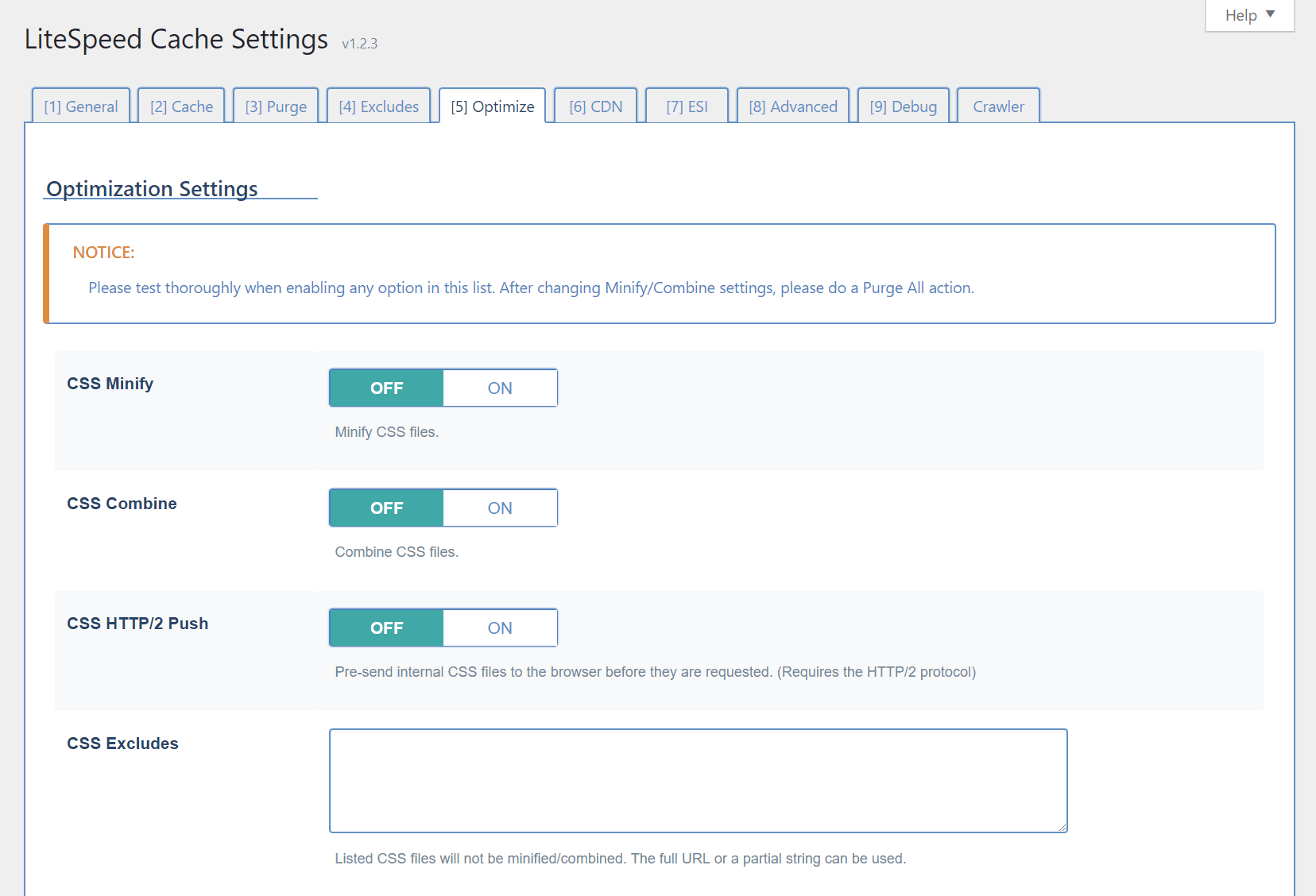
    From your WordPress Dashboard, navigate to LiteSpeed Cache > Settings and select the Optimize tab (or press 5).

    CSS Minify

    Extra white space characters, new line characters, and comments will be stripped from all CSS, if this option is turned on.

    CSS Combine

    All individual CSS files will be combined into a single CSS file.

    CSS HTTP/2 Push

    CSS will be sent to the browser before it is requested.

    CSS Excludes

    Use this space to list any CSS files (one per line) that should be excluded from the above three functions. You may enter full URLs or a partial string. There’s no need to use wildcards in partial strings.

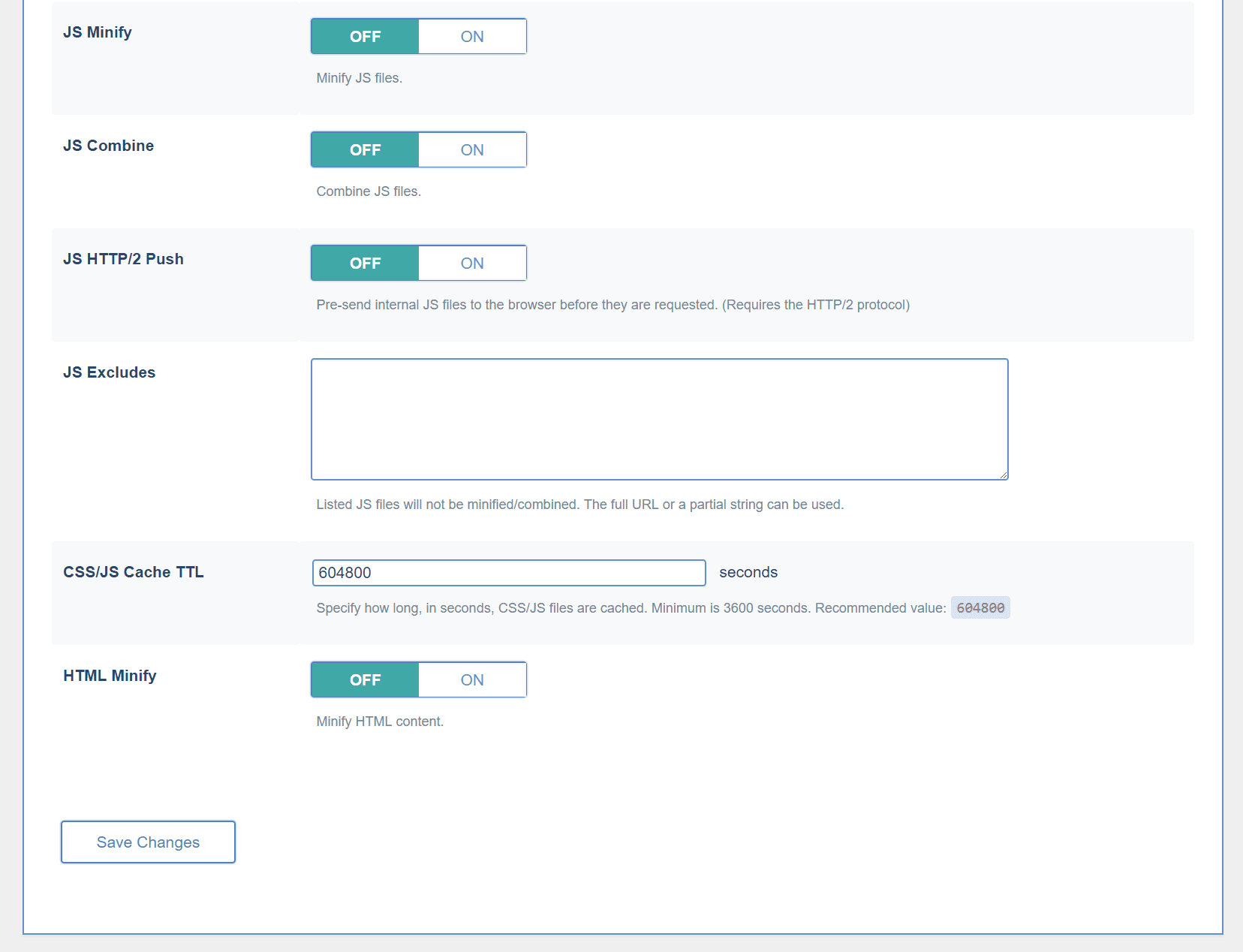
    JS Minify

    Extra white space characters, new line characters, and comments will be stripped from all JS, if this option is turned on.

    JS Combine

    All individual JS files will be combined into a single JS file.

    JS HTTP/2 Push

    JS will be sent to the browser before it is requested.

    JS Excludes

    Use this space to list any JS files (one per line) that should be excluded from the above three functions. You may enter full URLs or a partial string. There’s no need to use wildcards in partial strings.

    CSS/JS Cache TTL

    The minified and combined files are cached. This setting specifies for how long. The minimum is 3600 seconds, but we recommend 604800. When a Purge All command is issued, the minified and combined CSS/JS are included in that purge.

    HTML Minify

    Extra white space characters, new line characters, and comments will be stripped from all HTML, if this option is turned on.

    What if I’m using other plugins that include some of these services?

    There are many optimization plugins in the WordPress Plugin Directory, and they all have their own unique sets of features. Many of the individual options of any one plugin, however, may overlap with the individual options of the others.

    As long as the plugins you are using allow you to enable and disable features at will, then they may be used at the same time. Just be sure not to use the same features in more than one plugin at a time.

    Besides the fact that it just doesn’t make sense to have two plugins running the exact same optimization steps, it also has the potential to introduce buggy behavior.

    Pick a plugin to do a particular optimization technique and then disable that technique in all others.

    We’ve talked a little bit about this before, if you want to read up. At the time of that writing, we didn’t have some of the great extra features that we do now. Today we are better equipped to be your one-stop optimization shop than we’ve ever been! And we’re not finished yet, so stay tuned!

    Have some of your own ideas for future WordPress Wednesday topics? Leave us a comment!

    Don’t forget to meet us back here next week for the next installment. In the meantime, here are a few other things you can do:

  • LiteSpeed Announces QUIC Support

    LiteSpeed Announces QUIC Support

    We said it was coming, and now it is here!

    LiteSpeed Technologies is pleased to announce QUIC support!

    As of today, your LiteSpeed-powered sites can be on the cutting-edge with QUIC, via LiteSpeed WebADC and LiteSpeed Web Server.

    What is QUIC?

    QUIC (or, Quick UDP Internet Connection) is an experimental protocol initially developed by Google in 2012, and announced publicly the following year.

    As of mid-2015, roughly half of all requests from Chrome to Google servers were served over QUIC, and Google intended to ramp up QUIC traffic, eventually making it the default transport from Google clients to Google servers.

    QUIC is now in the hands of the IETF, which is working to develop a standard.

    Why use a QUIC Server?

    QUIC is a good choice for those looking to reduce connection-establishment time and improve congestion control.

    QUIC takes a unique approach to classic latency problems. Rather than attempting to solve the issues of packet-loss and long RTT’s (Round Trip Times), QUIC developers have devised new time-saving and resource-saving ways around these issues.

    Connection-establishment

    SPDY and HTTP/2 have made significant progress in improving application performance, but they fail to address the problem of high round trip time. There is a limited amount that can be done to improve RTT, as response time over a network is limited by the speed of light. QUIC sets aside the hard-to-solve question of reducing RTT and instead concentrates on reducing the number of trips that must be taken.

    When establishing a secure network connection with HTTPS, multiple round trips are required. The client and server shake hands and share encryption keys before they ever get around to the initial request. The QUIC approach is to combine some of these steps, which results in a need for fewer trips. QUIC uses UDP (User Datagram Protocol) instead of the ubiquitous TCP, and as such a multi-step handshake process can be stripped down to 1 or 2 steps, depending on whether this is a new connection, or a re-establishment of a known one.

    Congestion Control

    QUIC deals with packet loss more efficiently than HTTP/2. HTTP/2 and TCP rely on consecutive packets, which means the connection is stalled when one packet goes awry. QUIC and UDP, on the other hand, don’t require packets to arrive in order, and as such, one missing packet can’t tie up the entire queue.

    LiteSpeed + QUIC

    LiteSpeed provides the first production-grade mass-market QUIC implementation available for the public. If you want to serve your web content using the QUIC protocol, LiteSpeed is the solution.

    Concerned about user experience? Who isn’t? You gain an impressive edge over your competitors by serving applications over QUIC. Your visitors will love it. Shaving off even a few hundred milliseconds is important when it comes to UX. The site that loads in half a second now could load instantaneously over QUIC!

    QUIC is not a niche product. QUIC support has been enabled by default in all Chrome releases since August of 2013, and recently it was introduced in Opera as well (although it is disabled by default). While it has been widely adopted among Google’s own services, you’re not likely to find QUIC in use much outside of Google space. That is, until now.  Yes, now you can have a QUIC-powered WordPress blog, Joomla site, Magento shop and more.

    If you can serve it from LiteSpeed, you can power it with QUIC!

    QUIC support is built-in to LiteSpeed WebADC 2.1  and LiteSpeed Web Server 5.2.

    We’re energized by this new protocol, and motivated to see what we can do with it, so please stay tuned. And don’t forget to tell us what you think!

    Things to do now:

  • LiteSpeed is powered by QUIC

    LiteSpeed is powered by QUIC

    If you know LiteSpeed, you know our favorite place to be is on the cutting edge. In 2015, we delivered the first HTTP/2 production web server solution for the mass market, and here we are in 2017, doing it again:

    We’ve enabled QUIC on our own website

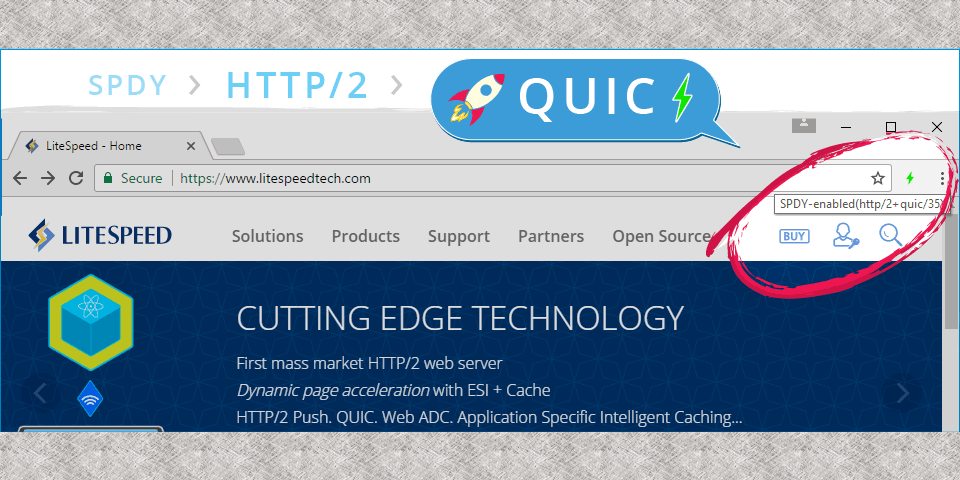
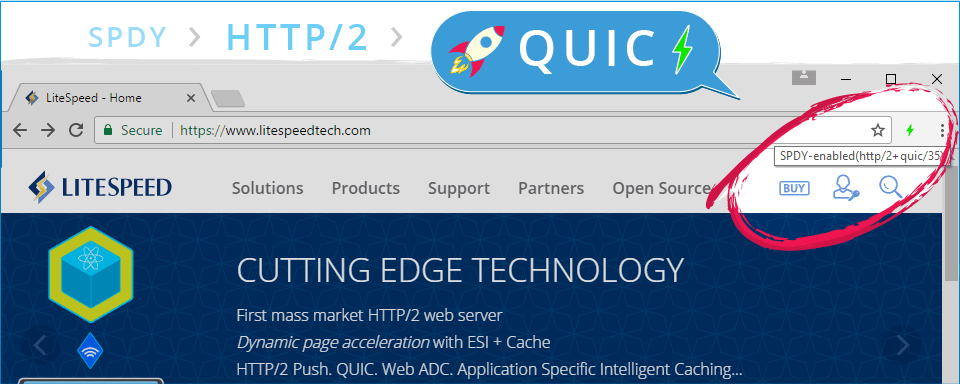
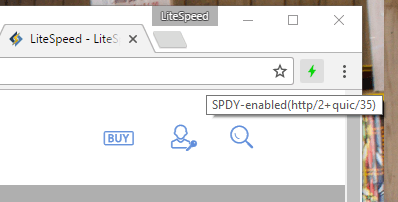
    There’s a Chrome extension which will allow you to see the protocols at work on your favorite websites: HTTP/2 and SPDY indicator by rauchg. Install it, and keep an eye on the little lightning bolt in the Chrome toolbar. Blue indicates HTTP/2 is enabled. Green indicates HTTP/2 + QUIC. And if you hover your cursor over the lightning bolt, you can see a list of enabled protocols for yourself.

    This particular screenshot was captured from our own website. As you can see, we are QUIC-powered!

    What is QUIC?

    The Google-developed QUIC (Quick UDP Internet Connections) protocol is the next-generation web protocol. It takes a new approach to reducing latency by addressing the problems of packet loss and long RTT’s (Round Trip Times). It manages the former through the use of UDP (User Datagram Protocol) vs. the ubiquitous TCP, and then deals with the latter by minimizing the number of round trips between sender and receiver.

    The IETF is currently working on a set of standards, but in the meantime you can learn more about QUIC via Wikipedia.

    QUIC is new, and while support has been widely-adopted among Google’s own services, you’re not likely to find it in use much outside of Google space. Until now, that is!

    Soon you’ll be able to enable QUIC on your site

    QUIC support will be forthcoming in LiteSpeed WebADC 2.1, with LiteSpeed Web Server support to follow. If you’ve got a non-mission-critical server to play with, you can download the WebADC release candidate and give QUIC a try right now!

    We’re pretty motivated to see what we can do with this new protocol, and we will have some exciting QUIC product releases soon.

    Enjoy the next biggest thing of the World Wide Web, today, with LiteSpeed!

    Stay tuned for some benchmarks comparing our QUIC solutions to other implementations out there!

  • Meet Us at WHD.global and HostingCon Global!

    Meet Us at WHD.global and HostingCon Global!

    We are going for a trip around the world! At the end of March, we will be leaving our office in New Jersey, USA, to fly all the way to Rust, Germany, to attend WHD.global in Europa-Park. The second we get back from WHD.global, we will be on the next flight to Los Angeles, California, for HostingCon Global. We would love to personally invite each and every one of you to come visit us at both/either of these wonderful events! (more…)