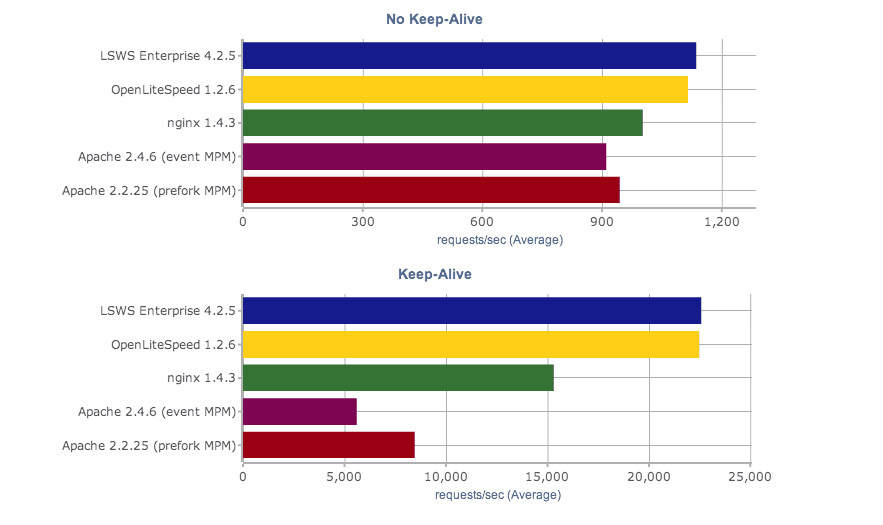
Our new static content benchmarks pit both versions of LiteSpeed Web Server against nginx and Apache, with LiteSpeed once again dusting the competition. (more…)
Learn more about LiteSpeed Web Server. LSWS conserves resources without sacrificing performance, security, compatibility, or convenience. When you replace Apache with LiteSpeed, you double your maximum capacity, and eliminate the need for a 3rd party caching layer – all in 15 minutes with zero downtime!

Our new static content benchmarks pit both versions of LiteSpeed Web Server against nginx and Apache, with LiteSpeed once again dusting the competition. (more…)

Our new auto-installer allows you to install LiteSpeed Web Server and our cPanel/WHM plugin with one script from the command line. This should make it much easier and convenient for hosts to deploy new LSWS/cPanel installations. (more…)

The new PHP suEXEC ProcessGroup mode allows shared hosting providers with extra memory to get better PHP performance through per-user opcode caching, plus allow custom php.ini’s and CloudLinux’s PHP Selector, too. (more…)
Just in time configuration cuts memory usage and speeds up restart time by cutting down on the number of Apache vhosts LSWS has configure at server startup. (more…)

Update: cPanel now officially supports LiteSpeed Web Server!
We have a lot of users using cPanel, and sometimes cPanel support for LSWS users can be something of a thorny issue. Some users have gotten the impression that cPanel will not support them just because they use LiteSpeed. cPanel and LiteSpeed want to assure you that this is not the case. I spoke with Brian Oates, cPanel’s Technical Support Manager, recently about how a support ticket should go: (more…)

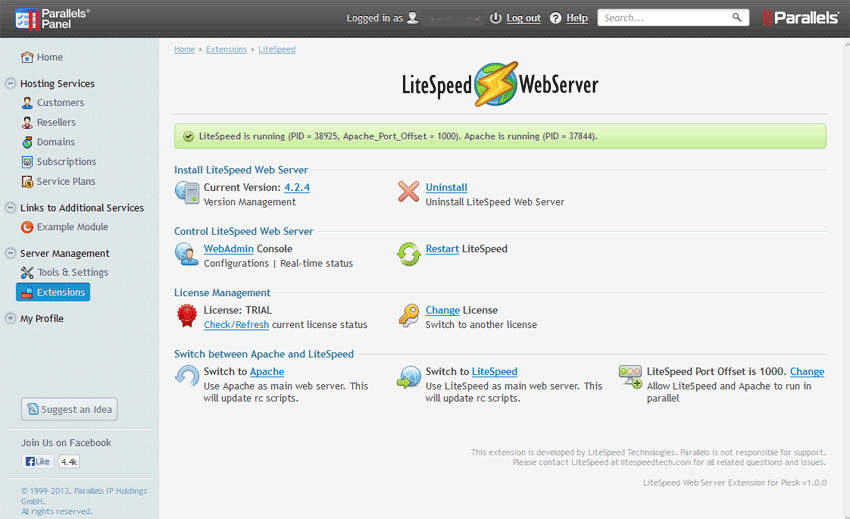
 Our new extension for Parallels’ Plesk panel makes it exceedingly easy for Plesk users to try LiteSpeed Web Server. (more…)
We’re adding more command line functions to make it easier to automate multiple installations of LSWS. With that in mind, we introduce the lsup command: lsup allows you to upgrade (or downgrade) your version of LSWS from the command line. The executable is located at $SERVER_ROOT/admin/misc/lsup.sh. Running this basic command automatically upgrades your installation of LSWS to the autoupdate release. (This does not mean the latest release, but the latest release that has been deemed stable enough for autoupdate.) In a basic installation on CentOS, this command would thus be:
/usr/local/lsws/admin/misc/lsup.sh
The command can be further customized to upgrade to, downgrade to, or reinstall specific versions. These options are explained in the lsup wiki article.
This command was the result of requests from our users. If there are other functions you want to see, please let us know.

Over the past few weeks we’ve been adding many new articles to OpenLiteSpeed’s documentation. (more…)