Category: Company News

What’s up at LiteSpeed? More personal than a press release – get all of your LiteSpeed Technologies news and company announcements here.

  • LiteSpeed QUIC and HTTP/3 Library v4.0

    LiteSpeed QUIC and HTTP/3 Library v4.0

    lsquic v4.0

    After about 2 years of strong stability and performance in production, LiteSpeed’s QUIC and HTTP/3 library gets its first major feature enhancement release: lsquic v4.0. Notable enhancements include:

    • Support for QUIC version 2
    • Version negotiation
    • Packet retry for address validation
    • Handshake improvements under high packet loss
    • Greatly improved QUIC interop results.

    Below is the detailed information about the improvements.

    QUIC version 2

    QUIC version 2 is in draft 10 as of this writing, and will be published as RFC9369 soon. QUIC version 2 is not intended to deprecate version 1. Instead, it is meant to mitigate ossification concerns and exercise the version negotiation mechanisms.

    There are a few QUIC implementations that already support QUIC v2 including ngtcp2, Kwik, picoquic, and HAProxy. lsquic might have been a little late to the party, but we are here now with v4.

    We also plan to release QUIC v2 into the production environment with our commercial server products very soon.

    Version Negotiation

    Version Negotiation is pretty much in the same boat as QUIC v2. It is in draft 14, and soon will be published as RFC9368. It updates RFC8999 by defining version negotiation mechanisms that leverage the Version Negotiation packet.

    Quote from draft 14:

    It is beneficial to avoid additional round trips whenever possible, especially given that most incremental versions are broadly similar to the previous version. This specification also defines a simple version negotiation mechanism which leverages similarities between versions and can negotiate between “compatible” versions without additional round trips.

    Version negotiation is a required feature in order to support QUIC v2.

    Retry Packet for Address Validation

    This feature is defined in RFC9000 section-8.1.2. It is not something new. It has been used in our commercial WebADC product from the very beginning, however this feature was not previously available in the open source lsquic code base. The related code is now published in v4.

    Handshake under high packet loss or corruption

    In QUIC interop test cases, handshakeloss and handshakecorruption have been two of the toughest tests to pass in our course of improving lsquic interoperability.

    The network quality simulated in the test cases is so poor, it is definitely not something a user will come across everyday. However, to make successful handshakes under such conditions, makes a QUIC implementation super resilient to bad network conditions. In the process of testing, many beneficial tweaks have been made, like minimizing server hello return packets, and ACK/PING fine tuning.

    You can see how much lsquic has been improved in the next section.

    QUIC interop improvements

    lsquic was in the first batch of open source QUIC implementations. It has been running in production environments for many years, and is both stable and performant. It has not only been used in LiteSpeed products, but also by other third-parties in large scale deployments.

    However, lsquic’s interoperability results have not always been the best. This does not mean that lsquic is not as good as the implementations that have better results. It is just that we do not focus on the interop tests. Some tests were not turned on, and some needed minor tweaks.

    Since we are making big improvements to lsquic, it is a good time to take this opportunity to improve interoperability with other implementations. Here is the comparison of before and after.
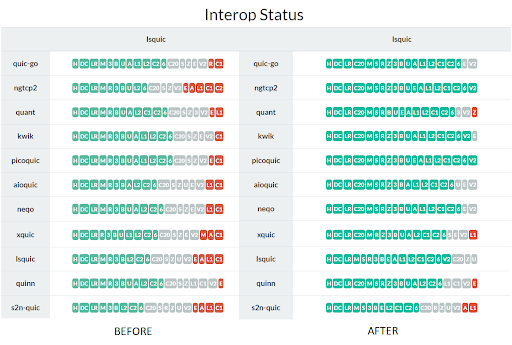
    lsquic 4.0 interop results

    Green is passed, gray is not supported by the client, and red is failure. As you can see, there are only a few red ones left. Those failures mostly are due to client side problems. lsquic now joins ngtcp2 and picoquic in the “passes all interop tests” club.

    You can check the full results at https://interop.seemann.io/

    Conclusion

    The lscquic v4.0 release is a big leap forward in terms of the latest development of the QUIC protocol. The LiteSpeed team is committed to bringing the best QUIC implementation to the public. Stay tuned for what is coming next.


  • QUIC.cloud is Production-Ready!

    QUIC.cloud is Production-Ready!

    QUIC.cloud CDN Production Ready
    We are pleased to announce that QUIC.cloud CDN is production-ready!

    If you tried QUIC.cloud previously, during our beta period, then we hope you will be pleasantly surprised by all of the exciting enhancements that we’ve implemented recently, including our own DNS service and a greatly expanded and improved network of global nodes.

    QUIC.cloud DNS

    Our new QUIC.cloud DNS is an authoritative GeoDNS solution that responds with optimal location-based results through our global AnyCAST network.

    QUIC.cloud DNS allows you to optionally simplify your site’s CDN setup with automated DNS configuration. A great option for those whose current DNS provider doesn’t support CNAME flattening, QUIC.cloud DNS allows you to use QUIC.cloud CDN with your root domain.

    Expanded and Improved Global Network

    Our CDN network is bigger and better than ever:

    • 68 PoPs and counting
    • Average latency less than 10ms in Europe, North America, and Oceania regions
    • Improved GeoRouting accuracy
    • Failover support: if a node is offline for a period of time, visitors are automatically shifted to other nodes, minimizing downtime

    Improved Security

    QUIC.cloud protects your WordPress sites from botnet attacks at a global scale. When an attack is detected, the bot is blocked at the CDN level, thereby extending protection to all domains in the network.

    Additionally, when enabled, QUIC.cloud will block all non-trusted visitors from accessing your WordPress site’s XML-RPC file.

    Protocol Switching

    QUIC.cloud is the first and only CDN capable of using QUIC & HTTP/3 to connect from client to server, when HTTP/3 is supported by the browser and the backend server. If HTTP/3 is not supported at either end, QUIC.cloud automatically connects via HTTP/2 or HTTP/1.1 as appropriate.

    HTTP/3 v1 Support

    QUIC.cloud has been preparing for HTTP/3 v1 since the beginning. We are proud to officially support end-to-end HTTP/3 v1 connections upon the IETF’s publication of the RFC.

    Regional Pricing

    We’ve switched to a regional pricing model to better reflect the price of routing traffic around the world. Enable all eight regions, or require traffic to be routed only through the regions you choose. You are in control.

    New introductory pricing for each region goes into effect on July 1st until the end of 2021.

    Improved User Dashboard

    In addition to the many changes we’ve implemented to improve useability, we’ve added a my.quic.cloud screen bursting with detailed statistics about your CDN traffic.

    Let us Know What You Think

    We hope we’ve convinced you to give production-ready QUIC.cloud a try! Introductory pricing is in effect until the end of this year.

    And know that just because we are out of beta, it doesn’t mean we have finished innovating or improving our service. We welcome your feedback!

    Is QUIC.cloud faster than your previous CDN providers? Are you encountering any issues with setup or performance? Please don’t switch away silently – we want to know the bad as well as the good, so we can address any issues.

    Let’s keep improving QUIC.cloud for everyone!

  • Introducing QUIC.cloud DNS

    Introducing QUIC.cloud DNS

    QUIC.cloud DNS

    LiteSpeed Technologies is pleased to announce QUIC.cloud DNS!

    What is QUIC.cloud DNS?

    In order for QUIC.cloud (or any CDN) to work properly, DNS is required. A DNS (Domain Name System) translates domain names to IP addresses, and facilitates the transfer of information around the internet.

    With QUIC.cloud’s new DNS service, you no longer have to configure a separate DNS provider for use with our CDN. You can configure DNS right from your QUIC.cloud dashboard, for full CDN integration.

    Setup is Easy

    QUIC.cloud DNS detects your current DNS configuration and provides an easy-to-use interface. You can easily modify and adjust your DNS records as needed.

    Why use QUIC.cloud DNS?

    Root Domain Support

    Some DNS providers do not support CNAME flattening, but CNAME flattening is required in order to use QUIC.cloud CDN with a root domain. By letting QUIC.cloud handle your DNS needs, you enable root domain support for the CDN service.

    Accurate Geo-Routing

    When you take advantage of QUIC.cloud’s built-in DNS, you get better integration with the CDN itself, but more importantly, you get potentially more accurate geolocation for your visitors. This matters because QUIC.cloud can make a more informed decision about which node to serve a request from, when it has a correct visitor location.

    We’ve seen other DNS providers use databases that are rarely up to date. And we’ve seen other DNS providers rely on a proxy IP address rather than the visitor’s own IP. In such situations, it is not uncommon for the DNS to report an incorrect visitor location. Acting on bad information, the CDN then serves content from a less-than-ideal node location.

    QUIC.cloud’s new DNS service uses a feature called ECS (EDNS-Client-Subnet), whereby a visitor’s subnet is provided as part of the DNS query. This allows us to use accurate location information to make better informed node selections. Better node selection means your site travels a shorter distance to your visitors, which means a faster, better user experience.

    Get Started

    QUIC.cloud DNS is available only for users of the QUIC.cloud CDN. It is included free of charge, and is ready to use today!

    You can find QUIC.cloud DNS on your dashboard.

    Check out our setup guide, too.

    —
    Thank you to Kacey Schroeder and Lucas Rolff for their contributions to this post.

  • LiteSpeed Offers Docker Solutions

    LiteSpeed Offers Docker Solutions

    LiteSpeed Docker

    OVERVIEW

    Docker is more popular than ever these days, and this year LiteSpeed Technologies has introduced Docker images for both LiteSpeed Enterprise and OpenLiteSpeed web servers. Additionally, we’ve made WordPress app bundles available in GitHub repos for each server image, along with a Magento app bundle for our Enterprise image. With LiteSpeed Docker solutions, you can easily set up High Performance WordPress or Magento with HTTP/3 protocol support, and developers can run on multiple platforms like Linux or Windows.

    Available Images

    We have made LiteSpeed Enterprise and OpenLiteSpeed Images available on Docker Hub.

    LiteSpeed Enterprise
    LiteSpeed Enterprise
    OpenLiteSpeed
    OpenLiteSpeed

    Deploy LiteSpeed

    You can deploy either of the LiteSpeed images on Docker in less than a minute.
    Here we’ll use OpenLiteSpeed as an example, and assume you already have Docker installed.

    Download the Image from Docker Hub

    docker pull litespeedtech/openlitespeed:latest

    Start a Container

    docker run -d --name openlitespeed -p 7080:7080 -p 80:80 -p 443:443 -it litespeedtech/openlitespeed:latest

    TIP: You can eliminate -p 7080:7080 from the command if you don’t need WebAdmin access.

    Add a sample page

    The server should start running successfully, and you should be able to log into the container. Add some files you want to display with the following command:

    docker exec -it openlitespeed bash

    Your default WORKDIR should be /var/www/vhosts/, since the default document root path is /var/www/vhosts/localhost/html. Simply add the following command to index.php, and then verify it from the browser with a public server IP address on both HTTP and HTTPS:

    echo '<?php phpinfo();' > localhost/html/index.php

    Deploy High-Performance WordPress with LiteSpeed

    To start a high-performance WordPress-with-LiteSpeed-Cache solution, you can choose to use one of the following containers:

    We’ll use WordPress + OpenLiteSpeed as an example, and assume you already have Docker and Docker Compose installed.

    Download the Open Source from GitHub

    Clone this repository or copy the files from this repository into a new folder:

    git clone https://github.com/litespeedtech/ols-docker-env.git

    Change the Default Values (Optional)

    Edit the .env file to update the demo site domain, default MySQL user, and password. Feel free to check the Docker Hub Tag page if you want to update the default LiteSpeed Enterprise, OpenLiteSpeed, or PHP versions.

    Start the Multicontainer

    Open a terminal, cd to the folder in which docker-compose.yml is saved, and run:

    docker-compose up -d

    Start Your First WordPress site

    After running the following command, you should be able to access the WordPress installation page with the configured domain. If there is no change in the .env file, then the default domain is https://localhost.

    bash bin/demosite.sh

    For more CLI usage information please check our documentation which covers:

    • Setting the WebAdmin Password
    • Creating a Domain and Virtual Host
    • Creating a Database
    • Installing a WordPress Site
    • Applying a Let’s Encrypt Certificate
    • Updating the Web Server
    • Applying OWASP ModSecurity

    Deploy High-Performance Magento with LiteMage

    To start a high-performance Magento-with-LiteMage-Cache solution, you can use the following container:

    We’ll assume you already have Docker and Docker Compose installed.
    As of version 2.4, Magento requires Elasticsearch to be the catalog search engine, we recommend you have 4GB RAM on the server. If you are using a system with less than 4GB, we recommend you create a swap file, otherwise your upgrade might fail.

    Download the Open Source from GitHub

    Clone this repository or copy the files from this repository into a new folder:

    git clone https://github.com/litespeedtech/lsws-magento-docker-env.git

    Change the Default Values (Optional)

    Edit the .env file to update the demo site domain, default MySQL user, and password. Feel free to check the Docker Hub Tag page if you want to update the default LiteSpeed Enterprise, or PHP versions.

    Start the Multicontainer

    Open a terminal, cd to the folder in which docker-compose.yml is saved, and run:

    docker-compose up -d

    Start Your First Magento site

    After running the following command, you should be able to access the Magento page with the configured domain. If there is no change in the .env file, then the default domain is https://localhost.

    bash bin/demosite.sh

    If you want to see Magento with sample data, simply add [-S, --sample] to apply:

    bash bin/demosite.sh -S

    Videos

    Customization

    Build Your Own Web Server Version

    Sometimes you may want to install more packages from the default image, or some other web server or PHP version which is not officially provided. You can build an image based on an existing image. Here’s how:

    1. Download the dockerfile project
    2. CD into the project directory
    3. Edit the Dockerfile if necessary
    4. Build, feeling free to substitute server and PHP versions to fit your needs

    For example:

    git clone https://github.com/litespeedtech/lsws-dockerfiles.git
    cd lsws-dockerfiles/template
    bash build.sh -L 5.4.9 -P lsphp74
    

    or

    git clone https://github.com/litespeedtech/ols-dockerfiles.git
    cd ols-dockerfiles/template
    bash build.sh -O 1.6.15 -P lsphp74
    

    Extend Existing Images

    If you want to customize the image by adding some packages, e.g. lsphp74-pspell, just extend it with a Dockerfile:

    FROM litespeedtech/openlitespeed:latest
    RUN apt-get update && apt-get install lsphp74-pspell -y
    

    Conclusions

    LiteSpeed Docker solutions allow you to start a pure LSWS or OLS web server on Docker, or start WP + LiteSpeed / Magento + LiteSpeed Docker solutions easily. You can also customize or extend the image whenever you need to. Our Docker solutions are still in a very early release stage, so feel free to raise an issue if you have any suggestions or problems. Contributions are always welcome.

    Special thanks to our friend Lars Hagen. Lars is a DevOps enthusiast, with a passion for Docker and everything in the cloud. He helped us lay out the foundation for building good, robust Docker images, which is why we now have these high-end Docker images to support and use today.

  • Looking Back at 2019 and Ahead to 2020

    Looking Back at 2019 and Ahead to 2020

    LiteSpeed 2019 in Review

    Happy New Year!

    LiteSpeed 2019 in Review

    Last year was a great year for the LiteSpeed community. We’d like to take a second and recap some of our proudest achievements of 2019.

    QUIC.cloud

    We released our brand new CDN service, and thanks to all of you, it has grown immensely while still in beta. If you haven’t tried it yet, what are you waiting for? If you need assistance, let us know and we will be happy to help you get it set up.

    Open Source LSQUIC

    LSQUIC, our open source QUIC and HTTP/3 library, was made available to those looking to implement QUIC or HTTP/3 in their own client and server projects. LSQUIC currently supports QUIC versions Q039, Q043, Q046, Q050, ID-23, and ID-24. Support for newer versions is routinely added soon after they are released.

    http3check.net

    Our new online tool is designed to be a simple way for you to check any URL for HTTP/3 and QUIC support. Give it a try!

    Jelastic Partnership

    This year we partnered with Jelastic, resulting in LiteSpeed availability within the Jelastic PaaS service. We expect this partnership to grow and be mutually beneficial for both the Jelastic and LiteSpeed communities.

    Cloud Images

    LiteSpeed is now more available and more convenient, with our new cloud images. OpenLiteSpeed is bundled with software such as WordPress, CyberPanel, or NodeJS, and can be installed in one click from Digital Ocean, Amazon Web Services, Google Cloud Platform, Azure, Linode, and Vulture!

    IETF HTTP/3 Support

    As the IETF has worked towards finalizing the HTTP/3 protocol, LiteSpeed has kept up the pace, updating our HTTP/3 implementation with every new version.

    LSQUIC FLOSS Weekly

    We were featured on our first ever podcast, FLOSS Weekly. It was a great opportunity to spread the word about LiteSpeed to thousands of listeners. If you have a podcast and are interested in hosting LiteSpeed as a guest please let us know!

    DirectAdmin and Plesk Plugins

    The LiteSpeed server and WordPress cache management features enjoyed by users of our WHM/cPanel control panel plugins are now available in our DirectAdmin and Plesk plugins!

    AND LASTLY…

    LiteSpeed was named Web Server of the Year 2019 by W3Techs! Thanks to all of you, LiteSpeed was the fastest growing web server in 2019, so let’s aim to keep that title in 2020.

    Looking Forward to 2020

    This year we have a lot of cool plans, but we also value your input and are always happy to hear your suggestions!

    As of now, our main goals are to:

    • Release LSCWP 3.0
    • Expand QUIC.cloud and remove its beta title
    • Achieve HTTP/3 standardization

    Happy New Year!

  • LSQUIC on FLOSS Weekly

    LSQUIC on FLOSS Weekly

    LSQUIC on FLOSS Weekly

    On Wednesday, November 27th, I was a guest on the FLOSS Weekly show on TWiT to discuss LSQUIC, our QUIC and HTTP/3 library.

    Background

    I first learned about the FLOSS Weekly podcast a year or two ago. The idea to appear as a guest on the show did not occur to me until much later. Immediately, it made sense: our QUIC and HTTP/3 library is a full-featured, well-tested, and robust implementation of an increasingly important Internet protocol. And — it’s open source!

    Because I have been involved with QUIC and HTTP/3 development at the IETF for some time, I would also be able to shed some light on certain aspects of these protocols.

    I emailed Randal Schwartz, the host of the show, and he slotted me in for November 27th.

    Preparation

    The date of the show was drawing near and, as I still had not received any details about the setup, I began to worry. Did Randal forget about me? Finally, on the 26th, I emailed Randal basically to ask him this. He replied, somewhat incredulously, “did you not receive my previous emails?!” It turns out, Gmail had been helpfully discarding Randal’s emails as SPAM. Sabotage?*

    The preparation for the show consisted mainly of testing my audio and video equipment. While the laptop’s built-in webcam was OK, TWiT deems any built-in laptop microphone as inadequate. I also learned about positioning of the webcam (eye-level) and lighting (in front, not behind). These simple adjustments make a large difference.

    Making The Show

    I admit it: I was nervous. While I have spoken in front of large audiences before, a live TV show would be a new experience for me.

    I made a Skype connection with a TWiT Live Line user a few minutes before the show. We checked the audio and video feeds and I said hello to Randal and Jonathan Bennett, that week’s co-host. And the show was on!

    Within a few minutes — after the introduction and an advertisement from the show’s sponsors — I was brought on and chatted away happily with Randal and Jonathan about QUIC, HTTP/3, and LSQUIC. The interviewers prepared well and we discussed the evolution of HTTP/3, the good and the bad of basing a transport protocol on top of UDP, LSQUIC performance and history, and many other topics. There were a few questions from the live “studio audience,” which is just a dedicated IRC channel. Some levity was had as well: no, there is no HTTP/4… yet!

    After Recording

    Rather than providing a condensed transcript, I suggest you click the link above and watch the YouTube video or grab it from your favorite podcast platform. The discussion lasted for about 50 minutes — or almost the whole show — after which it was time to wrap up.

    The edited version of the show was posted online in three or four hours. They did not take anything out; rather, the show was rearranged by topics, as we jumped around a bit, and for a better flow. It was a good editing job, which is not surprising: ours was FLOSS Weekly show number 557.

    I loved being on the FLOSS Weekly show and I recommend it to everyone. If you have an open-source project that you love, you should consider sharing it with the rest of the world on TWiT with Randal Schwartz and his brigade of co-hosts.

    TIMTOWTDI

    It was a special thrill for me to be interviewed by Randal Schwartz, the co-author of Programming Perl and Just another Perl hacker. That book I had on my bed stand and I carried it with me on my commute to college, hiding it under my jacket from the rain. Perl was my first true love.

    *Sabotage is unlikely

  • BBR Control in QUIC and HTTP/3

    BBR Control in QUIC and HTTP/3

    BBR Congestion Control in QUIC and HTTP/3

    BBR congestion control is now available for LiteSpeed QUIC and the upcoming HTTP/3.

    The newly released LiteSpeed Web Server 5.4.2, Web ADC 2.6.0, and OpenLiteSpeed 1.6.1 use BBR congestion control for QUIC connections. BBR (which stands for Bottleneck Bandwidth and RTT) is a new congestion control algorithm developed by Google in the last few years. It features several profitable properties.

    Resistance to Loss

    The main idea behind BBR is that packet loss may not mean that there is congestion in the network. For example, a packet may be lost due to transient radio interference. Cubic and other congestion-based algorithm do not distinguish between such spurious losses and real congestion, reducing their send rate in both cases. BBR, on the other hand, is not so easily spooked.

    As a result, BBR can deliver sustained throughput performance even in the face of suboptimal network conditions.

    Minimal Latency

    Bufferbloat has been the bane of good UX for years. Since the problem was identified and alarm sounded, there have been changes to network infrastructure equipment to avoid buffering too much data. Nevertheless, the fact remains: Cubic will try to fill the bottleneck buffer on the network path, increasing connection latency. A study of 4G LTE networks reveals that to mask packet loss, buffers are used extensively, thereby inflating RTT.

    BBR keeps track of the bottleneck bandwidth and periodically tests for minimum round-trip time. These estimates are used by the sender to avoid filling the bottleneck buffer. With BBR, an interactive web application is more likely to be responsive.

    Drawbacks

    Despite its terrific advantages, BBR is not without problems. It performs poorly when there are shallow buffers on the path and it may not be fair to other flows, claiming most of available bandwidth. These issues will be addressed in BBRv2, which is being actively developed at Google.

    Test Results

    Throughput Under Loss

    To compare BBR to Cubic, I set up a pre-release build of LSWS 5.4.2 and conducted a few experiments downloading a static file from the web server using the LiteSpeed QUIC client. The bottleneck was set up on the client side using netem and ifb.

    Rate (MBit/sec) Delay (ms) Loss (%) Cubic (sec) BBR (sec)
    20 25 0 4.5 4.5
    20 25 0.5 6.7 4.6
    20 25 1 8.6 4.6
    20 25 2 14.3 4.7
    20 25 3 17.6 4.7

    Table 1: Time to transfer 10 MB file, in seconds

    It is evident that Cubic is very sensitive to packet loss, while BBR is not.

    Latency

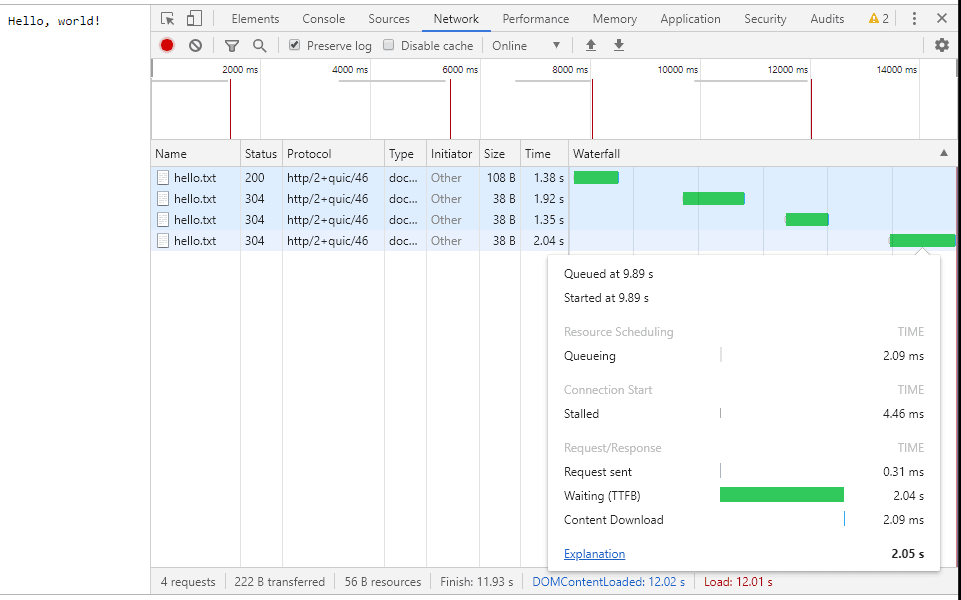
    To test the difference in latency between Cubic and BBR, we set up a simple website with three resources: an HTML page with links to two files: one large and one tiny. The bottleneck was set up to have 20 MBit/sec bandwidth and 25 ms delay with a large buffer. The user clicks on the large file and it begins downloading. The user then clicks on the small file. When Cubic is used, it takes one to two seconds to download the small file:


    Figure 1: Downloading small file when server uses Cubic

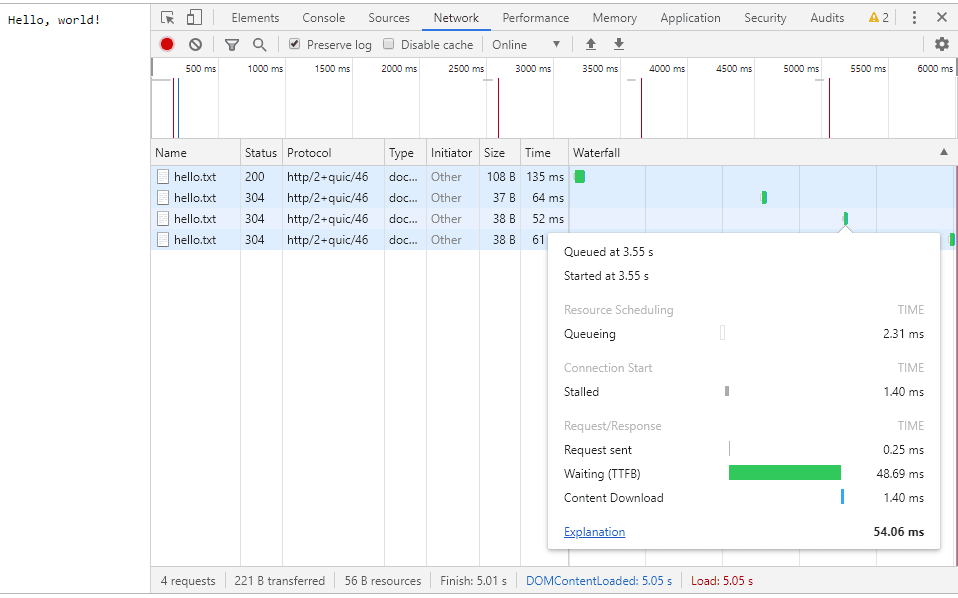
    This is because Cubic tries to fill the intermediate buffer. BBR, on the other hand, keeps the bottleneck buffer filled “just right” so that downloading a small file take on the order of RTT:


    Figure 2: Downloading small file when server user BBR

    BBR Congestion Control in QUIC and HTTP/3

    BBR is a novel congestion control technology. It has two advantages over the widely-deployed Cubic congestion control: insensitivity to random loss and low latency. With LiteSpeed, you can take advantage of this technology today to power your server’s Google QUIC and HTTP/3 connections.

    As Google evolves BBR, we will continue to support the most recent stable version.

  • QUIC Library Is Now Open-Source

    QUIC Library Is Now Open-Source

    LiteSpeed OpenSources QUIC HTTP/3

    LiteSpeed Technologies is releasing its QUIC and HTTP/3 library under an open-source license. This library, written in the C programming language, contains both client and server logic as well as fully functional example client and server programs to get you started. This is the same code that is used in our flagship LiteSpeed Web Server and LiteSpeed Web ADC products and in the open-source OpenLiteSpeed (OLS) web server.

    The following QUIC and HTTP/3 versions are currently supported:

    • Q039
    • Q043
    • Q046
    • h3-22

    Q039, Q043, and Q046 are versions of the Google QUIC protocol. Q046 is used by the current version of Chrome (Chrome 76). h3-22 is the experimental precursor to HTTP/3, the next-generation HTTP protocol. We will update the library as new gQUIC and HTTP/3 versions are released.

    This library subsumes the LiteSpeed QUIC Client Library which we released two years ago and replaces it on GitHub. The new module is a superset of the original client library.

    We use plenty of open-source tools and libraries. We are happy to contribute back to the community the fruits of our labor: a fully functional, mature, scalable, and robust QUIC library.

    Happy hacking!

    LiteSpeed QUIC Team.

  • LiteSpeed Support in Jelastic PaaS

    LiteSpeed Support in Jelastic PaaS

    LiteSpeed Support in Jelastic PaaS

    Last week Jelastic, the multi-cloud DevOps PaaS, announced out-of-box support for LiteSpeed Web Server and LiteSpeed Web ADC.

    What is Jelastic?

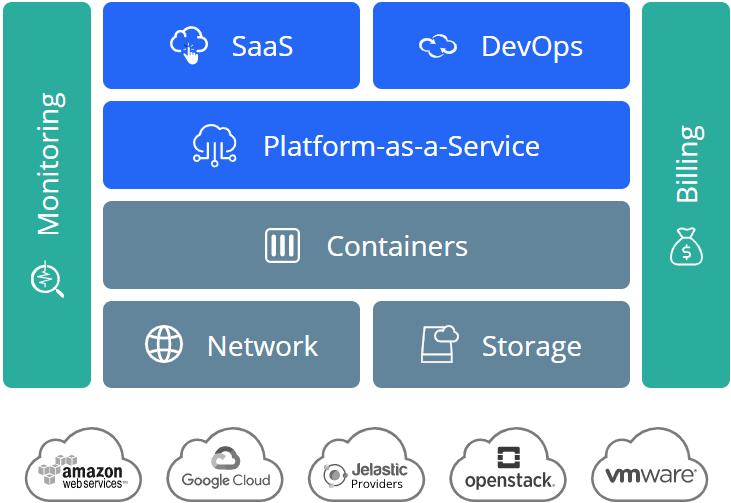
    LiteSpeed Support in Jelastic PaaSJelastic is a Platform-as-a-Service company. They provide a complete environment for customers to develop, run, and manage applications, free from the worries of building or maintaining infrastructure. Customers may install this platform in a variety of ways, including multi-cloud (AWS, Google Cloud, etc.) and bare metal. Pricing is a pay-as-you-use model. As a result, customers may allocate sufficient resources for High Availability, while only paying for the resources that are actually needed.

    Jelastic and LiteSpeed Together

    Through our new partnership, Jelastic offers LiteSpeed support in their PaaS product. PHP developers can take advantage of LiteSpeed’s high performance, low memory consumption, and other desirable features. Available in a turnkey package, with pay-as-you-use pricing:

    Specifically for Jelastic PaaS, there was created a more flexible pricing model for LiteSpeed stacks that suits dynamic cloud environments. The users can start with free licenses for LiteSpeed Web Server using up to 2GB per environment. Then the price will depend on the tiers according to resource usage (RAM and CPU). LiteSpeed Web ADC is charged hourly based on consumed external traffic.

    — Jelastic Press Release

    We’re pleased to partner with Jelastic. We suggest that existing Jelastic customers request access to LiteSpeed. And, we encourage prospective customers to visit Jelastic’s website to start a free trial!

  • Introducing HTTP3Check.net

    Introducing HTTP3Check.net

     QUIC Exploration Service http3check.net

    We are excited to announce our brand new QUIC exploration service: HTTP3Check.

    As you may know, LiteSpeed is committed to the new QUIC transport protocol as well as HTTP/3, the latest iteration of HTTP. gQUIC support comes standard with LiteSpeed Web Server and LiteSpeed Web ADC. Our own site features IETF-QUIC ID-18 and we are currently working hard on supporting HTTP/3 as well.

    As these new protocols are rolled into our products as well as servers across the Internet, it is helpful to have tools for searching, checking, and troubleshooting. For this reason, we developed a hosted QUIC and HTTP/3 search tool called HTTP3Check.

    Exploring QUIC With HTTP3Check

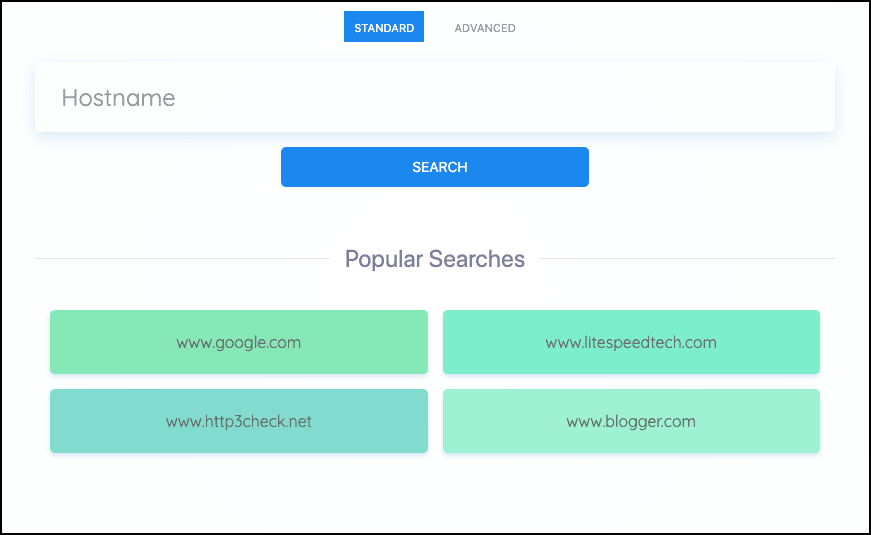
    http3check.net search screen

    With this service, users can query servers by hostname to check for QUIC and HTTP/3 support.
    Try searching our site, www.litespeedtech.com, by following this link:
    https://www.http3check.net/?host=www.litespeedtech.com.

    See popular searches to get an idea of what sites users are searching.

    Experts and enthusiasts can use the Advanced Search feature to include IP address and port number. See an Advanced Search example by following this link:
    https://http3check.net/?ip=159.65.253.210&port=4433&host=http3-test.litespeedtech.com.

    http3check.net QUIC metrics

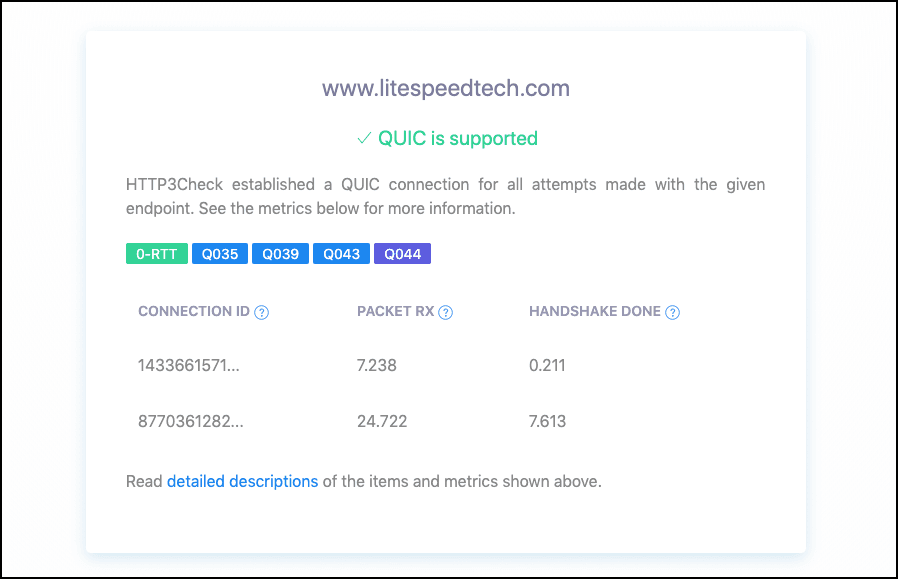
    HTTP3Check provides various items and metrics about the server’s QUIC support. With its first connection, the tool asks the given endpoint for all of the QUIC versions that it supports. After a successful first connection, the tool will open a second connection to test the server’s 0-RTT support. Along with the HTTP Header and the server’s certificate chain, the tool keeps track of packet and handshake timestamps to give the user an idea of the endpoint’s performance and latency.

    http3check.net Qlog results

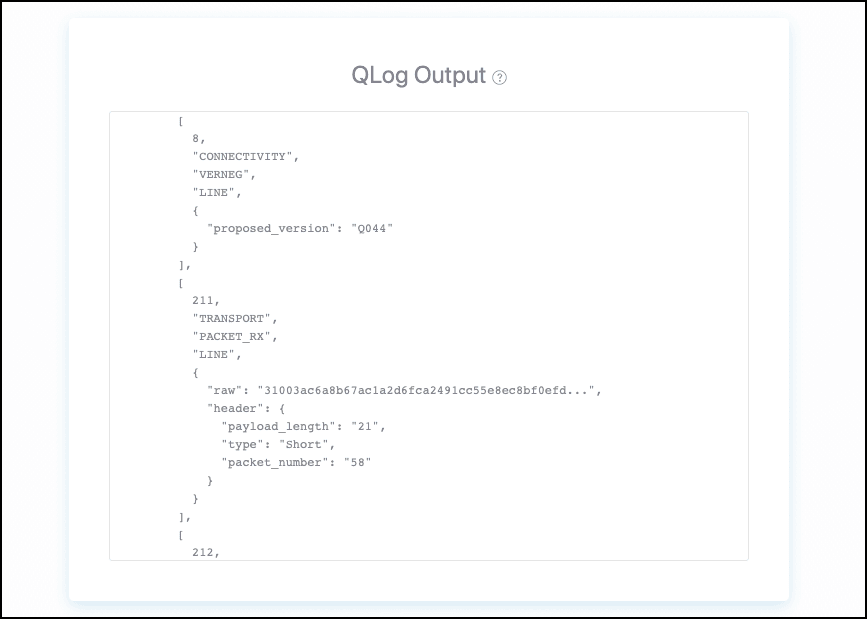
    Finally, HTTP3Check provides the user with the QLog results for the attempted connections. QLog is a standard under development for QUIC Connection debugging and visualization. Since the QLog contains information about all incoming packets and other important events, it is a great way to compare and troubleshoot servers.

    As the Internet prepares for new and improved protocols, prepare yourself with the tools necessary to search, query, and troubleshoot QUIC and HTTP/3.