Tag: nginx

Blog posts about NGINX vs. LiteSpeed.

  • ModSecurity Performance Comparison: Apache, nginx, LiteSpeed

    ModSecurity Performance Comparison: Apache, nginx, LiteSpeed

    ModSecurity Performance Apache nginx LiteSpeed

    Measuring ModSecurity Performance

    Each of the primary web server vendors includes the ability to run a Web Application Firewall (WAF), often described as ModSecurity (the terms are used here interchangeably). We wanted to answer the following questions about ModSecurity performance on Apache, nginx, and LiteSpeed:

    • What is ModSecurity’s impact on server performance?
    • Which rulesets performed better: the OWASP ModSecurity Core Rule Set or Comodo?
    • Which implementation performed better: ModSecurity 2, ModSecurity 3, or LiteSpeed’s proprietary implementation?
    • Whose ModSecurity configuration performed better: Apache, nginx, OpenLiteSpeed, or LiteSpeed Enterprise?

    ModSecurity’s Impact on Server Performance

    Web servers are often benchmarked, but here we document the specific impact of ModSecurity on overall server performance. The servers tested are:

    • Apache v2.4.41 using ModSecurity engine v2.9.2
    • nginx v1.17.6 using the nginx ModSecurity connector v1.0.1 and the ModSecurity engine v3.0.3
    • OpenLiteSpeed v1.6.4 using ModSecurity engine v3.0.4
    • LiteSpeed Enterprise v5.4.2 using its internal ModSecurity engine

    To be thorough, the tests include a concurrent volume of:

    • Static data
    • Dynamic data using a simple PHP script
    • A cached WordPress front page

    By showing these separately, differences between servers can be highlighted.

    The environment for both the web server machine and the client machine is:

    • Vultr high frequency VM
    • Network Connected 10Gb.
    • 1 CPU, 3.8Ghz, gen 6 VM
    • 1 Gb memory
    • CentOS 7

    OWASP vs. Comodo Rulesets

    The tests are performed using OWASP ModSecurity Core Rule Set (v3.3) and the Open Source Comodo rules (v1.225). Comodo differentiates between v2.x rules which are used by Apache and LiteSpeed Enterprise and v3.x rules which are used by nginx and OpenLiteSpeed.

    ModSecurity 2 vs. ModSecurity 3 vs. LiteSpeed Proprietary

    The fact that there are differences in rules to be used between servers highlights the fact that each server has a different engine for processing ModSecurity rules.

    • Apache uses the older ModSecurity v2.x engine. That engine was initially written specifically for Apache and is optimized for it.
    • nginx and OpenLiteSpeed use the newer ModSecurity v3.x engine. This engine was re-written from scratch specifically to remove the dependencies in Apache, and was written in a higher level language (C++ rather than C).
    • LiteSpeed Enterprise has its own proprietary engine, highly optimized and well integrated into the LiteSpeed server.

    ModSecurity Configuration in Apache vs. nginx vs. LiteSpeed

    Each server must be configured to use ModSecurity, both for the engine and for accessing the rules.

    • The easiest to configure is LiteSpeed Enterprise as the WAF configuration is incorporated into the WebAdmin interface. The ModSecurity engine is fully integrated into the server so there is no specific ModSecurity installation.
    • OpenLiteSpeed includes the ModSecurity Plugin as part of the distribution and requires only configuration of the Plugin in order to be recognized and use the rules. This is part of the WebAdmin interface, but the documentation must be followed as the procedures are not obvious.
    • For Apache you must obtain the mod_security Plugin independently from the server software. Once obtained and installed, follow the instructions, as configuring the rules is not an obvious process.
    • To obtain the rules engine for nginx you must install the source code and mod_security Plugin separately, compile the Plugin and install it. Once it is installed, you can configure it to use the rules. This is a cumbersome, error-prone, time-consuming process.

    Luckily, you can avoid the headache of configuring ModSecurity manually by using the scripts provided in the http2benchmark project.

    Benchmark Tools Used

    To provide a stable test bed to demonstrate ModSecurity performance differences, http2benchmark (available here and documented here) was used as a base. It’s advantages are many, but in particular it installs and configures web servers of your choosing on your server and runs tests from a client of your choosing. This lets you validate the performance in your own environment.

    The main server configurations can be found here, if you’d like to look them over.

    Since http2benchmark is managed by scripts, scripts were created to setup a WAF for your environment using OWASP rules for servers installed by http2benchmark for Apache, nginx, Litespeed Enterprise and OpenLiteSpeed.

    Note that there is documentation on how to use the scripts. For example, if you wish to configure an Apache, nginx and Litespeed Enterprise web server installed by http2benchmark you would run the following scripts on the test server as root:

    ./config_apache_modsec.sh
    ./config_nginx_modsec.sh
    ./config_lsws_modsec.sh
    

    These scripts allow you to control which servers are installed with the WAF, and to even use a different set of rules (the documentation describes the use of Comodo rules rather than OWASP rules).

    After configuring the server, you need to move over to the client system and run the /opt/benchmark.sh script to start the benchmarks.

    Benchmark Test Results

    Each test shows a particular run of h2load with three variations: ModSecurity disabled, ModSecurity enabled with the OWASP rules, and ModSecurity enabled with the Comodo rules. The actual command for the first test is:

    h2load -n 1000 -c 10 -t 1 -T 5 -m 10 -H 'Accept-Encoding: gzip,deflate' https://benchmark.com/hello.php
    

    The purpose is to specifically show the differences in performance between each of the servers processing a particular type of data and to show the effect of the ModSecurity processing on the server’s ability to process data. With http2benchmarks, higher numbers represent better performance.

    You can find the raw data from these tests here.

    Dynamic PHP File Benchmarks
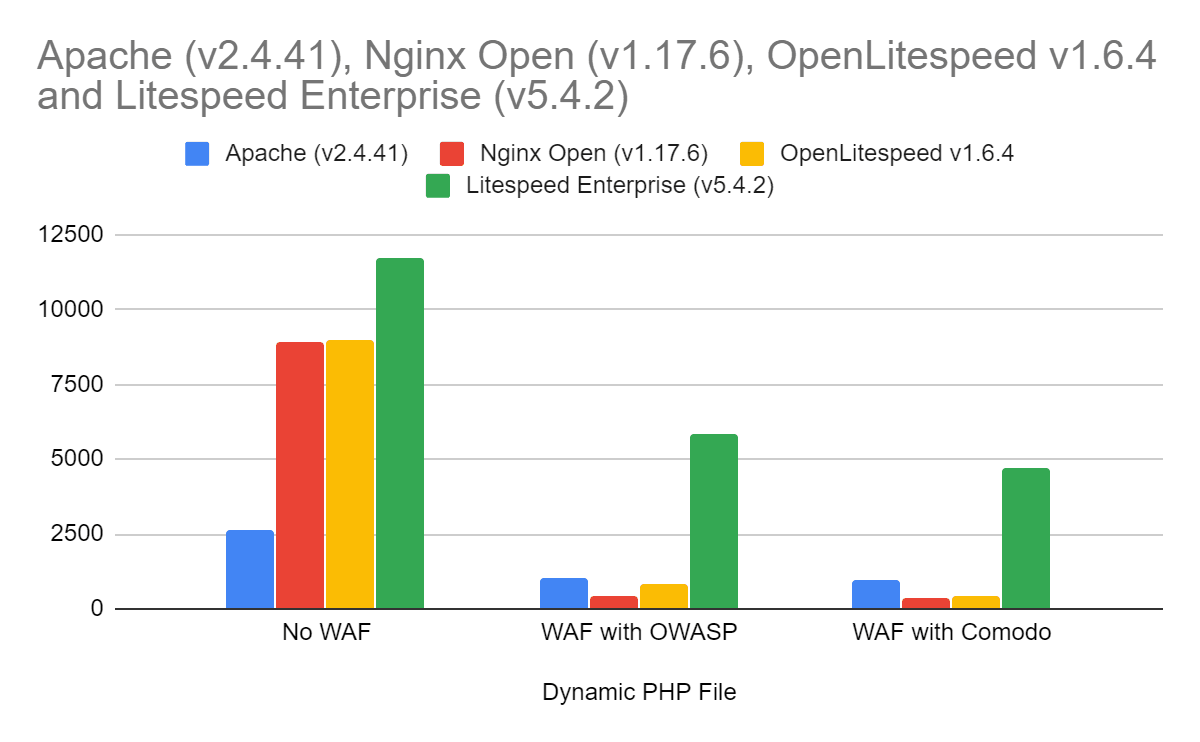
    The first test uses a dynamic PHP file: a file where the output is generated by the script and PHP engine. The server must process the input request and do some initial validation. The ModSecurity engine is involved in processing the request and validating that it is acceptable.

    The server software will then pass the request to the PHP engine (under server control), which generates the output. The output is passed back to the server for additional ModSecurity processing before the output can be passed back to the client.

    This test is particularly important as it uses generated (dynamic) data. Other than the request source, the server can not cache the request output either to avoid additional file I/O or to avoid ModSecurity engine use.

    The percentage of non-ModSecurity speed once ModSecurity is enabled:

    Percent of Original Speed with ModSecurity Enabled Apache (v2.4.41) nginx Open (v1.17.6) OpenLitespeed v1.6.4 Litespeed Enterprise (v5.4.2)
    OWASP

    39.00%

    4.91%

    8.96%

    49.84%

    Comodo

    36.97%

    3.93%

    4.48%

    40.21%

    The performance of each server relative to Apache:

    Speed Compared
    to Apache
    Apache (v2.4.41) nginx Open (v1.17.6) OpenLitespeed v1.6.4 Litespeed Enterprise (v5.4.2)
    OWASP

    100.00%

    43.00%

    78.94%

    570%

    Comodo

    100.00%

    36.26%

    41.63%

    485%

    The results show:

    • LiteSpeed Enterprise started as the best performer with ModSecurity disabled and continued as the best performer regardless of the rules used.
    • Apache ran the slowest with ModSecurity disabled but then ran better than OpenLitespeed or nginx with ModSecurity enabled due to its use of the highly optimized ModSecurity v2.x engine.
    • OpenLiteSpeed ran slower with ModSecurity disabled than nginx, but it ran faster or with comparable speeds with ModSecurity enabled.
    • nginx’s best times were without ModSecurity. With ModSecurity enabled it ran the slowest of the group.
    • Comodo rules are slower in all cases than the OWASP rules.

    Static HTML File Benchmarks
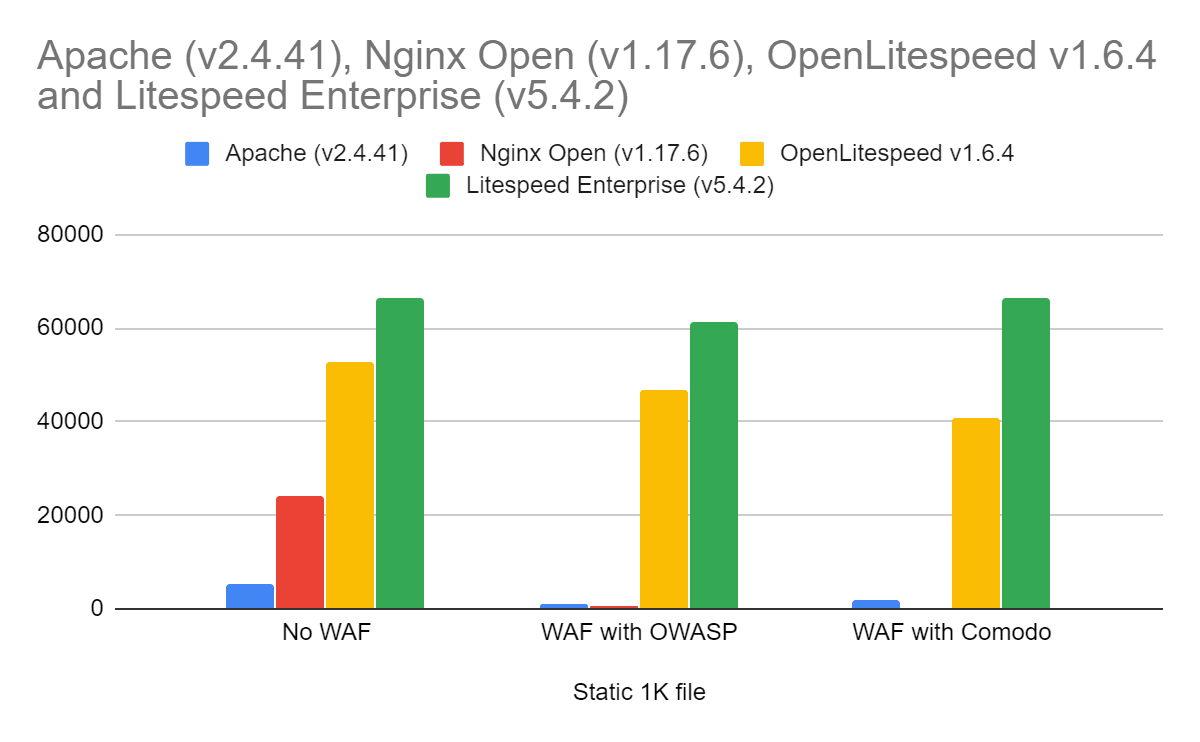

    The next test uses a 1K static file: a simple GET request which is served up quickly by the server. The server does limited processing on the input request to determine access to the file to read, obtains the file (generally out of cache), compresses it in this case and then sends the response to the client.

    The ModSecurity engine is involved in processing the request and validating that it is acceptable.

    This test is particularly important as it shows the impact of caching both of the file and of the ModSecurity response to this request. Since the request and the output do not change, the server can avoid both reading the data many times (which all servers do) and processing it through ModSecurity (which the LiteSpeed servers do).

    The percentage of non-ModSecurity speed once ModSecurity is enabled:

    Percent of Original Speed with ModSecurity Enabled Apache (v2.4.41) nginx Open (v1.17.6) OpenLitespeed v1.6.4 Litespeed Enterprise (v5.4.2)
    OWASP

    24.21%

    2.05%

    88.84%

    92.75%

    Comodo

    37.83%

    1.53%

    77.53%

    100.38%

    The performance of each server relative to Apache:

    Compare to Apache Apache (v2.4.41) nginx Open (v1.17.6) OpenLitespeed v1.6.4 Litespeed Enterprise (v5.4.2)
    OWASP

    100.00%

    39.48%

    3708.82%

    4886%

    Comodo

    100.00%

    18.86%

    2071.84%

    3384%

    The results show:

    • LiteSpeed Enterprise started as the best performer with ModSecurity disabled and continued as the best performer regardless of the rules used.
    • OpenLiteSpeed ran faster than any server but LiteSpeed Enterprise in all cases.
    • Apache ran the slowest with ModSecurity disabled but then ran better than nginx with ModSecurity enabled due to its use of the highly optimized ModSecurity v2.x engine.
    • nginx’s best times were without ModSecurity. With ModSecurity enabled it ran the slowest of the group.

    Cached WordPress Front Page Benchmarks
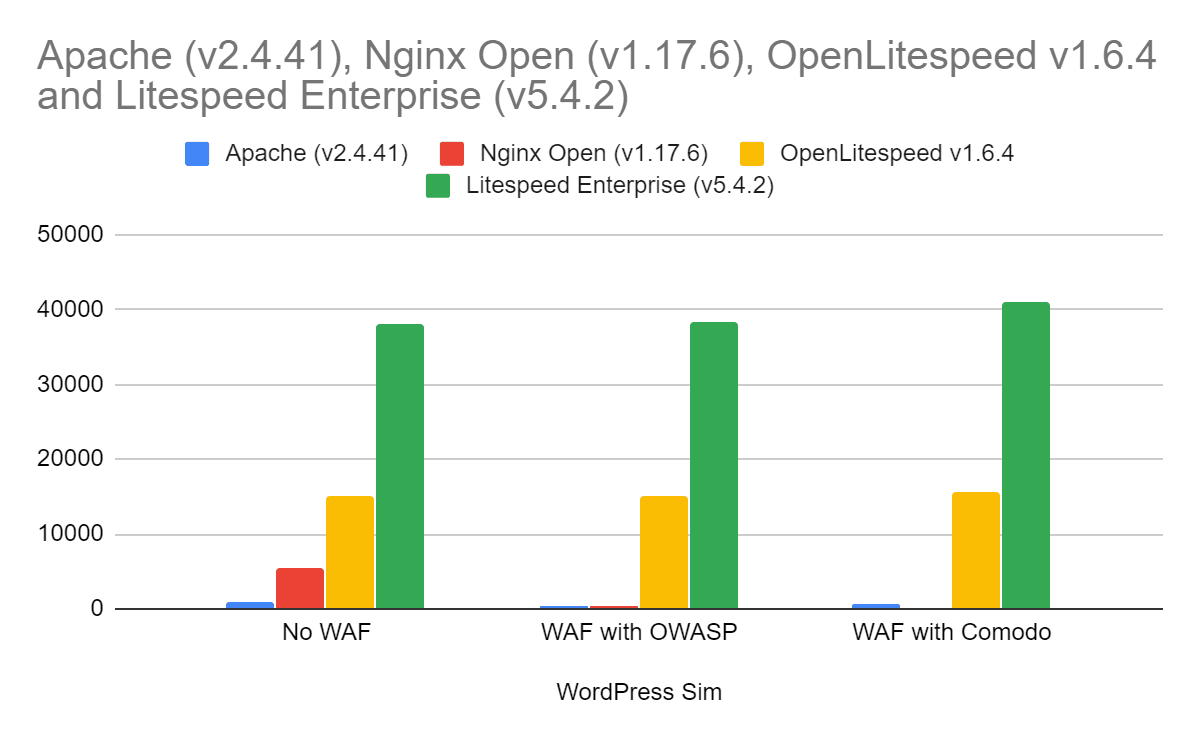

    The final test is a cached WordPress front page environment where a number of pages are served simultaneously. This is designed to represent a real-world server environment as closely as possible.

    It combines elements of the prior two tests:

    • Multiple, simultaneous operations
    • Requests of static data
    • Requests of dynamic data.

    This test is particularly important as it comes closest to representing how data is served in a real server environment. For cache solutions, Apache was paired with W3Total Cache, nginx with FastCGI cache , and both LiteSpeed servers with LSCache.

    The percentage of non-ModSecurity speed once ModSecurity is enabled:

    Percent of Original Speed with ModSecurity Enabled Apache (v2.4.41) nginx Open (v1.17.6) OpenLitespeed v1.6.4 Litespeed Enterprise (v5.4.2)
    OWASP

    63.74%

    4.94%

    100.33%

    100.84%

    Comodo

    64.48%

    3.44%

    104.47%

    108.15%

    The performance of each server relative to Apache:

    Compare to Apache Apache (v2.4.41) nginx Open (v1.17.6) OpenLitespeed v1.6.4 Litespeed Enterprise (v5.4.2)
    OWASP

    100.00%

    51.84%

    2918.45%

    7427%

    Comodo

    100.00%

    35.70%

    3003.65%

    7873%

    The results show:

    • LiteSpeed Enterprise started as the best performer with ModSecurity disabled and continued as the best performer regardless of the rules used.
    • OpenLiteSpeed ran faster than any server but LiteSpeed Enterprise in all cases.
    • Apache ran the slowest with ModSecurity disabled but then ran better than nginx with ModSecurity enabled due to its use of the highly optimized ModSecurity v2.x engine.
    • nginx’s best times were without ModSecurity. With ModSecurity enabled it ran the slowest of the group.

    LiteSpeed Enterprise ModSecurity Performance is Best

    • In all of the tests run, LiteSpeed Enterprise was the clear winner.
    • Both LiteSpeed Enterprise and OpenLiteSpeed ran better in serving up pages in the real-world environment.
    • Apache’s use of the ModSecurity v2 engine provided better performance than the v3 engine used by nginx.
    • nginx ran well without ModSecurity enabled, but degraded the most once it was enabled.
    • Comodo rules are a bit slower than the OWASP rules in almost all environments.

  • LiteSpeed Beats nginx in HTTP/3 Benchmark Tests

    LiteSpeed Beats nginx in HTTP/3 Benchmark Tests

    HTTP3 LiteSpeed vs. nginx

    LiteSpeed’s HTTP/3 implementation outperforms that of the hybrid nginx/quiche in a battery of benchmark tests. OpenLiteSpeed transfers resources more quickly, scales better, and uses less CPU and memory while doing it. In each of these metrics, LiteSpeed betters nginx by a factor of 2 or more. nginx could not complete some tests, while in others, it achieved only a fraction of TCP speed. Below, we describe the setup and the various benchmarks.

    Why Compare LiteSpeed and nginx HTTP/3 Now?

    HTTP/3 is a new protocol for the web, a successor to both Google QUIC and HTTP/2. As the QUIC Working Group at IETF is getting closer to finalizing the drafts, the nascent HTTP/3 implementations are maturing and some are now starting to see production use.

    LiteSpeed was the first to ship HTTP/3 support in LSWS in July of this year. We have been supporting QUIC since 2017, making improvements along the way. The HTTP/3 support rests on this foundation.

    Several weeks ago, Cloudflare released a special HTTP/3 patch for nginx, encouraging everyone to experiment. Because nginx is our competitor, we were excited to get a chance to kick nginx’s shiny new HTTP/3 tires. Cloudflare uses this patch in production, so it has to be good!

    Cloudflare’s Quiche Patch

    Quiche is an HTTP/3 and QUIC library by Cloudflare. It is written in Rust, a new high-level language. The library provides a C API, which is how it is used by nginx.

    Benchmark Setup

    Platform

    Both servers and the load tool are run on the same VM, which is a Ubuntu-14 machine with 32 GB of RAM and 20-core Intel Xeon E7-4870. The bandwidth and RTT are modified using netem.

    Web Servers

    For LiteSpeed, we use OpenLiteSpeed, which is the open-source version of our flagship LiteSpeed Web Server. We use version 1.6.4, which can be downloaded here.

    For nginx, we use 1.16.1 with the Cloudflare quiche patch. Compilation steps are described here.

    Both OpenLiteSpeed and nginx were configured to use one worker process. To be able to issue 1,000,000 requests using 100 connections, nginx’s maximum requests setting was increased to 10,000.

    # OpenLiteSpeed
    httpdWorkers      1
    
    # nginx
    worker_processes  1;
    http {
      server {
        access_log off;
        http3_max_requests 10000;
      }
    }
    

    Website

    The website is a simple selection of static files: 163-byte index file and files of 1 MB, 10 MB, 100 MB, and 1 GB in size. You can use this script to generate these.

    Load Tool

    We use h2load with HTTP/3 support to generate load. It is built very easily using the supplied Dockerfile.

    Benchmark Tests

    To get each number — requests per second or time to fetch a resource — three tests were run and the median value was taken.

    Fetching small page

    The index page is 163 bytes. We will fetch it in several ways using different network conditions.

    h2load options of interest:

    • -n: Total number of requests to send
    • -c: Number of connections
    • -m: Number of concurrent requests per connection
    • -t: Number of h2load threads

    -n 10000 -c 100

    OLS nginx
    100 mbps, 100 ms RTT 935 reqs/sec 890 reqs/sec
    100 mbps, 20 ms RTT 3915 reqs/sec 2910 reqs/sec
    100 mbps, 10 ms RTT 6420 reqs/sec 4100 reqs/sec

    -n 100000 -c 100 -t 10

    This is a longer run, each connection will now send 1000 requests

    OLS nginx
    100 mbps, 100 ms RTT 985 reqs/sec 980 reqs/sec
    100 mpbs, 20 ms RTT 4650 reqs/sec 4525 reqs/sec
    100 mbps, 10 ms RTT 8450 reqs/sec 7155 reqs/sec

    OpenLiteSpeed is a little faster at 100 ms and significantly faster at 20 ms and 10 ms RTT.

    -n 100000 -c 100 -m 10 -t 10

    OLS nginx
    100 mbps, 100 ms RTT 9010 reqs/sec 7365 reqs/sec
    100 mpbs, 20 ms RTT 24,700 reqs/sec 5850 reqs/sec *
    100 mbps, 10 ms RTT 25,230 reqs/sec 6855 reqs/sec *

    * High variance

    Tellingly, in the very first test, nginx was using 100% CPU, while OpenLiteSpeed was using about 45% CPU. This is the reason nginx numbers do not improve as the RTT goes down. On the other hand, OpenLiteSpeed, still does not use 100% CPU even with 20 and 10 ms RTTs.

    -n 1000000 -c 100 -m 10 -t 10

    To issue more than 1000 requests per connection, we need to set nginx’s http3_max_requests parameter to 10000 from its default value of 1000.

    OLS nginx
    200 mbps, 10 ms RTT 29,900 reqs/sec 7180 reqs/sec *

    * High variance

    Now we’ve managed to get OpenLiteSpeed to use 100% CPU. During this test, nginx allocated more than 1 GB of memory (resident size, as shown by top(1)). OLS never exceeded 28 MB.

    That’s more than 4 times the performance at about 1/37th the cost.

    Fetching single file

    In this scenario, we will fetch a single file under different network conditions and measure how long it takes to download the file.

    10 MB

    OLS nginx
    10 mbps, 100 ms RTT 9.8 sec 11.2 sec
    10 mpbs, 20 ms RTT 9.7 sec 10.8 sec
    10 mbps, 10 ms RTT 9.4 sec 10.8 sec

    We see that nginx is somewhat slower in this test. At the same time, it uses a lot more CPU than OpenLiteSpeed in each of the tests above: between 3 and 4 times more.

    100 MB

    OLS nginx
    100 mbps, 100 ms RTT 12.2 sec 40 sec *
    100 mpbs, 20 ms RTT 9.4 sec 40 sec *
    100 mbps, 10 ms RTT 9.3 sec 30 sec

    * High variance

    In all three benchmarks, nginx used 100% CPU, which is the most likely reason for its poor performance.

    1 GB

    I tried testing downloading 1 GB file using nginx at 1 Gbps but I got tired of waiting for it to finish. My guess is that the performance difference between OLS and nginx is even more drastic at this speed.

    Shallow Queue

    We have seen that nginx struggles when bandwidth is high. Let’s see how it does when bandwidth is low. One twist is that we will use a shallow queue using netem’s limit parameter. Here, we will set it to 7.

    Fetching single 10 MB file

    limit OLS nginx
    5 mbps, 20 ms RTT 1000 * 19.6 sec 22.5 sec
    5 mbps, 20 ms RTT 7 29.6 sec 48.1 sec

    * netem default

    Introducing a shallow queue on path reduces OLS performance by about 50%, whereas nginx performance is degraded by more than 100%. In both cases, LiteSpeed is significantly faster than nginx.

    OpenLiteSpeed HTTP/3 is Better Than nginx

    We compared OpenLiteSpeed and nginx using several types of benchmarks. In all tests, LiteSpeed performs better than nginx: it transfers files faster and uses less CPU and memory. nginx never reaches TCP-level throughput at low bandwidth. At high bandwidth, nginx throughput is a fraction of that of LiteSpeed.

    nginx’s HTTP/3 is not ready for production use. It delivers poor performance and, at the same time, uses too much CPU and memory.

    This result is not surprising. QUIC and HTTP/3 are complex protocols. New implementations will have a hard time matching the performance of LiteSpeed. Ours is a mature implementation, as we first shipped production-grade QUIC support back in the summer of 2017.

    nginx will likely improve in the future. We look forward to more benchmark testing when that occurs. Until then, LiteSpeed HTTP/3 cannot be beat.

  • Benchmarks: OpenLiteSpeed vs. NGiNX vs. Apache

    Benchmarks: OpenLiteSpeed vs. NGiNX vs. Apache

    Compare OpenLiteSpeed to NGiNX and Apache

    If our search statistics are any indication, the question on everyone’s mind is “How does OpenLiteSpeed compare to NGiNX and Apache?” We think that’s a question that deserves an answer, so we set up a test environment and got to work.

    Note: For a more in-depth discussion of the differences and similarities between LiteSpeed, Apache, and nginx, take a look at the comparison on our site.

    The Contenders

    We looked at OpenLiteSpeed, NGiNX, and Apache and we ran burst tests simulating 10,000 requests over 100 concurrent users. We looked at how the three web servers handled a small static file and a simple PHP script, and then we evaluated their WordPress performance.

    When it comes to WordPress, caching is important, so we made sure to use an appropriate caching solution for each web server in our tests.

    All tests were performed with Keep-Alive enabled. (See more common settings under Web Server Configuration below.)

    The Results

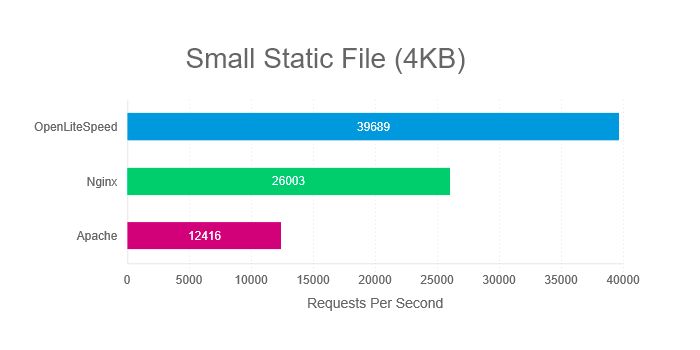
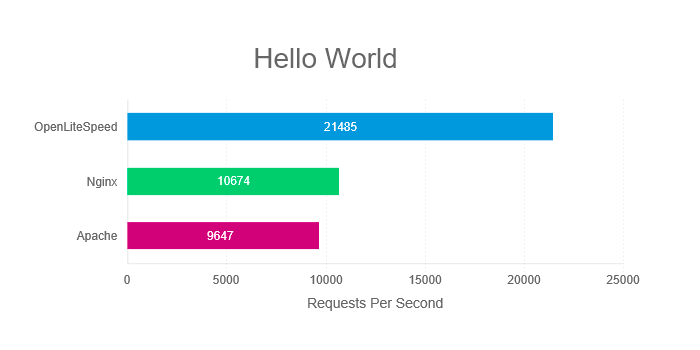
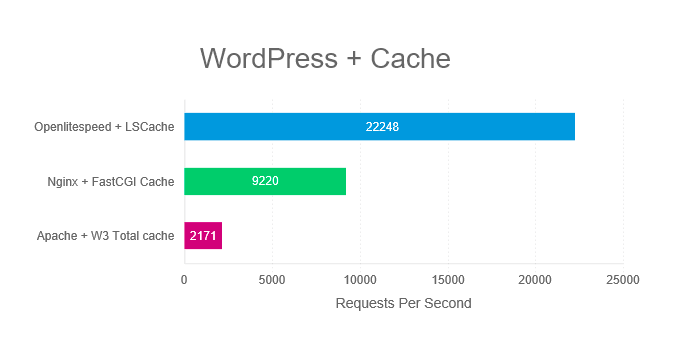
    The following charts show how many requests per second the three servers processed during our series of tests. The larger the number, the better.

    Compare OpenLiteSpeed to NGiNX and Apache: Small Static File Benchmark

    Static files require no processing, and so this test is useful for measuring the servers’ response times. How quickly can each server deliver small static files?

    Compare OpenLiteSpeed to NGiNX and Apache: Hello World PHP Benchmark

    When we benchmark the “Hello World” PHP app, we are not testing real-world conditions. Nevertheless, this is the best way to isolate the communication between server and PHP from the processing of the PHP itself. With this test, what we are most interested in is how efficiently the server communicates with the PHP engine.

    Compare OpenLiteSpeed to NGiNX and Apache: WordPress Cache Benchmark

    WordPress is a heavy PHP application and as such, caching is strongly recommended. In this test, we pair each server with an appropriate caching option.

    As you can see, OpenLiteSpeed outperforms NGiNX and Apache in all of our scenarios.

    Try it Yourself

    In the interest of transparency, we’re including the specs of our web server configuration and test environment below. Feel free to run the same benchmarks and compare OpenLiteSpeed to NGiNX and Apache for yourself.

    This is the command we used in all tests (Replace example.com/path with the location of your test subjects):

    ab -n 10000 -k -H "Accept-Encoding: gzip,deflate" -c 100 example.com/path

    Each test was run five times, and the average result was used for our graphs.

    Web Server Configuration

    Common settings for all servers:

    • Keep-Alive
    • gzip
    • OPCache
    • PHP use socket
    • PHP version 7.1.2

    Additional OpenLiteSpeed settings:

    • Number of Workers 4
    • PHP_LSAPI_CHILDREN=20
    • LSAPI_AVOID_FORK=1

    Additional NGiNX settings:

    • worker_processes 4
    • worker_connections 4096
    • pm.start_servers = 20

    Test Environment

    Software

    Web Server version:

    • OLS: v1.4.28
    • NGiNX: v1.12.2
    • Apache: v2.4.6

    Server API version:

    • OLS: LSAPI v6.11
    • NGiNX: FPM/FastCGI
    • Apache: Apache 2.0 Handler

    Cache version:

    WordPress version:

    • Version: 4.9.4

    Hardware

    Both Client and Server specs:

    • Intel Xeon CPU E7- 4870 4 Core @ 2.40GHz
    • 4GB RAM
    • 120GB ZFS RAID-Z2 iSCSI Drive
    • CentOS 7

    Although we didn’t use one for our benchmarks, We recommend Solid State Drives (SSD) in production environments.

    Summary

    What we hope you have noticed, is that OpenLiteSpeed easily outperforms the competition. If you are in the market for a new web server solution, and you are thinking Open Source, give OpenLiteSpeed a try.

    Not convinced?

    We encourage you to repeat our tests on your own hardware and see the difference for yourself! Or, join us in our Benchmarks Shootout! If you think you can configure NGNiX or Apache to beat LiteSpeed, we’d love to go head-to-head with you. Follow this link for more information.

    Want More?

    Esteban over at infranetworking wrote up a very detailed and thorough comparison between Apache, NGNiX, and LiteSpeed Web Server. (It’s in Spanish, but Google Translate does a decent job, if you don’t speak Spanish.)


    Article by: Lisa Clarke
    Benchmarks Performed by: Eric Leu
    Graphs by: Mark Zou

  • Of Benchmarks and Bug Fixes: OpenLiteSpeed Gets Even Faster!

    Of Benchmarks and Bug Fixes: OpenLiteSpeed Gets Even Faster!

    OLS Stopwatch
    A few weeks back, Jarrod from rootusers.com posted a benchmark that demonstrated that when handling small static files, Nginx outperformed our OpenLiteSpeed Web Server, particularly during the 1 and 2 CPU Core tests. We decided to dig deeper and investigate these results.

    (more…)

  • LiteSpeed vs Apache vs Nginx, Who Does Magento Hosting Better?

    LiteSpeed vs Apache vs Nginx, Who Does Magento Hosting Better?

    LiteMage March 2016 Benchmark Banner

    Before last years Magento Imagine conference, we announced a benchmark where we stated that LiteMage performed ~17-40x better than Turpentine + Varnish. This led to several people questioning the validity of our benchmark because LiteMage seemed too good to be true. A year later, we decided to revisit this benchmark with the latest version of each software to see where we stand.

    (more…)

  • PHP 7 vs HHVM Benchmark Series 3: How fast can WordPress go?

    PHP 7 vs HHVM Benchmark Series 3: How fast can WordPress go?

    race-to-the-finish-2-of-21_650x300

    In our previous PHP 7 vs HHVM benchmark, Benchmark Series 2: WordPress, we saw HHVM outperform PHP 7 by 7% on WordPress. That test was performed without any cache involvement to test pure HHVM and PHP 7 performance. In our recent Getting the Best WordPress Performance article, we saw just how much of a difference a page cache can make in regards to WordPress performance.

    (more…)

  • PHP7 vs HHVM Benchmark Series 1: Hello World

    PHP7 vs HHVM Benchmark Series 1: Hello World

    race-to-the-finish-2-of-21_650x300
    What is the best platform for the fastest PHP engines?

    The competition between PHP 7 and HHVM is starting to heat up. HHVM was previously the front runner, originally converting PHP code to C++ but eventually changing their strategy by instead converting to x86-64 machine code to dramatically increase a PHP site’s performance. PHP however is trying very hard to come out on top with the coming release of PHP 7. Who will win this competition, PHP 7 or HHVM?
    (more…)

  • LSAPI 6.8 officially released to support PHP 7

    LSAPI 6.8 officially released to support PHP 7

    lsapi_support_php7 USE

    PHP 7 Alpha 1 was released yesterday, marking the beginning of the PHP 7 major series, though the GA version is scheduled to be released by the end of 2015.  PHP 7 has improved performance, up to twice as fast as PHP 5.6, and consistent 64-bit support. “2015 is shaping up to be an amazing year for PHP. You’ll not only benefit from a whole slew of new features but also from performance going through the roof!” promises the PHP team. Quite exciting, isn’t it?

    (more…)

  • Not Even Close: Ruby LSAPI 4.1 Bests Nginx + Passenger (Another Benchmark)

    Not Even Close: Ruby LSAPI 4.1 Bests Nginx + Passenger (Another Benchmark)

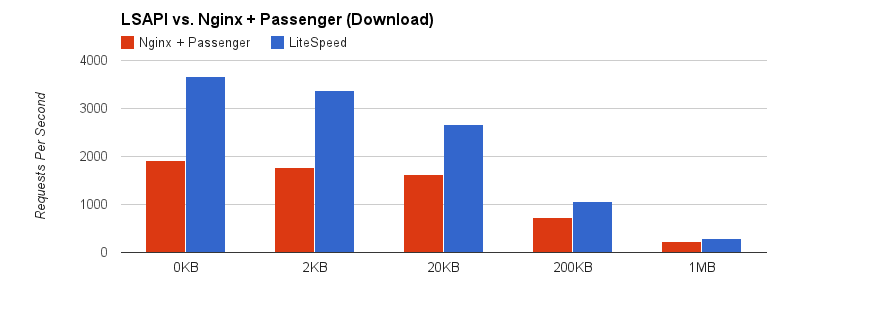
    Part 2 — Downloading


    In the last post, we benchmarked the uploading speed of LSWS 4.2.2 (with Ruby LSAPI 4.1) against Nginx with Passenger for a Ruby Rails Rack application. But rewindableinput was not our only change in Ruby LSAPI 4.1. (more…)

  • Not Even Close: Ruby LSAPI 4.1 Bests Nginx + Passenger (A Benchmark, Of Course)

    Not Even Close: Ruby LSAPI 4.1 Bests Nginx + Passenger (A Benchmark, Of Course)

    Part 1 — Uploading


    Now that we’ve finished tweaking the latest update of LiteSpeed’s SAPI for Ruby on Rails with Rack, we decided to celebrate with a little benchmarking. (more…)