Tag: http3

  • LiteSpeed QUIC and HTTP/3 Library v4.0

    LiteSpeed QUIC and HTTP/3 Library v4.0

    lsquic v4.0

    After about 2 years of strong stability and performance in production, LiteSpeed’s QUIC and HTTP/3 library gets its first major feature enhancement release: lsquic v4.0. Notable enhancements include:

    • Support for QUIC version 2
    • Version negotiation
    • Packet retry for address validation
    • Handshake improvements under high packet loss
    • Greatly improved QUIC interop results.

    Below is the detailed information about the improvements.

    QUIC version 2

    QUIC version 2 is in draft 10 as of this writing, and will be published as RFC9369 soon. QUIC version 2 is not intended to deprecate version 1. Instead, it is meant to mitigate ossification concerns and exercise the version negotiation mechanisms.

    There are a few QUIC implementations that already support QUIC v2 including ngtcp2, Kwik, picoquic, and HAProxy. lsquic might have been a little late to the party, but we are here now with v4.

    We also plan to release QUIC v2 into the production environment with our commercial server products very soon.

    Version Negotiation

    Version Negotiation is pretty much in the same boat as QUIC v2. It is in draft 14, and soon will be published as RFC9368. It updates RFC8999 by defining version negotiation mechanisms that leverage the Version Negotiation packet.

    Quote from draft 14:

    It is beneficial to avoid additional round trips whenever possible, especially given that most incremental versions are broadly similar to the previous version. This specification also defines a simple version negotiation mechanism which leverages similarities between versions and can negotiate between “compatible” versions without additional round trips.

    Version negotiation is a required feature in order to support QUIC v2.

    Retry Packet for Address Validation

    This feature is defined in RFC9000 section-8.1.2. It is not something new. It has been used in our commercial WebADC product from the very beginning, however this feature was not previously available in the open source lsquic code base. The related code is now published in v4.

    Handshake under high packet loss or corruption

    In QUIC interop test cases, handshakeloss and handshakecorruption have been two of the toughest tests to pass in our course of improving lsquic interoperability.

    The network quality simulated in the test cases is so poor, it is definitely not something a user will come across everyday. However, to make successful handshakes under such conditions, makes a QUIC implementation super resilient to bad network conditions. In the process of testing, many beneficial tweaks have been made, like minimizing server hello return packets, and ACK/PING fine tuning.

    You can see how much lsquic has been improved in the next section.

    QUIC interop improvements

    lsquic was in the first batch of open source QUIC implementations. It has been running in production environments for many years, and is both stable and performant. It has not only been used in LiteSpeed products, but also by other third-parties in large scale deployments.

    However, lsquic’s interoperability results have not always been the best. This does not mean that lsquic is not as good as the implementations that have better results. It is just that we do not focus on the interop tests. Some tests were not turned on, and some needed minor tweaks.

    Since we are making big improvements to lsquic, it is a good time to take this opportunity to improve interoperability with other implementations. Here is the comparison of before and after.
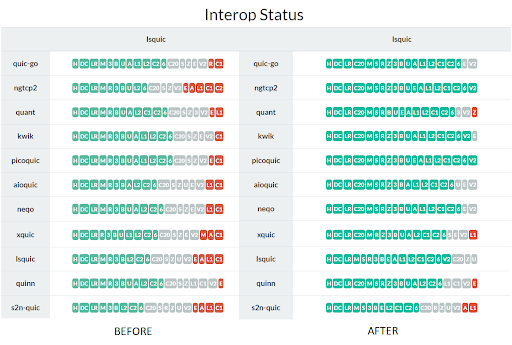
    lsquic 4.0 interop results

    Green is passed, gray is not supported by the client, and red is failure. As you can see, there are only a few red ones left. Those failures mostly are due to client side problems. lsquic now joins ngtcp2 and picoquic in the “passes all interop tests” club.

    You can check the full results at https://interop.seemann.io/

    Conclusion

    The lscquic v4.0 release is a big leap forward in terms of the latest development of the QUIC protocol. The LiteSpeed team is committed to bringing the best QUIC implementation to the public. Stay tuned for what is coming next.
  • Protocol Switching with Web ADC 3.0

    Protocol Switching with Web ADC 3.0

    Protocol Switching with Web ADC 3.0

    Web servers and web browsers rely on HTTP to communicate with each other. The HTTP protocol in use on the web today may be one of three versions (HTTP/1.1, HTTP/2, or HTTP/3) and not all browsers or servers support all three versions.

    LiteSpeed Web ADC v3.0 has the unique ability to proxy requests across all HTTP versions, providing end-to-end HTTP/3 for backend servers that support it.

    Because it can support all versions as both a server and a client, our ADC acts as a bridge between disparate technologies. This enables us to upgrade requests from HTTP/1 to HTTP/3 for backend servers that support HTTP/3, or to downgrade requests from HTTP/3 to HTTP/1 or HTTP/2 for backend servers that cannot. This provides maximum flexibility and optimal performance regardless of backend infrastructure.

    What is LiteSpeed Web ADC?

    LiteSpeed Web ADC is a high-performing HTTP load balancer and application delivery controller. It is a 100% software solution, meaning it can operate anywhere: private dedicated hardware, hosted environment, or the cloud, and can act as proxy to any type of backend web server (LiteSpeed, Apache, nginx, etc.).

    How Protocol Switching Works

    Browser to Web ADC

    Browser connections to the ADC work much as they would with any other server.

    The Initial connection is an HTTP/1 SSL connection. This may be negotiated to HTTP/2 during the SSL handshake, and further upgraded to HTTP/3 once the browser processes the ADC response headers. All LiteSpeed web serving products can handle all versions of HTTP requests. So, whether the connection is via HTTP/1, HTTP/2, or HTTP/3 mainly depends on what the browser can support.

    Web ADC to Backend Server

    Here is where LiteSpeed Web ADC differs from other proxies.

    When the ADC is unable to serve a request on its own and must retrieve a page from a backend web server, the ADC takes on the role of client. Then, the same process as above is played out between the ADC and the backend server. The ADC negotiates a connection via HTTP/1, HTTP/2, or HTTP/3 depending on what the backend server supports.

    No other proxy supports HTTP/3 connections to the backend servers. Many proxies don’t support HTTP/2 either. But LiteSpeed Web ADC provides support for all modern HTTP versions, along with all of the benefits that entails.

    Why it Matters

    LiteSpeed Web ADC has the ability to switch between HTTP protocol versions depending on the capabilities of the frontend browser and the backend servers. This interchangeability offers the maximum flexibility between infrastructures. Plus, it enables us to multiplex both the frontend and the backend, and support end-to-end HTTP/3. That leads to better performance all around.

    Get a trial license, and take LiteSpeed Web ADC 3.0 out for a spin today!

  • Improve Performance with DPLPMTUD

    Improve Performance with DPLPMTUD

    Improve HTTP/3 Performance with DPLPMTUD

    Alphabet soup to the rescue!

    Introduction

    DPLPMTUD, described in the newly published RFC 8899, is a way for a transport protocol to figure out the maximum size of a single packet. QUIC, which performs packetization by itself, is the perfect use case for this mechanism. We implemented DPLPMTUD in our web server products and we see significant performance advantages.

    Tame the Acronym

    DPLPMTUD stands for Data Packetization Layer Path MTU Discovery, where MTU, of course, stands for Maximum Transmission Unit.

    MTU is another way of saying “maximum packet size.”

    MTU Discovery means figuring out what the maximum packet size is.

    Having Path in the name reflects the fact that we care about the end-to-end (between client and server) MTU, not just between your browser and your wireless router.

    The first three letters — DPL — describes when this algorithm is meant to be used. Because QUIC arranges data into packets by itself, a QUIC implementation is that layer.

    How it Works

    By default, the maximum size of QUIC packets is limited to 1252 bytes (or 1232 bytes on IPv6). This is done to increase the chances of a successful QUIC connection, for research has shown that there are paths on the Internet that will drop packets larger than a certain threshold.

    The downside to using the lowest common denominator is that throughput on paths with larger PMTUs suffers unnecessarily. To cope with that, the QUIC Internet Draft recommends that endpoints use one of DPLPMTUD or PMTUD discovery mechanisms to find the optimal maximum packet size. For portability and simplicity, we chose to implement DPLPMTUD.

    The main idea of DPLPMTUD is simple. Pick the maximum packet size that you would be willing to send (MAX_PLPMTU) and then search the space between the current PLPMTU and that maximum value. The search is performed by constructing and sending probe packets. These are packets whose size is larger than PLPMTU. If the peer acknowledges receipt of the probe, increase PLPMTU; otherwise, decrease the ceiling.

    lsquic has two search modes, depending on the value of MAX_PLPMTU.

    Search Mode 1

    If MAX_PLPMTU is not specified, lsquic assumes that it is running on an Ethernet and will use MTU of 1500 bytes to calculate MAX_PLPMTU to be 1472 bytes (or 1452 bytes on IPv6). It then tries to use MAX_PLPMTU first, hoping for the best case that its initial guess was right. If the probe is acknowledged, then the maximum packet size is set to MAX_PLPMTU and the search ends.

    If the probe is not acknowledged (and, following the RFC’s recommendation, lsquic sends three probes one second apart), lsquic switches to a binary search. The next probe will be of size that is midway between the current maximum packet size and MAX_PLPMTU. This search will end when lsquic has found PLPMTU with at least 99% precision.

    Search Mode 2

    When MAX_PLPMTU is specified, then lsquic starts to use the binary search immediately.

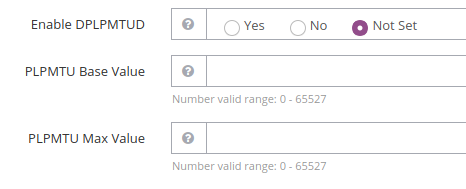
    Web Server Settings

    Performance Improvement

    The performance gain of using larger packets is straightforward: fewer packets are needed to transfer the same amount of data. This has two positive effects:

    1. Both sender and receiver have fewer packets to keep track of. This means fewer packets to encrypt and fewer packets to acknowledge. (The sender having fewer acknowledgements to process is another beneficial effect.)
    2. Smaller network overhead, improving goodput.

    The Numbers

    The speed-up is most easily observed when the sender transmits a lot of data and uses close to 100% of CPU. To do this, I used a command-line HTTP/3 client from our lsquic GitHub library to open five parallel connections to our HTTP/3 server on the local interface and fetch a 1 GB file each. (Five is an arbitrary number that produces a good load on my workstation; another number of connections could be used.) Using NetEm, I set the delay to be 1 ms (for an RTT of 2 ms).

    I tested three scenarios:

    1. DPLPMTUD is turned off on the server. This is as if DPLPMTUD were never implemented — maximum QUIC packet size is 1252 bytes.
    2. DPLPMTUD is turned on. This results in server connections probing for a maximum packet size of 1472 bytes.
    3. DPLPMTUD is turned on and the Maximum PLPMTU is set to 4096 bytes. This is not a realistic value to use on the Internet, but plausible on a local network.

    The metric is the time it takes all five connections to fetch a 1 GB file from the HTTP/3 server. Each scenario is run three times and the median time is recorded.

    Scenario Timing Improvement
    1: No DPLPMTUD 19.9 seconds 0% (baseline)
    2: Default: PLPMTU is 1472 bytes 17.7 seconds 11%
    3: PLPMTU is 4096 bytes 13.0 seconds 35%

    Transferring data in 8/9th of the time just by changing the packet size is a pretty good deal. Outside of the lab, the performance gain may not be as dramatic, but it will be a significant improvement nonetheless.

    Browser Support

    The browsers do not need any configuration to take advantage of DPLPMTUD: it will just work. Chrome limits PLPMTU to 1472 bytes by sending the special max_udp_payload_size QUIC transport parameter. Firefox does not limit PLPMTU. In practical terms, in a default server setup, the effect will be the same on both these browsers.

    Conclusion

    DPLPMTUD is a neat and effective performance booster for a protocol that is not easy to optimize. Users of LiteSpeed products can take advantage of it today: DPLPMTUD support is included in OpenLiteSpeed 1.7.5 and the upcoming LiteSpeed Web Server 6.0 and is enabled by default. Following our pioneer tradition, we deliver cutting edge technology before anybody else.

    Finding a good PLPMTU value quickly is the subject of ongoing research — both here at LiteSpeed and in the IETF community. Stay tuned, for we reserve the right to make our implementation even faster in the future!

  • LSQUIC on FLOSS Weekly

    LSQUIC on FLOSS Weekly

    LSQUIC on FLOSS Weekly

    On Wednesday, November 27th, I was a guest on the FLOSS Weekly show on TWiT to discuss LSQUIC, our QUIC and HTTP/3 library.

    Background

    I first learned about the FLOSS Weekly podcast a year or two ago. The idea to appear as a guest on the show did not occur to me until much later. Immediately, it made sense: our QUIC and HTTP/3 library is a full-featured, well-tested, and robust implementation of an increasingly important Internet protocol. And — it’s open source!

    Because I have been involved with QUIC and HTTP/3 development at the IETF for some time, I would also be able to shed some light on certain aspects of these protocols.

    I emailed Randal Schwartz, the host of the show, and he slotted me in for November 27th.

    Preparation

    The date of the show was drawing near and, as I still had not received any details about the setup, I began to worry. Did Randal forget about me? Finally, on the 26th, I emailed Randal basically to ask him this. He replied, somewhat incredulously, “did you not receive my previous emails?!” It turns out, Gmail had been helpfully discarding Randal’s emails as SPAM. Sabotage?*

    The preparation for the show consisted mainly of testing my audio and video equipment. While the laptop’s built-in webcam was OK, TWiT deems any built-in laptop microphone as inadequate. I also learned about positioning of the webcam (eye-level) and lighting (in front, not behind). These simple adjustments make a large difference.

    Making The Show

    I admit it: I was nervous. While I have spoken in front of large audiences before, a live TV show would be a new experience for me.

    I made a Skype connection with a TWiT Live Line user a few minutes before the show. We checked the audio and video feeds and I said hello to Randal and Jonathan Bennett, that week’s co-host. And the show was on!

    Within a few minutes — after the introduction and an advertisement from the show’s sponsors — I was brought on and chatted away happily with Randal and Jonathan about QUIC, HTTP/3, and LSQUIC. The interviewers prepared well and we discussed the evolution of HTTP/3, the good and the bad of basing a transport protocol on top of UDP, LSQUIC performance and history, and many other topics. There were a few questions from the live “studio audience,” which is just a dedicated IRC channel. Some levity was had as well: no, there is no HTTP/4… yet!

    After Recording

    Rather than providing a condensed transcript, I suggest you click the link above and watch the YouTube video or grab it from your favorite podcast platform. The discussion lasted for about 50 minutes — or almost the whole show — after which it was time to wrap up.

    The edited version of the show was posted online in three or four hours. They did not take anything out; rather, the show was rearranged by topics, as we jumped around a bit, and for a better flow. It was a good editing job, which is not surprising: ours was FLOSS Weekly show number 557.

    I loved being on the FLOSS Weekly show and I recommend it to everyone. If you have an open-source project that you love, you should consider sharing it with the rest of the world on TWiT with Randal Schwartz and his brigade of co-hosts.

    TIMTOWTDI

    It was a special thrill for me to be interviewed by Randal Schwartz, the co-author of Programming Perl and Just another Perl hacker. That book I had on my bed stand and I carried it with me on my commute to college, hiding it under my jacket from the rain. Perl was my first true love.

    *Sabotage is unlikely

  • LiteSpeed Beats nginx in HTTP/3 Benchmark Tests

    LiteSpeed Beats nginx in HTTP/3 Benchmark Tests

    HTTP3 LiteSpeed vs. nginx

    LiteSpeed’s HTTP/3 implementation outperforms that of the hybrid nginx/quiche in a battery of benchmark tests. OpenLiteSpeed transfers resources more quickly, scales better, and uses less CPU and memory while doing it. In each of these metrics, LiteSpeed betters nginx by a factor of 2 or more. nginx could not complete some tests, while in others, it achieved only a fraction of TCP speed. Below, we describe the setup and the various benchmarks.

    Why Compare LiteSpeed and nginx HTTP/3 Now?

    HTTP/3 is a new protocol for the web, a successor to both Google QUIC and HTTP/2. As the QUIC Working Group at IETF is getting closer to finalizing the drafts, the nascent HTTP/3 implementations are maturing and some are now starting to see production use.

    LiteSpeed was the first to ship HTTP/3 support in LSWS in July of this year. We have been supporting QUIC since 2017, making improvements along the way. The HTTP/3 support rests on this foundation.

    Several weeks ago, Cloudflare released a special HTTP/3 patch for nginx, encouraging everyone to experiment. Because nginx is our competitor, we were excited to get a chance to kick nginx’s shiny new HTTP/3 tires. Cloudflare uses this patch in production, so it has to be good!

    Cloudflare’s Quiche Patch

    Quiche is an HTTP/3 and QUIC library by Cloudflare. It is written in Rust, a new high-level language. The library provides a C API, which is how it is used by nginx.

    Benchmark Setup

    Platform

    Both servers and the load tool are run on the same VM, which is a Ubuntu-14 machine with 32 GB of RAM and 20-core Intel Xeon E7-4870. The bandwidth and RTT are modified using netem.

    Web Servers

    For LiteSpeed, we use OpenLiteSpeed, which is the open-source version of our flagship LiteSpeed Web Server. We use version 1.6.4, which can be downloaded here.

    For nginx, we use 1.16.1 with the Cloudflare quiche patch. Compilation steps are described here.

    Both OpenLiteSpeed and nginx were configured to use one worker process. To be able to issue 1,000,000 requests using 100 connections, nginx’s maximum requests setting was increased to 10,000.

    # OpenLiteSpeed
    httpdWorkers      1
    
    # nginx
    worker_processes  1;
    http {
      server {
        access_log off;
        http3_max_requests 10000;
      }
    }
    

    Website

    The website is a simple selection of static files: 163-byte index file and files of 1 MB, 10 MB, 100 MB, and 1 GB in size. You can use this script to generate these.

    Load Tool

    We use h2load with HTTP/3 support to generate load. It is built very easily using the supplied Dockerfile.

    Benchmark Tests

    To get each number — requests per second or time to fetch a resource — three tests were run and the median value was taken.

    Fetching small page

    The index page is 163 bytes. We will fetch it in several ways using different network conditions.

    h2load options of interest:

    • -n: Total number of requests to send
    • -c: Number of connections
    • -m: Number of concurrent requests per connection
    • -t: Number of h2load threads

    -n 10000 -c 100

    OLS nginx
    100 mbps, 100 ms RTT 935 reqs/sec 890 reqs/sec
    100 mbps, 20 ms RTT 3915 reqs/sec 2910 reqs/sec
    100 mbps, 10 ms RTT 6420 reqs/sec 4100 reqs/sec

    -n 100000 -c 100 -t 10

    This is a longer run, each connection will now send 1000 requests

    OLS nginx
    100 mbps, 100 ms RTT 985 reqs/sec 980 reqs/sec
    100 mpbs, 20 ms RTT 4650 reqs/sec 4525 reqs/sec
    100 mbps, 10 ms RTT 8450 reqs/sec 7155 reqs/sec

    OpenLiteSpeed is a little faster at 100 ms and significantly faster at 20 ms and 10 ms RTT.

    -n 100000 -c 100 -m 10 -t 10

    OLS nginx
    100 mbps, 100 ms RTT 9010 reqs/sec 7365 reqs/sec
    100 mpbs, 20 ms RTT 24,700 reqs/sec 5850 reqs/sec *
    100 mbps, 10 ms RTT 25,230 reqs/sec 6855 reqs/sec *

    * High variance

    Tellingly, in the very first test, nginx was using 100% CPU, while OpenLiteSpeed was using about 45% CPU. This is the reason nginx numbers do not improve as the RTT goes down. On the other hand, OpenLiteSpeed, still does not use 100% CPU even with 20 and 10 ms RTTs.

    -n 1000000 -c 100 -m 10 -t 10

    To issue more than 1000 requests per connection, we need to set nginx’s http3_max_requests parameter to 10000 from its default value of 1000.

    OLS nginx
    200 mbps, 10 ms RTT 29,900 reqs/sec 7180 reqs/sec *

    * High variance

    Now we’ve managed to get OpenLiteSpeed to use 100% CPU. During this test, nginx allocated more than 1 GB of memory (resident size, as shown by top(1)). OLS never exceeded 28 MB.

    That’s more than 4 times the performance at about 1/37th the cost.

    Fetching single file

    In this scenario, we will fetch a single file under different network conditions and measure how long it takes to download the file.

    10 MB

    OLS nginx
    10 mbps, 100 ms RTT 9.8 sec 11.2 sec
    10 mpbs, 20 ms RTT 9.7 sec 10.8 sec
    10 mbps, 10 ms RTT 9.4 sec 10.8 sec

    We see that nginx is somewhat slower in this test. At the same time, it uses a lot more CPU than OpenLiteSpeed in each of the tests above: between 3 and 4 times more.

    100 MB

    OLS nginx
    100 mbps, 100 ms RTT 12.2 sec 40 sec *
    100 mpbs, 20 ms RTT 9.4 sec 40 sec *
    100 mbps, 10 ms RTT 9.3 sec 30 sec

    * High variance

    In all three benchmarks, nginx used 100% CPU, which is the most likely reason for its poor performance.

    1 GB

    I tried testing downloading 1 GB file using nginx at 1 Gbps but I got tired of waiting for it to finish. My guess is that the performance difference between OLS and nginx is even more drastic at this speed.

    Shallow Queue

    We have seen that nginx struggles when bandwidth is high. Let’s see how it does when bandwidth is low. One twist is that we will use a shallow queue using netem’s limit parameter. Here, we will set it to 7.

    Fetching single 10 MB file

    limit OLS nginx
    5 mbps, 20 ms RTT 1000 * 19.6 sec 22.5 sec
    5 mbps, 20 ms RTT 7 29.6 sec 48.1 sec

    * netem default

    Introducing a shallow queue on path reduces OLS performance by about 50%, whereas nginx performance is degraded by more than 100%. In both cases, LiteSpeed is significantly faster than nginx.

    OpenLiteSpeed HTTP/3 is Better Than nginx

    We compared OpenLiteSpeed and nginx using several types of benchmarks. In all tests, LiteSpeed performs better than nginx: it transfers files faster and uses less CPU and memory. nginx never reaches TCP-level throughput at low bandwidth. At high bandwidth, nginx throughput is a fraction of that of LiteSpeed.

    nginx’s HTTP/3 is not ready for production use. It delivers poor performance and, at the same time, uses too much CPU and memory.

    This result is not surprising. QUIC and HTTP/3 are complex protocols. New implementations will have a hard time matching the performance of LiteSpeed. Ours is a mature implementation, as we first shipped production-grade QUIC support back in the summer of 2017.

    nginx will likely improve in the future. We look forward to more benchmark testing when that occurs. Until then, LiteSpeed HTTP/3 cannot be beat.

  • BBR Control in QUIC and HTTP/3

    BBR Control in QUIC and HTTP/3

    BBR Congestion Control in QUIC and HTTP/3

    BBR congestion control is now available for LiteSpeed QUIC and the upcoming HTTP/3.

    The newly released LiteSpeed Web Server 5.4.2, Web ADC 2.6.0, and OpenLiteSpeed 1.6.1 use BBR congestion control for QUIC connections. BBR (which stands for Bottleneck Bandwidth and RTT) is a new congestion control algorithm developed by Google in the last few years. It features several profitable properties.

    Resistance to Loss

    The main idea behind BBR is that packet loss may not mean that there is congestion in the network. For example, a packet may be lost due to transient radio interference. Cubic and other congestion-based algorithm do not distinguish between such spurious losses and real congestion, reducing their send rate in both cases. BBR, on the other hand, is not so easily spooked.

    As a result, BBR can deliver sustained throughput performance even in the face of suboptimal network conditions.

    Minimal Latency

    Bufferbloat has been the bane of good UX for years. Since the problem was identified and alarm sounded, there have been changes to network infrastructure equipment to avoid buffering too much data. Nevertheless, the fact remains: Cubic will try to fill the bottleneck buffer on the network path, increasing connection latency. A study of 4G LTE networks reveals that to mask packet loss, buffers are used extensively, thereby inflating RTT.

    BBR keeps track of the bottleneck bandwidth and periodically tests for minimum round-trip time. These estimates are used by the sender to avoid filling the bottleneck buffer. With BBR, an interactive web application is more likely to be responsive.

    Drawbacks

    Despite its terrific advantages, BBR is not without problems. It performs poorly when there are shallow buffers on the path and it may not be fair to other flows, claiming most of available bandwidth. These issues will be addressed in BBRv2, which is being actively developed at Google.

    Test Results

    Throughput Under Loss

    To compare BBR to Cubic, I set up a pre-release build of LSWS 5.4.2 and conducted a few experiments downloading a static file from the web server using the LiteSpeed QUIC client. The bottleneck was set up on the client side using netem and ifb.

    Rate (MBit/sec) Delay (ms) Loss (%) Cubic (sec) BBR (sec)
    20 25 0 4.5 4.5
    20 25 0.5 6.7 4.6
    20 25 1 8.6 4.6
    20 25 2 14.3 4.7
    20 25 3 17.6 4.7

    Table 1: Time to transfer 10 MB file, in seconds

    It is evident that Cubic is very sensitive to packet loss, while BBR is not.

    Latency

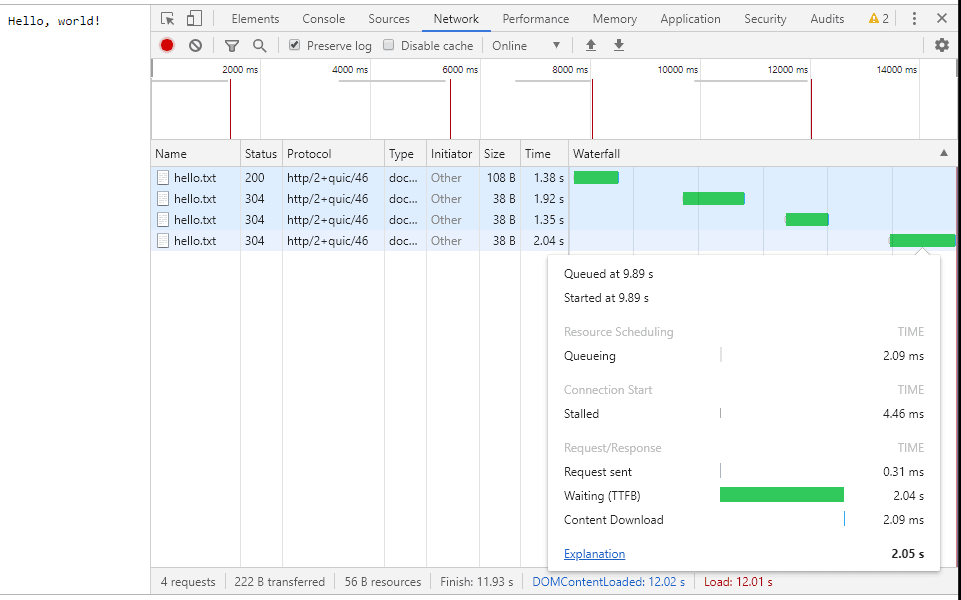
    To test the difference in latency between Cubic and BBR, we set up a simple website with three resources: an HTML page with links to two files: one large and one tiny. The bottleneck was set up to have 20 MBit/sec bandwidth and 25 ms delay with a large buffer. The user clicks on the large file and it begins downloading. The user then clicks on the small file. When Cubic is used, it takes one to two seconds to download the small file:


    Figure 1: Downloading small file when server uses Cubic

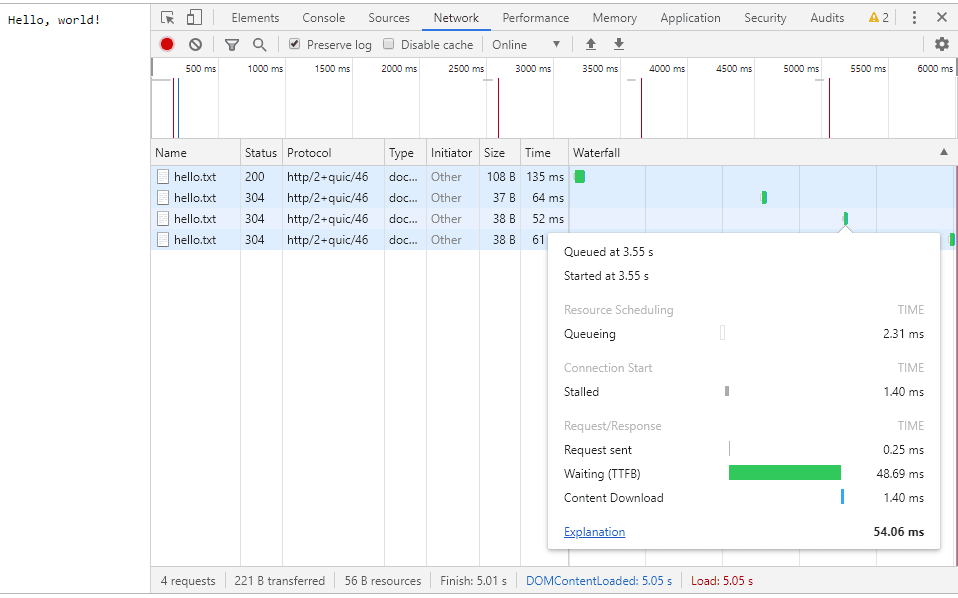
    This is because Cubic tries to fill the intermediate buffer. BBR, on the other hand, keeps the bottleneck buffer filled “just right” so that downloading a small file take on the order of RTT:


    Figure 2: Downloading small file when server user BBR

    BBR Congestion Control in QUIC and HTTP/3

    BBR is a novel congestion control technology. It has two advantages over the widely-deployed Cubic congestion control: insensitivity to random loss and low latency. With LiteSpeed, you can take advantage of this technology today to power your server’s Google QUIC and HTTP/3 connections.

    As Google evolves BBR, we will continue to support the most recent stable version.

  • QUIC Library Is Now Open-Source

    QUIC Library Is Now Open-Source

    LiteSpeed OpenSources QUIC HTTP/3

    LiteSpeed Technologies is releasing its QUIC and HTTP/3 library under an open-source license. This library, written in the C programming language, contains both client and server logic as well as fully functional example client and server programs to get you started. This is the same code that is used in our flagship LiteSpeed Web Server and LiteSpeed Web ADC products and in the open-source OpenLiteSpeed (OLS) web server.

    The following QUIC and HTTP/3 versions are currently supported:

    • Q039
    • Q043
    • Q046
    • h3-22

    Q039, Q043, and Q046 are versions of the Google QUIC protocol. Q046 is used by the current version of Chrome (Chrome 76). h3-22 is the experimental precursor to HTTP/3, the next-generation HTTP protocol. We will update the library as new gQUIC and HTTP/3 versions are released.

    This library subsumes the LiteSpeed QUIC Client Library which we released two years ago and replaces it on GitHub. The new module is a superset of the original client library.

    We use plenty of open-source tools and libraries. We are happy to contribute back to the community the fruits of our labor: a fully functional, mature, scalable, and robust QUIC library.

    Happy hacking!

    LiteSpeed QUIC Team.