You may be a fan of our LiteMage cache extension for Magento, or super enthusiastic about our WordPress cache plugin, but did you know that there is more to our cache story? Indeed. Chances are there is a LiteSpeed Cache plugin for your other favorite web apps, too.
LSCache plugins, in general
LSCache is a server-based caching module that is built directly into LiteSpeed Web Server. It saves static versions of dynamically-generated HTML pages in order to speed up subsequent access to those pages. In the beginning, LSCache was set up entirely through rewrite rules and configuration files. It required users to know a little something about their server backend, or to contact their hosting provider to set up caching for them. But more importantly, rewrite-rule caching is inflexible. As such, site owners had no ability to purge on demand, which meant they could only cache for a few minutes at a time, if they wanted to avoid serving stale content.
Enter LiteSpeed Cache Plugins.
LiteSpeed Cache plugins take the server-based LSCache functionality and give it a familiar interface, whether that be the WordPress Dashboard or the XenForo Admin Control Panel. Additionally, an LSCache plugin lets you define rules for managing your app’s cache, and then automatically updates the configuration files and rewrite rules on your behalf.
By putting the LSCache controls into the web apps that site owners use every day, LSCache has become far more accessible and flexible. Site owners may now cache pages for far longer than a few minutes, and they may manage their caches with greater precision.
As of this writing, LSCache is available in seven flavors! You are probably aware of one or two of these plugins. You may even be a power user. But why stop there? If you’re running all of your web apps on a LiteSpeed server, then you should take advantage of as many of these plugins as you can!
LSCache plugins, specifically

Every LSCache plugin is a conduit to the cache module of a LiteSpeed server, whether that be LiteSpeed Enterprise, LiteSpeed Web ADC, or OpenLiteSpeed. The server’s module does all of the work, while the plugin provides a simple way for a site owner to tell the server what to do. Because of this, most of our cache plugins have the same abilities. When there are differences, they are usually down to the abilities of the web app itself, or complexities involved in implementing a particular feature for that web app.
Speaking of the abilities of the web app, LSCache plugins are unique among cache solutions because they have a connection to both the server, and to the app. A plugin can use that relationship to provide features that other cache solutions (or simple rewrite rules) can’t duplicate. We alluded to a prime example of this earlier: tag-based purge.
Tag-based purge is a cache management tool that takes purge cues from events that occur within the app. For example, when a new post is created in WordPress, LSCache for WordPress tells the server’s LSCache module to purge every page that would be affected by a new post (i.e. the relevant category and tag pages, the home page, etc.).
All LSCache plugins are free and open source. To learn more about the specific features supported by each, click the name of the plugin.
Magento
All content can be assembled from cache, even per-user, private blocks. Multi-store, multi-currency, and multi-user-groups are supported. There are two different versions of LiteMage available: one for Magento 1.x and another for Magento 2.x.
WordPress
- Name: LSCache Plugin for WordPress
- Download: from LiteSpeed
- Works With: WordPress.org
- Required Server: LSWS Enterprise, OpenLiteSpeed, or LiteSpeed Web ADC
- Cache logged-in users? Yes
- ESI supported? Yes, except on OpenLiteSpeed
- Cache Crawler supported? Yes
In addition to the cache functions, our WordPress plugin also includes several optimization features, which makes it a nice all-in-one option for WordPress acceleration. Compatible with WooCommerce.
XenForo
- Name: LSCache Add-on for XenForo
- Download: from XenForo v1.x or v2.x
- Works With: XenForo 1.x or XenForo 2.x
- Required Server: LSWS Enterprise, OpenLiteSpeed, or LiteSpeed Web ADC
- Cache logged-in users? No
- ESI supported? No
- Cache Crawler supported? No
This is a simple XenForo add-on that speeds up your public forum pages for non-logged-in users. There are two different versions of LSCache for XenForo available: one for XenForo 1.x and another for XenForo 2.x.
Please note that as of this writing, the XenForo 2 add-on only supports rewrite-rule-based caching. Tag-based caching is forthcoming.
PrestaShop
- Name: LSCache Module for PrestaShop
- Download: from LiteSpeed
- Works With: PrestaShop 1.6 & 1.7
- Required Server: LSWS Enterprise, or LiteSpeed Web ADC
- Cache logged-in users? Yes
- ESI supported? Yes
- Cache Crawler supported? No
The PrestaShop module is one of our newer cache plugins. Introduced last year, it is highly-customizable on a global or per-store level. Tag-based smart purge keeps the cache from becoming stale when product details change.
MediaWiki
- Name: LSCache Extension for MediaWiki
- Download: from GitHub
- Works With: MediaWiki 1.25+
- Required Server: LSWS Enterprise, OpenLiteSpeed, or LiteSpeed Web ADC
- Cache logged-in users? Yes
- ESI supported? No
- Cache Crawler supported? No
This one is a straightforward little plugin that speeds up your MediaWiki site for both logged-in and non-logged-in users.
Drupal
- Name: LSCache Module for Drupal
- Download: from GitHub
- Works With: Drupal 8.x
- Required Server: LSWS Enterprise, OpenLiteSpeed, or LiteSpeed Web ADC
- Cache logged-in users? Yes
- ESI supported? No
- Cache Crawler supported? No
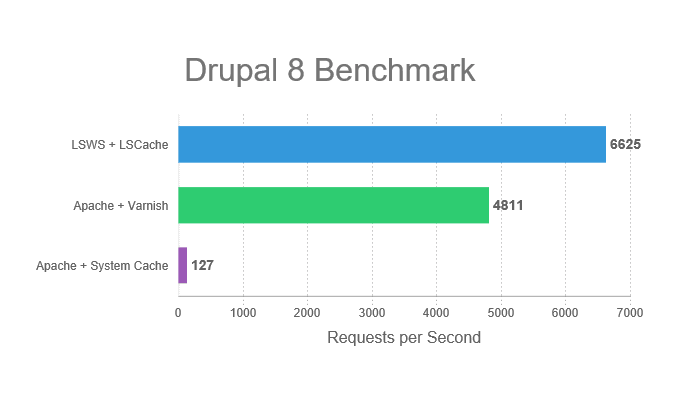
This one is hot off the presses! It’s comparable to most of the others, in that it supports public cache, private cache, and ESI, and it features tag-based cache purge.
Joomla
- Name: LSCache Module for Joomla
- Download: from GitHub
- Works With: Joomla 3.x
- Required Server: LSWS Enterprise, OpenLiteSpeed, or LiteSpeed Web ADC
- Cache logged-in users? Yes
- ESI supported? Yes, except on OpenLiteSpeed
- Cache Crawler supported? No
The Joomla plugin is another brand new release, and contains many of the LiteSpeed Cache features you already know and love.
Go forth and cache!
Hopefully you have found something new to try among our cache plugins! If you have a favorite web app that is not represented here, leave a comment. You never know… it might end up being next on our list.
The LiteSpeed wiki contains everything you need to know when it comes to installation and configuration, so be sure to check there if you get stuck.
Also? We have a Slack community for LiteSpeed users. Join up, leave feedback, help us test new features in development, and connect with your fellow LSCache plugin users!