Tag: showcase

Our Showcase category is for YOU. Do you have a business that has benefitted from upgrading to a LiteSpeed product? Do you provide a tool that can enhance the LiteSpeed experience? The companies featured in this category have a story to tell.

These stories are varied. Maybe it’s an upgrade to LiteSpeed Web Server or the installation of LSCache for WordPress that has made a measurable difference in a business’s most important metrics. Or maybe it’s a new control panel that has the potential to improve the admin experience.

Look through this Showcase category and get some ideas for your own business!

If you would like to tell your LiteSpeed story, contact us. We’ll work together to help you share your success story with our readers.

  • Extension Showcase with ecomDATA

    Extension Showcase with ecomDATA

    LiteSpeed Cache Plugin for JTL Shop

    Our friends at ecomDATA are here today, to share news of their new LiteSpeed Cache plugin for JTL Shop. This new plugin is available to all JTL Shop owners, regardless of what hosting company they use to host their shops. Without further ado, here is ecomDATA in their own words! -LC

    —

    Great news for JTL Shop owners: We are thrilled to introduce the LiteSpeed Cache Plugin for JTL Shop, exclusively available through ecomDATA. This plugin seamlessly integrates JTL stores with LiteSpeed Web Server’s superior ESI support, providing the ultimate caching solution for your online store. It significantly reduces server load and allows your JTL Shop to load up to 10 times faster!

    About LiteSpeed Cache for JTL Shop

    JTL Shop communicates with LiteSpeed Web Server and LiteSpeed Cache Plugin to save and serve static copies of dynamic web pages. This powerful combination significantly reduces your shop’s page-load time, enhancing the overall shopping experience for your customers.

    As the content in your shop changes, LiteSpeed Cache Plugin offers the flexibility to accurately cache and purge every page. By utilizing Edge Side Includes (ESI), you can punch holes for personalized content on public pages. The static content that remains consistent across visitors is stored in the cache. When the next user accesses the same page, the cached content is promptly delivered, with only the holes needing to be filled in with data specific to that visitor.

    Advantages

    Simple Installation Process

    You can effortlessly obtain the plugin from the JTL Extension Store and install it with a single click. Afterward, activation is all that’s needed to complete the installation of the free version (guest mode only). For more advanced configurations, explore the features offered by LiteSpeed Cache PRO.

    Reduced Server Load

    The LiteSpeed Cache Plugin reduces server load, enabling you to efficiently serve a larger number of visitors using the same hardware.

    Faster Page-Load Times

    LiteSpeed Cache Plugin allows up to 10 times faster loading times for your JTL shop. With this plugin your store achieves an impressive Time To First Byte (TTFB) as low as 20ms, whereas other JTL shops typically range from 200-1500ms for this metric.

    Enhanced SEO Ranking

    Google favors shorter Time To First Byte (TTFB) intervals. Faster loading times not only lead to more content customers but also prolong their stay on your website. Consequently, a reduced TTFB can positively impact your Google ranking.

    LiteSpeed Cache PRO Features

    • Both Public and Private Cache
    • Cache for Logged-in Users
    • Caching for Shopping Cart
    • Server-Level Full-Page Cache
    • Tag-Based Caching and Purge
    • Advanced Configurations and Template Mapping
    • Edge Side Includes (ESI)
    • Cache Blacklist
    • Built-in Crawler
    • Multiple Languages
    • Integrated into LSWS, OLS and Web ADC

    Please note that this LiteSpeed Cache Plugin is designed for JTL Shop 5. The free version can be used with OpenLiteSpeed Web Server, the pro version requires LiteSpeed Enterprise Web Server.

    A more detailed description of LiteSpeed Cache Plugin can be found on our LiteSpeed Cache Page. Installation and configuration instructions can be found in our Installation Manual.
    LiteSpeed Cache Plugin for JTL Shop

    –

    Our thanks to ecommDATA for sharing their story in this Showcase! Have you created a tool that LiteSpeed users may want to know about? Has your business experienced the LiteSpeed difference? If you would like to share your story with our readers, find me (@Lisa at Litespeed) on our Slack workspace, and we can discuss it. –LC

  • Platform Showcase: Managed LSWS and OLS with SPanel

    Platform Showcase: Managed LSWS and OLS with SPanel

    Managed LiteSpeed Web Server with SPanel

    Our friends at SPanel asked if they could tell our readers a little bit about their control panel, and about managed LiteSpeed Web Server with SPanel. So, without further ado, here is the SPanel team. -LC

    What is SPanel?

    SPanel is a multifunctional web hosting platform that simplifies server management to a level where anyone can operate their environment even without previous technical experience.

    SPanel developers focus strongly on their fully managed LiteSpeed Web Server and OpenLiteSpeed solutions. They cater to business-oriented site and app owners. You can choose a plan where all technical tasks will be handled by a professional support team.

    The solution consists of two essential parts: The Admin Interface and the User Interface.

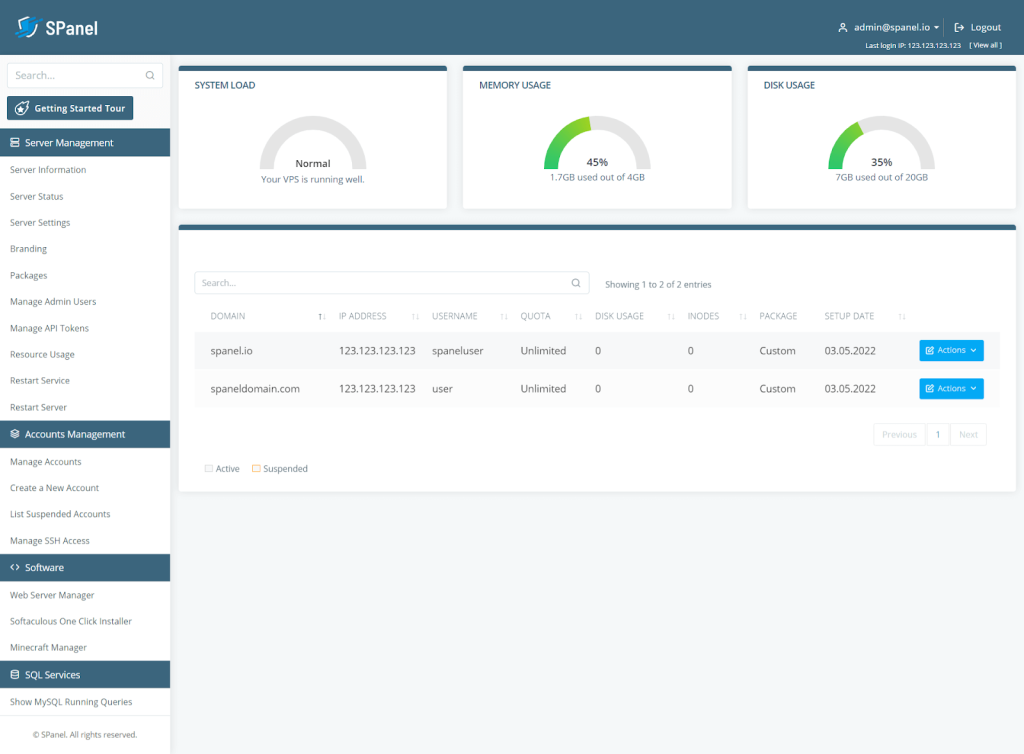
    SPanel LiteSpeed Web Server admin interface

    The Admin Interface is for managing the server and all associated accounts. It allows you to create, modify, and delete accounts, monitor your connectivity and running processes, restart the machine, and more.

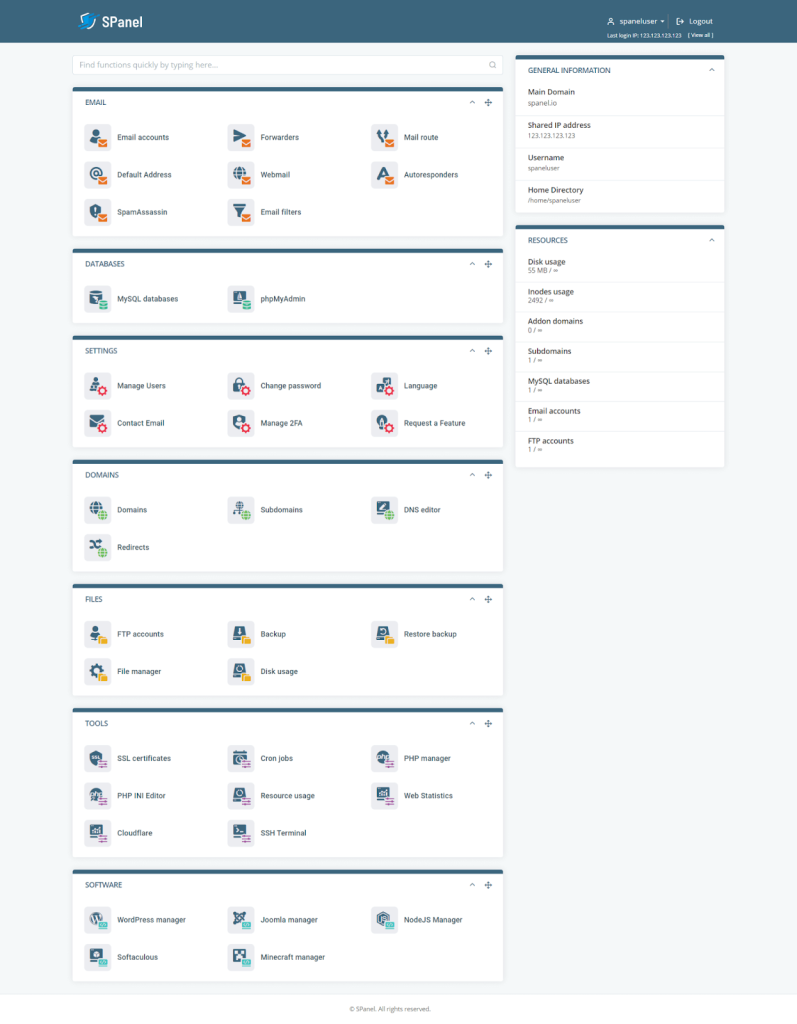
    SPanel LiteSpeed Web Server user interface

    The User Interface is responsible for managing individual accounts and services. It has an intuitive graphic interface that helps you deal with domain names, emails, site files, databases, SSL certificates, and more.

    SPanel integrates with all popular web hosting solutions. Using its powerful API, you can pair the platform with LiteSpeed, OpenLiteSpeed, Nginx, WHMCS, Softaculous – basically the full package of services to start any type of online project.

    For a complete list of features, check out the SPanel.io website or take a look at this introductory video:

    How to Install LiteSpeed Web Server or OpenLiteSpeed in SPanel

    Switching your service to LiteSpeed Web Server or OpenLiteSpeed is effortless in SPanel. The process involves literally just three clicks:

    IMAGE

    1. Log in to your SPanel Admin Area.
    2. Choose the Web Server Manager option under Software in the left-side menu.
    3. Choose LiteSpeed or OpenLiteSpeed on the next screen.
    4. Activate by clicking the blue button at the bottom of the page.

    That is all there is to it – quick and seamless integration that requires no technical expertise.

    SPanel Benefits

    cPanel still holds the lion’s share of the market for web hosting solutions, but alternatives like SPanel, Plesk, and InterWorx are certainly gaining traction

    In fact, there are numerous reasons why SPanel, in particular, has been getting so much attention. Here are a few of the most notable:

    • Fully Managed Service: SPanel might be extremely user-friendly, but many website owners still prefer to focus on their business instead of dealing with technicalities. For them, the developers offer a fully managed service where their support team takes care of all configurations, updates, monitoring, maintenance, and technical issues.
    • SShield: one of the things only SPanel can offer is SShield, an AI-powered security monitoring system. The tool has proven to be a beast when it comes to cybersecurity, recognizing over 99.98% of all known malware and spam. Whenever SShield detects suspicious activities in your web traffic, it proactively sends a notification, so you have enough time to react.
    • SWordPress Manager: another unique SPanel integration, targeted for WordPress users. If you are looking to simplify your day-to-day operations with the most popular CMS, you can install WP, take advantage of automatic updates, change admin password, and many more. The Security Lock feature allows you to restrict editing access to chosen folders and directories, protecting WordPress installation from any outside breaches.
    • Joomla Manager: similar to SWordPress Manager, SPanel packs a solution for all the Joomla fans. The Joomla Manager is integrated by default in SPanel, helping users with a one-click installation, password change, and site cloning.
    • Feature Requests by Users: the thing that most separates SPanel from similar platforms is the involvement of the entire community. The control panel receives regular updates, and most new feature implementations come directly from user suggestions. There is a Feature Requests forum on the official website. You can suggest a new feature or vote on other people’s ideas. The SPanel engineers gather all popular requests and put them on the to-do list, ensuring they see the light of day in future updates.

    Final Takes

    SPanel can be a highly reliable alternative to the market leaders in hosting management solutions. The platform is lightweight, highly secure, and extremely versatile. The managed plans are ideal for website owners who have a strong business focus. They take the weight off of the webmaster’s shoulders. And the licensing model, lets you take full advantage of SPanel with any host.

    —

    Our thanks to SPanel for sharing their story! Does your business provide a tool that enhances the LiteSpeed experience? If you would like to share your story with our readers, find me (@Lisa at Litespeed) on our Slack workspace, and we can discuss it. –LC
  • Customer Showcase: LiteSpeed Cache Package Boosts WordPress Performance

    Customer Showcase: LiteSpeed Cache Package Boosts WordPress Performance

    LiteSpeed Cache Boosts WordPress Performance for Hostinger

    Our friends at Hostinger are here today, sharing how LiteSpeed Cache boosts WordPress performance on their hosting infrastructure. Without further ado, here they are in their own words! -LC

    Rockets have engines, electric guitars have amplifiers, and WordPress has LiteSpeed. We applied LiteSpeed cache solutions to help our customers make the most of their WordPress websites. The actual results convinced us – LiteSpeed did an excellent job. Now, we’re ready to prove it.

    It’s More Than a Plugin

    Most of our customers are familiar with LiteSpeed Cache as a WordPress plugin. Surprisingly, only a few know that LiteSpeed impacts an entire hosting ecosystem, starting with a web server, where the WordPress Cache plugin gets its power.

    We’ve deployed LiteSpeed Web Server (LSWS) on our hosting infrastructure. Customers can access it through our hPanel. LSWS saves the website’s resources without losing any speed and security. It doubles the capacity of the server memory and CPU.

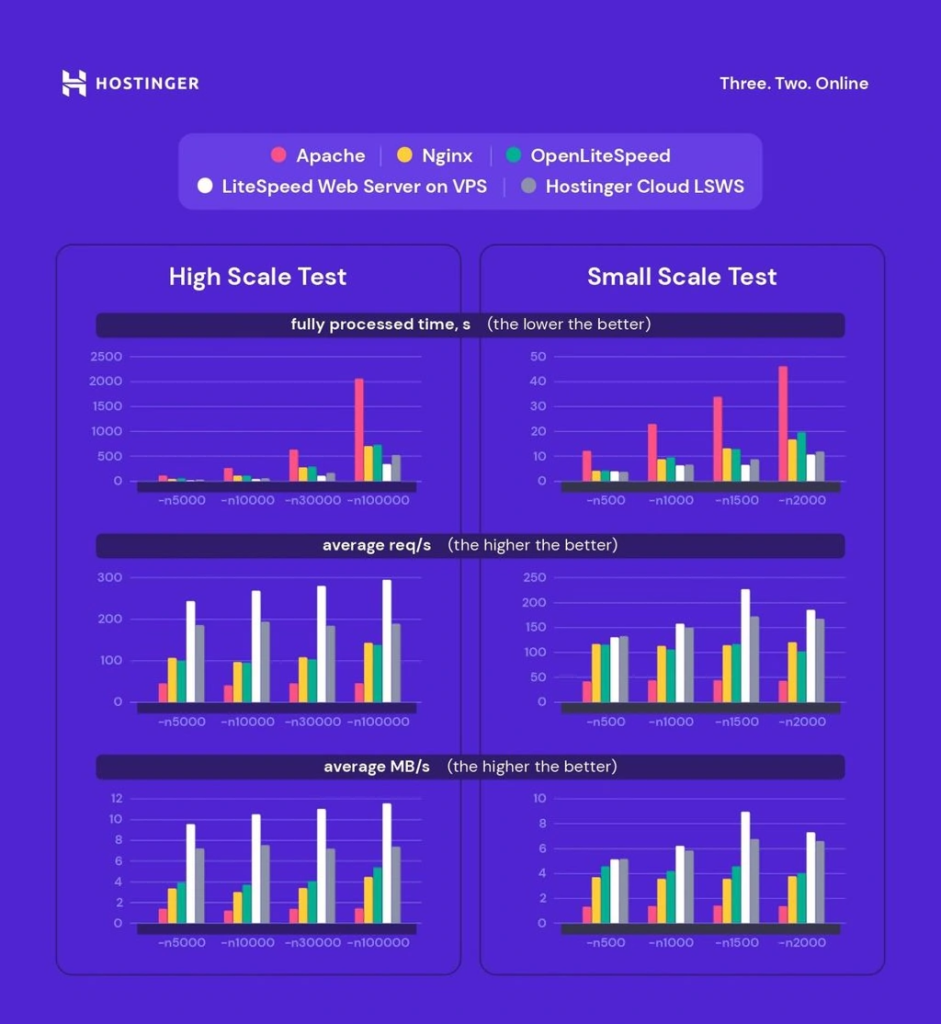
    As an Apache alternative, LSWS is performing up to 10 times better. And it’s lighter compared to Apache. We’ve run stress tests (high and small-scale) to see the difference between the three leading web servers (LiteSpeed Web Server, Nginx, and Apache). The results speak for themselves:

    LiteSpeed Boosts Performance for Hostinger

    More details about these results are available in our LiteSpeed cache plugin test tutorial.

    Give an Extra Boost with PHP Extensions

    Although LiteSpeed supports many PHP extensions, opcode caches are on the top of the list for WordPress developers (​​APCu, Xcache, Zend Opcache). Extensions accelerate PHP’s performance by being involved in the PHP execution life-cycle and storing the results of the compilation phase so the next time code can load instantly.

    LiteSpeed has a unique API (LSAPI). It ensures PHP communication with web servers. Usually, one has LSAPI automatically activated in the control panel. For our customers’ convenience, in hPanel, all PHP extensions suggested by LiteSpeed are already on. No action is needed, but we provide this tutorial on how to increase PHP memory, if desired.

    The Cherry on Top: WordPress Cache Plugin (LSCWP)

    This level of performance wouldn’t be possible without the main switcher to the engine – the LiteSpeed cache plugin installed on each WordPress website. We activate LSCWP on all Hostinger web hosting plans, so customers can be sure their websites are powered with LiteSpeed from day 1. There are different ways to adapt LiteSpeed cache to a website’s needs. With that in mind, we provide detailed descriptions of settings for Blog, eCommerce website, and online portfolio.

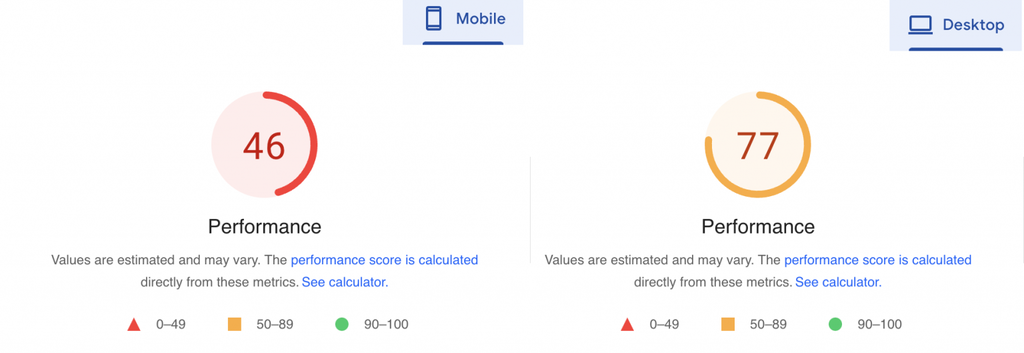
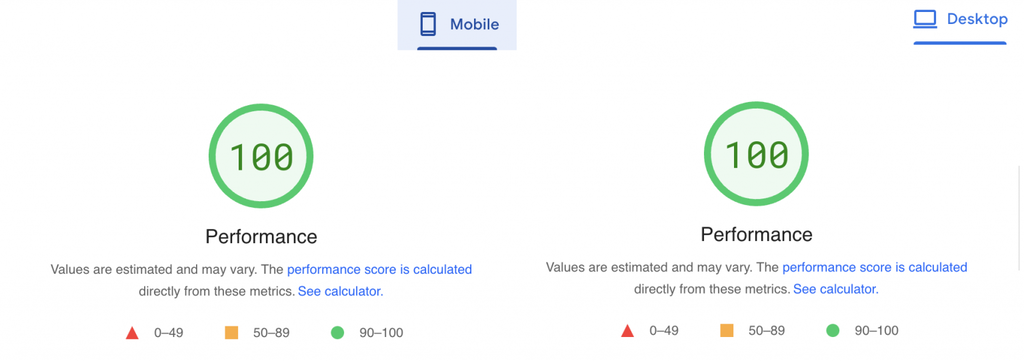
    Our LiteSpeed cache plugin test tutorial illustrates how it enhances the website’s performance. Here’s Google’s PageSpeed verdict.

    Before:

    WordPress Performance Before LiteSpeed Cache

    After:

    WordPress Performance After LiteSpeed Cache

    Impressive, right?

    QUIC.cloud + Cloudflare Integration

    Both QUIC.cloud and Cloudflare are reverse proxy content delivery networks (CDN). Unlike regular CDNs, they cache static files (images, CSS, JS, etc.) and dynamic HTML files. Combined, they provide a vast global network of about 270 points of presence (PoP). QUIC.cloud – 70 PoP and Cloudflare – 200. Those nodes operate like individual data centers storing your website’s data and letting visitors from different countries get a faster and more secure website experience.

    Why do you need both CDNs?

    Apart from being the new excellent CDN, QUIC.cloud does many other speed optimizations for WordPress sites like Low-Quality Image Placeholder generation, critical CSS generation, and so on. Because it comes as a part of the LiteSpeed Cache tool-set for website acceleration, it performs better with LSWS and is relatively easy to set up.

    How should you combine them?

    LiteSpeed recommends using QUIC.cloud for caching dynamic content and Cloudflare for static content. Cloudflare’s primary function is to deal with static content. But when both are turned to cache dynamic content, some conflicts may occur.

    Technically, you can use either of these CDNs for your WordPress optimization, but to achieve even better performance, we include both QUIC.cloud and Cloudflare in our web hosting plans. Setting them up in our hPanel is hassle-free.

    Conclusion

    As you see, LiteSpeed can improve WordPress performance at different levels of your website infrastructure: from the webserver to PHP extensions, from CDN to cache plugins. We chose LiteSpeed because of its advanced technological ecosystem and endless possibilities for customization.

    Hostinger users, who may not be as advanced in hosting, can reap the benefits of the LiteSpeed cache package while having peace of mind. When customers get their websites off the ground with Hostinger, we make sure all tools are integrated and ready to boost their Core Web Vitals.

    —

    Our thanks to Hostinger for sharing their story in this Customer Showcase! Has your business experienced the LiteSpeed difference? If you would like to share your story with our readers, find me (@Lisa at Litespeed) on our Slack workspace, and we can discuss it. –LC

  • Why LiteSpeed and WAF is Pure Love

    Why LiteSpeed and WAF is Pure Love

    LiteSpeed vs. Apache WAF

    Do you use WAF (Web Application Firewalls) to protect your sites? Our guest blogger, Lucas Rolff does. Lucas is, as he says, “the everything man – sales, support, accounting, coffee drinker, and operations guy” for Hosting4Real. Today he’ll be sharing his experience implementing WAF. See how its impact on his systems changed dramatically when he switched from Apache to LiteSpeed!

    So, without further ado, here’s Lucas’ story in his own words:
    —

    At Hosting4Real, we run WAF across our fleet. This is done mainly to protect against known vulnerabilities in the open source software our customers use. It also protects against generic attacks such as SQL injection, cross-site scripting, backdoors etc.

    We use the Comodo CWAF ruleset. CWAF contains hundreds of rules for SQL injection, cross-site scripting and, more importantly, rules targeting specific software vulnerabilities in WordPress, Joomla, Magento and other known CMS’s.

    WAF and Apache

    The issue with having an extensive list of WAF rules is that it tends to hurt your performance, both in your rules latency, and in the amount of resources your system requires to handle a request.

    On certain shared hosting servers with a particular traffic patterns, we noticed Apache would sometimes take up 100-200% (1-2 cores) alone for processing requests within mod_security. Eventually, we got to the point where we tried turning off mod_security rules, and we instantly saw a drop in CPU usage of about 100% (1 core).

    WAF and LiteSpeed

    In early-mid 2018 we decided to switch to LiteSpeed for various reasons, one of them being the CPU load experienced while using our Comodo WAF ruleset. After the switch to LiteSpeed, which had already decreased our CPU usage compared to Apache without mod_security, we decided to enable our ruleset again. We went in with the expectation that we’d see an increase in CPU load similar to the drop we saw when turning it off in Apache. To our surprise, we saw almost zero difference in the CPU usage on the server, despite running with the full set enabled.

    We didn’t believe this, so we talked to LiteSpeed core developers to figure it out!

    LiteSpeed uses it’s very own implementation to parse rules, instead of relying on a generic mod_security library. This has allowed LiteSpeed to optimize the way regular expressions are matched, as well as utilize an internal cache.

    What is even more impressive is that LiteSpeed has managed to only run the rules for dynamic requests. This is a big difference compared to how Apache and other web servers handle this.

    Apache, for example, will execute your rules for every single request, even the pictures of cats and hamsters. This means we’re maybe saving 40-90% processing power alone by this optimization.

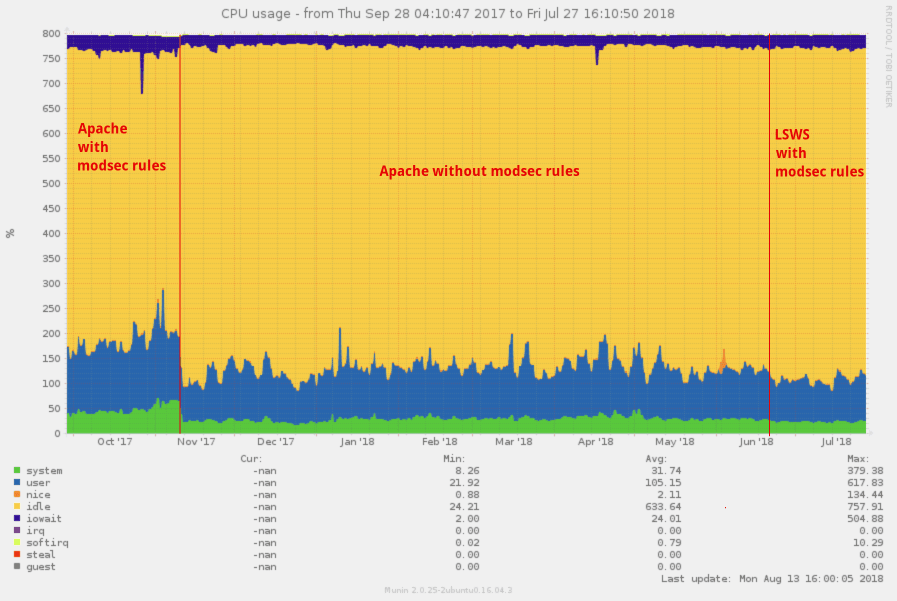
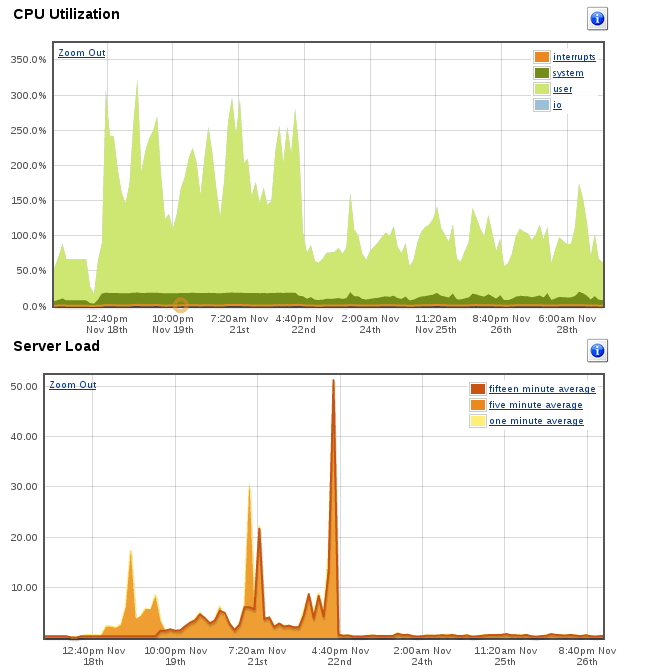
    Effectively, we went from a server using up 180-200% of our CPU the majority of the time due to mod_security, down to roughly 100% when using LiteSpeed. What is even more amazing is that the decrease of 80-100% CPU is despite an increase in traffic of 10.8% (from 42.06 million to 46.6 million requests).

    LiteSpeed vs. Apache WAF

    In the screenshot above you’ll see how our CPU usage changed.

    In the first section we see Apache with CWAF modsec rules. At the first red line we decided to disable the rules for the given server. At the second red line in mid-June, we decided to switch to LiteSpeed and then enable the CWAF modsec rules again, decreasing the CPU by a further 10-25%.


    In the above screenshot, we see that the traffic is rather stable with an increase in traffic in the last couple of weeks.

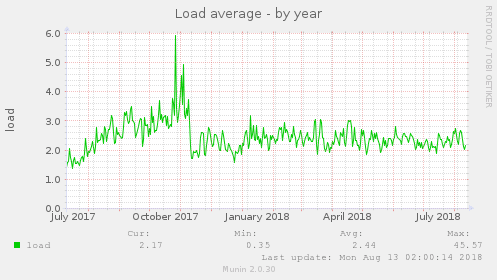
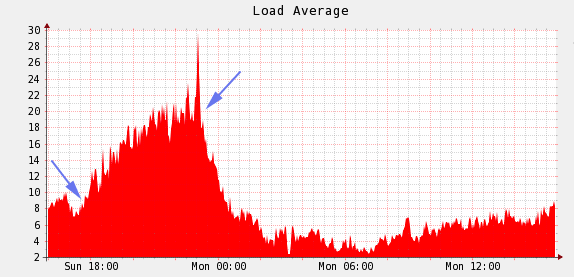
    And if we take a look at the Unix load, we also see a massive drop there as well.

    As you can see over time at the beginning of the Unix load graph, we’re seeing a slow increase in load – the load increase is consistent with the rate of growing traffic over the months, and also as new customers would get on board the server.

    How to Enable CWAF in cPanel for LiteSpeed

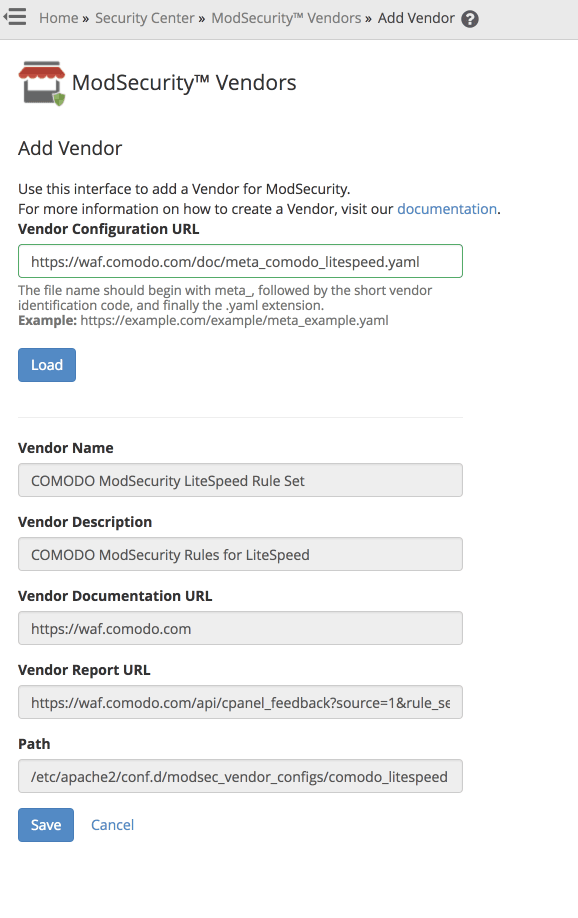
    Since LiteSpeed requires another set of rules compared to the Apache ones from CWAF, we have to use a new vendor. You can use “ModSecurity™ Vendors” from cPanel within WHM.

    In the ModSecurity™ Vendors page, click Add Vendor. Supply a Vendor Configuration URL, i.e. https://waf.comodo.com/doc/meta_comodo_litespeed.yaml. Click Load, which loads the vendor information in the fields below, and then click Save.

    This will automatically enable the ruleset, and ensure that updates to the ruleset are downloaded every night. It will also trigger a restart request to LiteSpeed.  So, the rules will be active seconds after you’ve clicked the Save button.

    The Server Hardware Specs

    CPU: Intel Xeon E5-1630 v4 @ 3.70GHz (4C/8T)
    RAM: 64GB DDR4 2400 Mhz ECC Memory
    Disks: 2x480GB Intel DC S3520 SSDs (for MySQL) and 2x2TB HGST Ultrastar 7K4000 Spinning disks for OS and files

    Who is Hosting4Real?

    We are a small Dutch-based company focusing on high-performance shared web hosting. We try to kill the bad reputation of the shared hosting market by offering extremely fast (and scalable) web hosting. We’re addicted to performance, and we use best-in-class software such as LiteSpeed to help us handle traffic peaks, as well as our own in-house-developed Content Delivery Network

    —
    Our thanks go to Lucas for sharing his story. Readers, if you have a LiteSpeed success story that you would like to share, drop by our Slack community, and let us know what you have in mind!

  • Customer Showcase: LSCache Provides All-in-One Optimization for WordPress

    Customer Showcase: LSCache Provides All-in-One Optimization for WordPress

    Customer Showcase: LSCache Provides All-in-One Optimization for WordPress

    Sergio Alfaro of the online shop Invitaciones y Tarjetas de Cumpleaños GRATIS needed a way to maximize his site’s performance without introducing third-party-plugin conflicts. LiteSpeed Cache for WordPress to the rescue! Below is the Invitaciones y Tarjetas de Cumpleaños GRATIS story as told by Sergio to LiteSpeed. Read on to see how LSCache Provides All-in-One Optimization for WordPress!

    Customer Profile

    • Store: Invitaciones y Tarjetas de Cumpleaños GRATIS located in Spain, EU
    • Hosting Provider: Mundiserver, using OVH server located in France, EU
    • WordPress Version: 4.9.1
    • LiteSpeed Cache Plugin Version: 1.8
    • Store Configuration: Standard WordPress installation
    • Average Traffic: 20,000 unique visitors/month with 45,000 page views/month
    • 3rd Party Plugins: LiteSpeed Cache, Yoast SEO, All in One WP Security, Complete Analytics Optimization Suite, Mailster, etc.

    The Invitaciones y Tarjetas Story

    Customer Showcase: Invitaciones y Tarjetas de Cumpleaños GRATIS

    The Challenge

    1. Maximize speed improvements without JS/CSS conflicts or third-party-plugin conflicts
    2. Avoid having to use a lot of plugins to optimize the website, manage the CDN, manage cache, etc.

    Before

    We used a “shared hosting” wordpress specialist hosted in Spain. I say “shared hosting” but really they were bigger dedicated servers with a small number of accounts assigned to each one and they used Cloud Linux to assign the resources.

    Our Setup

    The host provided:

    • 2GB RAM and 2 CPU cores
    • The host’s own WordPress plugin
    • nginx with Varnish
    • Strong rules to avoid WP hacking
    • Image optimization via a one-click server solution

    Along with the host’s own WP plugin, I used the premium WP Rocket plugin and tried the Autoptimizer plugin, too. I was hoping that the speed would be better than before, especially the time to first byte, but the total time to load continued to be very high in all combinations I tried.

    Another big problem was that the cache expired quickly and needed to be re-cached manually by the visitors. I dedicated several weeks to testing other solutions: W3 Total Cache was very complex, introduced many issues for my website and didn’t give me good results. WP Rocket worked easily and provided better results on speed test pages but really didn’t improve the total load time very much. I tried many other caches and optimization plugins but the best I was able to achieve was to load the homepage in around 3.5 seconds. Internal pages that had Adsense loaded in 5-10 seconds.

    The Pagespeed/YSlow scores, Pingdom and Webpagetest normally resulted in C or D scores and were never better than a B.

    After

    Now we have our own dedicated server where we store a lot of websites, many of them complex multistore/multilanguage Magento stores using the LiteMage plugin, along with several WordPress sites. For this reason, we use CloudLinux too, to work exactly in the same manner that our previous hosting did: separating all of the WHM accounts and limiting the assigned resources. In this way, we can provide unlimited resources to some domains and limited CPU/RAM to others.

    We have had amazing results with a Magento store that was hosted by Aspiration Hosting,using LiteSpeed Web Server with LiteMage, so we really are big fans of LiteSpeed. And so without any doubt, we bought a 4 CPU license for this server.

    For the https://www.invitacionesytarjetas.gratis website we limited the resources to 2 CPU cores and 2GB of RAM too: exactly the same as in our previous hosting.

    We installed the LiteSpeed Cache plugin for WordPress, and without modify anything, we noticed a very big speed improvement – simply using the default setup. And once we saw that this plugin is a really an All-in-One optimization suite, we started playing with different options.

    Current Plugin Configuration

    • Cache: All options enabled except Cache Mobile.
    • Optimize: All options enabled, including DNS Prefetch
    • Tuning: We’ve excluded one JS file from minification to avoid a conflict with another plugin. This is an awesome feature because you can continue using the Minimize/Combine JS options without the need to fully disable them if a conflict arises.
    • Media: LazyLoad features are off because our template already handles that feature. Image WebP Replacement is enabled.
    • CDN: We have enabled Cloudflare. We use the free account, as our website is worldwide oriented in the Spanish language, not only for Spain, and a CDN can always help. We set Load JQuery remotely to Google.
    • Everything else uses the default setting.

    Another great feature integrated in the plugin is Image Optimization. We have achieved Level 5 here with all images optimized: in total, 2429 images optimized and converted to webp format.

    I can’t forget to mention the amazing crawler feature. We are using Yoast’s sitemap.xml to be sure that all posts and pages are properly crawled and cached. This tool helps to minimize the number of uncached pages a visitor will encounter.

    Results

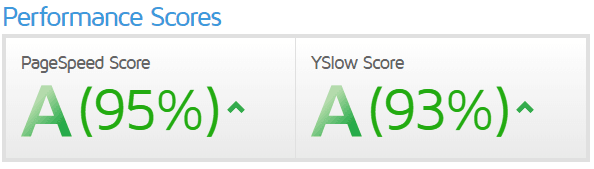
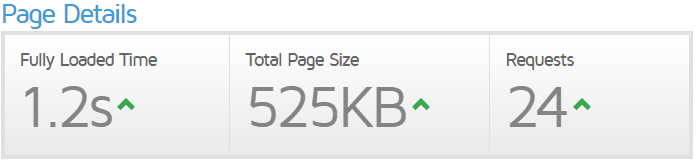
    GTmetrix: (Pagespeed A 95% / YSlow A 93% / 1.2s load):
    https://gtmetrix.com/reports/www.invitacionesytarjetas.gratis/hvFYT09v
     LSCache Provides All-in-One Optimization for WordPress Performance Scores
     LSCache Provides All-in-One Optimization for WordPress Page Details

    Pingdom tools: Performance B 88 – 377ms to full load
    https://tools.pingdom.com/#!/c5ntzi/https://www.invitacionesytarjetas.gratis
     LSCache Provides All-in-One Optimization for WordPress Pingdom Tools

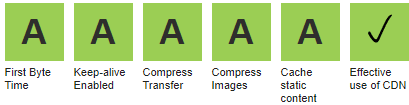
    Webpagetest: All in green A A A A A
    https://www.webpagetest.org/result/180116_3S_adf6f339b68fa9b7e31409979a63c8b0/
     LSCache Provides All-in-One Optimization for WordPress
     LSCache Provides All-in-One Optimization for WordPress

    So we are very happy with our LiteSpeed server in combination with the LiteSpeed Cache WordPress plugin.

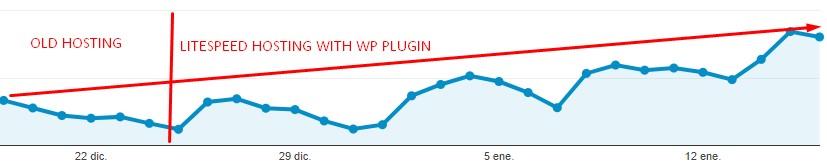
    We noticed an increase in organic traffic from Google within days of switching. No one can confirm that the main reason for such a gain is the 300% improvement in speed, or the exceptional ratings according to the Google requirements and guidelines, but at this screenshot from the last 30 days. Coincidence?

     LSCache Provides All-in-One Optimization for WordPress Traffic Increase

    Litespeed plugin is a real All-in-One plugin

    You no longer need to have 3-4 different plugins to achieve what you need. Often the use of multiple plugins can introduce conflicts. Finding the right combination of plugins with a good collection of features and the ability to work well together can be a challenge.

    LiteSpeed’s plugin has the server cache, CSS/JS minification and combination with the option to exclude some files, CDN support, DNS prefetch, a built-in crawler, image optimization, and many more advanced features.

    Even better? You can install the plugin, and using the default options, start to see improved performance immediately. After a while, you can start playing with all of the options, enabling and testing the results to discover the combination that is best for your site.

    We see how the LiteSpeed team works very hard adding a lot of new options each week to their plugin. They listen to the users demands, issues notifications and fix problems quickly. So, you can expect the best real solution for your speed problems.

    —
    Our thanks to Sergio for sharing his story! This is our first Customer Showcase in some time, and we would love to see more of them here. Have you experienced the LiteSpeed difference? If you would like to share your story with our readers, drop me a line, and we can discuss it. –Lisa

  • LiteMage Showcase: No Room To Optimize? Try LiteMage

    LiteMage Showcase: No Room To Optimize? Try LiteMage

    Sustainable Furniture2

    Welcome to the LiteMage Showcase! This is a series of blog posts where we take a look at Magento site owners using LiteSpeed Web Server + LiteMage Cache and highlight how LiteMage has uniquely benefited them. This week we are featuring Sustainable Furniture, a business based in Cornwall England specializing in ethically and sustainably sourced furniture and accessories.

    (more…)

  • LiteMage Showcase: Caching Made To Order

    LiteMage Showcase: Caching Made To Order

    x-litespeed-cache: hit,litemage

    Welcome to the LiteMage Showcase! This is a series of blog posts where we take a look at Magento site owners using LiteSpeed Web Server + LiteMage Cache and highlight how LiteMage has uniquely benefited them. This week we are featuring Rafasshop, a Spain-based business specializing in providing wholesalers with t-shirts, polo shirts, sweatshirts, and many other customize-able textile products.

    (more…)

  • LiteMage Showcase: 93.5% Faster Shoes

    LiteMage Showcase: 93.5% Faster Shoes

    x-litespeed-cache: hit,litemage

    Welcome to the LiteMage Showcase! This is a series of blog posts where we take a look at Magento site owners using LiteSpeed Web Server + LiteMage Cache and highlight how LiteMage has uniquely benefited them. This week we are featuring Izy Shoes, a Greece-based business specializing in women and children’s shoe sales!

    (more…)

  • New Case Study: WiredTree Uses LiteSpeed Web Server to Save Users Money

    New Case Study: WiredTree Uses LiteSpeed Web Server to Save Users Money

    eTeknix CPU and Load

    Our newest case study shows how WiredTree uses LiteSpeed Web Server to save their users from having to upgrade their hardware. (more…)

  • LiteSpeed Speeds Up XenForo in New Case Study

    LiteSpeed Speeds Up XenForo in New Case Study

    ForoMTB Load Graph

    Our second case study shows LiteSpeed Web Server greatly improving page speeds on a huge XenForo site. (more…)