Tag: anti-ddos

  • LiteSpeed Addresses HTTP/2 DoS Advisories

    LiteSpeed Addresses HTTP/2 DoS Advisories

    Summary

    On Tuesday, August 13th, 2019 a family of eight HTTP/2 security advisories was disclosed publicly in Vulnerability Note VU#605641.  We examined our software and discovered that the flagship LiteSpeed Web Server and LiteSpeed ADC products are not vulnerable to seven of the eight potential attacks.  In fact, even the one troublesome attack cannot cause any service outage: all it can do is waste computer resources.  Nevertheless, today, August 15th, 2019, LiteSpeed Technologies releases updated server software that addresses all of these security vulnerabilities:

    Note: We have also added the fixes to LSWS 5.3.8 build 7.

    Timeline

    • Spring 2019: Netflix finds vulnerabilities in several HTTP/2 implementations.
    • 1pm EDT, Tue Aug 13: HTTP/2 security advisories are disclosed.
    • 3 pm EDT, Tue Aug 13: LiteSpeed begins tests to see whether its software is vulnerable.
    • 10 pm EDT, Tue Aug 13: Tests are completed and plan of action is agreed upon.
    • 1 am EDT, Wed Aug 14: Software fixes are complete.
    • Wed Aug 14: Fixes are ported to all our products and verification tests are performed.
    • 5pm EDT, Thu Aug 15: Security updates for LiteSpeed software are available.

    Background

    As early as May of this year, security researchers at Netflix examined several HTTP/2 implementations.  What they discovered were several avenues for potential DoS attacks.  Netflix teamed up with Google to inform HTTP/2 software vendors of potential vulnerabilities and to coordinate a synchronized software update rollout.  No one alerted us, however, and we learned about these vulnerabilities two days ago from the public announcement. Meanwhile, other vendors have had the luxury to spend months to fix their software.

    LiteSpeed HTTP/2 Implementation Holds Up Well

    The good news is that LiteSpeed software does well in the face of these attacks.  In fact, only one of the potential vulnerabilities, CVE-2019-9516 (a.k.a. Zero-Length Headers Leak) is present in LiteSpeed Web Server and ADC.  A malicious client that sends a stream of zero-length header names and values causes the server to waste CPU cycles and to keep allocating memory for the duration of the connection.  In our testing, even when under such an attack, the server continued to process other connections with no perceptible performance impact. LiteSpeed closed the offending connections after 60 seconds, releasing excess memory.  Nevertheless, even though this attack cannot cause a service outage, the wasted CPU cycles is something we won’t accept.

    Advisories in Detail

    Below, we list the individual security advisories and their potential impact on our software — LSWS, ADC, and OpenLiteSpeed — before today’s new releases.  However, the new releases mitigate all of these attack scenarios.

    CVE-2019-9511 “Data Dribble”

    This attack does not affect LiteSpeed software

    CVE-2019-9512 “Ping Flood”

    Under this attack, LSWS and ADC use slightly more memory than usual and use 100% CPU, but continue to serve other traffic.  LiteSpeed closes the attacking connection in 20 seconds.

    OpenLiteSpeed enters a busy loop and cannot serve other traffic.

    CVE-2019-9513 “Resource Loop”

    LiteSpeed’s HTTP/2 implementation uses an efficient priority mechanism (not a tree) and thus pays no price when priorities change.

    CVE-2019-9514 “Reset Flood”

    This attack does not affect LiteSpeed software

    CVE-2019-9515 “Settings Flood”

    Same as Ping Flood above: LSWS and ADC cope well. OpenLiteSpeed is effectively DoSed.

    CVE-2019-9516 “0-Length Headers Leak”

    LSWS, ADC, and OpenLiteSpeed keep on allocating memory and using CPU in this attack scenario, but are still able to serve other traffic.  LiteSpeed closes the attacking connection in 60 seconds.

    The damage is limited to wasting computer resources: CPU and memory.  The amount of memory the server allocates is proportional to the volume of incoming traffic.  Because the server closes the malicious connections after a period of time and releases memory, this attack cannot take down LSWS or ADC.

    CVE-2019-9517 “Internal Data Buffering”

    This attack does not affect LiteSpeed software

    CVE-2019-9518 “Empty Frames Flood”

    This attack does not affect LSWS and ADC: no memory increase and no impact to service.  More CPU cycles are used to process frames.

    OpenLiteSpeed gets stuck in a loop and cannot serve other traffic.

    Mitigation

    The updates introduce several heuristics to detect an abnormally high frequency of control or unusual (e.g. empty) frames.  LiteSpeed closes offending connections forthwith.

    When the outgoing buffer is under pressure, the processing of incoming frames is suspended, preventing allocating excessive amounts of memory to keep up with incoming data.  This feedback mechanism is a natural and effective defense against potential future DoS attacks.

    Looking Ahead

    It surprises us that we didn’t receive notification of the impending security advisories.  Not only were we the HTTP/2 pioneer — at one point powering 96.5% of all websites that used HTTP/2 — but we also offer the best HTTP/2 performance in the world, beating the next fastest implementation by a factor of 8.  (Head over to https://http2benchmark.org/ to see for yourself.)

    We have reached out to relevant parties to ensure that LiteSpeed Technologies is kept in the loop the next time around.

    In all, it was two busy days.  We are proud of the limited impact these security advisories had on our software and of delivering security updates in such a short time.

  • reCAPTCHA Server-Wide Protection

    reCAPTCHA Server-Wide Protection

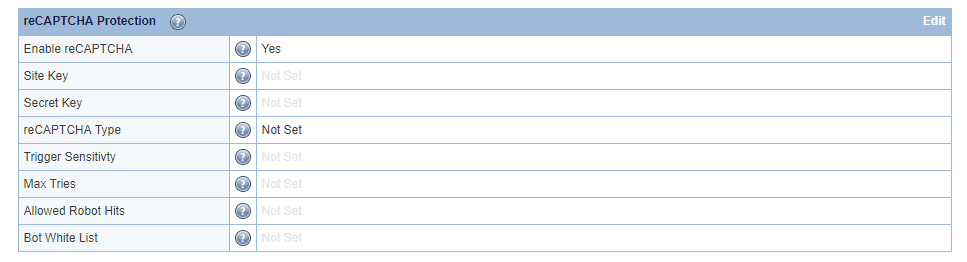
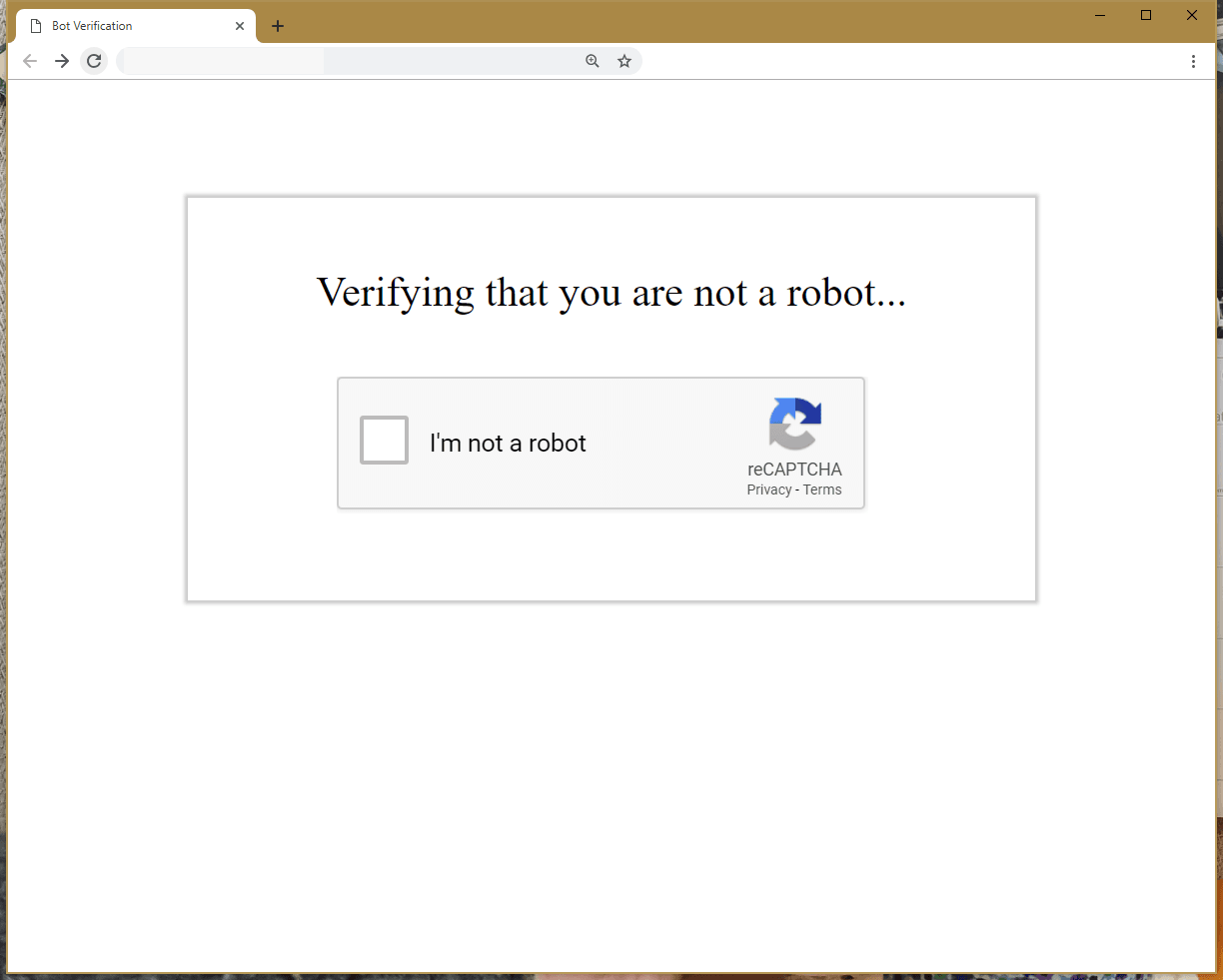
    reCAPTCHA Server-Wide Protection: Verifying that you are not a robot

    We are very excited to introduce a new feature to the LiteSpeed family: reCAPTCHA!

    reCAPTCHA is yet another form of DDoS Server-Wide Protection that we provide in order to maintain excellent performance and reduce downtime. You can find out more about our DDoS Protection features here.

    What is reCAPTCHA?

    Most people use the reCAPTCHA system to detect whether a visitor is a human or a robot. When a visitor accesses a site or wants to submit a form, they must complete a challenge. The challenge makes a request to Google’s reCAPTCHA server for validation. Google responds to the challenge with a success or failure message. If successful, the site considers the visitor human, and permits form submission.

    Most often, sites implement reCAPTCHA in the middle of a page, to ensure humans are the only submission sources. While this can help with data validation, by this point the visitor has already loaded the page. If the site is fully featured, it likely uses some backend technology – PHP, Ruby, Python, etc. If the site is under attack, a reCAPTCHA plugin will only help with validating results, but the server will still be bogged down with requests to the backend.

    However, LiteSpeed recognizes a higher potential to be had with reCAPTCHA. reCAPTCHA provides more control when compared to most DDoS protection solutions. Good actors will be able to access the site and bad actors will be stopped, providing a powerful tool to mitigate resource usage if we avoid triggering backend engines.

    The LiteSpeed Advantage

    LiteSpeed provides flexibility and scalability with our reCAPTCHA implementation. For starters, our reCAPTCHA page uses SSI. It is essentially a static page. When a visitor completes the challenge, LiteSpeed adds the IP to a whitelist. Once on the whitelist, we do not need to verify the visitor again in the future. This means that the only cost to the server for visitors redirecting to our reCAPTCHA page is equivalent to serving a small resource. On a website that runs, for example, WordPress, this means handling over 10x more requests than an NGINX server with FCGI Cache, assuming the attacker is visiting a cached page.

    Another advantage for LiteSpeed: reCAPTCHA doesn’t always have to be enabled. The LiteSpeed implementation uses a sensitivity scale. reCAPTCHA is activated automatically when the server undergoes heavy load.. When the load eases up, we deactivate reCAPTCHA, leaving a frictionless experience for the visitors. In addition to the sensitivity scale, you can also use rewrite rules to enable reCAPTCHA. With rewrite rules, you can better control where reCAPTCHA activates down to a page-by-page basis

    How does it work?

    reCAPTCHA Server-Wide Protection: ScreenShot

    LiteSpeed redirects non trusted visitors to a static page when the server detects high load. The static page generates a challenge for the visitor. Upon completion, the verification runs through LiteSpeed. LiteSpeed comes bundled with an executable that takes the challenge response and forwards the request to Google. If successful, Google replies with a response header that indicates success to LiteSpeed. Future visits by the same client will not be subjected to further reCAPTCHA checks.

    LiteSpeed denies clients that fail by dropping the connection or returning a 403 error.

    We permit access to a predefined list of “good bots”. Admins can add to this list via configuration options. In addition, good bots are not completely unlimited – if they visit the server too frequently (another configurable option), we redirect them to reCAPTCHA. This denies access in case a bad actor attempts to bypass verification by impersonating a good bot.

    How to Configure LiteSpeed Products to Use reCAPTCHA:

    You can enable reCAPTCHA at the Virtual Host level for LSWS Native Virtual Hosts as well as Apache Virtual Hosts (with or without a control panel).

    For LSWS native, you can find the server-level reCAPTCHA settings in the Web Admin under Configuration > Server > Security after CGI Settings. At minimum, Enable reCAPTCHA and Trigger Sensitivity** should be set.

    • Enable reCAPTCHA enables it server wide.
    • Trigger Sensitivity** is a scale to configure the server “busy-ness” sensitivity level. Set to 0 to disable reCAPTCHA, and 100 to always trigger reCAPTCHA.

    Other options

    • Site Key & Secret Key are keys that you can generate yourself for Google’s reCAPTCHA. LiteSpeed has a default set of keys, so this is not required, but is available if you prefer to use your own set of keys. For server wide protection that needs to cover a lot of domains, make sure Verify the origin of reCAPTCHA solutions is unchecked. Otherwise, you may need to apply a key for each domain.
    • reCAPTCHA Type indicates to the static page which type of reCAPTCHA to use. Currently, reCAPTCHA v2 Invisible and reCAPTCHA v2 Checkbox are available. Invisible will attempt to submit a reCAPTCHA challenge without user input, but it is still possible for the user to need to complete a challenge. Checkbox requires the visitor to check a box before the challenge is issued.
    • Max Tries is the number of attempts the visitor is allowed before LiteSpeed blocks the IP. Sometimes, reCAPTCHA may not show up properly for the visitor, so we recommend setting a low number greater than 1. 3 is the default.
    • Allowed Robot Hits is the number of visits allowed by a bot to the server per 10 seconds. Each visit by the bot that triggers the reCAPTCHA logic (most every request that is “normal”) will increment the count. The default is 3, but if your sites have some bots that crawl the sites, we recommend that you have a higher count.
    • Bot White List is a Regex-supported list of user agents to count as a “Good Bot”. Some bots such as Googlebot are considered good by default (Googlebot is unlimited if we can confirm that the visitor is in fact Googlebot.), but this is provided for a customized list, if needed.

    **Trigger Sensitivity is a LSWS configuration only. The ADC (and soon, OLS) use a concurrent HTTP connection count and a concurrent HTTPS connection count.

    Tips and Tricks

    You can configure or override reCAPTCHA on a per-vhost basis, however, you must enable reCAPTCHA at the server level in order for it to take effect at all.

    reCAPTCHA Server-Wide Protection: Setup

    Assuming you have enabled reCAPTCHA at the server level globally, you can override the settings at a virtual host level, but how you do so depends on which environment you are using.

    Override/Disable for Apache Virtual Hosts

    As of LSWS v5.4RC4, you can configure vhost-level reCAPTCHA via the LsRecaptcha directive in the virtual host include configuration.

       LsRecaptcha (0-100)
    

    The 0-100 value defines or overrides Trigger Sensitivity for the virtual host. When LsRecaptcha is set to 0, it means the reCAPTCHA feature has been disabled for that virtual host.

    NOTE: The LsRecaptcha directive cannot be used in .htaccess files.

    Override for LiteSpeed Native Virtual Hosts

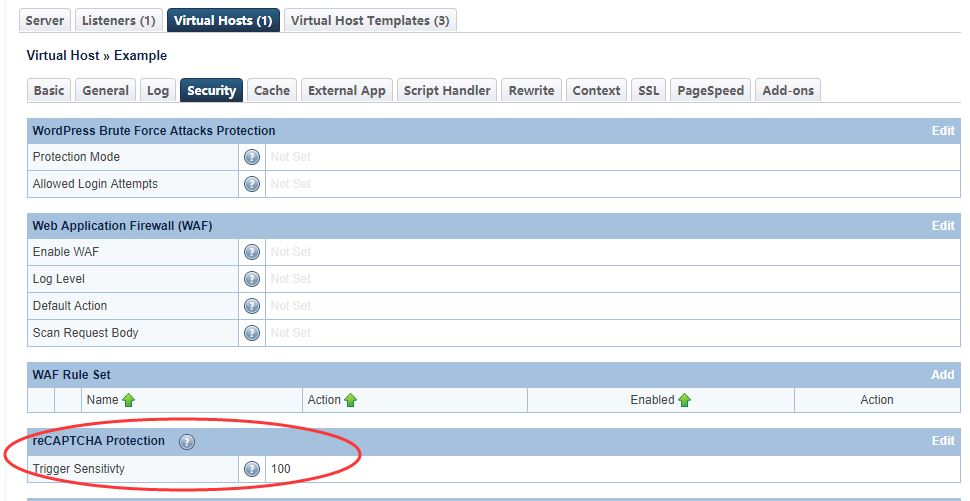
    Use the LSWS WebAdmin console to override reCAPTCHA in LSWS native mode.

    Navigate to Configuration → Virtual Hosts → Security → reCAPTCHA Protection

    reCAPTCHA Server-Wide Protection: LiteSpeed Native Trigger Sensitivity

    Advanced Configuration: Define reCAPTCHA Actions Through Rewrite Rules

    If you want to further define the reCAPTCHA action as deny or drop, you can use one of the following rewrite rule directives in control panel virtual host document root .htaccess:

    [E=verifycaptcha] or [E=verifycaptcha: ACTION]

    [E=verifycaptcha] will always redirect to reCAPTCHA until verified. ACTION can be deny to return a 403 or drop to drop the connection when Max Triesis reached. Until Max Tries is reached, the client will be redirected to reCAPTCHA.

    For example:

    RewriteCond SOME-CONDITIONAL-CHECK
    RewriteRule .* - [E=verifycaptcha]
    

    (SOME-CONDITIONAL-CHECK would be a suspicious UA, IP address, etc.)

    NOTE: In most cases, rewrite rules will override the default server behavior. However, in cases where trigger sensitivity is high, visitors may be sent directly to reCAPTCHA before the rewrite rules can even be processed.

    Customize the Good Bots List

    Google bots are considered good bots because they help index your site. However, they cannot do their job properly without receiving the correct page. The Bot Whitelist configuration may be used to specify bots that you may need for your site.

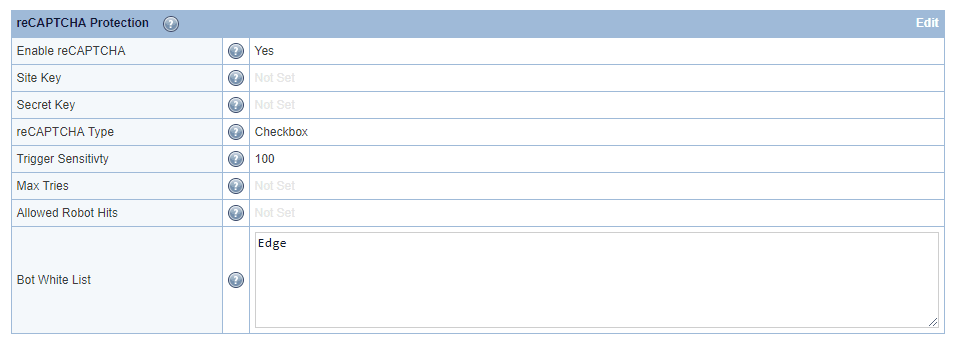
    reCAPTCHA Server-Wide Protection: Bot Whitelist

    Here, we have configured ‘Edge’ in the Bot Whitelist text area. Bot Whitelist is a ‘contains’ match, but regex may be used as well.
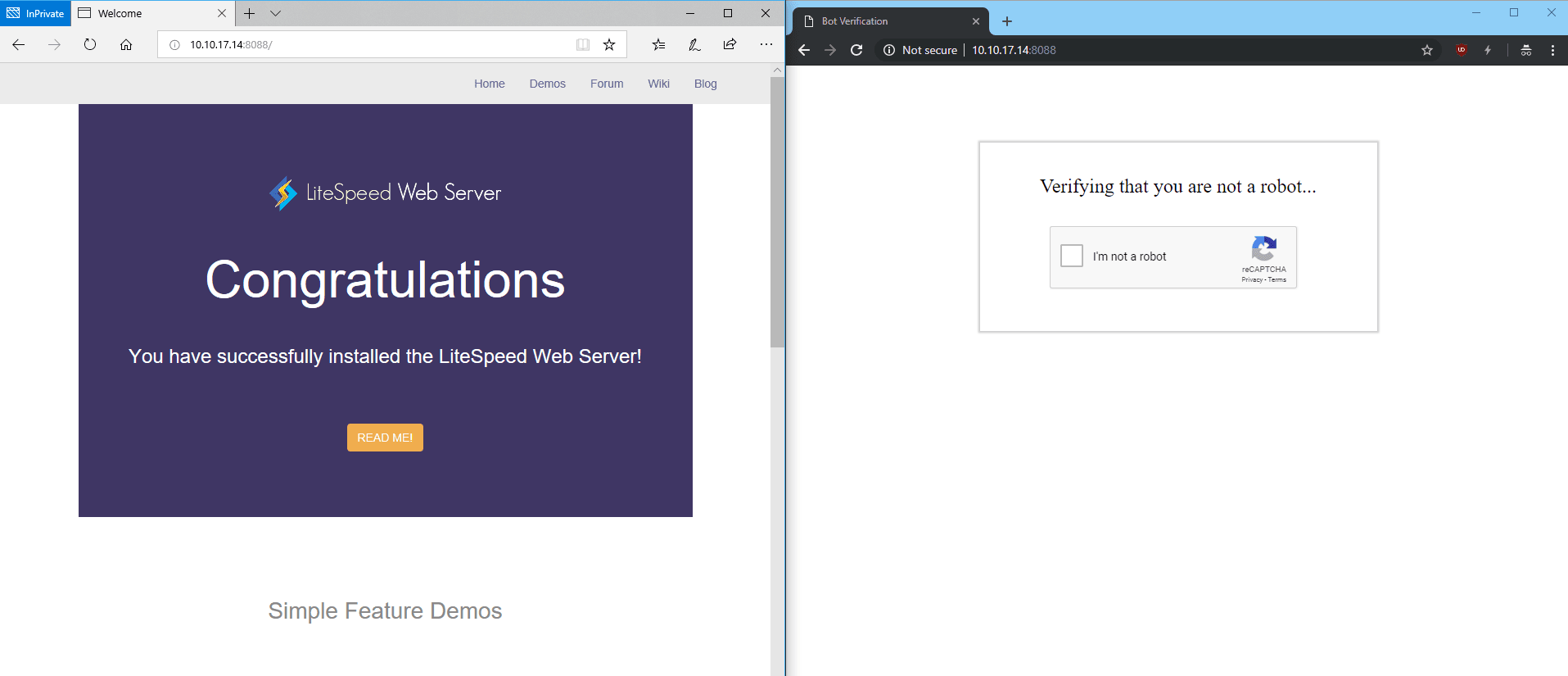
    After restarting, browsers containing Edge in the user-agent header will bypass reCAPTCHA:

    reCAPTCHA Server-Wide Protection: Bypassing reCAPTCHA

    The Allowed Bot Hits configuration may be used to limit how many times a good bot (including Googlebot) is allowed to hit a URL before it is redirected to reCAPTCHA as well. This may be useful to prevent bad actors from bypassing reCAPTCHA using a custom user agent.

    Customizing the reCAPTCHA Page

    The default reCAPTCHA page is generic. If you would like to customize the page, you may do so by creating a file at $SERVER_ROOT/lsrecaptcha/_recaptcha_custom.shtml.

    There are two script tags that are required and it is strongly recommended to avoid changing the form and the recaptchadiv unless you know what you are doing. There are three echos within the page itself. Those are used by the web server to customize the reCAPTCHA type and keys and specify any query string used.

    Beyond those required attributes, everything else is customizable. As noted before, please ensure that you have backups of the default page and your customized page. Note that the .shtml extension is required in order to use the LSWS configured type and keys.

    Trigger Sensitivity

    Trigger Sensitivity refers to the automatic reCAPTCHA sensitivity. The higher the value, the more likely reCAPTCHA Protection will be used. A value of 0 is equivalent to “Off” while a value of 100 is equivalent to “Always On”.

    Default values:

    • Server level: 0.
    • Virtual Host level: inherits server-level setting.

    Syntax: Integer value between 0 and 100.

    LiteSpeed calculates Trigger Sensitivity as the percentage of your server capacity used, based on the number of active connections. reCAPTCHA is activated when this formula is true:

    Active connections * 100 / Max Connections > (100 – Trigger Sensitivity)

    Other Good Things to Know

    As mentioned, LiteSpeed only redirects non-trusted visitors. Check the Access Control Settings to configure trusted IPs.

    LiteSpeed redirects to reCAPTCHA once every few seconds (up to 10 seconds), and throttles all other requests. This is to prevent triggering reCAPTCHA too often, which would result in an extremely difficult challenge.

    Sometimes, the reCAPTCHA static page hangs. This may be because a resource (.css, .js) has triggered reCAPTCHA. Wait a few seconds and try again. The page should redirect properly.

    reCAPTCHA is currently available on LiteSpeed Web Server v5.4RC1 and later, and LiteSpeed Web ADC v2.4 and later. Coming soon to OpenLiteSpeed.

  • DDoS Attacks Taken Offline By LiteSpeed Enterprise 5.1.13

    DDoS Attacks Taken Offline By LiteSpeed Enterprise 5.1.13

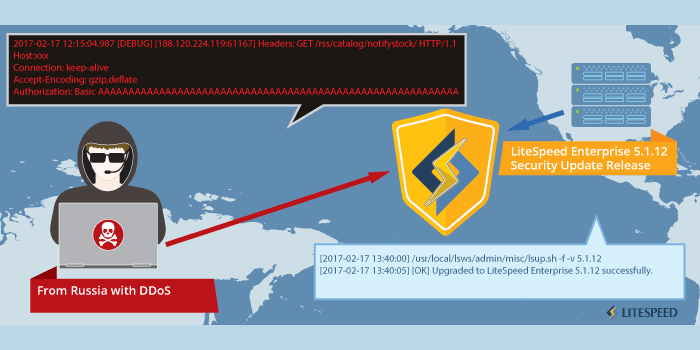
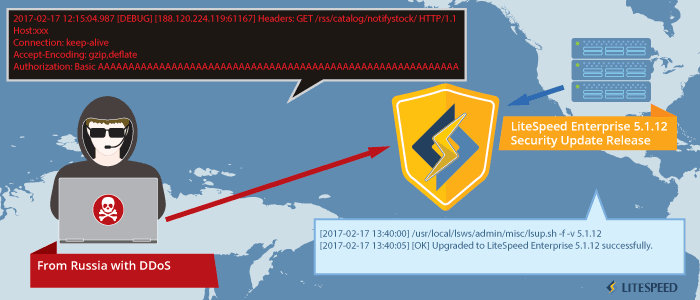
    LiteSpeed Enterprise servers around the globe were specifically targeted today by a surge of focused DDoS attacks.

    Our tech support staff was alerted to the problem and quickly worked with our customers to gain access to one of the affected servers. Within an hour we had identified the vulnerability and corrected it, releasing LiteSpeed Enterprise 5.1.13.

    LiteSpeed clients deploying LiteSpeed Enterprise should upgrade to 5.1.13 as soon as possible to avoid the DoS vulnerability.

    The attack focused on a heap buffer overflow bug that was only present during logging operations (after the request had completed processing). The effect was to cause the server to spin for a while then unduly terminate, causing service disruption. To the best of our knowledge, no remote code injection, no root escalation and no data was compromised.

    LiteSpeed Technologies is committed to providing the highest levels of service to our clients and ensuring that their sites remain protected and available at all times.

    Timeline of a DDoS Attack on LiteSpeed Servers

    12:15 EST: first reports of service disruptions
    12:45 EST: LiteSpeed tech support gains access to affected server
    13:15 EST: LiteSpeed tech support deploys first fix build
    13:40 EST: LiteSpeed tech support pushes bug fix build of 5.1.12
    14:05 EST: LiteSpeed tech support releases 5.1.13

  • LSMCD: A Persistent, Highly Scalable and Available Memcached Replacement

    LSMCD: A Persistent, Highly Scalable and Available Memcached Replacement

    LSMCD

    Think database web applications have to be slow? Think again! With our completely free and open source LiteSpeed Memcached, you can accelerate your site by alleviating database load dynamically!

    (more…)

  • Real Problem, Real Solution, Really Fast

    Real Problem, Real Solution, Really Fast

    LiteSpeed Fast

    From feature request to solution delivery in less than an hour.

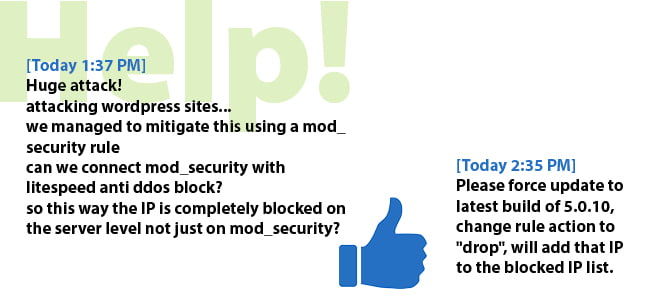
    Recently, there have been a number of large-scale brute-force attacks on WordPress sites. These attacks try to bypass WordPress security by attempting to log in with every possible combination of username and password, sometimes sending thousands of requests per second.

    Since these attacks began, one of our clients had all 50 of his hosted WordPress sites simultaneously attacked. He was able to mitigate these attacks using LiteSpeed’s mod_security rules, but wanted a way to easily and automatically block these IPs at the server level.

    We responded within an hour – modifying our code and publishing a new build that allowed the client to add offending IP addresses to the blocked IP list using mod_security rules. These IPs can then be easily grabbed from the blocked IP list and added to the server level firewall using a script – stopping the connection at the network level before it ever reaches LiteSpeed Web Server.

    That’s the kind of speed you can expect from LiteSpeed!

  • Why Your HTTP Server Can’t Block SYN Floods (And What You Can Do)

    Why Your HTTP Server Can’t Block SYN Floods (And What You Can Do)

    SYN floods are back in vogue. As DDoS-ing becomes more and more of an industry and the resources necessary for an effective attack become more accessible, SYN flooding has become more popular. Unfortunately, LiteSpeed Web Server (or Apache or Nginx or Lighttpd or Cherokee or Jetty or Tomcat or …) can’t help you with SYN floods. Here’s why and what you can do (including signing up for our free anti-DDoS proxy service): (Check our wiki for simple steps to hardening your kernel against SYN floods. Both the wiki and this article are geared toward hardening a Linux kernel only.) (more…)

  • DDoS Update: GoDaddy EU Hit

    DDoS Update: GoDaddy EU Hit

    More DDoS attacks in the news, and now hitting something closer to home for most of our users: GoDaddy EU announced that a DDoS attack on Monday caused problems in their system for over 24 hours. (more…)

  • Be Very Afraid: DDoS Attacks in the News

    Be Very Afraid: DDoS Attacks in the News

    Sorry for the sensationalistic headline. We don’t want you to overreact. Yes, the Internet is dangerous now, but it’s always been a dangerous place. Below you’re going to find a bunch of articles pointing out just how dangerous the Internet is (and especially focusing on DDoS attacks) (more…)

  • To the Rescue: LiteSpeed’s Free Anti-DDoS Service is Back!

    To the Rescue: LiteSpeed’s Free Anti-DDoS Service is Back!

    After taking a couple months to retool, we’re bringing back our ever-popular, FREE anti-DDoS proxy service. (more…)

  • LiteSpeed Against Thc-ssl-dos

    LiteSpeed Against Thc-ssl-dos

    thc-ssl-dos script was published two days ago, and it has been posted all-over the internet. You may wonder if LiteSpeed is vulnerable to this attack. The short answer is (more…)