
Category: Featured Posts

The latest LiteSpeed news and featured content. Includes series such as WordPress Wednesday, Developer’s Corner, Notes from the Road, Customer Showcase, and more.

  • Stretch Your Hardware Budget With LiteSpeed

    Stretch Your Hardware Budget With LiteSpeed

    Stretch your hardware budget

    Times are tough for hosting providers. Hardware costs are climbing. Between tariffs, supply chain disruptions, and rising component costs, your margins are being squeezed from every angle.

    Your clients’ needs are outpacing your existing hardware, but purchasing additional servers is becoming cost-prohibitive.

    Enter LiteSpeed. With LiteSpeed Web Server, you can host more customers on the hardware you already own.

    Hardware Costs Are Not Coming Down

    In recent months:

    • Server component prices have risen significantly, and these price hikes are beginning to be felt in server and infrastructure costs.
    • Tariff uncertainty is adding volatility to purchasing decisions and making long-term procurement planning more difficult.
    • Colocation and power costs are increasing.

    Hosting providers are caught between raising prices and losing customers.

    But there is a third option: LiteSpeed Web Server.

    Concrete Ways LiteSpeed Saves Money

    LiteSpeed can often handle more traffic than Apache without requiring a hardware upgrade.

    LiteSpeed’s event-driven architecture can process thousands of concurrent connections with a fraction of the memory that traditional Apache deployments would require. That higher concurrency means you can serve more customers per machine.

    LSCache is LiteSpeed’s built-in full-page caching solution. By serving cached pages, LSCache reduces repeated PHP execution and unnecessary database queries, lowering CPU load. It also eliminates the need for a separate Varnish layer, keeping your stack efficient and compact.

    LiteSpeed Web Server was the first production server to support HTTP/3 and QUIC. In fact, LiteSpeed helped write the specification as an active participant in the IETF working group. Built-in HTTP/3 support can reduce the need for extra layers in deployments that might otherwise rely on additional proxy infrastructure.

    LiteSpeed supports ModSecurity rules asynchronously for robust application-layer protection with lower overhead.

    Apache users can switch to LiteSpeed Web Server with minimal disruption, and typically without downtime. LiteSpeed is a drop-in replacement for Apache and supports Apache configuration and .htaccess files.

    LiteSpeed can significantly increase the amount of traffic each server can handle, allowing you to:

    • delay your next hardware purchase
    • extend the useful life of your existing hardware
    • reduce the number of nodes in a cluster

    If you can serve the same workload with fewer servers, power consumption drops and energy costs become easier to control, especially at scale.

    Why Now?

    The ROI window is now.

    • There is little sign of near-term relief in infrastructure costs
    • Every month you delay efficiency improvements is another month of unnecessary hardware and operating costs
    • The cost of a LiteSpeed license is typically a fraction of the cost of new hardware

    Audit your current server utilization and then sign up for a LiteSpeed trial to experience the difference for yourself!


  • Proxy n8n with LiteSpeed Web Server

    Proxy n8n with LiteSpeed Web Server

    n8n with LiteSpeed Web Server

    If you are running cPanel with LiteSpeed Enterprise and want to deploy a modern automation service such as n8n, the setup can be both straightforward and reliable.

    In this article, we will walk through a basic example of running n8n inside Docker on a cPanel server, then publishing it through LiteSpeed Enterprise using reverse proxy rules that support both normal HTTP traffic and WebSocket connections.

    Set up n8n

    Below is a n8n example docker-compose.yml used for the n8n.example.com domain:

    version: "3.8"
    
    services:
      n8n:
        image: docker.n8n.io/n8nio/n8n:latest
        container_name: n8n
    
        ports:
          - "127.0.0.1:5678:5678"
    
        environment:
          - TZ= America/Los_Angeles
          - N8N_HOST=n8n.example.com
          - N8N_PROTOCOL=https
          - N8N_PROXY_HOPS=1
          - WEBHOOK_URL=https://n8n.example.com/
          - N8N_EDITOR_BASE_URL=https://n8n.example.com/
          - N8N_ENFORCE_SETTINGS_FILE_PERMISSIONS=true
          - N8N_RUNNERS_ENABLED=true
        volumes:
          - n8n_data:/home/node/.n8n
    
        restart: unless-stopped
    
    volumes:
      n8n_data:


    A few points are worth highlighting here:

    • N8N_HOST, N8N_PROTOCOL, WEBHOOK_URL, and N8N_EDITOR_BASE_URL help n8n understand that it is being served behind HTTPS on the public domain.
    • N8N_PROXY_HOPS=1 is important when n8n is behind a reverse proxy, because it helps n8n trust the forwarded request information correctly.

    Learn more about n8n environment variables.

    Proxy Setup

    To support both HTTP requests and WebSocket traffic, we used Apache-style userdata include files in cPanel.

    We added the following:

    <IfModule mod_rewrite.c> 
    RewriteEngine on 
    RewriteRule (.*) http://localhost:5678/\$1 [P,L] 
    ProxyPass / ws://localhost:5678/ 
    </IfModule>
    

    to /etc/apache2/conf.d/userdata/ssl/2_4/n8examplecom/proxy.conf for the SSL configuration and to /etc/apache2/conf.d/userdata/std/2_4/n8examplecom/proxy.conf for the non-SSL configuration.

    This configuration allows the domain to proxy regular traffic to the n8n container on localhost:5678, while also passing WebSocket connections correctly.

    Note: The backend target is always plain HTTP because SSL termination happens at the web-server level.

    After saving the include files, we rebuilt and reloaded the web server configuration, like so:

    /scripts/buildhttpdconf
    systemctl restart lsws
    

    Domain access

    Once DNS, SSL, Docker, and proxy rules are all in place, you can visit the public domain at https://n8n.example.com.

    From there, register your account on the n8n instance and begin building workflows.

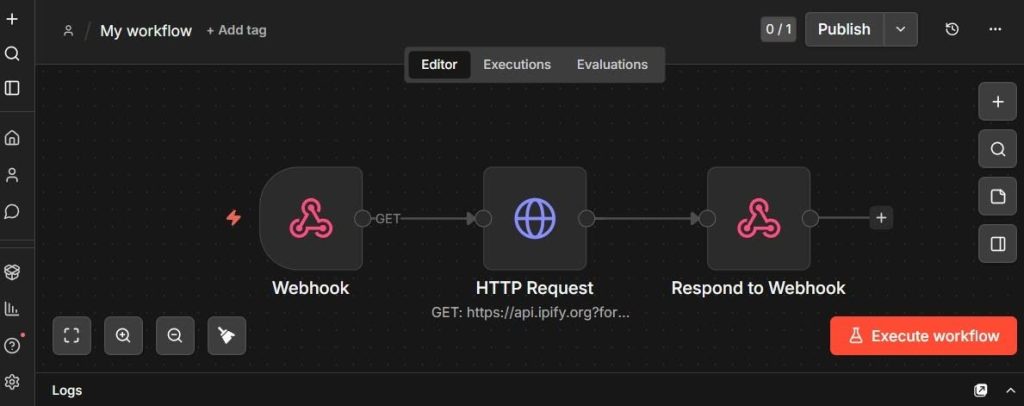
    Set up simple test workflow

    To confirm that the reverse proxy and application are working properly, create a simple test workflow:

    1. Receive a webhook request
    2. Make an HTTP request to api.ipify.org
    3. Return the detected IP address as JSON

    Webhook node

    Use these two URLs:

    • Test URL: https://n8n.example.com/webhook-test/test-api
    • Production URL: https://n8n.example.com/webhook/test-api

    Set the webhook response mode to Using "Respond to Webhook" node.

    HTTP Request node

    Create an HTTP Request node with:

    • Method: GET
    • URL: https://api.ipify.org?format=json

    This endpoint returns a simple JSON response containing the requester IP address.

    Respond to Webhook node

    Set the following:

    • Respond With: JSON
    • Response Body (Expression):
      {  
      "myIP": "{{$json.ip}}"  
      }  
    

    n8n workflow
    The image above shows what the workflow looks like in the editor.

    Activate the workflow

    Activate the workflow to validate the webhook.

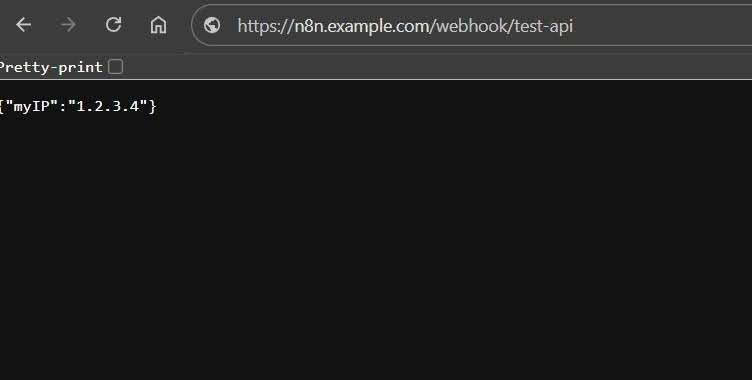
    n8n with LiteSpeed Web Server test output

    After activating the workflow, visiting the webhook URL in the browser should return a JSON response showing your IP address, like so:

    {"myIP": "192.0.2.0"}
    

    This is a simple but useful validation test, because it confirms:

    • the domain is reachable
    • HTTPS is working
    • the reverse proxy is forwarding requests correctly
    • n8n is processing the workflow
    • the response is being returned properly through LiteSpeed

    Conclusion

    Running n8n on cPanel with LiteSpeed Enterprise and Docker is practical. With the right proxy configuration, it is possible to support both standard HTTP traffic and WebSocket connections cleanly, while keeping the service accessible over HTTPS on its own domain.

    If you are looking for a clean way to publish n8n on a LiteSpeed Enterprise server, this is a solid approach.

  • Security Update for LSCWP

    Security Update for LSCWP

    Security patch for LiteSpeed Cache for WordPress

    We have a security update for LiteSpeed Cache for WordPress. Recently we were made aware of a vulnerability in the LiteSpeed Cache for WordPress plugin. We patched this vulnerability earlier this month, in v7.6.

    To protect your WordPress sites, please update to the latest version of the LSCache plugin immediately.

    This cross-site scripting vulnerability, reported by the Trustwave team, has been assigned CVE-2025-12450.

    Impact

    This vulnerability only affects those who have debug enabled:

    • Debug Log must be ON or Admin IP Only
    • Enable Cache must be ON

    With both of these settings in place, the vulnerability may be exploited when a visitor accesses a link with a particular malicious string appended to the URL.

    Since it’s not common to turn on debug mode and keep it on, we don’t expect this vulnerability to be frequently exploited.

    Actions

    We recommend that every site upgrade to the plugin version 7.6 or higher to patch this vulnerability.

    Timeline

    • October 14, 2025: Trustwave alerted us to the issue.
    • October 15, 2025: We patched the issue and released v7.6 to the WordPress repository
    • October 21, 2025: We added v7.6 to the list of stable releases in our control panel plugins

    Conclusion

    We thank Trustwave for bringing this issue to our attention. This vulnerability has been patched, so if you are keeping your LiteSpeed Cache plugin up-to-date, there is nothing you need to do. If you have not updated in a while, please do so today.