Category: QUIC Cloud

  • LSCWP 5.0: Auto CDN Setup

    LSCWP 5.0: Auto CDN Setup

    Automatic QUIC.cloud Setup in LiteSpeed Cache v5.0 for WordPress

    Version 5.0 of the LiteSpeed Cache for WordPress plugin has arrived, and it provides a simple automated process to get you started with QUIC.cloud CDN!

    Whether you prefer to stay in the driver’s seat and follow our existing manual onboarding procedure, or you’d like to let the plugin take the wheel, the end result is the same: your WordPress site powered by LiteSpeed Cache and QUIC.cloud CDN!

    Please Note: As of March, 2025, and Version 7.0 of the LiteSpeed Cache plugin, the CDN setup process has been simplified and completely changed. As such, we’ve rewritten the instructions below to reflect the new way of getting started with QUIC.cloud CDN.

    Enable QUIC.cloud services
    Enable QUIC.cloud services

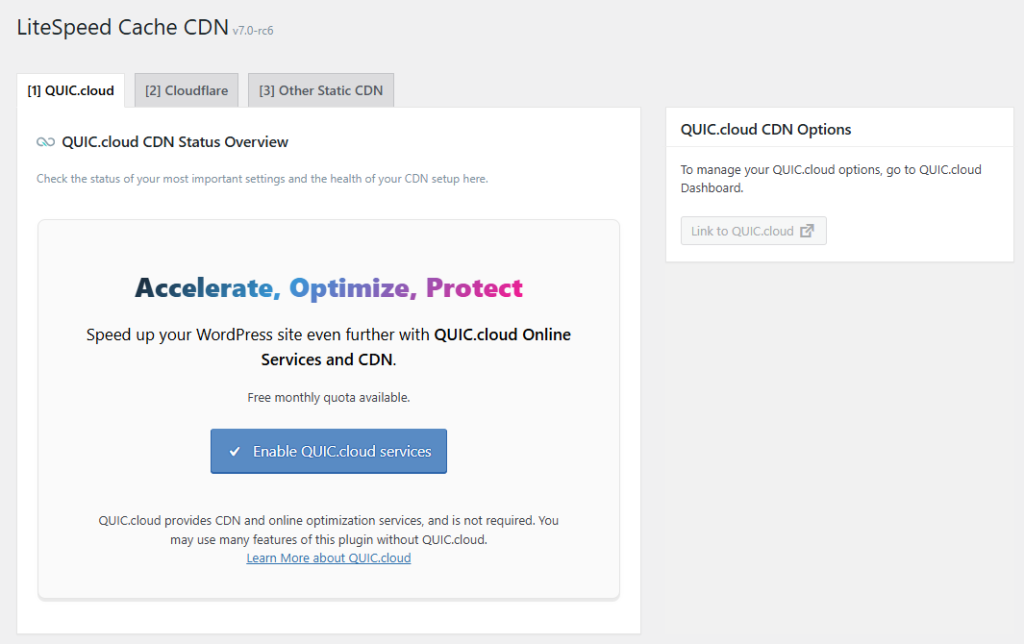
    We’re going to assume that this domain isn’t connected to QUIC.cloud yet, and that you are seeing an Enable QUIC.cloud services button. If this is not the case, and you have already connected your domain, you can skip a lot of what is in this blog post. You might prefer to check out the documentation, starting at the Enable QUIC.cloud CDN section.

    Press the Enable QUIC.cloud services button. QUIC.cloud will attempt to detect your server type and IP. Wait a few moments for this to complete.

    Create a QUIC.cloud Account

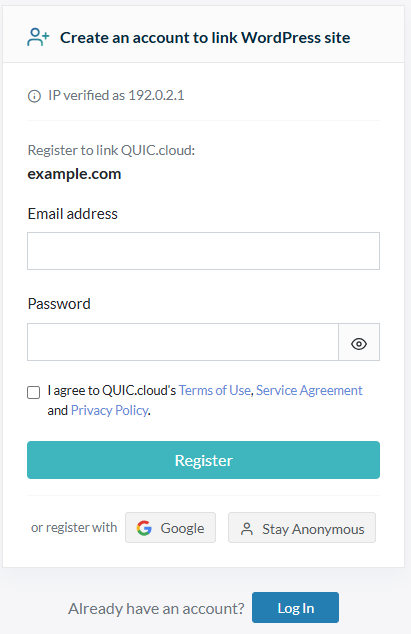
    Next, you’ll be prompted to create a QUIC.cloud account to link to your WordPress site.

    (If you already have a QUIC.cloud account for another domain, there is no need to create a new account. You can have multiple domains in your QUIC.cloud account. Log in to your existing account, and this domain will be added.)
    Create a QUIC.cloud account

    Enter your email address, choose a password, agree to the QUIC.cloud terms and conditions, and click Register. Check your email for a validation message from QUIC.cloud, and confirm your account by clicking the activation link within.

    Your QUIC.cloud-WordPress connection is complete!

    Set up the CDN

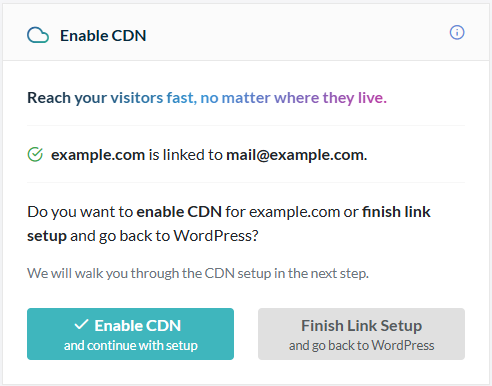
    Next, you’ll be prompted to choose whether to enable the CDN or finish linking without the CDN.
    Set up the CDN

    Click the Enable the CDN button.

    Point your DNS to QUIC.cloud

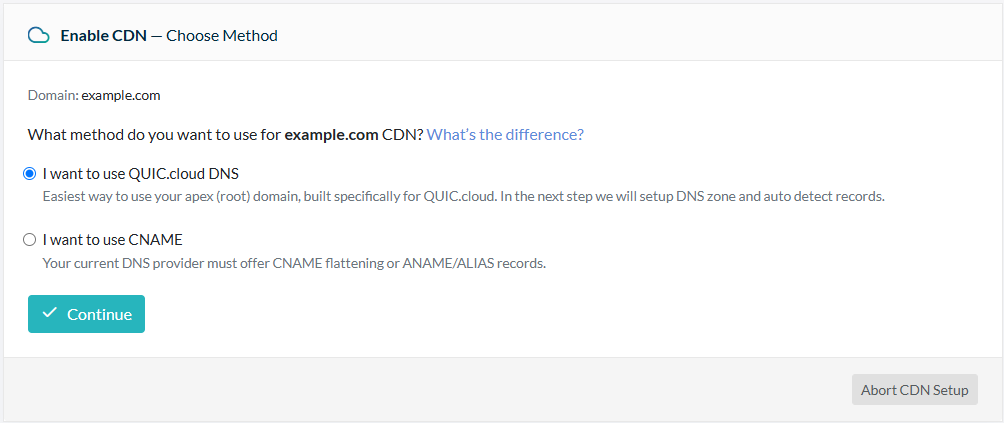
    If you plan to use QUIC.cloud CDN, you must point your domain’s DNS in our direction. You can either do this by updating CNAME records, or by switching to our own QUIC.cloud DNS service.

    For the purposes of this blog post we are going to assume you wish to use QUIC.cloud DNS. If this is not the case, please see QUIC.cloud’s DNS documentation for other options.
    Point your DNS to QUIC.cloud

    Select I want to use QUIC.cloud DNS and press Continue.

    Import existing DNS records to QUIC.cloud

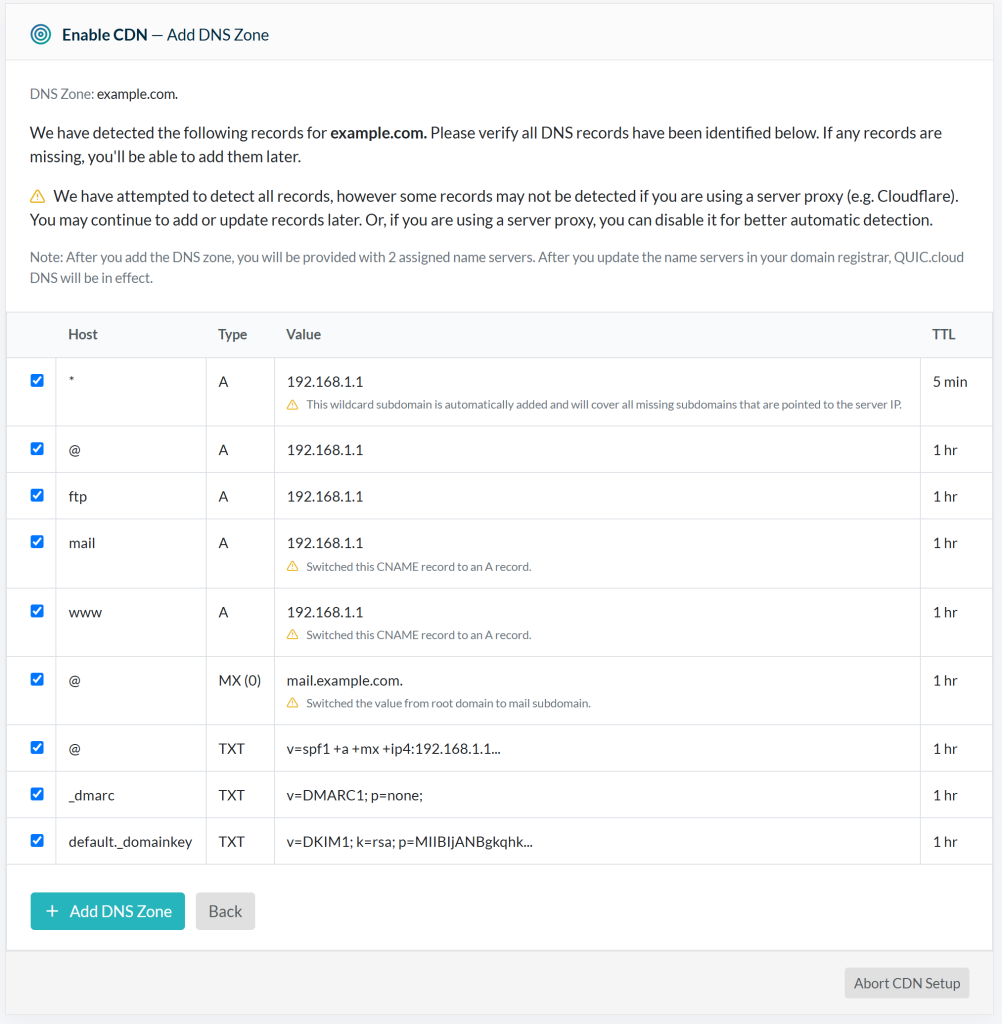
    QUIC.cloud will attempt to detect your domain’s DNS records and import them. Please be patient while it works, and don’t close the window during this time.
    Import existing DNS records to QUIC.cloud

    Once detection is complete, you will be asked to confirm that your DNS information is correct. Accept all of the detected records, or uncheck any that you no longer need, and click the Add DNS Zone button.

    Update your nameservers

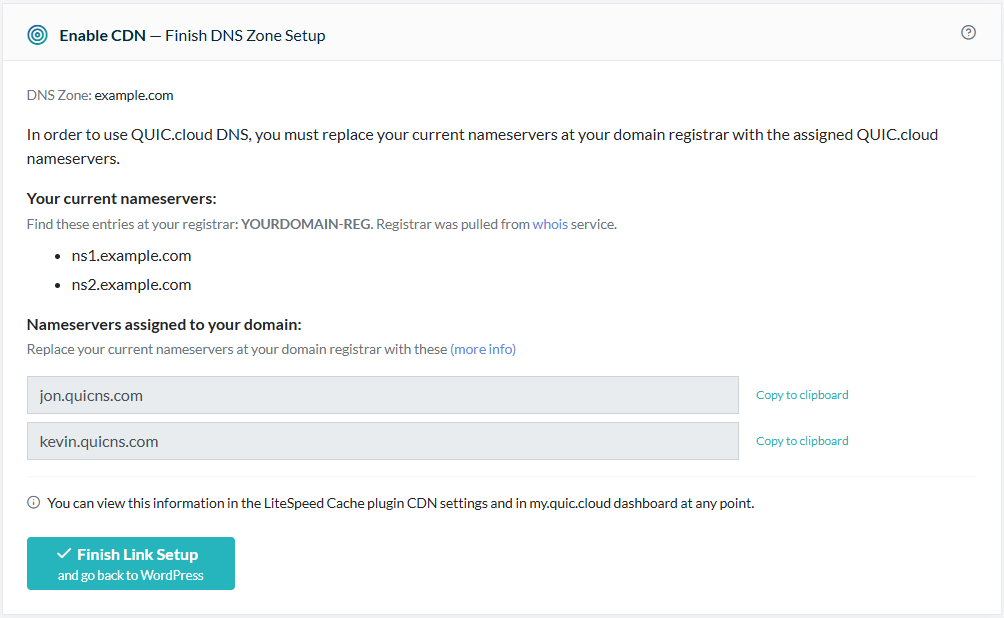
    Once your DNS records have been imported into QUIC.cloud, you will need to instruct your domain registrar where to find your DNS records.

    QUIC.cloud will attempt to verify that your nameservers are correctly set up at your domain registrar.

    Your domain registrar is the provider you purchased your domain name from. Sometimes this is the same as your hosting provider, but that is not always the case. Make sure that you are in the right place before you change anything!

    Log in to your domain registrar. Look for the area of their site which allows you to manage Nameservers. It may be called “DNS Zone” or “Manage DNS” or something similar. Your previous DNS provider’s nameservers should still be on file. You’ll see them listed under NS1, NS2, and possibly NS3 and NS4 as well.
    Update your Nameservers

    Change the NS1 and NS2 records, to match those displayed in the dialog box under Nameservers assigned to your domain. In this example, that would be jon.quicns.com and kevin.quicns.com. If your domain registrar has additional records (NS3, NS4, etc.) erase those values. You should now only have QUIC.cloud-provided NS records at your domain registrar.

    Click the Finish Link Setup and go back to WordPress button.

    Verify DNS

    After the above steps are complete, you can check the status of your domain’s DNS with a tool like DNSChecker.org. There are typically delays due to DNS caching, but if your DNS has still not propagated after 24 hours, please open a support ticket and we’ll look into it.

    Allowlist QUIC.cloud IPs

    You’re almost finished! In order for QUIC.cloud to perform its services, it needs to be able to communicate with your origin server. Some server-level and application-level firewalls may interfere with this communication. If you have one of these firewalls in place, you will need to make sure it is allowing QUIC.cloud IP addresses.

    Please see Adding QUIC.cloud IPs to Allowlist for more information.

    All Done!
    Congratulations! You are now using QUIC.cloud CDN!

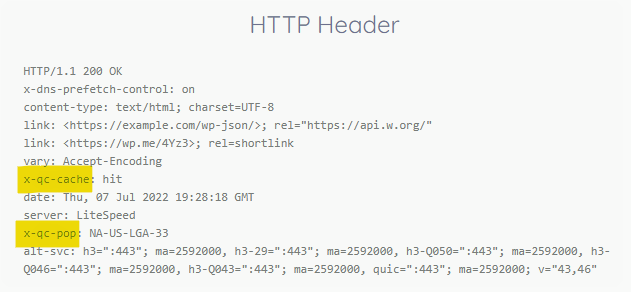
    You can use the HTTP/3 Check tool to verify that your site is being served by QUIC.cloud and supports the latest cutting edge Internet protocols. Look for the x-qc-pop header to locate the QUIC.cloud node that served the request, and the x-qc-cache header to determine whether the page was cached at the node.

    You can keep an eye on your bandwidth usage and tweak your CDN settings in your QUIC.cloud Dashboard.

    This content was last verified and updated in April of 2025. If you find an inaccuracy, please let us know! In the meantime, see our documentation site for the most up-to-date information.

  • Expert Interview: CDNs with Kevin Fwu

    Expert Interview: CDNs with Kevin Fwu

    Expert Interview: CDNs with Kevin Fwu

    Hi everyone! Today we are talking with Kevin Fwu, a software engineer and a Content Delivery Network (CDN) expert. Kevin has been working on QUIC.cloud CDN for the past few years. Today we are discussing CDNs, and what you should know about them when considering using one for your website.

    So let’s start with an important question. What is a CDN?

    A CDN is a global network of servers that operate as a proxy/stand-in source for your site. Effectively, it makes it so that your site can be quickly accessed from anywhere around the world.

    Do all websites benefit from a CDN?

    No. There are multiple scenarios where a CDN doesn’t really benefit a site. The most obvious one is if you don’t actually need to globalize your site. If your site visitors are from one location, a CDN can actually hurt your site because you are now wedging an extra server in between the client and your server.

    So for sites that are global, is using a CDN easy?

    It can be. Probably the toughest thing to do is choosing [a CDN provider] because every one of the CDNs out there has its own benefits and cons.

    What are some different features users should look for when choosing a CDN provider?

    There are a bunch of things to consider, but some of the most important ones are:

    • what security options are available
    • what happens when your site is under attack
    • what happens when other sites are under attack
    • what the CDN can cache, how the CDN clears the cache
    • where the CDN is located
    • how it decides where to serve your site from

    Is a user’s site less secure when they use a CDN?

    Objectively, no. Different CDNs behave differently, but you still need to keep the same issues in mind. CDNs by definition operate as a proxy in between visitors and your server. You should still protect your site as you would otherwise, with two caveats:

    1. CDNs will have their own security implementation, which is strictly beneficial for security.
    2. Your backend server must take care to keep its security rules applied. When a CDN is active, all traffic is routed through the CDN’s servers. For security purposes, the backend server should attempt to filter the IPs of visitors that hit the CDN server. It should not filter the IP of the CDN server itself.

    What are those same issues you are referring to?

    Hacking attempts, DDoS attacks, things of that nature.

    So let’s discuss caching. Does every CDN server have a copy of your website to serve it easily?

    For a pull cdn, when a website is called by a user, it will be served from the nearest PoP, but if it hasn’t been called to that PoP before, it will need to be retrieved from the origin server instead. Once it’s been retrieved from the origin server, the PoP saves the page for the future.

    As far as content, pretty much every CDN (beside QUIC.cloud) is a static content CDN. This means that the dynamic content (the main page itself and any other content that needs to run code) is not saved on the CDN server. QUIC.cloud is unique in that it is capable of caching the dynamic content on visits. Other CDNs have attempted to implement dynamic caching, but their implementations tend to lack robustness: inability to purge on clean up, inability to handle varied pages, etc.

    What do dynamic content CDNs do that static CDNs don’t?

    Most websites are dynamically generated, meaning the site runs code to generate the page. The generated page likely will not change until the content changes (e.g. someone posts a new blog). In all other circumstances, the generated page is exactly the same. A dynamic content CDN takes advantage of this by caching the generated page, making it effectively a static page (a page that is uploaded from the filesystem; no code runs). This is hugely important for high trafficked sites as it saves the site’s server from needing to run the same code every time someone visits the page.

    The key to a good dynamic content CDN is the ability to purge the cache when the content changes. You don’t want a situation where you update the site and you have to wait minutes, hours, or days for the cache to be cleared.

    Another key is the ability to control what pages are cacheable, what pages need to look different to which users, etc. These are all possible variants of a single page that need to be accounted for. A dynamic content CDN should be able to handle all of these situations and serve the content quickly.

    While working on QUIC.cloud, did you make sure it can do all of the things you just listed, such as automatically purging the cache when the content changes?

    Yes. When we discussed how we wanted QUIC.cloud CDN to work, it was important to us that we make it convenient for the user while keeping it feature focused.

    So is there any last thing you think our readers should know about CDNs?

    CDNs are a wonderful asset that are beneficial for most sites. Every CDN has its pros and cons and there is no one-size-fits-all solution. It is important to determine your own personal requirements (such as bandwidth usage, speed, security, etc.) and to do your research on which CDN best suits your site.

    CDNs can be a very powerful tool in making global websites operate efficiently all over the world. With their security features and caching abilities they bring a new layer of superior technology. QUIC.cloud CDN offers a quantity of free monthly bandwidth to all users, so give it a try today and see what change it can make for you.

    [Editor‘s Note: This blog post is the first of what we hope will be many Expert Interviews! Is there a LiteSpeeder you’d like to hear from, or a particular topic you’d like to know more about? Let Kacey know in the comments!]

  • Why Should I Switch to QUIC.cloud?

    Why Should I Switch to QUIC.cloud?

    Why Switch to QUIC.cloud?
    You may be wondering whether QUIC.cloud could replace your current CDN on your WordPress sites. Here we attempt to answer the question “Why Switch to QUIC.cloud?” by addressing some of the specific concerns that you may have.

    What makes QUIC.cloud unique?

    QUIC.cloud has a few important features that other CDNs do not, including intelligent full page dynamic caching, CDN-level cache for logged-in users, and end-to-end HTTP/3 connectivity..

    Full Page Dynamic Caching

    QUIC.cloud takes the power of dynamic LiteSpeed caching to a global level. Out-of-the-box, QUIC.cloud works with the LSCache plugin for WordPress, delivering your cached content around the world, whether your site is powered by a LiteSpeed server or not.

    LiteSpeed Cache is the world’s smartest cache and purge system. Plus, the LSCache plugin has a five-star rating, and the most active users of any cache plugin in the WordPress Plugin Directory!

    CDN Level Cache for Logged-in Users

    LiteSpeed cache features ESI technology, which makes QUIC.cloud the only CDN that can cache content for logged-in users directly at the CDN level.

    End-to-End HTTP/3 Connectivity

    QUIC.cloud was born supporting HTTP/3. And, assuming there is HTTP/3 support at the client and the origin server, end-to-end HTTP/3 connectivity is possible with QUIC.cloud. If either end does not support HTTP/3, QUIC.cloud automatically switches to HTTP/2 or HTTP/1 as appropriate.

    Why should a Cloudflare Business Plan user switch?

    Cost

    As of this writing, Cloudflare Business costs $200 per month. QUIC.cloud includes many of the same features within its ecosystem at a fraction of the price. Among these are DDoS protection, dynamic content caching, and application security for WordPress.

    In addition, QUIC.cloud also provides access to services such as image optimization and CSS optimization, which are not a part of Cloudflare plans at all.

    Access to these services is provided for free via the LiteSpeed Cache plugin. While monthly free quota is limited, it is enough for some sites. If it’s not enough for yours, depending on your site’s needs (and possibly your patience level), you can either wait for the free quota to replenish itself every month, or you can pay a reasonable price for more quota.

    Security

    Because QUIC.cloud focuses on WordPress, QUIC.cloud knows how to protect WordPress. Brute force and xmlrpc.php attack mitigation is built into the CDN service.

    Caching

    QUIC.cloud’s ability to intelligently cache dynamic content sets it apart. LiteSpeed Cache’s targeted smart purge technology purges updated content, as well as any other page that is influenced by that content. In other words, QUIC.cloud and LiteSpeed purge just the right number of pages. Other solutions purge too few (just the edited page) or too many (all of the site’s pages).

    Can QUIC.cloud compete with APO or Railgun?

    Cloudflare APO (Automatic Platform Optimizations) for WordPress caches dynamic content on the edge network. QUIC.cloud does this, too. And, as we’ve covered already, QUIC.cloud dynamic cache is smarter.

    Cloudflare’s Railgun is not about page caching. It’s about speeding up the process of retrieving uncached content from an origin server. Cloudflare needs to worry about this because Cloudflare must retrieve all dynamic requests from the origin server. QUIC.cloud is different, because both static and dynamic content may be cached at the CDN level (and managed through the LSCache plugin). This not only improves the overall bandwidth speed, but it also means that QUIC.cloud can keep requests to the origin server to a minimum.

    So, why switch to QUIC.cloud, again?

    QUIC.cloud was among the very first CDNs to launch full page caching for WordPress, and QUIC.cloud currently provides the smartest and fastest caching system for WordPress.

    Other CDNs such as the reverse-proxy-based Cloudflare, or the push/pull-based Stackpath, specialize in static content. They may do dynamic content, too, but not like LiteSpeed can.

    QUIC.cloud is blazing fast, caching both dynamic and static content, and serving it globally via the cutting-edge HTTP/3 protocol. Additionally, QUIC.cloud is affordable (even free for sites with modest needs), and provides built-in attack protection for your WordPress site.

    We invite you to give QUIC.cloud a try today!

    Acknowledgements

    Many thanks to Shivam Saluja for his contributions to this article.

  • QUIC.cloud is Production-Ready!

    QUIC.cloud is Production-Ready!

    QUIC.cloud CDN Production Ready
    We are pleased to announce that QUIC.cloud CDN is production-ready!

    If you tried QUIC.cloud previously, during our beta period, then we hope you will be pleasantly surprised by all of the exciting enhancements that we’ve implemented recently, including our own DNS service and a greatly expanded and improved network of global nodes.

    QUIC.cloud DNS

    Our new QUIC.cloud DNS is an authoritative GeoDNS solution that responds with optimal location-based results through our global AnyCAST network.

    QUIC.cloud DNS allows you to optionally simplify your site’s CDN setup with automated DNS configuration. A great option for those whose current DNS provider doesn’t support CNAME flattening, QUIC.cloud DNS allows you to use QUIC.cloud CDN with your root domain.

    Expanded and Improved Global Network

    Our CDN network is bigger and better than ever:

    • 68 PoPs and counting
    • Average latency less than 10ms in Europe, North America, and Oceania regions
    • Improved GeoRouting accuracy
    • Failover support: if a node is offline for a period of time, visitors are automatically shifted to other nodes, minimizing downtime

    Improved Security

    QUIC.cloud protects your WordPress sites from botnet attacks at a global scale. When an attack is detected, the bot is blocked at the CDN level, thereby extending protection to all domains in the network.

    Additionally, when enabled, QUIC.cloud will block all non-trusted visitors from accessing your WordPress site’s XML-RPC file.

    Protocol Switching

    QUIC.cloud is the first and only CDN capable of using QUIC & HTTP/3 to connect from client to server, when HTTP/3 is supported by the browser and the backend server. If HTTP/3 is not supported at either end, QUIC.cloud automatically connects via HTTP/2 or HTTP/1.1 as appropriate.

    HTTP/3 v1 Support

    QUIC.cloud has been preparing for HTTP/3 v1 since the beginning. We are proud to officially support end-to-end HTTP/3 v1 connections upon the IETF’s publication of the RFC.

    Regional Pricing

    We’ve switched to a regional pricing model to better reflect the price of routing traffic around the world. Enable all eight regions, or require traffic to be routed only through the regions you choose. You are in control.

    New introductory pricing for each region goes into effect on July 1st until the end of 2021.

    Improved User Dashboard

    In addition to the many changes we’ve implemented to improve useability, we’ve added a my.quic.cloud screen bursting with detailed statistics about your CDN traffic.

    Let us Know What You Think

    We hope we’ve convinced you to give production-ready QUIC.cloud a try! Introductory pricing is in effect until the end of this year.

    And know that just because we are out of beta, it doesn’t mean we have finished innovating or improving our service. We welcome your feedback!

    Is QUIC.cloud faster than your previous CDN providers? Are you encountering any issues with setup or performance? Please don’t switch away silently – we want to know the bad as well as the good, so we can address any issues.

    Let’s keep improving QUIC.cloud for everyone!

  • Introducing QUIC.cloud DNS

    Introducing QUIC.cloud DNS

    QUIC.cloud DNS

    LiteSpeed Technologies is pleased to announce QUIC.cloud DNS!

    What is QUIC.cloud DNS?

    In order for QUIC.cloud (or any CDN) to work properly, DNS is required. A DNS (Domain Name System) translates domain names to IP addresses, and facilitates the transfer of information around the internet.

    With QUIC.cloud’s new DNS service, you no longer have to configure a separate DNS provider for use with our CDN. You can configure DNS right from your QUIC.cloud dashboard, for full CDN integration.

    Setup is Easy

    QUIC.cloud DNS detects your current DNS configuration and provides an easy-to-use interface. You can easily modify and adjust your DNS records as needed.

    Why use QUIC.cloud DNS?

    Root Domain Support

    Some DNS providers do not support CNAME flattening, but CNAME flattening is required in order to use QUIC.cloud CDN with a root domain. By letting QUIC.cloud handle your DNS needs, you enable root domain support for the CDN service.

    Accurate Geo-Routing

    When you take advantage of QUIC.cloud’s built-in DNS, you get better integration with the CDN itself, but more importantly, you get potentially more accurate geolocation for your visitors. This matters because QUIC.cloud can make a more informed decision about which node to serve a request from, when it has a correct visitor location.

    We’ve seen other DNS providers use databases that are rarely up to date. And we’ve seen other DNS providers rely on a proxy IP address rather than the visitor’s own IP. In such situations, it is not uncommon for the DNS to report an incorrect visitor location. Acting on bad information, the CDN then serves content from a less-than-ideal node location.

    QUIC.cloud’s new DNS service uses a feature called ECS (EDNS-Client-Subnet), whereby a visitor’s subnet is provided as part of the DNS query. This allows us to use accurate location information to make better informed node selections. Better node selection means your site travels a shorter distance to your visitors, which means a faster, better user experience.

    Get Started

    QUIC.cloud DNS is available only for users of the QUIC.cloud CDN. It is included free of charge, and is ready to use today!

    You can find QUIC.cloud DNS on your dashboard.

    Check out our setup guide, too.


    Thank you to Kacey Schroeder and Lucas Rolff for their contributions to this post.