Category: Benchmarks

With LiteSpeed Benchmarks, compare LiteSpeed Web Server, Apache, and NGINX. Compare LiteSpeed Cache with other web app caching solutions, too.

  • Performance Testing Namespaces

    Performance Testing Namespaces

    Performance Testing Namespaces

    Namespaces in Linux are often used to implement containers and are great at administering sandboxes where files, users, processes and just about all system resources are separated from all other processes. Many commonly used applications, including Docker and Kubernates, use namespaces to implement their sandboxes. Kernel support for namespaces makes them virtually bulletproof and as such, namespaces are considered the gold standard for creating safe sandbox environments.

    OpenLiteSpeed supports both the bubblewrap tool and Linux native namespaces to meet the needs of a safe sandbox environment. But while they both provide a safe environment (bubblewrap actually uses namespaces in its implementation), there are differences between them in execution with OpenLiteSpeed. In this article, we’ll be performance testing namespaces and bubblewrap in OpenLiteSpeed.

    Differences between Bubblewrap and Namespaces

    OpenLiteSpeed’s support of bubblewrap is quite simple: set up a command line, and then execute it and allow bubblewrap to implement the sandbox. There are special command line options for generating the bubblewrap command line. These include custom /etc/passwd and /etc/group files to meet your needs, and file copies to generate files with the correct permissions. Bubblewrap itself does the bulk of the work.

    The namespaces feature in OpenLiteSpeed performs virtually all of the same tasks, but does so in a different way. Instead of a command line, you specify the name of a configuration file, which contains commands in it. Also, when a set of namespaces for a given user’s environment is created, it is persisted so that later executions do not have to recreate it. They can simply join it using facilities similar to nsenter. This should result in significantly better performance, but does it? That’s what we will aim to find out in this article.

    Goals

    • Determine the conditions where namespaces and bubblewrap perform the same.
    • Determine the conditions where namespaces perform better than bubblewrap and how much improvement there is.

    In an earlier blog which described OpenLiteSpeed’s use of bubblewrap, PHP processes were used to describe the feature. And while PHP is good for demonstrating how it works, and it remains the most common use of bubblewrap in OpenLiteSpeed, it is not the best tool to show performance differences between bubblewrap and namespaces.

    LiteSpeed highly optimizes PHP, and starts a small number of lsphp processes to serve any number of PHP requests. Thus the setup is one time for each execution of lsphp. It’s still worth using namespaces as doing so removes the overhead of executing an intermediary process. The lsphp program is run directly rather than through bubblewrap, so the actual performance gain is slight.

    Plain CGI executables provide the largest gain in performance and are the best tool to demonstrate the value of LiteSpeed’s native namespaces over bubblewrap’s implementation of namespaces. These are programs which are directly run by the web server and do their communications with the server though standard I/O and environment variables (see Common Gateway Interface).

    Performance Benchmarks

    In https://http2benchmark.org/ the test tool of choice is h2load, thus we used it for testing performance here as well.

    Test environment

    • Hardware: Intel i7, with 16GB of memory.
    • Software: VM with Ubuntu 22.04, configured to use 8GB of memory and 3 processors. VirtualBox running on Windows.
    • Test version of OpenLiteSpeed with a pre-release of namespace support. Running 3 workers to utilize the 3 processors.
    • After each test, we ran unmount_ns to assure that a subsequent test would not benefit from a persisted namespace. Also, we stopped and restarted OpenLiteSpeed after each test as well.
    • We tested using the sample CGI program included with OpenLiteSpeed: cgi-bin/helloworld. This program is simple enough to incur minimal overhead and thus demonstrate the value of any performance changes between the tests.

    Test results

    Small Load Test

    Command line:

    h2load -n 10000 -c 10 https://127.0.0.1:8089/cgi-bin/helloworld
    

    Where:

    • -n 10000: 10,000 total requests
    • -c 10: 10 concurrent requests

    Bubblewrap results:

    • 69 seconds
    • 145 requests per second
    • 7 K/sec

    Namespace results:

    • 16 seconds
    • 613 requests per second
    • 29 K/sec

    Without namespace or bubblewrap:

    • 13 seconds
    • 761 requests per second
    • 35 K/sec

    This shows in a small number of requests a 431% improvement in clock time and 423% improvement in throughput. The penalty for namespaces is 23% in clock time and 24% in throughput.

    Large Load Test

    Command line:

    h2load -n 100000 -c 100 -m 10 https://127.0.0.1:8089/cgi-bin/helloworld
    

    Where:

    • -n 100000: 100,000 total requests
    • -c 100: 100 concurrent requests
    • -m 10: 10 streams, or since this is http, the number of requests in flight at a time.

    Bubblewrap results:

    • 1123 seconds
    • 89 requests per second
    • 8 K/sec

    Namespace results:

    • 159 seconds
    • 628 requests per second
    • 36 K/sec

    Without namespace or bubblewrap:

    • 125 seconds
    • 799 requests per second
    • 43 K/sec

    This shows in a larger number of requests a 706% improvement in clock time and 706% improvement in throughput. The penalty for namespaces is only 27% in clock time and 27% in throughput.

    Conclusion

    In conclusion, it is clear that for CGI requests, you can accomplish substantial performance gains using namespaces over bubblewrap. These performance gains merely hint at the other resource gains in CPU, memory, processes, etc. And the value of a sandbox comes at a reasonable cost in performance and overhead.

  • ModSecurity Performance Comparison: Apache, nginx, LiteSpeed

    ModSecurity Performance Comparison: Apache, nginx, LiteSpeed

    ModSecurity Performance Apache nginx LiteSpeed

    Measuring ModSecurity Performance

    Each of the primary web server vendors includes the ability to run a Web Application Firewall (WAF), often described as ModSecurity (the terms are used here interchangeably). We wanted to answer the following questions about ModSecurity performance on Apache, nginx, and LiteSpeed:

    • What is ModSecurity’s impact on server performance?
    • Which rulesets performed better: the OWASP ModSecurity Core Rule Set or Comodo?
    • Which implementation performed better: ModSecurity 2, ModSecurity 3, or LiteSpeed’s proprietary implementation?
    • Whose ModSecurity configuration performed better: Apache, nginx, OpenLiteSpeed, or LiteSpeed Enterprise?

    ModSecurity’s Impact on Server Performance

    Web servers are often benchmarked, but here we document the specific impact of ModSecurity on overall server performance. The servers tested are:

    • Apache v2.4.41 using ModSecurity engine v2.9.2
    • nginx v1.17.6 using the nginx ModSecurity connector v1.0.1 and the ModSecurity engine v3.0.3
    • OpenLiteSpeed v1.6.4 using ModSecurity engine v3.0.4
    • LiteSpeed Enterprise v5.4.2 using its internal ModSecurity engine

    To be thorough, the tests include a concurrent volume of:

    • Static data
    • Dynamic data using a simple PHP script
    • A cached WordPress front page

    By showing these separately, differences between servers can be highlighted.

    The environment for both the web server machine and the client machine is:

    • Vultr high frequency VM
    • Network Connected 10Gb.
    • 1 CPU, 3.8Ghz, gen 6 VM
    • 1 Gb memory
    • CentOS 7

    OWASP vs. Comodo Rulesets

    The tests are performed using OWASP ModSecurity Core Rule Set (v3.3) and the Open Source Comodo rules (v1.225). Comodo differentiates between v2.x rules which are used by Apache and LiteSpeed Enterprise and v3.x rules which are used by nginx and OpenLiteSpeed.

    ModSecurity 2 vs. ModSecurity 3 vs. LiteSpeed Proprietary

    The fact that there are differences in rules to be used between servers highlights the fact that each server has a different engine for processing ModSecurity rules.

    • Apache uses the older ModSecurity v2.x engine. That engine was initially written specifically for Apache and is optimized for it.
    • nginx and OpenLiteSpeed use the newer ModSecurity v3.x engine. This engine was re-written from scratch specifically to remove the dependencies in Apache, and was written in a higher level language (C++ rather than C).
    • LiteSpeed Enterprise has its own proprietary engine, highly optimized and well integrated into the LiteSpeed server.

    ModSecurity Configuration in Apache vs. nginx vs. LiteSpeed

    Each server must be configured to use ModSecurity, both for the engine and for accessing the rules.

    • The easiest to configure is LiteSpeed Enterprise as the WAF configuration is incorporated into the WebAdmin interface. The ModSecurity engine is fully integrated into the server so there is no specific ModSecurity installation.
    • OpenLiteSpeed includes the ModSecurity Plugin as part of the distribution and requires only configuration of the Plugin in order to be recognized and use the rules. This is part of the WebAdmin interface, but the documentation must be followed as the procedures are not obvious.
    • For Apache you must obtain the mod_security Plugin independently from the server software. Once obtained and installed, follow the instructions, as configuring the rules is not an obvious process.
    • To obtain the rules engine for nginx you must install the source code and mod_security Plugin separately, compile the Plugin and install it. Once it is installed, you can configure it to use the rules. This is a cumbersome, error-prone, time-consuming process.

    Luckily, you can avoid the headache of configuring ModSecurity manually by using the scripts provided in the http2benchmark project.

    Benchmark Tools Used

    To provide a stable test bed to demonstrate ModSecurity performance differences, http2benchmark (available here and documented here) was used as a base. It’s advantages are many, but in particular it installs and configures web servers of your choosing on your server and runs tests from a client of your choosing. This lets you validate the performance in your own environment.

    The main server configurations can be found here, if you’d like to look them over.

    Since http2benchmark is managed by scripts, scripts were created to setup a WAF for your environment using OWASP rules for servers installed by http2benchmark for Apache, nginx, Litespeed Enterprise and OpenLiteSpeed.

    Note that there is documentation on how to use the scripts. For example, if you wish to configure an Apache, nginx and Litespeed Enterprise web server installed by http2benchmark you would run the following scripts on the test server as root:

    ./config_apache_modsec.sh
    ./config_nginx_modsec.sh
    ./config_lsws_modsec.sh
    

    These scripts allow you to control which servers are installed with the WAF, and to even use a different set of rules (the documentation describes the use of Comodo rules rather than OWASP rules).

    After configuring the server, you need to move over to the client system and run the /opt/benchmark.sh script to start the benchmarks.

    Benchmark Test Results

    Each test shows a particular run of h2load with three variations: ModSecurity disabled, ModSecurity enabled with the OWASP rules, and ModSecurity enabled with the Comodo rules. The actual command for the first test is:

    h2load -n 1000 -c 10 -t 1 -T 5 -m 10 -H 'Accept-Encoding: gzip,deflate' https://benchmark.com/hello.php
    

    The purpose is to specifically show the differences in performance between each of the servers processing a particular type of data and to show the effect of the ModSecurity processing on the server’s ability to process data. With http2benchmarks, higher numbers represent better performance.

    You can find the raw data from these tests here.

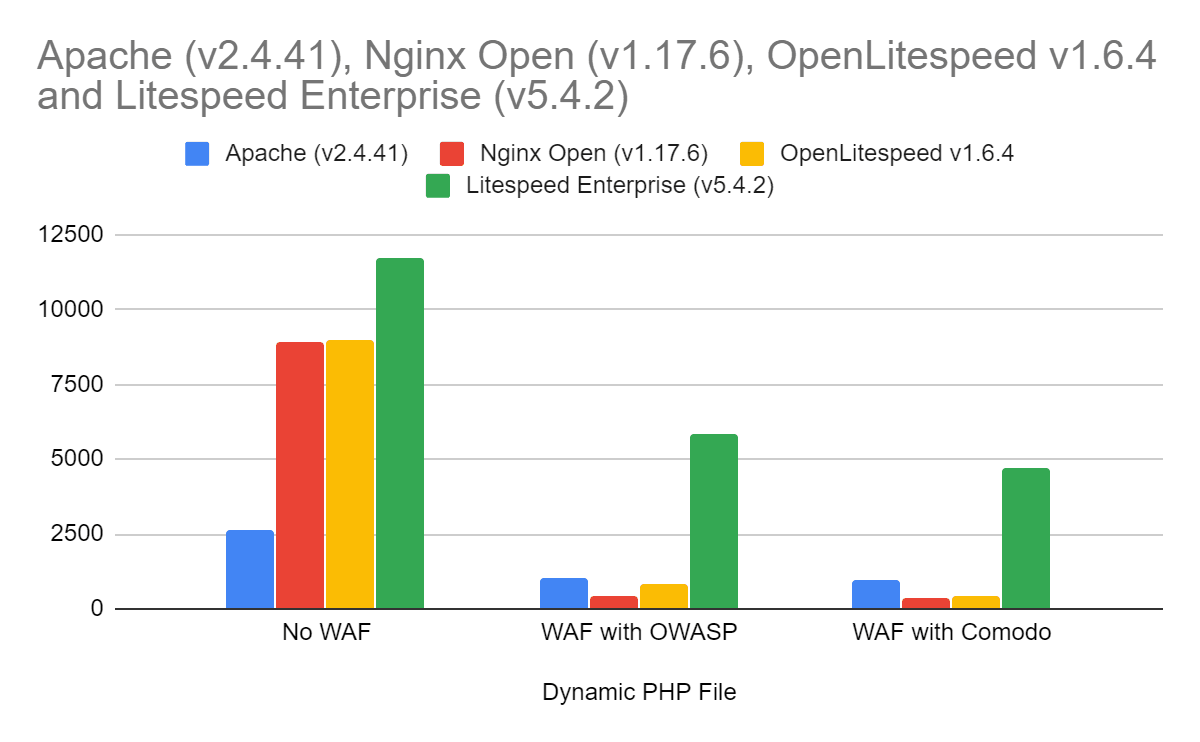
    Dynamic PHP File Benchmarks

    The first test uses a dynamic PHP file: a file where the output is generated by the script and PHP engine. The server must process the input request and do some initial validation. The ModSecurity engine is involved in processing the request and validating that it is acceptable.

    The server software will then pass the request to the PHP engine (under server control), which generates the output. The output is passed back to the server for additional ModSecurity processing before the output can be passed back to the client.

    This test is particularly important as it uses generated (dynamic) data. Other than the request source, the server can not cache the request output either to avoid additional file I/O or to avoid ModSecurity engine use.

    The percentage of non-ModSecurity speed once ModSecurity is enabled:

    Percent of Original Speed with ModSecurity Enabled Apache (v2.4.41) nginx Open (v1.17.6) OpenLitespeed v1.6.4 Litespeed Enterprise (v5.4.2)
    OWASP

    39.00%

    4.91%

    8.96%

    49.84%

    Comodo

    36.97%

    3.93%

    4.48%

    40.21%

    The performance of each server relative to Apache:

    Speed Compared
    to Apache
    Apache (v2.4.41) nginx Open (v1.17.6) OpenLitespeed v1.6.4 Litespeed Enterprise (v5.4.2)
    OWASP

    100.00%

    43.00%

    78.94%

    570%

    Comodo

    100.00%

    36.26%

    41.63%

    485%

    The results show:

    • LiteSpeed Enterprise started as the best performer with ModSecurity disabled and continued as the best performer regardless of the rules used.
    • Apache ran the slowest with ModSecurity disabled but then ran better than OpenLitespeed or nginx with ModSecurity enabled due to its use of the highly optimized ModSecurity v2.x engine.
    • OpenLiteSpeed ran slower with ModSecurity disabled than nginx, but it ran faster or with comparable speeds with ModSecurity enabled.
    • nginx’s best times were without ModSecurity. With ModSecurity enabled it ran the slowest of the group.
    • Comodo rules are slower in all cases than the OWASP rules.

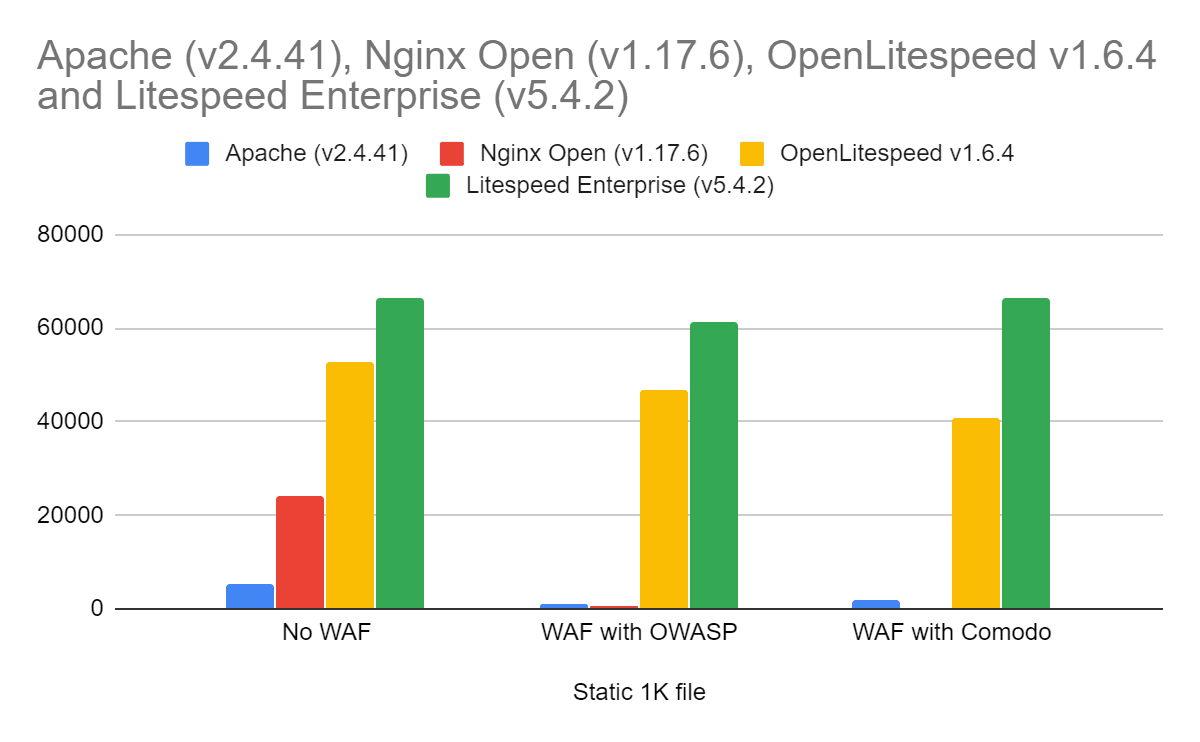
    Static HTML File Benchmarks


    The next test uses a 1K static file: a simple GET request which is served up quickly by the server. The server does limited processing on the input request to determine access to the file to read, obtains the file (generally out of cache), compresses it in this case and then sends the response to the client.

    The ModSecurity engine is involved in processing the request and validating that it is acceptable.

    This test is particularly important as it shows the impact of caching both of the file and of the ModSecurity response to this request. Since the request and the output do not change, the server can avoid both reading the data many times (which all servers do) and processing it through ModSecurity (which the LiteSpeed servers do).

    The percentage of non-ModSecurity speed once ModSecurity is enabled:

    Percent of Original Speed with ModSecurity Enabled Apache (v2.4.41) nginx Open (v1.17.6) OpenLitespeed v1.6.4 Litespeed Enterprise (v5.4.2)
    OWASP

    24.21%

    2.05%

    88.84%

    92.75%

    Comodo

    37.83%

    1.53%

    77.53%

    100.38%

    The performance of each server relative to Apache:

    Compare to Apache Apache (v2.4.41) nginx Open (v1.17.6) OpenLitespeed v1.6.4 Litespeed Enterprise (v5.4.2)
    OWASP

    100.00%

    39.48%

    3708.82%

    4886%

    Comodo

    100.00%

    18.86%

    2071.84%

    3384%

    The results show:

    • LiteSpeed Enterprise started as the best performer with ModSecurity disabled and continued as the best performer regardless of the rules used.
    • OpenLiteSpeed ran faster than any server but LiteSpeed Enterprise in all cases.
    • Apache ran the slowest with ModSecurity disabled but then ran better than nginx with ModSecurity enabled due to its use of the highly optimized ModSecurity v2.x engine.
    • nginx’s best times were without ModSecurity. With ModSecurity enabled it ran the slowest of the group.

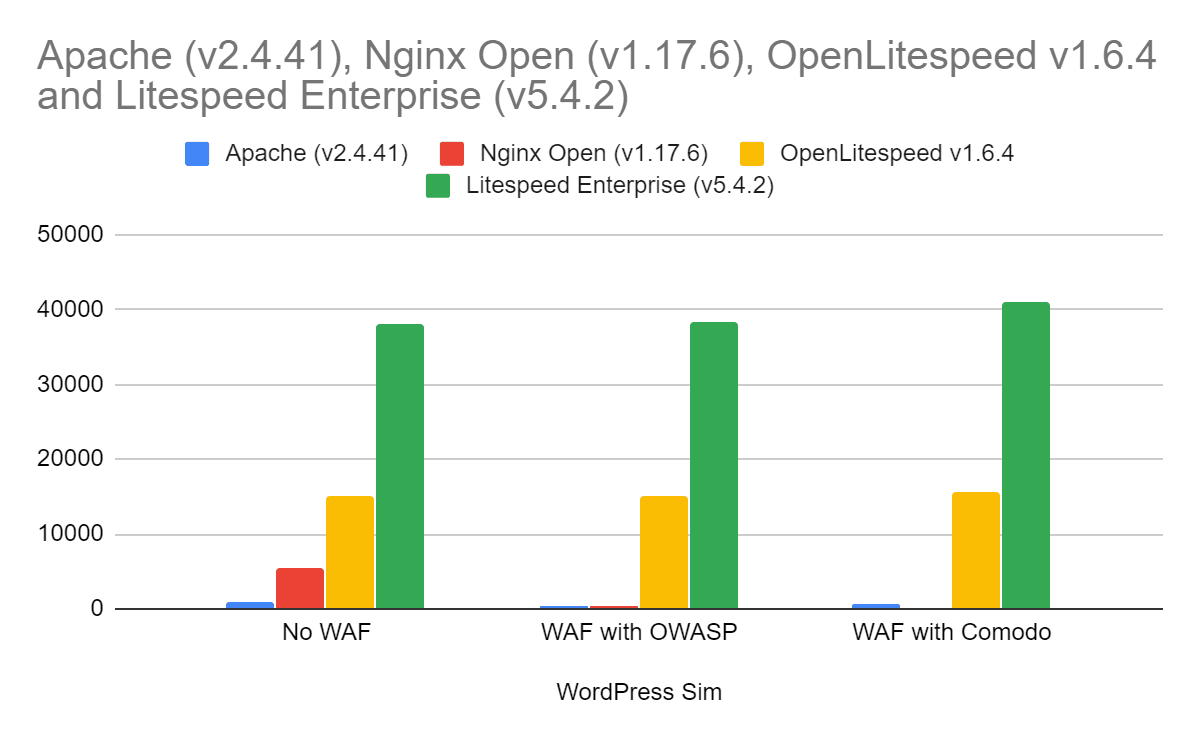
    Cached WordPress Front Page Benchmarks


    The final test is a cached WordPress front page environment where a number of pages are served simultaneously. This is designed to represent a real-world server environment as closely as possible.

    It combines elements of the prior two tests:

    • Multiple, simultaneous operations
    • Requests of static data
    • Requests of dynamic data.

    This test is particularly important as it comes closest to representing how data is served in a real server environment. For cache solutions, Apache was paired with W3Total Cache, nginx with FastCGI cache , and both LiteSpeed servers with LSCache.

    The percentage of non-ModSecurity speed once ModSecurity is enabled:

    Percent of Original Speed with ModSecurity Enabled Apache (v2.4.41) nginx Open (v1.17.6) OpenLitespeed v1.6.4 Litespeed Enterprise (v5.4.2)
    OWASP

    63.74%

    4.94%

    100.33%

    100.84%

    Comodo

    64.48%

    3.44%

    104.47%

    108.15%

    The performance of each server relative to Apache:

    Compare to Apache Apache (v2.4.41) nginx Open (v1.17.6) OpenLitespeed v1.6.4 Litespeed Enterprise (v5.4.2)
    OWASP

    100.00%

    51.84%

    2918.45%

    7427%

    Comodo

    100.00%

    35.70%

    3003.65%

    7873%

    The results show:

    • LiteSpeed Enterprise started as the best performer with ModSecurity disabled and continued as the best performer regardless of the rules used.
    • OpenLiteSpeed ran faster than any server but LiteSpeed Enterprise in all cases.
    • Apache ran the slowest with ModSecurity disabled but then ran better than nginx with ModSecurity enabled due to its use of the highly optimized ModSecurity v2.x engine.
    • nginx’s best times were without ModSecurity. With ModSecurity enabled it ran the slowest of the group.

    LiteSpeed Enterprise ModSecurity Performance is Best

    • In all of the tests run, LiteSpeed Enterprise was the clear winner.
    • Both LiteSpeed Enterprise and OpenLiteSpeed ran better in serving up pages in the real-world environment.
    • Apache’s use of the ModSecurity v2 engine provided better performance than the v3 engine used by nginx.
    • nginx ran well without ModSecurity enabled, but degraded the most once it was enabled.
    • Comodo rules are a bit slower than the OWASP rules in almost all environments.
  • LiteSpeed Beats nginx in HTTP/3 Benchmark Tests

    LiteSpeed Beats nginx in HTTP/3 Benchmark Tests

    HTTP3 LiteSpeed vs. nginx

    LiteSpeed’s HTTP/3 implementation outperforms that of the hybrid nginx/quiche in a battery of benchmark tests. OpenLiteSpeed transfers resources more quickly, scales better, and uses less CPU and memory while doing it. In each of these metrics, LiteSpeed betters nginx by a factor of 2 or more. nginx could not complete some tests, while in others, it achieved only a fraction of TCP speed. Below, we describe the setup and the various benchmarks.

    Why Compare LiteSpeed and nginx HTTP/3 Now?

    HTTP/3 is a new protocol for the web, a successor to both Google QUIC and HTTP/2. As the QUIC Working Group at IETF is getting closer to finalizing the drafts, the nascent HTTP/3 implementations are maturing and some are now starting to see production use.

    LiteSpeed was the first to ship HTTP/3 support in LSWS in July of this year. We have been supporting QUIC since 2017, making improvements along the way. The HTTP/3 support rests on this foundation.

    Several weeks ago, Cloudflare released a special HTTP/3 patch for nginx, encouraging everyone to experiment. Because nginx is our competitor, we were excited to get a chance to kick nginx’s shiny new HTTP/3 tires. Cloudflare uses this patch in production, so it has to be good!

    Cloudflare’s Quiche Patch

    Quiche is an HTTP/3 and QUIC library by Cloudflare. It is written in Rust, a new high-level language. The library provides a C API, which is how it is used by nginx.

    Benchmark Setup

    Platform

    Both servers and the load tool are run on the same VM, which is a Ubuntu-14 machine with 32 GB of RAM and 20-core Intel Xeon E7-4870. The bandwidth and RTT are modified using netem.

    Web Servers

    For LiteSpeed, we use OpenLiteSpeed, which is the open-source version of our flagship LiteSpeed Web Server. We use version 1.6.4, which can be downloaded here.

    For nginx, we use 1.16.1 with the Cloudflare quiche patch. Compilation steps are described here.

    Both OpenLiteSpeed and nginx were configured to use one worker process. To be able to issue 1,000,000 requests using 100 connections, nginx’s maximum requests setting was increased to 10,000.

    # OpenLiteSpeed
    httpdWorkers      1
    
    # nginx
    worker_processes  1;
    http {
      server {
        access_log off;
        http3_max_requests 10000;
      }
    }
    

    Website

    The website is a simple selection of static files: 163-byte index file and files of 1 MB, 10 MB, 100 MB, and 1 GB in size. You can use this script to generate these.

    Load Tool

    We use h2load with HTTP/3 support to generate load. It is built very easily using the supplied Dockerfile.

    Benchmark Tests

    To get each number — requests per second or time to fetch a resource — three tests were run and the median value was taken.

    Fetching small page

    The index page is 163 bytes. We will fetch it in several ways using different network conditions.

    h2load options of interest:

    • -n: Total number of requests to send
    • -c: Number of connections
    • -m: Number of concurrent requests per connection
    • -t: Number of h2load threads

    -n 10000 -c 100

    OLS nginx
    100 mbps, 100 ms RTT 935 reqs/sec 890 reqs/sec
    100 mbps, 20 ms RTT 3915 reqs/sec 2910 reqs/sec
    100 mbps, 10 ms RTT 6420 reqs/sec 4100 reqs/sec

    -n 100000 -c 100 -t 10

    This is a longer run, each connection will now send 1000 requests

    OLS nginx
    100 mbps, 100 ms RTT 985 reqs/sec 980 reqs/sec
    100 mpbs, 20 ms RTT 4650 reqs/sec 4525 reqs/sec
    100 mbps, 10 ms RTT 8450 reqs/sec 7155 reqs/sec

    OpenLiteSpeed is a little faster at 100 ms and significantly faster at 20 ms and 10 ms RTT.

    -n 100000 -c 100 -m 10 -t 10

    OLS nginx
    100 mbps, 100 ms RTT 9010 reqs/sec 7365 reqs/sec
    100 mpbs, 20 ms RTT 24,700 reqs/sec 5850 reqs/sec *
    100 mbps, 10 ms RTT 25,230 reqs/sec 6855 reqs/sec *

    * High variance

    Tellingly, in the very first test, nginx was using 100% CPU, while OpenLiteSpeed was using about 45% CPU. This is the reason nginx numbers do not improve as the RTT goes down. On the other hand, OpenLiteSpeed, still does not use 100% CPU even with 20 and 10 ms RTTs.

    -n 1000000 -c 100 -m 10 -t 10

    To issue more than 1000 requests per connection, we need to set nginx’s http3_max_requests parameter to 10000 from its default value of 1000.

    OLS nginx
    200 mbps, 10 ms RTT 29,900 reqs/sec 7180 reqs/sec *

    * High variance

    Now we’ve managed to get OpenLiteSpeed to use 100% CPU. During this test, nginx allocated more than 1 GB of memory (resident size, as shown by top(1)). OLS never exceeded 28 MB.

    That’s more than 4 times the performance at about 1/37th the cost.

    Fetching single file

    In this scenario, we will fetch a single file under different network conditions and measure how long it takes to download the file.

    10 MB

    OLS nginx
    10 mbps, 100 ms RTT 9.8 sec 11.2 sec
    10 mpbs, 20 ms RTT 9.7 sec 10.8 sec
    10 mbps, 10 ms RTT 9.4 sec 10.8 sec

    We see that nginx is somewhat slower in this test. At the same time, it uses a lot more CPU than OpenLiteSpeed in each of the tests above: between 3 and 4 times more.

    100 MB

    OLS nginx
    100 mbps, 100 ms RTT 12.2 sec 40 sec *
    100 mpbs, 20 ms RTT 9.4 sec 40 sec *
    100 mbps, 10 ms RTT 9.3 sec 30 sec

    * High variance

    In all three benchmarks, nginx used 100% CPU, which is the most likely reason for its poor performance.

    1 GB

    I tried testing downloading 1 GB file using nginx at 1 Gbps but I got tired of waiting for it to finish. My guess is that the performance difference between OLS and nginx is even more drastic at this speed.

    Shallow Queue

    We have seen that nginx struggles when bandwidth is high. Let’s see how it does when bandwidth is low. One twist is that we will use a shallow queue using netem’s limit parameter. Here, we will set it to 7.

    Fetching single 10 MB file

    limit OLS nginx
    5 mbps, 20 ms RTT 1000 * 19.6 sec 22.5 sec
    5 mbps, 20 ms RTT 7 29.6 sec 48.1 sec

    * netem default

    Introducing a shallow queue on path reduces OLS performance by about 50%, whereas nginx performance is degraded by more than 100%. In both cases, LiteSpeed is significantly faster than nginx.

    OpenLiteSpeed HTTP/3 is Better Than nginx

    We compared OpenLiteSpeed and nginx using several types of benchmarks. In all tests, LiteSpeed performs better than nginx: it transfers files faster and uses less CPU and memory. nginx never reaches TCP-level throughput at low bandwidth. At high bandwidth, nginx throughput is a fraction of that of LiteSpeed.

    nginx’s HTTP/3 is not ready for production use. It delivers poor performance and, at the same time, uses too much CPU and memory.

    This result is not surprising. QUIC and HTTP/3 are complex protocols. New implementations will have a hard time matching the performance of LiteSpeed. Ours is a mature implementation, as we first shipped production-grade QUIC support back in the summer of 2017.

    nginx will likely improve in the future. We look forward to more benchmark testing when that occurs. Until then, LiteSpeed HTTP/3 cannot be beat.

  • QUIC Performance Benchmarks with HTTP/2

    QUIC Performance Benchmarks with HTTP/2

    QUIC Performance Benchmarks

    Purpose

    As we develop our own IETF QUIC implementation, we are focused on protocol correctness and robust performance. To get a better idea of the extent of our implementation comparative performance, we decided to benchmark it against other publicly available implementations.

    Since there are few stable IETF QUIC implementations, we have restricted the list of servers tested to only mature GQUIC implementations. We have made the assumption that the performance for an IETF QUIC implementation and its GQUIC counterpart should match closely.

    Benchmark

    We have designed a flexible QUIC benchmarking program and included a testing script for easy test automation. This open-source program is available in the lsquic repository on Github. It has the ability to request an array of files over many concurrent connections using many concurrent streams. This flexibility makes it an essential tool for understanding the performance of a QUIC implementation.

    We used this program and testing script to run a series of benchmark tests to understand the strengths and weaknesses of our own QUIC implementation, as well as other publicly available implementations. The benchmarking tests are meant to push servers to their limit and simulate realistic QUIC traffic. They range from requesting many small files to requesting a few large files.

    Methods

    The benchmark tests follow the client-server model and take place on a private network with a 10G link between the two testing machines. The client testing program used is the http_client sample client distributed with the lsquic-client repository.

    The independent variables in this benchmark are server type, the number of requests, the size of requests, the number of concurrent clients, the number of concurrent connections per client, and the number of concurrent streams per client.

    The server types tested in this experiment are lsws, proto-quic, caddy, and quic-go. Not all server types will be included in each test.

    The dependent variables in this benchmark are client time, client CPU usage, server CPU usage, and in some tests, packets received on client machine.

    The testing script runs five trials and calculates the average client time as well as the standard deviation across trials. Using the Linux top(1) command, the tester manually monitors client and server CPU usage and reports an average value, rounded to the nearest factor of 5.

    Results

    Round 1: Many Small Requests

    Description

    With the first test in this series of benchmarks, looked at how each server would handle a high number of small requests. A single test client would open one hundred concurrent connections, with a maximum of ten concurrent request streams. The client would make one million requests; each request was for a 630-byte file.

    Results

    server Client_time_avg (sec) client_time_stdev Client_cpu (%) Server_cpu (%)
    lsws 12.829 0.079 90 100
    proto-quic 42.462 2.187 90 100
    quic-go 60.421 0.407 85 295
    caddy 67.706 0.380 80 335

    Discussion

    The server with the lowest average client time was the LiteSpeed Web Server. It reached full server CPU utilization for a single thread of execution. Next, Google’s proto-quic server had the second lowest average client time and reached full server CPU utilization for a single thread of execution. Finally, the Golang-based implementations, quic-go and Caddy, reported the highest average client time. Additionally, both quic-go and Caddy used more than a single thread, consuming more resources that the previously reported servers.

    Round 2

    Description

    A single test client opens ten concurrent connections, with a maximum of ten concurrent request streams. The client makes four hundred requests; each request is for a 10-megabyte file.

    ./tools/bench/lsqb.sh -a <CLIENT_PATH> -H <HOSTNAME> -s <IP>:<PORT> -p <FILE_PATH> -T 5 -C 1 -r 400 -c 10 -m 50 -w 10 -K

    Results

    server client protocol client_time_avg client_time_stdev client_cpu server_cpu
    lsws ab HTTP/1.1 8.170 0.041 100 100
    lsws h2load HTTP/2 6.948 0.221 100 100
    lsws http_client QUIC 14.385 0.290 100 90
    proto-quic http_client QUIC 49.708 1.113 80 100
    quic-go http_client QUIC 86.011 2.650 80 240
    caddy http_client QUIC 82.537 2.555 80 250

    Discussion

    The LiteSpeed Web Server (lsws) trial with the lowest average client time is the HTTP/2 protocol. Next, the HTTP/1.1 protocol had the second lowest average client time. Finally, in comparison with the other LiteSpeed Web Server trials, the QUIC protocol had the highest average client time.
    When compared to other QUIC trials, LiteSpeed Web Server (lsws) using QUIC showed the lowest average client time. It is followed by Google’s proto-quic server and the Golang-based implementations, quic-go and caddy.

    Learn more about the LiteSpeed’s lsquic implementation in the Github repository.

  • Benchmarking LSCache for Drupal

    Benchmarking LSCache for Drupal

    LiteSpeed Cache Module for Drupal Benchmarks

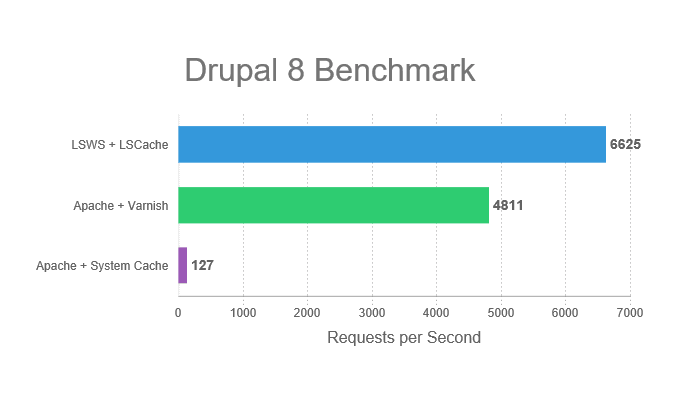
    We’re back with more benchmarks! This time, we’ve put our new LSCache module for Drupal 8 to the test. We compared LiteSpeed Web Server with LSCache, Apache with Varnish (Cachewall), and Apache with System Cache.

    Our testing consisted of burst tests and load testing, both of which are explained in more detail below.

    The Results

    Benchmark

    The following chart shows how many requests per second each server + cache solution combination processed during our burst tests. The larger the number, the better.

    As you can see, LiteSpeed Web Server + LSCache outperforms both Apache + Varnish and Apache + System Cache.

    Load Testing

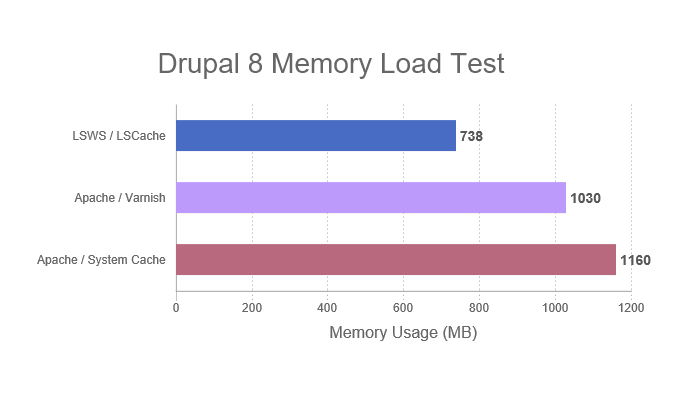
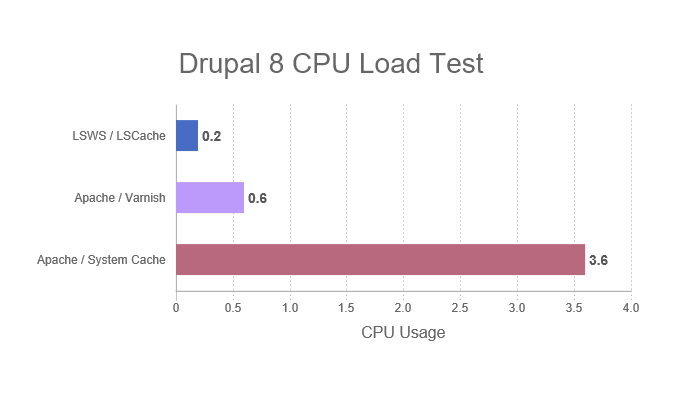
    The following graphs show the CPU and Memory usage during testing for each server + cache solution combination tested. For these measurements, a smaller number is better.

    LiteSpeed Web Server + LSCache consumed less memory and CPU than both Apache tests.

    Try it Yourself

    You can see the specs of our configuration and test environment below. Feel free to run the same benchmarks yourself and verify our results.

    These are the commands we used in all tests (Replace example.com/path with the location of your test subjects):

    Benchmark

    ab -n 10000 -k -H "Accept-Encoding: gzip,deflate" -c 100 example.com/path

    Load Testing
    LSWS+LSCache and Apache+Varnish:

    siege -c 100 -r 20 -d 6 example.com/path

    Apache+System:

    siege -c 100 -r 20 -b example.com/path

    NOTE: We used -d 6 instead of -b in two cases because we wanted to ensure that each server+cache was processing roughly the same number of transactions per second. The -d parameter allows you to specify a delay.

    Each test was run five times, and the average result was used for our graphs.

    Web Server Configuration

    Common settings for LSWS and Apache:

    • Keep-Alive ON
    • PHP 7.1.15
    • Zend OPCache ON
    • Max Connections 20
    • PHP Child 5

    Test Environment

    Software

    Web Server version:

    • LSWS: v5.2.5
    • Apache: v2.4.6

    Control Panel: cPanel: v68.0.36
    Operating System: CloudLinux 7.4, all accounts set to unlimited
    Server API version:

    • LSWS: LSAPI v6.11
    • Apache: FPM/FastCGI

    Cache version:

    Drupal version: 8.5

    Hardware

    • Web-Server: 1-CPU + 2G Memory
    • ab-Server: 4-CPU + 4G Memory
    • Network: 4.5G Bandwidth

    Conclusion

    We hope these results encourage you to give LSCache for Drupal 8 a try!

    If you run into any trouble or would like to share some feedback, drop by our forum. We’re here to help!

    And don’t forget, our Slack community is a great place to connect other LiteSpeed users. Check out the #drupal-cache channel while you’re there.

  • Benchmarking LSCache for Joomla

    Benchmarking LSCache for Joomla

    We put our new LSCache extension for Joomla to the test, comparing OpenLiteSpeed and LSCache to Apache and Joomla System Page Cache. These are the results.

    Our testing consisted of burst tests simulating 10,000 requests over 100 concurrent users.

    The Results

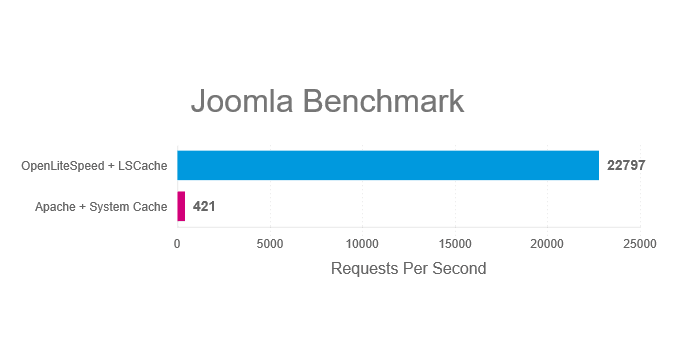
    The following chart shows how many requests per second the two servers and cache solutions processed during our series of tests. The larger the number, the better.

    As you can see, OpenLiteSpeed + LSCache outperforms Apache + Joomla System Page Cache..

    Try it Yourself

    In the interest of transparency, we’re including the specs of our configuration and test environment below. Feel free to run the same benchmarks yourself and verify our results.

    This is the command we used in all tests (Replace example.com/path with the location of your test subjects):

    ab -n 10000 -k -H "Accept-Encoding: gzip,deflate" -c 100 example.com/path

    Each test was run five times, and the average result was used for our graphs.

    Web Server Configuration

    Common settings for both servers:

    • Keep-Alive
    • gzip
    • OPCache
    • PHP use socket
    • PHP version 7.1.2

    Additional OpenLiteSpeed settings:

    • Number of Workers 4
    • PHP_LSAPI_CHILDREN=20
    • LSAPI_AVOID_FORK=1

    Test Environment

    Software

    Web Server version:

    • OLS: v1.4.28
    • Apache: v2.4.6

    Server API version:

    • OLS: LSAPI v6.11
    • Apache: Apache 2.0 Handler

    Cache version:

    Hardware

    Both Client and Server specs:

    • Intel Xeon CPU E7- 4870 4 Core @ 2.40GHz
    • 4GB RAM
    • 120GB ZFS RAID-Z2 iSCSI Drive
    • CentOS 7

    Although we didn’t use one for our benchmarks, We recommend Solid State Drives (SSD) in production environments.

    Try LSCache for Joomla today, and tell us what you think!

  • Benchmarks: OpenLiteSpeed vs. NGiNX vs. Apache

    Benchmarks: OpenLiteSpeed vs. NGiNX vs. Apache

    Compare OpenLiteSpeed to NGiNX and Apache

    If our search statistics are any indication, the question on everyone’s mind is “How does OpenLiteSpeed compare to NGiNX and Apache?” We think that’s a question that deserves an answer, so we set up a test environment and got to work.

    Note: For a more in-depth discussion of the differences and similarities between LiteSpeed, Apache, and nginx, take a look at the comparison on our site.

    The Contenders

    We looked at OpenLiteSpeed, NGiNX, and Apache and we ran burst tests simulating 10,000 requests over 100 concurrent users. We looked at how the three web servers handled a small static file and a simple PHP script, and then we evaluated their WordPress performance.

    When it comes to WordPress, caching is important, so we made sure to use an appropriate caching solution for each web server in our tests.

    All tests were performed with Keep-Alive enabled. (See more common settings under Web Server Configuration below.)

    The Results

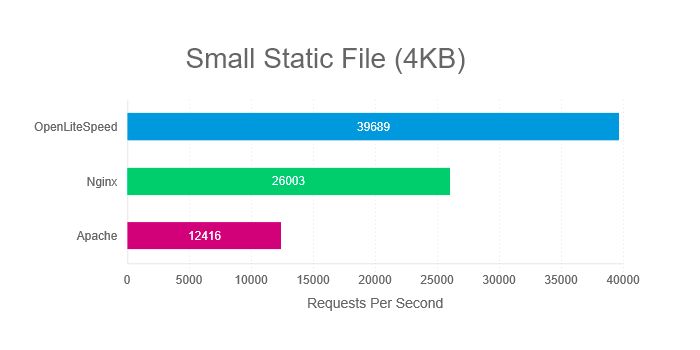
    The following charts show how many requests per second the three servers processed during our series of tests. The larger the number, the better.

    Compare OpenLiteSpeed to NGiNX and Apache: Small Static File Benchmark

    Static files require no processing, and so this test is useful for measuring the servers’ response times. How quickly can each server deliver small static files?

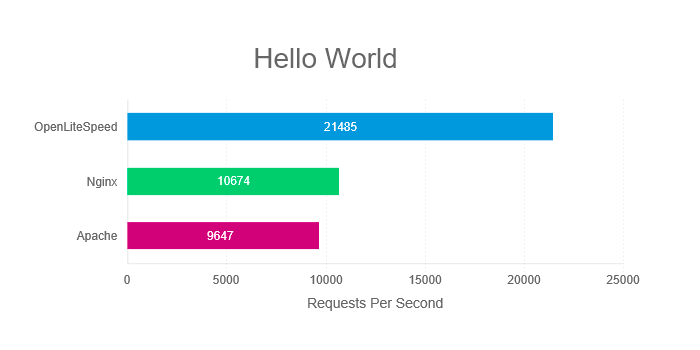
    Compare OpenLiteSpeed to NGiNX and Apache: Hello World PHP Benchmark

    When we benchmark the “Hello World” PHP app, we are not testing real-world conditions. Nevertheless, this is the best way to isolate the communication between server and PHP from the processing of the PHP itself. With this test, what we are most interested in is how efficiently the server communicates with the PHP engine.

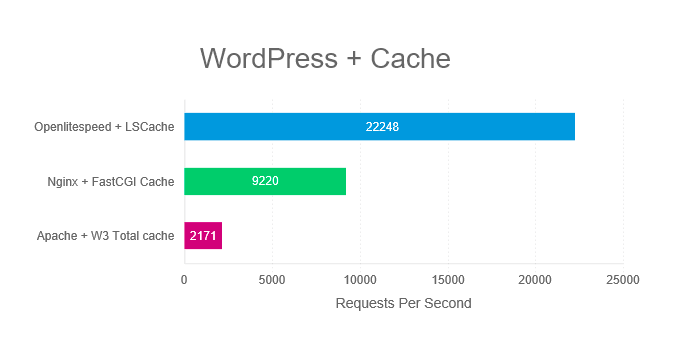
    Compare OpenLiteSpeed to NGiNX and Apache: WordPress Cache Benchmark

    WordPress is a heavy PHP application and as such, caching is strongly recommended. In this test, we pair each server with an appropriate caching option.

    As you can see, OpenLiteSpeed outperforms NGiNX and Apache in all of our scenarios.

    Try it Yourself

    In the interest of transparency, we’re including the specs of our web server configuration and test environment below. Feel free to run the same benchmarks and compare OpenLiteSpeed to NGiNX and Apache for yourself.

    This is the command we used in all tests (Replace example.com/path with the location of your test subjects):

    ab -n 10000 -k -H "Accept-Encoding: gzip,deflate" -c 100 example.com/path

    Each test was run five times, and the average result was used for our graphs.

    Web Server Configuration

    Common settings for all servers:

    • Keep-Alive
    • gzip
    • OPCache
    • PHP use socket
    • PHP version 7.1.2

    Additional OpenLiteSpeed settings:

    • Number of Workers 4
    • PHP_LSAPI_CHILDREN=20
    • LSAPI_AVOID_FORK=1

    Additional NGiNX settings:

    • worker_processes 4
    • worker_connections 4096
    • pm.start_servers = 20

    Test Environment

    Software

    Web Server version:

    • OLS: v1.4.28
    • NGiNX: v1.12.2
    • Apache: v2.4.6

    Server API version:

    • OLS: LSAPI v6.11
    • NGiNX: FPM/FastCGI
    • Apache: Apache 2.0 Handler

    Cache version:

    WordPress version:

    • Version: 4.9.4

    Hardware

    Both Client and Server specs:

    • Intel Xeon CPU E7- 4870 4 Core @ 2.40GHz
    • 4GB RAM
    • 120GB ZFS RAID-Z2 iSCSI Drive
    • CentOS 7

    Although we didn’t use one for our benchmarks, We recommend Solid State Drives (SSD) in production environments.

    Summary

    What we hope you have noticed, is that OpenLiteSpeed easily outperforms the competition. If you are in the market for a new web server solution, and you are thinking Open Source, give OpenLiteSpeed a try.

    Not convinced?

    We encourage you to repeat our tests on your own hardware and see the difference for yourself! Or, join us in our Benchmarks Shootout! If you think you can configure NGNiX or Apache to beat LiteSpeed, we’d love to go head-to-head with you. Follow this link for more information.

    Want More?

    Esteban over at infranetworking wrote up a very detailed and thorough comparison between Apache, NGNiX, and LiteSpeed Web Server. (It’s in Spanish, but Google Translate does a decent job, if you don’t speak Spanish.)

    —
    Article by: Lisa Clarke
    Benchmarks Performed by: Eric Leu
    Graphs by: Mark Zou

  • Customer Showcase: LSCache Provides All-in-One Optimization for WordPress

    Customer Showcase: LSCache Provides All-in-One Optimization for WordPress

    Customer Showcase: LSCache Provides All-in-One Optimization for WordPress

    Sergio Alfaro of the online shop Invitaciones y Tarjetas de Cumpleaños GRATIS needed a way to maximize his site’s performance without introducing third-party-plugin conflicts. LiteSpeed Cache for WordPress to the rescue! Below is the Invitaciones y Tarjetas de Cumpleaños GRATIS story as told by Sergio to LiteSpeed. Read on to see how LSCache Provides All-in-One Optimization for WordPress!

    Customer Profile

    • Store: Invitaciones y Tarjetas de Cumpleaños GRATIS located in Spain, EU
    • Hosting Provider: Mundiserver, using OVH server located in France, EU
    • WordPress Version: 4.9.1
    • LiteSpeed Cache Plugin Version: 1.8
    • Store Configuration: Standard WordPress installation
    • Average Traffic: 20,000 unique visitors/month with 45,000 page views/month
    • 3rd Party Plugins: LiteSpeed Cache, Yoast SEO, All in One WP Security, Complete Analytics Optimization Suite, Mailster, etc.

    The Invitaciones y Tarjetas Story

    Customer Showcase: Invitaciones y Tarjetas de Cumpleaños GRATIS

    The Challenge

    1. Maximize speed improvements without JS/CSS conflicts or third-party-plugin conflicts
    2. Avoid having to use a lot of plugins to optimize the website, manage the CDN, manage cache, etc.

    Before

    We used a “shared hosting” wordpress specialist hosted in Spain. I say “shared hosting” but really they were bigger dedicated servers with a small number of accounts assigned to each one and they used Cloud Linux to assign the resources.

    Our Setup

    The host provided:

    • 2GB RAM and 2 CPU cores
    • The host’s own WordPress plugin
    • nginx with Varnish
    • Strong rules to avoid WP hacking
    • Image optimization via a one-click server solution

    Along with the host’s own WP plugin, I used the premium WP Rocket plugin and tried the Autoptimizer plugin, too. I was hoping that the speed would be better than before, especially the time to first byte, but the total time to load continued to be very high in all combinations I tried.

    Another big problem was that the cache expired quickly and needed to be re-cached manually by the visitors. I dedicated several weeks to testing other solutions: W3 Total Cache was very complex, introduced many issues for my website and didn’t give me good results. WP Rocket worked easily and provided better results on speed test pages but really didn’t improve the total load time very much. I tried many other caches and optimization plugins but the best I was able to achieve was to load the homepage in around 3.5 seconds. Internal pages that had Adsense loaded in 5-10 seconds.

    The Pagespeed/YSlow scores, Pingdom and Webpagetest normally resulted in C or D scores and were never better than a B.

    After

    Now we have our own dedicated server where we store a lot of websites, many of them complex multistore/multilanguage Magento stores using the LiteMage plugin, along with several WordPress sites. For this reason, we use CloudLinux too, to work exactly in the same manner that our previous hosting did: separating all of the WHM accounts and limiting the assigned resources. In this way, we can provide unlimited resources to some domains and limited CPU/RAM to others.

    We have had amazing results with a Magento store that was hosted by Aspiration Hosting,using LiteSpeed Web Server with LiteMage, so we really are big fans of LiteSpeed. And so without any doubt, we bought a 4 CPU license for this server.

    For the https://www.invitacionesytarjetas.gratis website we limited the resources to 2 CPU cores and 2GB of RAM too: exactly the same as in our previous hosting.

    We installed the LiteSpeed Cache plugin for WordPress, and without modify anything, we noticed a very big speed improvement – simply using the default setup. And once we saw that this plugin is a really an All-in-One optimization suite, we started playing with different options.

    Current Plugin Configuration

    • Cache: All options enabled except Cache Mobile.
    • Optimize: All options enabled, including DNS Prefetch
    • Tuning: We’ve excluded one JS file from minification to avoid a conflict with another plugin. This is an awesome feature because you can continue using the Minimize/Combine JS options without the need to fully disable them if a conflict arises.
    • Media: LazyLoad features are off because our template already handles that feature. Image WebP Replacement is enabled.
    • CDN: We have enabled Cloudflare. We use the free account, as our website is worldwide oriented in the Spanish language, not only for Spain, and a CDN can always help. We set Load JQuery remotely to Google.
    • Everything else uses the default setting.

    Another great feature integrated in the plugin is Image Optimization. We have achieved Level 5 here with all images optimized: in total, 2429 images optimized and converted to webp format.

    I can’t forget to mention the amazing crawler feature. We are using Yoast’s sitemap.xml to be sure that all posts and pages are properly crawled and cached. This tool helps to minimize the number of uncached pages a visitor will encounter.

    Results

    GTmetrix: (Pagespeed A 95% / YSlow A 93% / 1.2s load):
    https://gtmetrix.com/reports/www.invitacionesytarjetas.gratis/hvFYT09v
     LSCache Provides All-in-One Optimization for WordPress Performance Scores
     LSCache Provides All-in-One Optimization for WordPress Page Details

    Pingdom tools: Performance B 88 – 377ms to full load
    https://tools.pingdom.com/#!/c5ntzi/https://www.invitacionesytarjetas.gratis
     LSCache Provides All-in-One Optimization for WordPress Pingdom Tools

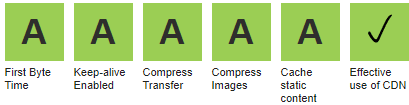
    Webpagetest: All in green A A A A A
    https://www.webpagetest.org/result/180116_3S_adf6f339b68fa9b7e31409979a63c8b0/
     LSCache Provides All-in-One Optimization for WordPress
     LSCache Provides All-in-One Optimization for WordPress

    So we are very happy with our LiteSpeed server in combination with the LiteSpeed Cache WordPress plugin.

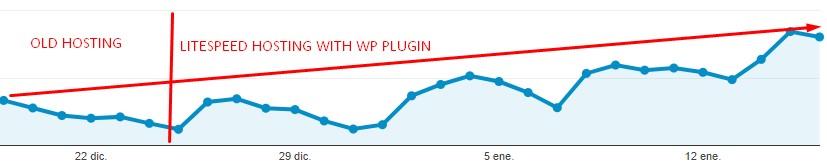
    We noticed an increase in organic traffic from Google within days of switching. No one can confirm that the main reason for such a gain is the 300% improvement in speed, or the exceptional ratings according to the Google requirements and guidelines, but at this screenshot from the last 30 days. Coincidence?

     LSCache Provides All-in-One Optimization for WordPress Traffic Increase

    Litespeed plugin is a real All-in-One plugin

    You no longer need to have 3-4 different plugins to achieve what you need. Often the use of multiple plugins can introduce conflicts. Finding the right combination of plugins with a good collection of features and the ability to work well together can be a challenge.

    LiteSpeed’s plugin has the server cache, CSS/JS minification and combination with the option to exclude some files, CDN support, DNS prefetch, a built-in crawler, image optimization, and many more advanced features.

    Even better? You can install the plugin, and using the default options, start to see improved performance immediately. After a while, you can start playing with all of the options, enabling and testing the results to discover the combination that is best for your site.

    We see how the LiteSpeed team works very hard adding a lot of new options each week to their plugin. They listen to the users demands, issues notifications and fix problems quickly. So, you can expect the best real solution for your speed problems.

    —
    Our thanks to Sergio for sharing his story! This is our first Customer Showcase in some time, and we would love to see more of them here. Have you experienced the LiteSpeed difference? If you would like to share your story with our readers, drop me a line, and we can discuss it. –Lisa

  • Why is Benchmarking WordPress so Hard?

    Why is Benchmarking WordPress so Hard?

    As promised, we’re going to be giving the hosting industry a tool for doing a proper “benchmark” as a means of evaluating your own WordPress capabilities in a standardized way. I’m going to start this post with a few definitions, since there has been a lot of misuse of the words and language in best practices.

    The essence of any meaningful benchmark is repeatability. If your test results are changing every time you run them, you are not running a benchmark. A benchmark environment is very tightly controlled and the results should be identical every time you run the test.

    Some people may want to compare environments. In order for the comparison to be valid, you must have control over both (or all) of the environments to make very broad conclusions. You may be able to make very specific conclusions, but you need to account for the things that you did not control in your test, and you ABSOLUTELY need to be able to explain any anomalies in the data.

    Case in point: It is fairly popular for hosts to run gtmetrix or webpagetest and suggest grandiose claims like “A is 10X faster than B”. However, doing so overlooks simple things like A might be much closer to the geographic location than B. If you are running a test from Australia against a site hosted in Australia and comparing the results against a completely different website hosted in Indiana, it is near impossible to draw any scientifically valid conclusions. The only realistic statement you might be able to make is that users in Australia get better performance from site A than users in Indiana get from a completely different site B… and even then, you’d be overlooking the variability of internet latency, possibilities of DDoS attacks impacting one site or the other while you were testing, peering issues, etc…

    So, how do we benchmark?

    Well, it starts with an environment, an understanding of what should happen (Benchmarking 101) and some questions. Let’s recount our last two weeks or so of preparation.

    Yes, I said two weeks…

    For this exercise, LiteSpeed was looking to get an idea of how our LSCache plugin for WordPress would compare to the most common Apache + WordPress cache solution (WP SuperCache). As it turns out, I also write a WordPress blog, so we downloaded my blog via WordPress’ export function and installed it in both environments. Throughout this blog post, I will mention assets that you will be able to download from a repository that we are building so that you can run the exact same tests that we run in any environment you’d like. The entire process will be documented in such a way that you should be able to follow it and modify it to fit your own needs, should you desire.

    When you are preparing to publish, it really helps to keep a notebook. It’s also an extremely valuable exercise to include various members of the team to build consensus and help evaluate “what happened” when you run a test. As a side note, we also uncovered two or three things that didn’t work the way we expected in our admin panel, and managed to get them fixed. Who knew that benchmarking could uncover bugs? 🙂

    My team for benchmarking includes:

    Kevin (Lead WordPress plug-in developer)
    George (LiteSpeed WebServer Architect)
    Mike (Lead WHM plug-in cache management developer)
    Rob (Social Media/Documentation lead)
    Jackson (Support/environment Manager)
    Jon and Mark (Test Environment admins)
    Steve (me… performance benchmark guy or marketing/BD lead…depending on the day)

    So, why is benchmarking a big deal here at LiteSpeed?

    We want to be the fastest solution for the Internet. If we are not, we need to understand where and why to continuously improve our products. This is an all-hands effort because it supports our core mission, and there is nothing more important to our company than being the best. (OK,I’m going to take the marketing hat off and go back to engineering 🙂 )

    Our test tool of choice for benchmarking is LoadRunner. It is a tool that I have been personally using for 17 years, and I have a wealth of contacts in industry if/when I need help. More importantly, I know that LoadRunner works in all of the possible test conditions and I don’t need 5 tools to do my work. LoadRunner Community Edition is completely free for anyone to use. We extend it with SiteScope for LoadRunner Community Edition to gather system level data while running the test, but we also have our team looking at traditional tools like TOP, Apache logs, etc. to do sanity checking.

    Sanity checking?

    Sanity checking is a double blind testing method of flushing out errors in your test environment. As an example, Jon and Mark will shout out the Server Load numbers from the CentOS console while I validate that the SiteScope data generally agrees. Mike will open a browser window and randomly click on the WordPress articles in our test site to see if the results match what our tool is reporting.

    And here is the rub: They do not always match. When they do not match, you need to fix something.

    And now you know why we’ve had 7 people working on this off and on for two plus weeks. We’ve been fixing problems in the test environment in preparation to run the benchmarks. Our last runs were almost “clean”. What does clean mean? Clean means that there wasn’t anything in the data that couldn’t be easily explained and didn’t follow the mathematical model exactly. Clean also means that we are getting the exact same results when we re-run tests.

    Clean means repeatable. (Every benchmark in this article was run multiple times to confirm that the results did not change between runs)

    We started with a WordPress (version X) site running on CentOS 7 [2 CPUs with 4 cores and 4GB of memory] (Full spec hyperlink). The site contains a home page that greets the visitor and 15 articles. I wrote a script that simulates someone coming to the site, and then randomly selecting an article to read. In our load testing software, we have the ability to run up to 50 concurrent users. Developing the working script took less than an hour, and a link to it along with the various scenarios we execute and result sets will all be provided at the bottom of this post.

    So why has this taken two weeks?

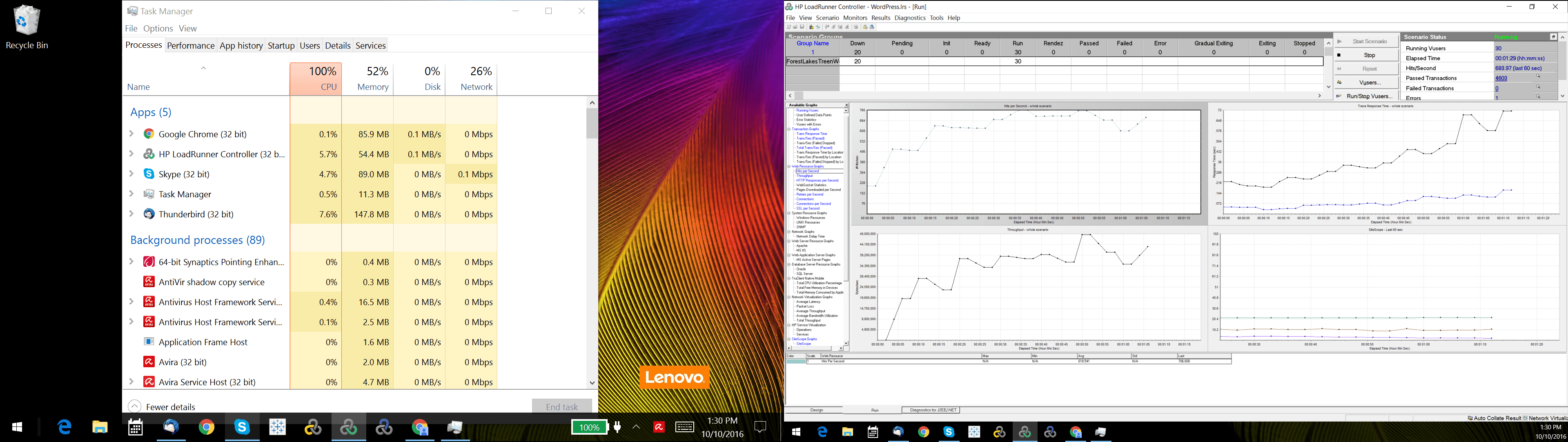
    Well… this might take a second. Before you benchmark WordPress, you need to benchmark your script and your test environment. That’s right. Benchmark your testing software first… and flush out environment issues. As an example, our load generators were Windows 10 VMs and our throughput was terrible because they were consuming a lot of CPU. In addition, the network bandwidth would stop climbing at around 200MB/s. As it turns out, Windows Defender was scanning every packet request which caused the high CPU utilization and limited bandwidth…somewhat.
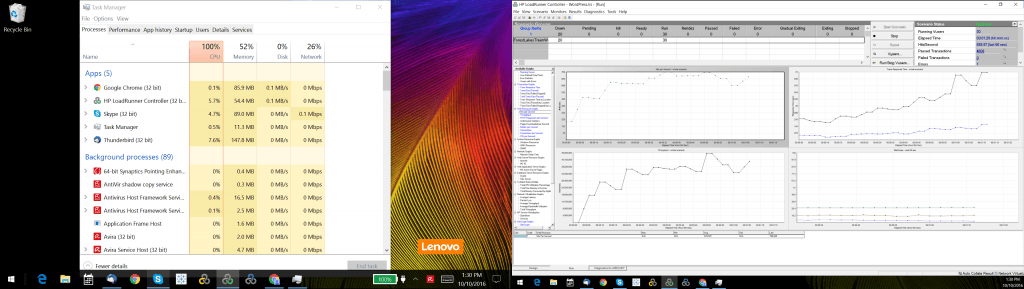
    overcooked-load-generator

    Next, investigation revealed that there was another bandwidth issue from outbound calls to Google for fonts in the page, saturating our internet connection. We turned off font calls and other outbound calls in the WordPress theme and our load generators scaled better. We tuned the TCP stack and were soon able to generate 4Gb/s per load generator, which gave us the ability to sustain 8 Gb/s. While we were connected to a 10Gb/s switch, we believe there was some bandwidth loss due to virtualization and we were never able to generate the full 10 Gb/s. As an independent verification step, we also ran iperf and got similar results. Whatever the cause, we know we are limited to 8Gb/s maximum.

    litespeedtech.com/packages/benchmark/LoadRunner/WordPress/2016/network8-9Gb/Report.htm
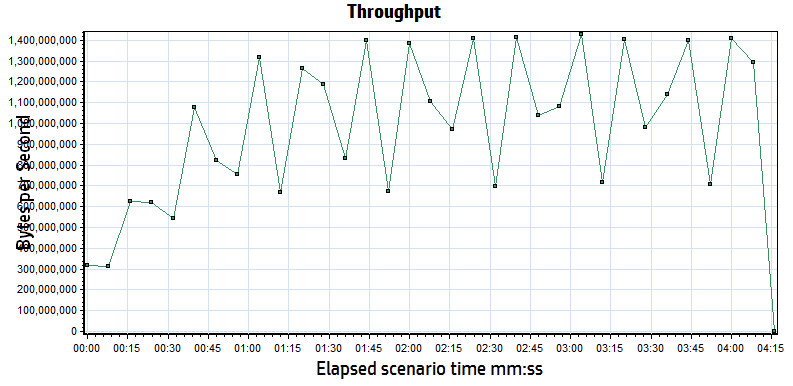
    throughput

    When an internet user visits a website, their browser will open multiple connections to speed up the movement of data. Some tools bypass this to conserve resources, only opening one connection to download a cached page, but then avoid sending the content via the other connections simulating a browser. We will run a test this way to illustrate why the results are not very meaningful. Most testing tools also allow you to make changes to the run-time settings that can impact what you are testing and what the subsequent results mean. We’re going to discuss those settings and how we incorporate them into our benchmarks.

    That’s right. Plural. Benchmarks.

    There is no one single benchmark that you can run that explains everything about the system. You will always be constrained by what is built, usually not by what is possible. We run a multitude of tests as a suite for describing system capabilities, and with good reason.

    It is prohibitively expensive to test maximum capabilities.

    WordPress is approximately 30% of the internet, so I will assume that they’ve done enough work to be able to build a low volume website like my blog. However, when a WordPress site has a significant audience, performance is not guaranteed. Like any PHP application, WordPress will bog down when you have a lot of users hitting PHP, so caching is popular to offload PHP workload. Instead of running 10,000 users in a test, which would require expensive licenses and hardware to drive the load, many people simulate via a high transaction rate. This method is not perfect, but it does allow you to understand transactional throughput. Transactional throughput is not user load, and if you see a benchmark that suggests that the two are equivalent, you should probably not pay too much attention to it.

    Since this benchmark is about WordPress and two web server/caching options, your first thought might be to batter both systems with your max load and see what happens! [hint: this isn’t very useful- unless you are trying to convince someone that they shouldn’t do it…]

    An example of a poorly defined test plan reads something like this:

    “We ran a 50 user test against two WordPress environments to see which one performed better.”

    In order for a requirement to be testable, you need to state a lot more specific information. Our example definition below remains incomplete, but for the purposes of this article will serve to illustrate how much further one needs to go to become “testable”

    We’re going to break our requirement into components, and then make sure that the tooling and the environment are set-up correctly to handle the test we are attempting to run:

    A Test Plan comes to Life:

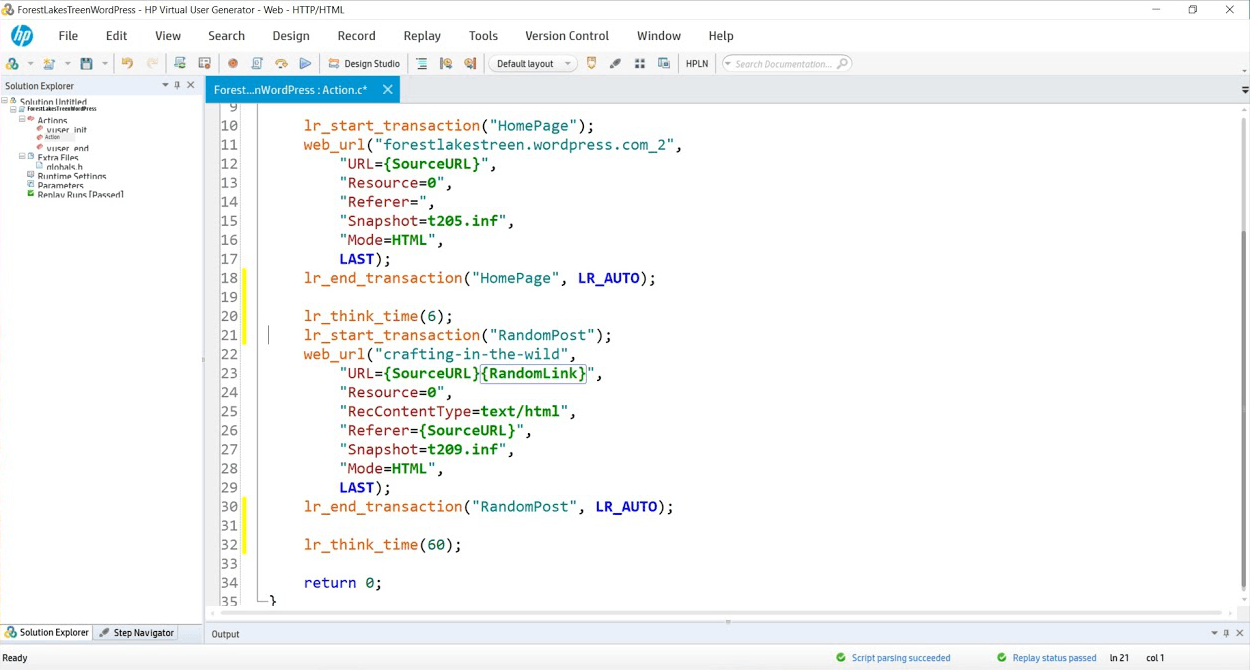
    Simulate 50 concurrent users running a script that hits the WordPress landing page and then randomly selects a blog link to read. In our scripts, lr_transaction statements capture transaction times for pages and store the results for analysis. We will measure the WordPress Home Page and then a randomly selected blog post throughout the duration of the tests we perform. We’ve created two variables

    {SourceURL}, which can be edited to store an IP or server name should you wish to test in your own WordPress domain.

    {RandomLink}, which contains the 15 articles and randomly picks one per user per iteration. If you wanted to simulate a larger collection of cached objects, you could create more articles and simply append their paths to the text file that serves as a data repository for this variable.

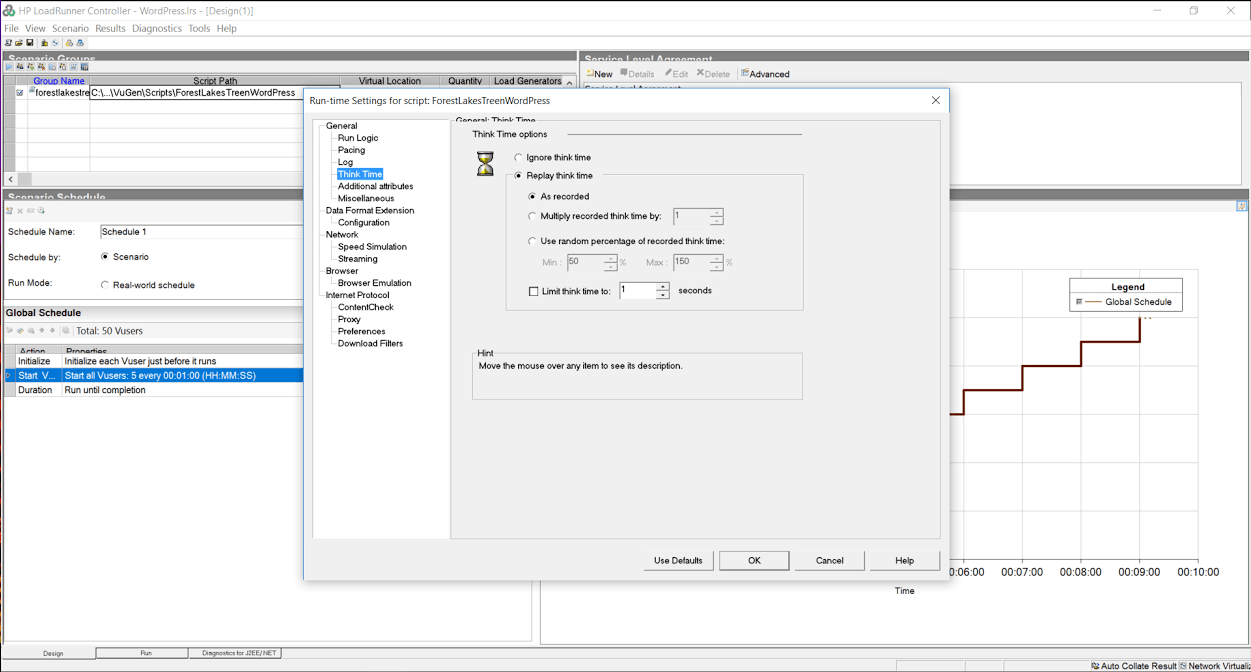
    While think time was recorded at 6 and 60 seconds, we have edited it to 1 second in both cases to gather more data rather than having the system sit idly for 99% of the test.
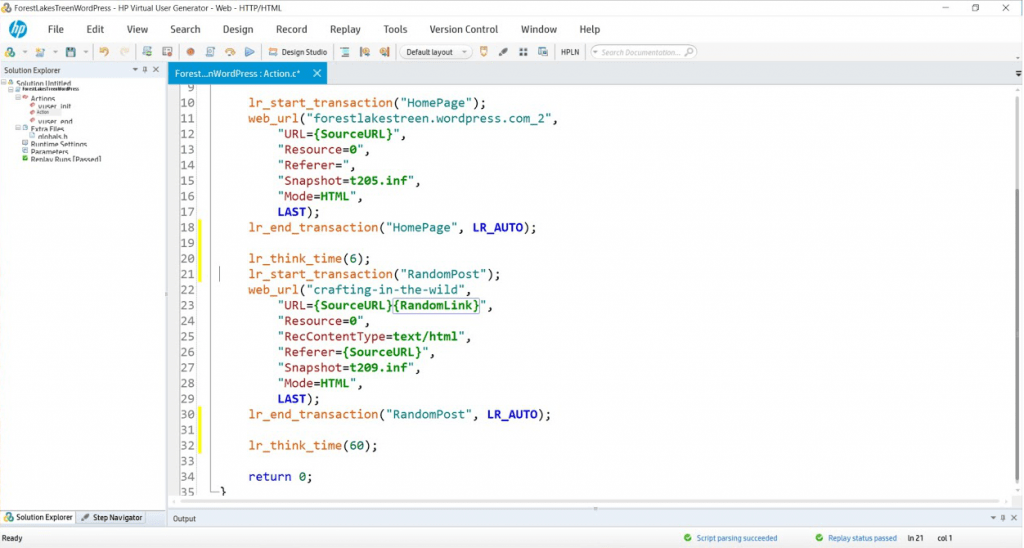
    loadrunner-script

    During this suite of tests, we will:

    Turn off HTML Parsing to avoid downloading resources with no think time to test the cache’s capability to create and close connections.

    Turn on HTML Parsing to download resources with no think time to simulate a high volume event and to test the cache’s ability to work with a server load of a real WordPress site serving pages from cache.

    Turn on HTML Parsing to download resources and replay think time typical of a real WordPress user to simulate a real world workload on a cache.

    Assumptions:

    1. System should not fail to respond to any transactions.
    2. All pages will be served from cache (cache warm-ups prior, if necessary).
    3. Page load speeds should remain relatively consistent for the duration of the test.

    Since both environments will be exercised with only cached content, every request will be served from cache in both Apache and LiteSpeed. During the test, we will attempt non-cached transactions like adding comments or logging in to the WordPress Admin panel and observe the effects the load has on the overall system. We will use the same script in the various exercises, only changing the run time settings to simulate different conditions.

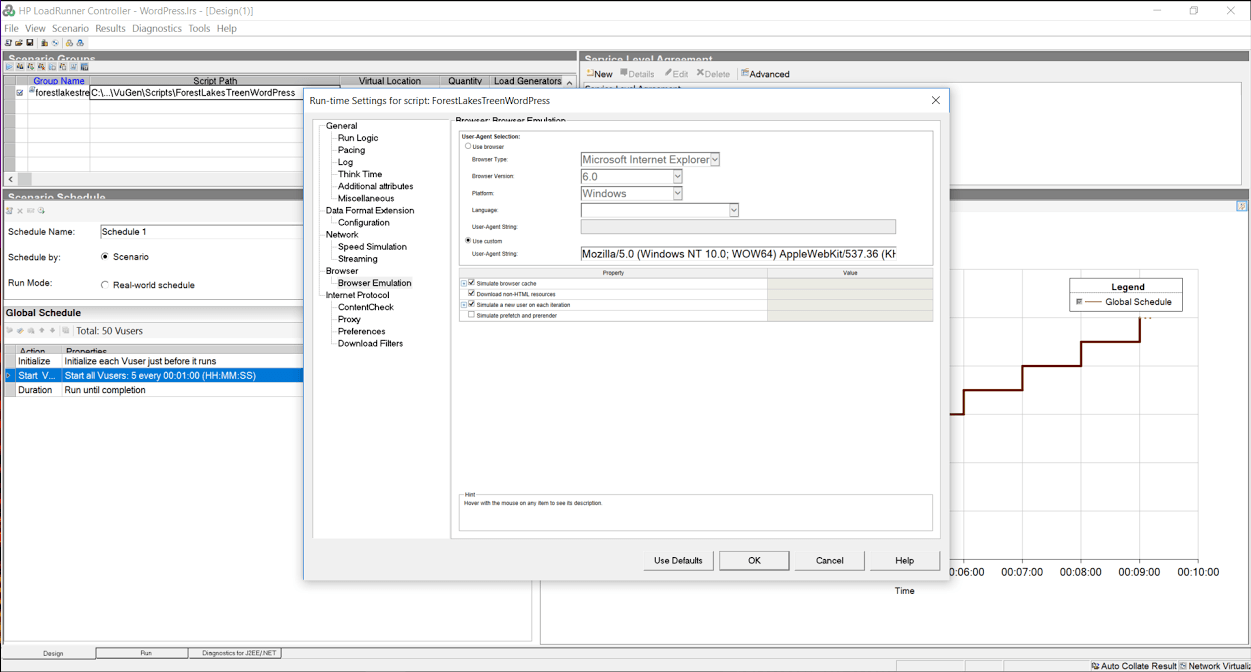
    In our tool’s runtime settings, we have the option to turn off the parsing of the cache served page so that it does not download resources, or pull them from the local browser cache. Simulating the browser behavior of downloading resources puts more load on the server, and also helps us measure throughput or the ability of the web server/cache to move data across the network.
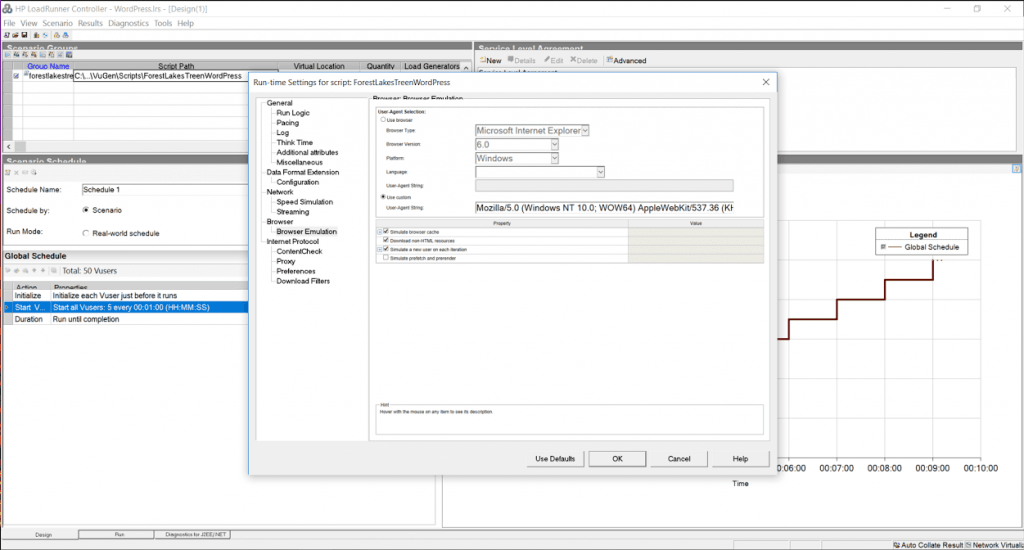
    runtime-settings

    In addition, when the script is recorded, it saves the amount of time a typical user spends reading the page into “think time”. As you might imagine, an average WordPress post has a significant amount of think time in it. By ignoring think time, we get a much higher load than replaying think time, which can help us stress test the environment… but is that what we want to do? [Maybe.]
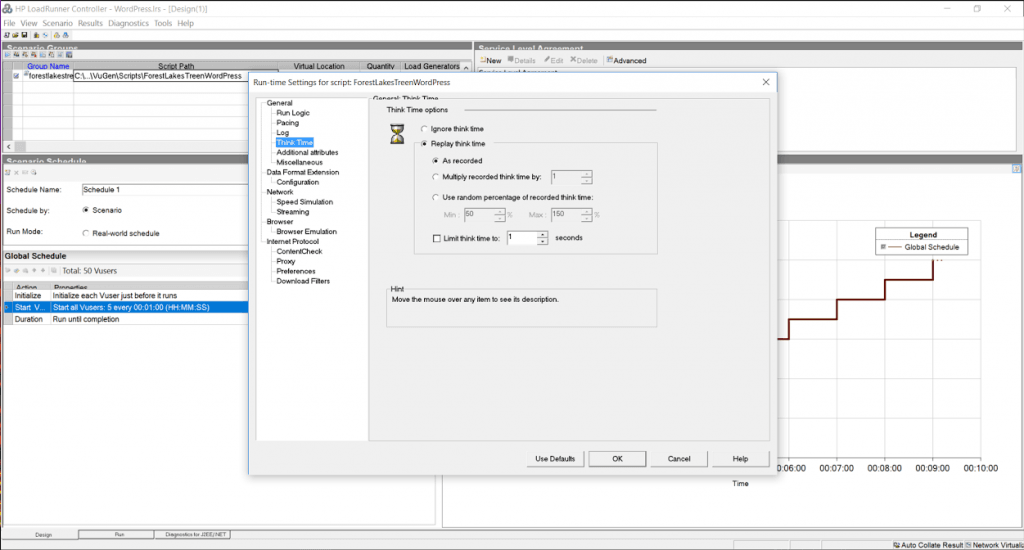
    think-time-options

    Debugging and Benchmarking Begin

    I’ve already discussed the model in the original performance blog (Benchmarking data looks like this…), and as a reminder, the tests should basically draw straight lines. When they do not, something is broken. To start, we want to know the characteristics of a single user running with no think time and downloading resources, since this will be our maximum load.

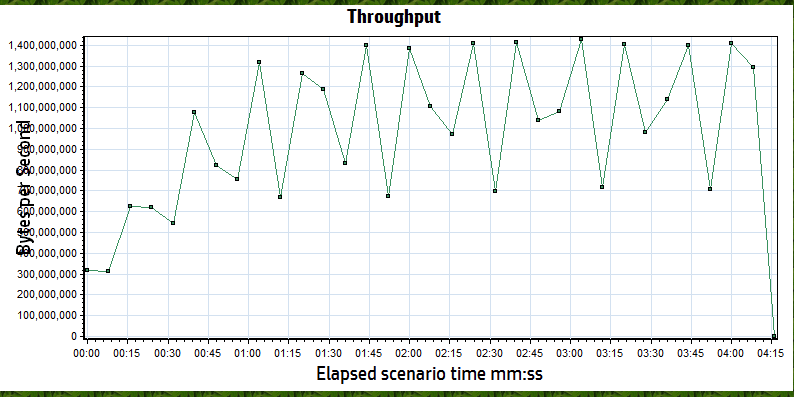
    Both Apache and LiteSpeed perform about the same in these conditions. A round estimate for throughput is that each user will consume about 90 MB/s or 0.4 Gb/s of bandwidth and generates about 1500 hits/sec. With a maximum of 8Gb/s of available bandwidth, we know that we cannot use all 50 users to run our test (rough estimates are ~20 users will saturate the network). This graph confirms that the network saturates around 5 minutes mark and somewhere around 20 users because the throughput no longer increases as the number of users grows.
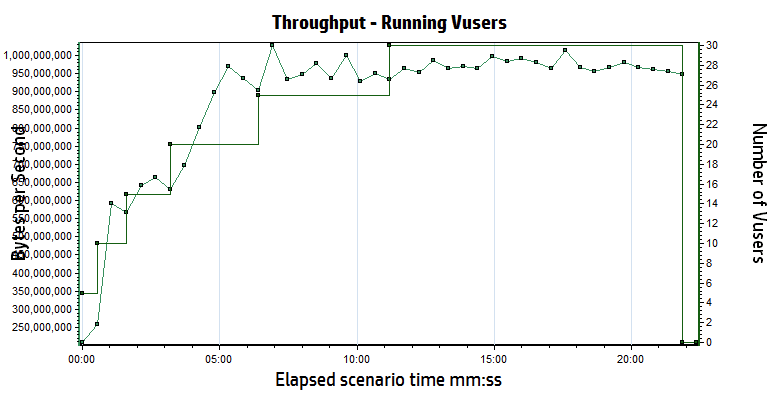
    throughtput-saturated-vusers

    Let’s do some quick math to double check our work.

    If we run one user, we see about 11ms response time, which would translate to approximately 90 requests for any page per second (1s/11ms). If you look at most of the articles you’ll see that most contain “about X-teen resources” per page, so your hits per second should be 90 times X-teen, which matches our 1500 hits per second.

    Here is the most important point: THIS MATH IS ALWAYS TRUE. It does not matter if the site is WordPress, Magento, or just PHP. Hits per second = (1s / single user page time) * average number of resource per page. If you turn off the downloading of resources, your average number of resources per page will be one (just the cache reply) …but the single user page time will probably drop to 1-3 ms.

    Believe the math.

    Low Load Baseline (5 users)

    When you are benchmarking, you are not trying to stress a system to its breaking point. You only want your system to respond as fast as it can, and that stops happening when you start approaching breaking points. While a single user response time is good for some things, it doesn’t create any of the deadlock conditions that a multi-user baseline will. Since LiteSpeed and Apache should both handle 5 users without issues, we start with 1 user and ramp up to 5 users by adding 1 user every 30 seconds. In a second I’ll explain why this didn’t happen the way we expected.

    We use the script to hit the test site for a minute or two, just to make sure that everything is cached, then we start a 5 minute test cycle. During the baseline tests, we planned to run three slightly different scenarios:

    Scenario #1: cache hits only, think time of 1 second between pages, downloading of resources
    Scenario #2: cache hits only, no think time, downloading of resources
    Scenario #3: cache hits only, no think time, no downloading of resources

    When it is done, we swap the LiteSpeed configuration for the Apache configuration… Lather, rinse, and repeat.

    litespeedtech.com/packages/benchmark/LoadRunner/WordPress/2016/apache-baseline/Report.htm

    litespeedtech.com/packages/benchmark/LoadRunner/WordPress/2016/nginx-baseline/Report.htm

    litespeedtech.com/packages/benchmark/LoadRunner/WordPress/2016/litespeed-baseline/Report.htm

    Replay Think Time/Download Resources

    Completed Trans. Hit/s Throughput Tx Home/Random Server Load
    LiteSpeed 1733 70 3.3 MB/s 0.007/0.010 0.026
    nginx 1778 60.5 3.7 MB/s 0.011/0.016 0.157
    Apache/WPSC 1776 70 4.3 MB/s 0.013/0.015 0.055

    No Think Time/Download Resources

    Completed Trans. Hit/s Maximum Throughput Tx (s) Home/Random Server Load
    LiteSpeed 221 K 7511 674 MB/s 0.007/0.009 1.12
    nginx 130 K 4428 501 MB/s 0.013/0.014 1.37
    Apache/WPSC 105 K 3568 424 MB/s 0.015/0.019 13.48

    What happened to the third test (no think time, don’t download resources)? We decided that there was very little reason to run it, because there is a problem that surfaces in this first test, which completely caught us off guard. Apache cannot scale in this environment past approximately 3200 h/s. Period.

    Notice the wording “in this environment”? That is a very specific statement. It is only relevant to this 2 CPU server, but we have seen the exact same behavior with other applications- so it has nothing to do with WordPress. We are saying (with a high degree of confidence) that Apache becomes CPU bound around 3200 hits/sec… regardless of what the hit is. The same behavior occurs at 3200 hit/sec with downloading full pages or just cache responses in a 2 CPU environment. It is a limitation of Apache and can only be addressed via adding more resources.

    If you look at the data with think time enabled, even a minimal 1s delay between requests drops the transaction rate to only 70 hits/sec. A hit is any request for any object (static or cached) being served by apache and/or LiteSpeed. The difference between the two in a low volume environment is negligible. If your WordPress site does not get a lot of traffic, you will not see any improvement running LiteSpeed.

    But, please, keep reading…

    The second test actually exposes the Apache problem. By removing the think time, you can simulate a much higher workload with the same number of users. The LiteSpeed Server delivers 8200 hits/sec, while the Apache workload peaks at about 3200 hits/sec (You’ll see this in the final data sets too). Take a look at the server load. Apache is running at 8X capacity, which results in requests being briefly queued by the processor and the longer response times in both Home Page and Random Page transactions.

    For the record, LiteSpeed capped at 16,000 hits/sec, but we were at the limits of everything (bandwidth, load generation capacity, LiteSpeed capacity…). There were peaks that were higher, but 16K sustained was held for nearly 10 minutes.

    Now, normally, this is the part in the effort that vendors would generally throw a celebratory high five and proclaim their awesomeness… but, let’s hold the applause. When you are 5X as scalable as your competition, that’s huge!

    Except the data tells a weird story.

    Under no load conditions, LiteSpeed and Apache perform about the same.

    AND…

    Under 1X vs. 8X load conditions, LiteSpeed and Apache perform about the same.

    And, that is 100% correct… Almost.

    While the Apache server is running at 8X load, you see a slight increase in the time that the pages get served by the cache. 5ms. Throughout the test, we would open browser sessions and independently hit pages on the site. Guess what. They were fast.

    The one hidden nugget in all of this is that the server load is not the same. The cache is fine, and able to respond, even though the server load is high. However, all uncached requests are occurring against a server that is dying. We tried logging into the root of the server, the WordPress Admin panel, and adding comments. Guess what. They were not fast… 30 seconds or more.

    This also explains why I hold webpagetest, gtmetrix, et. al. in such disdain. They test at low volume and they ignore the effects on the back-end web server. If you ignore load conditions and back-end system resources, everyone gets a trophy… Until the real world comes for them. Interestly enough, Internet Sucuri published a blog post about Layer 7 DDoS attacks and you’ll notice that the median attack size is very similar to… The Apache limit we demonstrated earlier. (Sucuri Layer 7 DDoS Blog). If nothing else, LiteSpeed buys you 4-5X more Layer 7 DDoS resiliency.

    So, what next?

    We better run a much bigger load against both servers to see what happens!

    We will rerun scenario #1 and scenario #2 with 5 users being added every 30 seconds in an attempt to reach the limit of 50 users in both scenarios. Scenario #2 may cause issues.

    Scenario #3 is officially retired (Siege-like) because …well, it doesn’t make sense. Please understand that if you are using Siege, you are not requesting resources unless you explicitly code every object on the cache page into a get request for every page within your WordPress site. You can use Siege, but you’d need to write a script that called the cache page, and then called every bitmap, CSS, and javascript object on the page to represent a user with a browser. For every page. Just not maintainable.

    Without downloading resources, you might as well test “hello world”…

    Replay Think Time/Download Resources

    Completed Trans. Hit/s Throughput Tx Home/Random Server Load
    LiteSpeed 21292 503 32 MB/s 0.013/0.026 0.205
    nginx 21484 535 33 MB/s 0.012/0.014 0.60
    Apache/WPSC 21122 527 39 MB/s 0.022/0.037 1.961

    litespeedtech.com/packages/benchmark/LoadRunner/WordPress/2016/apache-with-think-time/Report.htm

    litespeedtech.com/packages/benchmark/LoadRunner/WordPress/2016/nginx-with-think-time/Report.htm

    litespeedtech.com/packages/benchmark/LoadRunner/WordPress/2016/litespeed-with-think-time/Report.htm

    No Think Time/Download Resources

    Completed Trans. Hit/s Throughput Tx (s) Home/Random Server Load
    LiteSpeed 334K 12K 738 MB/s 0.048/0.055 1.6
    nginx 236K 6K 363 MB/s 0.090/0.094 1.8
    Apache/WPSC 93K 3400 300 MB/s 0.217/0.151 91.0

    litespeedtech.com/packages/benchmark/LoadRunner/WordPress/2016/apache-no-think-time/Report.htm

    litespeedtech.com/packages/benchmark/LoadRunner/WordPress/2016/nginx-no-think-time/Report.htm

    litespeedtech.com/packages/benchmark/LoadRunner/WordPress/2016/litespeed-no-think-time/Report.htm

    MAX
    litespeedtech.com/packages/benchmark/LoadRunner/WordPress/2016/litespeed-saturated/Report.htm

    Once again, with think time, both environments performed about the same. However, Apache running on 2 cores performance is saturated and becoming CPU bound, even though the transaction rate is nowhere near the 3200 hits/sec limit. Whenever you begin to run out of resources, the natural response is to add more resources. However, Apache’s CPU consumption is not linear at all, and doubling the amount of CPU’s would not double capabilities.

    Both environments performed well and most likely would be good choices for low volume WordPress hosting, but there is nothing equivalent about them. While 200 ms may be acceptable, a server load of 91 is an operations nightmare. LiteSpeed Web Server is seeing DDoS level hit rates, and still performing very well.

    We know that you can build sites that support many more readers by adding additional Apache servers, or perhaps larger servers. We’re a little disappointed in the fact that we cannot really “go big” on this because we all want to know how far we can go here at LiteSpeed. We’re always looking to push the engineering further.

    Drawing conclusions

    Final thoughts from a “benchmark suite”…

    Going through this exercise has been very helpful. We discovered some things we didn’t know. We confirmed some things that we thought we knew. We also corrected some things we were doing wrong.

    My personal takeaways are:

    While LiteSpeed would love to have every WordPress user as a customer, the truth is that if your site has low volume, then you shouldn’t expect much of a performance gain from running our software. We are working on some things that will change my opinion on the topic greatly, but for now, LiteSpeed really only helps at higher volumes and will likely help you if you are a Layer 7 DDoS victim.

    Assuming that you are operating a high volume WordPress hosting business, the case for LiteSpeed is pretty clear. Shared hosting providers can easily double their WordPress hosting capability by upgrading to LiteSpeed. If you write a WordPress blog with light traffic like mine, you are likely paying very little (I’m paying nothing), but you are also very likely grouped with hundreds of people like me in the shared environment. The aggregate load of these hundreds of WordPress blogs could result in death by a thousand paper cuts, or even worse, a hundred support calls/tickets from angry WordPress bloggers.

    As a final test, I turned up all of the real user features within the tool (realistic think times and browser side caching) and I reran 50 users against the Apache server. The peaks were about 70 hits/s and 7MB/s. This underscores a very important point. Real user loads are significantly lower than simulated loads because real users need time to think, which in turn gives the server time to think. Assuming that the math is a straight line, you could safely scale Apache to nearly 40X this real user load, or about 2000 active users reading WordPress articles. Similarly, the math for LiteSpeed would suggest about 20,000 real world active users interacting with a WordPress server in typical fashion. Real world active users do not mean concurrent users, nor logged in and browsing – more an audience/community sizing guideline.

    However, it is more likely that you will run out of inbound bandwidth at the host long before hitting the physical limits of the Apache server. A 10Gb/s port on a switch can only send as much data as the smallest network can accept before delays get introduced. Remember that a host only controls what happens inside of their four walls. They do not control the size of the content nor the network on the other side of their switch. One of the first things we fixed was the image sizes in our WordPress test server, because most were 4MB (mostly because I upload them from my phone and I’m lazy). You will ALMOST ALWAYS run into a bandwidth issue as a hosting provider first if your data center wasn’t designed by monkeys.

    Bandwidth is finite and expensive. Even the smallest servers are capable of consuming all of your bandwidth, which means that the bandwidth bottleneck will begin to protect the server by throttling the requests to the server. If you don’t have any idea of how much bandwidth per WordPress user your site consumes, forget about making any other claims. In addition, if you haven’t tested it all the way through, you probably missed the opportunity to tune your infrastructure.

    From testing for two solid weeks, we were able to flush out some network and server issues that degraded our test environment. We kept copious notes and developed methods and procedures to maximize performance by 400% over the two weeks. Just because Siege suggests that you can move 8Gb/s against your test environment, doesn’t mean you can actually do so and you don’t actually know for sure until you try it.

    In looking at Siege output, I noticed it had run for X number of seconds, and moved Y MB. In the end, it calculated that the network had a max rate of transfer of Z Gb/s. The only way you arrive at that conclusion with that scale is by calculation. (MBs cannot become Gb/s any other way). What this means is that you’ve never actually tried to move that much data, and you are assuming that everything is setup correctly and it will just work. Hypothetically.

    Our testing suite removes hypothetical to give you real world results that you can use to evaluate where you stand against the physical limits of your infrastructure. It doesn’t matter how expert you are, there are mistakes and/or misconfigurations that can be discovered via testing to improve performance. We are willing to share ANY and all of our test assets and expertise to help you assess LiteSpeed. (email: santonucci@litespeedtech.com)

    Keep an eye out later this year when we upgrade our WordPress cache to do some game changing things (and of course, the supporting benchmark blog post 🙂 ).


  • Democracy and the Benchmark

    Democracy and the Benchmark

    It seems like we’re entering the YouTube era of benchmarking.

    aliens

    You know how you can go on YouTube and find someone who knows almost nothing about the subject they are posting a video about? Well, benchmarking these days is kind of like that…

    (more…)